OneAccess ONE80 Manuale utente

ONE80 – Installation Manual 1
http://www.oneaccess-net.com
ONE80
Installation Manual Version B
April 2007

ONE80 – Installation Manual
2
OneAccess
28, rue de la Redoute
92260 Fontenay aux Roses
France
The law of 11 March 1957, paragraphs 2 and 3 of article 41, only authorizes, firstly,
’copies and reproductions strictly reserved for use by copyists and not for general
use and, secondly, analyses and short quotations for the purpose of example and
illustration. Therefore, ’any representation or reproduction, entire or partial, made
without the consent of the author or his representatives is illegal’ (paragraph 1 of
article 40).
Any such representation or reproduction, made in any manner whatsoever, would
therefore constitute an infringement of the law as sanctioned by articles 425 and in
accordance with the penal code.
Information contained in this document is subject to change without prior notice and
does not constitute any form of obligation on the part of OneAccess.
OneAccess and the distributors can in no case be held responsible for direct or
indirect damage of any kind incurred as a result of any error in the software or
guide.
Every care has been taken to ensure the exactitude of information in this manual. If
however you discover an error, please contact OneAccess After Sales Service
division.
Edition August 2006
1000 00 N 4022 844 C 00 ind. B

ONE80 – Installation Manual 3
How to Read this Manual
The present document is broken down into 8 chapters.
Chapter 1 – Safety Instructions
This chapter provides the safety instructions for use and installation of the router.
Chapter 2 – Router Description
This section describes the router front and rear panels and the associated technical
characteristics.
Chapter 3 – Interface Description
This section describes the router interfaces.
Chapter 4 - Installation
This chapter describes how to modify the jumper positions and gives instructions to
connect the router.
Chapter 5 – Power-up
This chapter describes the device power-up and how to monitor the self-test
progress.
Chapter 6 – Technical Characteristics
This section describes technical characteristics such as operating conditions.
Chapter 7 – Directives and Standards
This chapter details the list of standards, which the device complies with.
Appendix – Connection Description
This chapter provides the pin-out of cables that are compatible with the router.

ONE80 – Installation Manual
4
Table of Contents
HOW TO READ THIS MANUAL ...........................................................................................................................3
TABLE OF CONTENTS...........................................................................................................................................4
1SAFETY INSTRUCTIONS...........................................................................................................................5
1.1 Connection to Power Supply .....................................................................................................................5
1.2 Overcurrent Protection...............................................................................................................................5
1.3 Safety Level Interface................................................................................................................................5
2DIRECTIVES AND STANDARDS .............................................................................................................6
2.1 Declaration of Conformity.........................................................................................................................6
2.2 Standards....................................................................................................................................................7
3ROUTER DESCRIPTION.............................................................................................................................8
3.1 Hardware Description ................................................................................................................................8
3.2 Front Panel .................................................................................................................................................9
3.3 Rear Panel ................................................................................................................................................10
3.4 Configuration Identification.....................................................................................................................12
4INTERFACE DESCRIPTION.....................................................................................................................13
4.1 G.SHDSL Interface (SHDSL) .................................................................................................................13
4.2 Console interface (CONSOLE) ...............................................................................................................14
4.3 LAN 10/100 Mbps interface (ETHERNET)............................................................................................15
4.4 Switch Interface (SWITCH) ....................................................................................................................16
5INSTALLATION.........................................................................................................................................17
5.1 Connection ...............................................................................................................................................17
6POWER-UP .................................................................................................................................................18
7TECHNICAL CHARACTERISTICS .........................................................................................................19
7.1 Climatic Environment..............................................................................................................................19
7.2 Power Supply...........................................................................................................................................19
7.3 Dimensions...............................................................................................................................................19
8DIRECTIVES AND STANDARDS ...........................................................................................................20
8.1 Declaration of Conformity.......................................................................................................................20
8.2 Standards..................................................................................................................................................21
ANNEXE A: CONSOLE CABLE..........................................................................................................................23

ONE80 – Installation Manual 5
1 Safety Instructions
The following symbol instructs the user to read the manual carefully before any
connection:
1.1 Connection to Power Supply
To connect the power supply, always follow these steps:
•Connect the DC input jack from the power supply to the DC 12V power input
on the rear panel of the router,
•Connect the power supply to an AC electrical outlet (100-240 VAC). Plugging
in the power supply turns on the router.
Unplug the AC input before assembling/disassembling any part on the
device. The AC input is the part you must disconnect first. For safety rea-
sons, you shall be able to easily access this part.
1.2 Overcurrent Protection
The product requires that the building’s electrical installation is designed for
protection against short-circuit (over current) protection.
A fuse or circuit breaker no larger than 240 VAC, 10A must be used on the phase
conductors.
1.3 Safety Level Interface
All safety levels of the interfaces are described in each paragraph presenting the
interfaces (paragraphs 3.1 to 3.4).
The interface modules and optional boards can be installed only in the
products authorized by OneAccess and only by qualified staff as
recommended in the installation manual.

ONE80 – Installation Manual
6
2 Directives and Standards
2.1 Declaration of Conformity

ONE80 – Installation Manual 7
2.2 Standards
The ONE80 is designed in conformity with the standards listed hereafter, provided
that the basic housing, modules, interface boards and installation kits are mounted
as recommended in the corresponding installation manual(s).
Safety
EN60950-1: 2001, First
Edition Safety of information technology equipment, including electrical
business equipment.
Environment:
Climatic, physico chemical, mechanic, packing
ETS 300 019-1 (95) Environmental conditions and environmental testing for
telecommunication equipment
In use: Temperature Controlled
Test specification:
- class T3.1 (normal)
- class T3.1 (exceptional)
Part 1, Classification of environmental conditions
Storage: partly temperature controlled
T1.1 Part 2, Specification of environmental test
Transportation: careful Transportation
T2.3
Electromagnetic Compatibility, immunity
ETSI EN 301 489-17 V1.2.1
(2002-08) ElectroMagnetic Compatibility (EMC) standard for radio equipment
and services.
Part 17: Specific conditions for 2,4 GHz wideband transmission
systems and 5 GHz high performance RLAN equipment.
ETSI EN 300 328 V1.6.1 Data transmission equipment operating in the 2,4 GHz ISM band
and using wide band modulation techniques;
Harmonized EN covering essential requirements under article 3.2
of the R&TTE Directive.
ETSI EN 300 386 V.1.3.3
(2005-04) Telecommunication network equipment;
ElectroMagnetic Compatibility (EMC) requirements.
Waste Electrical and Electronic Equipment
202/96/EC The ONE80 respects the European directive on the waste disposal
from the electrical and electronics components.
Restricted use of Hazardous Substances (RoHS)
2002/95/EC The ONE80 respects the European directive on the restricted use
of Hazardous Substances in electric and electronic equipment.

ONE80 – Installation Manual
8
3 Router Description
3.1 Hardware Description
This section details the various types of services offered by the ONE80. The
described configurations are the maximum configurations for the motherboard and
the extension modules. Other configurations can be derived by under-equipment.
Indeed, the ONE80 can have fewer interfaces compared to those presented below.
The acronyms mentioned in bold between brackets locate markings of the interfaces
back panel.
3.1.1 Motherboard Interface
The ONE80 motherboard is equipped with the following interfaces. The interface
marking is indicated in bold and between brackets.
•1 G.SHDSL access network (2 or 4 wires) or IMA SHDSL (8 wires) (SHDSL),
•1 Console port (CONSOLE),
•1 Managed switch 4 ports (SWITCH).
•1 LAN access 10/100 Mbps (ETHERNET),
Optional Interfaces factory mounted:
•WLAN 802.11b/g with 2 antennas (managed by the method « antenna
diversity »).

ONE80 – Installation Manual 9
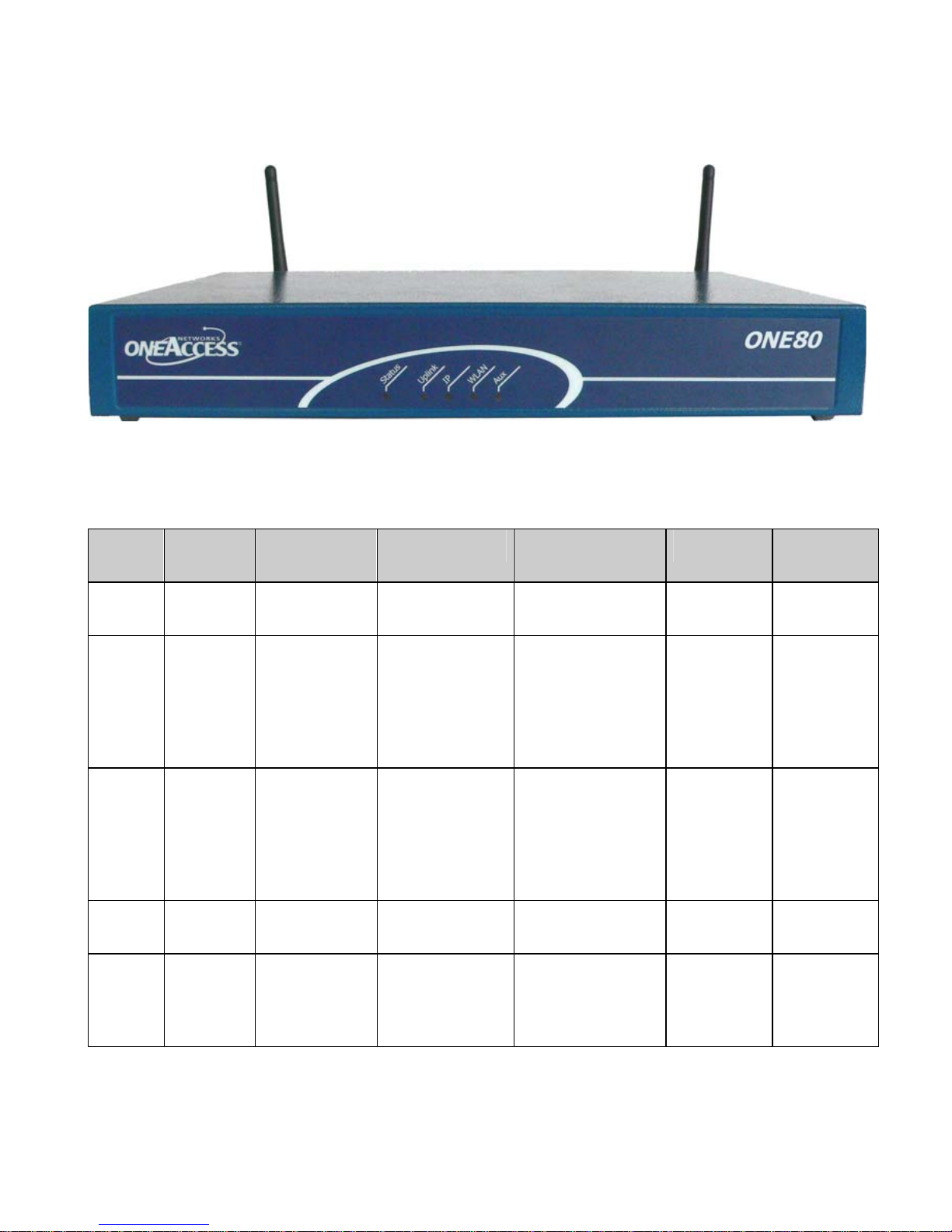
3.2 Front Panel
The front panel is provided with LEDS, which inform about the status of several
router functions.
Figure 1. Front Panel
Leds OFF Green Red Blinking Red Orange Blinking
Green
Status Switched
Off Switched On
& Operational Switched On &
Not operational Reboot in
progress
Uplink No
SHDSL
lines
configured
All SHDSL
lines are
synchronized
All SHDSL lines
are not
synchronized
(loss of signal)
Minimum one
configured
SHDSL line is not
synchronized
(loss of signal)
Minimum
one SHDSL
line is in the
progress of
synchroniz
ation
IP Not used All IP
interfaces are
up
All IP interfaces
are down
At least one
IP Interface
is not up
(example:
PPPoA not
connected)
WLAN Not used Interface up Traffic in
progress
Aux No auto
configurat
ion
Auto
configuration
successfully
completed
Auto
configuratio
n in
progress

ONE80 – Installation Manual
10
3.3 Rear Panel
This section details the various types of ONE80 rear panel so that the user can
identify the interface type and port numbering.
It should be noted that only the fully-loaded configurations are represented.
Other configurations can be derived by not providing some interfaces
represented on the product. The configurations below are presented as an
example. OneAccess reserves the right to market them or not.
Indice
Altri manuali OneAccess Router di rete
Manuali Router di rete popolari di altre marche

NETGEAR
NETGEAR FS526T - Switch Manuale utente

Korenix
Korenix JetNet 5710G Series Manuale utente

Automated Logic
Automated Logic ZN551 Manuale del proprietario

Cisco
Cisco ASR 1000 Series Manuale dell'operatore

EnGenius
EnGenius ESR-9710 Manuale utente

Cisco
Cisco 805 Series Istruzioni operative e di sicurezza