Opel MOVANO Manuale utente

OPEL Movano / Vivaro
Infotainment Manual


Introduction .................................... 4
Radio ........................................... 39
CD Player .................................... 50
AUX input ..................................... 54
USB port ...................................... 56
Bluetooth music ........................... 60
External devices .......................... 67
Navigation .................................... 69
Voice recognition ....................... 110
Phone ........................................ 113
Index .......................................... 134
Contents

4 Introduction
Introduction
General information ....................... 4
Control elements overview ............ 6
Theft-deterrent feature ................. 21
Usage .......................................... 22
Tone settings ............................... 31
Volume settings ........................... 33
System settings ........................... 34
General information
The Infotainment system provides
state-of-the-art in-car information and
entertainment.
The radio is equipped with assignable
channel presets for FM, MW and LW
wavebands.
The audio player plays audio CDs,
MP3 CDs and also WMA CDs.
External data storage devices, e.g.
iPod, MP3 player or USB stick, or a
portable player can be connected to
the Infotainment system. External
audio sources can also be connected
via Bluetooth.
The digital sound processor provides
several preset equalizer modes for
sound optimisation.
The navigation system's dynamic
route planning will reliably guide you
to your destination and can help avoid
traffic jams and other traffic problems.
Optionally, the Infotainment system
can be operated using controls on the
steering column or via the voice
recognition system.
In addition, the Infotainment system
can be equipped with a handsfree
phone system.
The well-thought-out design of the
controls and the clear displays enable
you to control the system easily and
intuitively.
Note
This manual describes all options
and features available for the
various Infotainment systems.
Certain descriptions, including those
for display and menu functions, may
not apply to your vehicle due to
model variant, country
specifications, special equipment or
accessories.
Important information on
operation and traffic safety
9Warning
Drive safely at all times when
using the Infotainment system.
If in doubt, stop the vehicle before
operating the Infotainment
system.

Introduction 5
Radio reception
Radio reception may be disrupted by
static, noise, distortion or loss of
reception due to:
■ changes in distance from the
transmitter,
■ multi-path reception due to
reflection,
■ shadowing.
In case of poor radio reception the
volume will automatically drop as to
minimize the disturbance effect.
Using this manual
■ This manual describes features
that may or may not be on your
specific vehicle, either because
they are optional or due to changes
subsequent to the printing of this
manual. Please refer to the
purchase documentation to confirm
each of the features found on the
vehicle.
■ Certain controls and descriptions,
including symbols, displays and
menu functions may not apply to
your vehicle due to model variant,
country specifications, special
equipment or accessories.
■ The table of contents at the
beginning of this manual and within
each section shows where the
information is located.
■ The index will enable you to search
for specific information.
■ The vehicle display screens may
not support your specific language.
■ Display messages and interior
labelling are written in bold letters.
■ The operations given within this
manual refer to Infotainment
system controls. For equivalent
steering column controls, refer to
the control elements overview
3 6.
Warnings and Cautions
9Warning
Text marked 9 Warning provides
information on risk of accident or
injury. Disregarding this
information may lead to injury.
Caution
Text marked Caution provides
information on possible damage to
the vehicle. Disregarding this
information may lead to vehicle
damage.
Symbols
Page references are indicated with 3.
3 means "see page".

6 Introduction
Control elements overview
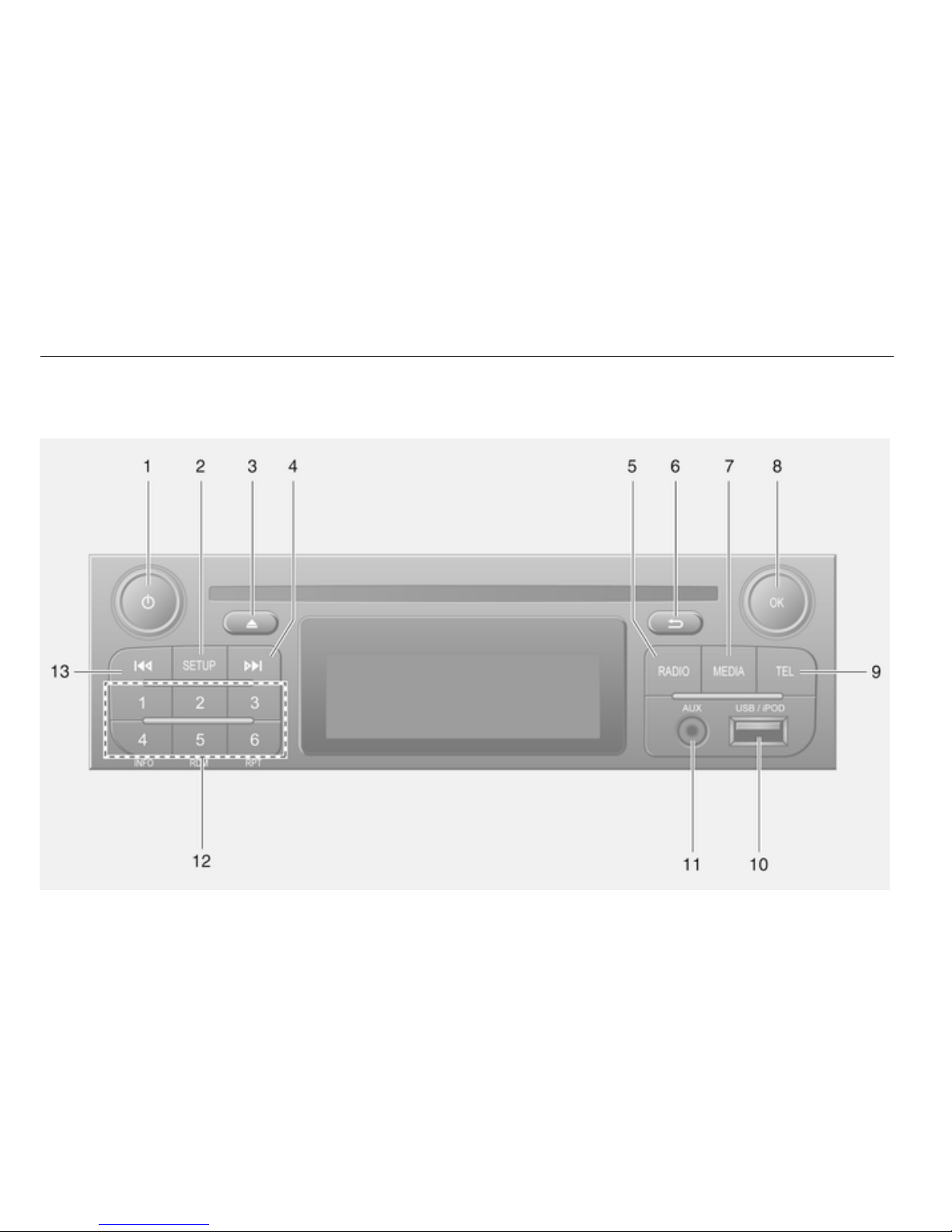
R15 BT USB

Introduction 7
1m - Press: Switch on/off ........ 22
Press: Mute/unmute .............. 22
Turn: Adjust volume .............. 22
2 SETUP - Short press:
Settings menu ....................... 22
Display radio text
information ............................ 45
Long press: Automatic
station storing ........................ 44
3Mute/unmute ......................... 22
43 - Radio, Short press:
Search for next radio
frequency .............................. 41
Long press: Automatic
station search ........................ 41
5 RADIO - Change audio
source, waveband ................. 39
6/ - Return to previous
menu, cancel an action ......... 22
7 MEDIA - Change audio
source ................................... 51
8 OK rotary knob ...................... 22
Press: Confirm an action ....... 22
Turn: Access display
menu options ........................ 22
Turn: Change radio
frequency .............................. 41
9 TEL - Telephone menu ....... 113
10 USB port ............................... 56
11 AUX input .............................. 54
12 Station buttons 1...6 .............. 41
Short press: Select station .... 41
Long press: Save station ...... 41
13 2 - Radio, Short press:
Search for previous radio
frequency .............................. 41
Long press: Automatic
station search ........................ 41

8 Introduction
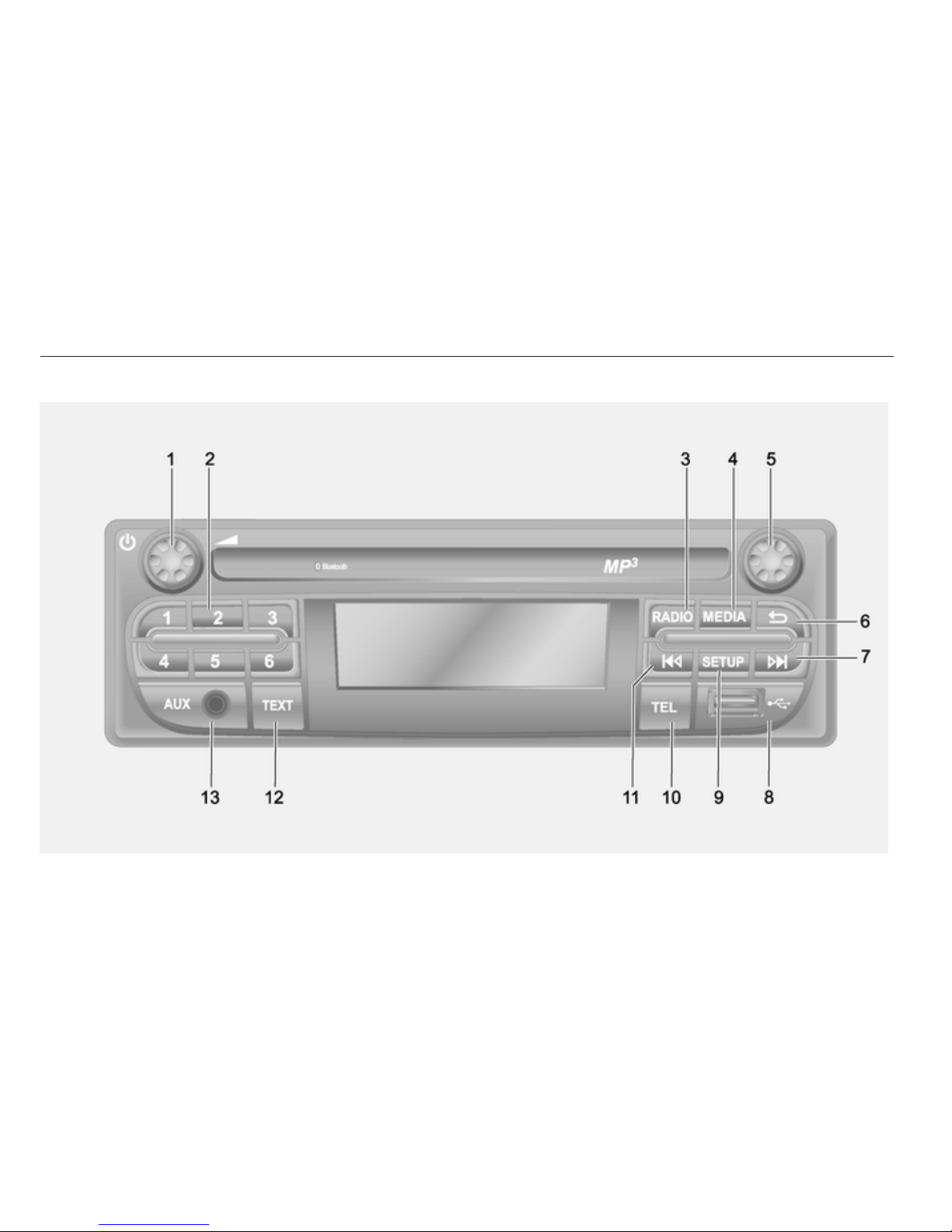
R16 BT USB

Introduction 9
1m - Press: Switch on/off ........ 22
Turn: Adjust volume .............. 22
2Station buttons 1...6 .............. 41
Short press: Select station .... 41
Long press: Save station ...... 41
3 RADIO - Change audio
source, waveband ................. 39
4 MEDIA - Change audio
source ................................... 51
5Rotary knob ........................... 22
Short press: Confirm an
action .................................... 22
Turn: Access display
menu options ........................ 22
6/ - Return to previous
menu, cancel an action ......... 22
73 - Radio, Short press:
Search for next radio
frequency .............................. 41
Long press: Automatic
station search ........................ 41
Audio/MP3/WMA CD,
Short press: Skip track
forwards ................................ 51
Long press: Fast forward ...... 51
8USB port ............................... 56
9 SETUP - Short press:
Settings menu ....................... 22
10 TEL - Telephone menu ....... 113
11 2 - Radio, Short press:
Search for previous radio
frequency .............................. 41
Long press: Automatic
station search ........................ 41
12 TEXT - Display radio text
information ............................ 45
13 AUX input .............................. 54

10 Introduction
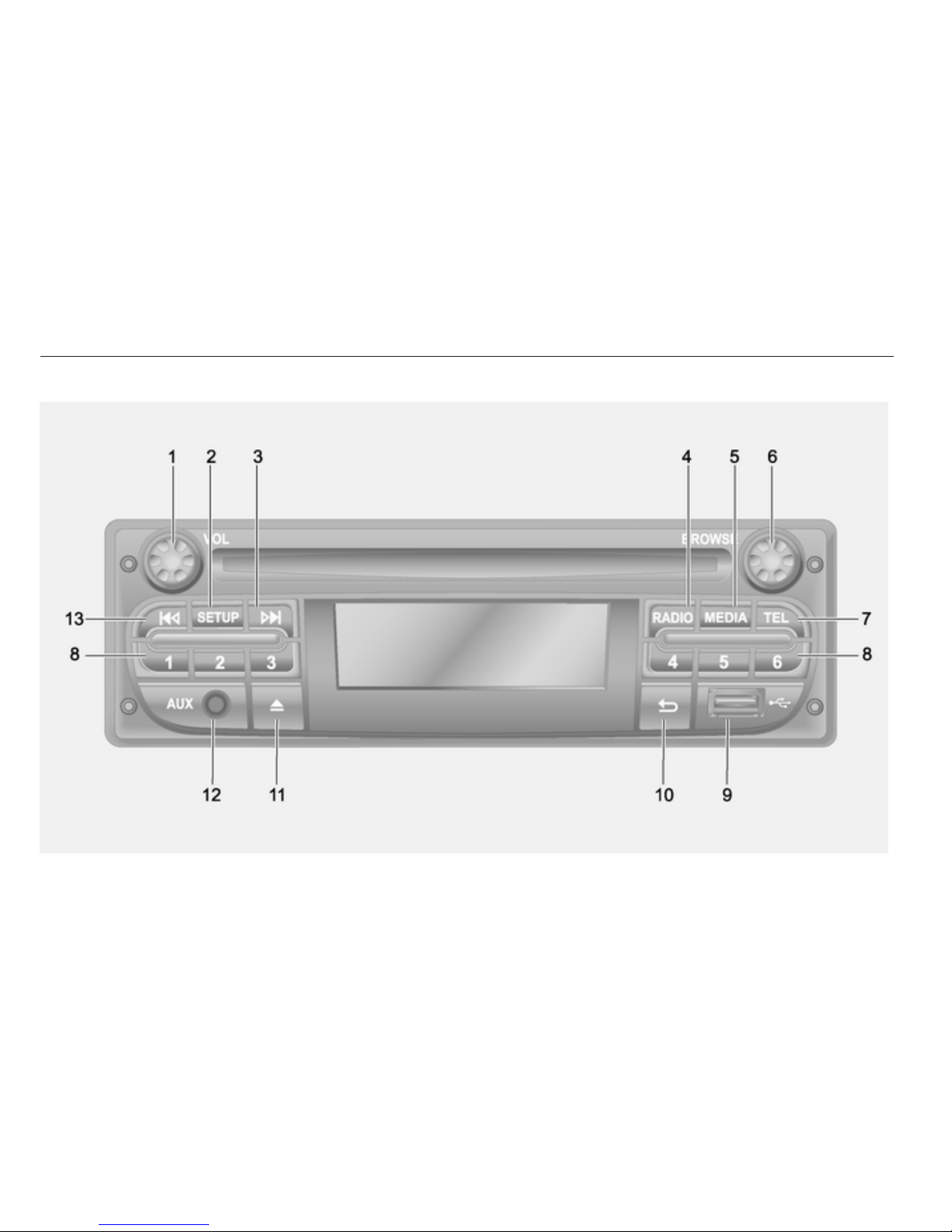
CD16 BT USB
Altri manuali per MOVANO
4
Questo manuale è adatto per i seguenti modelli
10
Indice
Altri manuali Opel Ricevitore per auto