
Optus F101 Manuale utente

1
Optus F101
3G Mobile Phone
User Manual

2
PC Software Requirements
Join Me PC Software included supports Microsoft Windows 7, Vista (32 and 64 bit), XP with
Service Pack 2 & 3. A limited version of Join Me is supplied that supports MAC OS 10.5, 10.6
ZTE cannot guarantee that third party hardware or software is compatible with this product.
Warnings and Safety Notices
Please read all the safety notices before using this device.
Do not use the phone near fuel or chemicals or in any prescribed area such as service stations
and refineries.
Do not transport or store flammable gas, liquid or explosives in the same compartment of
your vehicle as your mobile phone and accessories.
Copyright © 2011 ZTE Corporation All rights reserved.
1st Edition May 2011
No part of this publication may be excerpted, reproduced, translated or utilized in any form or
by any means, electronic or mechanical, including photocopying and microfilm, without the
prior written permission of ZTE Corporation.
ZTE Corporation operates a policy of continuous development. ZTE Corporation reserves the
right to make changes and improvements to any of the products described in this document
without prior notice.
Limitation of Liability
ZTE shall not be liable for any loss of profits or indirect, special, incidental or consequential
damages resulting from or arising out of or in connection with using this product, whether or
not ZTE had been advised, knew or should have known the possibility of such damages. The
user should refer to the enclosed warranty card for full warranty and service information.

3
Contents
RF Safety Information .................................................................................................... 5
Handset Overview ......................................................................................................... 6
Information Bar Icons..................................................................................................... 8
Menu Quick Reference Guide ........................................................................................ 9
1 Getting Started..............................................................................................11
1.1 Insert the (U)SIM Card................................................................................................................11
1.2 Insert the battery.........................................................................................................................12
1.3 How to switch the phone On or Off......................................................................................13
1.4 How do I connect the charger? .............................................................................................13
1.5 Tips about charging and battery life....................................................................................14
1.6 How do I set the time and date?............................................................................................14
1.7 How do I lock / unlock the keypad? .....................................................................................15
1.8 How to make a voice call ..........................................................................................................15
1.9 How to answer an incoming call............................................................................................15
1.10 How to send a Text Message (SMS).......................................................................................15
1.11 How to navigate the Menu ......................................................................................................16
1.12 Call Features Summary..............................................................................................................17
2 Contacts......................................................................................................... 19
3 Messages and Emails.................................................................................... 21
3.1 How to send a Text Message (SMS) ......................................................................................21
3.2 How to view a received Text Message (SMS).....................................................................21
3.3 How to use Predictive Text.......................................................................................................22
3.4 How to add words to the built in Dictionary (My Words).............................................23

4
3.5 Special Characters and SMS Message Length ..................................................................23
3.6 How to send a Multimedia Message (MMS) ......................................................................24
3.7 How to receive a Multimedia Message (MMS)..................................................................24
3.8 WAP Push Messages .................................................................................................................25
3.9 How to send an Email ................................................................................................................25
3.10 How to receive an Email............................................................................................................26
3.11 How to set up automatic Email Retrieval............................................................................26
3.12 What are User Folders?..............................................................................................................26
3.13 How to create a new Mailbox .................................................................................................27
4 Handset Features & Applications................................................................ 28
5 Troubleshooting,Technical and Warranty Information............................. 32
5.1 Troubleshooting and FAQ’s......................................................................................................32
5.2 Error Messages .............................................................................................................................34
5.3 Technical Parameters .................................................................................................................35
5.4 Support Information ..................................................................................................................36
5.5 Warranty Information ................................................................................................................36

5
N14945
RF Safety Information
The handset has an internal antenna located at the top of the phone. For optimum
performance with minimum power consumption do not cover the antenna area with your
hand. Hold the handset between thumb and finger in the middle of the device. Covering the
antenna affects call quality, may cause the handset to operate at higher power level than
needed, and may shorten talk and idle times.
Radio Frequency Energy
The handset is a low-power radio transmitter and receiver.When switched on it intermittently
transmits radio frequency (RF) energy (radio waves).The transmit power level is optimized for
best performance and automatically reduces when there is good quality reception. Maximum
power is only used at the edge of network coverage so under most circumstances the power
output is very low. Under poor network conditions the phone transmits at a higher power,
may get hot and have a significantly shorter battery life.
Declaration of Conformity - SAR (Specific Absorption Rate)
We declare that the product(s) detailed in this manual, and in combination with our
accessories, conform with the essential requirements of The Radio Communications Standard
(Electro-magnetic Radiation Human Exposure) 2003 and the Australian Communications and
Media Authority Section 376 of the Telecommunications Act 1997. The highest value SAR
recorded for this device is 1.44 W/Kg.
6
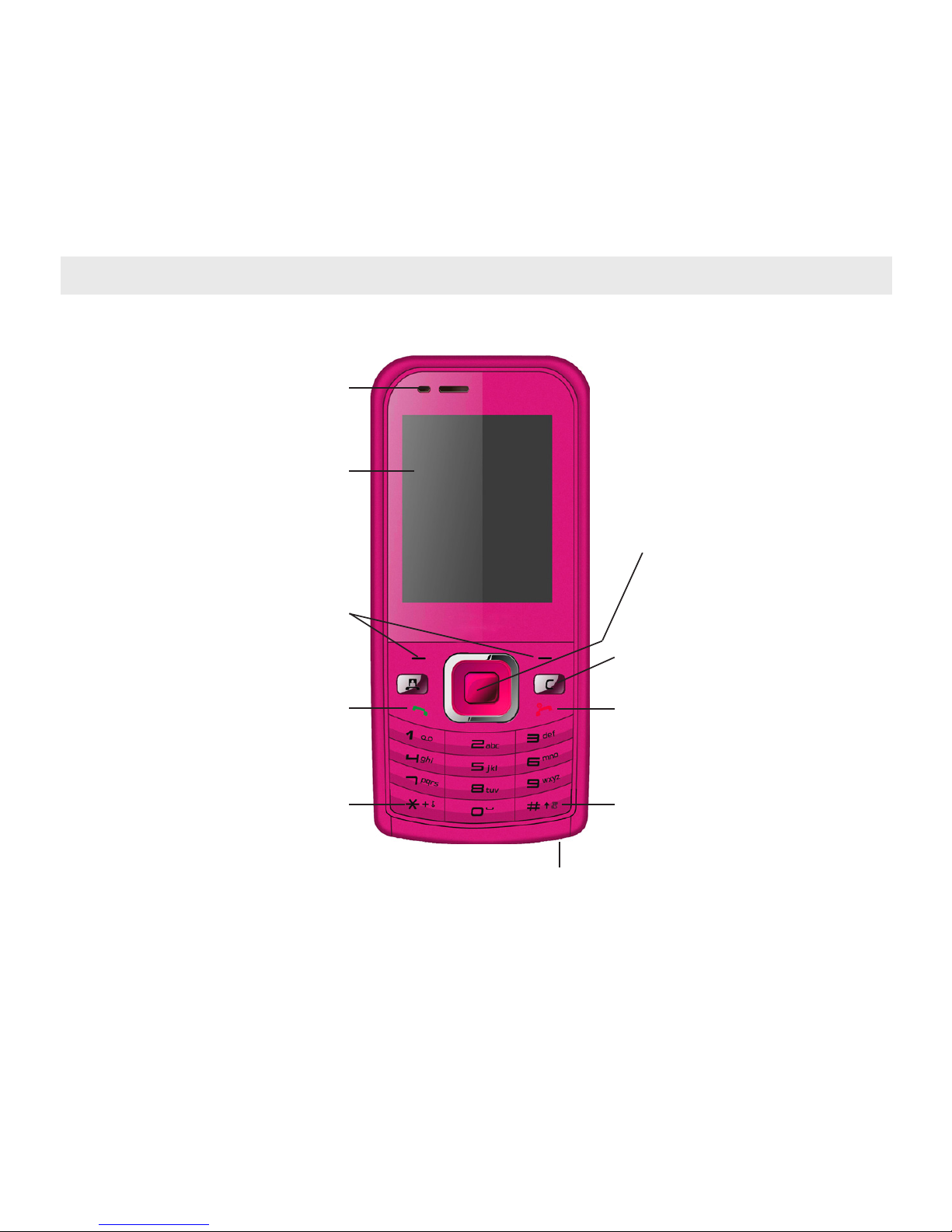
Handset Overview
Earpiece
Display
Left & Right Soft Keys
Performs the function shown
on the display
Call Key
Dial a number, answer a
call, show Call History
*Key
Lock / Unlock the keypad.
Access text symbols.
Insert a Pause or Wait command.
C Key
Step back in menus.
Clear text.
Power / End Key
Hold down to power On or O.
Press to End a call.
# Key
Switch to Meeting Mode
Change text modes
Microphone
Arrow Keys, OK Key
Use the Arrow Keys to navigate &
access shortcuts. OK to conrm.
7
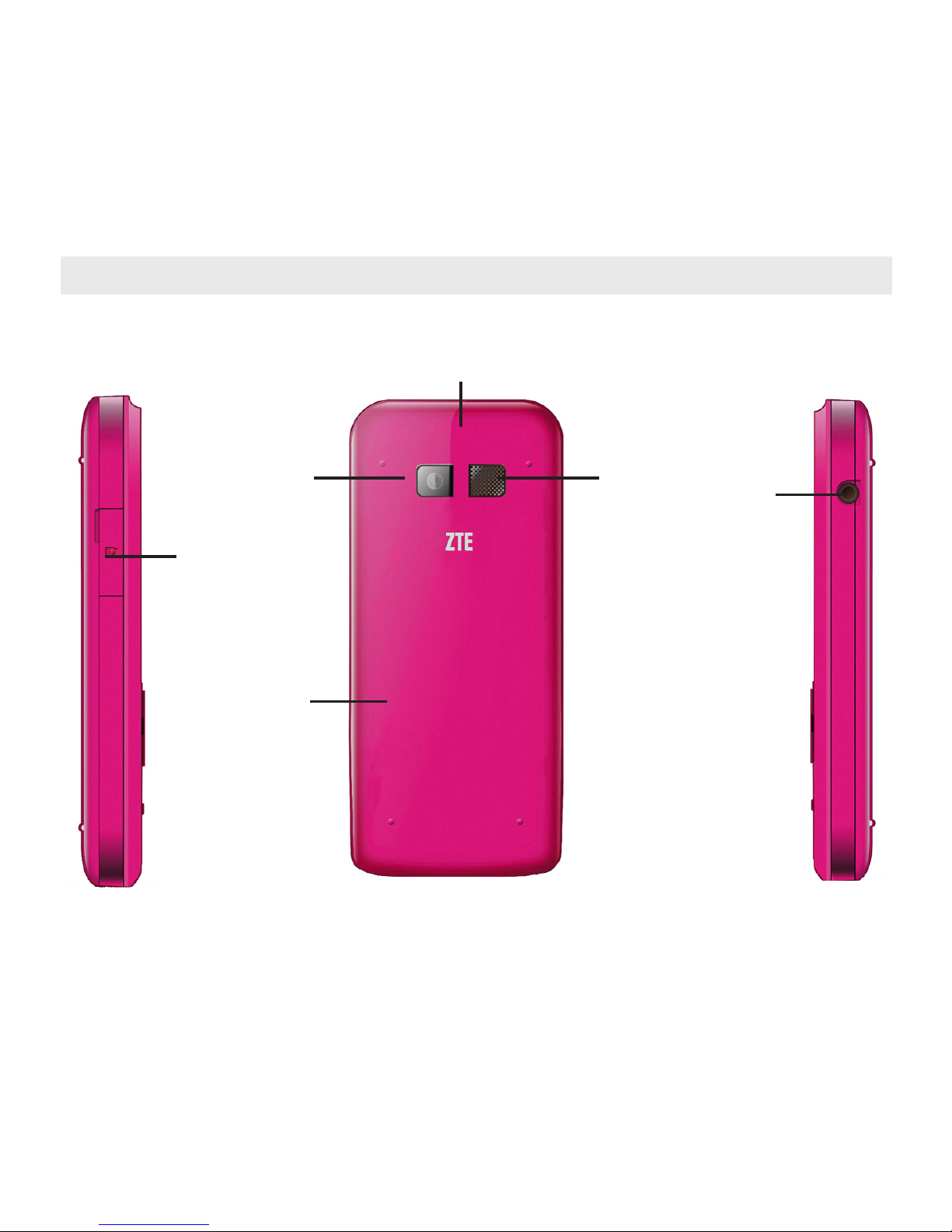
Handset Overview
microSD
Battery Cover
Camera
Headset port
Speaker
Thumb catch to open the battery
cover
Left Rear Right

8
Information Bar Icons
3G Signal Strength Battery Level Indicator
GSM Signal Strength Alarm is set
EDGE Signal Strength Missed Call
New SMS Message Missed Video Call
Message Memory is Full Bluetooth ON
New MMS Message Silent Mode
New E-mail Vibrate mode enabled
New Wap Push Message Call Forward is Active
Headset and Vibrate Mode Data channel available (GPRS)
Headset Mode Data channel active (PDP)
Roaming

9
Menu Quick Reference Guide

10
Menu Quick Reference Guide Continued…
Indice
Altri manuali Optus Telefono cellulare

Optus
Optus X Lite Manuale utente

Optus
Optus X SLEEK Manuale utente

Optus
Optus X Tap Manuale utente

Optus
Optus X Sight 2 Manuale utente

Optus
Optus X Swift 5G Manuale utente

Optus
Optus X Tap 2 Manuale utente

Optus
Optus X Spirit 2 Manuale utente

Optus
Optus X Smart Manuale utente

Optus
Optus X Vista Manuale utente


