
Overmax Vertis 5510 Aim Manuale utente
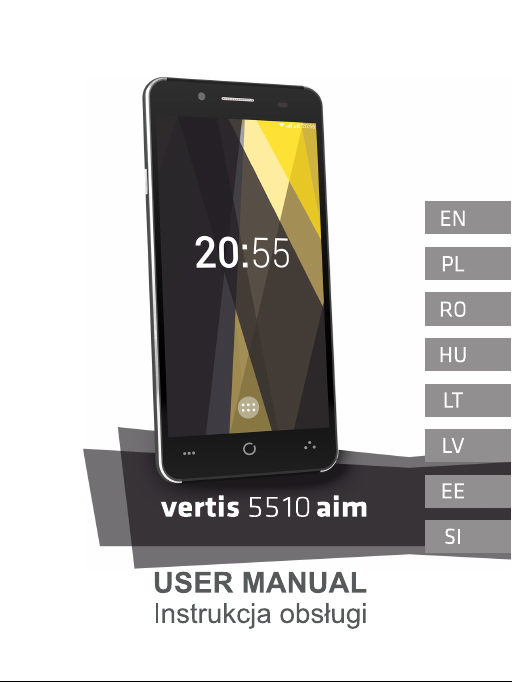

Welcome!
To switch on the phone, press and hold the power button for several
seconds.
At the first start of the phone, the assistant will carry through the basic
settings configuration.
Opening the device
Switch off your phone before installing or replacing the battery, SIM, or
memory card.
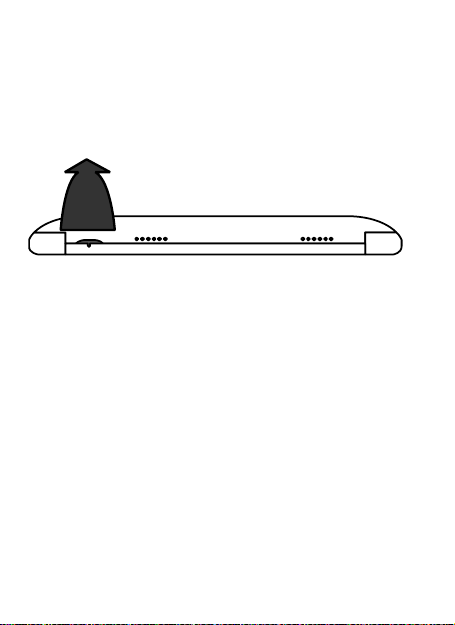
Remove the back cover.
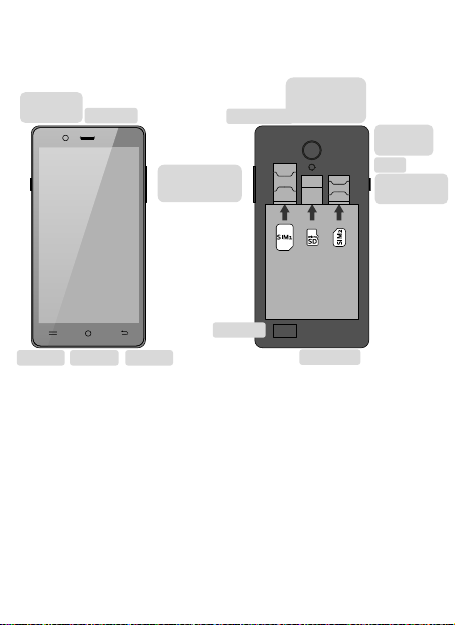
Hold the SIM card with the cut corner oriented as shown and slip it into
the card holder.
Insert the memory card into the card slot with the metal contacts facing
down until it inserts to the right position.
Insert the battery by aligning the gold contacts on the battery with the
gold contacts in the battery compartment. Gently push down on the
battery until it clicks into place.
Press the cover gently back into place until you hear a click.

Keys Explained
Menu Press to get the options for the current screen.
Home Press to return to the Home Screen from any application
or screen. Hold to see recently used applications.
Back Press to go to the previous screen.
Power Hold to switch audio profiles, or to turn on or off Airplane
mode, or to power off. Press to switch your phone to
Sleep mode. Press to wake up your phone.
Volume
adjustmentt
Power /
Lock
Charging
interface
MicroUSB
Menu
Home
Back
Speaker
Speaker
Front
camera
Headphone
jack
Flash
Back
camera
Microphone

Phone Calls
Press Home key > tap > Phone or tap on the Home Screen.
Enter the phone number using the on-screen keypad.
Tap the dial icon.
Sending an Message
Press Home key > tap > Messaging.
Tap to create new message.
Enter the recipient’s number or name. As you type, matching contacts will
appear. Tap a suggested contact to add as a recipient. You can also
tap to select recipients from the contacts.
Tap Type text message and type your message.
• Tap Menu Key to insert quick text or contact.
• If you are sending an MMS, tap Menu Key to add a subject, or to attach
pictures, videos, audio, or slideshow.
Tap to send your message.
Taking Pictures with Your Camera
Your phone has camera function. Open it by pressing Home Key >
tap > Camera.
Tap to take a picture. To view it, just tap the picture in the right
corner of the screen.
Information
More information about the use of the device and the system can be
found at: www.overmax.eu

Witaj!
W celu włączenia telefonu, należy nacisnąć i przytrzymać przez kilka
sekund przycisk zasilania.
Przy pierwszym uruchomieniu telefonu, asystent przeprowadzi przez
podstawową konfigurację ustawień.
Otwarcie telefonu
Przed instalacją oraz wymianą baterii, karty SIM lub karty pamięci należy
wcześniej wyłączyć telefon.
Zdejmij tylną pokrywę.
Uchwyć kartę SIM tak, aby ucięty róg znajdował się w pozycji pokazanej
na zdjęciu, a następnie wsuń ją do portu karty.
Włóż kartę pamięci do gniazda karty tak, aby metalowe styki skierowane
były w dół, a następnie wciśnij ją delikatnie, dopóki nie zostanie
zablokowana we właściwej pozycji.
Włóż baterię tak, aby jej złącze spasowało się ze złączem komory baterii.
Delikatnie dociśnij baterię, aż zostanie zablokowana we właściwej
pozycji.
Delikatnie dociśnij tylną pokrywę z powrotem na miejsce, aż usłyszysz
charakterystyczne kliknięcie.

Urządzenie i przyciski
Menu wyświetla opcje bieżącego ekranu.
Home powrót do widoku pulpitu, przytrzymanie wyświetla
ostatnio używane aplikacje.
Powrót powrót do poprzedniego ekranu.
Zasilanie uruchamia urządzenie / włącza i wyłącza ekran.
Aby włączyć wyświetlacz telefonu, wciśnij Przycisk Zasilania. Kliknij
ikonkę i przeciągnij ją w górę.
Gniazdo
słuchawkowe
Regulacja
głośności
Zasilanie /
Blokowanie
Port
Ładowania
micro USB
Menu
Home
Powrót
Głośnik
Głośnik
Przednia
Kamera
Lampa
błyskowa
Tylna
kamera
Mikrofon

Nawiązywanie połączeń
Nawiązywanie połączeń poprzez wprowadzenie numeru. Kliknij Przycisk
Home > a następnie > Telefon lub kliknij na Ekranie głównym.
Przy użyciu klawiatury ekranowej wprowadź numer telefonu.
Kliknij ikonkę wybierania numeru.
Wysyłanie wiadomości
Wciśnij Przycisk Home i kliknij > Wiadomości.
Kliknij , aby utworzyć nową wiadomość.
Wprowadź nazwę lub numer odbiorcy. Podczas wpisywania wyświetlane
będą odpowiadające danemu ciągowi znaków kontakty. Kliknij dany
kontakt, aby ustawić go jako odbiorcę wiadomości. Możesz także kliknąć
, aby wybierać odbiorców z listy kontaktów.
Kliknij Wpisz tekst wiadomości, a następnie napisz wiadomość.
• Kliknij Przycisk Menu, aby wprowadzić szablon lub kontakt.
• Podczas pisania wiadomości MMS kliknij przycisk Menu, aby dodać
temat oraz , aby załączyć obrazy, pliki wideo, audio lub pokazy slajdów.
Kliknij , aby wysłać wiadomość.
Robienie zdjęć
W widoku ekranu głównego kliknij ikonkę aparatu, aby wyświetlić interfejs
aparatu / kamery.
Kliknij ikonkę aparatu, aby aktywować tryb zdjęć.
Kliknij ikonkę kamery, aby aktywować tryb wideo.
Kliknij ikonkę migawki, aby zrobić zdjęcie.
Informacje
Więcej informacji dotyczących obsługi urządzenia oraz systemu znajduje
się na stronie: www.overmax.eu
Bun venit!
Pentru a porni telefonul tineti apasat butonul de alimentare pentru cateva
secunde.
La prima pornire a telefonului, asistentul va efectua un tur prin
configurarea setarilor de baza.
Pornirea dispozitivului
Opriți telefonul înainte de a instala sau înlocui bateria, SIM-ul, sau cardul
de memorie.
Scoateți capacul din spate.
Țineți cartela SIM cu colțul tăiat orientat după cum se arată și impingeti în
suportul cartelei.
Introduceți cardul de memorie în slotul pentru cartela cu contactele
metalice în jos până când se introduce în poziția corectă.
Introduceți bateria aliniind contactele aurii de pe baterie cu contactele
aurii din compartimentul bateriei. Împingeți ușor în jos pe baterie până
când se fixează în poziție.
Apăsați capacul ușor înapoi în loc până când auziți un clic.
Semnificatia tastelor
Meniu Apăsați pentru a obține opțiunile pentru ecranul curent.
Acasa Apăsați pentru a reveni la ecranul de start din orice
aplicație sau ecran. Țineți apasat pentru a vedea
aplicațiile utilizate recent.
Inapoi Apasati pentru a accesa ecranul anterior.
Pornire Țineți apasat pentru a comuta profile audio, sau pentru
a activa sau dezactiva modul avion, sau pentru a il opri.
Apăsați pentru a comuta telefonul în modul Sleep.
Apăsați pentru “a trezi” telefonul.
Ajustare
volum
Pornire /
Blocare
Interfata de
incarcare
Micro USB
Meniu
Acasa
Inapoi
Difuzor
Difuzor
Camera
frontala
Casti jack
Blit
Camera
spate
Microfon

Apel de la telefon
Apasati tasta Home > apasati > Telefon sau apasati pe
Ecranul de Start.
Introduceți numărul de telefon utilizând tastatura de pe ecran.
Apasati pictograma de apelare
Trimiterea unui mesaj
Apasati tasta Home > apasati > Mesagerie.
Apasati pentru a crea un mesaj nou.
Introduceți numărul destinatarului sau numele. Pe măsură ce tastați, vor
apărea contactele potrivite. Apasati pe un contact sugerat pentru
a-l adauga ca destinatar. De asemenea, puteți apăsa pentru a selecta
destinatarii din lista de contacte.
Apasati Tastati mesaj text si tastati mesajul.
• Tap Menu Key to insert quick text or contact.
• Daca trimiteti un MMS, apasati tasta Meniu pentru a adauga un
subiect pentru a adauga imagini, videoclipuri, audio, sau slideshow.
Apasati pentru a trimite mesajul.
Realizeaza fotografii cu camera
Telefonul are funcția de cameră foto. Deschideti apasand tasta Home >
apasati > Camera.
Apasati pentru a face o fotografie. Pentru a o vizualiza, atingeți
pur și simplu imaginea în colțul din dreapta al ecranului.
Informatii
Mai multe informatii despre utilizarea dispozitivului si despre sistem veti
putea gasi pe www.overmax.eu
Indice
Lingue:
Altri manuali Overmax Telefono cellulare

Overmax
Overmax vertis1820easy Manuale utente

Overmax
Overmax Vertis-Expi Manuale utente

Overmax
Overmax vertis 4003 you Manuale utente

Overmax
Overmax Vertis 2210 Manuale utente

Overmax
Overmax vertis 4001 you Manuale utente

Overmax
Overmax VERTIS famy Manuale utente

Overmax
Overmax Vertis Yard Manuale utente

Overmax
Overmax Vertis 02 plus Manuale utente

Overmax
Overmax Vertis 2211 easy Manuale utente


