
Ozmo Active Istruzioni per l'installazione

User Instruction for Ozmo
TABLE OF CONTENTS
What’s included:
USB cable (for charging)
Ozmo cup
Cradle (Java + only)
Mobile Device Compatibility:
iPhone 5 with iOS8 or above
Android (available on Google Play December 23rd)
This appliance can be used by children aged from 8 years and above and
persons with reduced physical sensory or mental capabilities or lack of
experience and knowledge if they have been given supervision or instruction
concerning use of the appliance in a safe way and understand the hazards
involved.
Children shall not play with the appliance.
Cleaning and user maintenance shall not be made by children without
supervision.
This product is charged by 5V d.c. only (please confirm), do not connect to
supply mains.
This instruction can be also ready on the website of our company.
changes or modifications not expressly approved by the party responsible for
compliance could void the user’s authority to operate the equipment.
1 Getting Started
1.1 Charging the Cup
Connect the Ozmo cup to a power source using the USB charger. The
Ozmo cup will vibrate once when the USB is plugged in. When three LED
lights go on, the cup is fully charged.

A fully charged Ozmo cup lasts up to 3 weeks depending on your activity
level. Battery life may deteriorate over time with frequent use.
Caution: Please secure the flip for the USB charge socket on the Ozmo
cup to protect from water damage.
1.2 Signing up with the Ozmo App
Download the Ozmo app from the App Store or Google Play.
Create an account, fill out your details, and set your desired goals.
1.3 Syncing the Cup with the App
For the first time connecting the Ozmo cup, press the reset button next to
charge socket on the Ozmo cup with a paper clip.
Switch on your Bluetooth on your mobile device.
LED lights will flash when the OzmoApp successfully connects with the
Ozmo cup. Your drinking amounts will be recorded every time you sip from
the cup and when your Bluetooth is on.

2 Using Ozmo Every Day
2.1 The Ozmo cup and app can be used separately.
2.2 To use the Ozmo cup only: LED lights will be used as reminders to
drink and to keep you on track with your drinking goals.
2.3 To use both the Ozmo cup and the app: LED lights and app
notifications will be used as reminders to drink your beverage.
2.4 To open the Ozmo Active cup, flip the cap open and drink. To close,
press the clasp down until you hear a click. The sound lets you know
it has been closed properly. This will prevent spillage.
2.5 To open the Ozmo Java and Java+ lid, use a finger to press down on
the embedded circle. To close the lid, press down the opposite side of

the embedded circle.
Note: Ozmo can accurately detect water and non-transparent drinks such as
coffee. However, auto-detection may not be as accurate with other beverages.
3 Water and Coffee
Fill up the Ozmo cup with water or coffee. Either one is automatically detected
when the lid of the cup is closed tightly. The measurement of the cup will be
recorded.
Caution: Do not fill up the Ozmo cup with extremely hot beverage; the
temperature has to be below 176°F or 80°C.

The amount you drink will be recorded every time you take a sip from the cup
and when the lid is closed tightly. The Ozmo Cup will not record your drinking
activities if the lid is not tightly closed.
Notifications will be sent via the Ozmo app to remind you to stay hydrated,
keeping you on track with your goal.
Note: If water or coffee is not shown or detected on the app, please clean the
channel and make sure nothing is clogged inside.

4 Understanding the LED and vibration alerts
1st LED light blinking: You achieved 20% of your hydration goal for the day.
2nd LED lights blinking: You achieved 50% of your hydration goal for the day.
3rd LED lights blinking: You achieved 90% of your hydration goal for the day.
3 LED lights blinking: You achieved your hydration goal for the day.
2nd LED light on with vibration (3 times) : Lid opened or close not tightly

1st LED light blinking 3 times and circularly: Low power alert
Vibration (2 times) when plugin the USB cable
Vibration (6 times) when dehydration more than 1 hour
3 LED light on when fully charge

Caution: To protect from water damage, please ensure the flap for the
USB charge socket on the Ozmo cup is secure.
5 Keeping your beverage warm with our Cradle (for

Java+ only)
The Cradle is able to keep your Ozmo Java+ warm for however long you
desire. Your beverage will be kept at a temperature of 114°F or 45°C. The
Ozmo Cradle can be connected to a USB power source. Simply place your
Java+ cup on to the cradle and it will begin warming your beverage.
Caution: Do not wash the Cradle as it is not water-resistant. To clean, use a
damp cloth or wet wipe.
Disclaimer: LiquiddamagetotheOzmocradleisnotcoveredbywarranty
6 Syncing with Wearable Accessories
To sync wearable accessories, go to “Settings> Your Profile > Profile Settings
> Choose the device at the bottom”in the Ozmo app.
7 How to Clean
Use a non-abrasive sponge or towel with soap and water to rinse out your
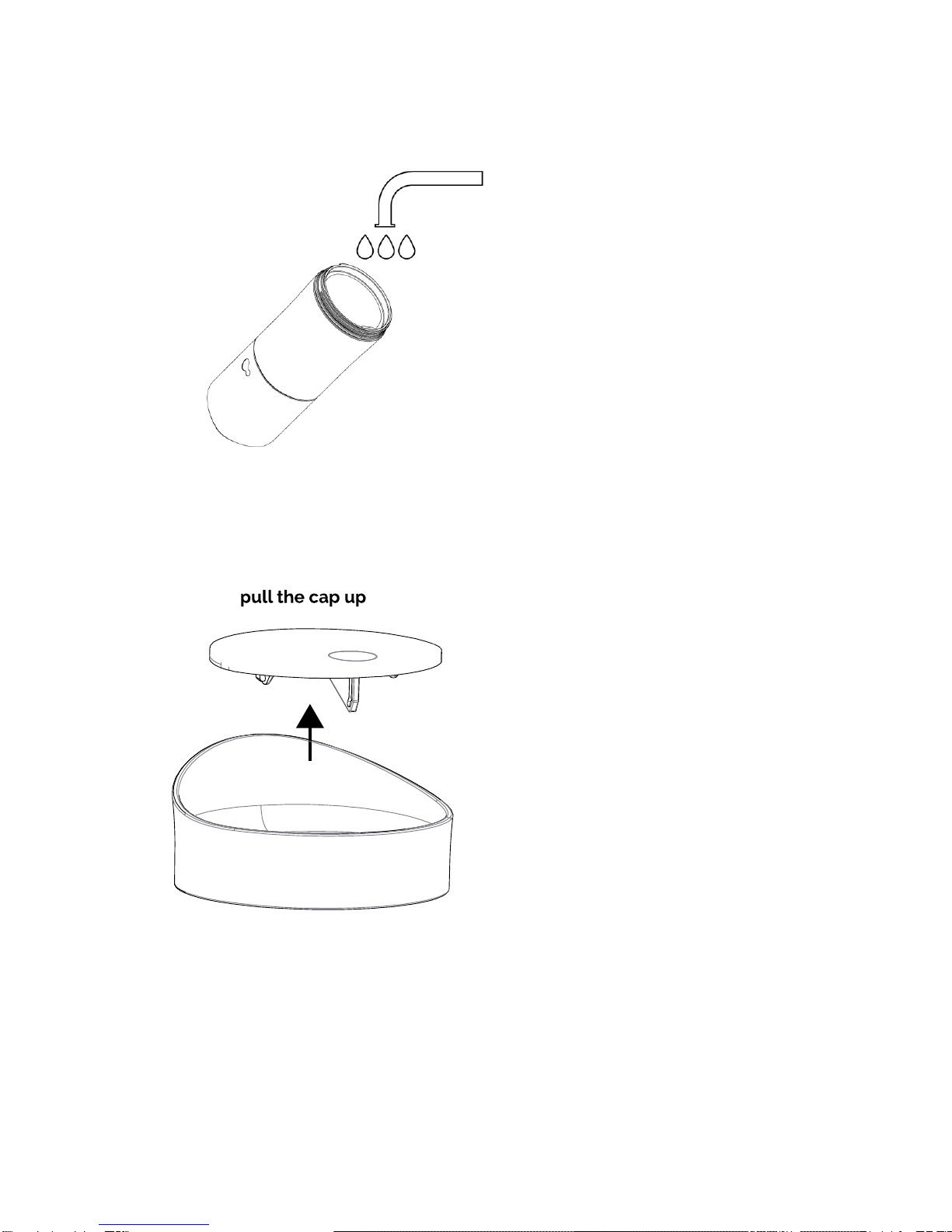
Ozmo cup.
To properly clean the Ozmo Java and Java+ lid, pull the cap up to disconnect
from the lid. Use a non-abrasive sponge or towel with soap and water.
8 Attention
Questo manuale è adatto per i seguenti modelli
1
Indice


