
Patton electronics SL4050/B12/E Manuale utente

SL4050/B12/E
SmartLink Series 12-Line VoIP SIP Phone
SL4050/B2/E
SmartLink Series 2-Line VoIP SIP Phone
Quick Start Guide
0
Approval
The Model SL4050 phones are not approved for, and are not intended for, connection to the Public Switched
Telephone Network (PSTN).
Part Number:
07MSL4050-QS, Rev. D
Revised:
August 12, 2008
Sales Office:
+1 (301) 975-1000
Technical Support:
+1 (301) 975-1007
E-mail:
WWW:
www.patton.com

2
SmartLink 4050 Series Quick Start Guide
•
The SmartLink SIP Phone contains no user serviceable parts.
The equipment shall be returned to Patton Electronics for
repairs, or repaired by qualified service personnel
.
• Mains Voltage: Do not open the case when the power cord is
attached. The mains outlet that is utilized to power the SmartLink SIP
Phone shall be within 10 feet (3 meters) of the device, shall be easily
accessible, and protected by a circuit breaker.
• Do not work on the system or connect or disconnect cables during
periods of lightning activity.
• Ultimate disposal of this equipment must be handled according to all
applicable national laws and regulations.
WARNING

SmartLink 4050 Series Quick Start Guide
3
1.0 Before you begin
The VoIP SIP phone can be set up using the keypad and a web browser, such as Internet Explorer. If you pur-
chased this product to make a VoIP call, you must have either an Ethernet-based Cable or a DSL modem with an
active connection to the Internet.
1.1 Check your package contents
The following items are included in the SmartLink 4050/B12 and SmartLink 4050/B2 packaging. Contact your
supplier immediately if an item is missing.
SmartLink 4050/B12 VoIP SIP Phone SmartLink 4050/B2 VoIP SIP Phone
Ethernet cable, 5-foot (1.5-meter), Qty: 1 SmartLink documentation CD-ROM
\
Power Adaptor Wall/Desk mounting plate
4
SmartLink 4050 Series Quick Start Guide
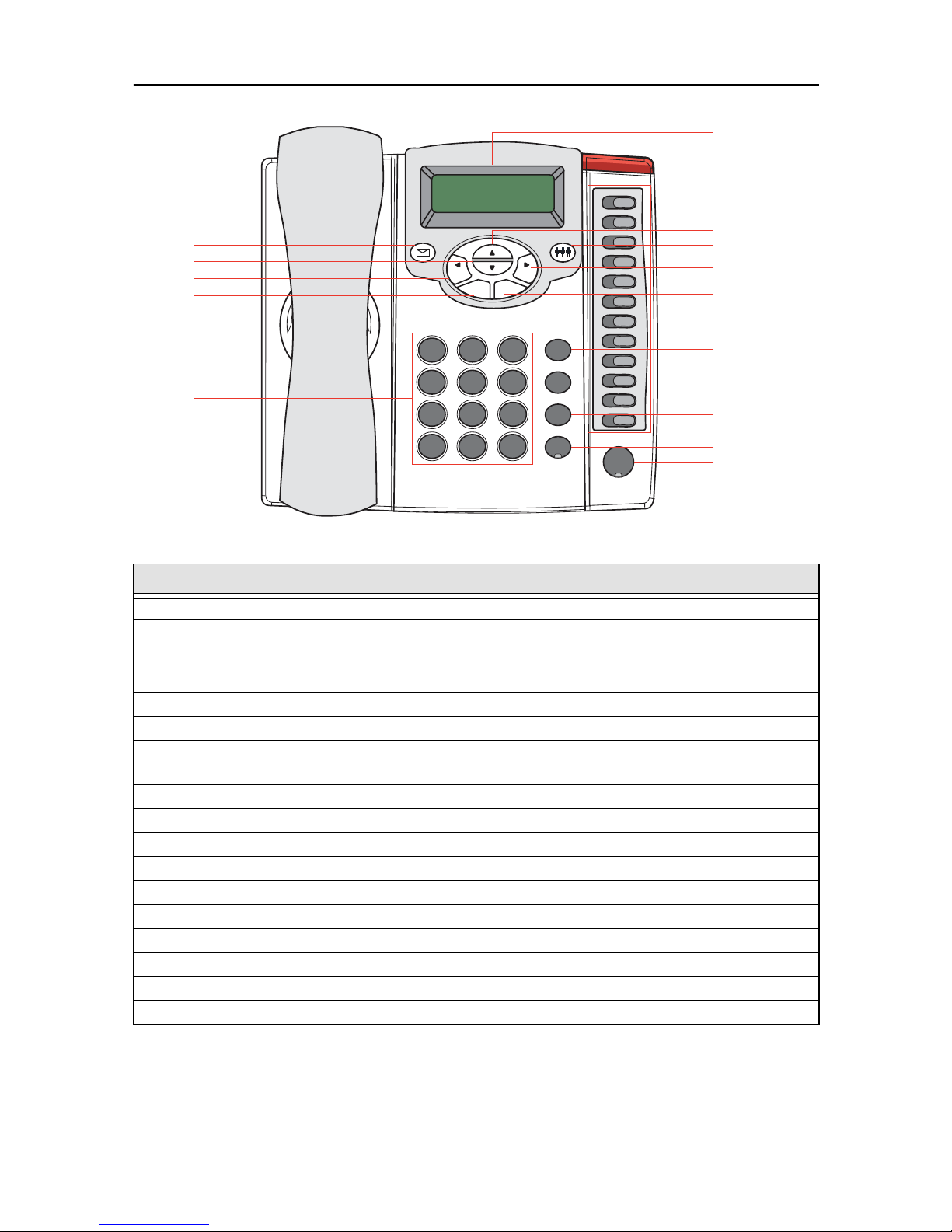
1.2 Overview of the SL4050/B12/E key functions
Item Description
2 x 16 LCD Display Displays menu, time, clock, name, phone number, call status
LED Indicator Indicates that phone is currently in use or ringing
Up Cycle through the phone menu, adjust volume
3-Way Conference Enable 3-way conference
OK/Right Confirm setting change, exit menu, dial, save changes
Menu Access the phone menu
Mute/Function Disable user's microphone so that the person on the other line can not hear anything,
access the language selection, access the time format
Transfer Transfer the person you are currently having a conversation to another line
Redial/Call History Redial last dialed number, access redial menu
Hold Place the person on the other line on hold, answer call waiting
Speaker Phone Enable user to use the phone without using the handset
Voice Message Check voice message
Down Cycle through the phone menu, adjust volume
Cancel/Left Deny changes, cancel phone calls, ignore phone calls, backspace
Phone Book Access the phonebook
Numeric Keypad Input IP/phone number/alphabet characters
Local Multiline Switch to different lines
OKCancel
Menu
Phone Book
12
ABC 3
DEF
4
GHI 5
JKL 6
MNO
7
PQRS 8
TUV 9
WXYZ
0
@#
*.
Mute/Func
Transfer
Redial
Hold
SPEAKER
M1
M2
M3
M4
M5
M6
M7
M8
M9
M10
M11
M12
Voice Message
Down
Cancel/Left
Phone Book
Numeric Keypad
3-Way Conference
LED Indicator
OK/Right
Menu
Local Multi-Line
Mute/Function
Transfer
Redial/Call History
Hold
Speaker Phone
Up
2x16 Characters LED Display

SmartLink 4050 Series Quick Start Guide
5
1.3 Overview of the SL4050/B2/E key functions
Item Description
2 x 16 LCD Display Displays menu, time, clock, name, phone number, call status
LED Indicator Indicates that phone is currently in use or ringing
Up Cycle through the phone menu, adjust volume
3-Way Conference Enable 3-way conference
OK/Right Confirm setting change, exit menu, dial, save changes
Menu Access the phone menu
Mute/Function Disable user's microphone so that the person on the other line can not hear anything,
access the language selection, access the time format
Transfer Transfer the person you are currently having a conversation to another line
Redial/Call History Redial last dialed number, access redial menu
Hold Place the person on the other line on hold, answer call waiting
Speaker Phone Enable user to use the phone without using the handset
Voice Message Check voice message
Down Cycle through the phone menu, adjust volume
Cancel/Left Deny changes, cancel phone calls, ignore phone calls, backspace
Phone Book Access the phonebook
OKCancel
Menu
Phone Book
Numeric Keypad
2x16 Characters LED Display
Voice Message
Down
Cancel/Left
Phone Book
3-Way Conference
LED Indicator
OK/Right
Menu
Mute/Function
Transfer
Redial/Call History
Hold
Speaker Phone
Up
12
ABC 3
DEF
4
GHI 5
JKL 6
MNO
7
PQRS 8
TUV 9
WXYZ
#
*
.
Mute/Func
Transfer
Redial
Hold
0
@
Speaker

6
SmartLink 4050 Series Quick Start Guide
1.4 Numeric Keypad Definitions
You can use alphanumeric characters to enter details into the Phone Book, to create text and e-mail messages.
The table below shows the characters that you can enter in the different text modes.
Key Text Mode Key Text Mode
Normal (ABC) Numeric (0-9) Normal (ABC) Numeric (0-9)
1 pqrsPQRS 7
abcABC 2 tuvTUV 8
defDEF 3 wxyzWXYZ 9
ghiGHI 4 @ . _ * # ()
% & + / $ , 0
jklJKL 5 . *
mnoMNO 6 #
17
PQRS
2
ABC 8
TUV
3
DEF 9
WXYZ
4
GHI 0
@
5
JKL *.
6
MNO #
SmartLink 4050 Series Quick Start Guide
7
2.0 Installing the VoIP SIP phone
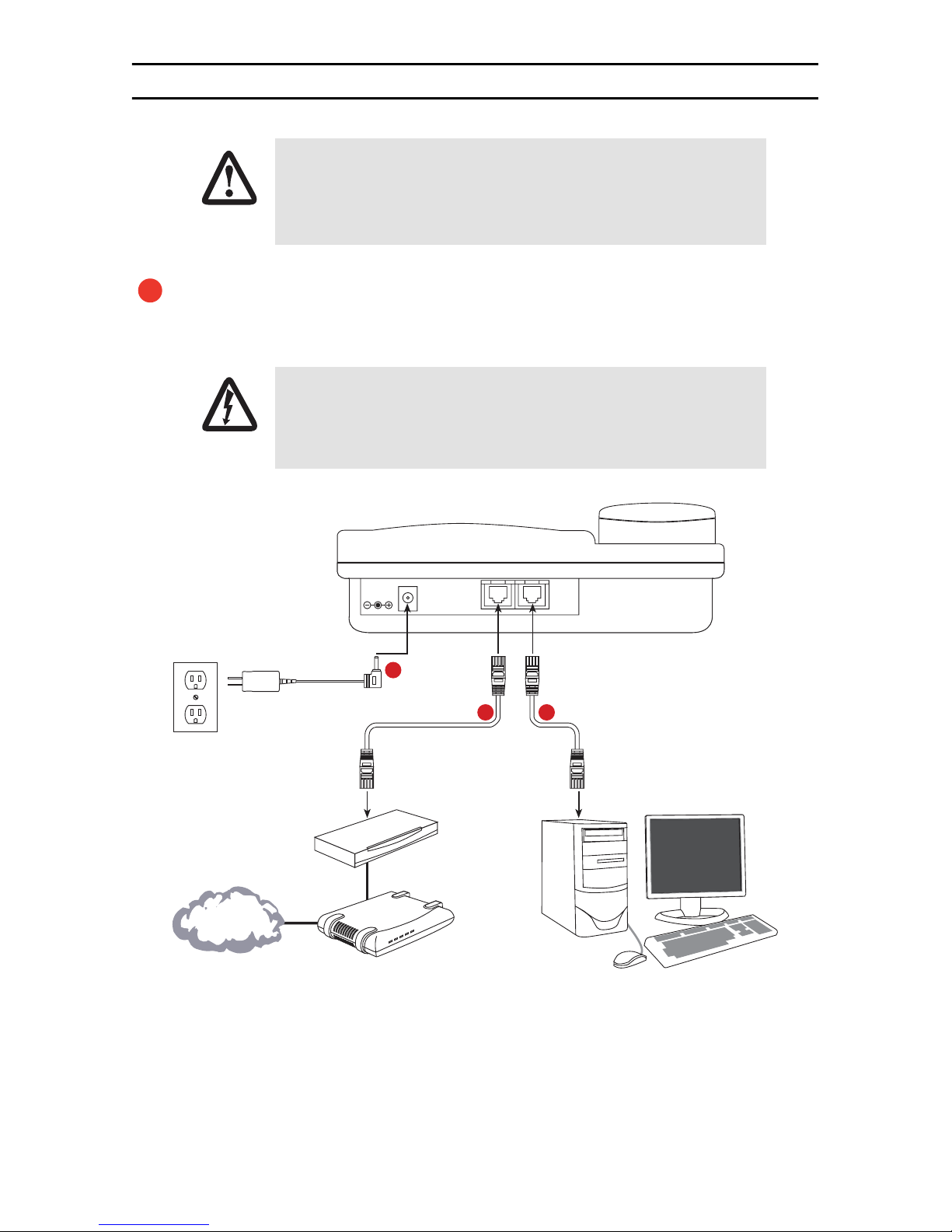
Figure 1.
Connecting the SL4050/B12/E SIP Phone
The interconnecting cables shall be acceptable for external use and shall be rated for
the proper application with respect to voltage, current, anticipated temperature, flam-
mability, and mechanical serviceability.
Plug one end of the Ethernet cable included with the VoIP SIP phone into the WAN port on the SIP phone
(see
figure 1
for SL4050/B12/E or
figure 2
on page 8 for SL4050/B2/E). Plug the other end of the
cable into the xDSL modem or cable modem (or into an optional router or hub).
Do not work on the system or connect or disconnect cables during periods
of lightning activity.
CAUTION
1
WARNING
DC IN 5V WAN LAN
Power adapter
Ethernet Cable (included with
SL 4050/10 phone) Ethernet Cable (optional)
Router/Hub
(optional)
Cable/xDSL
modem
Power Cable LAN RX TX
PC (optional)
SmartLink 4050/10 VoIP SIP Phone
12
3
Internet or
optional WAN

8
SmartLink 4050 Series Quick Start Guide
Figure 2.
Connecting the SL4050/B2/E SIP Phone
If you will not be connecting a PC to the phone, go to step 3. Otherwise, connect an Ethernet cable into
the LAN port of the SIP phone (see
figure 1
on page 7 for SL4050/B12/E or
figure 2
for SL4050/B2/
E). Plug the other end of the cable into the Ethernet port on the PC.
Plug the power adapter barrel connector into the power connector on th SIP phone (see
figure 1
on
page 7 for SL4050/B12/E or
figure 2
for SL4050/B2/E). Plug the other end of the power adapter into
an AC electrical outlet.
2
DC IN 5V
SmartLink 4050/B2 VoIP SIP Phone
LAN WAN
Power adapter 3
Ethernet Cable (included with
SL 4050/2 phone)
Ethernet Cable (optional)
PC (optional)
12
Router/Hub
(optional)
Cable/xDSL
modem
PowerCableLANRXT
X
Internet or
optional WAN
3

SmartLink 4050 Series Quick Start Guide
9
3.0 Setting up the VoIP SIP phone
Figure 3.
Menu summary, page 1 of 2
DisableEnable ADSL DIALUP:
ENABLE/DISABLE
ADSL DIALUP:
ENABLE ADSL DIALUP:
DISABLE
ADSL ID:
My_ADSL_ID
ADSL Password:
********
DHCP:
ENABLE/DISABLE
IP Address:
AUTO IP Address:
010.000.000.100
Subnet Mask:
AUTO
Router IP:
AUTO
Subnet Mask:
255.255.255.000
Router IP:
010.000.000.254
DNS Server IP:
010.000.000.001
SNTP Server IP:
220.130.158.52
ENABLE/DISABLE – select
enable or disable
UTO – IP address given by
the router or ISP
SNTP Server IP – IP or URL
A
DisableEnable
Press the MENU key
Display Name:
Your name

10
SmartLink 4050 Series Quick Start Guide
Figure 4.
Menu summary, page 2 of 2
UPDATE CHANGES?
<OK> OR <CANCEL>
Press the MENU key
Version:
V: 01.31
WAN MAC Address:
00D0E9123456
Ringing Type:
Ringing 1~4/5~8/9
Anony Call Rej:
ENABLE/DISABLE
Anonymous Call:
ENABLE/DISABLE
CF No Answer:
ENABLE/DISABLE
CF User Busy:
ENABLE/DISABLE
CF Unconditional:
ENABLE/DISABLE
Do Not Disturb:
ENABLE/DISABLE
SNTP Cycle:
01
Ringing 1~9
1~4: Tone
5~8: Melody
9: MP3
M2 Setting:
Line
LAN MAC Address:
00D0E9123457
M2 ~ M12
Type: Line/Park
One Touch Dial/
Extension
SL4050/B12
Model Only
Altri manuali per SL4050/B12/E
1
Questo manuale è adatto per i seguenti modelli
1
Indice
Altri manuali Patton electronics Telefono IP

Patton electronics
Patton electronics SL4050/10 Manuale utente

Patton electronics
Patton electronics SmartLink 4050 Series Manuale utente

Patton electronics
Patton electronics SL4050/10 Manuale utente

Patton electronics
Patton electronics SL4050/B12/E Manuale utente

Patton electronics
Patton electronics SmartLink 4050 Series Manuale utente

Patton electronics
Patton electronics SmartLink 4050 Series Manuale utente

Patton electronics
Patton electronics SmartLink 4050 Series Manuale utente


