
PENKO Omega Manuale di istruzioni

PENKO Engineering B.V.
Your Partner for Fully Engineered Factory Solutions
Omega QuickStart manual

Omega QuickStart manual
2
CONTENTS
System Overview.............................................................................................................................................................3
Connecting power ...........................................................................................................................................................3
Connecting a loadcell......................................................................................................................................................4
Connecting a laptop ........................................................................................................................................................5
Connecting to the Factory network ...............................................................................................................................6
First power up..................................................................................................................................................................6
Connecting to the Omega...............................................................................................................................................6
Ethernet.......................................................................................................................................................................6
USB...............................................................................................................................................................................6
Using Easy Setup to calibrate weighers.......................................................................................................................10
Next steps ......................................................................................................................................................................14
Updating the Omega Firmware....................................................................................................................................15
Omega QuickStart manual
3
SYSTEM OVERVIEW
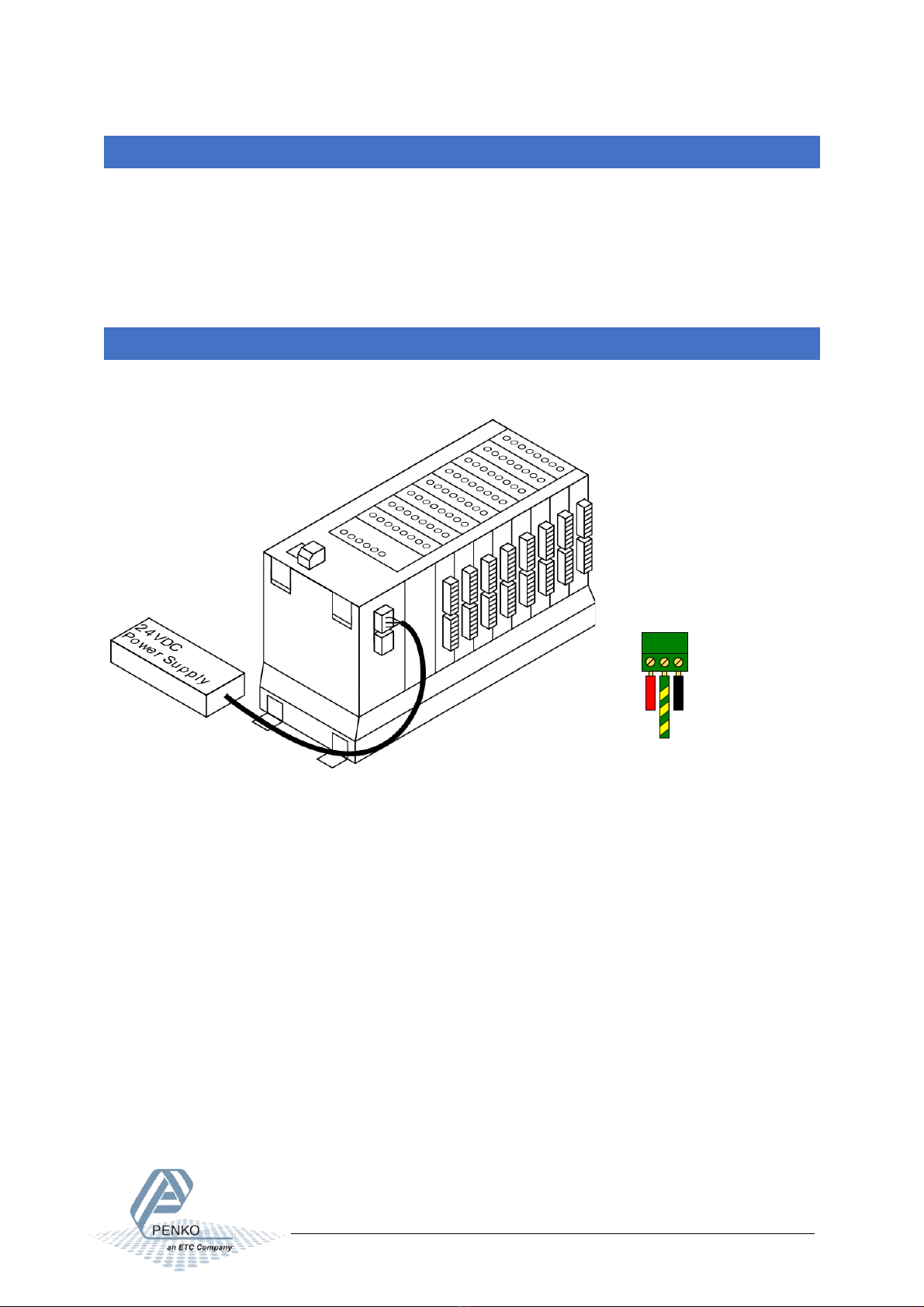
The Omega system can consist of multiple rack units. Each rack unit consists of:
•A Bus unit.
•One power supply.
•One CPU module.
•Up to 8 weigher or I/O modules.
•Unused slots are covered by a dummy module.
CONNECTING POWER
The Omega system uses a 24VDC nominal power supply. The applied voltage should be between 18 and
36Volts.
Two power connections are provided. Both connections are wired identically to provide power to the next unit
in a multiple unit system.

Omega QuickStart manual
4
CONNECTING A LOADCELL
Each ADC+DIO or ADC+AIO module has two loadcell connections. The loadcell connects as following:

Omega QuickStart manual
5
CONNECTING A LAPTOP
A laptop for initial setup can be connected to the USB3 connection of the CPU module. This requires a USB-A to
Mini USB-B cable.
Alternately, a laptop can be connected to Ethernet 2.

Omega QuickStart manual
6
CONNECTING TO THE FACTORY NETWORK
FIRST POWER UP
After applying power, the unit starts up. The OK led on the CPU lights up RED while in boot mode.
After a few seconds this LED blinks green in a heartbeat pattern to show that the application is running. After
approximately 1,5 minutes the SD/INT LED stops flashing, and the unit is ready.
CONNECTING TO THE OMEGA
ETHERNET
When the laptop is connected to the Ethernet 2 port, the Omega will supply an IP address. Open your web
browser (Edge, Chrome, Safari or Firefox) and type the address 10.1.2.1. This will open the Omega web
interface.
When connected to the Ethernet 1 port, the factory LAN must supply an IP address through DHCP.
USB
When the laptop is connected to the USB3 port, the PC will add a network adapter device over USB. Open your
web browser (Edge, Chrome, Safari or Firefox) and type the address 10.54.32.1. This will open the Omega web
interface.

Omega QuickStart manual
7
The default login is:
Username: administrator
Password: administrator
Then click LOGIN
After successful login the dashboard is shown:
Click on “My Omega” to show an overview of the installed components.

Omega QuickStart manual
8
Click on “option cards overview” To shows a quick overview of all available channels. All weight, input output
and status indicators are live values.

Omega QuickStart manual
9
This example contains:
•dual loadcell and digital io module
•Digital I/O module
•Analog I/O module
Only the loadcell inputs are used to show a weight.
When a weigher is shown as “------” the following things can be wrong:
•No loadcell is connected.
•The loadcell is Wired wrong.
•Weight is above the maximum load.
•Weight is below the minimum load.
•The channel is not calibrated.
Click on “Settings”, followed by “Easy Setup”

Omega QuickStart manual
10
USING EASY SETUP TO CALIBRATE WEIGHERS
Now click on the “SETTINGS” for the “Dual Channel Loadcell Digital Outputs(1-1-1)” to start the setup for
channel 1 of the first card.
The display tab shows that this channel has no valid weight “-------”
The Weigher settings tab allows changing the maximum load, display step, decimal point position and the
weight unit. The weigher can be configured to show up to 3000 counts for certified installation or up to 10.000
counts for non-certified installations. Step sizes larger than 1 can be used to reduce the number of counts. Set
the maxload and decimal point accordingly.
Indice
Manuali Hardware di rete popolari di altre marche

Matrix Switch Corporation
Matrix Switch Corporation MSC-HD161DEL Manuale utente

B&B Electronics
B&B Electronics ZXT9-IO-222R2 Manuale utente

Yudor
Yudor YDS-16 Manuale utente

D-Link
D-Link ShareCenter DNS-320L Manuale utente

Samsung
Samsung ES1642dc Istruzioni per l’uso

Honeywell Home
Honeywell Home LTEM-PV Istruzioni per il montaggio


