Pervasive Displays ECO-Sign Manuale utente

i
ECO-Sign
User Manual
Rev. 1.0
July, 2011
Pervasive Displays Inc.
Tel:+886-6-2795399 | Fax:+886-6-2795300

ii
Contents
I. Introduction............................................................................................1
1. What is the ECO-Sign Solution? .........................................................1
2. ZigBee Wireless Technology...............................................................2
3. ZigBee Topologies ............................................................................3
4. Node Types .....................................................................................4
5. ECO-Sign Model & Composed of Elements...........................................5
II. Pre-Installation .......................................................................................7
III. Quick Start with ECO-Sign........................................................................8
IV. Quick Start with Template Design............................................................10
V. Software Installation..............................................................................11
1. Supported Operating Systems..........................................................11
2. Instructions...................................................................................11
VI. Hardware Installation.............................................................................12
1. Overview.......................................................................................12
2. Mounting ECO-Sign ........................................................................13
3. LED Indicator (on Device) ...............................................................18
4. Connecting Coordinator / Router......................................................18
5. Recharging Device..........................................................................19
VII. Coordinator Network Configuration..........................................................20
1. Communication Port .......................................................................20
2. Configure Coordinator.....................................................................21
3. Web Configuration..........................................................................23
VIII.Working with Device and Coordinator.......................................................26
1. Starting ESS (ECO-Sign System)......................................................26
2. Coordinator ...................................................................................27
3. Target...........................................................................................29
4. EPD Device....................................................................................31
5. Template.......................................................................................35
6. Schedule.......................................................................................40
7. Configuration.................................................................................41

iii
8. How does Eco-Sign work? ...............................................................43
9. Information...................................................................................44
IX. How to update firmware? .......................................................................46
1. Naming rule ..................................................................................46
2. Update tool ...................................................................................46

User Manual of ECO-Sign v1.0
-1-
Confidential
I. Introduction
1. What is the ECO-Sign Solution?
The ECO-Sign solution is a green, eco-friendly and low power signage solution which
includes e-Paper devices with ZigBee wireless gateways and software.
The ECO-Sign has ultra-low power consumption and provides wireless updates of the
display. With no wires and rechargeable batteries the ECO-Sign is easy to install and is a
perfect solution for office or factory automation, electronic shelf labels, e-Signage/e-POP,
logistic or container applications.
The included software has a powerful template designer and the built in scheduler
provides an easy remote management tool. The solution is characterized by the following
features:
(1) Slim & Light: Fewer parts, simple electronics, no thermal concerns and less
mechanical challenges.
(2) Active Matrix TFT: Built in active-matrix electrophoretic display.
(3) Paper Like: It is reflective, has a very wide viewing angle and excellent contrast.
(4) Rechargeable Battery: 1 year operating time on a single charge.
(5) Wireless: Without any power cord and network cables, the content can be updated
wirelessly and controlled remotely.
(6) Ultra Low Power Consumption: It is very energy efficient and allows you to
define when the device sleeps or wakes up.
(7) Color: It also provides area color for color requirements.
(8) Secure: No OS, so impervious to hacker & virus. 128 bits AES (16 Bytes) security.
(9) Lower Content Cost: Simple and straightforward. No need for computing power or
memory overhead.
(10) Low Maintenance: Light and Thin, easy to install and repair, less installation
overhead.

User Manual of ECO-Sign v1.0
-2-
Confidential
2. ZigBee Wireless Technology
ZigBee is a specification for a suite of high level communication protocols using small,
low-power digital radios based on the IEEE 802.15.4 standard for Wireless Personal Area
Networks (WPANs). The technology defined by the ZigBee specification is intended to be
simpler and less expensive than other WPANs, such as Bluetooth. ZigBee is targeted at
radio-frequency (RF) applications that require a low data rate, long battery life, and
secure networking and is designed for wireless controls and sensors.
ZigBee has two modes of operation: Active, also called WakeUp, and Sleep mode. In the
active mode the device is communicating with other nodes in the network. In sleep mode
the radio is turned off and the system enters power saving mode. The user can configure
the interval of both states.
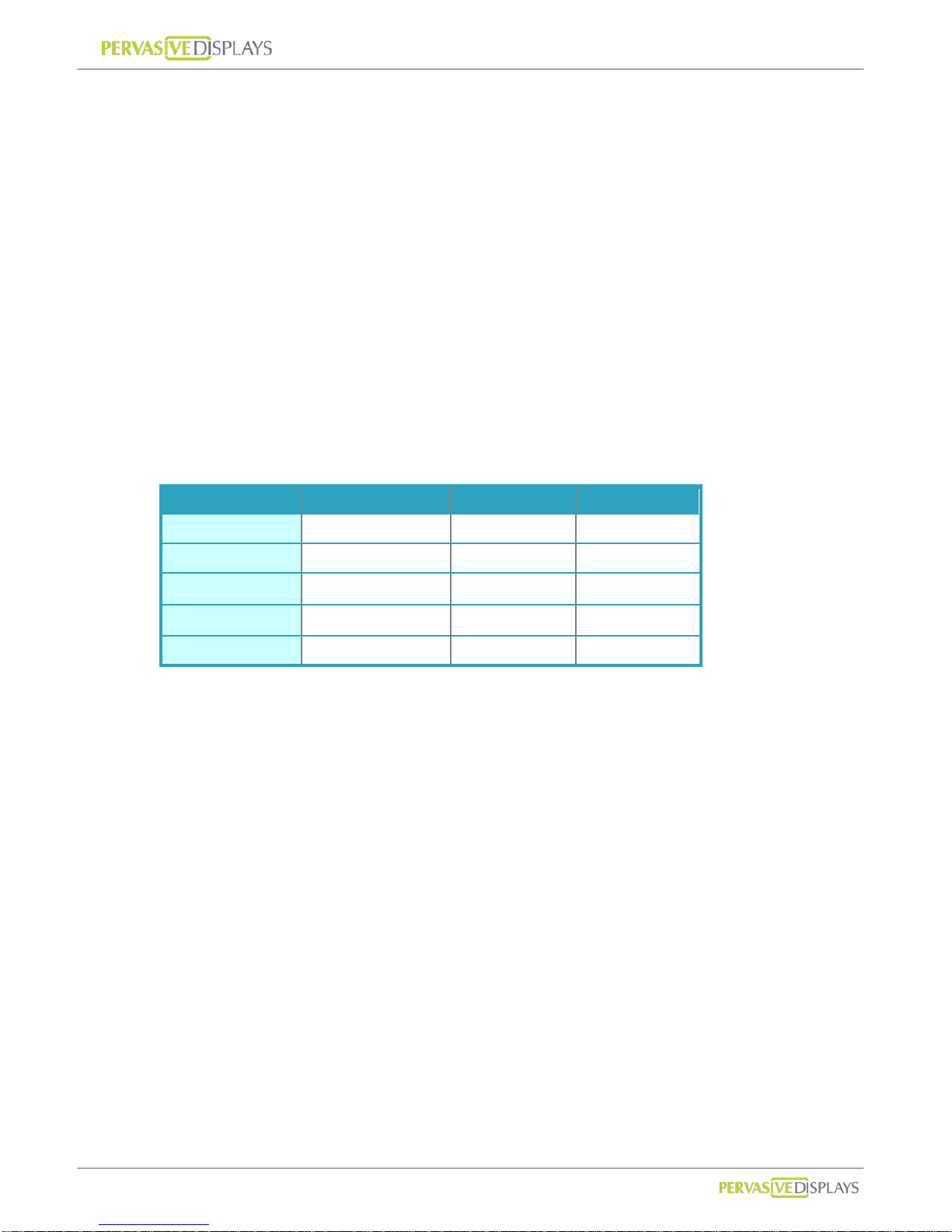
ZigBee operates in the industrial, scientific and medical (ISM) radio bands; 868 MHz in
Europe, 915 MHz in the USA and Australia, and 2.4 GHz in most jurisdictions worldwide.
2.4GHz 868MHz 915MHz
Band ISM ISM
Coverage Worldwide Europe US
Modulation QPSK BPSK BPSK
Channel 16 1 10
Data Rate 250K bps 20K bps 40K bps
The ECO-Sign uses ZigBee 2.4GHz.

User Manual of ECO-Sign v1.0
-3-
Confidential
3. ZigBee Topologies
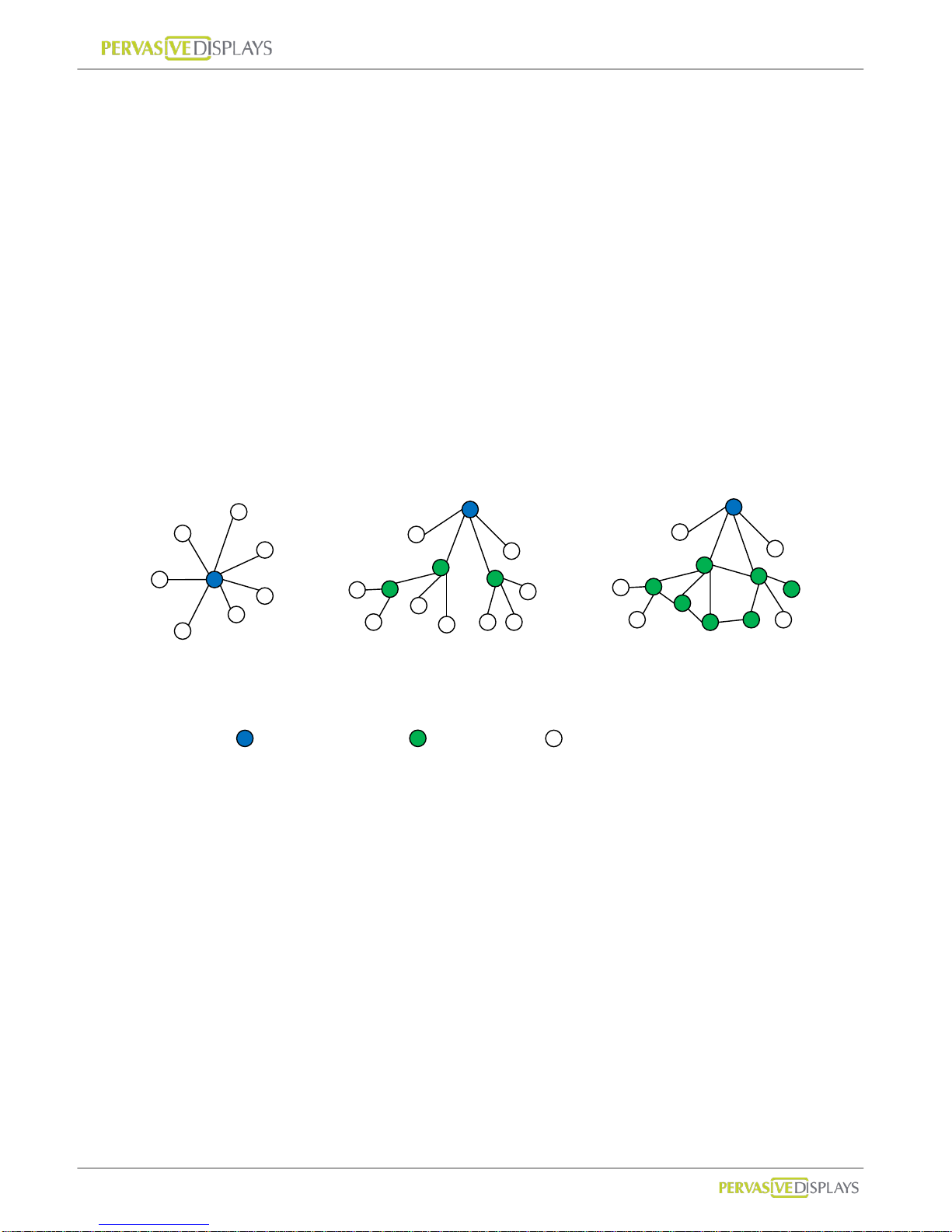
A ZigBee network can adopt one of three topologies: Star, Tree or Mesh.
(1) Star Topology
A Star network has a central node, which is linked to all other nodes in the network.
All messages travel via the central node.
(2) Tree Topology
A Tree network has a top node with a branch/leaf structure below. To reach its
destination, a message travels up the tree (as far as necessary) and then down the
tree.
(3) Mesh Topology
A Mesh network has a tree-like structure in which some leaves are directly linked.
Messages can travel across the tree, when a suitable route is available.
Star
Tree
Mesh
: Coordinator
: Router
: End-Device

User Manual of ECO-Sign v1.0
-4-
Confidential
4. Node Types
The ZigBee standard has the capacity to address up to 65,535 nodes in a single network.
There are three different types of nodes in a ZigBee network:
(1) ZigBee Coordinator: The most capable device, the coordinator forms the root of the
network tree and might bridge to other networks. It is the device that started the
network originally and is able to store information about the network, including acting
as the Trust Center & repository for security keys.In the above illustration the ZigBee
Coordinator is color-coded in blue.
(2) ZigBee Router: As well as running an application function, a router can act as an
intermediate node, passing messages from source to destination. ZigBee Routers are
color coded in green.
(3) ZigBee End Device: It’s equal to our ECO-Sign Device. ECO-Sign Device contains
just enough functionality to talk to the parent node (either the Coordinator or a Router)
and refresh the content on e-Paper display. ZigBee End Devices are color-coded in
white.

User Manual of ECO-Sign v1.0
-5-
Confidential
5. ECO-Sign Model & Composed of Elements
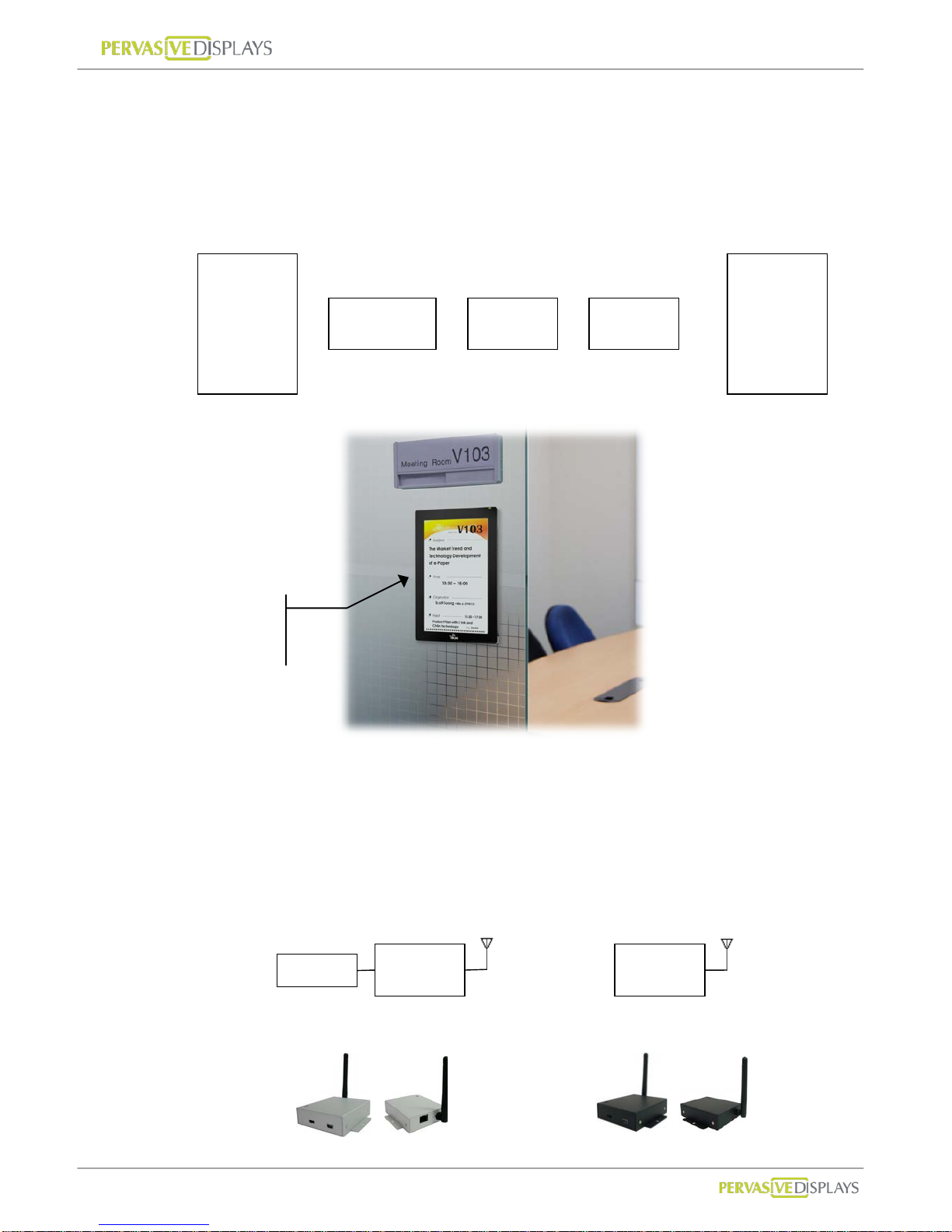
The components of the ECO-Sign solution are illustrated below:
(1) ECO-Sign Devices: (hereinafter the “Device”) The Active-Matrix e-Paper display with
Timing Control board, ZigBee module and rechargeable battery.
(2) Gateways: Gateways include ZigBee Coordinator and ZigBee Router. ZigBee
Coordinator (hereinafter the “Coordinator”) is the beginning of ZigBee network tree
and is capable to transfer data from Ethernet to ZigBee signal which is addressable by
internet/intranet IP.
Router (hereinafter the “Router”) acts as repeater to enhance the ZigBee signal hence
increasing the distance a node can be installed from the coordinator.
e-Paper
Display
Timing
Controller
ZigBee Battery
+
+
+
=
ECO-Sign
Device
ZigBee ZigBee
Ethernet
Coordinator
Router
ECO-Sign
Device

User Manual of ECO-Sign v1.0
-6-
Confidential
(3) Software: This software is the graphic user interface to manage devices, gateways,
networks, data sources, schedules and templates.
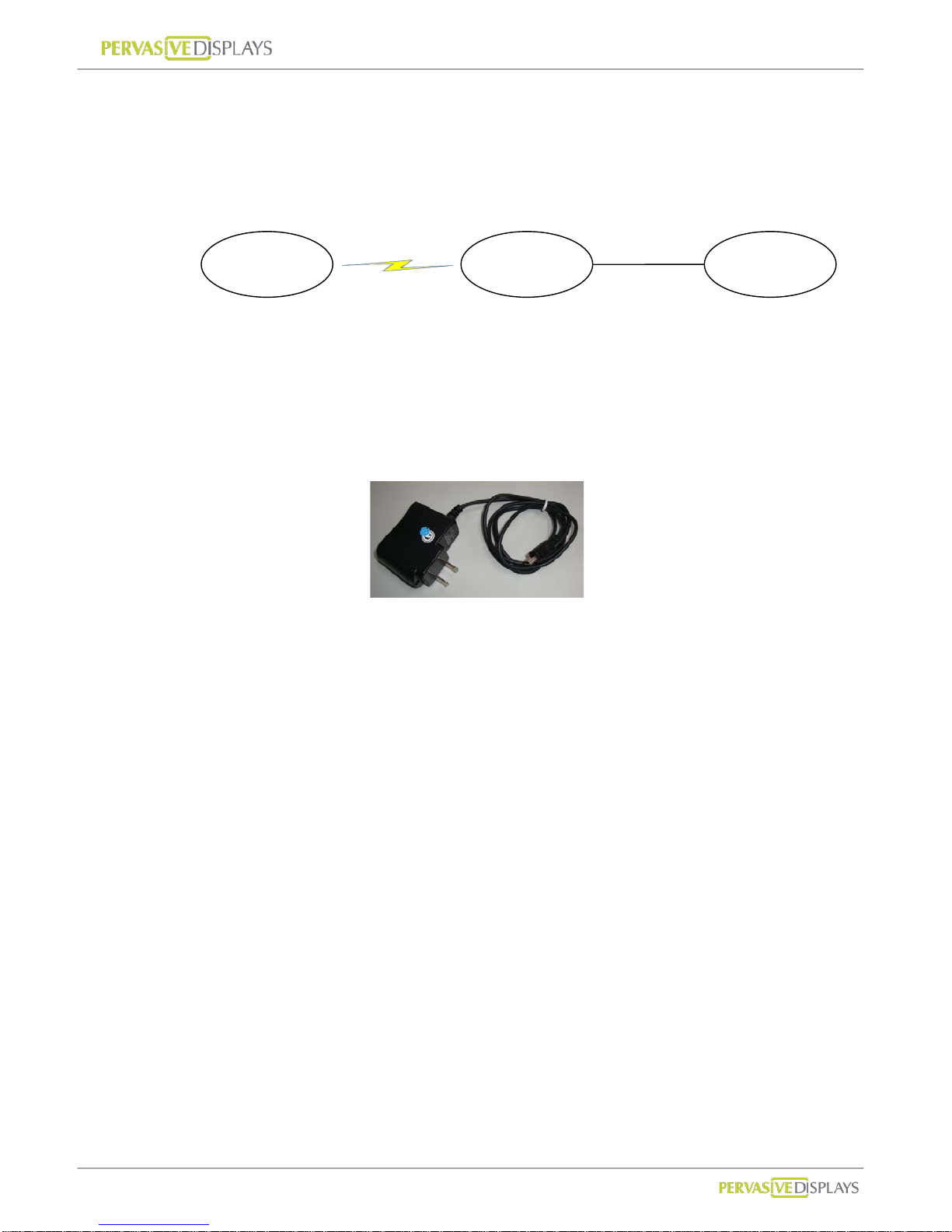
(4) Peripherals: mini-USB power adapter.
Coordinator and Router are powered by this mini-USB power adapter.
Device is powered by rechargeable battery which has embedded in the cover. The
adapter can also be used for recharging the Devices.
ECO-Sign
Devices
Gateways Software
ZigBee/RF
TCP/IP
Coordinator
Router

User Manual of ECO-Sign v1.0
-7-
Confidential
II. Pre-Installation
(1) Please remember to switch the Devices OFF after testing or demonstrating in order to
save battery power.
(2) If you purchase 2 sample kits or more, different color labels (dot sticker) on the
devices will identify the components of respective kit. Note that a different color also
indicates a different ZigBee channel. There will be no interaction by between the
channels, hence a coordinator can only communicate with the same color coded
routers and ECO-Signs. Please make sure that all the devices (Coordinator, Router and
ECO-Sign) have the same color label.
(3) This software is only used for ZigBee Coordinator with Ethernet (RJ45 port) which
firmware version is greater than 0.53. It doesn’t work for Coordinator connecting with
computer by USB cable or firmware version is less than 0.5.
Indice
Manuali Portale popolari di altre marche

LST
LST M500RFE-AS Manuale utente

Kinnex
Kinnex Media Gateway Manuale utente

2N Telekomunikace
2N Telekomunikace 2N StarGate Manuale utente

Mitsubishi Heavy Industries
Mitsubishi Heavy Industries Superlink SC-WBGW256 Manuale utente

ZyXEL Communications
ZyXEL Communications ZYWALL2 ET 2WE Manuale utente

Telsey
Telsey CPVA 500 - SIP Manuale utente