
Pfeiffer Vacuum ASI 35 Manuale utente

OPERATING INSTRUCTIONS
EN
Translation of the Original
COMMUNICATION INTERFACES
Leak detection

Disclaimer of liability
These operating instructions describe all models and variants of your product. Note that your
product may not be equipped with all features described in this document. Pfeiffer Vacuum
constantly adapts its products to the latest state of the art without prior notice. Please take
into account that online operating instructions can deviate from the printed operating
instructions supplied with your product.
Furthermore, Pfeiffer Vacuum assumes no responsibility or liability for damage resulting from
the use of the product that contradicts its proper use or is explicitly defined as foreseeable
misuse.
Copyright
This document is the intellectual property of Pfeiffer Vacuum and all contents of this
document are protected by copyright. They may not be copied, altered, reproduced or
published without the prior written permission of Pfeiffer Vacuum.
We reserve the right to make changes to the technical data and information in this document.
2/154

Table of contents
1 About this manual 7
1.1 Validity 7
1.1.1 Products concerned 7
1.1.2 Applicable documents 10
1.2 Target group 10
1.3 Conventions 10
1.3.1 Instructions in the text 10
1.3.2 Abbreviations 10
1.3.3 Proof of trademark 10
2 Safety 11
2.1 General safety information 11
2.1.1 Safety instructions 11
2.1.2 Precautions 12
2.2 Intended use 12
2.3 Foreseeable misuse 12
2.4 Electrostatic Discharge (ESD) Information 12
3 Profibus 14
3.1 Connection 14
3.1.1 Features of the Profibus cable 14
3.1.2 Profibus connection of the detector to the PLC 14
3.1.3 Profibus connection interface 14
3.2 Setting 15
3.2.1 Set the leak detector 15
3.2.2 GSD file 16
3.2.3 PLC configuration 16
3.3 Use 16
3.3.1 Reading data (from the leak detector to the PLC) 16
3.3.2 Writing data (from PLC to leak detector) 17
3.3.3 List of parameters 17
3.3.4 Special format details 19
3.3.5 ZSW status word (Input) 21
3.3.6 STW command word (Output) 22
3.3.7 Use examples 22
4 Profinet 25
4.1 Connection 25
4.1.1 Features of the Profinet cable 25
4.1.2 Profinet connection of the detector to the PLC 25
4.1.3 Profinet connection interface 25
4.2 Setting 26
4.2.1 Set the leak detector 27
4.2.2 GSDML file 27
4.2.3 PLC configuration 27
4.3 Use 28
5 EtherNet/IP 29
5.1 Connection 29
5.1.1 EtherNet/IP cable characteristics 29
5.1.2 EtherNet/IP connection from detector to the PLC 29
5.1.3 EtherNet/IP connection interface 29
5.2 Setting 30
5.2.1 Leak detector parameters 30
5.2.2 EDS file 31
5.2.3 PLC configuration 31
Table of contents
3/154

5.3 Use 32
5.3.1 Coding 32
6 EtherCAT 33
6.1 Connection 33
6.1.1 Features of the EtherCAT cable 33
6.1.2 EtherCAT connection from the detector to the PLC 33
6.1.3 EtherCAT connection interface 33
6.2 Setting 34
6.2.1 Set the leak detector 35
6.2.2 ESI file 35
6.2.3 PLC configuration 35
6.3 Use 36
7 37-pin inputs/outputs 37
7.1 Connection 37
7.1.1 Features of the 37-pin I/O cable 37
7.1.2 37-pin I/O connection interface 37
7.2 Setting 38
7.2.1 Types of contact: activation mode 38
7.2.2 Selection of the default configuration (Select Default Config.) 38
7.2.3 Other Configurations (Other Configurations) 39
7.3 Use 44
7.3.1 Analog Output 44
7.3.2 Formulas 46
7.3.3 Digital input 48
7.3.4 Digital outputs (Digital Output) 50
7.3.5 Digital transistor outputs (Digital Transistor Output) 52
7.3.6 DS-P Digital relay outputs (Digital Relay Output) 53
7.3.7 TX Digital relay outputs (Digital Relay Output) 53
7.3.8 Internal 24 VDC or external 24 VDC power supply 54
7.4 Quick View 55
7.5 Save 56
7.6 Loading a configuration (Load Config from SD Card) 56
8 USB 57
8.1 Connection 57
8.1.1 Features of the USB cable 57
8.1.2 USB connection interface 57
8.2 Setting 57
8.2.1 Set the leak detector 57
8.2.2 Driver installation 58
9 Ethernet 60
9.1 Connection 60
9.1.1 Features of the Ethernet cable 60
9.1.2 Ethernet connection interface 60
9.2 Setting 60
9.2.1 Set the leak detector 60
9.2.2 MAC address 61
9.2.3 Program and driver installation 61
9.2.4 Uninstall 63
10 15-pin inputs/outputs 64
10.1 Connection 64
10.1.1Features of the 15-pin I/O cable 64
10.1.215-pin I/O connection interface 66
10.2 Setting 66
10.3 Formulas 67
Table of contents
4/154

11 RS-232 serial link 69
11.1 Connection 69
11.1.1Features of the RS-232 serial link cable 69
11.1.2RS-232 serial link interface 69
11.2 RS-232 70
11.3 Basic mode 71
11.3.1Standard basic mode 71
11.3.2Spreadsheet basic mode 72
11.3.3Available commands 73
11.4 Advanced mode (Advanced) 73
11.4.1Protocol 73
11.4.2Available commands 73
11.5 Short commands 73
11.6 Long commands 74
11.6.1Different types of long commands 74
11.6.2Discharge protocol for long commands 74
11.6.3Quick list of commands 75
11.6.4List of immediate commands 83
11.6.5List of commands on request 84
11.6.6List of commands with parameters 102
11.6.7Additional information 113
11.7 List of messages 116
11.8 Data export mode 117
11.9 HLT5xx protocol 118
11.10 HLT2xx protocol 128
12 Installation 133
12.1 Compatibility table 133
12.2 Receipt of the product 134
12.3 ASI 35 134
12.3.1Removing the interface in place - ASI 35 134
12.3.2Installation of the new interface - ASI 35 136
12.4 ASM 340 138
12.4.1Removal of the interface in place - ASM 340 138
12.4.2Installation of the new interface - ASM 340 139
12.5 ASM 390-392 141
12.5.1Removal of the interface in place- ASM 390/392 141
12.5.2Installation of the new interface - ASM 390/392 143
12.6 ASM 306S 145
12.6.1Removal of the communication in place - ASM 306S 145
12.6.2Installation of the new interface - ASM 306S 146
13 Additional equipment 149
13.1 ASM 142 type I/O cable 149
13.2 ASM 182 type I/O cable 149
13.3 Type HLT I/O module 149
13.4 Type ASI 20 MD I/O module 149
13.5 Type 2xxx or 3xxx I/O module 149
14 Malfunctions 150
15 Decommissioning 151
15.1 Disposal 151
15.2 Electrical and Electronic Equipment (EEE) 151
16 Spare parts 152
16.1 ASM 340 152
16.2 ASM 390/392 152
Table of contents
5/154

1 About this manual
IMPORTANT
Read carefully before use.
Keep the manual for future consultation.
1.1 Validity
These operating instructions are a customer document of Pfeiffer Vacuum. The operating instructions
describe the functions of the named product and provide the most important information for the safe use
of the device. The description is written in accordance with the valid directives. The information in these
operating instructions refers to the product's current development status. The document shall remain
valid provided that the customer does not make any changes to the product.
1.1.1 Products concerned
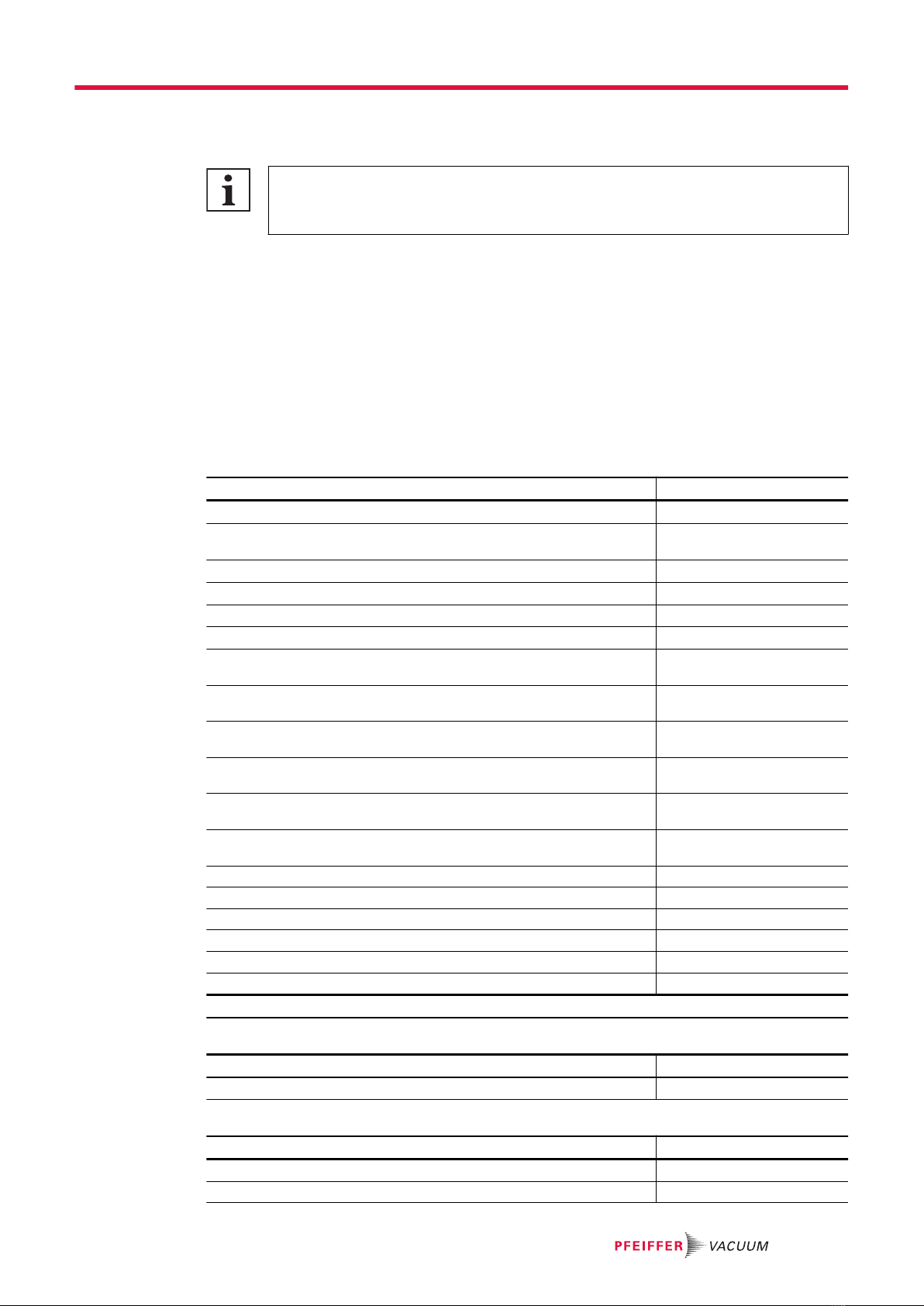
This document applies to products with the following part numbers:
ASI 35
Description Part number
ASI 35 electronic box equipped - 37-pin I/O - RS-232 - USB 1) 123057S
ASI 35 electronic box equipped - 37-pin I/O - RS-232 - USB - Ether-
net 1)
123058S
ASI 35 electronic box equipped - 15-pin I/O - RS-232 - Profinet 1) 126914S
ASI 35 electronic box equipped - 15-pin I/O - RS-232 - Profibus 1) 126915S
ASI 35 electronic box equipped - 15-pin I/O - RS-232 - EtherCAT 1) 129996S
ASI 35 electronic box equipped - 15-pin I/O - RS-232 - EtherNet/IP 1) 129997S
Accessory - ASI 35 communication interface kit - 15-pin I/O - RS-232 -
EtherCAT
130190
Accessory - ASI 35 communication interface kit - 15-pin I/O - RS-232 -
EtherNet/IP
130191
Accessory - ASI 35 communication interface kit - 15-pin I/O - RS-232 -
Profinet
130192
Accessory - ASI 35 communication interface kit - 15-pin I/O - RS-232 -
Profibus
130193
Accessory - ASI 35 communication interface kit - 37-pin I/O - RS-232 -
USB - Ethernet
130195
Accessory - ASI 35 communication interface kit - 37-pin I/O - RS-232 -
USB
130196
ASI 35 - 37-pin I/O - RS-232 - USB Sxxx0x02MM9A
ASI 35 - 37-pin I/O - RS-232 - USB - Ethernet Sxxx0x04MM9A
ASI 35 - 15-pin I/O - RS-232 - Profibus Sxxx0x08MM9A
ASI 35 - 15-pin I/O - RS-232 - Profinet Sxxx0x09MM9A
ASI 35 - 15-pin I/O - RS-232 - EtherNet/IP Sxxx0x0AMM9A
ASI 35 - 15-pin I/O - RS-232 - EtherCAT Sxxx0x0CMM9A
1) Contact us to check the compatibility of your leak detector with this accessory
ASM 310
Description Part number
ASM 310 - 15-pin I/O - RS-232 BSAA0200MM9A
ASM 306S
Description Part number
ASM 306S - 15-pin I/O - RS-232 RSAS0xA0MM9A
ASM 306S - 37-pin I/O - RS-232 - USB RSAS00A2MM9A
About this manual
7/154

Description Part number
ASM 306S - 37-pin I/O - RS-232 - USB - Ethernet RSAS00A4MM9A
ASM 306S - 15-pin I/O - RS-232 - Profibus RSAS0xA8MM9A
ASM 306S - 15-pin I/O - RS-232 - Profinet RSAS0xA9MM9A
Accessory - ASM 306S communication interface kit - 37-pin I/O -
RS-232 - USB
127258S
Accessory - ASM 306S communication interface kit - 37-pin I/O -
RS-232 - USB - Ethernet
127256S
Accessory - ASM 306S communication interface kit - 15-pin I/O -
RS-232
127254S
Accessory - ASM 306S communication interface kit - 15-pin I/O -
RS-232 - Profibus
127257S
Accessory - ASM 306S communication interface kit - 15-pin I/O -
RS-232 - Profinet
127255S
ASM 340 Wet
Description Part number
ASM 340 Wet - 15-pin I/O - RS-232 JSVA02A0Mx9x
ASM 340 Wet - 37-pin I/O - RS-232 - USB JSVA02A2Mx9x
ASM 340 Wet - 37-pin I/O - RS-232 - USB - Ethernet JSVA02A4Mx9x
ASM 340 Wet - 15-pin I/O - RS-232 - Profibus JSVA02A8Mx9x
ASM 340 Wet - 15-pin I/O - RS-232 - Profinet JSVA02A9Mx9x
ASM 340 Wet - 15-pin I/O - RS-232 - EtherNet/IP JSVA02AAMx9x
ASM 340 Wet - 15-pin I/O - RS-232 - EtherCAT JSVA02ACMx9x
Accessory - ASM 340 communication interface kit - 37-pin I/O -
RS-232 - USB
121350S
Accessory - ASM 340 communication interface kit - 37-pin I/O -
RS-232 - USB - Ethernet
121352S
Accessory - ASM 340 communication interface kit - 15-pin I/O -
RS-232
121349S
Accessory - ASM 340 communication interface kit - 15-pin I/O -
RS-232 - EtherCAT
129995S
Accessory - ASM 340 communication interface kit - 15-pin I/O -
RS-232 - EtherNet/IP
129994S
Accessory - ASM 340 communication interface kit - 15-pin I/O -
RS-232 - Profibus
127447S
Accessory - ASM 340 communication interface kit - 15-pin I/O -
RS-232 - Profinet
127448S
ASM 340 Dry
Description Part number
ASM 340 Dry - 15-pin I/O - RS-232 KSBA00A0MM9A
ASM 340 Dry - 37-pin I/O - RS-232 - USB KSBA0xA2MM9A
ASM 340 Dry - 37-pin I/O - RS-232 - USB - Ethernet KSBA00A4MM9A
ASM 340 Dry - 15-pin I/O - RS-232 - Profibus KSBA00A8MM9A
ASM 340 Dry - 15-pin I/O - RS-232 - Profinet KSBA00A9MM9A
ASM 340 Dry - 15-pin I/O - RS-232 - EtherNet/IP KSBA00AAMM9A
ASM 340 Dry - 15-pin I/O - RS-232 - EtherCAT KSBA00ACMM9A
Accessory - ASM 340 communication interface kit - 37-pin I/O -
RS-232 - USB
121350S
Accessory - ASM 340 communication interface kit - 37-pin I/O -
RS-232 - USB - Ethernet
121352S
Accessory - ASM 340 communication interface kit - 15-pin I/O -
RS-232
121349S
Accessory - ASM 340 communication interface kit - 15-pin I/O -
RS-232 - EtherCAT
129995S
About this manual
8/154

Description Part number
Accessory - ASM 340 communication interface kit - 15-pin I/O -
RS-232 - EtherNet/IP
129994S
Accessory - ASM 340 communication interface kit - 15-pin I/O -
RS-232 - Profibus
127447S
Accessory - ASM 340 communication interface kit - 15-pin I/O -
RS-232 - Profinet
127448S
ASM 340 Integrable
Description Part number
ASM 340 Integrable - 15-pin I/O - RS-232 MSXA02A0MM9A
ASM 340 Integrable - 37-pin I/O - RS-232 - USB MSXA02A2MM9A
ASM 340 Integrable - 37-pin I/O - RS-232 - USB - Ethernet MSXA02A4MM9A
ASM 340 Integrable - 15-pin I/O - RS-232 - Profibus MSXA02A8MM9A
ASM 340 Integrable - 15-pin I/O - RS-232 - Profinet MSXA02A9MM9A
ASM 340 Integrable - 15-pin I/O - RS-232 - EtherNet/IP MSXA02AAMM9A
ASM 340 Integrable - 15-pin I/O - RS-232 - EtherCAT MSXA02ACMM9A
Accessory - ASM 340 communication interface kit - 37-pin I/O -
RS-232 - USB
121350S
Accessory - ASM 340 communication interface kit - 37-pin I/O -
RS-232 - USB - Ethernet
121352S
Accessory - ASM 340 communication interface kit - 15-pin I/O -
RS-232
121349S
Accessory - ASM 340 communication interface kit - 15-pin I/O -
RS-232 - EtherCAT
129995S
Accessory - ASM 340 communication interface kit - 15-pin I/O -
RS-232 - EtherNet/IP
129994S
Accessory - ASM 340 communication interface kit - 15-pin I/O -
RS-232 - Profibus
127447S
Accessory - ASM 340 communication interface kit - 15-pin I/O -
RS-232 - Profinet
127448S
ASM 390
Description Part number
ASM 390 - 15-pin I/O - RS-232 CSGB01G0MM9x
ASM 390 - 37-pin I/O - RS-232 - USB CSGB01G2MM9x
ASM 390 - 37-pin I/O - RS-232 - USB - Ethernet CSGB01G4MM9x
Accessory - ASM 390/392 communication interface kit - RS-232 - 37-
pin I/O - USB
126254S
Accessory - ASM 390/392 communication interface kit - 37-pin I/O -
RS-232 - USB - Ethernet
126255S
Accessory - ASM 390/392 communication interface kit - 15-pin I/O -
RS-232
126253S
ASM 392
Description Part number
ASM 392 - 15-pin I/O - RS-232 ESGB02G0MM9x
ASM 392 - 37-pin I/O - RS-232 - USB ESGB02G2MM9x
ASM 392 - 37-pin I/O - RS-232 - USB - Ethernet ESGB02G4MM9x
Accessory - ASM 390/392 communication interface kit - 37-pin I/O -
RS-232 - USB
126254S
Accessory - ASM 390/392 communication interface kit - 37-pin I/O -
RS-232 - USB - Ethernet
126255S
Accessory - ASM 390/392 communication interface kit - 15-pin I/O -
RS-232
126253S
About this manual
9/154
1.1.2 Applicable documents
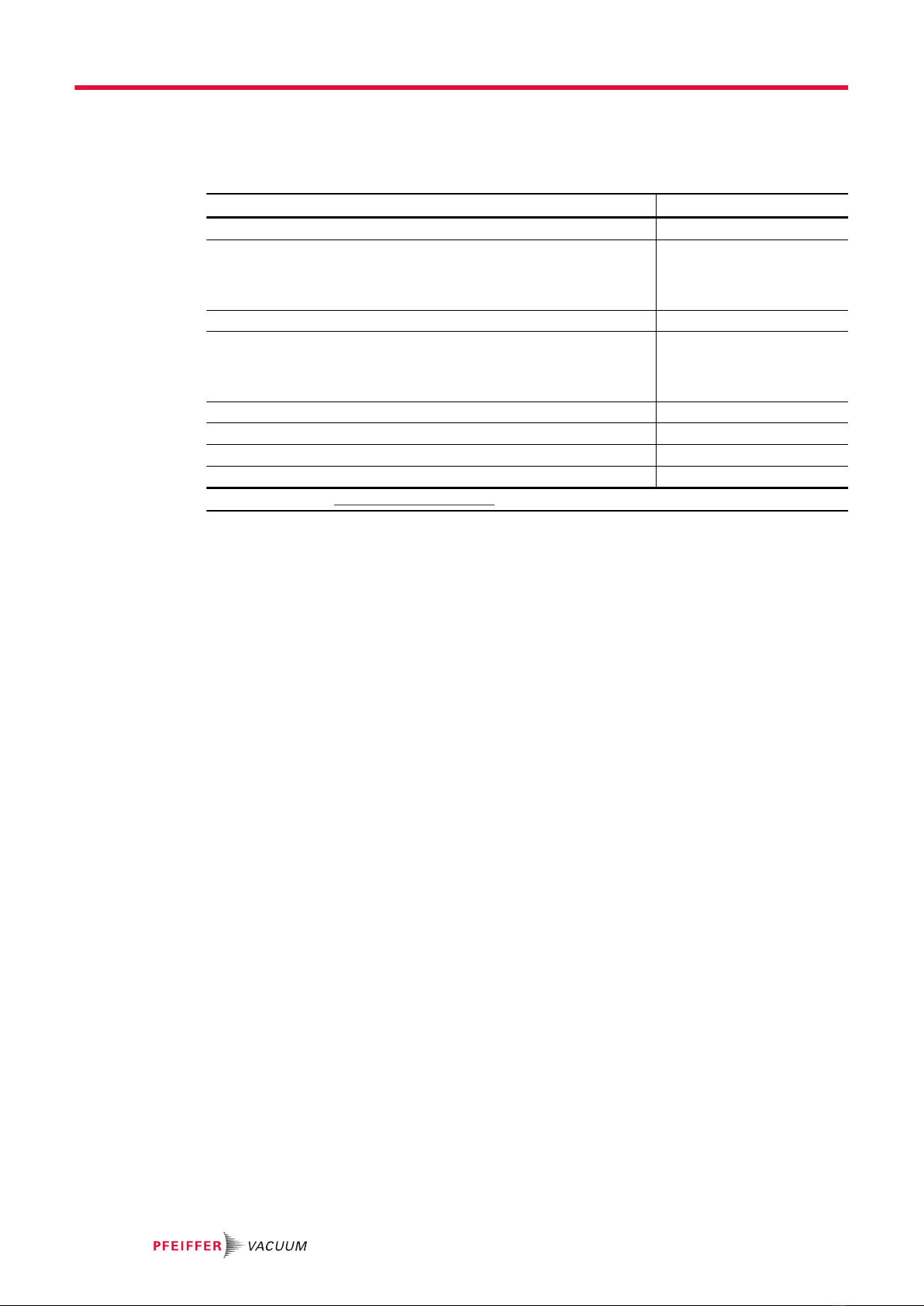
Useful documents for the using the options and/or accessories, and for product maintenance are as fol-
lows:
Document Part number 1)
User manual - ASI 35 leak detector 127801
User manual - ASM 310 leak detector 114916 (ASM 310 model
V1/V2)
128864 (ASM 310 model
V3)
User manual - ASM 306S leak detector 127443
User manual - ASM 340 leak detector 121762 (ASM 340 model
V1)
128863 (ASM 340 model
V2)
User manual - ASM 390/392 leak detector 126348
User manual - I/O module type HLT 122864
User manual - I/O module type ASI 20 MD 123358
User manual - I/O module type 2xxx or 3xxx 123359
1) also available at www.pfeiffer-vacuum.com
1.2 Target group
This user manual is intended for all persons in charge of transport, installation, commissioning/decom-
missioning, use, maintenance or storage of the product.
The work described in this document must only be carried out by persons with suitable technical training
(specialized staff) or persons who have undergone Pfeiffer Vacuum training.
1.3 Conventions
1.3.1 Instructions in the text
Usage instructions in the document follow a general structure that is complete in itself. The required ac-
tion is indicated by an individual step or multi-part action steps.
Individual action step
A horizontal, solid triangle indicates the only step in an action.
►This is an individual action step.
Sequence of multi-part action steps
The numerical list indicates an action with multiple necessary steps.
1. Step 1
2. Step 2
3. ...
1.3.2 Abbreviations
I/O Input/Output
[XXXXXX] The control panel menus and parameters are shown in bold between square brackets.
Example: [Advanced] [Input/Output] to select the Input/Output menu.
The screenshots are given as an example only. They can vary according to the user setting.
1.3.3 Proof of trademark
●Profibus® is a registered trademark of Profibus Nutzerorganisation e.V.
●Profinet® is a registered trademark of Profibus Nutzerorganisation e.V.
●EtherCAT® is a registered trademark of Beckhoff Automation GmbH, Germany.
●EtherNet/IP™ is a registered trademark licensed by ODVA, Inc.
About this manual
10/154
Altri manuali per ASI 35
4
Questo manuale è adatto per i seguenti modelli
5
Indice
Manuali Apparecchiature di registrazione popolari di altre marche


Strymon
Strymon NIGHTSKY Manuale utente

Mitsubishi Electric
Mitsubishi Electric 16CH DIGITAL RECORDER DX-TL5000U Manuale utente

Tews Technologies
Tews Technologies TPMC465 Manuale utente

Honeywell
Honeywell Excel 50 Manuale utente

SeaLevel
SeaLevel COMM+8.LPCI Manuale utente

Arturia
Arturia AUDIOFUSE STUDIO Manuale utente


