
Philips BM6 Manuale utente

www.philips.com/support
BM6
User manual
Always there to help you
Register your product and get support at
Question?
Contact
Philips


1EN
Contents
1 Important 2
Safety 2
2 Your multiroom speaker 3
Introduction 3
What's in the box 3
Overview of the main unit 4
3 Prepare 6
Connect power and turn on 6
4 Play 8
Play in single mode 8
Play in group mode 9
Control play 11
5 Other features 12
Update rmware 12
Reset group status 12
6 Product information 13
Specications 13
7 Troubleshooting 14
8 Understand meanings of LED status 15
9 Notice 17
Written offer 18

2EN
1 Important
Safety
• Make sure that there is enough free space
around the product for ventilation.
• Only use attachments or accessories
specied by the manufacturer.
• Use only power supplies listed in the user
manual.
• This speaker is designed to be waterproof
in compliance with IPX4.
• Do not place any sources of danger on the
product (e.g. lighted candles).
• Where the plug the Direct Plug-in Adapter
or an appliance coupler is used as the
disconnect device, the disconnect device
shall remain readily operable.
Warning
• Never remove the casing of this unit.
• Never lubricate any part of this unit.
• Place this unit on a at, hard and stable surface.
• Never place this unit on other electrical equipment.
• Keep this unit away from direct sunlight, naked ames
or heat.
This is CLASS II apparatus with double
insulation, and no protective earth provided.

3EN
2 Your multiroom
speaker
Congratulations on your purchase, and
welcome to Philips! To fully benet from the
support that Philips offers, register your product
at www.philips.com/welcome.
Introduction
With the splash proof Philips izzylink speaker
with a built-in battery, you can:
• listen to music from your Bluetooth-
enabled devices even on the go;
• listen to music everywhere in your home
through a group of izzylink-compatible
multiroom speakers (not supplied);
• listen to music from an external audio
device through a 3.5mm audio cable.
What's in the box
Check and identify the contents of your
package:
• 1 x izzylink multiroom speaker
• 1 x power adapter
• Printed materials

4EN
Overview of the main unit
a GROUP button/indicator
• Press and hold to group with another
izzylink-compatible multiroom speaker.
• Press to exit or return to a group.
• Flashes green during grouping.
• Turns solid green after successful
grouping.
• Flashes green when the speaker acts
as a slave and is disconnected from its
master.
b Signal strength indicator
• Indicates the signal strength of group
connection.
c button/indicator
• Turn the speaker on or off.
• Lights up red during charging.
d +/-
• Turn clockwise/anticlockwise to
increase/decrease volume.
• Press to mute/unmute the speaker.
acbdefgh
ij kl m
e
• Start, pause, or resume play.
f Volume indicator
• Lights up after power-on.
• Dims in standby mode.
• Turns green when the speaker acts as
a slave in a group of speakers.
g button/indicator
• Flashes blue in pairing mode.
• Turns solid blue after successful
connection with a Bluetooth-enabled
device.
• Turns off in power-off/standby mode
or when the speaker acts as a slave in
a group of speakers.
• Press and hold for three seconds to
disconnect the current Bluetooth
connection.
• Press and hold for ten seconds to clear
the pairing information.

5EN
h AUDIO IN button/indicator
• Switch to the Audio In source.
• Lights up white in Audio In mode.
i GROUP RESET
• Press with a sharp object to restore
factory defaults.
j SOFTWARE UPGRADE socket
• USB socket for speaker software
upgrade only.
k DC IN socket
• Power socket.
l AUDIO IN socket
• Audio input socket (3.5mm) for an
external audio device.
m Protective cover

6EN
3 Prepare
Always follow the instructions in this chapter
in sequence.
If you contact Philips, you will be asked for the
model and serial number of this apparatus.The
model number and serial number are on the
bottom of the apparatus.Write the numbers
here:
Model No. __________________________
Serial No. ___________________________
Connect power and turn on
Caution
• Risk of product damage! Make sure that the power
supply voltage corresponds to the voltage printed on
the bottom of the speaker.
• Risk of electric shock! When you unplug the AC power
adapter, always pull the plug from the socket. Never
pull the cord.
• Before you connect the AC power adapter, make sure
that you have completed all the other connections.
1 Pull open the protective cover on the back
of the speaker.
2 Connect the power adapter to
• the DC IN socket on the back of the
speaker.
• the wall power socket.
» The volume indicator lights up.
» The signal strength indicators ash
for several seconds until the speaker
boots up.
» For rst-time use or in single mode,
the indicator starts ashing and the
speaker enters pairing mode.
» When the speaker acts as the master
in group mode, the indicator starts
ashing until the speaker nds the last
paired Bluetooth-enabled device.
» When the speaker acts as a slave in
group mode, the GROUP indicator
starts ashing until the speaker nds its
master in the group.
Tip
• Single mode indicates to use a speaker as a single
Bluetooth speaker that does not acts as a master or
slave in a group of speakers.
• Group mode indicates that several izzylink-compatible
multiroom speakers form a group, with one speaker
acting as the master and the others as slaves.
Switch to standby mode
• In single mode, press .
» The volume indicator dims.
» All the other indicators turn off.
• In group mode, press on any speaker in
the group.
» The volume indicator on each speaker
in the group dims.
» All the other indicators turn off.
• In single mode, to switch on from standby
mode, press again.

7EN
• In group mode, press on any speaker
in the group to switch all the speakers on
from standby mode.
Note
• You can hold to turn off the volume indicator
completely.
• In single mode, if the Bluetooth connection is invalid or
music playback is stopped for 15 minutes, the speaker
switches to standby mode automatically.
• In group mode, if the Bluetooth connection with the
master speaker is invalid or music playback is stopped
for 15 minutes, all the speakers in the group switch to
standby mode automatically.
Use battery power
The speaker can also be powered by the built-
in rechargeable battery.
Note
• Rechargeable battery has a limited number of charge
cycles.The battery life and number of charge cycles
vary by use and settings.
• It takes you approximately three hours to fully charge
the battery.
To charge the built-in battery:
• Connect to AC power supply.
» The power indicator lights up red until
the speaker is fully charged.
8EN
4 Play
Play in single mode
Single mode: Single mode means that the
speaker is not grouped with any other izzylink-
compatible multiroom speakers. Instead, it is
used as a standalone speaker.
Connect a Bluetooth-enabled device
Note
• Make sure that your Bluetooth-enabled device is
compatible with this speaker.
• Before pairing a device with this speaker, read its user
manual for Bluetooth compatibility.
• The speaker can memorize a maximum of 8 paired
devices.
• Make sure that the Bluetooth function is enabled on
your device, and your device is set as visible to all other
Bluetooth devices.
• Any obstacle between this speaker and a Bluetooth
device can reduce the operational range.
• Keep away from any other electronic device that may
cause interference.
• The operational range between this speaker and a
Bluetooth device is approximately 10 meters (30 feet).
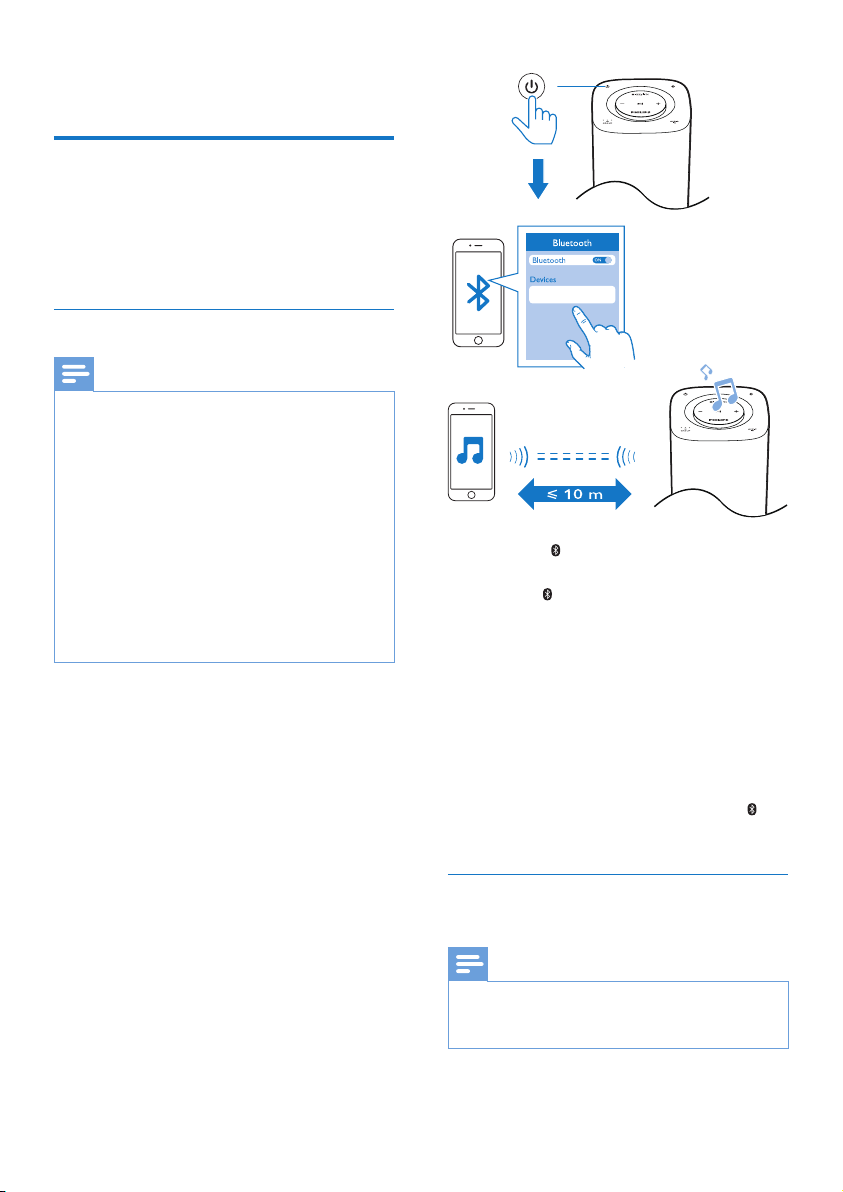
1 Press the button to switch to Bluetooth
source and enter pairing mode.
» The indicator ashes blue.
2 On your Bluetooth device, enable
Bluetooth and search for Bluetooth devices
(refer to the user manual of the device).
3 When [Philips BM6 XXX] is displayed on
your device, select it to start pairing and
connection. If necessary, enter the default
password “0000”.
» After successful pairing and connection,
the speaker beeps twice, and the
indicator turns solid blue.
Play from the connected Bluetooth-
enabled device
Note
• Music play pauses when there is an incoming call or
video recording is in progress on the connected mobile
phone.
Philips BM6 XXX
Indice
Altri manuali Philips Altoparlanti attivi


