
Philips S5340 Manuale utente

S5340, S5320, S5100
4222_002_5827_1_FrontCover_A6_bl.indd 1 11-09-15 11:41


7
17
16 18
13
4
3
5
68
9
10
2
12
11
114
15


English
Introduction
Congratulations on your purchase and welcome to
Philips! To fully benefit from the support that Philips
offers, register your product at
www.philips.com/welcome.
Please read this user manual, as it contains information
about the features of this shaver as well as some tips
to make shaving easier and more enjoyable.
General description
1 Protection cap for shaving unit
(S5420,S5400,S5380,S5230 only)
2 Click-on shaving unit
3 On/off button
4 Turbo button (S5620,S5380 only)
5 Handle
6 Socket for small plug
7 Battery charge indicator with 1 light
(S5420,S5400,S5230 only)
8 Battery charge indicator with 3 lights
(S5620,S5600,S5380 only)
9 Unplug for use symbol
10 Travel lock symbol
11 Replacement reminder
12 Cleaning reminder
13 Click-on trimmer attachment
(S5600,S5420,S5400,S5380,S5230 only)
14 Click-on beard styler attachment (S5620 only)
15 Comb for beard styler attachment (S5620 only)
16 Adapter
17 Small plug
18 Pouch (S5620,S5600 only)
5
English

Important safety information
Read this important information carefully before you
use the appliance and its accessories and save it for
future reference. The accessories supplied may vary
for different products.
Danger
- Keep the adapter dry ().
Warning
- The adapter contains a transformer. Do not cut off
the adapter to replace it with another plug, as this
causes a hazardous situation.
- This appliance can be used by children aged from 8
years and above and persons with reduced
physical, sensory or mental capabilities or lack of
experience and knowledge if they have been given
supervision or instruction concerning use of the
appliance in a safe way and understand the hazards
involved. Children shall not play with the appliance.
Cleaning and user maintenance shall not be made
by children without supervision.
- Always unplug the shaver before you clean it
under the tap.
- Always check the appliance before you use it. Do
not use the appliance if it is damaged, as this may
cause injury. Always replace a damaged part with
one of the original type.
6English

Caution
- Never immerse the adapter in water nor rinse it
under the tap.
- Never use water hotter than 80°C to rinse the
shaver.
- Only use this appliance for its intended purpose as
shown in the user manual.
- For hygienic reasons, the appliance should only be
used by one person.
- Never use compressed air, scouring pads, abrasive
cleaning agents or aggressive liquids such as petrol
or acetone to clean the appliance.
- Water may drip from the socket at the bottom of
the shaver when you rinse it. This is normal and
not dangerous because all electronics are enclosed
in a sealed power unit inside the shaver.
Electromagnetic fields (EMF)
- This Philips appliance complies with all applicable
standards and regulations regarding exposure to
electromagnetic fields.
General
- This shaver is waterproof (). It is suitable for use in
the bath or shower and for cleaning under the tap.
For safety reasons, the shaver can therefore only
be used without cord.
- The appliance is suitable for voltages ranging from
100 to 240 volts.
- The adapter transforms 100-240 volts to a safe
low voltage of less than 24 volts.
- Maximum noise level: Lc = 69dB(A)
7
English

The display
Charging
Battery charge indicator with 3 lights (specific
types only)
- Charging takes approx. 1 hour.
- Quick charge: When the appliance is connected to
the power outlet, the lights of the battery charge
indicator light up one after the other continuously.
When the appliance contains enough energy for
one shave, the bottom light of the battery charge
indicator flashes slowly.
- If you leave the appliance connected to the power
outlet, the charging process continues. To indicate
that the appliance is charging, first the bottom light
flashes and then lights up continuously. Then the
second light flashes and then lights up continuously,
and so on until the appliance is fully charged.
Battery charge indicator with 1 light (specific
types only)
- Charging takes approx. 1 hour.
- Quick charge: When the appliance does not
contain enough energy for one shave, the battery
charge indicator flashes quickly. When the battery
charge indicator starts flashing slowly, the appliance
contains enough energy for one shave .
- If you leave the appliance connected to the power
outlet, the charging process continues. To indicate
that the appliance is charging, the battery charge
indicator flashes slowly.
8English

Battery fully charged
Note: This appliance can only be used without cord.
Note: When the battery is full, the display switches off
automatically after 30 minutes.
Note: If you press the on/off button during charging, the
'unplug for use' symbol flashes white to remind you that
you have to disconnect the appliance from the power
outlet.
When the battery is full, all lights of the battery charge
indicator light up continuously.
- Battery charge indicator with 3 lights (specific types
only)
- Battery charge indicator with 1 light (specific types
only)
Battery low
When the battery is almost empty, the battery charge
indicator flashes orange.
- Battery charge indicator with 3 lights (specific types
only)
9
English
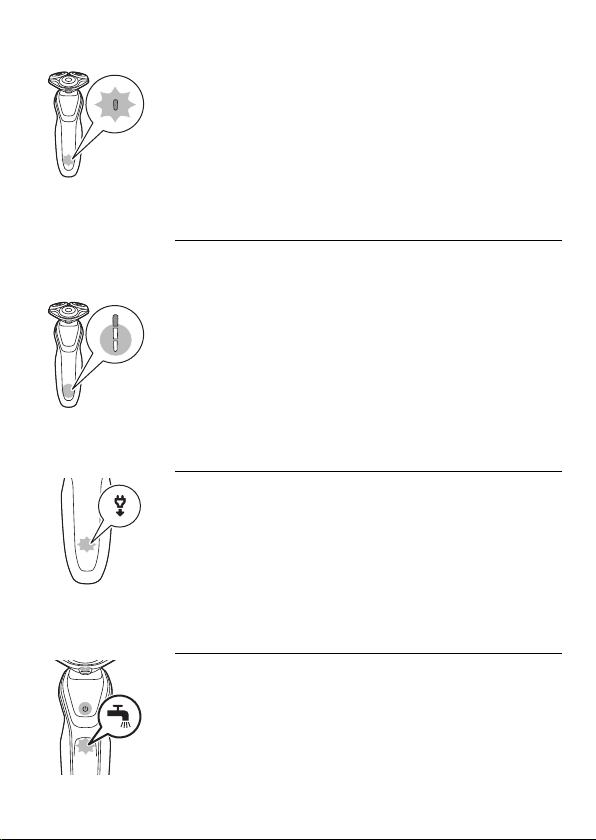
- Battery charge indicator with 1 light (specific types
only)
Remaining battery capacity
Battery charge indicator with 3 lights (specific
types only)
- The remaining battery capacity is indicated by the
lights of the battery charge indicator that light up
continuously.
’Unplug for use’ reminder
- The appliance is equipped with an ‘unplug for use’
reminder. The ‘unplug for use’ symbol flashes to
remind you that you have to disconnect the
appliance from the adapter before you can switch
it on.
Cleaning reminder
Clean the shaver after every shave for optimal
performance. When you switch off the shaver, the
cleaning reminder flashes to remind you to clean the
shaver.
10 English
Altri manuali per S5340
1
Questo manuale è adatto per i seguenti modelli
2
Indice
Lingue:
Altri manuali Philips Rasoio


