Phonak CP1 Manuale utente

www.phonak.com
Manufacturer:
Phonak AG
Laubisrütistrasse 28
CH-8712 Stäfa
Switzerland
EU Representative:
Phonak GmbH
D-70736 Fellbach-Oeffingen
Germany
User Guide
029-0278-02/V1.00/2013-09/A+W Printed in Switzerland © Phonak AG All rights reserved
Cordless phone

3
2
1. Welcome 6
2. Getting to know the phone 7
2.1 Check the package content 7
2.2 How the phone works 8
2.3 Descriptions of the device 9
2.4 Hearing aid compatibility 13
3. Important safety information 14
4. Getting started 19
4.1 Setting up the power supply 19
4.2 Connecting the base 20
4.3 Inserting the battery 21
4.4 Charging the handset 22
4.5 Changing the display language 23
4.6 Setting date and time 24
4.7 Setting the location 25
4.8 Testing the connection to the hearing aid 26
4.9 Transferring existing contacts 28
Contents
5. Everyday use 30
5.1 Making and ending a call 30
5.2 Muting the handset microphone 32
5.3 Making a call with a Phonak hearing aid 32
5.4 Set the volume 35
5.5 Setting ringtones 36
5.6 Switching on /o the handset / Idle mode 38
5.7 Setting up a contact entry 39
5.8 Looking up contacts 42
5.9 Finding the handset 43
5.10 Using the caller ID list 44
5.11 Events in the Inbox menu 45
5.12 Answerphone “Voice box” 46
5.13 Additional features when using the phone 48
6. Handset settings 50
6.1 Switching the key lock feature on /o 50
6.2 Switching on /o ring tones 51
6.3 Other Contact list functions 52

45
Contents
6.4 Other handset settings 54
6.5 Alarm clock function 57
6.6 Fitting the belt clip 60
6.7 Reception strength indicator 61
6.8 Eco-mode 62
6.9 Battery status display 63
6.10 Multiple handsets for one base 64
6.11 Using an existing base 67
6.12 Changing the battery 68
7. PIN-codes and resetting your settings 69
7.1 Changing PIN codes 69
7.2 Resetting your settings 70
7.3 Resetting the system PIN 70
8. Troubleshooting 71
9. Information on product safety 74
10. Service warranty 76
10.1 Local warranty 76
10.2 International warranty 76
10.3 Warranty limitation 77
11. Compliance information 78
12. Information and explanation of symbols 88

67
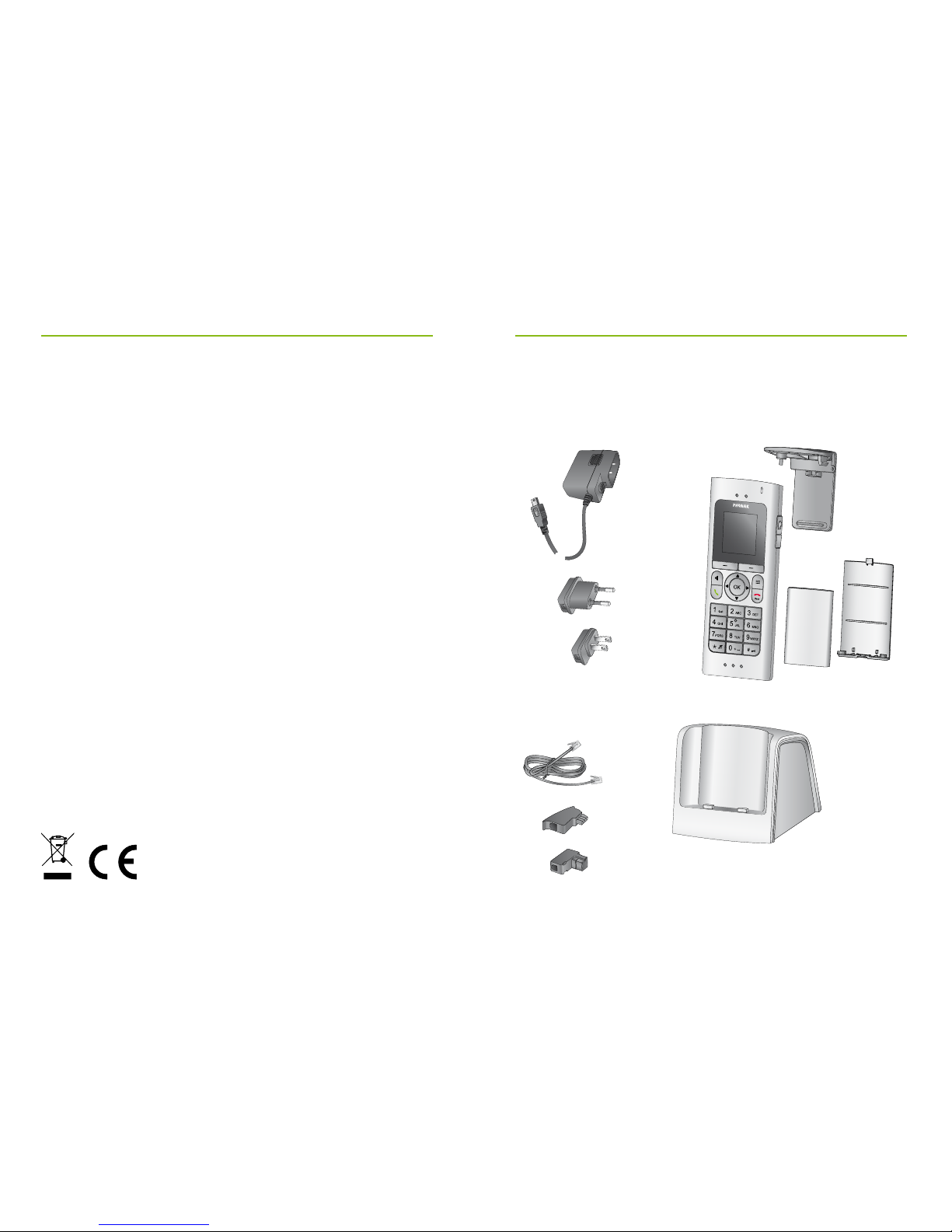
2.1 Check the package content
2. Getting to know the phone
Removable
belt clip
Battery
cover
Rechargeable
battery
Handset
Power supply with
adapters
Phone cable RJ11
with adapters
DECT base and
charger („Base“)
CH
D
EU
US/CAN
The cordless phone DECT CP1 is a quality product
developed by Phonak, one of the world’s leading
companies in the eld of hearing technology.
Please read this user guide thoroughly in order to be
able to benet from all the possibilities this product
can oer.
If you have any questions, please consult your hearing
care professional or go to www.phonak.com/dect
Phonak – life is on www.phonak.com
1. Welcome

89
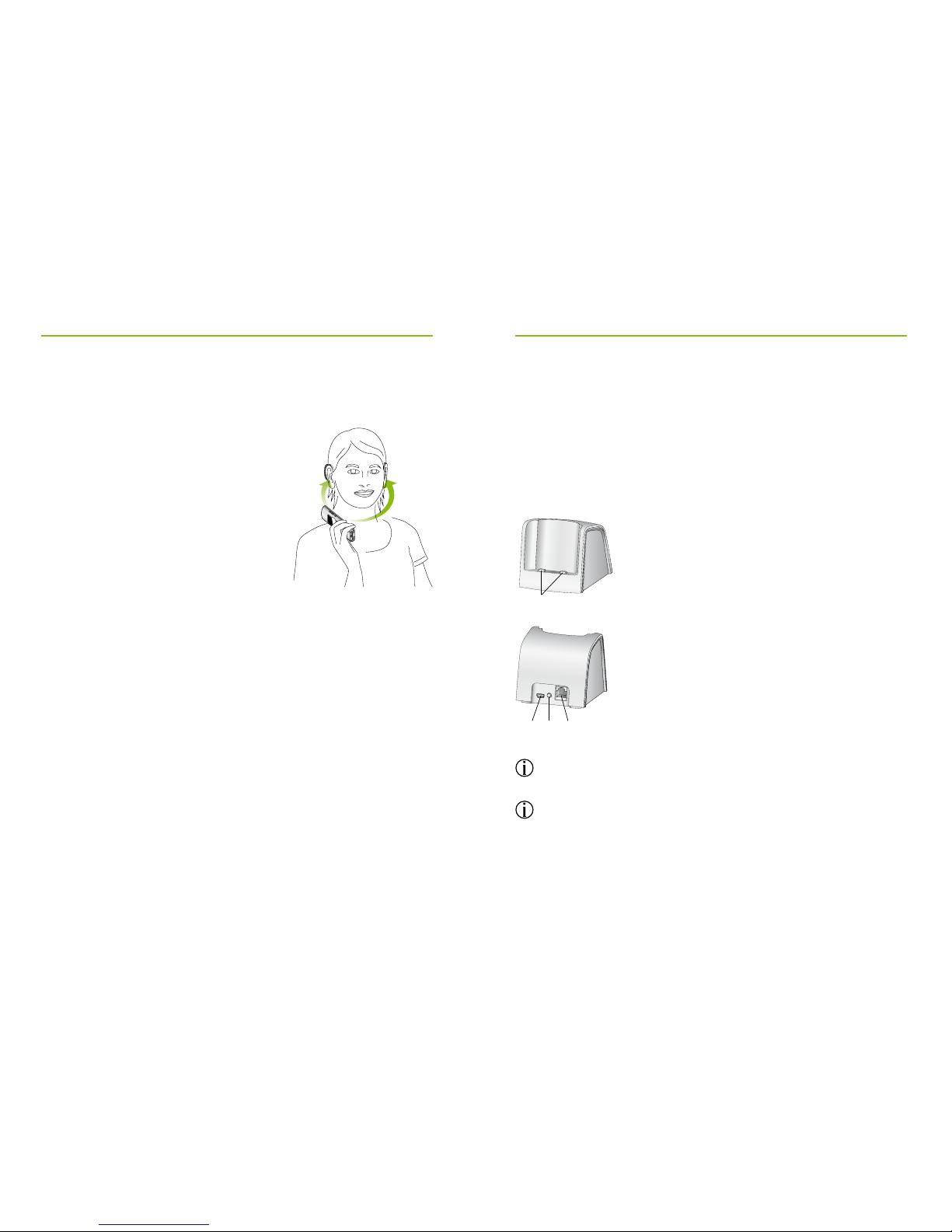
2.2 How the phone works
This telephone can be used as
any other cordless phone. But the
integrated wireless Phonak
transmission technology makes
telephoning with Phonak hearing
aids much easier.
The phone signal is sent wirelessly
to both hearing aids in digital
quality.
If you approach the handset towards your head, the
hearing aids will automatically switch to the phone
program.
Of course, you can also use the phone without a
hearing aid.
The phone supports the international DECT standard
(Digital Enhanced Cordless Telecommunications).
2. Getting to know the phone
2.3 Descriptions of the devices
The base
The base is connected to the telephone line and is also
the charger for the handset.
The default PIN code for the base is “0000”.
The base and the handset have already been paired up
at the factory. You don’t need to log them on.
a
bcd
aCharging contacts
b Power supply input
cPairing button: short press will
force handsets to ring
Press 2 sec. = Pair another
handset to this base.
dAnalog phone line plug.

10 11
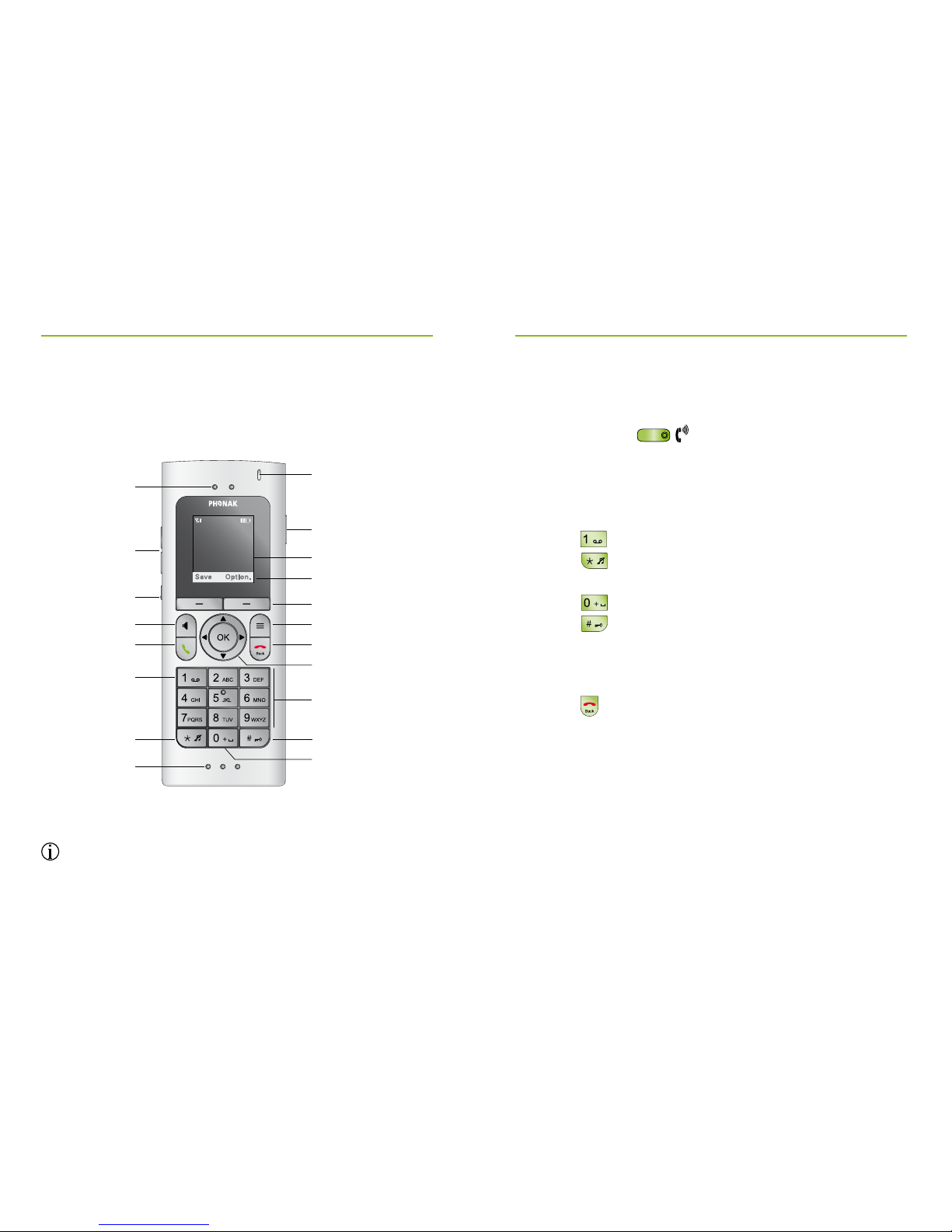
The handset
To change the display language, follow the
instructions in Chapter 4.5.
2. Getting to know the phone
d
e
f
g
h
j
l
i
m
n
o
q
r
p
k
s
c
b
a
aReceiver
bVolume up / down
cVolume boost
Press 2 sec. = Hearing aid connectivity test
(demo mode)
dHands-free on /o
eTalk /repeat call
fPress 2 sec. = Dial voicemail number
gPress 2 sec. = All ring tones o/on
hMicrophone openings
iPress 2 sec. = Dial international prex “+”
jPress 2 sec. = Keypad lock on /o
kNumber keypad
lNavigation keys
mEnd call / Back (one menu level up)
Press 2 sec. in standby mode = handset on/o
nFunction key
oDisplay keys
pContext menu
(use the display keys to select functions depending
on the display)
qDisplay
r3.5 mm headset socket
sIndicator light

09:10
1. August
DECT 1
Mic Option
0800800800
0:05
12 13
2. Getting to know the phone
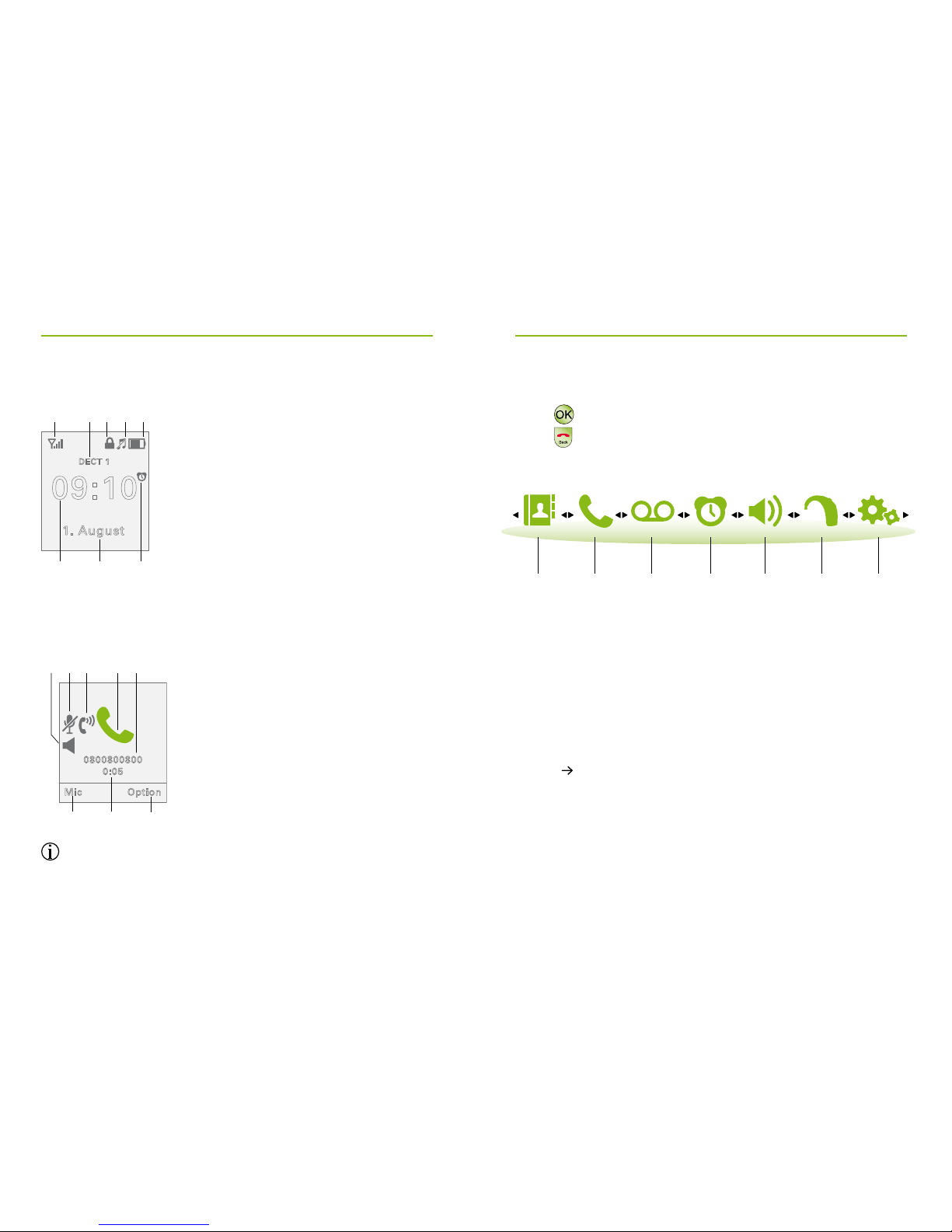
Display symbols in standby mode
Display symbols if call is in progress
The content of the display varies depending on
the settings.
a b c
defh g aTime
bDate
cAlarm clock on
d Battery and charging state
eRingtone o
fKeypad locked
gHandset name
(visible if more than one hand-
set is used with the same base)
hSignal strength from base
a b a
cd
efg aContext dependent functions
bElapsed time of call
cPhone number or name
dActive call indicator
eBoost mode on
fHandset microphone muted
gHands free on
Menu points
Press to enter menu and sub-menus.
Press to go back.
2.4 Hearing aid compatibility
This product uses a dedicated wireless link to the Phonak
hearing aids. Please ask your hearing care professional
about the compatibility to your hearing aids.
The compatibility can easily be checked using the demo
mode ( Chapter 4.8).
Contact
Chapter
5.7
Chapter
6.4
Chapter
5.3
Chapter
6.2
Chapter
6.5
Chapter
5.1
Chapter
5.12
Calls Voicebox Alarm
clock
Audio-
settings
Hearing
aid
Settings

14 15
3. Important safety information
Please read the information on the following pages
before using your Phonak DECT CP1.
These devices may only be repaired by an authorized
service center. Changes or modications to the
devices that were not explicitly approved by Phonak
are not permitted. Such changes may damage these
devices, your ear or the hearing aid.
Opening any of the devices might damage them. If
problems occur which cannot be resolved by
following the instructions of this user guide, consult
your hearing care professional.
Do not use the devices in explosive areas (mines or
industrial areas with danger of explosions).
Do not use the devices in areas where electronic
equipment is prohibited.
DECT CP1 US/CAN version may NOT be used in
Europe as it causes and suers from interference
with the European cellular networks. Illegal
use of such products are prohibited by European
Telecommunications Authorities.
DECT CP1 EU version may NOT be used in the US and
Canada as it causes and suers from interference
with US and Canada cellular networks, and for that
reason is deemed illegal to use by the FCC and IC.
The handset contains small parts that can cause
choking, if swallowed by children. Keep out of reach
of children under 3 years, mentally challenged
people and pets. If swallowed, consult a physician
or hospital immediately.
The following is only applicable for persons with
active implantable medical devices (i.e. pacemakers,
debrillators, etc.):
If you experience any interference, do not use the
device and contact the manufacturer of the active
implant (please, note that interference can also
be caused by power lines, electrostatic discharge,
airport metal detectors etc.).
Please contact the local recycling facility for removal
of the battery and dispose of electrical components in
accordance with your local regulations.

16 17
3. Important safety information
External devices may only be connected if they
have been tested in accordance with corresponding
IECXXXXX standards.
Using the cables in any way contradictory to their
intended purpose (e.g., wearing the phone cable
around the neck) can cause injury.
The mini-USB port is to be used for the described
purpose only.
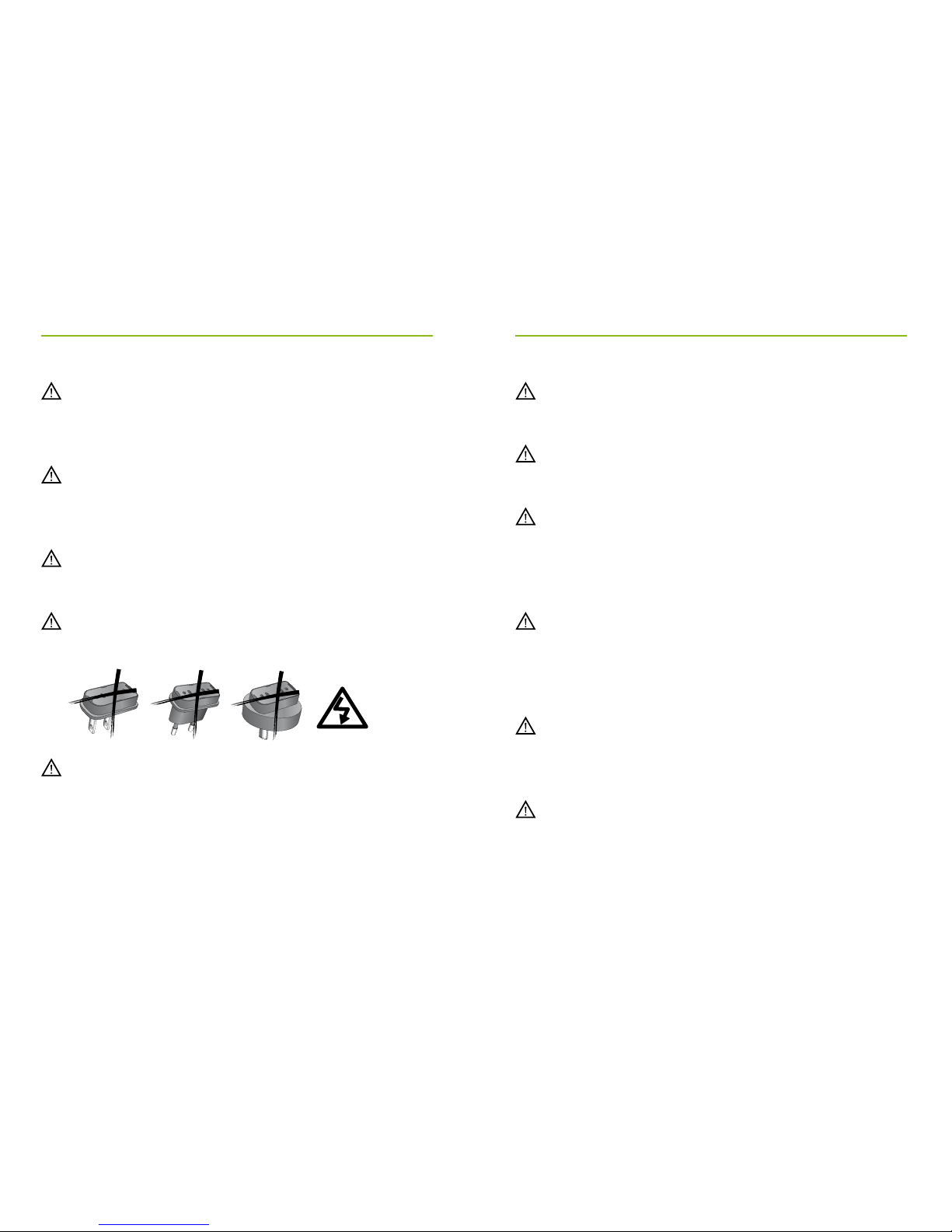
Caution: electric shock. Do not insert power adapter
alone into electrical outlets.
For safety reasons, only use chargers supplied by
Phonak or USB certied chargers with a rating of
5VDC, min. 1000 mA.
Never supply the base from a PC or laptop USB port.
This may damage your equipment.
Do not connect a USB or phone cable exceeding
3 meters (9 ft) in length to the base.
Only insert a rechargeable battery that meets the
specication in the Phonak DECT CP1 data sheet as
inserting wrong batteries can damage the device
or cause serious injuries.
Don’t hold the handset with the back of the handset
to your ear while it is ringing, or when hands-
free mode is switched on. This can cause severe,
permanent damage to your hearing.
The handset may cause buzzing noises in analog
hearing aids. If you have any problems, contact your
hearing care professional.
Only give your Phonak DECT CP1 to someone else
together with the instruction manual.

2.
a.
b.
3.
US EU UK only
18 19
3. Important safety information 4. Getting started
4.1 Setting up the power supplys
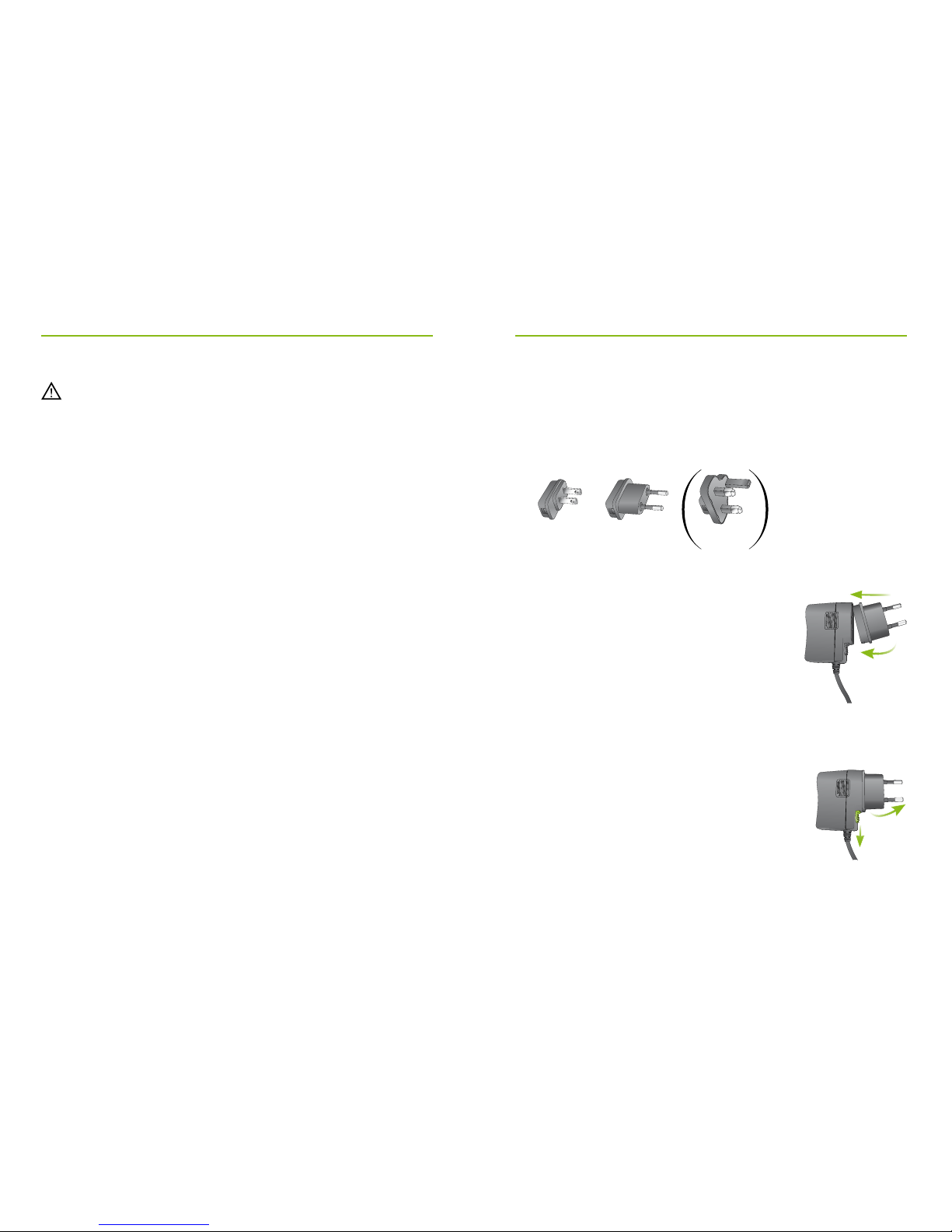
1. Select the power adapter that corresponds to your
country.
2. Insert the round corner of the adapter
to the round corner of the universal
power supply until it is completely
inserted.
3. Click the tail of the adapter in to lock
it into place. Make sure the adapter is
securely locked.
To remove the power adapter:
a. Pull back the tab on the universalpower
supply and hold.
b. Gently pull the adapter upwards to
remove it from receptacle.
c. Then start over with step 1 (above).
Please do not use a faulty base, or have it repaired
by the Service Department, since it may disrupt other
radio services.
Notices
Some of the functions described in this instruction
manual are not available in all countries.
The phone will not work during a power cut. It cannot
be used for emergency calls either.
Altri manuali per CP1
3
Indice
Altri manuali Phonak Telefono senza fili