
Phonex Broadband NeverWire 14 Manuale utente
NeverWire 14
User Guide

© 2002 Phonex Broadband Corporation. All rights reserved. All Phonex Broadband
brand and product names are trademarks of Phonex Broadband Corporation. Other
product and company names mentioned herein may be the trademarks of their
respective owners.
Information in this document is subject to change without notice. No part of this
document may be reproduced or transmitted in any form or by any means, elec-
tronic or mechanical, for any purpose, without the express written permission of
Phonex Broadband Corporation.
Printed in the U.S.A.
Version 1, May 2002
Phonex Broadband Corporation
6952 High Tech Drive
Midvale, UT 84047-3756
800-257-0601
www.phonex.com
NeverWire 14
User Guide
Awarded ‘Best
of Innovations’
Phonex Broadband Corporation
is proud to be the first company
worldwide to market a broadband
networking device that turns any electrical outlet into a
10BaseT Ethernet portal.
The NeverWire 14 is the winner of the Best of Innovations
2002 award in the Home Data Networking category of
products from the Consumer Electronics
Association. As the most widely renowned
consumer technology awards program,
Innovations recognizes the best designed
and engineered products in digital
communications technology.

1 Introduction 1
A History of Leadership ................................................1
Where to Find Information ............................................2
2 Quick Start Guide 4
3 Welcome to Home Networking 8
Learning about Home Networking ..............................8
Taking Advantage of Powerline Technology..............10
4 Uses for the NeverWire 14 12
File Sharing....................................................................12
Sharing Printers and Other Devices ..........................12
Internet Access Sharing ..............................................13
Putting It All Together ..................................................14
5 Getting to Know the NeverWire 14 15
Prerequisites ..................................................................15
Package Contents..........................................................16
The NeverWire 14..........................................................17
6 ConnectingYour Hardware 19
Selecting Locations for the NeverWire 14 ................19
Connecting a Single Computer ..................................20
Connecting a Broadband Modem ..............................22
Connecting to a Hub or Switch ..................................24
Security Encryption ......................................................26
Moving the Units ..........................................................28
Contents
PhonexBroadband NeverWire 14

7 ConfiguringYour Computer(s) 29
BeforeYou Start ............................................................30
Overview ........................................................................31
DeterminingYour Operating System..........................32
Windows 95/98/98SE ....................................................33
Windows Millennium Edition (Me), NT, 2000,
and XP Pro/XP Home ..................................................42
Macintosh ......................................................................43
8 Troubleshooting 44
Troubleshooting Process Steps....................................44
Problem List ..................................................................51
Indicator Lights ............................................................52
Diagnostics ....................................................................53
Technical Support ........................................................55
9 Frequently Asked Questions 56
Top Five Questions ........................................................56
Benefits/Applications Questions ................................57
Networking/Equipment Questions..............................58
Installation Questions ..................................................59
Ongoing Use Questions................................................60
Appendices 62
Specifications ................................................................63
Ordering Information ..................................................64
Glossary..........................................................................65
Index ..............................................................................70
FCC Statement ..............................................................72
Safety..............................................................................73
Contents
PhonexBroadband NeverWire 14

Introduction
PhonexBroadband NeverWire 14
1
Thank you for purchasing the NeverWire 14 home networking
system.The NeverWire 14 allows you to share files, printers, and
high-speed Internet access at any electrical power outlet in your
home or office. We are confident you will enjoy the many benefits
of this innovative device.
A History of Leadership
Phonex Broadband Corporation, based in Midvale, Utah, is a
privately held company recognized as the world’s leading
developer of powerline technology. Our proprietary technologies
enable voice and data devices to communicate reliably using
standard electrical wiring. We have been designing, manufac-
turing, and marketing a broad base of telephone accessories,
communication equipment, and Internet access products for over
twelve years, and over 9 million nodes of our products have been
installed worldwide.
The strong history of Phonex Broadband’s successes has resulted
in a knack for being“first to market”with the most innovative
solutions for the digital home of today.The NeverWire 14 is proof
of the company’s leadership in the home networking arena.
1

PhonexBroadband NeverWire 14
Where to Find Information
Your NeverWire 14 product is backed by helpful information
designed to get your home network up and running quickly and
securely.
Quick Start Guide
Use the quick installation instructions to guide you in the most
common setup tasks.There is a separate Quick Start Guide in the
package box as well as on pp. 6-8.
User Guide
This manual offers more detailed installation instructions, along
with suggestions about configuring your home network and
helpful references, including a Frequently Asked Questions (FAQ)
file, a Troubleshooting Guide, and a Glossary.
Web Site
See the Phonex Broadband Corporation web site for the latest
product news, or to find a convenient retail source for additional
NeverWire 14 units:
http://www.phonex.com
2
1Introduction

Where to Find Information
PhonexBroadband NeverWire 14 3
Technical Support
If you have questions about your NeverWire 14, please contact us
in one of these ways.
On the Web Site
http://www.phonex.com
By Email or Fax
Contact us by email or fax at any time:
Email: [email protected]
Fax: 801-566-0880
By Telephone
The Customer Service Center is available 24 hours a day, seven
days a week.The number is toll-free from anywhere in the U.S.:
800-257-0601

Quick Start Guide
PhonexBroadband NeverWire 14
2
The following Quick Start Guide will help you to set up your
NeverWire 14’s quickly. For more details on setup, refer to
Chapter 5,“Getting to Know the NeverWire 14,”and Chapter 6,
“ConnectingYour Hardware.”
Also see“Safety”in the Appendices at the end of this User Guide.
After setting up your NeverWire 14’s with the Quick Start Guide,
refer to Chapter 7,“ConfiguringYour Computer(s),”for helpful
instructions about setting up your home network.
4
PhonexBroadband NeverWire 14 5
2Quick Start Guide
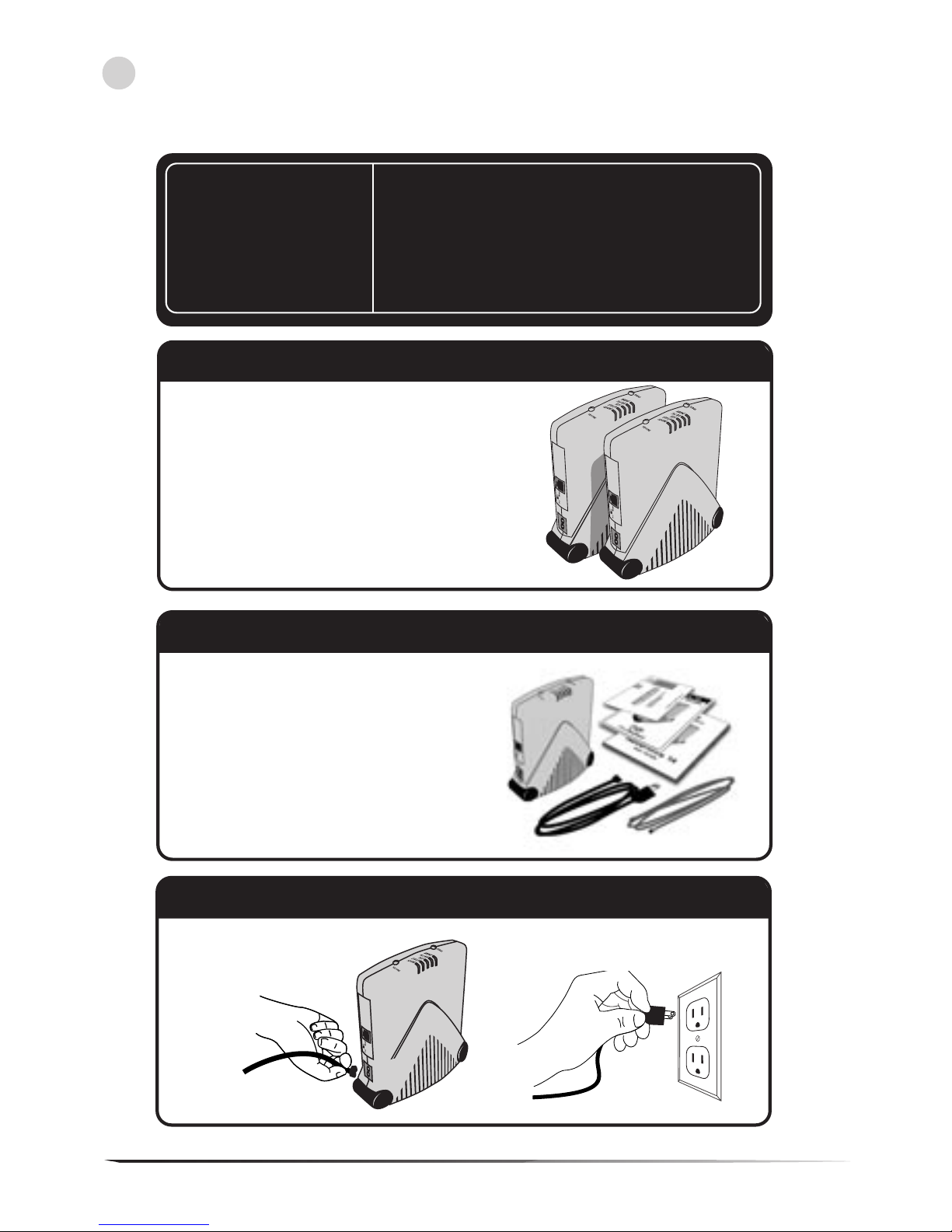
Verify that you have TWO or more
NeverWire 14 units. The NeverWire 14
home networking system requires at
least two units to function. You cannot
establish a network with only one
NeverWire 14 unit.
Check contents of box--You should
have one NeverWire 14 unit, one Power
Cord, one Ethernet Cable, one User
Guide, one Quick Start Guide and one
Registration card per box. If you do
not have all of these materials,
please call at 1-800-257-0601, visit our
web site at www.phonex.com, or email
Step 3
Step 1: Verify Number Of Units
Step 2: Box contents
Step 3: Connect Power Supply
Plug both power cords into
the NeverWire 14 units.
Plug both power cords into the wall.
• Installing units near halogen lamps, light
dimmers and touch lamps may cause
interference and slow data transfer speeds.
• In addition, units will not function if plugged
into a surge protector.
Before you
begin your
NeverWire 14
Installation,
please note:
Altri manuali per NeverWire 14
1
Indice
Manuali Hardware di rete popolari di altre marche

Matrix Switch Corporation
Matrix Switch Corporation MSC-HD161DEL Manuale utente

B&B Electronics
B&B Electronics ZXT9-IO-222R2 Manuale utente

Yudor
Yudor YDS-16 Manuale utente

D-Link
D-Link ShareCenter DNS-320L Manuale utente

Samsung
Samsung ES1642dc Istruzioni per l’uso

Honeywell Home
Honeywell Home LTEM-PV Istruzioni per il montaggio


