
Phonic Ear LOOP Manuale utente

© 2005 PhonicEar A/S 921-21-110-00/Rev.
teleloop amplifier
other resources online at www.phonicear.dk
International: +45 3917 7101 • germany (kostenlose Rufnummer): 0800/1844736
u.s.: 800.227.0735, then press 7 • canada: 800.263.8700•website: www.phonicear.dk
Your local representative:
GB user guide

table of contents
LOOP function . . . . . . . . . . . . . . . . . . . . . . . . . . . . . . . . . . . . . . . . . . . . . 2
LOOP features . . . . . . . . . . . . . . . . . . . . . . . . . . . . . . . . . . . . . . . . . . . . . 3
LOOP accessories . . . . . . . . . . . . . . . . . . . . . . . . . . . . . . . . . . . . . . . . . . . 4
LOOP instructions . . . . . . . . . . . . . . . . . . . . . . . . . . . . . . . . . . . . . . . . . . 5
Troubleshooting . . . . . . . . . . . . . . . . . . . . . . . . . . . . . . . . . . . . . . . . . . . 10
Warranty . . . . . . . . . . . . . . . . . . . . . . . . . . . . .. . . . . . . . . . . . . . . . . . . . 11
Puzzle Loop User Guide_UK.qxd 09-09-2005 09:53 Page 6

2
LOOP is the PUZZLE system’s teleloop amplifier. LOOP transfers the sound from TV and radio
directly to your hearing aid (or telemagnetic receiver) and you receive the sound loud and clear.
LOOP can also receive alarms from the PUZZLE system’s alerting transmitters (DETECT DOOR and/or
OBSERVER). When an alarm is received, the signal from the radio or the TV is turned down and
an alarm signal is heard instead. LOOP can receive up to seven different alarms apart from the
alarm for battery change. Each alarm has its own unique sound pattern, which makes it easier to
distinguish between the different alarm signals. The individual sound patterns are set on the
alerting transmitters (DETECT DOOR and/or OBSERVER).
Important
Use only cables and jack plugs supplied by an authorized Phonic Ear representative/installer or
LOOP may be damaged.
LOOP function
Puzzle Loop User Guide_UK.qxd 09-09-2005 09:53 Page 7

1 channel tuner
To set personal code for use
with other PUZZLE systems
LOOP features
back
2 loop connection
To connect teleloop cable
5 microphone connection
To connect external
microphone
3 12V AC/18V DC connection
To connect 12volt
power transformer
6 indicator light
Shows that power is on
7 volume control
To adjust volume level
8 bass control
To adjust bass levels
9 treble control
To adjust treble levels
1 2 3 4 5
4 radio/TV connections
To connect radio,
television, etc.
front
76
bottom
8 9
3
English
10 channel type
To set channels to “X” or “Y”.
Maintain in “X” Position for
normal use
10
Puzzle Loop User Guide_UK.qxd 09-09-2005 09:53 Page 8

4
11 teleloop cable
Installed in rooms where
LOOP will be used
LOOP accessories (included with LOOP system)
12 teleloop cable clips
To secure the teleloop cable along
the wall, floor and/or ceiling
16 Clip microphone
Placed in front of source loudspeaker if
sound source cannot be attached to teleloop
amplifer by an output connection. Can also
be used to amplify conversations.
14 connector set
Includes:
• Adaptor, SCART/phono
• Adaptor: 6,3mm (.25in) plug stereo
to 3,5mm (.125in) stereo jack
• Connector cable: 2m (6.5ft),
3,5mm (.125in) plug stereo to 3,5mm
(.125in) stereo plug
• Stereo cable: 2m (6.5ft),
3,5mm (.125in) stereo plug
to 2 x phono plug
13 screwdriver
To adjust bass and treble controls
and to set personal code
LOOP accessories (not included, sold separately)
16
13
14
12
11
Power transformer
(optional in some countries)
(not shown)
boundary microphone (not shown)
cusion loop (not shown)
17
18
15
Puzzle Loop User Guide_UK.qxd 09-09-2005 09:53 Page 9

teleloop installation Place teleloop cable
along wall, floor, or
ceiling of room where
LOOP will be used and
secure with cable clips.
To avoid cable damage,
run cable under carpet,
behind baseboard or
around doorframe.
1
1
2
LOOP instructions
English
TV
top view of room
sofa
2
door
ATTENTION: Make sure that
teleloop cable is fully stretched out.
If cable is too long, shorten it to fit
room size.
connecting teleloop cables
Remove gray Loop con-
nector from back of unit.
Loosen cable connection
screws on the Loop
connector.
11
2
2
Strip ends of cable to
expose 1 cm of wire.
Insert ends of cable into
connector holes and
tighten screws using the
screwdriver.
Replace gray connector
into Loop hole on unit.
3
3
5
1
2
Cushion LOOP (sold separately)
Place cushion loop pad under a cush-
ion in the seat where you are listening
to the sound source. The cushion loop
limits the range of the teleloop and
possible “interference ability”. It can
also be easily moved around the room
as necessary.
Puzzle Loop User Guide_UK.qxd 09-09-2005 09:53 Page 10

connect to microphone (optional)
Plug microphone cable into Mic
connection on back of LOOP.
NOTE: When Clip microphone or
boundary microphone are used for
conversations, the TV and radio should
be switched off.
If sound source cannot be attached to
teleloop amplifier by an output
connection, then microphone can be
placed in front of the source
loudspeaker.
6
LOOP instructions
connect to TV and radio
TV connection
Plug one end of the cable (from connector
set) into one of the Radio/TV connections
on back of LOOP.
Then plug other end of the cable into
Line Out or SCART connection on TV.
Radio connection
Plug one end of the cable (from connec-
tor set) into one of the Radio/TV
connections on back of LOOP.
Then plug other end of the cable into
Line Out connection on radio.
NOTE: Sound sources other than
TV and radio can be connected to LOOP.
Contact an authorized Phonic Ear repre-
sentative/installer for more information.
3
4
Puzzle Loop User Guide_UK.qxd 09-09-2005 09:53 Page 11

LOOP instructions
English
connecting transformer
Plug transformer cord into
12V AC 18V DC connec-
tion on back of LOOP.
1
1Plug transformer into
wall socket. Red light on
front of LOOP should go on.
2
2
7
5
6selecting personal code
Use Channel tuner on back of
LOOP to set personal code.
NOTE: Use the screwdriver
included with LOOP to turn
dial to desired setting.
All other PUZZLE alarm transmitters
and receivers should be set to the
same personal code.
Puzzle Loop User Guide_UK.qxd 09-09-2005 09:54 Page 12

8
LOOP instructions
adjusting volume
Use volume control on front of
LOOP to adjust volume level:
Min = Lowest volume
Max = Highest volume
NOTE: As a general rule, the
volume should be adjusted so that
you don’t experience irritating
changes in volume when you
change between “M” and “T”
positions on your hearing aid.
7
8
Channel type X and Y
Dip switch on underside of LOOP
should be in “X” position as stan-
dard to use channels 0-F. (16)
Y
X
Y
X
Puzzle Loop User Guide_UK.qxd 09-09-2005 09:54 Page 13
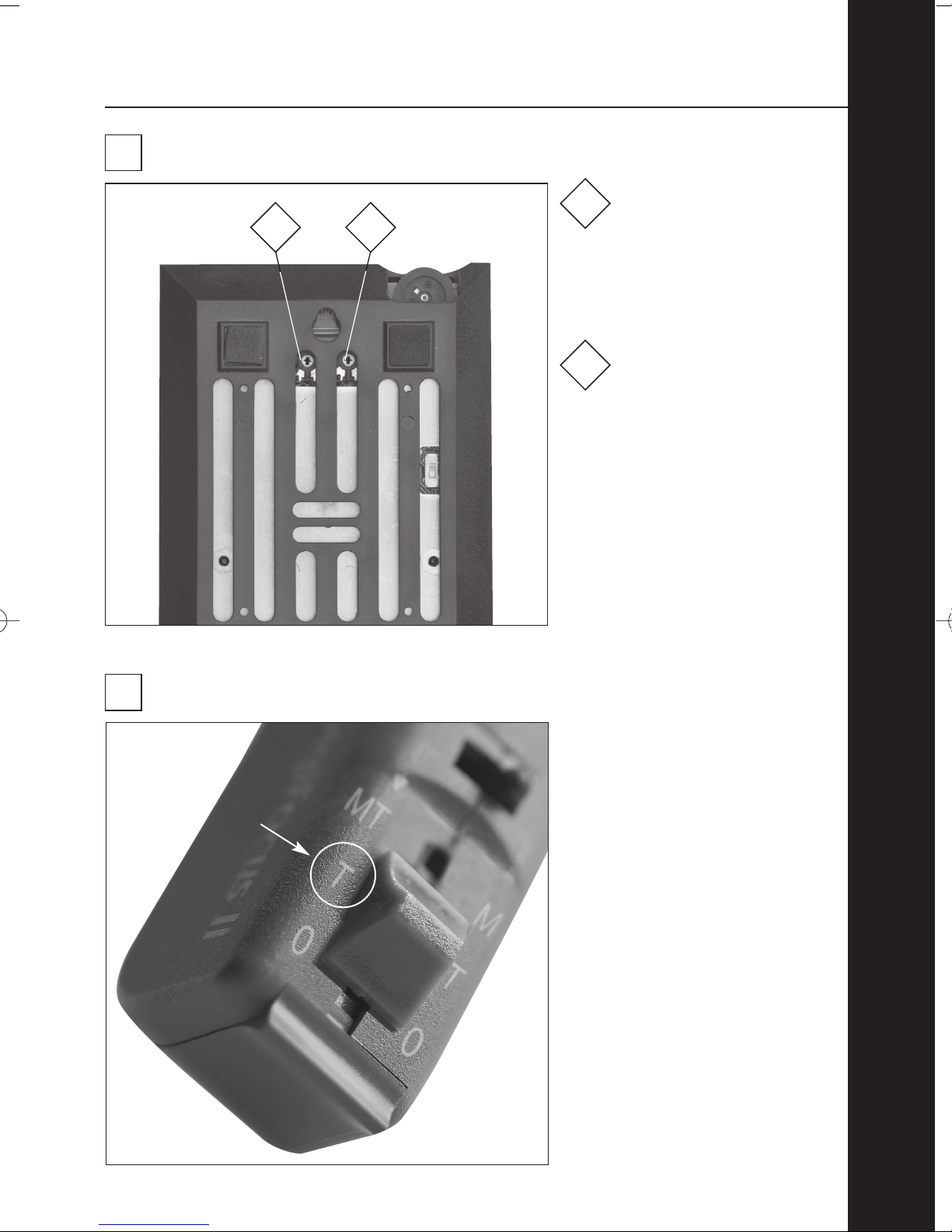
LOOP instructions
adjusting bass and treble
Turn left control on
bottom of LOOP clockwise
to increase bass level and
counterclockwise to
reduce bass level.
1
1 2
Turn right control on
bottom of LOOP clockwise
to increase treble level
and counterclockwise to
reduce treble level.
2
English
hearing aid setting
Set hearing aid to “T”
position when using teleloop.
9
NOTE: Use the screwdriver
included with LOOP to adjust
bass and treble controls.
9
10
Puzzle Loop User Guide_UK.qxd 09-09-2005 09:54 Page 14
Indice
Altri manuali Phonic Ear Amplificatore


