
Piega CONNECT PLUS Manuale utente

PIEGA CONNECT PLUS
EXPECT MORE
USER
MANUAL

User Manual PIEGA connect plus // 2
CONTENT
1 CONTENT .......................................................2
2 IMPORTANT SAFETY INSTRUCTIONS.............3
3 PIEGA CONNECT PLUS AT A GLANCE............4
3.1 SCOPE OF DELIVERY ....................................... 4
3.2 INTEGRATED STREAMING CLIENTS................. 5
3.2.1 SPOTIFY CONNECT................................. 5
3.2.2 GOOGLE CHROMECAST BUILT-IN .......... 5
3.2.3 APPLE AIRPLAY ....................................... 5
3.2.4 ROON READY .......................................... 5
3.3 PIEGA ROOMCONTROL APP............................ 6
4 OPERATING ELEMENTS .................................7
4.1 PIEGA CONNECT PLUS AT A GLANCE............. 7
4.2 REMOTE CONTROL AT A GLANCE................... 8
5 CONNECT TO LOCAL NETWORK (WIFI)..........9
6 WIRELESS CONNECTION TO
YOUR SPEAKERS ...........................................9
6.1 CONFIGURE THE SPEAKER GROUP.............. 10
6.2 TRI-BAND 2.4/5.2/5.8GHZ .............................. 10
7 CONNECT YOUR REMOTE CONTROL...........11
8 TV CONNECTIVITY OPTIONS ........................11
8.1 HDMI ARC CONNECTION ............................... 11
9 BLUETOOTH CONNECTION ..........................12
10 MUTE / ON / OFF..........................................13
11 INPUT SOURCE SELECTION.........................13
12 FIRMWARE UPDATE .....................................14
13 TECHNICAL DATA.........................................14
14 DECLARATION OF CONFORMITY ................15

User Manual PIEGA connect plus // 3
2 IMPORTANT SAFETY INSTRUCTIONS
Read all safety instructions carefully.
1. Heed all warnings.
2. Follow all instructions and recommendations.
3. Do not use this apparatus near water.
4. Clean with dry and soft cloth only.
5. Do not install near any heat sources such as radiators, heat registers, stoves, or other devices that produce heat.
6. Protect the power cord from being stepped on or pinched, particularly at plugs, convenience receptacles, and at
the point they exit from the apparatus.
7. Only use accessories or attachments approved by the manufacturer.
8. Do not defeat the safety purpose of the polarized type plug. If the provided plug does not t into your outlet, consult
an electrician for replacement of the obsolete outlet.
9. Unplug this apparatus during lightning storms or when unused for long periods of time.
10. Refer all servicing to qualied personnel. Servicing is required if the apparatus has been damaged in any way,
e.g. the power supply cord or plug is damaged, liquid has been spilled or objects have fallen into the apparatus.
Equally if it has been exposed to rain or moisture, does not operate normally, or has been dropped.
11. The power plug should be easily accessible to disconnect the equipment.
12. Warning: To reduce the risk of re and electric shock, do not expose this apparatus to rain or moisture.
13. Do not expose the apparatus to dripping or splashing and do not place objects lled with liquids, such as vases, on the appa-
ratus.
14. Maintain 150 mm safety clearance all around the apparatus to ensure adequate ventilation.
15. Do not place objects with naked ames, such as lit candles on the apparatus.
16. This apparatus is approved for indoor use only.
User Manual PIEGA connect plus // 4
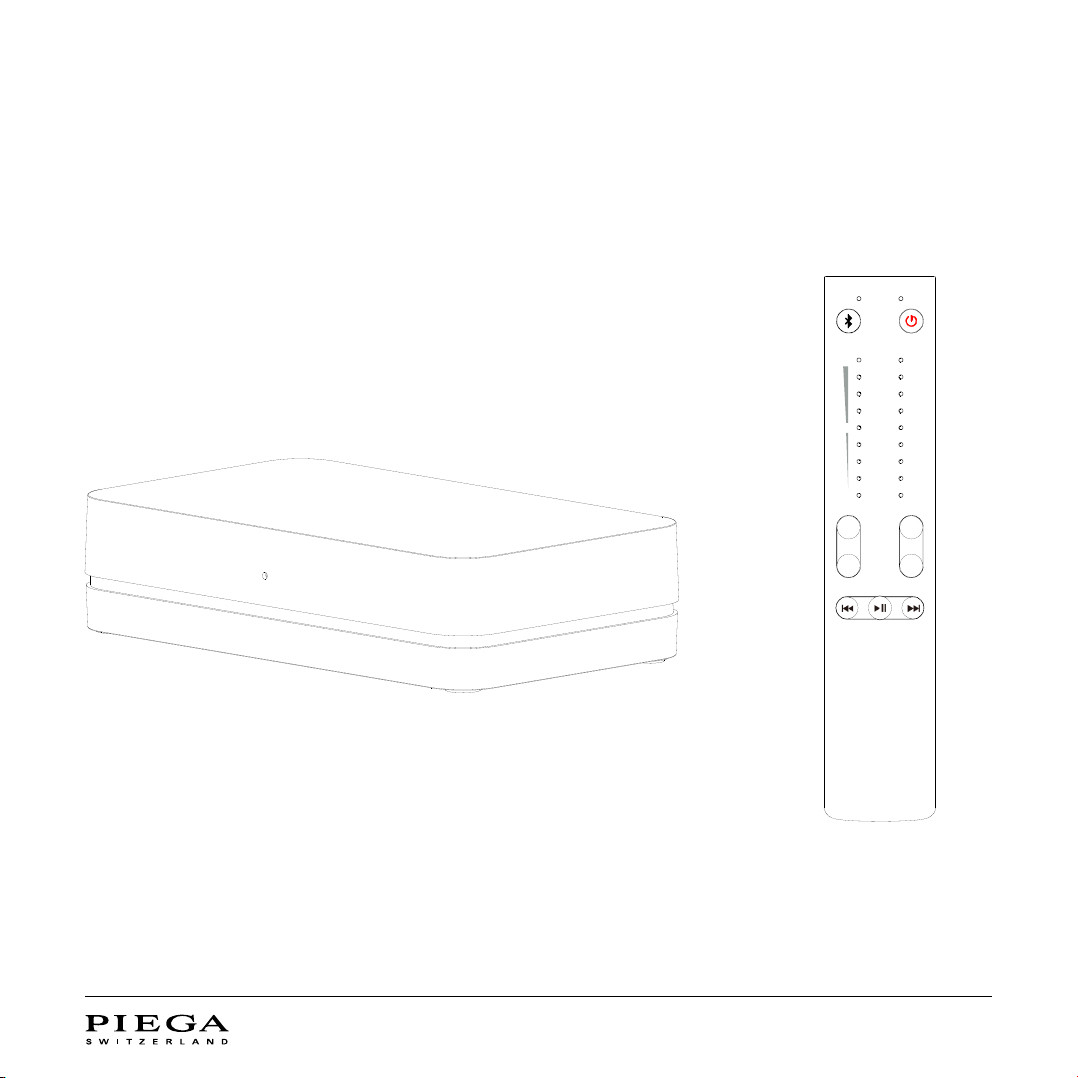
3 PIEGA CONNECT PLUS AT A GLANCE
3.1 SCOPE OF DELIVERY
The scope of delivery includes:
Also included:
•Power supply
•External antenna
PIEGA connect plus
Remote control
+ +
- -
PAIR MUTE
MAX
MIN
VOL
STREAM
USB
COAX
OPT3
OPT2
OPT1
HDMI
AUX
LINE
User Manual PIEGA connect plus // 5
3.2 INTEGRATED STREAMING CLIENTS:
The PIEGA connect plus comes with the following pre-installed streaming clients: Google Chromecast, Spotify Connect,
Apple AirPlay, Roon Ready.
3.2.1 SPOTIFY CONNECT
Spotify Connect allows you to play your music directly from
the Spotify app to your PIEGA connect plus.
The Spotify software is subject to third party licenses found
here: https://www.spotify.com/connect/third-party-licenses.
Simply use your smartphone, tablet or computer to
remotely control listening on another device. Learn more
on spotify.com/connect.
3.2.2 GOOGLE CHROMECAST BUILT-IN
Google Chromecast supports various music platforms and
radio stations. With Google Chromecast built-in you can
easily play music from your mobile device to your PIEGA
connect plus.
Chromecast built-in is a trademark of Google LLC.
3.2.3 APPLE AIRPLAY
Apple AirPlay lets you share music from your Apple devices to
your loudspeakers. And what you share always stays personal
and private.
3.2.4 ROON READY
Roon Ready network devices have Roon’s streaming technology
built in, and are certied by Roon Labs to provide the highest level
of quality and performance in network streaming:
https://roonlabs.com

User Manual PIEGA connect plus // 6
3.3 PIEGA ROOMCONTROL APP
Every room has individual acoustic properties that may have a substantial impact on sound reproduction. Our PIEGA Control App
with integrated PIEGA RoomControl function recognises these factors in a quick and easy way, calibrates your speakers according-
ly and balances negative effects so that you will get the most from your high-quality speakers. The PIEGA RemoteControl function
replaces the wireless remote control if you wish to operate all functions conveniently from your smartphone.
The RoomControl app will be available from Spring 2022 in your Google Play or Apple app store.
User Manual PIEGA connect plus // 7
4 OPERATING ELEMENTS
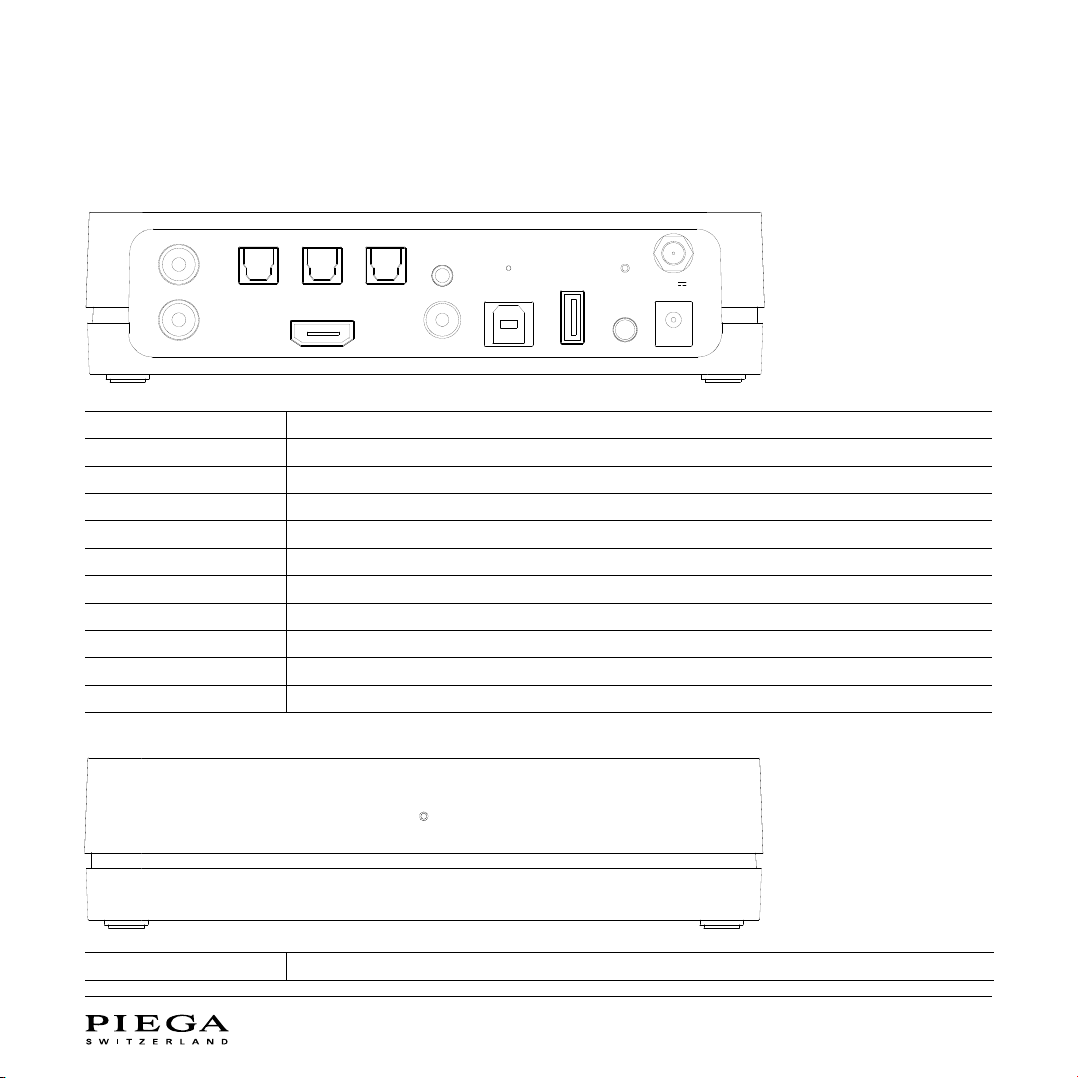
4.1 PIEGA CONNECT PLUS AT A GLANCE
LINE Analog stereo input RCA
OPT1 - 3 Digital optical input S/PDIF
HDMI ARC HDMI input to connect your TV
AUX Analog stereo input 3.5 mm jack
COAX Digital coaxial input S/PDIF
RESET Resets the apparatus to factory default
USB AUDIO PC/MAC input for playback from your computer via USB
SERVICE USB input for rmware updates
GROUP INDICATOR Indicates the connection status and the selected loudspeaker group
PAIR/GROUP Button to select the loudspeaker group and pair the remote control
DC 5V/3A Connects the external power supply
WIFI INDICATOR Indicates the WIFI connection status
HDMI
OPT1 OPT2 OPT3
LINE
AUX
USB AUDIO
SERVICE
COAX
GROUP
PAIR/GROUP
DC
5V/3A
R
L
RESET
User Manual PIEGA connect plus // 8
4.2 REMOTE CONTROL AT A GLANCE
+ +
- -
PAIR MUTE
MAX
MIN
VOL
STREAM
USB
COAX
OPT3
OPT2
OPT1
HDMI
AUX
LINE
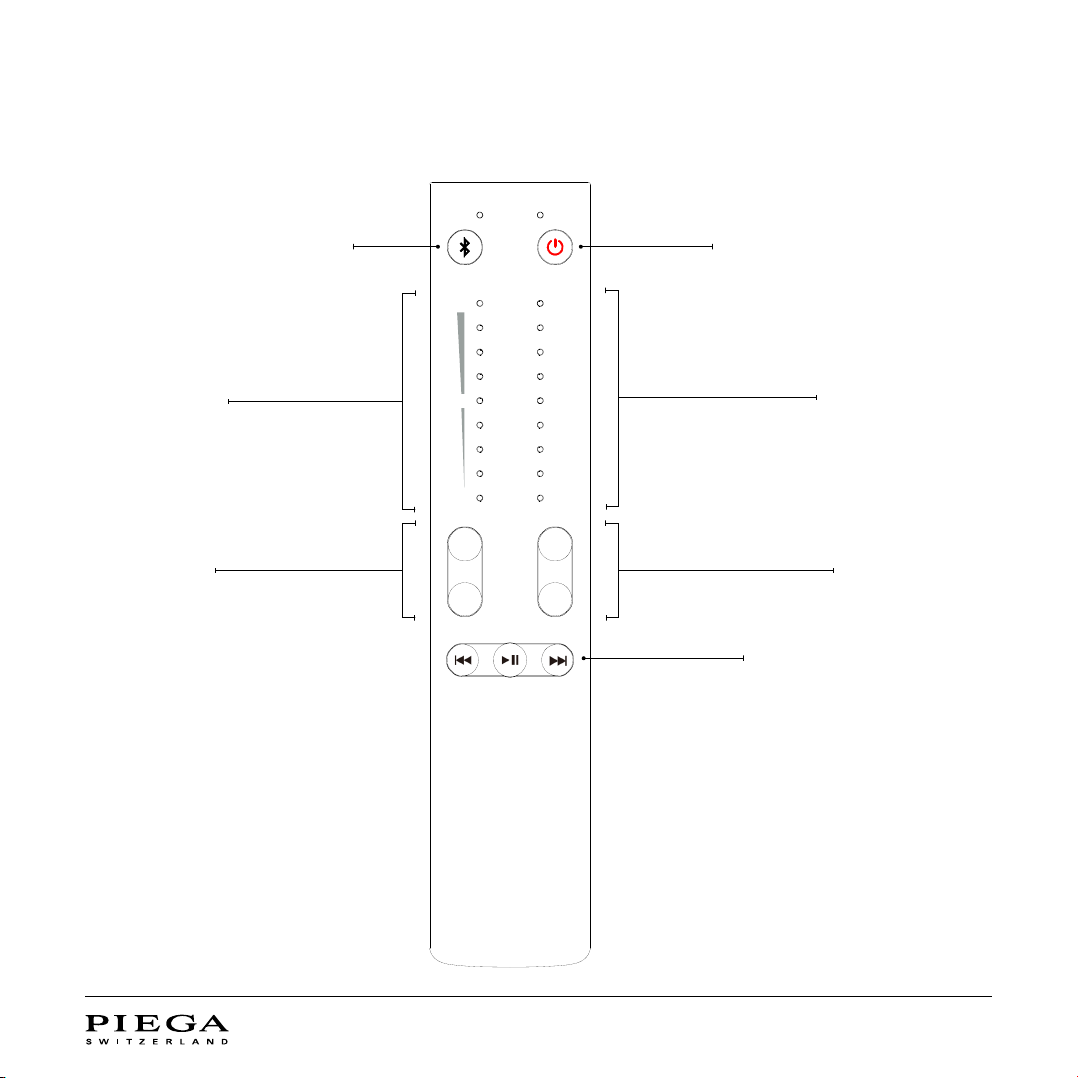
Connect your devices via Bluetooth
(Initiate pairing)
Switch PIEGA connect plus ON/OFF
and/or MUTE
Volume indicator Input source indicator
Select input source
Rewind / Play / Pause / Forward
Volume control

User Manual PIEGA connect plus // 9
5 CONNECT TO LOCAL NETWORK (WIFI)
Google Home offers a simple way of integrating your speakers into your local network and operating them easily:
1. Download the Google Home app on your smart device.
2. Power your speakers.
IMPORTANT: Ensure power is connected for at least 1 minute for Google Home to detect your PIEGA connect plus.
3. Open the Google Home app on your smart device.
4. A message should pop-up allowing you to select your PIEGA connect plus (Stereo Hub).
Alternatively, you can add a new device by pressing «+» in the upper area of the screen.
5. Follow the instructions on the app to complete the installation.
Note: If the setup with Google Home fails, we recommend using the «RESET» function on the rear panel of your
PIEGA connect plus. Restarting your smart device might also help.
6 WIRELESS CONNECTION
TO YOUR SPEAKERS
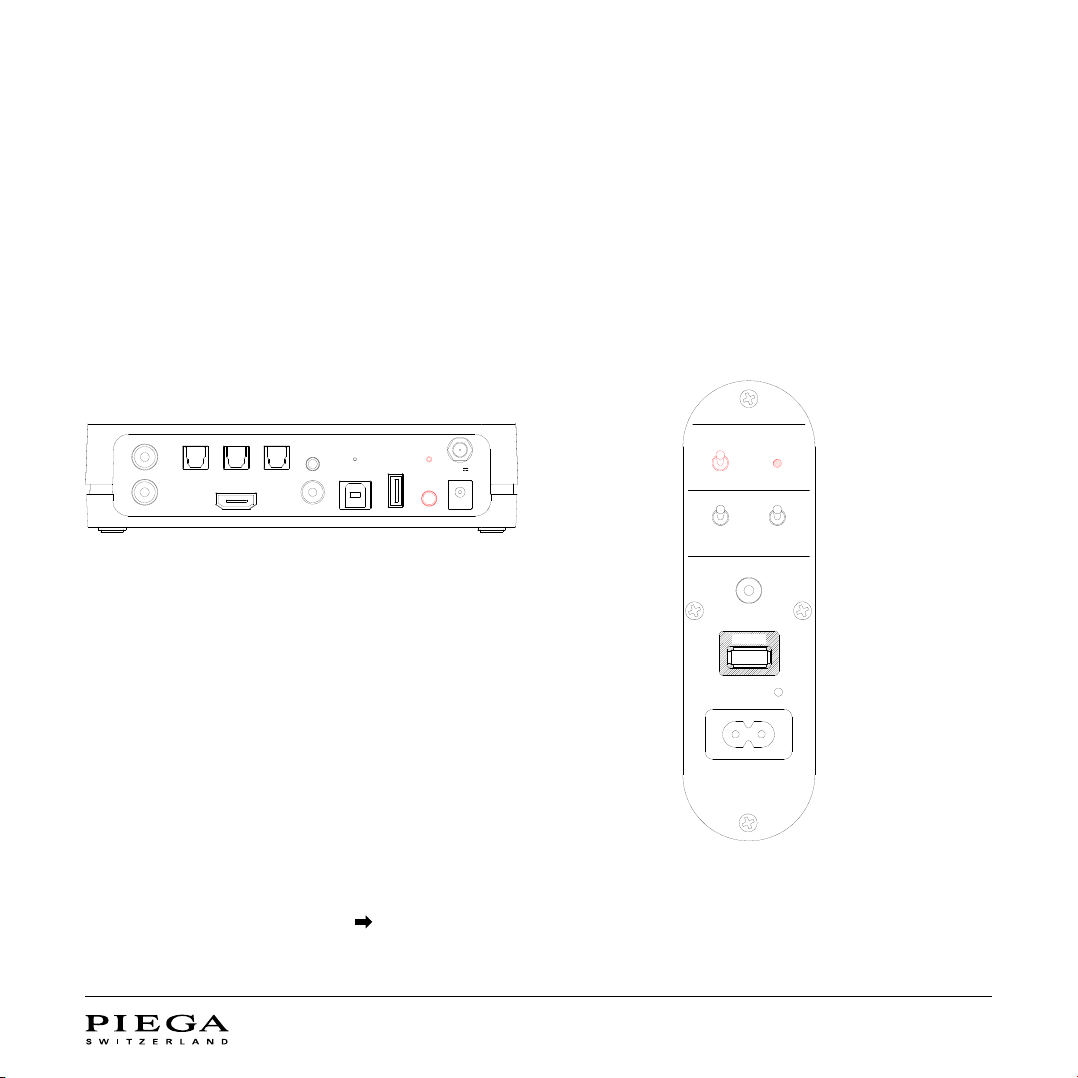
The «GROUP» function is only required when using several PIEGA wireless systems (more than one PIEGA connect plus).
The music signal is only sent to speakers within the same group. This ensures the smooth operation of up to three
independent PIEGA wireless systems in one room/at/house.
User Manual PIEGA connect plus // 10
6.1 CONFIGURE THE SPEAKER GROUP
Make sure to set the same colour «GROUP» on your PIEGA connect plus and your Premium Wireless speaker. As long as you’re
using just one PIEGA connect plus, you are free to choose any colour: white, blue, or red.
Once the colours match on both units, the connection is
being established automatically.
6.2 TRI-BAND 2.4/5.2/5.8GHZ
For wireless signal transmission (music PIEGA connect plus to loudspeaker) the following frequencies are used:
2.4/5.2/5.8GHz (tri-band). Your PIEGA connect plus automatically selects the best suited frequency to ensure the
best possible wireless transmission at all times.
HDMI
OPT1 OPT2 OPT3
LINE
AUX
USB AUDIO
SERVICE
COAX
GROUP
PAIR/GROUP
DC
5V/3A
R
L
RESET
Group
white
blue
red
Speaker Position
service
INPUT
analog
neutral
wall
corner
POWER
AC 100-120/220-240V 50/60Hz 250W
left
mono
right
PIEGA
CONNECT PLUS
Press «PAIR/GROUP» for at least 3 sec. to make a colour
selection.
The «GROUP» indicator conrms the selected group.
PIEGA PREMIUM WIRELESS
LOUDSPEAKER
PIEGA Premium Wireless loudspeaker
Flip the switch to select the desired group.
The «GROUP» indicator conrms the selected group.
Altri manuali per CONNECT PLUS
1
Indice
Altri manuali Piega Lettore multimediale


