
PINE64 PINEPHONE Manuale utente

PINEPHONE USER MANUAL - QUICK START GUIDE (EN)
1 Package contents
● User Manual - Quick Start Guide (x1
)
● PinePhone (x1
)
● USB-C power cable (x1
)
2 Safety precautions and recycling
2.1 Cautions
Before using the device please read this manual carefully.
Notes for safe operation:
● The PinePhone should be charged using a 15W (5V 3A) USB-PD power adapter. Charging at a
higher voltage may result in damage to the device.
● The PinePhone will only operate when its internal temperature is between 5°C and 65°C. It
should never be operated with an external temperature lower than -20°C or higher than 40°C.
● Do not puncture, disassemble, strike or squeeze the battery. Old batteries need to be disposed of
in accordance with local regulations (see
section 2.2
).
● Do not expose the device to direct sunlight, water or high levels of humidity.
● In the event of overheating, power off the PinePhone and let it cool for 15 minutes.
● Comply with local regulation pertaining to using mobile devices. This extends to and includes use
of the device in public spaces, when operating motor vehicles and heavy machinery.
2.2 Recycling of components and batteries
Recycling any PinePhone components should be done according to local regulation. This may require
you to dispose of the phone or its parts at a local recycling centre or at a designated container.
Please consult local legislation for details.
Batteries should never, under any circumstances, be disposed of with general household waste.
The end user is legally obliged to return used batteries. Batteries can be returned to us to be disposed of.
The batteries are to be returned to the sender - for more information contact us on [email protected].
2
3 Getting started
3.1 Back case removal
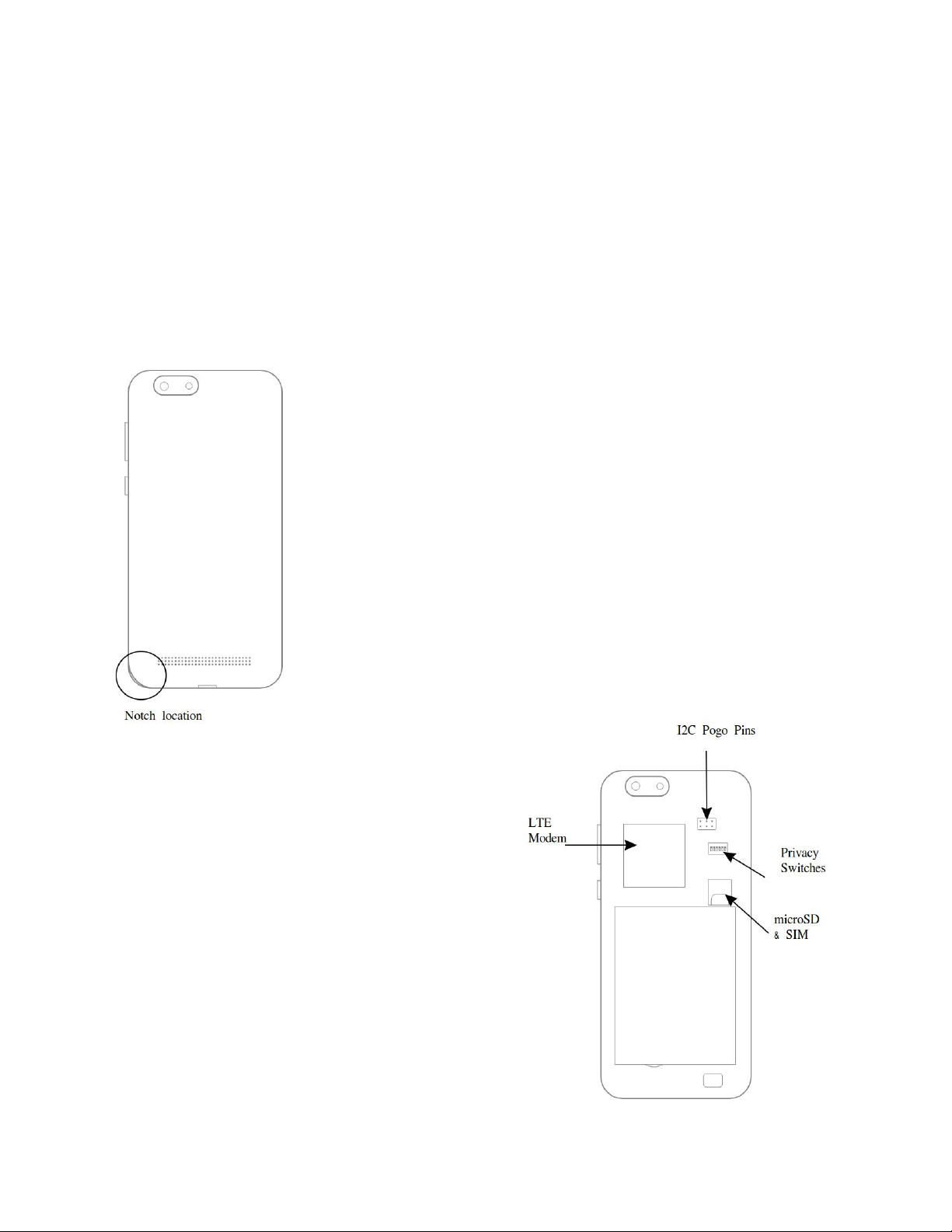
To remove the back case of the PinePhone, use your fingernail or another soft object to pop up the back
case. A notch to easily remove the cover is located at the bottom left of the PinePhone when its back is
facing you and its camera is oriented up.
3.2 Initial setup
Your PinePhone arrives with a plastic strip placed between the power
connectors and battery. You need to remove it prior to use.
● remove battery using your fingernail or a prying tool
● remove and dispose of the plastic strip placed between the
battery and power connectors
You may insert a SIM card and microSD card into the phone with the back
case and battery removed. A microSD card may be used to provide an
operating system to the PinePhone, or it may serve as additional storage
for an operating system installed internally to eMMC. Do not attempt to
remove the microSD or SIM cards with the battery inserted into the
device.
3.2 Privacy switches and pogo pins
Under the cover you find pogo pins and privacy switches
labeled 1-6 with their respective functions. Pogo pins
use the I2C (two pins) protocol and can be used for
accessories and additional functionality.
Privacy switches can be engaged to electrically disable
(numbers according to legend on device):
1. LTE modem + GPS
2. WiFi / Bluetooth
3. Microphone
4. Rear Camera
5. Front camera
6. Headphones OFF / UART ON switch
Disabling headphones enables UART output via the
headphones jack (see Wiki for details).
2

3
3.3 Operating the PinePhone
The PinePhone is capable of running multiple operating systems (OSes) (see section 4
) from internal
flash eMMC as well as a SD card. Bootable SD cards have priority over internal eMMC.
To power the PinePhone ON, press and hold the power button for 2 seconds. Boot-up time varies from
one OS to another, but you should permit up-to 60 seconds for the phone to start fully. Most OSes have a
boot indicator such as a vibration rumble or notification LED flash.
For detailed instructions and to select and operating systems please please visit:
https://wiki.pine64.org/index.php/PinePhone
4 Operating systems
All OSes available for the PinePhone are delivered by community developers and partner-projects.
PINE64 does not create software for the PinePhone.
Regardless of which OS comes pre-installed on your device, you can install and run any other OS
available for the PinePhone. Please reference our Software Release
section on Wiki for more details:
https://wiki.pine64.org/index.php/PinePhone_Software_Release#Software_Releases
5 Hardware
5.1 External component description
Device dimensions: 160.5 x 76.6 x 9.2mm. Device weight:
220 grams.
The PinePhone features a 5.95” HD IPS capacitive
touchscreen (16M colors; 1440x720, 18:9 ratio). The
headphone jack is located on the top leading edge. The
top bar above the LCD houses a 2MP, f/2.8, 1/5"
front-facing camera, a multi-color notification LED, a
proximity sensor, an ambient light sensor as well as the
earpiece speaker. Power button and the volume rocker are
located at the right leading edge.
The bottom leading edge houses the USB type C port
(power, data and video out in DisplayPort Alternate mode)
and microphone. On the back of the device, in the left top
corner, a 5MP, 1/4" camera and LED flash are to be
found. A mono loudspeaker is found at the bottom of the
device.
3

4
5.2 Device hardware specifications
More information, including PCBA hardware revisions and schematics at:
https://wiki.pine64.org/index.php/PinePhone
Key hardware specifications:
●System on Chip: Allwinner A64
●RAM: 2GB LPDDR3 SDRAM
●Storage: 16GB eMMC, extendable up to 2TB via microSD, supports SDHC and SDXC, UHS1
● SIM: Micro-SIM
● Communications modem: Quectel EG25-G
○ LTE: B1, B2, B3, B4, B5, B7, B8, B12, B13, B18, B19, B20, B25, B26, B28, B38, B39,
B40, B41
○WCDMA: B1, B2, B4, B5, B6, B8, B19
○GSM: 850, 900, 1800, 1900 (MHz)
●WLAN: Wi-Fi 802.11 b/g/n, 1x1, single-band, hotspot capable
●Bluetooth: 4.0, A2DP
●GNSS: GPS/GLONASS/BeiDou/Galileo/QZSS, with A-GPS
5.3 Troubleshooting common issues
● To perform a hard shutdown, hold the power button down for 5 seconds.
● In the event one or more components of the PinePhone fail to engage, ensure that the privacy
switches (see section 3.2
) are in the ON position.
● The battery must be installed for all components of the PinePhone to function properly.
● With no OS installed battery may discharge over time.
● Not all OSes support all of PinePhone’s hardware features.
6 Regulatory compliance
The PinePhone is CE and FCC certified.
Device fully compliant with RED directive (2014/53/EU):
●Quectel EG25-G
Worldwide LTE, UMTS/HSPA(+) and GSM/GPRS/EDGE
●Realtek RTL8723CS
Wi-Fi 802.11 b/g/n
7 Documentation and contact information
Detailed hardware and software documentation, including FCC, CE and RED certifications, can be
located on our Wiki (wiki.pine64.org).
Contact
Sale enquires: [email protected]
Support: [email protected]
General enquiries: [email protected]
4

5
MANUEL UTILISATEUR DU PINEPHONE – GUIDE DE DÉMARRAGE
RAPIDE (FR)
1 Contenu de la boîte
● Manuel Utilisateur – Guide de démarrage rapide (x1
)
● PinePhone (x1
)
● Câble d’alimentation USB-C (x1
)
2 Précautions sur la sécurité et le recyclage
2.1 Précautions
Avant d’utiliser l’appareil, veuillez lire ce manuel attentivement.
Mises en garde et variables opérationnelles
● Il est recommandé de charger le PinePhone avec un chargeur USB-PD de 15W (5V 3A). Une
recharge a une plus haute tension pourrait endommager l’appareil.
● Le PinePhone n’est fonctionnel que quand sa température interne est entre 5°C et 65°C. Il n’est
pas recommandé de l’utiliser lorsque la température externe est inférieure à 20°C ou supérieure
à 40°C.
● Veuillez ne pas percer, démonter, donner un coup dans ou secouer la batterie. Les vieilles
batteries doivent être traités en accord avec les réglementations locales (voir section 2.2)
.
● N’exposez pas l’appareil à la lumière directe du soleil, à l’eau ou à une moisissure dense.
● En cas de surchauffe, éteignez le PinePhone et laissez-le refroidir pour 15 minutes.
● Respectez les réglementations locales concernant l’usage de téléphones mobiles. Cela s’étend
à, et inclut, l’utilisation de l’appareil dans les espaces publics, pendant l’utilisation d’un véhicule
motorisé et de machinerie lourde.
2.2 Recyclage des composants et batteries
Le recyclage de n’importe quel composant du PinePhone doit être fait en accord avec les
réglementations locales. Cela peut vous obliger à jeter votre téléphone ou ses parties dans un centre de
recyclage local agréé ou dans un point de collecte.
Les batteries ne doivent jamais, sous aucunes circonstances, être jetées avec les ordures ménagères.
L’utilisateur final est légalement forcé à retourner les batteries usagées. Les batteries peuvent nous être
retournées pour pouvoir être jetées. Les batteries doivent être retournées à l’expéditeur – pour plus
d’informations, contactez-nous via [email protected].
5

6
3 Premiers pas
3.1 Retirer la coque arrière
Pour retirer la coque arrière du PinePhone, utilisez vos ongles ou un autre objet souple pour déclipser la
coque arrière. Une encoche pour retirer facilement cette coque est située en bas à gauche du PinePhone
quand son dos vous fait face et sa caméra est orientée vers le haut.
3.2 Paramétrage initial
Votre PinePhone arrive avec une bande plastique placée entre les
connecteurs d’alimentation et la batterie. Vous devez la retirer avant
d’utiliser le téléphone.
● Retirez la batterie avec votre ongle ou un outil-levier
● Retirez et jetez la bande plastique placée entre la batterie et les
connecteurs d’alimentation
Vous pouvez insérer une carte SIM et microSD dans le téléphone avec la
coque arrière et la batterie retirée. Une carte microSD peut être utilisée
afin de fournir un système d’exploitation au PinePhone, ou pour du
stockage additionnel au système d’exploitation interne installé dans la
eMMC. N’essayez pas de retirer les cartes microSD et SIM si la batterie
est toujours insérée dans l’appareil.
3.2 Interrupteurs de confidentialité et
broches pogo
Sous la coque arrière, vous trouverez des broches pogo
et des interrupteurs de confidentialité numérotés 1 à 6
avec leurs fonctions respectives. Les broches pogo
utilisent le protocole I2C (deux broches) et peuvent être
utilisées pour des accessoires et des fonctionnalités
additionnelles.
Les interrupteurs de confidentialité peuvent être activés
pour désactiver électriquement (numéros selon la
légende sur l’appareil):
1. Modem LTE + GPS
2. Wi-Fi / Bluetooth
3. Microphone
4. Caméra arrière
5. Caméra avant
6. Commutateur Ecouteurs ÉTEINT / UART
ALLUMÉ
6

7
Désactiver les écouteurs active la sortie UART via la prise jack (Voir Wiki pour plus de détails)
3.3 Utiliser le PinePhone
Le PinePhone est capable de faire tourner plusieurs systèmes d’exploitation (OS) (voir section 4)
depuis
l’eMMC interne, mais aussi la carte SD. Les cartes SD amorçables ont une priorité plus élevée que
l’eMMC interne.
Pour allumer le PinePhone, maintenez enfoncé le bouton d’allumage pendant 2 secondes. Le temps de
démarrage varie selon l’OS, mais vous devriez laissez 60 secondes au téléphone pour un démarrage
complet. La majorité des OS ont un indicateur de démarrage comme une vibration ou un flash de la LED
de notification.
Pour des instructions détaillées et le choix d’un système d’exploitation, veuillez visiter :
https://wiki.pine64.org/index.php/PinePhone
4 Systèmes d’exploitation
Tous les OS disponible pour le PinePhone sont délivrés par les développeurs communautaires et les
projets partenaires. PINE64 ne produit pas de logiciel pour le PinePhone.
Indépendamment de l’OS préinstallé sur votre appareil, vous pouvez installer et utiliser n’importe quel OS
disponible pour le PinePhone. Veuillez voir la section Software Releases
du Wiki pour plus de détails :
https://wiki.pine64.org/index.php/PinePhone_Software_Release#Software_Releases
5 Matériel
5.1 Descriptions des composants
externes
Dimensions: 160,5 x 76,6 x 9,2mm. Poids: 22g.
Le PinePhone possède un écran IPS HD 5.95” avec tactile
capacitif (16M couleurs ; 1440x720, ratio 18:9). La prise
jack se trouve sur le bord haut. La barre en haut du LCD
renferme une caméra avant de 2MP, f/2.8, 1/5”, une LED
RGB de notification, un capteur de proximité et un
haut-parleur avant. Les boutons d’allumage et de volume
sont situés sur le bord droit.
Le bord du bas possède le port USB type C (alimentation,
données et vidéo en mode alternatif DisplayPort) et un
microphone. Au dos de l’appareil, dans le coin
haut-gauche, une caméra de 5MP, 1/4” ainsi qu’un flash
LED sont présents. Un haut-parleur mono se trouve au
bas de l’appareil.
7

8
5.2 Spécifications du matériel de l’appareil
Plus d’informations, y compris les révisions matérielles PCBA et schémas, trouvables ici :
https://wiki.pine64.org/index.php/PinePhone
Spécifications clés du matériel:
●Processeur (SoC): Allwinner A64
●RAM: 2GB LPDDR3 SDRAM
●Stockage: 16GB eMMC, extensible jusqu’à 2TB via microSD, supporte SDHC et SDXC, UHS1
● SIM: Micro-SIM
● Modem de communication: Quectel EG25-G
○ LTE: B1, B2, B3, B4, B5, B7, B8, B12, B13, B18, B19, B20, B25, B26, B28, B38, B39,
B40, B41
○WCDMA: B1, B2, B4, B5, B6, B8, B19
○GSM: 850, 900, 1800, 1900 (MHz)
●WLAN: Wi-Fi 802.11 b/g/n, 1x1, bande unique, capable de partage de connexion
●Bluetooth: 4.0, A2DP
●GNSS: GPS/GLONASS/BeiDou/Galileo/QZSS, avec A-GPS
5.3 Dépannage des problèmes courants
● Pour effectuer un arrêt forcé, maintenez le bouton d’allumage pendant 5 secondes.
● Si un ou plusieurs composants du PinePhone n’arrivent pas à s’activer, vérifiez que les
interrupteurs de confidentialités (voir section 3.2)
soient en position Allumé.
● La batterie doit être installée pour que tous les composants du PinePhone fonctionnent
correctement.
● La batterie peut se décharger, même en ayant aucun OS d’installé.
● Les OS ne supportent pas tous les fonctionnalités matérielles du PinePhone.
6 Conformité réglementaire
Le PinePhone est certifié CE et FCC.
Appareil entièrement conforme à la directive RED (2014/53 / UE):
●Quectel EG25-G
Worldwide LTE, UMTS/HSPA(+) and GSM/GPRS/EDGE
●Realtek RTL8723CS
Wi-Fi 802.11 b/g/n
7 Documentation et informations de contact
Une documentation détaillée du matériel et du logiciel est disponible sur notre site web (pine64.org) et
Wiki (wiki.pine64.org).
Contact
Demandes commerciales: [email protected]
Support: [email protected]
Demandes générales: [email protected]
8

9
PINEPHONE BEDIENUNGSANLEITUNG - QUICK START GUIDE (DE)
1 Lieferumfang
● Bedienungsanleitung - Quick Start Guide (x1
)
● PinePhone (x1
)
● USB-C Ladekabel (x1
)
2 Sicherheitshinweise und Entsorgung
2.1 Warnhinweise
Bitte lesen Sie diese Bedienungsanleitung vor Inbetriebnahme des Gerätes sorgfältig durch.
Bedingungen für den Betrieb und Vorsichtsmaßnahmen:
● Das PinePhone sollte mit einem 15W (5V 3A) USB-Netzteil geladen werden. Höhere
Spannungen während des Ladens können Schäden am Gerät verursachen.
● Das PinePhone funktioniert nur bei inneren Temperaturen zwischen 5°C und 65°C. Es sollte
niemals bei Umgebungstemperaturen unter -20°C oder über 40°C betrieben werden.
● Der Akku darf keinesfalls durchbohrt, zerlegt, zerquetscht oder geschlagen werden. Alte Akkus
müssen ordnungsgemäß nach örtlichen Vorschriften entsorgt werden (siehe Abschnitt 2.2
).
● Schützen Sie das Gerät vor direktem Sonnenlicht, Wasser und Feuchtigkeit.
● Sollte sich das PinePhone überhitzen, schalten Sie es aus und lassen Sie es 15 Minuten
abkühlen.
● Halten Sie sich an die örtlichen Vorschriften bezüglich der Nutzung von Mobiltelefonen. Dies
betrifft auch die Verwendung des Gerätes in öffentlichen Räumlichkeiten oder während der
Bedienung von Kraftfahrzeugen und schweren Maschinen.
2.2 Ordnungsgemäße Entsorgung von Bestandteilen und Akkus
Jegliche Bestandteile des PinePhones sollten gemäß örtlicher Vorschriften entsorgt und
wiederverwertet werden. Dies erfordert vermutlich die Entsorgung des Mobiltelefons oder einzelnen
Teilen an örtlichen Recyclingstellen oder gekennzeichneten Containern.
Für weitere Details informieren Sie sich bitte bei Ihrer Gemeinde- oder Stadtverwaltung.
Akkus und Batterien sollten unter keinen Umständen im Hausmüll entsorgt werden.
Der Endnutzer ist gesetzlich dazu verpflichtet, benutzte Akkus und Batterien zurückzugeben. Akkus
können an uns zurückgesendet werden, um dort fachgerecht entsorgt zu werden.
Geben sie Akkus an den Vertreiber zurück - für mehr Informationen kontaktieren Sie [email protected].
9

10
3 Erste Schritte
3.1 Entfernung der Gehäuserückseite
Um die Rückseite des Gehäuses vom PinePhone zu entfernen, klappen Sie das Gehäuse vorsichtig mit
Ihrem Fingernagel oder einem weichen Gegenstand auf. Während die Rückseite zu Ihnen und die
Kamera nach oben zeigt, befindet sich an der unteren linken Ecke des PinePhones eine Aussparung zum
einfachen Öffnen der Gehäuserückseite (siehe Abbildung).
3.2 Erste Einrichtung
Für den Transport befindet sich ein Kunststoffstreifen zwischen dem Akku
und den dafür vorgesehenen Kontakten in Ihrem PinePhone. Dieser muss
vor der Benutzung entfernt werden.
● Entfernen Sie die Batterie mithilfe Ihres Fingernagels oder eines
Gehäuseöffners
● Entfernen und entsorgen Sie den Kunststoffstreifen zwischen
dem Akku und den Kontakten
Während die Rückseite und der Akku entnommen sind können Sie eine
SIM-Karte und eine microSD-Karte in das PinePhone einsetzen. Eine
microSD-Karte kann entweder zur Bereitstellung eines Betriebssystems
oder als zusätzlicher Speicher für ein Betriebssystem auf dem internen
eMMC verwendet werden. Versuchen Sie niemals, microSD- oder
SIM-Karten zu entfernen während der Akku sich im Gerät befindet.
3.2 Privacy-Schalter und Federkontakte
Unter der Abdeckung befinden sich Federkontakte und
mit 1-6 gekennzeichnete Privacy-Schalter mit der
Beschriftung der jeweiligen Funktionen. Die
Federkontakte benutzen das I2C-Protokoll (zwei Pins)
und können für Zubehör und Zusatzfunktionalität genutzt
werden.
Die Privacy-Schalter können umgelegt werden um
folgende Module elektrisch abzuschalten
(Nummerierung entspricht der Legende auf dem Gerät):
1. LTE-Modem + GPS
2. WiFi / Bluetooth
3. Mikrofon
4. Kamera auf der Rückseite
5. Kamera auf der Vorderseite
6. Kopfhörer AUS / UART AN Schalter
10
Altri manuali per PINEPHONE
2
Indice
Lingue:
Altri manuali PINE64 Telefono cellulare


