
PLDT alcatel CJB1F6003AAA Manuale utente

CJB1F6003AAA
Kid’s Smart Watch
Quick Start Guide
2
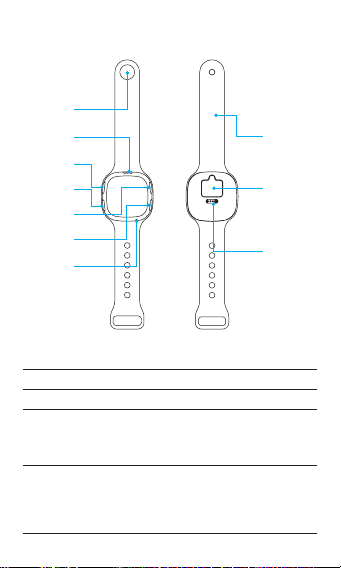
Know your watch
Overview
Front Back
B
C
D
E
F
G
A
H
I
J
AWatch-buon
BSpeaker
CVolume + On the Home screen: Press to enter the call list,
press again to choose contacts.
In the List mode: Press to increase the volume
or page up.
DVolume - In the List mode: Press to decrease the volume
or page down.
When you have an incoming voice call, short
press to answer.
Press for 3 seconds to start recording.
3
ESOS key Emergency calls: Long press the ‘SOS’ key for at
least 3 seconds.
FPower key • Power on/o
• When you have an incoming call, short press
to reject the call.
• On the Home screen, short press to enter
the volume mode.
• On all screens other than Home, short press
once to go back.
• Long press the buon for at least 8 seconds
to iniate a system reboot.
GMicrophone
HWristband
ISIM slot
JCharging (Pogo pin input port)
Note:
• The screen will light up by pressing any key.
• Watch only supports GPRS network and Nano SIM card without
encrypng PIN code.
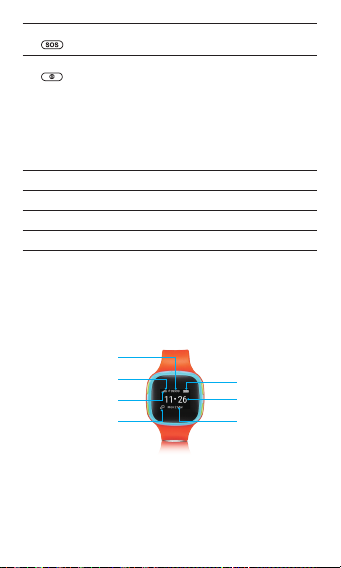
Screen
Baery power
Time
Date
G: GPRS
Steps
Signal strength
Voice SMS ps

4
Basic operaons on your watch
Power on/o
Press and hold the Power key for 3 seconds to power on/o your
watch.
Press and hold the Power key for 8 seconds to reboot when your
watch crashes.
SOS
Press and hold the SOS key for 3 seconds on any screen (except the
incoming/ongoing/dialing call screen) to call ten key family members.
1. It will aempt to dial 10 chosen numbers in turn. If there is no
answer within 10 seconds, it will move onto the next number in
the list unl a call successfully connects. If the 10 numbers failed
to answer the call, SOS feature will instead aempt to dial 911
(Emergency services).
2. If a SIM card is not inserted, or if the watch does not have a signal,
the SOS feature will instead aempt to dial 911 (Emergency
services). You can press the Power Key at any me to either
cancel the call setup or hang up the call. Note: this number can
be customized.
Note: Press the Power key to interrupt the call.
Sending a voice message
1. Press Volume - for 3 seconds to start recording.
2. Release to stop recording, as well as to send the voice message.
3. Once done sending, it will go back to the last screen.
Note: Nocaon icon will ash when your watch receives a voice
message.
Voice message management
• Press Volume + to scroll up the menu.
• Press Volume - to scroll down the menu.
• Short press the Power key to go back to the Home screen.
Note: The storage is limited to 30 voice messages. If there are more
than 30 messages, the message will be overwrien automacally.
Calling and answering
1. Short press Volume + to enter the family number list.
2. Short press Volume + to choose the next family number.
3. Press Volume - to iniate a call or press for 3 seconds to send a
voice message to the chosen family number.

5
4. Press Volume - to answer an incoming call.
Note: Press the Power key to go back to the Home screen or reject
a call.
Volume adjustment
• Press Volume + to increase the volume.
• Press Volume - to decrease the volume.
Note: Decrease the volume to mute your watch. When you have an
incoming call, your watch will vibrate.
Power o & Airplane mode
Long press the Power key for 3 seconds to enter “Power o &
Airplane mode” screen.
Update
Watch will install the rmware automacally aer nishing
downloading.

6
Using the applicaon on your
Telpad or smartphone
Installing your MOVETIME Track & Talk watch
Applicaon
• For Telpad users, download the app from KnAPPsack.
• For Smartphone and Tablet users, you can search and download it
directly from Google Play Store or IOS App Store.
Pairing
1. Input the IMEI to pair your watch
Obtain the IMEI number through the package informaon or by
pressing Volume +/- and the SOS key at the same me unl the
informaon is displayed on the screen. Then input the IMEI number
to the applicaon informaon bar and conrm.
Input IMEI
and press
Conrm.
The server will send a random code to your watch and the informaon
displayed on the screen should be noted at this me. Input the
random code in the applicaon informaon bar and conrm.

7
2. Scan the QR code to pair your watch
You can share the QR code to add some group members. Scanning
the QR code will be automacally adjusted according to the interval
me.
Funcons
Applicaon screen
Slide le
to nd
the list
Hide or show the shortcut menu.
Touch to refresh the watch locaon instantly.

8
Touch to enter the details page of Electronic fence.
Touch to jump to the navigaon page.
Steps.
Power.
Touch to enter the voice message screen.
Touch to call kid’s watch.
NOTE: This feature or icon is not available on Telpad App.
Member management
Touch Family numbers to open the member list.
Set the local emergency call number here.
Note: The rst user of the device is the default administrator. There is
only one administrator per device.

9
Administrator can transfer the management rights in the members’
management page. The contact marked will be synchronized to
display in the dial-out list.
Voice message
Touch to enter the voice screen.
When you create a voice message, the length of each recording is
15s. You can dialogue with your children or other group members.
10
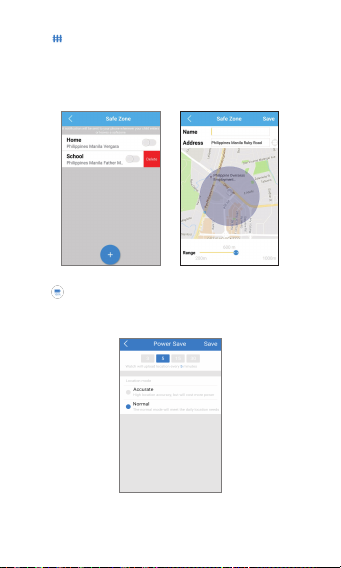
Safe zone
Touch to enter the Safe zone screen.
In this funcon, you can set an area on the map as a safe area for your
child. When your child leaves the security area, you will be noed.
Take note that the accuracy of the nocaon will depend on the
frequency of the locaon. The longer you set the interval me for
posioning, the longer it will take to receive a nocaon.
Save power
Touch to enter the power screen.
You can choose the locaon frequency according to your daily
usage habits. Dierent posioning modes will aect the posioning
accuracy and standby me.
Indice


