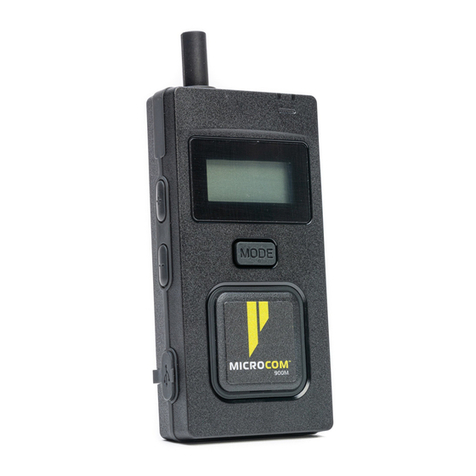
Pliant MICROCOM 2400XR Manuale utente

OPERATING MANUAL
Pliant Technologies, LLC
205 Technology Parkway
Auburn, Alabama 36830 USA
Phone +1.334.321.1160
Toll-Free 1.844.475.4268 or 1.844.4PLIANT
Fax +1.334.321.1162 www.plianttechnologies.com
COPYRIGHT © 2020 Pliant Technologies, LLC. All rights reserved. Pliant®, MicroCom™, and the Pliant “P” are trademarks of Pliant
Technologies, LLC. All other trademarks are property of their respective owners.
Document Reference: D0000566_A

CONTENTS
Introduction .............................................................................................................................................1
What’s Included with MicroCom 2400XR? ...........................................................................................2
Controls ....................................................................................................................................................3
Display Indicators ....................................................................................................................................3
Setup ........................................................................................................................................................4
Battery .....................................................................................................................................................4
Operation .................................................................................................................................................5
Menu Settings .........................................................................................................................................6
Device Specifications..............................................................................................................................8
Product Care and Maintenance .............................................................................................................9
Product Support......................................................................................................................................9
License Information.................................................................................................................................10
Pliant Warranty Statement ....................................................................................................................11

1 / 12
INTRODUCTION
We at Pliant Technologies want to thank you for purchasing MicroCom 2400XR. MicroCom 2400XR
is a robust two-channel full-duplex multi-user wireless intercom system that operates in the 2.4GHz
frequency band to provide superior range and performance, all without the need for a basestation.
The system features lightweight belt packs and provides exceptional sound quality, enhanced noise
cancellation, and long-life battery operation. In addition, the MicroCom’s IP67-rated belt pack is
built to endure the wear and tear of everyday use, as well as the extremes in outdoor environments.
In order to get the most out of your new MicroCom 2400XR, please take a few moments to read
this manual completely so that you better understand the operation of this product. This document
applies to model PMC-2400XR. For questions not addressed in this manual, feel free to contact the
Pliant Technologies Customer Support Department using the information on page 9.
PRODUCT FEATURES
• Robust Two Channel System
• Simple to Operate
• Up to 10 full-duplex Users
• Pack to Pack Communication
• Unlimited Listen-Only Users
• 2.4 GHz Frequency Band
• Frequency Hopping Technology
• Ultra Compact, Small, and Lightweight
• Rugged, IP67-Rated Belt Pack
• Long 12-hour battery life
• Field Replaceable Battery
• Available Drop-in Charger

2 / 12
WHAT’S INCLUDED WITH MICROCOM
2400XR?
• Belt Pack
• Li-Ion Battery (Installed during shipment)
• USB Charging Cable
• Belt Pack Antenna (Detached during shipment. Attach it to the belt pack prior to operation.)
• Quick Start Guide
OPTIONAL ACCESSORIES
• PAC-USB5-CHG: MicroCom 5-Port USB Charger
• PAC-MCXR-5CASE: IP-67-rated MicroCom Hard Carry Case
• PAC-MC-SFTCASE: MicroCom Soft Travel Case
• PBT-XRC-55: MicroCom XR 5+5 Drop-In Belt Pack and Battery Charger
• PHS-SB11LE-DMG: SmartBoom® LITE Single Ear Pliant headset with Dual Mini connector for
MicroCom
• PHS-SB110E-DMG: SmartBoom PRO Single Ear Pliant headset with Dual Mini connector for
MicroCom
• PHS-SB210E-DMG: SmartBoom PRO Dual Ear Pliant headset with Dual Mini connector for
MicroCom
• PHS-IEL-M: MicroCom in-ear headset, single ear, left only
• PHS-IELPTT-M: MicroCom in-hear headset with push-to-talk (PTT) button, single ear, left only
• PHS-LAV-DM: MicroCom lavalier microphone and eartube
• PHS-LAVPTT-DM: MicroCom lavalier microphone and eartube with PTT button

3 / 12
CONTROLS
DISPLAY INDICATORS
M
TALK
LOCK
USER M
VOLUME
CH A
10u
Master Pack Indicator
Battery Status
Mode Indicator
Signal Indicator
Talk Indicator
User Role
Status/Charge LED
Power Button
Talk Button
Headset Connection
USB Charger
Connection
Volume +/– Buttons
Mode Button
OLED Screen
Antenna
Channel Button
Active Channel
Volume Level
Lock Indicator
M
TALK
LOCK
USER M
VOLUME
CH A
10u
Master Pack Indicator
Battery Status
Mode Indicator
Signal Indicator
Talk Indicator
User Role
Status/Charge LED
Power Button
Talk Button
Headset Connection
USB Charger
Connection
Volume +/– Buttons
Mode Button
OLED Screen
Antenna
Channel Button
Active Channel
Volume Level
Lock Indicator

4 / 12
SETUP
1. Attach the belt pack antenna. It is reverse threaded; screw counter-clockwise.
2. Connect a headset to the belt pack.
3. Power on. Press and hold the POWER button for two (2) seconds, until the screen turns on.
4. Access the menu. Press and hold the MODE button for 2 seconds, until the screen changes to
<SETTING MODE>. Short-press MODE to scroll through the settings, and then scroll through
setting options using VOLUME +/−. Press and hold MODE to save your selections and exit the
menu.
a. Select a Group. Select a group number from 00–51.
Important: Belt packs must have the same group number to communicate.
b. Select an ID. Select a unique ID number.
• ID options: M, 01–09, S, or L
• One pack
must
always
use the “M” ID and serve as the master pack for proper system
function. An “M” indicator designates the master pack on its OLED.
• Listen-only packs must use the “L” ID. You may duplicate ID “L” on multiple belt packs.
• Shared packs must use the “S” ID. You may duplicate ID “S” on multiple belt packs, but
only one shared pack may talk at a time.
• When using “S” IDs, the last full-duplex ID (“09”) cannot be used.
c. Confirm pack’s Security Code. Belt packs must use the same security code to work
together as a system.
BATTERY
The rechargeable Lithium-ion battery is installed in the device at shipment. To recharge the
battery, either 1) plug the USB charging cable into the device USB port or 2) connect the device to
the drop-in charger (PBT-XRC-55, sold separately). The LED in the top right corner of the device
will illuminate solid red while the battery is charging and will turn off once the battery is fully
charged. The battery charge time is approximately 3.5 hours from empty (USB port connection) or
approximately 6.5 hours from empty (drop-in charger). The belt pack may be used while charging,
but doing so may lengthen battery charge time.

5 / 12
OPERATION
• LED Modes - LED is blue and double blinks when logged in and
single blinks when logged out. LED is red when battery charging in
progress. LED turns off when charging is complete.
• Lock - To toggle between Lock and Unlock, press and hold the
TALK and MODE buttons simultaneously for 3 seconds. “Lock”
appears on the OLED when locked. This function locks the Talk,
Mode, and Channel buttons, but it does not lock headset volume
control or the Power button.
• Volume Up and Down - Use the +and −buttons to control the
headset volume. “Volume” and a stair-step indicator display the belt
pack’s current volume setting on the OLED. You will hear a beep in
your connected headset volume is changed. You will hear a
different, higher-pitched beep when maximum volume is reached.
• Talk - Use the Talk button to enable or disable talk for the device.
“TALK” appears on the OLED when enabled.
»Latch talking is enabled/disabled with a single, short press of the
button.
»Momentary talking is enabled by pressing and holding the button
for 2 seconds or longer; talk will remain on until the button is
released.
»Shared users (“S” ID), can enable talk for their device with the
momentary talking function (press and hold while talking.) Only
one Shared user can talk at a time.
• Channel -Use the Channel button to toggle between the channels
enabled on the belt pack.
• Out of Range Tones - The user will hear three quick tones when the
belt pack logs out of the system, and they will hear two quick tones
when it logs in.
OPERATING MULTIPLE MICROCOM SYSTEMS IN ONE LOCATION
Each separate MicroCom system should use the same Group and Security Code for all belt packs
in that system. Pliant recommends that systems operating in proximity to one another set their
Groups to be at least ten (10) values apart. For example, if one system is using Group 03, another
system nearby should use Group 13.
Figure 1: Lock Indicator
Figure 2: Volume Setting
Figure 3: Talk Indicator
Figure 4: Channel Indicator

6 / 12
MENU SETTINGS
The following settings are adjustable from the belt pack menu.
1. To access the menu, press and hold the MODE button for 3 seconds, until the screen changes to
<Setting Mode>.
2. Short-press the MODE button to scroll through the settings: Group, ID, Side Tone, Mic Gain,
Channel A, Channel B, and Security Code.
3. While viewing each setting, you may scroll through its options using the VOLUME +/−buttons;
then, continue to the next menu item by pressing the MODE button. See the Table below for
the available options under each setting.
4. Once you have nished your changes, press and hold MODE to save your selections and exit the
menu.
Setting Default Options Description
Group N/A 00–51 Coordinates operation for belt packs communicating
as a system. Belt packs must have the same group
number to communicate.
ID N/A M
01–09
S
L
Master ID
Full-Duplex ID Options
Shared
Listen-Only
Side Tone 5 1–5, Off Allows you to hear yourself while talking. Louder
environments may require you to enable your side
tone.
Mic Gain 1 1–8 Determines the headset microphone audio level being
sent from the microphone pre amp.
Channel A On On, Off
Channel B On On, Off
Security Code
(“SEC Code”)
0000 4-digit alpha-
numeric
code
Limits access to a system. Belt packs must use the
same security code to work together as a system.

7 / 12
RECOMMENDED SETTINGS BY HEADSET
The following table provides recommended MicroCom settings for several common headset
models.
Headset Model Recommended Setting
Mic Gain
Headset with boom mic 1
Headset with lavalier mic 3

8 / 12
DEVICE SPECIFICATIONS
Specification* PMC-2400XR
Radio Frequency Type ISM 2400–2483 MHz
Radio Interface GFSK with FHSS
Maximum Effective Isotropically
Radiated Power (EIRP)
400 mW
Number of Talk Channels 2
Antenna Detachable Type Dipole Antenna
Charge Type USB Micro; 5 V; 1–2 A
Maximum Full Duplex Users 10
Number of Shared Users Unlimited
Number of Listen Only Users Unlimited
Battery Type Rechargeable 3.7 V; 2,000 mA Li-ion eld-replaceable
battery
Battery Life Approx. 12 hours
Battery Charging Time 3.5 hours (USB cable)
6.5 hours (Drop-in charger)
Dimension 4.83 in. (H) × 2.64 in. (W) × 1.22 in. (D, with belt clip)
[122.7 mm (H) x 67 mm (W) x 31 mm (D, with belt clip)]
Weight 6.35 oz. (180 g)
Display OLED
*
Notice about Specifications: While Pliant Technologies makes every attempt to maintain the accuracy of the information
contained in its product manuals, that information is subject to change without notice. Performance specifications included in this
manual are design-centered specifications and are included for customer guidance and to facilitate system installation. Actual
operating performance may vary. Manufacturer reserves the right to change specifications to reflect latest changes in technology
and improvements at any time without notice.
NOTE: This model complies with ETSI standards (300.328 v1.8.1)
Altri manuali per MICROCOM 2400XR
2
Indice
Altri manuali Pliant Sistema di interfono

Pliant
Pliant Tempest2400 MasterBelt Manuale utente

Pliant
Pliant MICROCOM 900M Manuale utente

Pliant
Pliant MICROCOM 900M Manuale utente

Pliant
Pliant MICROCOM 900M Manuale utente

Pliant
Pliant MICROCOM 2400XR Manuale utente

Pliant
Pliant CREWCOM Manuale utente

Pliant
Pliant CREWCOM CB2-900 Manuale utente

Pliant
Pliant MICROCOM 900XR Manuale utente

Pliant
Pliant CrewCom CCU-44 Manuale utente

Pliant
Pliant MICROCOM 900XR Manuale utente