
PNI Wayfinder V2000 Manuale utente
OPERATION MANUAL
V2000 DIGITALVEHICLECOMPASS
PNIC V2000 Operation Manual.idd 4/9/2001, 4:28 PM1

Making Ordinary Products Extraordinary
PNIC V2000 Operation Manual.idd 4/9/2001, 4:28 PM2-1

1
You have purchased one of the most sophisti-
cated compasses available for use in a
vehicle. The PNI V2000 is one of several
models using our latest technology to make
a digital compass easy and fun to use, while
still incorporating patented magnetic sensor
technology to give you accurate compass
headings. PNI’s magnetic sensor technology
electronically measures your vehicle’s mag-
netic eld and calibrates for inaccuracies
mathematically with its built-in micropro-
cessor. The result is unequaled compass
performance in a vehicle environment.
Features
• Patented magnetic sensor technology
same as the built-in compasses in GM,
Ford, and Chrysler vehicles.
• Bearing point stores one compass heading
at a time in memory to stay on desired
course.
• Inside or outside temperature in either
Fahrenheit or Celsius with temperature
sensor installed.
• ICE alert feature warns the driver to icy
road conditions when the temperature
sensor is installed outside.
CONGRATULATIONS!
PNIC V2000 Operation Manual.idd 4/9/2001, 4:28 PM2-1

2
• Automatic shut-off when no magnetic
eld changes have been sensed for
approximately 10 minutes.
• Programmable automatic backlight shut-
off feature.
• Photo diode light sensing feature turns
the backlight on or off depending on the
amount of ambient light when used with
12-volt adapter.
• Distortion warning when magnetic inter-
ference from outside sources is affecting
compass accuracy.
• Holographic LCD improves brightness
and contrast while removing glare.
• One-year warranty.
FEATURES
PNIC V2000 Operation Manual.idd 4/9/2001, 4:28 PM2-3

3
The manual is designed with procedures
organized in the order that they will be needed.
Additional information about procedures or
compass use can be found in our Frequently
Asked Questions section.
1. The LCD icons are written in capital
letters surrounded by quotes.
2. Buttons are indicated by a graphical icon
of each button, such as
.
3. Procedures are organized so that the
action to perform follows the step
number and result of that action is
italicized.
4. “Press” means quickly press and release a
button in less than two seconds.
5. “Hold” means press and hold the button
for at least two seconds, or until a display
appears.
6. Indicates a warning or important
information.
7. Indicates a feature or optional equip-
ment available at additional cost.
CONVENTIONS USED IN THIS MANUAL
PNIC V2000 Operation Manual.idd 4/9/2001, 4:28 PM2-3

4
Display . . . . . . . . . . . . . . . . . . . . . . . . . . 5
Installing the PNI V2000 . . . . . . . . . . . 7
Installing the battery . . . . . . . . . . . . .7
Windshield installation guidelines . . 8
Windshield mounting . . . . . . . . . . . .9
Installing the 12-volt adapter . . . . .10
Installing the temperature sensor . .11
Calibration . . . . . . . . . . . . . . . . . . . . . . 13
Bearing point mode . . . . . . . . . . . . . . 14
Temperature mode . . . . . . . . . . . . . . . 15
ICE alert feature . . . . . . . . . . . . . . . .16
Backlight mode . . . . . . . . . . . . . . . . . . 17
Photo diode feature . . . . . . . . . . . . .18
Optional accessories . . . . . . . . . . . . . 19
Frequently asked questions . . . . . . . 20
Service and replacement . . . . . . . . . . 24
Limited warranty . . . . . . . . . . . . . . . . 27
CONTENTS
PNIC V2000 Operation Manual.idd 4/9/2001, 4:28 PM4-5
5
DISPLAY
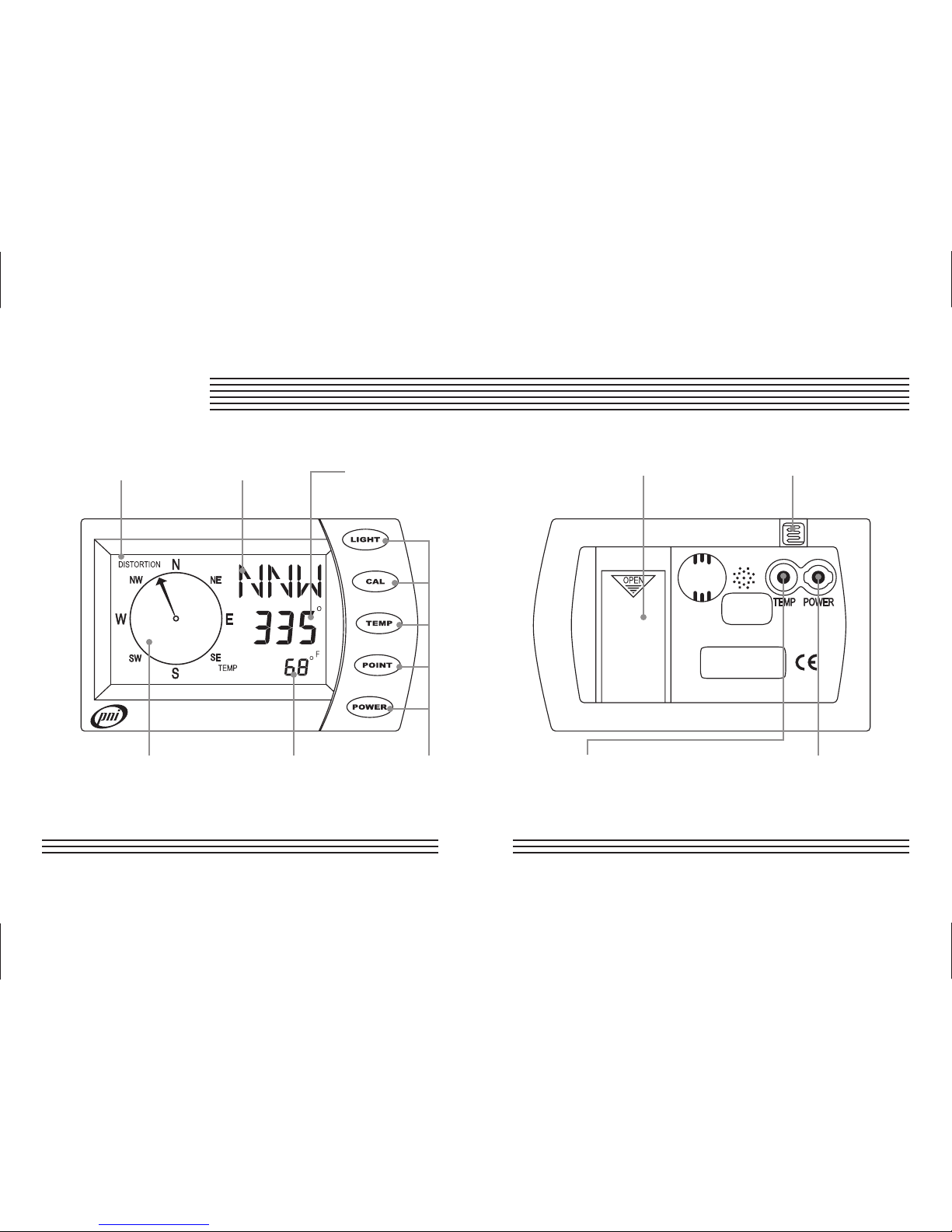
“DISTORTION” Cardinal Point Numeric Heading
Icon Readout Readout
Compass Rose Temperature and Buttons
Bearing Point Readout
Compass Front
Battery Photo Diode
Compartment
Temperature 12-Volt Power
Sensor Jack AdapterJack
Compass Back
PNIC V2000 Operation Manual.idd 4/9/2001, 4:28 PM4-5

6
When turned on, the unit displays heading in
one of 16 cardinal points (N, NNE, NE, ENE,
E, etc.), numeric digits with a resolution of 5°,
and a compass rose at all times. The compass
rose points in the direction displayed on the
cardinal points.
Buttons and icons
Light button
Press to turn the backlight on or off or
hold to set the backlight auto shut-off value.
Cal button
Press or hold to begin the calibration
process.
Temp button
Press to display the temperature or hold
to program the display of Fahrenheit or Celsius
values.
Point button
Press to display a stored bearing point
or hold to store a new bearing point.
Power button
Press to turn the PNI V2000 on or off.
“Distortion” icon
The “DISTORTION” icon displays when mag-
netic interference is compromising compass
accuracy or when a battery has been installed.
DISPLAY
PNIC V2000 Operation Manual.idd 4/9/2001, 4:28 PM6-7

7
Installing the battery
The unit uses a 3-volt CR123A lithium-type
battery, installed according to the diagram on
the inside of the battery compartment. Push the
battery straight down into the compartment,
not at an angle. Once the battery is inserted,
the unit will cycle through a quality test of
two different displays. The entire test lasts
approximately 10 seconds, then displays heading
information.
Note: Heading information will
be inaccurate until you calibrate.
After installation, you must calibrate the
unit. As a reminder, the “DISTORTION”
icon will display in the upper left corner
until the unit is calibrated.
Every time the battery is removed the PNI
V2000 must be calibrated and all previous
feature settings must be re-programmed.
If any of the two quality test screens
display for more than 30 seconds, remove
the battery, wait for approximately one
minute, and then reinsert the battery.
The PNI V2000 has a programmable
auto shut-off feature. When no mag-
netic eld change has been detected for
approximately 10 minutes, the compass
automatically switches off.
INSTALLING THE PNI V2000
PNIC V2000 Operation Manual.idd 4/9/2001, 4:28 PM6-7

8
Windshield installation guidelines
Choose a place on the windshield that will
not obstruct the driver’s view and is within
reach so the buttons are easy to push. Make
sure the windshield surface is clean. Once
installed, the face of the compass must be
pointing toward the rear of the vehicle.
The PNI V2000 mounting bracket is
designed to allow for the unit to be
easily removed. Removal or replacement
of the compass without disrupting the
bracket mechanism eliminates the need
to recalibrate the compass.
The compass can be tilted up or down
a maximum of 20° from road level and
still maintain accuracy. If tilted more
than 20°, the heading information may
not be accurate (see illustration next
page).
The accuracy of the PNI V2000 will be
diminished by a strong magnetic eld,
such as that found in proximity to an
audio speaker. It is recommended that
the unit be mounted 5 or more inches
away from stereo speakers.
INSTALLING THE PNI V2000
PNIC V2000 Operation Manual.idd 4/9/2001, 4:28 PM8-9
Altri manuali per Wayfinder V2000
1
Indice
Altri manuali PNI Bussola


