
Pocket Wizard MiniTT1 Manuale utente

a
Quick Guide
for Nikon
340.00 – 354.00 MHz, US FCC/IC
433.42 – 434.42 MHz, CE
MAKE IT POSSIBLE™
IMPORTANT: US FCC/Canada frequency radios are NOT compatible with
CE frequency radios or Japan frequency radios and vice versa. For more
information on frequency, please go to:
www.PocketWizard.com/wheretobuy/frequency
Please read this Quick Guide thoroughly before operating.
Visit www.PocketWizard.com/support to download
extended documentation and the PocketWizard Utility.
All information in this Quick Guide is subject to change.
This PocketWizard radio runs on powerful
software called ControlTL® (Control The
Light™). It can be configured for your specific
needs using the PocketWizard Utility which
can be downloaded at:
www.PocketWizard.com/support/downloads.
Be sure ALL your PocketWizard ControlTL
radios, including this one, are updated to
the latest firmware for proper functionality.
Power on any connected equipment from
the top down: Flash, then radio, then camera.
All equipment should be turned OFF when
making connections or unwanted triggering
may occur.
READ ME FIRST:
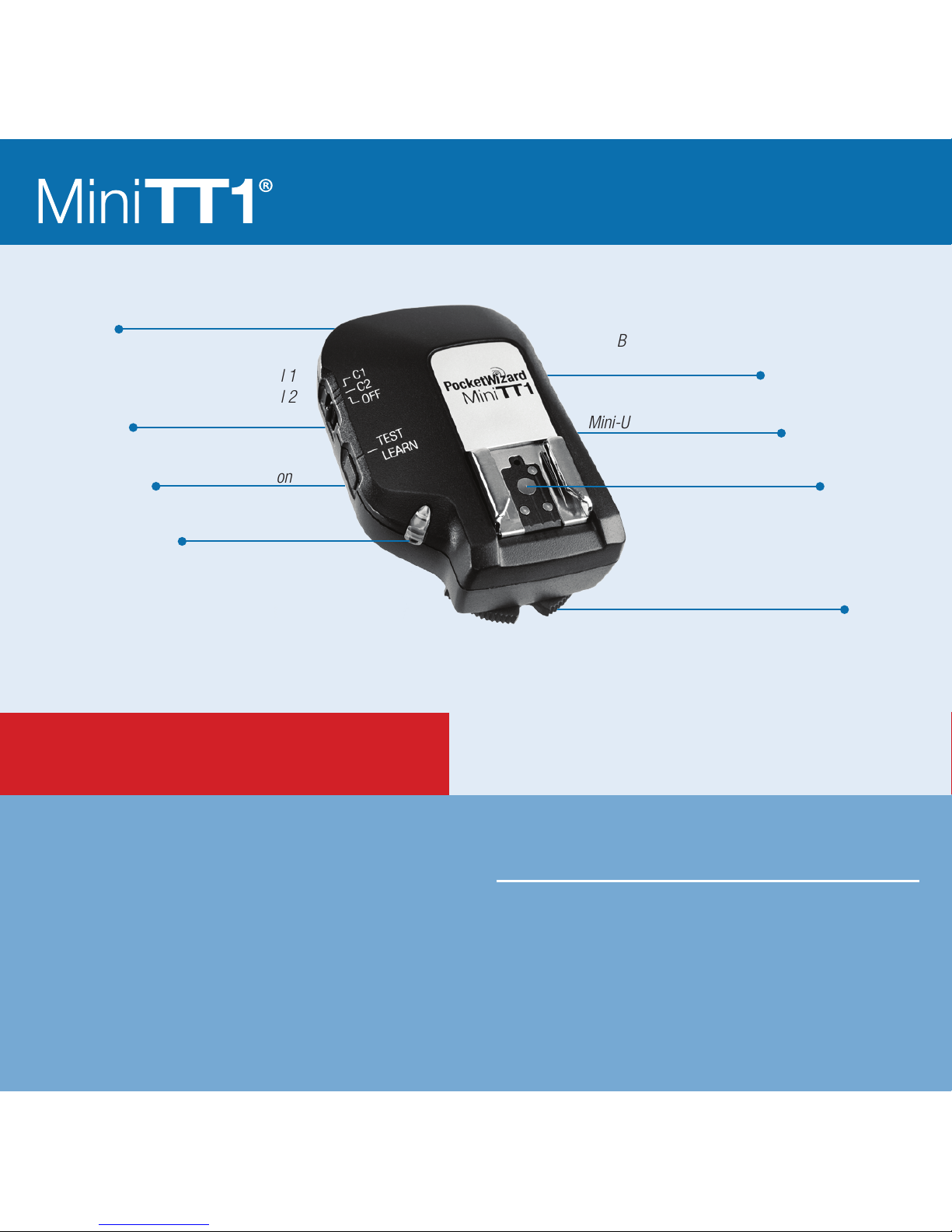
Locking Ring
Conguration/Channel 1
Conguration/Channel 2
Power Off
Internal Antenna
TEST/LEARN Button
Battery Compartment
(on bottom)
Mini-USB Connector (on side)
Nikon-style Hot Shoe
Status LED
a
PocketWizard recommends powering your
Speedlights with high-capacity rechargeable
batteries. If operation is not optimal, check
Speedlight batteries first.
Review product manuals for your camera
and flash system. For most basic functions
when using Nikon’s system or PocketWizard
radios, operation is identical.
You may use a FlexTT5 as a transmitter
instead of a MiniTT1 in all scenarios.
Make sure all PocketWizard radios are
set to the same PocketWizard channel.
PocketWizard channels are used instead
of Nikon channels. See Learn Mode section.
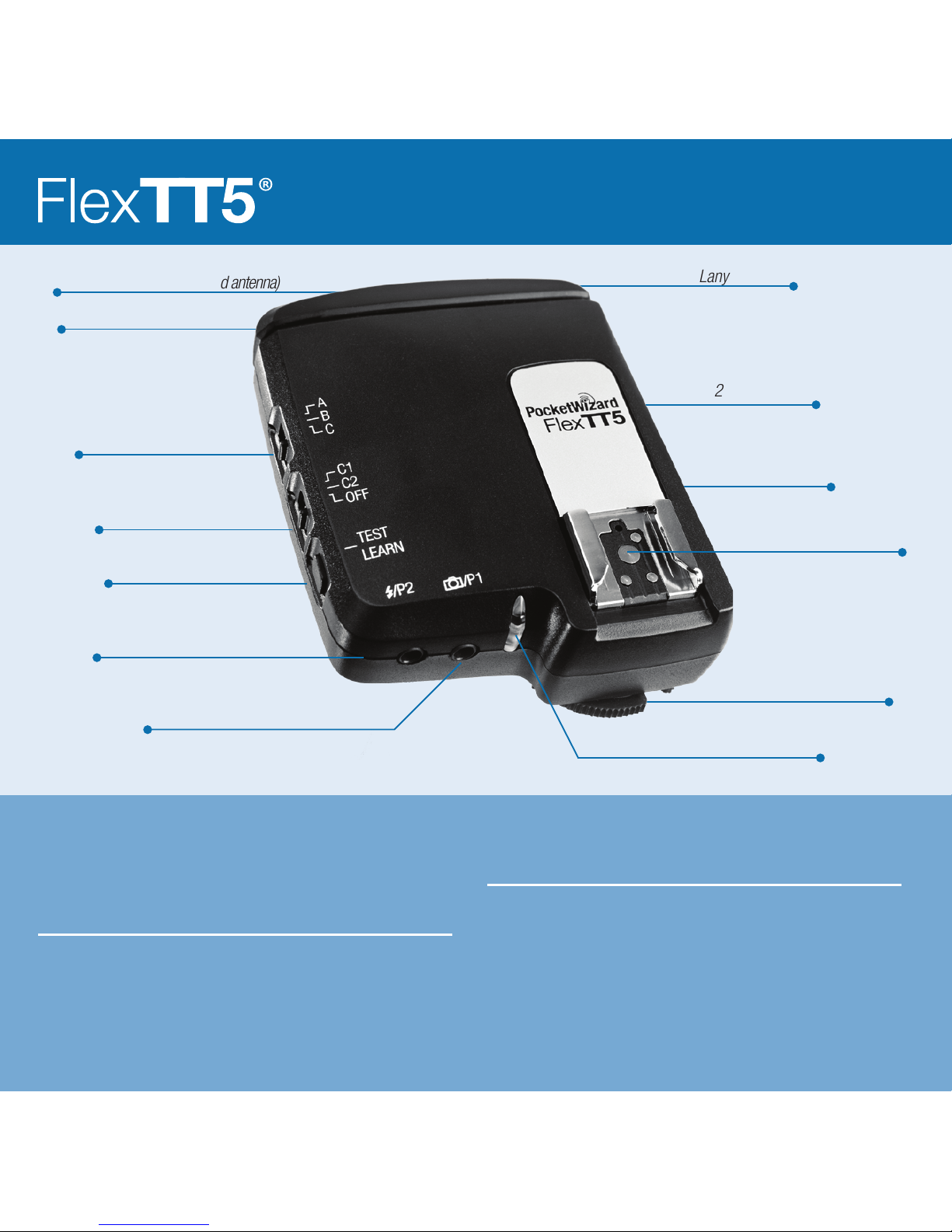
Locking Ring
Batteries
2 AA [IEC:LR6]
Adjustable Antenna
Lanyard Loop
Mini-USB Connector (behind antenna)
1/4-20 Mount
(on bottom)
Remote Flash Triggering Port
Remote Camera Triggering Port
Nikon-style Hot Shoe
Status LED
TEST/LEARN Button
Conguration/Channel 1
Conguration/Channel 2
Power Off
Zone Switch

Basic Wireless i-TTL: MiniTT1 FlexTT5
No ash on Camera
1. Slide MiniTT1 Transmitter onto camera.
2. Slide Speedlight onto remote FlexTT5 Transceiver. Set the Speedlight for standard i-TTL
mode (not REMOTE or MASTER). Repeat for each remote Speedlight. All remote i-TTL
Speedlights will be treated as one zone of light.
3. Make sure all your PocketWizard radios are on the same channel and take pictures normally.
This mode is like using the SU-800 in TTL Commander mode, or the SB-800 or SB-900 as
MASTER in Advanced Wireless Lighting TTL Mode with master ash cancelled and remote
group A selected as TTL with 0.0 FEC.
Basic Wireless i-TTL: MiniTT1 FlexTT5
Flash on Camera
1. Slide MiniTT1 Transmitter onto camera.
2. Slide Nikon Speedlight onto MiniTT1 radio. Set the Speedlight for standard i-TTL mode.
3. Slide Speedlight onto remote FlexTT5 Transceiver. Set the Speedlight for standard i-TTL
mode (not REMOTE or MASTER). Repeat for each remote Speedlight. All remote i-TTL
Speedlights will be treated as one zone of light.
4. Make sure all PocketWizard radios are on the same channel and take pictures normally.
i-TTL

a
Advanced Wireless i-TTL: MiniTT1 FlexTT5
Flash on Camera
1. Slide MiniTT1 Transmitter onto camera.
2. Slide Nikon SB-800 or SB-900 Speedlight onto MiniTT1 radio. Set Speedlight for
MASTER = ON. Enable remote groups/zones per ash instructions. Nikon SU-800
Wireless Speedlight Commander may also be used.
3. Set remote FlexTT5 radio to desired Nikon remote group/zone (A, B, C) using
FlexTT5 zone switch.
4. Slide Speedlight onto remote FlexTT5 Transceiver. Set Speedlight for standard i-TTL mode
(not REMOTE or MASTER). Repeat for each remote Speedlight. All remote i-TTL
Speedlights on same FlexTT5 group/zone will be treated as one zone of light.
5. Adjust ash output level compensation using MASTER Speedlight ash controls.
6. Make sure all your PocketWizard radios are on the same channel and take pictures normally.
IMPORTANT: Nikon Speedlights set to REMOTE = ON and connected to remote FlexTT5
radios will not function properly as remotes. Turn off REMOTE or MASTER for your remote
Speedlights. Set desired Nikon remote group/zone via remote FlexTT5 zone switch.
PocketWizard channel is used instead of Nikon channel.
ISO, aperture, ash exposure compensation (FEC), and other settings will work with exposure
normally via the PocketWizard ControlTL system.

MiniTT1 Plus II, MultiMAX, Integrated, or FlexTT5
connected to manual ash
Remote ash with or without i-TTL ash on camera
1. Slide MiniTT1 Transmitter onto camera.
2. If desired, slide Nikon i-TTL Speedlight onto MiniTT1 radio.
3. Make sure all your PocketWizard radios are on the same channel and take pictures normally.
Note: Manual remote ashes are not calculated as part of the i-TTL exposure.
Adjust your exposure or FEC to compensate accordingly.
Use PocketWizard Utility to engage HyperSync™ and explore faster than X-sync shutter
speeds. Visit www.PocketWizard.com for more information.
Learn about the AC3 ZoneController, PowerTracking, and controlling your Speedlights and
select studio ashes by reading the extended documentation for the following PocketWizard
radios and accessories:
• AC3 ZoneController for Nikon (coming soon)
• PowerST4 for Elinchrom
• AC9 AlienBees Adapter for Nikon (coming soon)
Manual FlashManual Flash

a
Channels can be set via PocketWizard Utility (recommended) or
taught from any PocketWizard transmitter using Learn Mode.
Learn Mode is not required for normal operation of the radios.
IMPORTANT: Hold radios at least 2 feet apart when teaching/learning.
1. Turn MiniTT1 or FlexTT5 radio ON and select channel to be taught: C.1 or C.2.
2. Press and hold TEST for several seconds until LED blinks amber, then release TEST.
3. Quickly press and hold TEST on teaching transmitting radio (MiniTT1, FlexTT5, Plus II
or MultiMAX). When LED blinks green, channel is learned. Connected ash may
trigger during Learn.
• 1 green blink = Low Standard channel learned (1 through 16, including Plus 1 through 4)
• 2 green blinks = High Standard channel learned (MultiMAX 17 through 32)
• 3 green blinks = ControlTL channel learned
For remote i-TTL systems, teach MiniTT1 radio to be used as primary transmitter rst,
then use it to teach all FlexTT5 units.
MiniTT1 and FlexTT5 radios send out both ControlTL and Standard triggers every time
they are triggered. For remote i-TTL to function, ControlTL channel must be learned.
If you see only 1 or 2 green blinks, and you desire i-TTL, teach again with MiniTT1
or FlexTT5 radio. Look for 3 green blinks to verify ControlTL is learned.
To teach all radios Standard channels, use Standard transmitter as teaching radio for all
learning radios, including MiniTT1 radio to be used as primary transmitter.
To avoid inadvertent ashing, turn OFF remote radios that have already been taught or
have already had the channel set.
Learn Mode

Auto-Relay Mode
A FlexTT5 radio in camera’s shoe and connected with motor drive cord to P1 can receive
a radio trigger and trigger the camera’s motor drive, which in turn triggers a remote ash.
The channel used for relay transmit is 1 higher than receive channel, unless set via
PocketWizard Utility.
Example: If you taught FlexTT5 radio Standard channel 2, then relay transmit occurs on
Standard channel 3. Press TEST on hand-held trigger radio to begin relay sequence.
For Auto-relay with remote i-TTL Speedlights triggered by the remote camera, an -ACC
cable is required. For Auto-Relay with manual ashes, engage Basic Trigger Mode in the
PocketWizard Utility - any PocketWizard motor drive cable can be used.
Status LED
Normal “waiting for trigger” operation = short blink every 2 seconds.
Normal short blink color indicates Battery Level:
Green Good battery
Amber Warning – battery low
Red Very low battery – change immediately
Steady red LED in sync with TEST indicates normal transmission.
(Hold for 10 seconds to teach – see Learn mode)
Short red blink in sync with trigger indicates normal reception.
Rapid red blinking when not triggering or half-pressing camera indicates error condition.
Power off the unit, reseat all connections, and power back on.
Other Functions

a
Reset
RESET
RESET A / CHANNEL RESET:
To reset learned channels to channels last set in Utility, hold TEST on power up. LED blinks
green twice to indicate reset. Release TEST. Advanced features set via Utility are retained.
RESET B / FACTORY DEFAULTS:
To reset all advanced features and channels to FACTORY DEFAULTS, hold TEST on power up
for longer than 10 seconds. When LED blinks green 4 times, release.
• All settings may be congured using the PocketWizard Utility available from
www.PocketWizard.com See the online extended documentation or the help text in the
Utility for detailed descriptions of these settings.
Factory defaults
Channel
C.1 = ControlTL channel 1, Standard channel 1
C.2 = ControlTL channel 2, Standard channel 2
Use ControlTL for Rx Channel = enabled (For FlexTT5 Only)
Modeling
Non-Speedlight Modeling Light Mode = Camera Wake
Modeling Light Active Autotrack = enabled
Modeling Light Active = 100% (inactive due to Autotrack setting)
Modeling Light Sleep = 10%
Modeling Light Delayed Sleep = enabled
Modeling Light Delay After Camera Sleeps = 30 secs.

Exposure
Speedlight Flash Control = Normal i-TTL
Non-TTL Flash Control = Auto ISO and Aperture Tracking
Non-TTL Exposure Compensation Value (f-stops) = -3.0
Sync Timing
HyperSync Offset = -170 microseconds
High Speed Sync (FP Flash Sync) Disable Mode = not enabled
High Speed Sync (FP Flash Sync) Begins At = 1/400
Flash
Remote Beeper = No Change On Wakeup
Optical Trigger = No Change On Wakeup
Remote TTL Flash Sleep Mode = disabled
Flash Idle Time Out Mode = disabled (For FlexTT5 Only)
Misc
Basic Trigger Mode = disabled
Force TTL Master Mode = enabled
Transmitter Only Mode = disabled (For FlexTT5 Only)
Bottom Shoe Disable Mode = not enabled (For FlexTT5 Only)
Altri manuali per MiniTT1
3
Questo manuale è adatto per i seguenti modelli
1
Indice
Altri manuali Pocket Wizard Accessori per fotocamere


