
Polsen ULW-96 Manuale utente

PRODUCT
MANUAL
-96
WIRELESS
SYSTEM
96-CHANNEL
CAMERA-MOUNTABLE UHF

2
96-CHANNEL
CAMERA-MOUNTABLE
UHF WIRELESS SYSTEM
ULW-96
THANK YOU FOR CHOOSING POLSEN.
The Polsen ULW-96 is our premier broadcast-quality camera-mountable UHF wireless system
designed for EFP (electronic eld production), ENG (electronic news gathering), and other
professional applications. It provides hands-free mobility where audio cables are not practical.
The ULW-96 is a robust, frequency-agile system with 96 channels to choose from to help avoid
interference. Up to eight systems can be used simultaneously in the same location. To ensure
extremely quiet and reliable operation, the internal electronic components are IECQ-certied to
meet international standards of quality.
The ULW-96 boasts professional features including a line input on the transmitter and a
headphone output on the receiver. There are three selectable output-levels to ensure proper gain-
staging and a headphone level control that allows real-time monitoring at comfortable volumes.
The 20 mW radio frequency (RF) output level enables an operating range of more than 250'
(optimum) with relatively low intermodulation potential. The ULW-96 offers outstanding exibility
for broadcast-quality wireless applications in the eld.
Please read and follow these instructions and keep this manual in a safe place.

3
33
CONTENTS
Introduction...........................................................................................................................2
Precautions ...........................................................................................................................3
Overview
Receiver ................................................................................................................... 4-5
Transmitter ............................................................................................................. 6-7
Handheld Transmitter / Accessories.............................................................8-9
Installing Batteries...................................................................................................... 10-11
Operating Instructions................................................................................................11-14
Mounting the ULW-96..............................................................................................15-16
Stage Direction and Talent Cueing.............................................................................. 17
Using Multiple UHF Wireless Systems...................................................................... 17
Troubleshooting...........................................................................................................18-21
FCC Statement ...................................................................................................................21
Specications / Frequency Chart.........................................................................22-23
One-Year Limited Warranty...........................................................................................24
PRECAUTIONS
• Exposure to high sound levels can cause
permanent hearing loss. Avoid listening at high
volumes for extended periods of time.
• Keep this product away from water and any
ammable gases or liquids.
• Handle this product with care.
• Clean this product with only a soft, dry cloth.
• Keep this product away from children.
• Use only parts provided by the manufacturer.
• To avoid damage to this product, be careful not
to overtighten or improperly thread any of the
threaded ttings.
• All photos are for illustrative purposes only.
4
OVERVIEW
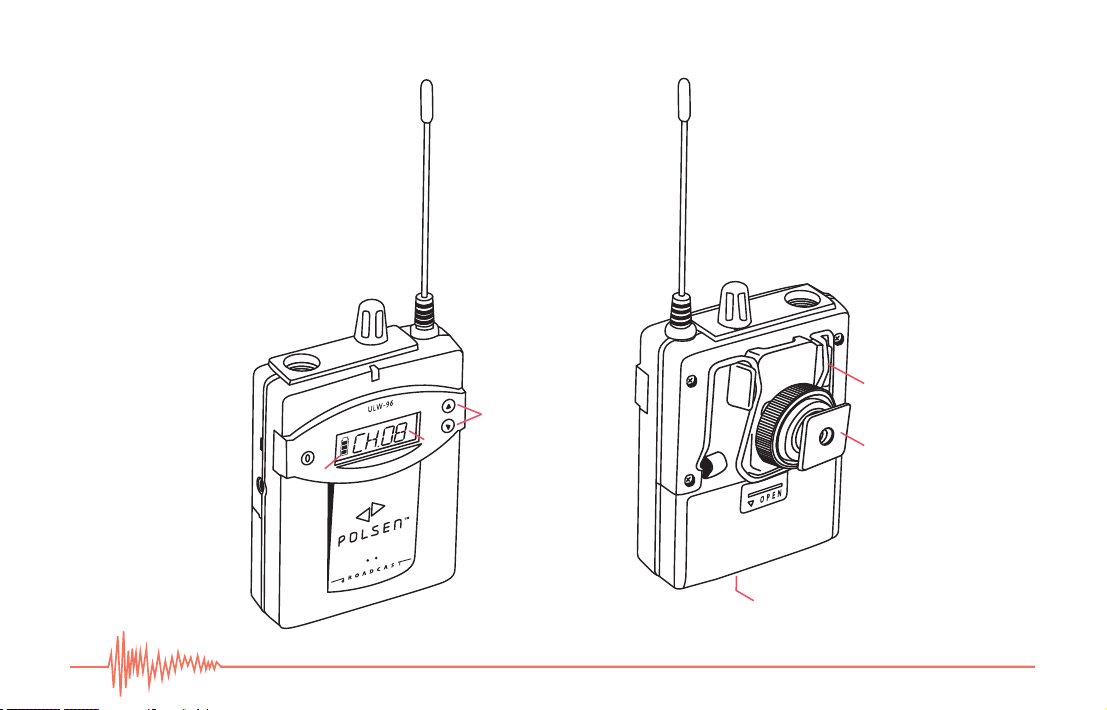
Receiver
2.
1.
3.
4.
5.
6.
7.
8.
9.
10.
11.
13.
12.
14.
15.

5
5
Receiver:
1. Antenna
2. Headphone-level control
Rotate knob clockwise to turn the unit on, and counterclockwise to
turn the unit off. You should feel it click when it turns on and off.
Rotate knob to adjust the volume of the headphones when you’re
monitoring the sound.
3. Headphone output
Plug your headphones into this jack to monitor the transmission in
real time without the latency that often occurs when monitoring via
a camera’s headphone output.
4. Audio output (selectable level)
This can be connected to your camera’s mic input, or to an audio
recorder for remote eld-recording.
5. Audio output-level switch (hi/mid/low)
Slide this switch to adjust the output level.
6. RF LED
The RF LED glows red while power is on and green when the unit is
receiving a strong RF signal.
7. Info button
Press and hold this button to display the transmission frequency on
the LCD.
8. LCD
The LCD will glow for a few seconds when the unit is turned on
and when the Set or Channel up/down buttons are pressed
(see 11. Channel up/down buttons).
9. Battery power icon
10. Channel (transmission frequency in MHz when Info button
is held down)
11. Channel up/down buttons
Press these buttons to change the channel. Press and hold to
rapidly change channels.
12. Two-way belt clip
13. Shoe adapter
14. Battery compartment
Accepts two AA batteries.
15. Charging contacts
For charging via the Polsen ULW-96-BBCH charger
(sold separately).
6
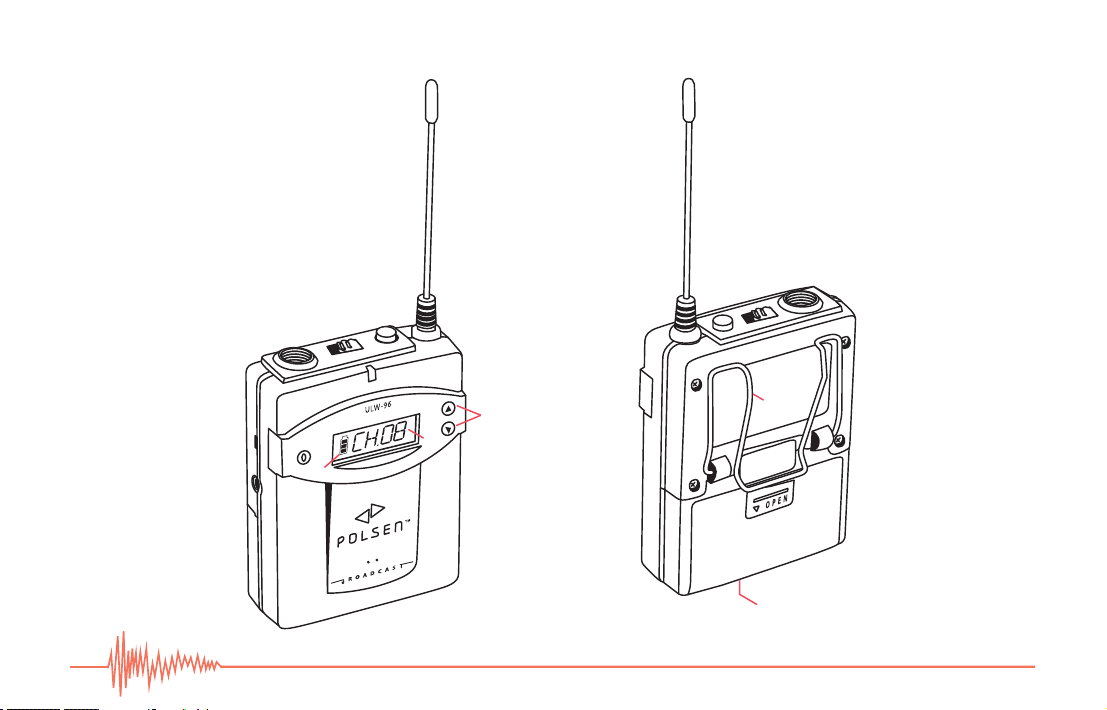
Transmitter
OVERVIEW
2.
1.
3.
6.
5.
7.
8.
9.
10.
11.
12. 13.
14.
15.
4.

7
Transmitter:
1. Antenna
2. Mute button
This two-position button mutes the microphone. When the button is in
down-position, the mute is active.
3. Power switch
Slide this switch to turn the transmitter on or off.
4. Microphone input
This is a mini XLR (TA-3) jack. Fully insert the microphone’s TA-3 plug
and make sure it clicks into place. To remove, press the button on the
connector to release the locking mechanism.
5. Sensitivity switch (hi/mid/low)
Slide the switch to adjust the microphone level.
6. Line input
7. Power LED
The Power LED glows red when the unit is on.
8. Set button
To change the channel, press and hold this button for approximately 3
seconds, until the channel number blinks. Then use the channel up/
down buttons to select a channel and press Set to conrm
(see 12. Channel up/down buttons).
9. LCD
The LCD will glow for a few seconds when the unit is turned
on or when the Set or Channel up/down buttons are
pressed (see 12. Channel up/down buttons).
10. Battery power icon
11. Channel (transmission frequency in MHz when channel
up/down buttons are held down)
12. Channel up/down buttons
Press and hold one of these buttons to display the
transmission frequency in MHz on the LCD.
After using the Set button to enable channel changing
(see 8. Set button), press these buttons to change the
channel. Press and hold to rapidly change channels.
13. Two-way belt clip
14. Battery compartment
Accepts two AA batteries.
15. Charging contacts
For charging via the Polsen ULW-96-BBCH charger
(sold separately).
8
Handheld Transmitter / Accessories
OVERVIEW
1.
3.
15.
16.
4.
7.
6.
8.
5.
9.
10.
11.
12.
13.
14.
18.
17.
19.
2.

9
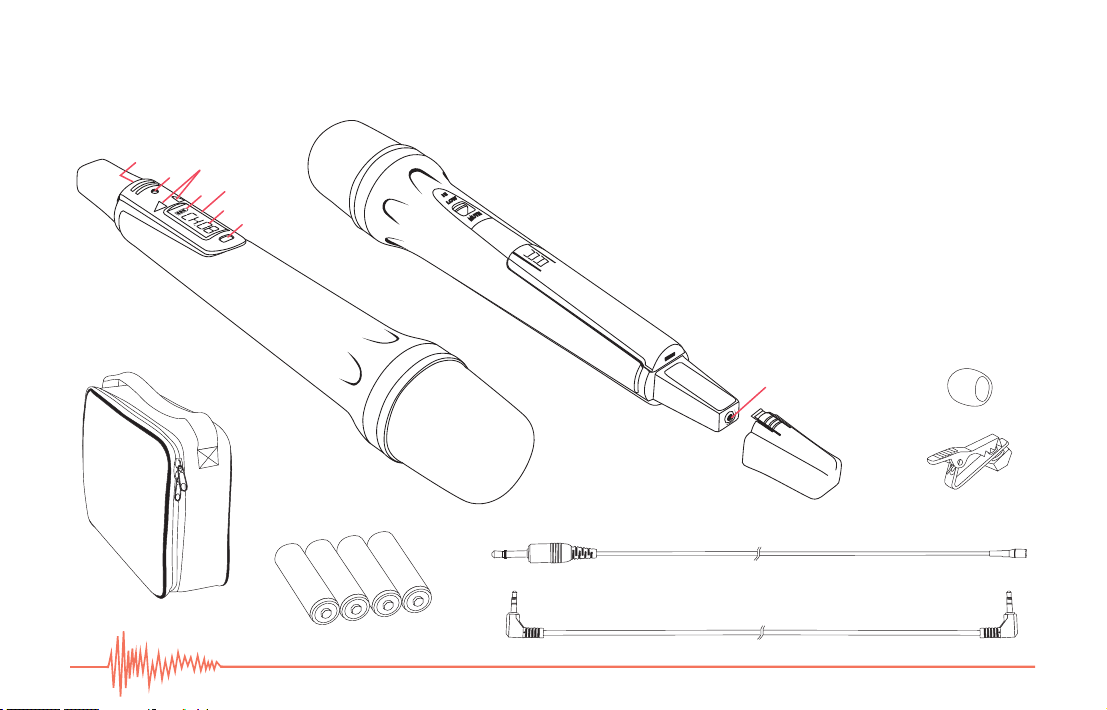
Handheld Transmitter:
1. Microphone head
2. Three-way AF control (hi/low/mute)
Slide this switch to adjust the transmitter’s AF output.
3. Battery compartment
a. Accepts two AA batteries.
4. Set button
To change the channel, press and hold this button for
approximately 3 seconds, until the channel number
blinks. Then use the channel up/down buttons to select a
channel and press Set to conrm (see 8. Channel up/down
buttons).
5. LCD
6. Battery power icon
7. Channel (transmission frequency in MHz when
channel up/down buttons are held down)
8. Channel up/down buttons
Press and hold one of these buttons to display the
transmission frequency in MHz on the LCD.
After using the Set button to enable channel changing, use
these buttons to select a channel (see Set 4. button). Press
and hold to rapidly change channels.
9. Power LED
The Power LED glows red when the unit is on.
10. Power button
Press and hold for approximately two seconds to turn on or off.
11. Charging-port cap
12. Charging port
For charging via the ULW-96-HCH charger (sold separately).
13. Antenna
Included Accessories:
14. Lavalier microphone
15. Tie clip
16. Foam windscreen
17. Carrying case
18. Output cable (1/8"male to 1/8" male)
19. Four AA batteries (six for ULW-96-HH combo)
Handheld Transmitter / Accessories
10
INSTALLING BATTERIES
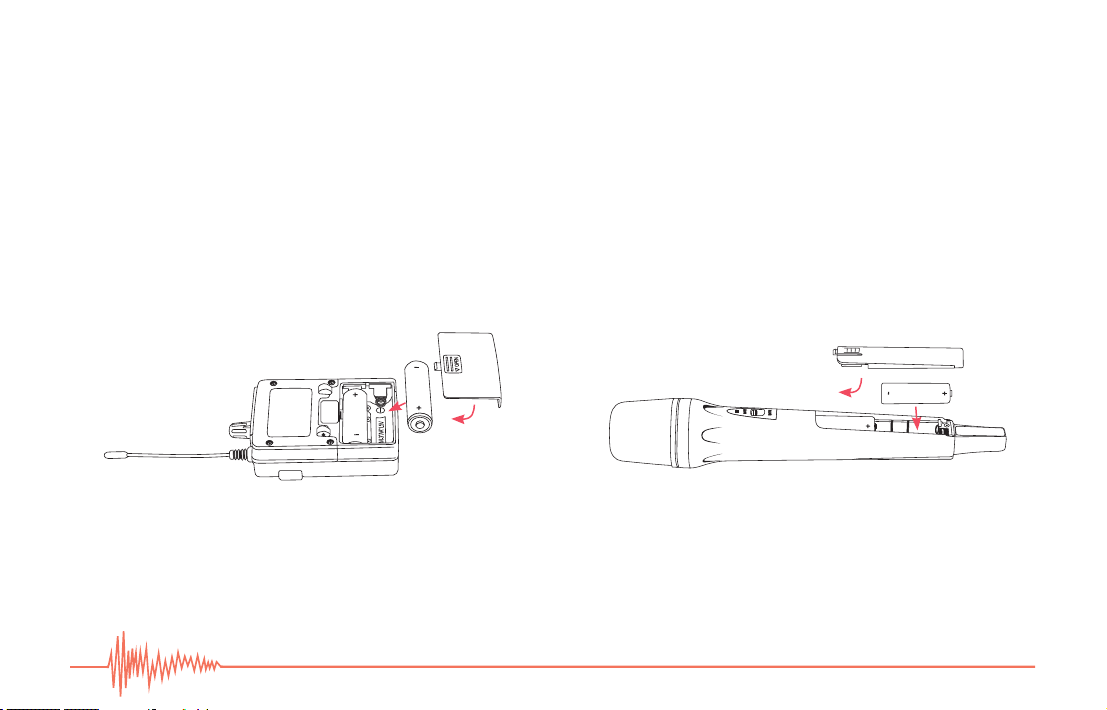
The transmitter, receiver, and handheld transmitter are each powered by two AA batteries. To install batteries, follow these steps:
1. Make sure the unit is turned off.
2. Gently remove the battery compartment cover by pressing on the cover and sliding it in the direction of the arrow.
3. Insert two fresh AA batteries in the proper orientations.
4. Close the compartment by pushing the cover so it locks into place.
Rechargeable Batteries:You can use rechargeable AA batteries with the receiver and transmitter and charge them by inserting
both units into the Polsen ULW-96-BBCH charger (sold separately). When using rechargeable batteries with the handheld
transmitter, you can charge them by plugging the unit into the Polsen ULW-HCH charger (sold separately).
Indice
Altri manuali Polsen Sistema microfonico


Manuali Sistema microfonico popolari di altre marche


Sennheiser
Sennheiser Evolution Wireless Digital EW-DX EM 2 Manuale utente

Alpha Technologies
Alpha Technologies RBMS Manuale utente

SWIT Electronics Co.,LTD.
SWIT Electronics Co.,LTD. CW-S150 Manuale utente

Shure
Shure UA844 Manuale utente

Panasonic
Panasonic SHFX70 - DVD HOME THEATER WIRELESS SYSTEM Manuale utente

Pyle
Pyle PDWM5000 Manuale utente