Portech MT-350 Mobile Trunk Manuale utente

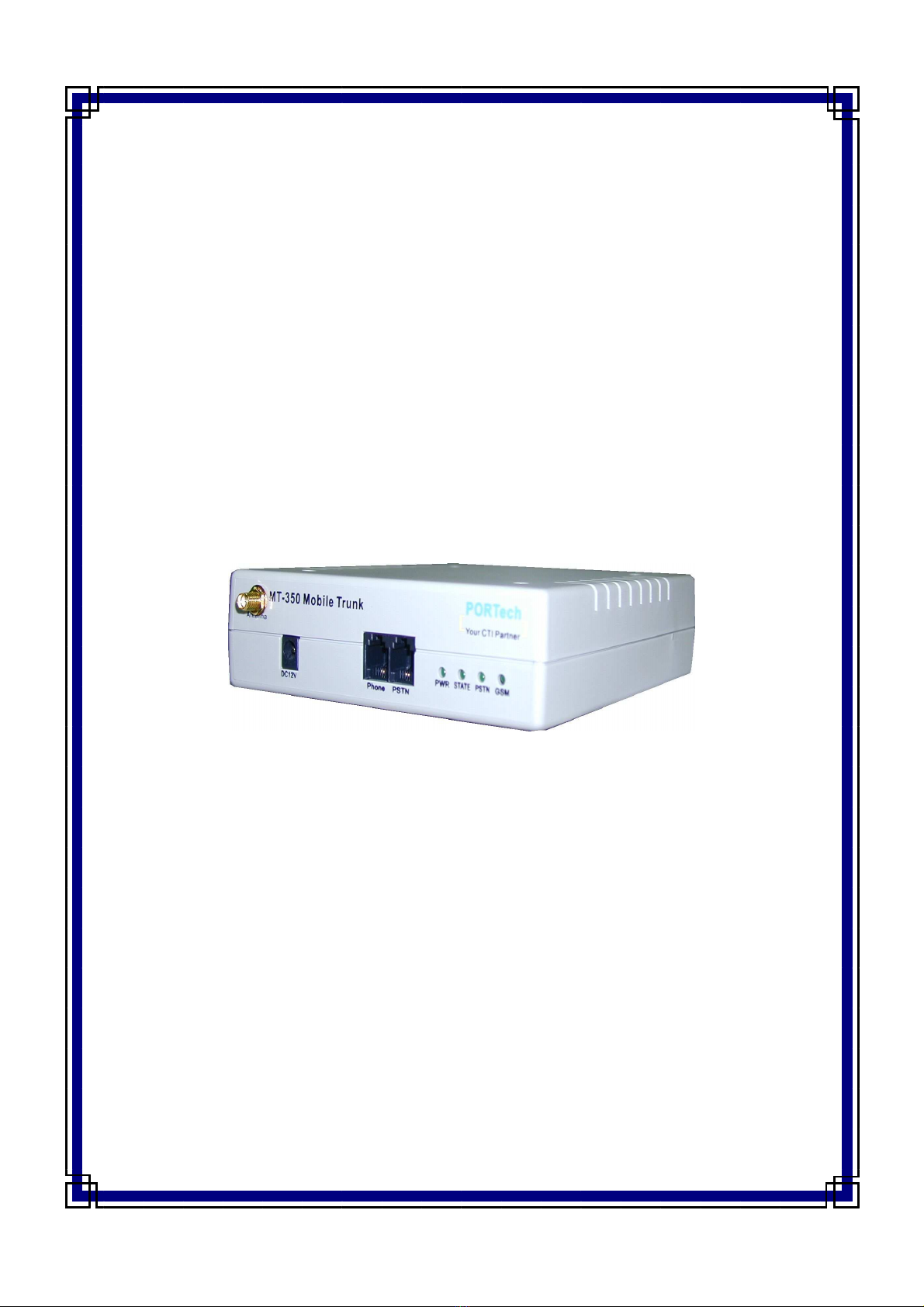
MT-350 Mobile Trunk
Operation Manual
PORTech Communications Inc.
www.discountcomms.co.uk

§ IN EX §
1. Preface ...................................................................................1
2. Function Interpretation ...........................................................1
3. Parts Names...........................................................................2
4. imension rawing ................................................................2
5. emonstration on ouble Sides of Equipment ......................3
6. Install Line Connections .........................................................4
7. Set the Allow-to- ial Code .....................................................5
8. Code Conversion Setting .......................................................5
9. Cancel Code-Conversion .......................................................5
10. Set Parameter ......................................................................6
(1)Set GSM dial-out code amount ...........................................6
(2)Polarity reversing function ...................................................6
(3) efinition of TMF reversing signal ....................................6
(4)Limit of communicating time................................................6
(5)GSM function of dialing out the prompt voice......................7
(6)When not connecting to Telephone Office line, GSM will
provide the forced dial-out function..........................................7
(7)Set up GSM extra dialing local code ...................................7
(8)Sound volume modulation...................................................8
(9)Restore default setting ........................................................8
(10)Set up extra dialing local-code to PSTN............................8
(11)GSM simulated echo-bell-sound function..........................8

(12)GSM isn’t ready, call will be forced to dial out from PSTN 9
(13)Supervisor Password Setting ............................................9
(14)Input for PIN Code Request ............................................10
11.Setting of Specific Call-Transfer..........................................10
(1)PSTN TO GSM..................................................................10
(2)GSM TO PSTN..................................................................10
(3)GSM free transfer setup ....................................................11
12. Short Code Setting .............................................................12
13. Call-Transfer Restriction Setting ........................................13
14. Echo Cancel Function ........................................................14
15. Q&A ....................................................................................14
16 Specification ........................................................................16


MT-350 Operation Manual 1
1. Preface
Congratulations! You have selected the remarkable product “MT-350 Mobile
Trunk” by your sharp and intellectual judgment. ”MT-350” will provide you the best wire
and wireless communication services. Before using this product, you have to read over
this Operation Manual, letting this product serve you with its full functions, to satisfy
your ideal desire and enjoy yourself in the wire and wireless communication applied in
daily lives. The “MT-350” product is under our delicate design, which has fulfilled the
ideal way of communications expressed on the slogan of “making wireless to wire”
versus “making wire to wireless”. It can save your communication expense and bring
you an unpredictable effort using this product.
2. Function Interpretation
(1) Conversion of wire & wireless communication
We can use MT-350 Mobile Trunk to apply conventional telephone set replacing
cell phone to perform sending and receiving phone calls.
(2) Auto-select economic route
From various settings, MT-350 will determine the calls connected through local
PSTN Line or GSM on accordance of call numbers dialed therein, which can save
phone-call fee as a favorable benefit.
(3) Through the connection towards local PSTN line, the phone calls will proceed with
code-transfer dialing process. For example, when you dial “002”, MT-350 will
transfer it to “006” and transmit the calls through the other fixed communication
network systems.
(4) Vocal volume modulating system
In order to cooperate with different application environment, the Wizard is capable
to modulate the vocal voice of phone.
(5)MVPN Function
Provide MVPN routing according to the prefix of MVPN number for GSM carrier.

MT-350 Operation Manual 2
3. Parts Names
After opening the package, please check whether all parts attached to MT-350
Wizard are provided in the package. If there is any missing, please query the sales
agent promptly to supplement for the insufficient parts. The parts on the list are
specified below:
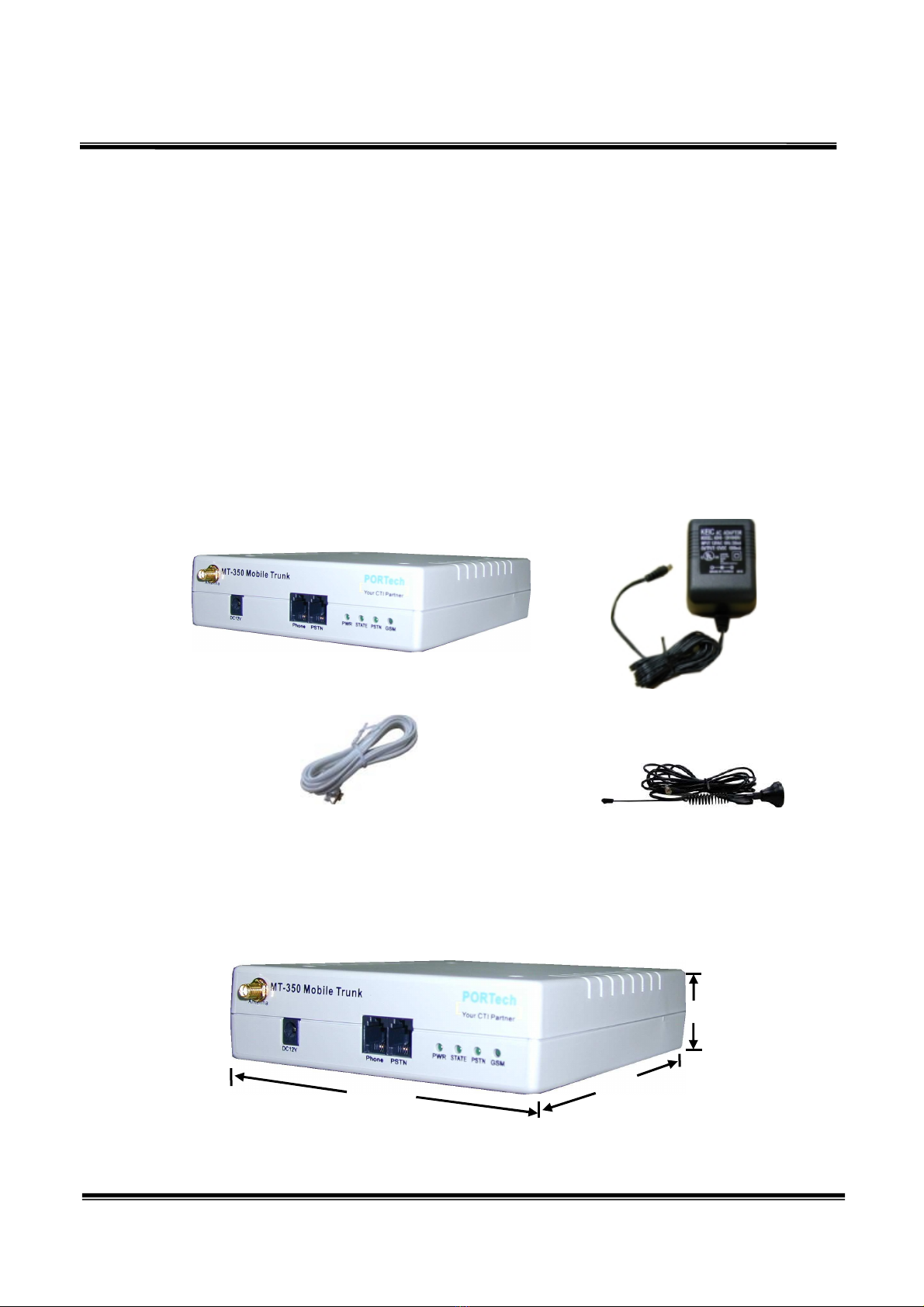
(1) ”MT-350” primary machine
(2) Transformer AC- C (110V AC – 12V C) or (220V AC – 12V C)
(3) Phone connecting box
(4) Antenna
(5) This Operation Manual
4. Dimension Drawing
(1)
(2)
(4)
(3)
4.0cm
14.5cm
17.0
cm

MT-350 Operation Manual 3
5. Demonstration on Double Sides of quipment
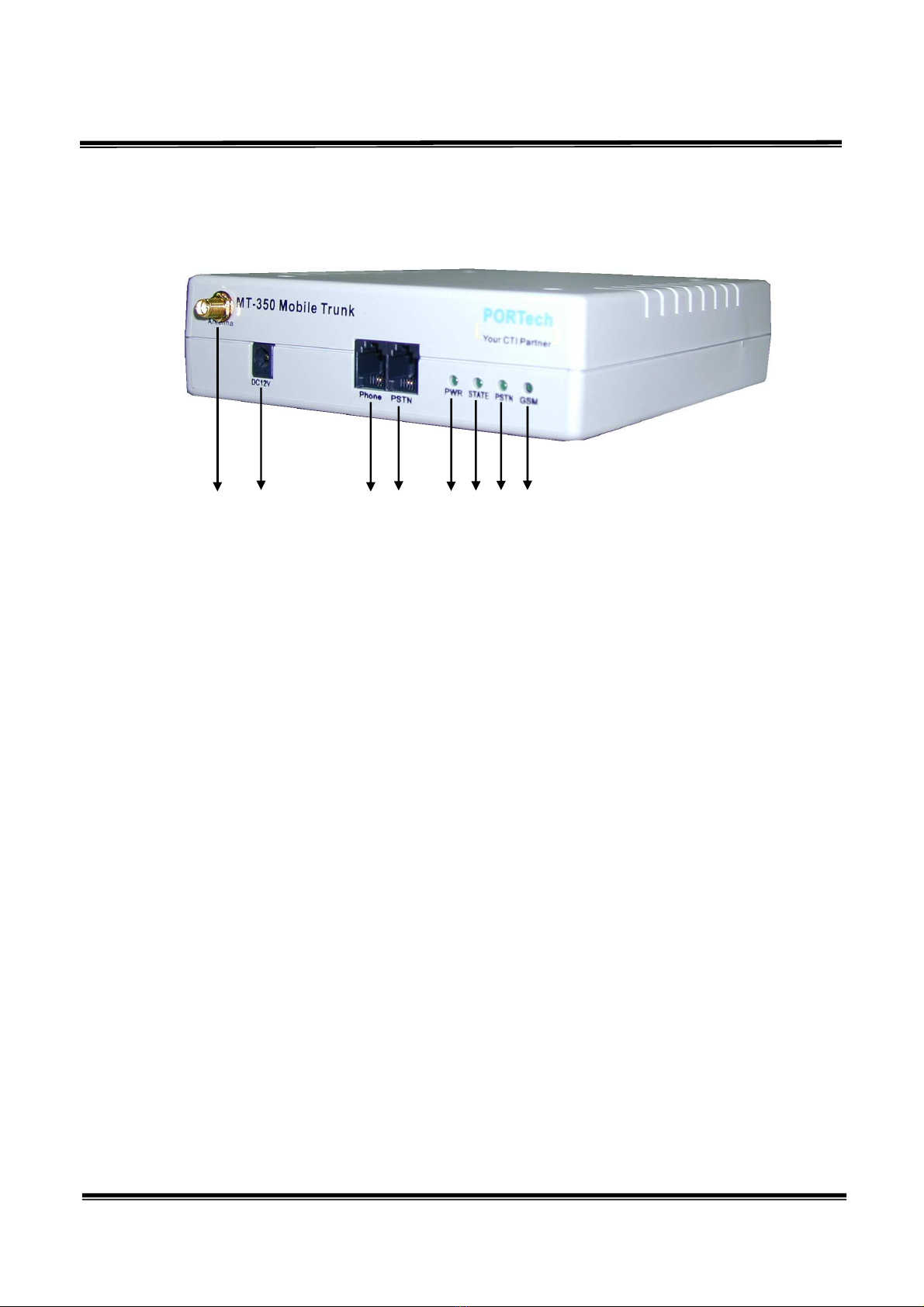
(1)Connecting seat of externally connected antenna.
(2) C 12V: power input.
(3)PHONE: Telephone/switchboard connector; with standard RJ-11 USA type plug,
connected to the Telephone Office loop of phone set or switchboard.
(4)PSTN phone jack : Central office line interface, standard RJ11 phone jack.
(5)PWR LE (Power Indicator)
(6)STATE LE : Slow flashing during the initialization stage, light up when the phone
set is picked up. Fast flashing during the GSM line in use. Flash timing indicates the
RSSI(received signal strength indicator), 5 times per second for the strongest
receiving, 1 time per second for the poorest receiving.
(7)PSTN LE : Flashing during the PSTN line in use.
(8)GSM LE : Fast flashing when the GSM channel is available, otherwise, slow
flashing.
** Insert the SIM card from the back (take off the slide first)
(1) (2) (3) (4) (5)(6)(7) (8)

MT-350 Operation Manual 4
6. Install Line Connections
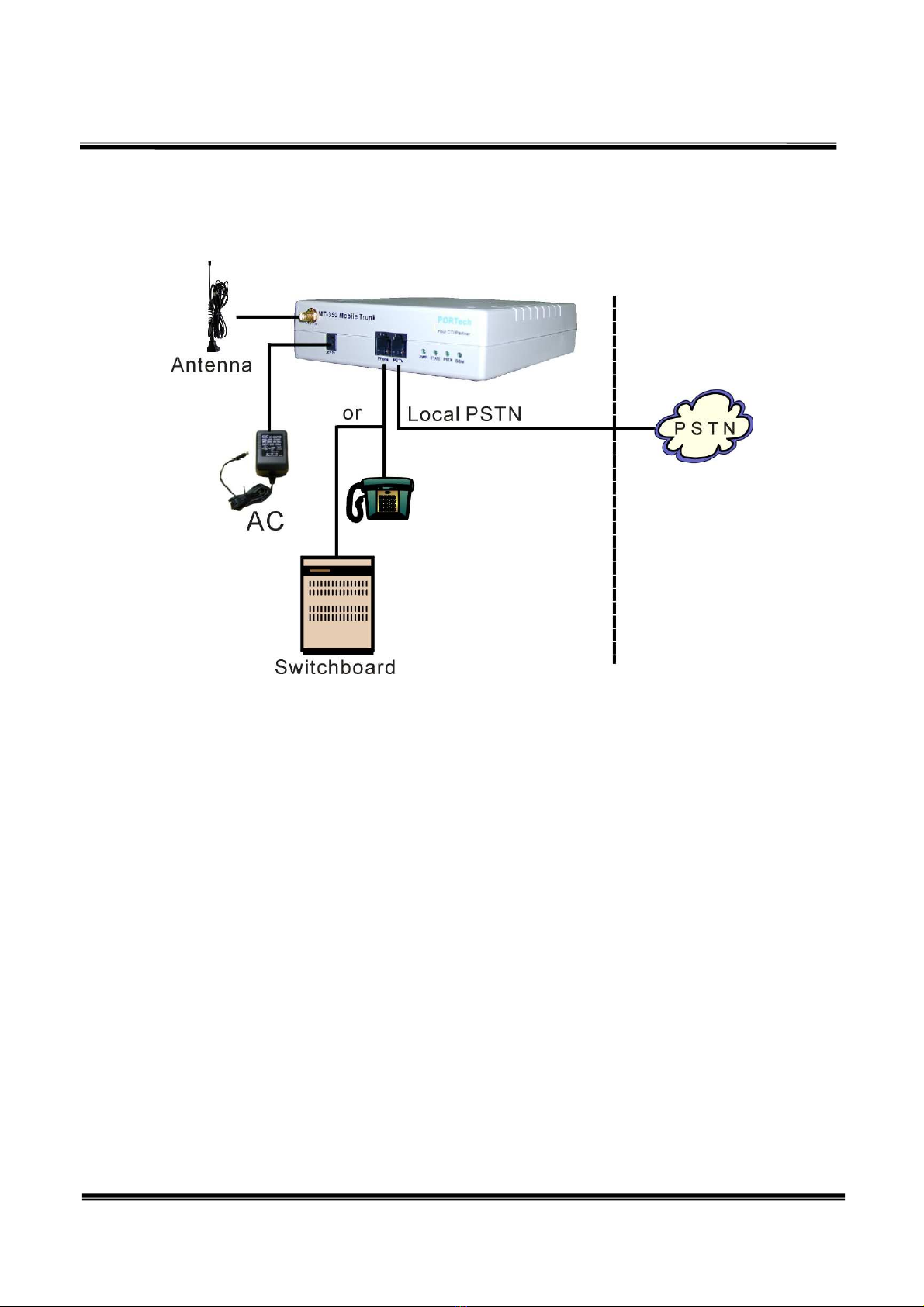
Wiring iagram
(1)Take apart your local PSTN connecting line from the phone or switchboard, and
connect it to the LINE connecting slut of MT-350. If you use MT-350 to send and
receive calls only, then you don’t need to connect the local PSTN line.
(2)Connect PHONE connecting slut to the inlet side (Telephone Office) of phone or
switchboard.
(3)Put in transformer power. The C end connects to C 12V of MT-350, and then the
PW lamp on the front side of MT-350 should light up.
(4)MT-350 will proceed with system detection after booting. Please connect the Line
and Phone correctly before energizing it. If problem is found during the system
operation, please take power source off first and process wiring task next.

MT-350 Operation Manual 5
7. Set the Allow-to-Dial Code
(1)Hold the phone and dial numbers following the order illustrated below:
***#nnnn#: n means the code that allows sending calls out from GSM. Hang up the
phone and the setting is thus completed. When the coding number is altered, follow
the above steps to set up again.
when nnnn is set to ※
※※
※**
****
**, it will close the calls-sending function from GSM.
Format: ***# [waiting for confirming voice] (turn setting function on)
nnnn# [waiting for echo voice in responding]
Where nnnn means the allow-to-dial code, which as ***#0937, #0948# are on
behave of 0937- and 0948-; the code is dialed out from GSM.
efault setting =0, all call number starting with code “0” means allow-to-dial code.
8. Code Conversion Setting
Format: ###* [Waiting for confirming voice] (turn setting function on)
aaaa# [Waiting for echo voice in responding]
bbbb# [Waiting for echo voice in responding]
Where aaaa means original code, bbbb means converted code; the ###*002#006#
means converting head codes 002- to 006- automatically.
We have defined this code dialing mechanism outputting through Telephone Office
line system of PSTN. If we want to output through GSM, we can set the first code to
“*”, such as ###*002#*006#, which means that MT-350 will auto-convert head
codes 002- to 006- and dial out through GSM.
9. Cancel Code-Conversion
Format: ###* [Waiting for confirming voice] (turn setting function on)
**# [Waiting for echo voice in responding]
is to cancel code conversion function.

MT-350 Operation Manual 6
10. Set Parameter
(1)Set GSM dial-out code amount
Format: *#** [Waiting for confirming voice]
71aabb#
aa means dial-out code amount, bb have to be inputted in exactly identical to aa.
xample: *#**711010#, which means setting dial-out codes amount = 10. If correct, the
MT-350 then will beep up once in response. If not correct, the MT-350 will
beep up four times consecutively instead.
efault setting =10
(2)Polarity reversing function
Format: *#** [Waiting for confirming voice]
510101# is to turn the reversing function off,
510202# is to turn it on (default).
efault setting = 02
(3) efinition of TMF reversing signal
Format: *#** [Waiting for confirming voice]
52aabb#
In some regions or systems, TMF reversing signals vary and can be defined by
this function:
aa= 11 (* TONE), 12(# TONE), 13(A TONE), 14(B TONE), 15(C TONE),
00( TONE)
bb needs conforming to aa.
efault setting = 15 (C TONE)
(4)Limit of communicating time
Format: *#** [Waiting for confirming voice]
61aabb#
aa means the communicating time in the unit of min. ( 00-99), and will show alerting
sound 30 sec ahead of hang-up. bb should be identical to aa by input. If setting to “00”, it
then means unrestricted.
xample: *#**610505#, which means that system will send out alert sound at the
Indice
Altri manuali Portech Portale

Portech
Portech MV-370 Manuale utente

Portech
Portech MV-372 Manuale utente

Portech
Portech MV-370 Manuale utente

Portech
Portech 372 Manuale di istruzioni

Portech
Portech FTA-102L Manuale utente

Portech
Portech MV-370 Manuale utente

Portech
Portech MV-374 Manuale utente

Portech
Portech MV-374 Manuale utente

Portech
Portech MV-370 Manuale utente

Portech
Portech MV-3732 Manuale utente
Manuali Portale popolari di altre marche

LST
LST M500RFE-AS Manuale utente

Kinnex
Kinnex Media Gateway Manuale utente

2N Telekomunikace
2N Telekomunikace 2N StarGate Manuale utente

Mitsubishi Heavy Industries
Mitsubishi Heavy Industries Superlink SC-WBGW256 Manuale utente

ZyXEL Communications
ZyXEL Communications ZYWALL2 ET 2WE Manuale utente

Telsey
Telsey CPVA 500 - SIP Manuale utente