PRECISION DIGITAL Minimux II PD138 Manuale utente

PRECISION DIGITAL CORPORATION
PD138 Minimux® II
Temperature & Process Scanner
•8 Inputs Per Unit, Eliminates Need for 7 Displays
•Unlimited Number of Units Per System
•Free Custom Message Labels
•Thermocouples, RTDs, Process, AC & DC Inputs
•Internally or Manually Controlled Scanning
•Adjustable Dwell Time for Each Channel
•Independent Alarm Input for Each Channel
•First-Out Alarm Indication
•Alarms Indicated by LEDs, Built-in Horn, and Relay
•Built-In 85 dB Horn with Silence Pushbutton
•Stop-On-Alarmed Channel (field select)
•Non-Interruptible 4-20 mA Inputs
•Sunlight Readable Indication
•NEMA 4X / IP65 Front
•Shallow Depth 1/8 DIN Enclosure
•-40 to 65°C Operating Temperature Range
www. .com information@itm.com1.800.561.8187

PD138 Minimux®II Temp & Process Scanner Instruction Manual
2
Disclaimer
The information contained in this document is subject to change
without notice. Precision Digital makes no representations or
warranties with respect to the contents hereof and specifically
disclaims any implied warranties of merchantability or fitness for a
particular purpose.
CAUTION: Read complete
instructions prior to
installation and operation
of the meter.
WARNING: Risk of
electric shock or
personal injury.
Warning
This product is not recommended for life support applications or
applications where malfunctioning could result in personal injury or
property loss. Anyone using this product for such applications does
so at his/her own risk. Precision Digital Corporation shall not be held
liable for damages resulting from such improper use.
Limited Warranty
Precision Digital Corporation warrants this product against defects in
material or workmanship for the specified period under
“Specifications” from the date of shipment from the factory. Precision
Digital’s liability under this limited warranty shall not exceed the
purchase value, repair, or replacement of the defective unit.
Registered Trademarks
All trademarks mentioned in this document are the property of their
respective owners.
© 2009-2015 Precision Digital Corporation. All rights reserved.
!
www. .com information@itm.com1.800.561.8187

PD138 Minimux®II Temp & Process Scanner Instruction Manual
3
Table of Contents
INTRODUCTION...........................................................................5
ORDERING INFORMATION ........................................................6
SPECIFICATIONS........................................................................7
SETUP AND PROGRAMMING OVERVIEW................................8
SAFETY INFORMATION..............................................................9
INSTALLATION............................................................................9
Unpacking...........................................................................................9
Panel Mounting.................................................................................10
CONNECTIONS OVERVIEW.....................................................11
SIGNAL CONNECTIONS...........................................................11
Three-Wire RTD Inputs.....................................................................12
Thermocouple Inputs........................................................................12
4-20 mA Inputs.................................................................................13
Voltage Inputs...................................................................................14
MULTIPLE PD138 CONNECTIONS ..........................................15
ALARM-IN CONNECTIONS.......................................................17
ALARM RELAY CONNECTIONS ..............................................18
Connections......................................................................................18
EXTERNAL SIL, ACK, & STOP/GO CONNECTIONS...............19
PROGRAMMING OVERVIEW....................................................19
Front Panel Pushbuttons and Status LED Indicators........................19
Programming Dwell Time .................................................................21
Programming Dwell Time for Multiple PD138 System......................22
Returning to Four-Second Default Dwell Time .................................22
PROGRAMMING ALARM SEQUENCES..................................22
Stop or Continuous Scanning On Alarm...........................................23
Selecting Alarm Sequence ...............................................................23
Relay Fail-Safe.................................................................................23
OPERATION...............................................................................24
Scan, Stop Scan & Quick-Scroll.......................................................24
Stop Scan.........................................................................................24
Quick-Scroll......................................................................................24
Multiple Units....................................................................................25
Built-In Horn.................................................................................25
Alarm Relay.................................................................................25
SILENCE, STOP/GO & ACK Buttons ..........................................25
External SILENCE, STOP/GO & ACK Terminals.........................25
Alarms ..............................................................................................26
First-Out Alarms (F2A)......................................................................26
Alarm Indication................................................................................27
www. .com information@itm.com1.800.561.8187

PD138 Minimux®II Temp & Process Scanner Instruction Manual
4
ALARM SEQUENCE EXAMPLES.............................................28
Sequence A......................................................................................28
If Momentary Alarm......................................................................29
If Maintained Alarm......................................................................29
Sequence F2A..................................................................................30
Acknowledge ...............................................................................31
Stop-On-Alarm..................................................................................32
MESSAGE LABELS...................................................................33
MOUNTING DIMENSIONS.........................................................34
Table of Contents
Figure 1. Panel Cutout and Mounting................................................10
Figure 2. Connector Labeling for PD138...........................................11
Figure 3. Case Dimensions – Side View............................................34
Figure 4. Case Dimensions – Top View.............................................34
www. .com information@itm.com1.800.561.8187
PD138 Minimux®II Temp & Process Scanner Instruction Manual
5
INTRODUCTION
The Minimux®II is a microprocessor-based eight channel analog input
scanner/multiplexer and annunciator that provides low-cost automatic
switching for multi-point display and alarm systems. Each Minimux®II can
automatically switch up to eight inputs to another device such as a digital
panel meter, controller, or PLC. Multiple units can be connected together
to scan an unlimited number of points. Front panel push-buttons allow for
easy programming of independent adjustable dwell times as well as rapid
channel skipping. The built-in annunciator logic can detect and indicate
which input signals are in alarm condition. The built-in horn, alarm relay,
and front panel LEDs are sure to catch the operator’s attention. Signal
switching is done with reed relays making the Minimux®II ideal for
switching thermocouples, RTDs, control loops, and AC & DC signals.
www. .com information@itm.com1.800.561.8187

PD138 Minimux®II Temp & Process Scanner Instruction Manual
6
ORDERING INFORMATION
24 VDC
Model 115 VAC
Model 230 VAC
Model Description
PD138-2 PD138-3 PD138-4 8 Channel Temp & Process Scanner
PD138-2-CL PD138-3-CL PD138-4-CL 8 Channel Temp & Process Scanner
with current loop resistor
Notes:
1.Message labels forthe PD138 may be specified at time of order or later. See page 33for details.
2.There is no special cable required to connect multiple PD138s together.
Enclosures
Model # of Units Description Mounting
PDA2501-V 1 Plastic NEMA 4X Enclosure Through Door
PDA2502-V 2 Plastic NEMA 4X Enclosure Through Door
PDA2503-V 3 Plastic NEMA 4X Enclosure Through Door
PDA2504-V 4 Plastic NEMA 4X Enclosure Through Door
PDA2505-V 5 Plastic NEMA 4X Enclosure Through Door
PDA2506-V 6 Plastic NEMA 4X Enclosure Through Door
PDA2522 2 Plastic NEMA 4X Enclosure; 1(V) 1(H) Through Door
PDA2601-V 1 Stainless Steel NEMA 4X Enclosure Through Door
PDA2602-V 2 Stainless Steel NEMA 4X Enclosure Through Door
PDA2603-V 3 Stainless Steel NEMA 4X Enclosure Through Door
PDA2604-V 4 Stainless Steel NEMA 4X Enclosure Through Door
PDA2605-V 5 Stainless Steel NEMA 4X Enclosure Through Door
PDA2606-V 6 Stainless Steel NEMA 4X Enclosure Through Door
PDA2622 2 SS NEMA 4X Enclosure; 1(V) 1(H) Through Door
PDA2701-V 1 Steel NEMA 4 Enclosure Through Door
PDA2702-V 2 Steel NEMA 4 Enclosure Through Door
PDA2703-V 3 Steel NEMA 4 Enclosure Through Door
PDA2704-V 4 Steel NEMA 4 Enclosure Through Door
PDA2705-V 5 Steel NEMA 4 Enclosure Through Door
PDA2706-V 6 Steel NEMA 4 Enclosure Through Door
PDA2722 2 Steel NEMA 4 Enclosure; 1(V) 1(H) Through Door
PDA2801 1 Plastic NEMA 4X Enclosure Through Cover
Systems
Model Description Kit Components
PDS178 Temperature
Scanning & Alarming
System
PD765-6R2-00
PD138-3
PDA2821
Process & Temperature
Meter
Minimux II
Plastic NEMA 4X Enclosure
PDS178X2
Large Display
Temperature
Scanning & Alarming
System
PD765-6X2-00
PD138-3
PDA2821
Trident X2 Meter
MINIMUX II Scanner
Plastic NEMA 4X Enclosure
www. .com information@itm.com1.800.561.8187

PD138 Minimux®II Temp & Process Scanner Instruction Manual
7
SPECIFICATIONS
Number of Channels per
Minimux 8 double-pole channels per unit
Number of Channels per
System Unlimited
Signals Switching DPST reed relays
Contact Resistance 0.2 maximum
Maximum Input Voltage 200 V (switched or common mode)
Maximum Current
Switched 0.5 A
Maximum Power Switched 10 W
Dwell Time Each channel adjustable from 0.6 to 30
seconds
Non-Volatile Memory All programming values are stored in non-
volatile
memory for ten years if power is lost
Scan Method Internal or manually controlled
Channel Indication Green LED on front panel
Disabling Channels Any channel may be disabled
Scan Stop The scan may be stopped by pressing and
holding the STOP/GO button for more than 0.5
seconds. The scan may be resumed by
pressing and releasing the STOP/GO button
quickly (less than 0.5 seconds)
Alarm Input Independent alarm input for each channel.
Input Impedance; 25 Kohm, typical pull-up to 5
V
Alarm Sequence Sequence A or Sequence F2A (First-Out)
Alarm Outputs Alarm condition indicated by:
1. Front panel red LED for each channel.
2. Relay, 1 SPDT (form C); rated 2 A @ 30
VDC or 2 A @ 250 VAC resistive load;
1/14 HP @ 125 / 250 VAC for inductive
loads. For fail-safe operation, the relay is
energized in the non-alarm state. In the
case of a power failure, the relay will go to
the alarm state, (NC contact is connected
to common).
3. Built-in horn, 85 dB.
4. Stop-on-alarmed-channel (user select)
Alarm Acknowledge Front panel ACK and rear connector terminals
External Switch Functions The functions of the front panel buttons are
available at screw terminals at the rear of the
instrument
www. .com information@itm.com1.800.561.8187

PD138 Minimux®II Temp & Process Scanner Instruction Manual
8
Message Labels Free, custom printed, 2 lines per message at
14 characters per line. Factory or field
printable. See page 33 or www.predig.com
for details.
Connections Removable screw terminal connectors
provided:
Power + Relay 22 to 12 AWG
Alarm Input, Analog
Signal, External
Switches, I/O
30 to 16 AWG
Environmental Operating temperature -40°C to 65°C
Storage temperature -40°C to 85°C
Relative humidity 0 to 95% non-
condensing
Power Options
Based On Model Number 115 VAC, ± 10%, 50/60 Hz, 4 VA
230 VAC, ± 10%, 50/60 Hz, 4 VA
12-24 VDC (9-18 VAC, 50/60 Hz) 2 W
LED Test All LEDs are tested on power-up
Enclosure 1/8 DIN, high impact plastic, UL94V-0
Front Panel NEMA 4X, panel gasket provided
Warranty 3 years parts and labor
SETUP AND PROGRAMMING OVERVIEW
Programming and installing the PD138 involves three basic steps:
1) Connections
a) AC power
b) Signal inputs and output
c) Multiple PD138s (if needed)
d) Alarm-Inputs (if needed)
e) Alarm relay (if needed)
f) External switch inputs (if needed)
2) DIP Switch Setup
a) Sequence A or Sequence F2A alarm operation
b) Stopping-on-alarm or to continue scanning on alarm
c) Relay fail-safe
3) Programming the PD138 for various functions:
a) Channels to scan
b) Dwell times of scanned channels
www. .com information@itm.com1.800.561.8187

PD138 Minimux®II Temp & Process Scanner Instruction Manual
9
SAFETY INFORMATION
CAUTION: Read complete
instructions prior to
installation and operation
of the instrument.
WARNING: Risk of
electric shock.
WARNING
Hazardous voltages exist within enclosure. Installation and service should
be performed only by trained service personnel.
INSTALLATION
There is no need to remove the instrument from its case to
complete the installation, wiring, and setup.
Unpacking
Remove the instrument from box. Inspect the packaging and
contents for damage. Report damages, if any, to the carrier.
If any part is missing or the unit malfunctions, please contact your
supplier or the factory for assistance.
!
www. .com information@itm.com1.800.561.8187

PD138 Minimux®II Temp & Process Scanner Instruction Manual
10
Panel Mounting
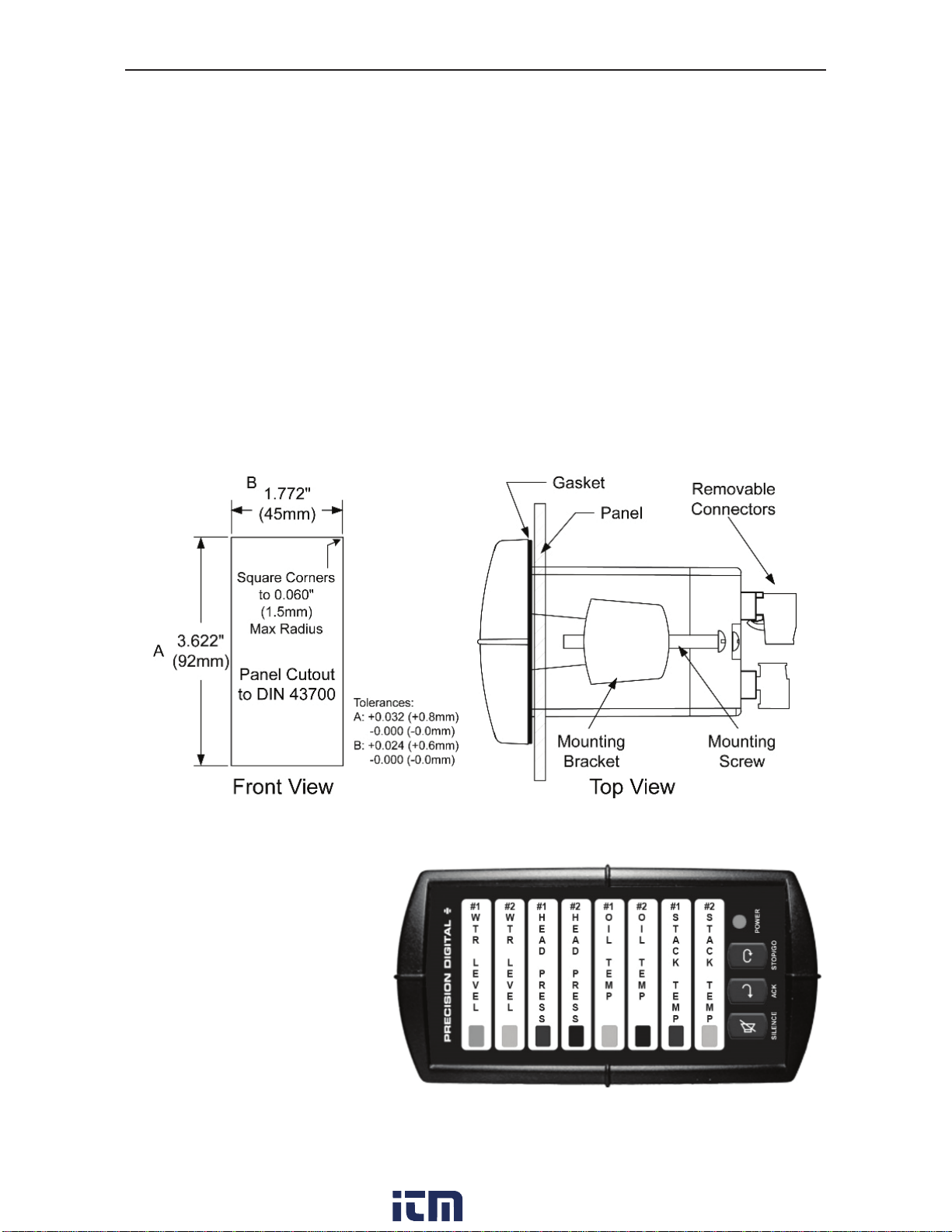
•Prepare a standard 1/8 DIN vertical panel cutout – 1.772" x 3.622"
(45 mm x 92 mm). Refer to Figure 1 for more details.
•Clearance: allow at least 4" (102 mm) behind the panel for wiring.
•Panel thickness: 0.04" - 0.25" (1.0 mm - 6.4 mm).
Recommended minimum panel thickness to maintain Type 4X
rating: 0.06" (1.5 mm) steel panel, 0.16" (4.1 mm) plastic panel.
•Remove the two mounting brackets provided with the meter (back-off
the two screws so that there is ¼" (6.4 mm) or less through the
bracket. Slide the bracket toward the front of the case and remove).
•Insert the unit into the panel cutout.
•Install mounting brackets and tighten the screws against the panel.
To achieve a proper seal, tighten the mounting bracket screws
evenly until the front is snug to the panel along its short side. DO
NOT OVER TIGHTEN, as the rear of the panel may be damaged.
Figure 1. Panel Cutout and Mounting
Note: The PD138 can
be horizontally mounted.
Free custom message
labels can be ordered to
align with horizontal
mounting, see page 33
or www.predig.com for
details.
www. .com information@itm.com1.800.561.8187
Indice
Altri manuali PRECISION DIGITAL Scanner