
Predator CESTUS 300 Manuale utente
PREDATOR CESTUS 300
PMW710
Quick Start Guide / Guide de démarrage rapide
Kurzanleitung / Guide de démarrage rapide
Skrócona instrukcja obsługi / Snabbstartsguide
Hurtigstartguide / Pikakäynnistysopas
Hurtig start-guide / Руководство пользователя
快速入門指南 /
快速入门使用指南
1
English
Specifications
• Model: PMW710
• Connector Type: USB
• Cable Length: Ø3.2, 1800mm
• Dimensions (L x W x H): 127.3 x 65.3 x 39.5 mm (Default SKU)
• Weight: 118.5±5g
• Maximum DPI: 5000
• Programmable buttons: 4
• Sensor Type: Optical
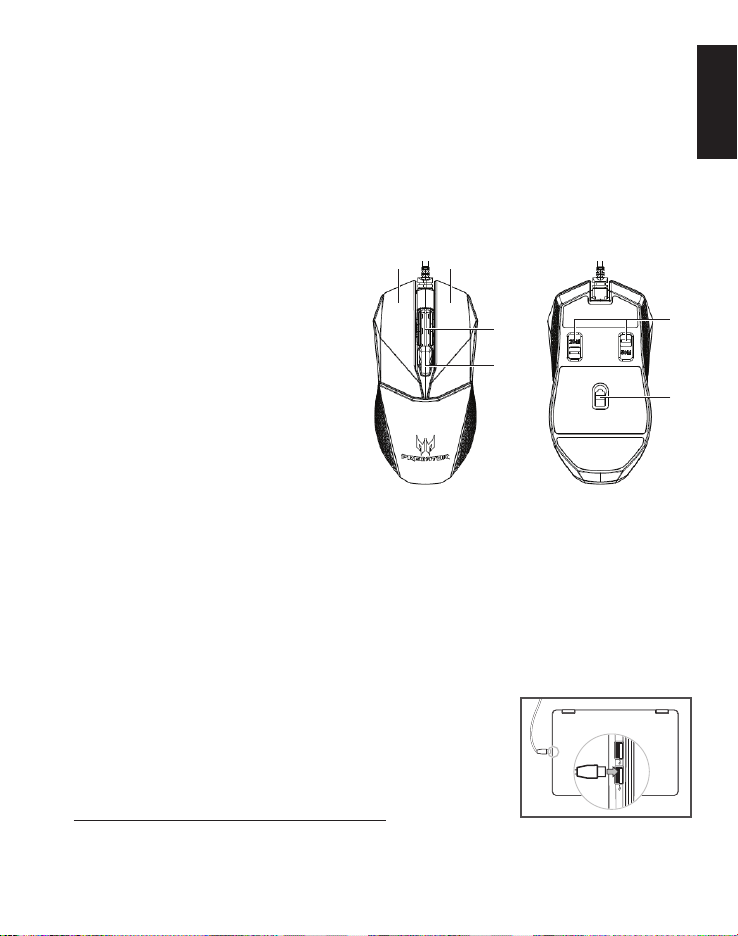
Device features
1. Scroll wheel
2. Left button
3. Right button
4. DPI settings
5. Omron dual switches
(50M + 20M)
6. Optical sensor
Contents of the box
• Gaming mouse x 1
• Quick start guide x 1
System Compatibility
• Microsoft®Windows®10, Windows®8.1, Windows®8, Windows®7
• USB Port
• Internet connection for optional software downloads
Getting started
1. Plug the USB cable into your PC.
2. System will automatically detect the device.
3. Lighting modes can be adjusted after
installation completes.
4. You can download the software from
http://go.acer.com/quartermaster
4
1
2 3
5
6
2
English
Caution
• Do not disassemble the device or operate the device under
abnormal conditions.
• Do not submerge the device in water.
• If the device RGB lights could not be lightened up, please re-plug
in the USB.
• If the device could not be functional, or there was thermal
abnormal situation, please re-plug in the USB.
• If you still encounter problems after going through the corrective
measures, please contact your dealer or an authorized service
center for assistance.
• For more information regarding the PREDATOR accessories,
please visit the PREDATOR website at www.acer.com/predator
Environment
Temperature:
• Operating: -10 °C to 50 °C
• Non-operating: -20 °C to 60 °C
Humidity (non-condensing):
• Operating: 10% to 90%
• Non-operating: 10% to 95%
Manufacturer address
Acer Inc.
8F, 88, Sec. 1, Xintai 5th Rd. Xizhi, New Taipei City 221, Taiwan
Europe – EU Declaration of Conformity
We declare under our sole responsibility that the product
is conformity with all the essential requirements and other
provisions of the European Council Directive RoHS Directive
(2011/65/EU), EMC Directive (2014/30/EU) and the Low
Voltage Directive (2014/35/EU) issued by the Commission of
the European Community.

3
English
This product must not be disposed of with your other household
waste or treat them in compliance with the local regulations or
contact your local city office, your household waste disposal
service or the shop where you purchased the product.
This device complies with Part 15 of the FCC Rules. Operation
is subject to the following two conditions: (1) This device
may not cause harmful interference, and (2) this device must
accept any interference received, including interference that
may cause undesired operation.
This equipment has been tested and found to comply with
the limits for a Class B digital device, pursuant to Part 15
of the FCC Rules. These limits are designed to provide
reasonable protection against harmful interference in a
residential installation. This equipment generates, uses and
can radiate radio frequency energy and, if not installed and
used in accordance with the instructions, may cause harmful
interference to radio communications. However, there is
no guarantee that interference will not occur in a particular
installation. If this equipment does cause harmful interference
to radio or television reception, which can be determined by
turning the equipment off and on, the user is encouraged to try
to correct the interference by one of the following measures:
• Reorient or relocate the receiving antenna.
• Increase the separation between the equipment and receiver.
• Connect the equipment into an outlet on a circuit different
from that to which the receiver is connected.
• Consult the dealer or an experienced radio/TV technician
for help.
FCC Caution: Any changes or modifications not expressly
approved by the party responsible for compliance could void
the user's authority to operate this equipment.
Notice: Canadian users
CAN ICES-3(B)/NMB-3(B)
Please visit www.acer.com/predator for warranty.
4
Français (Canada)
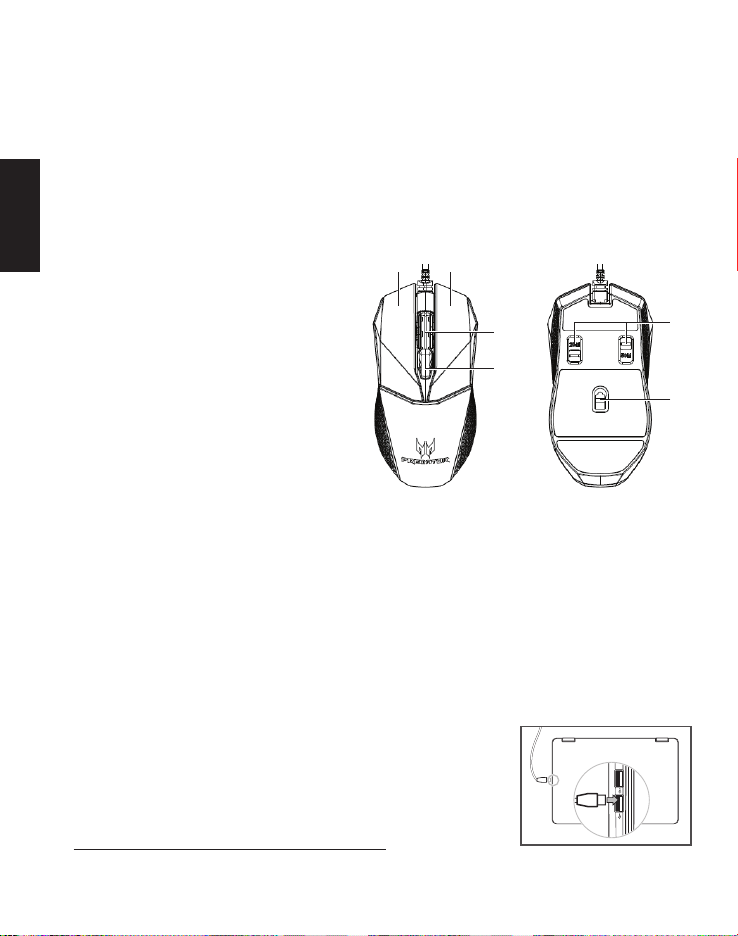
Caractéristiques techniques
• Modèle : PMW710
• Type de connecteur : USB
• Longueur de câble : Ø3,2, 1800mm
• Dimensions (Lo x La x H) : 127,3 x 65,3 x 39,5 mm (UGS par défaut)
• Poids: 118,5±5g
• PPP maximum: 5000
• Boutons programmables: 4
• Type de capteur: Optique
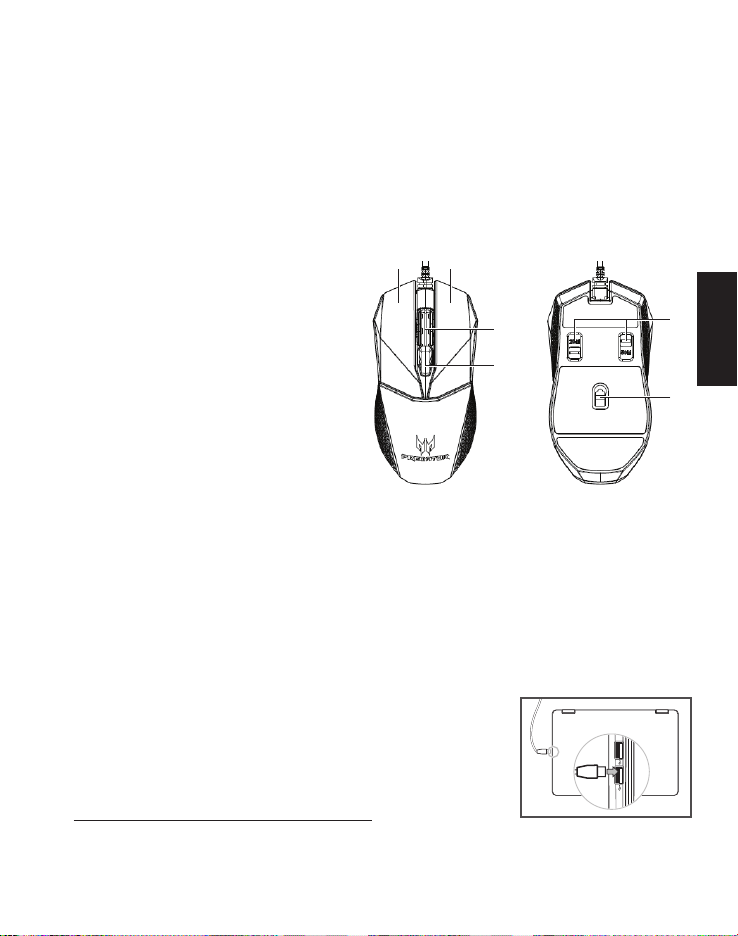
Fonctionnalités du
périphérique
1. Molette de défilement
2. Bouton gauche
3. Bouton droit
4. Paramètres PPP
5. Deux commutateurs Omron
(50M ou 20M)
6. Capteur optique
Contenu de la boîte
• Souris de jeue x 1
• Guide de démarrage rapide x 1
Compatibilité système
• Microsoft®Windows®10, Windows®8.1, Windows®8, Windows®7
• Port USB
• Connexion Internet pour les téléchargements logiciels optionnels
Pour commencer
1. Branchez le câble USB dans votre PC.
2. Le système détectera automatiquement l’appareil.
3. Les modes d’éclairage peuvent être ajustés une
fois l’installation terminée.
4. Vous pouvez télécharger le logiciel sur
http://go.acer.com/quartermaster
4
1
2 3
5
6

5
Français (Canada)
Attention
• Ne démontez pas l’appareil et n’utilisez pas l’appareil dans des
conditions anormales.
• Ne plongez pas l’appareil dans l’eau.
• Si les lumières RVB de l'appareil ne s’allument pas, veuillez
rebrancher l’USB.
• Si l’appareil ne fonctionne pas ou s’il y a eu une situation anormale,
veuillez rebrancher l’USB.
• Si vous avez toujours des problèmes après avoir passé en revue
les mesures correctrices, veuillez contacter votre revendeur ou un
centre de service agréé.
• Pour plus d’informations concernant les accessoires PREDATOR,
veuillez visiter le site Web de PREDATOR sur
www.acer.com/predator
Environnement
Température:
• En marche : -10 °C à 50 °C
• À l’arrêt : -20 °C à 60 °C
Humidité (sans condensation):
• En marche : 10% à 90%
• À l’arrêt : 10% à 95%
Adresse du fabricant
Acer Inc.
8F, 88, Sec. 1, Xintai 5th Rd. Xizhi, New Taipei City 221, Taiwan
6
Français (Canada)
Cet appareil est conforme à l’article 15 des Réglementations
de la FCC. L’utilisation de cet appareil est soumise aux deux
conditions suivantes: (1) Cet appareil ne doit pas provoquer
d’interférences nuisibles, et (2) cet appareil doit accepter toute
interférence reçue, y compris des interférences qui peuvent
provoquer un fonctionnement non désiré.
Cet appareil a été testé et reconnu conforme aux normes
applicables au matériel informatique de Classe B, en vertu
de l’article 15 des Réglementations de la FCC. Ces normes
visent à fournir aux installations résidantes une protection
raisonnable contre les interférences. Cet appareil génère, utilise
et peut diffuser des signaux radioélectriques. En outre, s’il n’est
pas installé et employé conformément aux instructions, il peut
provoquer des interférences nuisibles aux communications
radio. Quoi qu’il en soit, on ne peut pas garantir que des
interférences ne se produiront pas dans certaines installations.
Si l’appareil est à l’origine de nuisances vis-à-vis de la réception
de la radio ou de la télévision, ce que l’on peut déterminer en
l’allumant puis en l’éteignant, il est recommandé à l’utilisateur
de prendre une des mesures suivantes pour tenter de remédier
à ces interférences:
• Réorientez ou changez l’antenne réceptrice de place.
• Éloignez l’appareil du récepteur.
• Branchez l’appareil à une prise appartenant à un circuit
différent de celui du récepteur.
• Consultez le fournisseur ou un technicien radio/télévision
expérimenté.
Avertissement FCC : Toutes transformations et modifications
non approuvées par la partie responsable de la conformité
pourraient faire perdre à l’utilisateur son droit d’utiliser cet
équipement.
Remarque : Utilisateurs canadiens
CAN ICES-3(B)/NMB-3(B)
Veuillez visiter www.acer.com/predator pour la garantie.
7
Deutsch
Technische Daten
• Modell: PMW710
• Steckertyp: USB
• Kabellänge: Ø3,2, 1800mm
• Abmessungen (L x B x H): 127,3 x 65,3 x 39,5 mm (Standard SKU)
• Gewicht: 118,5±5g
• Maximum DPI: 5000
• Programmierbare Tasten: 4
• Sensortyp: Optisch
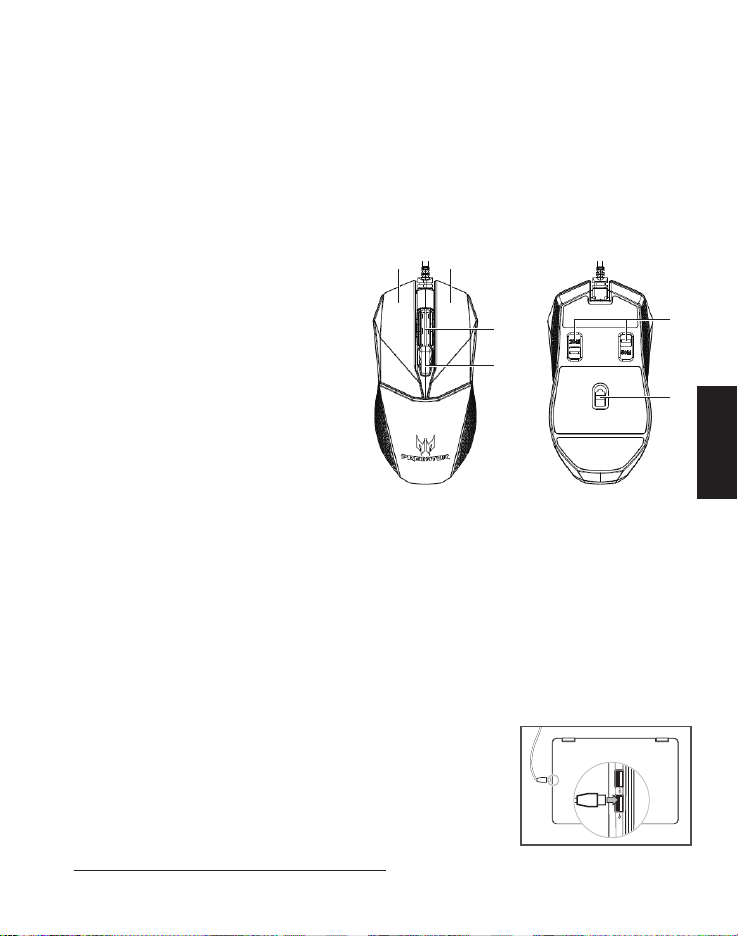
Geräteeigenschaften
1. Bildlaufrad
2. Linke Taste
3. Rechte Taste
4. DPI Einstellungen
5. Omron Dual-Schalter
(50M + 20M)
6. Optischer Sensor
Paketinhalt
• Gaming-Maus x 1
• Kurzanleitung x 1
Systemkompatibilität
• Microsoft®Windows®10, Windows®8.1, Windows®8, Windows®7
• USB-Anschluss
• Internetverbindung für optionale Software Downloads
Erste Schritte
1. Schließen Sie das USB-Kabel an Ihren PC an.
2. Das System erkennt das Gerät automatisch.
3. Die Beleuchtungsmodi können nach Abschluss
der Installation angepasst werden.
4. Sie können die Software von
http://go.acer.com/quartermaster herunterladen.
4
1
2 3
5
6
8
Deutsch
Achtung
• Nehmen Sie das Gerät nicht auseinander und betreiben Sie es nicht
unter ungeeigneten Bedingungen.
• Tauchen Sie das Gerät nicht in Wasser ein.
• Wenn die RGB-Lampen des Geräts nicht aufleuchten, stecken Sie bitte
den USB-Stecker wieder ein.
• Wenn das Gerät nicht funktionsfähig ist oder eine thermische Störung
auftrat, stecken Sie bitte den USB-Stecker wieder ein.
• Sollten Sie nach dem Durchführen der Korrekturmaßnahmen weiterhin
Probleme haben, dann wenden Sie sich bitte an Ihren Händler oder an
das technische www.acer.com/predator.
• Weitere Informationen über PREDATOR Zubehör finden Sie auf der
PREDATOR Webseite unter www.acer.com/predator
Umgebung
Temperatur:
• Betrieb: -10 °C bis 50 °C
• Nichtbetrieb: -20 °C bis 60 °C
Luftfeuchtigkeit (nicht kondensierend):
• Betrieb: 10% bis 90%
• Nichtbetrieb: 10% bis 95%
Adresse des Herstellers
Acer Inc.
8F, 88, Sec. 1, Xintai 5th Rd. Xizhi, New Taipei City 221, Taiwan
Europa - EU-Konformitätserklärung
Wir erklären in alleiniger Verantwortung, dass das Produkt mit
allen wesentlichen Anforderungen und anderen Bestimmungen der
Richtlinie des Europäischen Rates, der RoHS-Richtlinie (2011/65/EU),
der EMV-Richtlinie (2014/30/EU) und der Niederspannungsrichtlinie
(2014/35/EU) übereinstimmt, die von der Kommission der
Europäischen Gemeinschaft ausgegeben wurden.
Dieses Produkt darf nicht mit Ihrem Hausmüll entsorgt werden.
Beachten Sie die lokalen Vorschriften für den Umgang oder wenden Sie
sich an die zuständige lokale Behörde, Ihren Hausmüllbeseitigungsdienst
oder das Geschäft, in dem Sie das Produkt gekauft haben.
Bitte besuchen Sie www.acer.com/predator für Garantieinformationen.
9
Français
Caractéristiques
• Modèle : PMW710
• Type de connecteur : USB
• Longueur de câble : Ø3,2, 1800mm
• Dimensions (Lo x La x H) : 127,3 x 65,3 x 39,5 mm (UGS par défaut)
• Poids: 118,5±5g
• PPP maximum: 5000
• Boutons programmables : 4
• Type de capteur: Optique
Fonctionnalités du
périphérique
1. Molette de défilement
2. Bouton gauche
3. Bouton droit
4. Paramètres PPP
5. Deux commutateurs Omron
(50M ou 20M)
6. Capteur optique
Contenu de la boîte
• Souris de jeu x 1
• Guide de démarrage rapide x 1
Compatibilité système
• Microsoft®Windows®10, Windows®8.1, Windows®8, Windows®7
• Port USB
• Connexion Internet pour les téléchargements logiciels optionnels
Pour commencer
1. Branchez le câble USB dans votre PC.
2. Le système détectera automatiquement
l’appareil.
3. Les modes d’éclairage peuvent être ajustés une
fois l’installation terminée.
4. Vous pouvez télécharger le logiciel sur
http://go.acer.com/quartermaster
4
1
2 3
5
6
Questo manuale è adatto per i seguenti modelli
1
Indice
Lingue:


