PrimaLuceLab SESTO SENSO 2 Manuale utente

VERSION 3.0
Update 19-12-2021
SESTO SENSO 2 is made by PrimaLuceLab SpA (Italy). For any matters relating to the use, service and warranty,
please refer to the addresses given in the relevant documents.!
PrimaLuceLab SpA • Via Roveredo 20/B, 33170, Pordenone • www.primalucelab.com
SESTO SENSO 2 robotic focusing motor
USER MANUAL

PrimaLuceLab SpA SESTO SENSO 2 user manual
English
WARNING
If improperly handled, SESTO SENSO 2 may damage. So please follow the instructions below:
•Do not disassemble
•Do not open, damage or subject to electric shock or excessive impact any part of SESTO SENSO 2. Do not drop.
•Do not short the electronic elements
•Do not expose at temperatures below -20°C and above +60°C
•Do not burn or incinerate any component.
•Do not expose to rain or other atmospheric effect related to water
•Do not bend, modify or force any part of SESTO SENSO 2
Index
Components Identification 2
Contents of the package 2
Technical specifications 3
Install SESTO SENSO 2 on the telescope’s focuser 4
Install SESTO SENSO 2 in EAGLE or Windows 7/8/10/11 computer 6
Control SESTO SENSO 2 with PLAY software 9
Update SESTO SENSO 2 firmware with PLAY software 13
Calibrate SESTO SENSO 2 with PLAY software 14
SESTO SENSO 2 Advanced Settings in PLAY software 15
Controlling SESTO SENSO 2 with Virtual HandPad 16
Control SESTO SENSO 2 with ASCOM drivers and third party softwares 21
Installing 26mm, 33mm or 37mm adapters for SESTO SENSO 2 25
Troubleshooting 26
INFORMATION TO USERS 28
"
page 1
QUALITY CONTROL
Each SESTO SENSO 2 unit, after created in our laboratories, it’s tested by PrimaLuceLab technical experts to check all com-
ponents. We verify mechanics and electronics. In case you check any malfunction, please contact us immediately (+ 39-0434-
1696106 or [email protected]). Do not try to disassemble, repair or modify yourself SESTO SENSO 2, without our
written approval, in order not to loose the Producer Warrantee.

PrimaLuceLab SpA SESTO SENSO 2 user manual
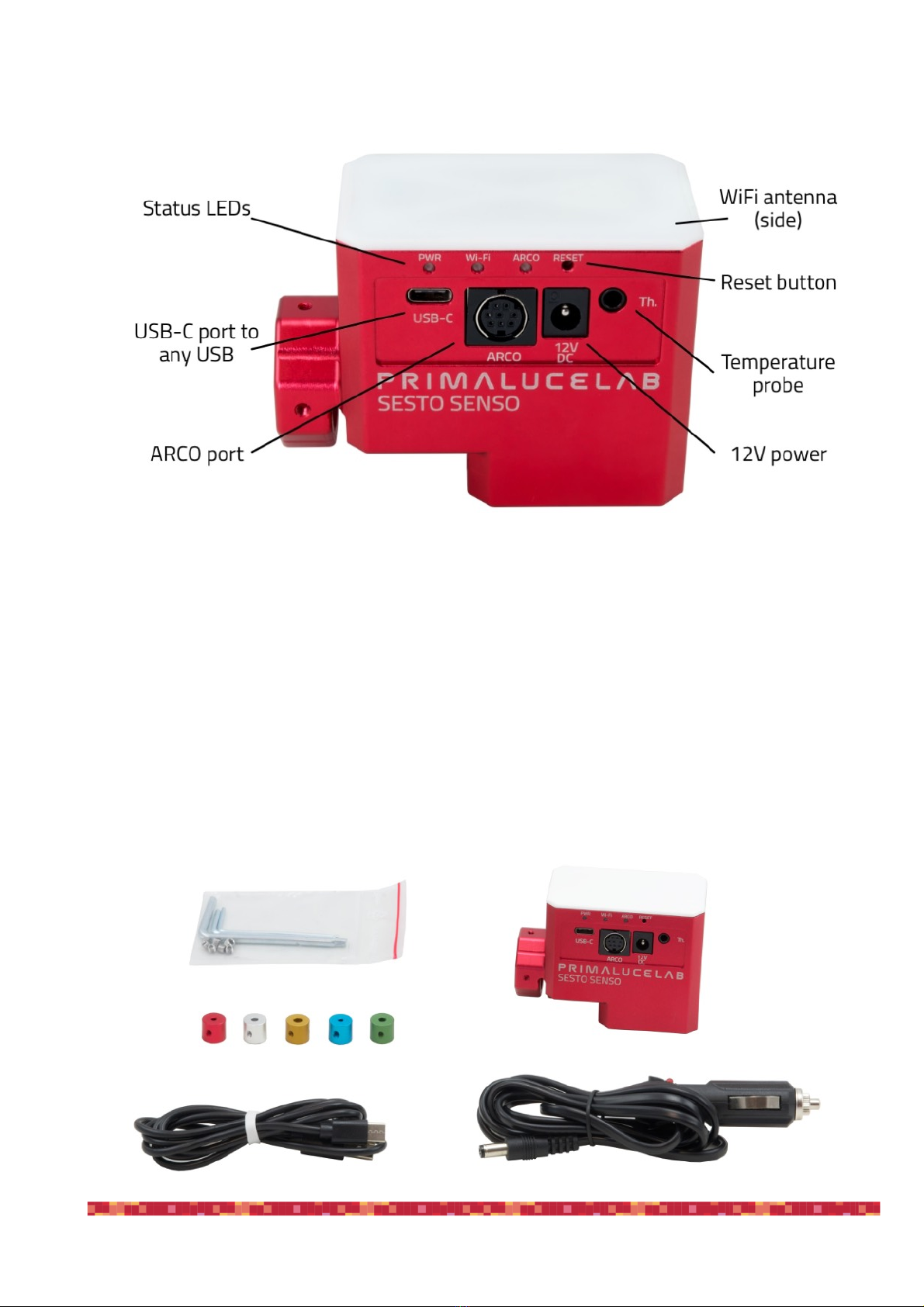
Components Identification
Contents of the package
•SESTO SENSO 2 robotic focusing motor
•5 bushings
•Allen keys with grub screws
•Power cable for cigarette plug
•USB-C to USB cable
•Quick Start guide
"
page 2

PrimaLuceLab SpA SESTO SENSO 2 user manual
Technical specifications
"
page 3
CAUTION
In order to correctly use SESTO SENSO 2, you have to connect it to your telescope’s focuser. The installation
procedure changes based on the telescope’s focuser so please refer to the next paragraphs. But if you want, you
can proceed with the SESTO SENSO 2 first use also without having the focuser not installed on the telescope’s
focuser.
NOTE
In order to proceed with installation you have to download the SESTO SENSO 2 software package from the
DOWNLOAD
section of our www.primalucelab.com website.
Save the package (it’s in zip format) onto the EAGLE or computer you want to use to control the SESTO SENSO
2 and unzip it with the proper unzip software (You can right-click and select “Expand” or you can use software
from https://www.winzip.com).
Power
12V - 5.5/2.5 connector - positive tip polarity
Power consumption @ 12V
800mA max
Working temperature
-20°C / +60°C
Control with:
USB
WiFi
Resolution
0,7 microns per step
Temperature probe
Internal to read motor temperature (in the package)
External for focus temperature compensation (optional)
Provided software
Driver for Windows 64 bit (compatible with Windows 7, 8, 10, 11)
PLAY for control with Windows 10/11 operative system
ASCOM driver for control from external software (tested with ASCOM platform
6.4)
Virtual HandPad for WiFi control
Weight
380 grams

PrimaLuceLab SpA SESTO SENSO 2 user manual
Install SESTO SENSO 2 on the telescope’s focuser
In order to connect SESTO SENSO2 to the focuser of your telescope, remove the manual focus micrometric knob
by unscrewing the screw normally present on the knurled knob. After pulling it out, you also need to disconnect the
coarse focuser knob, by means of an Allen screw on the knob. On some plastic-covered focusers, you need to re-
move the plastic to access the disassembly screw. Connect one of the bushings you find in the SESTO SENSO 2
box (based on the diameter that fits your focuser) to the small focuser shaft of your focuser.
Now you can connect SESTO SENSO 2 to your focuser by paying attention to centering the micrometric pin with
the pre-assembled bushing on SESTO SENSO 2, until it stops. By using the provided Allen screw, lock the 2 grub
screws that fix the pre-assembled bushing on SESTO SENSO 2 to the bushing you just installed on your focuser's
shaft.
"
page 4
NOTE
in order to work, SESTO SENSO 2 requires
your focuser to have the micro metric knob.
NOTE
SESTO SENSO 2 is designed to be connec-
ted to 25mm shaft. If you have another dia-
meter, you may add the optional 26, 33 or
37mm adapters. Please refer to page 25 in
order to know how to install the adapters.

PrimaLuceLab SpA SESTO SENSO 2 user manual
Then, by using the provided Allen screw, please fix the screws that fix the outer ring of SESTO SENSO 2 to your
focuser.
Finally, use the Allen screw to lock the 3 small grub screws fix the outer ring of SESTO SENSO 2 to your focuser.
"
page 5
NOTE: After installing SESTO SENSO 2 on your focuser, check the smoothness of the movement keeping SE-
STO SENSO 2 powered off and then manually moving the focus knob of your focuser. The presence of SESTO
SENSO 2 will make the movement harder (since the motor is connected) but the motion must still be uniform. If
you notice an uneven movement, repeat the installation procedure.
NOTE: SESTO SENSO 2 connects to several focusers that may have different machining and tolerances preci-
sions. Focusing accuracy, especially when using automatic focusing procedures, depends on the focuser me-
chanics and not only strictly on SESTO SENSO 2. If your focuser has an important backlash, you can adjust the
backlash parameter in the software.

PrimaLuceLab SpA SESTO SENSO 2 user manual
Install SESTO SENSO 2 in EAGLE or Windows 7/8/10/11 computer
SESTO SENSO 2 can be installed in the EAGLE or an external computer running Windows 7, 8, 10 or 11 operating
system. In the SESTO SENSO 2 package you can find a 12V power cable with cigarette plug and a PC connection
cable for USB port.
Connect SESTO SENSO 2 power cable to a power sour-
ce (SESTO SENSO 2 power port is Ø5.5 ø2.5mm with
center positive) and then connect the USB-C cable to the
USB port of your EAGLE or standard computer. You will
see the PWR LED on (this means SESTO SENSO 2 is
powered) and, after a few seconds the Wi-Fi LED will also
be become lit - This means that the SESTO SENSO 2 is
online and the WiFi connection is ready to be used.
Once connected the SESTO SENSO 2 should be auto-
matically detected and Windows should automatically
install the new driver. To verify this this, please go to Con-
trol Panel and then choose Device Manager. You should
see the SESTO SENSO 2 listed under “Ports (COM &
LPT)” and described as “Silicon Labs CP210x” (in order to
check, you can disconnect and then reconnect the SE-
STO SENSO 2 USB cable and see how Windows lists it).
If you can’t find it, Windows is not able to automatically
install the SESTO SENSO 2 driver. In order to do this,
please follow this procedure:
1) go to "Device Manager”
2) locate "CP2102N USB to UART Bridge Controller" un-
der "Other devices"
!
"
page 6
PLEASE NOTE
In order to correctly work, SESTO SENSO 2 requires an external 12V power supply and by connecting it to the
USB port of a computer is not enough. Always connect an AC power unit or a 12V battery to the SESTO SENSO
2 12V power port before connecting the USB cable to the computer.

PrimaLuceLab SpA SESTO SENSO 2 user manual
3) Right-click on the device and select "Update Driver
Software”
4) select the second option “Browse my computer for
driver software” in order to specify the location of the
downloaded driver.
5) Select the folder where you saved and expanded
the SESTO SENSO 2 software package you downloa-
ded from our website, click “Next” and complete the
installation procedure.
(Please remember to unzip/expand the file you down-
loaded before starting the installation of the SESTO
SENSO 2)
"
page 7

PrimaLuceLab SpA SESTO SENSO 2 user manual
6) at the end of the procedure, a message will appear
indicating successful installation.
Now, under COM and LPT devices, you will see a new
COM port (in this example COM16) which is the one
used by your computer to communicate with SESTO
SENSO 2.
"
page 8
NOTE
If the driver is not correctly installed in your Windows operative system, SESTO SENSO 2 won’t be able to con-
nect to your EAGLE or external computer and it won’t work. So please check that the COM driver is correctly in-
stalled before proceeding to the next step.

PrimaLuceLab SpA SESTO SENSO 2 user manual
Control SESTO SENSO 2 with PLAY software
If you want to control SESTO SENSO 2 with the EAGLE or a Windows 10/11 computer, you can use our PLAY
software you can download from the DOWNLOAD section of our website. In order to use SESTO SENSO 2 with
PLAY, you have to use the SESTO SENSO 2 firmware at least version 3.0. Please refer to the “Update SE-
STO SENSO 2 firmware with PLAY software” paragraph in order to read how to update SESTO SENSO 2
firmware.
PLAY software allows you to control not only SESTO SENSO 2 focusing motors but also other devices that may
compose your telescope. For this reason, PLAY starts with the CONFIGURATOR section where you have to con-
nect your devices first, and then you can proceed to the CAPTURE section that allows you to control the connected
devices.!
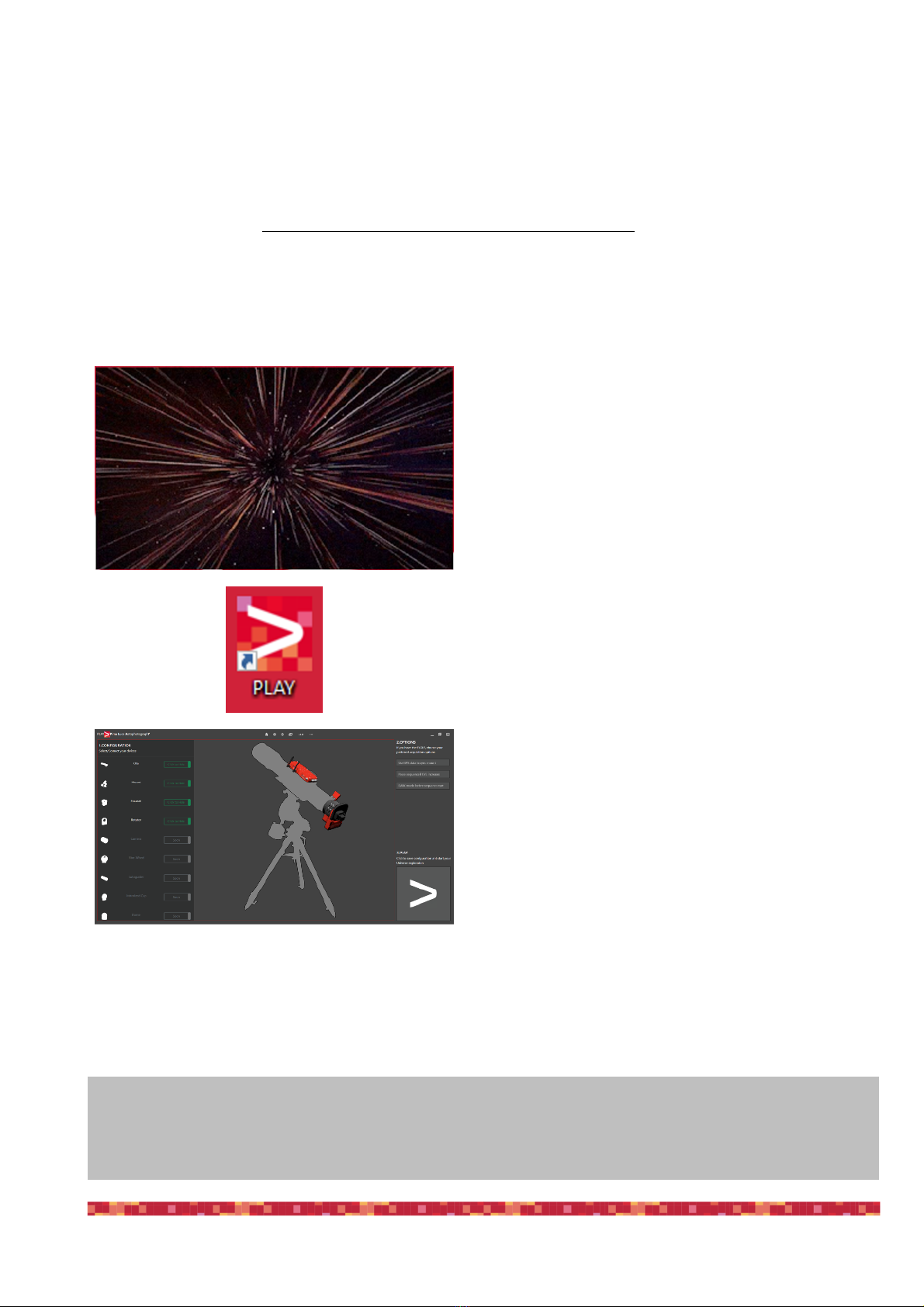
Double click on PLAY-setup.exe file to start installa-
tion, you will see an animation during the installation
procedure.
Installation process automatically creates a shortcut
on the operative system Desktop.
At the end of the installation process, PLAY is auto-
matically launched.
"
page 9
ATTENTION
In the event you need to manually reset SESTO SENSO 2 please proceed this way: with the SESTO SENSO 2
not connected to USB port and without power, press the “RST” reset button (keep it pressed for 10 seconds) and,
at the same time, connect to power. The SESTO SENSO 2 will reboot and it will be reset to factory settings.
Altri manuali per SESTO SENSO 2
2
Indice
Altri manuali PrimaLuceLab Motore