Primare D30.2 Manuale utente

>
i
Primare D30.2 Compact Disc Player User Guide
§0 Preface 11/1/01, 4:43 pm1

>Preface
ii
COPYRIGHT AND ACKNOWLEDGMENTS
Copyright © 2000 Primare Systems AB. All rights reserved.
Primare Systems AB
Idavägen 17D
SE-352 46 Växjö
Sweden
The information in this guide is believed to be correct as of the date of
publication. However, our policy is one of continuous development and so the
information is subject to change without notice, and does not represent a
commitment on the part of Primare Systems AB.
Primare is a trademark of Primare Systems AB. All rights reserved. All other
product names are trademarks or registered trademarks of their respective
owners.
Class 1 Laser Product
The compact disc player is classified as a CLASS 1 LASER product. Use of
control adjustments or Performance of procedures other than those specified
herein may result in hazardous radiation.
CAUTION – INVISIBLE LASER RADIATION WHEN OPEN AND INTERLOCK
DEFEATED. AVOID EXPOSURE TO BEAM.
FCC Warning: This equipment generates and can radiate radio frequency
energy and if not installed and used correctly in accordance with our
instructions may cause interference to radio communications or radio and
television reception. It has been type-tested and complies with the limits set out
in Subpart J, Part 15 of FCC rules for a Class B computing device. These limits
are intended to provide reasonable protection against such interference in
home installations.
EEC: This product has been designed and type-tested to comply with the limits
set out in EN55013 and EN55020.
This guide was produced by Human-Computer Interface Ltd,
http://www.interface.co.uk
§0 Preface 11/1/01, 4:43 pm2

>
iii
Contents
Introduction
WELCOME TO THE D30.2 COMPACT DISC
P L AY E R ........................................................................ (1
USING THE D30.2 WITH OTHER PRIMARE
PRODUCTS................................................................ (2
TECHNICAL SPECIFICATION............................. (2
Using the D30.2 Compact Disc Player
FRONT PANEL CONTROLS.................................. (3
FRONT PANEL DISPLAY ........................................ (4
SWITCHING ON AND OFF................................ (4
PLAYING A DISC.................................................... (5
LOCATING A POSITION ON THE DISC........ (5
Advanced use
CHANGING THE FRONT PANEL DISPLAY..... (7
REPEATING PLAYBACK.......................................... (7
PROGRAMMING A SELECTION OF TRACKS (8
Connecting the D30.2 Compact Disc Player
BACK PANEL CONNECTIONS........................... {11
POWER CONNECTION........................................ {12
ANALOGUE OUTPUTS........................................... {12
DIGITAL OUTPUT..................................................... {12
Index
§0 Preface 11/1/01, 4:43 pm3

>Preface
iv
§0 Preface 11/1/01, 4:43 pm4

>
1
Introduction
Welcome to the Primare D30.2 Compact Disc Player! This chapter introduces
you to its key features, and explains how you can use it to achieve superb
sound from your CD collection.
WELCOME TO THE D30.2 COMPACT DISC PLAYER
Every component of the D30.2, from the CD transport to the audio output
stage, has been designed to achieve the highest possible audio performance.
Top of the range Sony transport mechanism
The Primare D30.2 Compact Disc Player uses an advanced Sony transport
mechanism. A precision crystal clock oscillator is used to ensure low jitter, for
excellent audio performance.
Precision digital to analogue conversion
Digital to analogue conversion is performed by four Burr-Brown PCM1704
D/A converters. The analogue signal path is fully balanced in order to retain
the accuracy of the digital signal, and make the signal highly resistant to
interference. The D30.2 also provides a gold plated S/PDIF output for direct
connection to a digital system.
No compromise power supply for the highest possible
performance
The Primare D30.2 Compact Disc Player uses separate isolated power
supplies for the digital and analogue circuits, for maximum isolation. The result
is an extremely high signal to noise ratio, allowing you to take full advantage
of the dynamic range possible with CD.
Careful design for mechanical stability
The Primare D30.2 is designed to ensure very low mechanical noise and
electromagnetic interference for extremely accurate tracking of the disc. This
ensures that the digital signal is free from errors so it is converted into an audio
signal as close to the original as the basic principle allows. The front panel
design isolates the display circuitry from the audio circuitry to avoid
interference.
Intuitive user interface
In keeping with the philosophy of the Primare range of systems, the D30.2 can
be controlled through a very simple and intuitive interface, designed so that it
will not distract you from the pleasure of listening to music on your system.
In fact most of the features of the D30.2 can be accessed through just seven
front panel push buttons. The full set of functions, including scan and
programming, is available using the remote control supplied with the D30.2.
Alternatively, all the functions of the D30.2 can be controlled by the optional
C30 Remote Control, along with the other Primare components in your system.
§1 Introduction 11/1/01, 4:43 pm1

>Introduction
2
USING THE D30.2 WITH OTHER PRIMARE
PRODUCTS
Although the D30.2 Compact Disc Player is flexible enough to work with
virtually any other equipment you have in your system, it is ideally suited for
use with the balanced inputs of the A30.1 Integrated Amplifier. A particular

benefit of using the D30.2 with a Primare preamplifier is that you can control
your entire system with a single remote control, to give you a fully integrated
system with the simplest possible user interface.
TECHNICAL SPECIFICATION
Mechanism Sony
D/A Converter Burr-Brown PCM1704 24-bit 8 x oversampling 96kHz
Filter Burr-Brown DF1704 24-bit 8 x oversampling 96kHz
Output RCA 2.2V
Output XLR 4.4V
Output Impedance 100Ω
Frequency Response 20Hz – 20kHz (+0/-0.2dB)
Signal to Noise Ratio 100dB A-weighted
THD and noise 0.01% (20Hz – 20kHz)
Digital Output 75Ωcoaxial
Standby <7.5W (fixed power <13.5W)
Play <23.5W
Dimensions 430 x 385 x 100mm
Weight 11kg
§1 Introduction 11/1/01, 4:43 pm2

>
3
Using the D30.2 Compact Disc Player
This chapter explains how to operate the D30.2 Compact Disc Player, using
either the front panel controls or the remote control.
FRONT PANEL CONTROLS
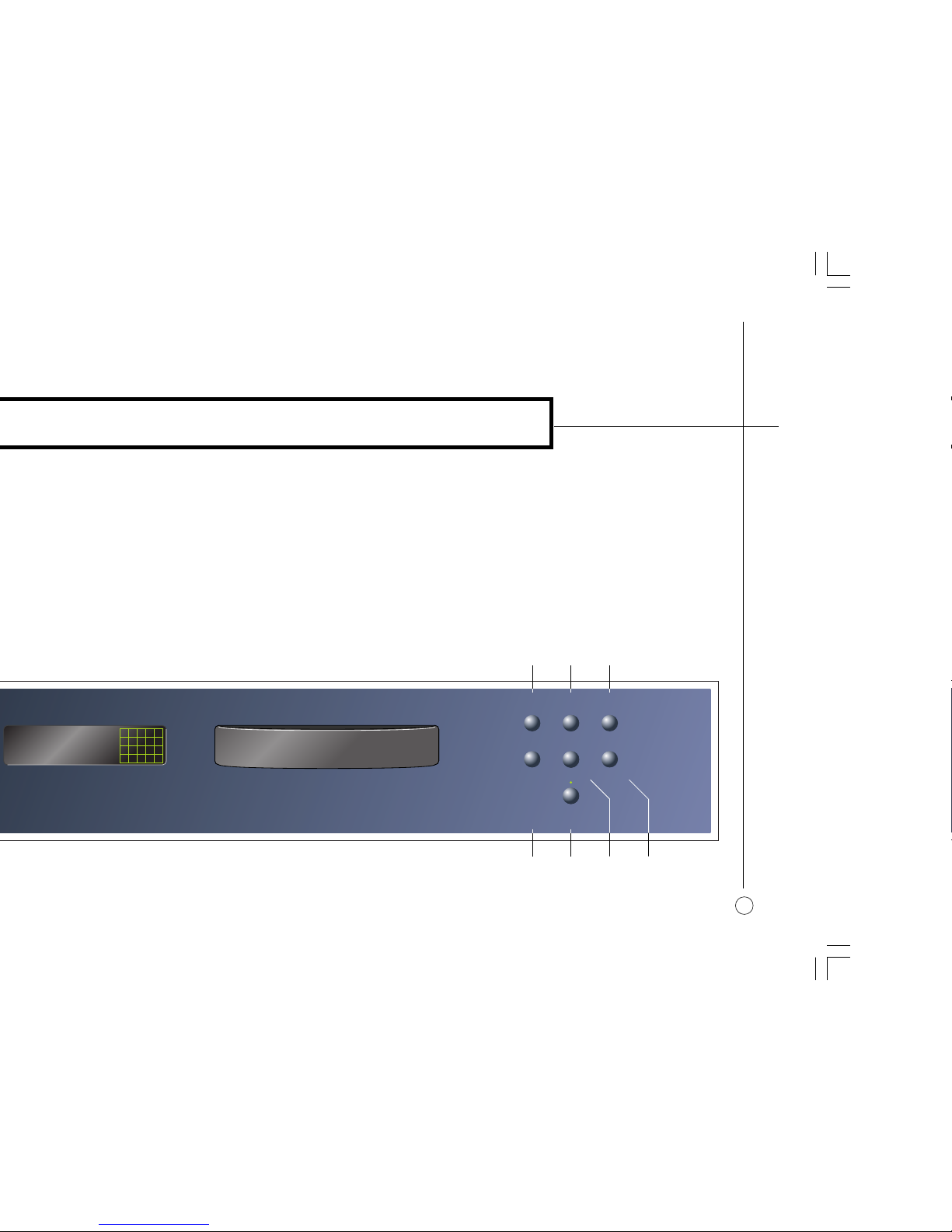
The main functions of the D30.2 Compact Disc Player can be accessed using
the six front panel push buttons, and information about its operation is
displayed on the front panel display:
]A The OPEN button opens or closes the disc tray.
]B The STOP button stops play.
]C The PLAY button plays or pauses the disc.
]D The DIM button blanks or restores the front panel display.
]E The STANDBY button switches the D30.2 to standby, or brings it out of
standby.
]F The PREVIOUS button restarts the current track, or steps to the previous
track.
]G The NEXT button steps to the next track.
D30.2 COMPACT DISC PLAYER
PLAYSTOPOPEN
PREVIOUS
STANDBY
NEXTDIM
12 1 2.34
INDEXTRACK MIN SEC
12 13 14 15
16 17 18 19 20
>
]D ]E ]F ]G
]A ]B ]C
§2 Using 11/1/01, 4:44 pm3

>Using the D30.2 Compact Disc Player
4
FRONT PANEL DISPLAY
The following illustration shows the information on the front panel display:
12 15 2.34
INDEX
REPEAT
TRACK MIN SEC
12 13 14 15
16 17 18 19 20
>
=
]
A
]
B
]F]E
]
D
]
C
]A Current track.
]B Current index number.
]C Current track time.
]D Track list.
]E Play/pause mode.
]F Repeat mode.
To dim the front panel display
•Press the DIM button on the front panel or remote control.
The display will blank.
To restore the front panel display
•Press the DIM button again on the front panel or remote control.
The display will also be restored briefly if you give any command.
SWITCHING ON AND OFF
To switch on
•Use the switch under the left-hand edge of the front panel.
During normal operation you can leave the D30.2 switched on and in
standby.
To switch to standby
•Press the STANDBY button on the front panel or the STBY button on the
remote control.
To switch on from standby
•Press the STANDBY button on the front panel, or any command on the
remote control.
§2 Using 11/1/01, 4:44 pm4

<
Using the D20 Compact Disc Player
5
PLAYING A DISC
To insert a disc
•Press the OPEN button on the front panel or remote control to open the
tray.
•Place the CD in the tray with the label uppermost.
•Press the OPEN button on the front panel or remote control to close the
tray, or gently push the front of the tray.
The front panel display briefly shows the total number of tracks on the disc, and
the total duration of the disc.
For example: 23 74.07
INDEXTRACK MIN SEC 1 2 3 4 5
6 7 8 9 10
11 12 13 14 15
16 17 18 19 20
To play a disc
•Press the PLAY button on the front panel or remote control.
While a disc is playing the front panel display shows the current track number,
the current index number, and the time of the current track.
For example: 4 1 3.45
INDEXTRACK MIN SEC 4 5
6 7 8 9 10
11 12 13 14 15
16 17 18 19 20
>
Note: If the disc does not include index points, the index number will be
shown as 1.
To stop play
•Press the STOP button on the front panel or remote control.
To pause play
•Press the PLAY button on the front panel or remote control
The pause indicator will be shown on the front panel display:
4 1 3.57
INDEXTRACK MIN SEC 4 5
6 7 8 9 10
11 12 13 14 15
16 17 18 19 20
>
=
You can then resume play by pressing the PLAY button again.
LOCATING A POSITION ON THE DISC
You can step between tracks to locate a particular track on the disc, or you
can scan forwards or backwards to locate a position within a track.
To step between tracks
•Press the PREVIOUS or NEXT buttons on the front panel, or the [or ]
buttons on the remote control.
You can hold down the button to step quickly between tracks.
§2 Using 11/1/01, 4:44 pm5

>Using the D30.2 Compact Disc Player
6
The front panel display shows the number of the track as you step:
14
INDEXTRACK MIN SEC
14 15
16 17 18 19 20
>
When you release the button the current track starts playing from the
beginning.
If you step between tracks on a CD while the disc is paused it will wait for you
to press the PLAY button on the front panel or remote control before playing
from the track you have selected.
To scan through the disc
•Hold down the ¯or ˘button on the remote control
As you scan, the front panel display shows the current track and position within
the track. If the disc includes index points the display also shows the current
index number.
•Release the button to start playing from the position you have located.
§2 Using 11/1/01, 4:44 pm6
Indice
Altri manuali Primare Lettore CD

Primare
Primare CD32 Manuale utente

Primare
Primare CD21 Manuale utente

Primare
Primare CD35 Manuale utente

Primare
Primare CD31 Manuale utente

Primare
Primare D20 Manuale utente

Primare
Primare DVD26 Manuale utente

Primare
Primare DD35 Manuale utente

Primare
Primare DD15 Manuale utente

Primare
Primare CD31 Manuale utente

Primare
Primare CDI10 Manuale utente