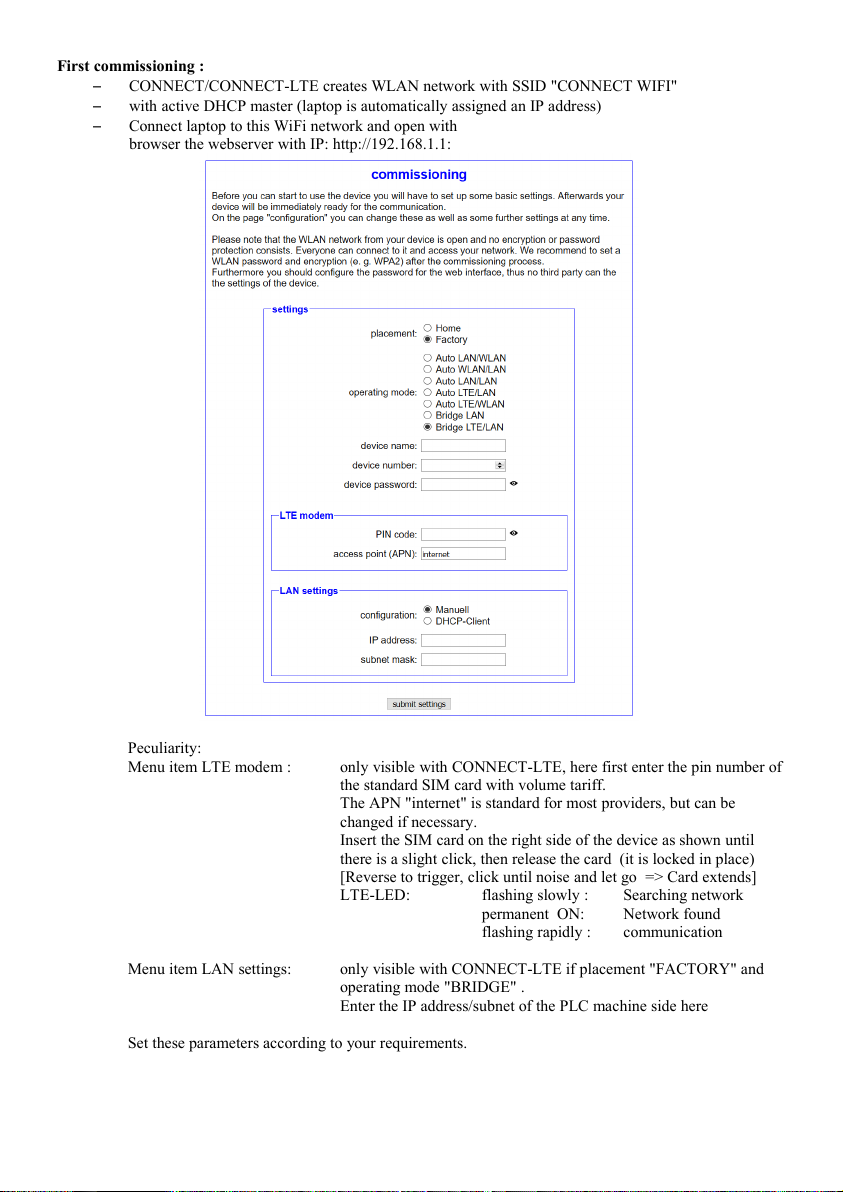
Explanation of parameters :
Placement: Home (PC-site)
Factory (plant/maschine/PLC-site)
Device name: Name of this evice (max. 15 character )
Device number: Number of this evice (1-65535) for assignment of the connection
(no duplicate device numbers allowed, please note !)
Only HOME:
operating mo e LAN A LAN B WIFI USB LTE
Auto LAN internet PC config config ---
Auto WLAN internet config PC config ---
Partner evice:
Number: Device number of the partner evice for establishing a connection
Passwor : Passwor of the partner evice for establishing a connection, not necessary if
none is store in the partner evice
Only FACTORY:
Operating mo e LAN A LAN B WIFI USB LTE
Auto LAN/WLAN internet PC PLC config ---
Auto WLAN/LAN internet PLC PC config ---
Auto LAN/LAN internet PC config PLC ---
Auto LAN (LTE) config PLC config --- internet
Auto WLAN (LTE) config config PLC --- internet
Bri ge LAN internet/PLC config config config ---
Bri ge LAN (LTE) PLC config config --- internet
Passwor : Passwor for connection security, max. 100 characters
(no man atory entry)
Connect accor ing to the tables PC, Internet, PLC/machine an establish with the PC with Internet rights
a connection to the Internet (e.g. "www.Google.com"). The configure evices then buil a
connection to each other. Note LED S1!
Web interface:
Open the CONNECT web interface by clicking "http://192.168.1.1" in your browser with an active WIFI-
connection.
Click on the 3 stripes in the top left to open the evice menu :
–Overview
–Status
–Configuration
–Firmware-up ate