
prophecy gofanco PRO-HD21Split2P Manuale utente

PRO-HD21Split2P
1x2 4K 120Hz HDMI Splier with Bulit-in & User Adjustable
EDID Management and Audio Extractor
®
Made in Taiwan
User‘s Guide

®
PRO-HD21Split2P
Congratulaons for owning a gofanco product. Our products
aim to meet all your connecvity needs wherever you go.
Have fun with our products!
Please read this manual carefully before rst use.
If you need more informaon about our products, please visit
www.gofanco.com.
For technical support, please email us at
support@gofanco.com.
For drivers/manuals download, please go to
hp://www.gofanco.com/download.

®
PRO-HD21Split2P
• Supports up to 4K @120Hz YUV 4:4:4/4:2:2/4:2:0*
• Supports HDR** at 4K @60Hz YUV 4:2:0 10bits/12bits***
• Supports VRR (Variable Refresh Rate) & ALLM (Auto Low La-
tency Mode)
• Supports CEC pass-through on input & output 2
• HDCP 2.3 and 1.4 compliant
• Wide frequency range: 25MHz~1188MHz
• Video bandwidth: 40G
2. Features
1. Introduction
3
gofanco Prophecy PRO-HD21Split2P is a cost-eective and
state-of-the-art 4K @120Hz HDMI splitter solution in the mar-
ket today, transmitting high-denition video and high-quality
audio from one source to 2 dierent locations without losing
quality. The PRO-HD21Split2P also supports HDR and the true
4K120 video! In addition, this device supports separation of
high-quality digital S/PDIF (Toslink) audio & stereo analog au-
dio from the incoming HDMI signal.
With built-in USB rmware update mechanism, compatibility
among countless HDMI sources and receivers are further gua-
ranteed. With support for 4K @120Hz resolution and high-de-
nition audio, the PRO-HD21Split2P is suitable for high-quali-
ty HDMI broadcasting, e-sports, digital signage and education
applications!
®
PRO-HD21Split2P
i
• 1x PRO-HD21Split2P
• 1x DC 5V power adapter
• 1x User Manual
3. Package Contents
Future 8K upgradable.
HDR = High Dynamic Range.
Video bandwidth of 4K @60Hz YUV 4:2:0 10bits (HDR) is 384MHz, and 4K
@60Hz YUV 4:4:4 8bits is 594MHz.
If the output does not produce video, press and hold the “reset” buon
for about 2 seconds to reset the device
*
**
***
• Supports audio extraction to Toslink & Stereo
• Supports 4K to 1080p resolution downscaling***
• Supports pre-congured EDIDs and EDID learning
• Supports xvYCC, x.v.Color & Deep Color
• Firmware upgradable via Micro-USB for expanded compatibility
• Supports Dolby Digital, DTS-HD and Dolby TrueHD audio
4

®
PRO-HD21Split2P
4. Specications
Item Description
Role of usage 1x2 Distribution Amplier (Splitter)
HDCP compliance HDCP 2.3 / 1.4
Video bandwidth Up to FRL 5 (40G)
Video support Up to 4K2K 120Hz 4:4:4/4:2:2/4:2:0
Audio support DTS-HD Master Audio, Dolby TrueHD Dolby Digital,
DTS, LPCM
ESD protection Human body model — ±15kV [air-gap discharge] &
±8kV [contact discharge]
Firmware update Via Micro-USB port
Input 1x HDMI
Output 2x HDMI + 1x TOSLINK + 1x 3.5mm phone jack
HDMI connector Type A [19-pin female]
Dip switch EDID Mode selection
Mechanical
Housing Metal enclosure
Dimensions
[L x D x H]
Model 120 x 63 x 23mm[4.7" x 2.5" x 0.9" ]
Package 198 x 137 x 74mm [7.8" x 5.4" x 2.9"]
Carton 420 x 400 x 300mm [1'4"x 1'3" x 11.8"]
Weight Model 194g[6.8 oz]
Package 350g[12.3 oz]
Power supply 5V DC
Power consumption 3 Watts [max]
Operation temperature 0~40°C [32~104°F]
Storage temperature -20~60°C [-4~140°F]
Relative humidity 20~90% RH [no condensation]
5

®
PRO-HD21Split2P
5. Connection Diagram
6
®
PRO-HD21Split2P
6. Panel Description
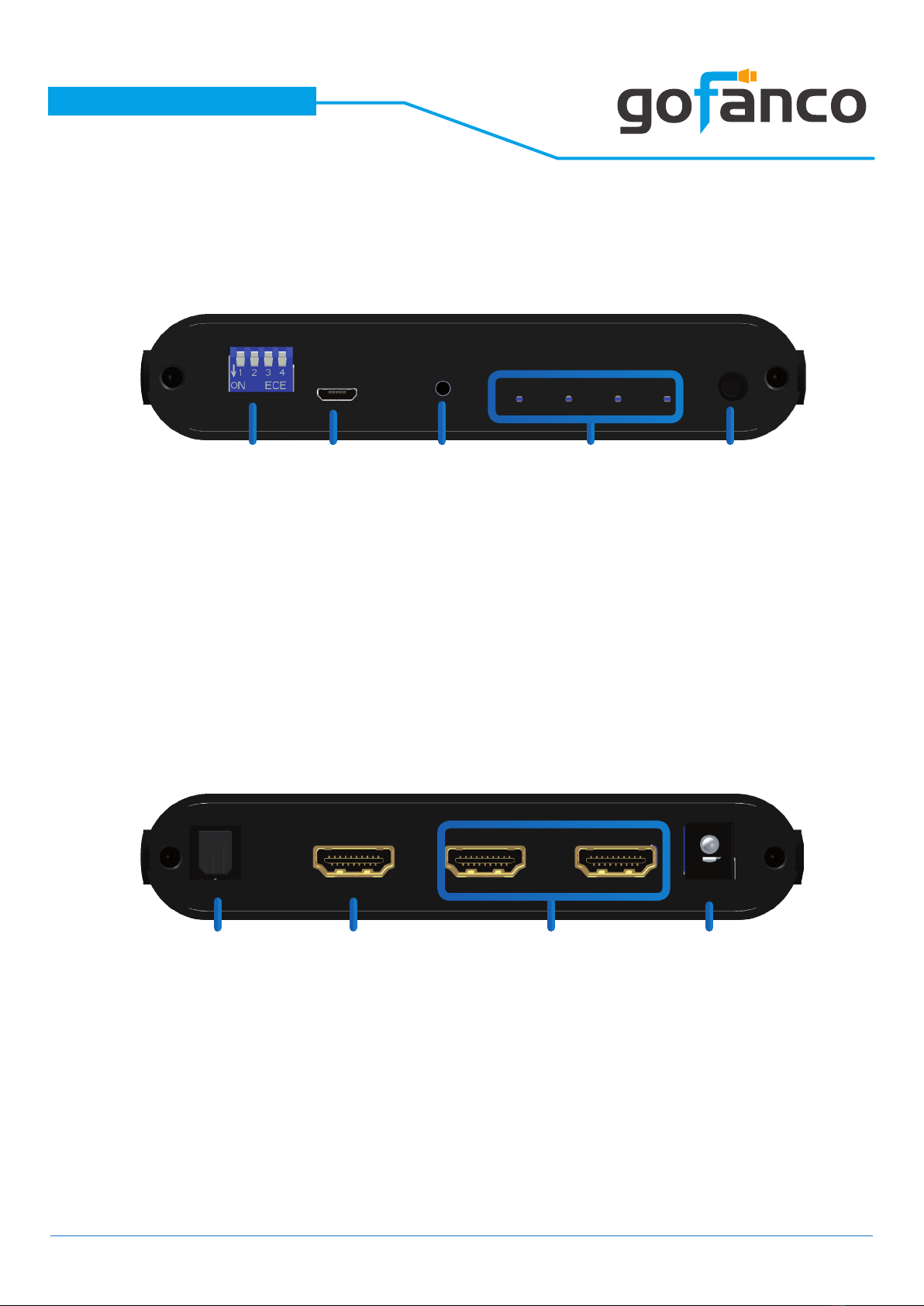
Front Panel
Rear Panel
1.EDID MODE:
See more details in the DIP SWITCH SETTING section
2.Micro-USB Port: Firmware update / Software control
3.Push Button: Reset the device
4.LED Indicators: Input FRL format, Input signal, Output 1 signal,
Output 2 signal (from left to right)
5.Stereo (3.5mm) Out
6.S/PDIF (Toslink) Out
7.HDMI IN: Connect to an HDMI input source
8.HDMI OUTPUTS 1-2: HDMI outputs to HDMI displays
9.+5V DC: Connect to 5V DC power supply unit
7
2
6
43
7
5
8 9
1

®
PRO-HD21Split2P
7. Dip Switch Setting
DIP Switch Position Description
Pin 1 Pin 2 Pin 3 Pin 4
- - 4K Ultra HD(4K@120 4:4:4 (32G)) 8ch PCM audio
- - 4K Ultra HD(4K@120 4:2:0 (24G)) 2ch audio
- - EDID learning from output 1
- - User dened EDID
- - -Enable scale up on output 1*
- - -Normal(Bypass)
---Enable scale down on output 2*
---Normal(Bypass)
8
On [] O []
1. EDID learning mode will mask display DSC informaon.
2. For a complete EDID learning, including the display DSC informaon, use
“User dened EDID” mode to learn EDID from the display.
Supported Resolution
Scale up
1080P to 4K2K
2560x1080 to 5K2K
Scale down
4K2K to 1080P
5K2K to 2560x1080
*Notes:

®
PRO-HD21Split2P
8. Installation
• Switch off all devices, including the monitors.
• Connect to the displays.
• Connect an HDMI source (such as a Blu-ray Disc player)
to the HDMI In.
• Plug in 5V DC power supply.
• Power on the HDMI monitors.
• Power on the HDMI source.
Broadcasts HDMI signal to 2 HDMI displays!
9
®
PRO-HD21Split2P
10
9. Software Operation
The included software features the following functions in
Splitter mode: 1) Main: View input/output information; 2)
EDID: Load user-dened EDID & read/download EDID; 3) Sys-
tem: Firmware version/update & FRL (Fixed Rate Link) output
This Windows PC software can be downloaded from our web-
site. Please visit www.gofanco.com/download, search for this
product by its part# PRO-HD21Split2P, and download the
software and save it to your system.
To use the software, connect our device to a Windows PC with
a USB cable (Micro-USB to Type-A USB, not included in the
package).
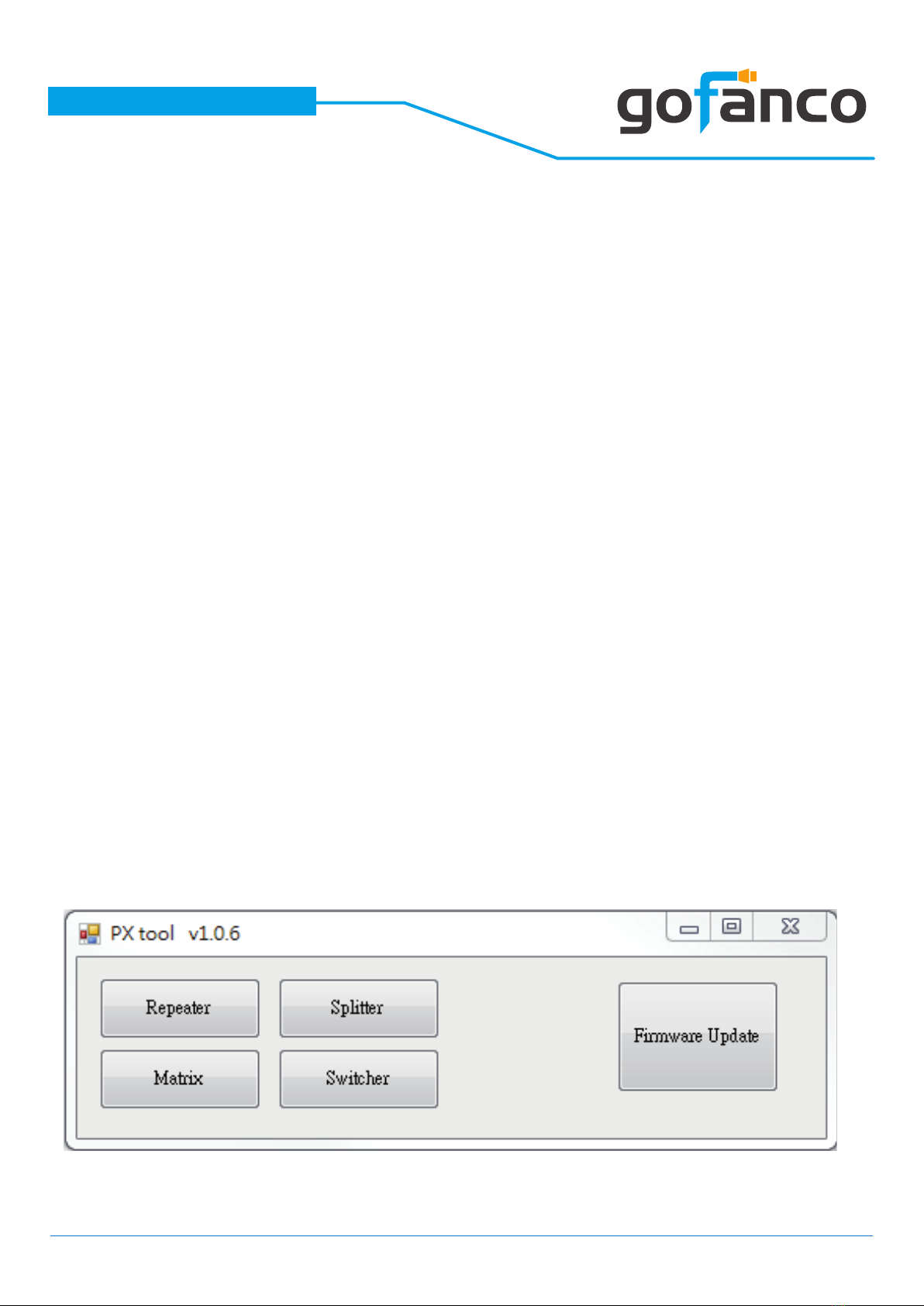
The following window will pop up when the software is laun-
ched. Click Splitter button to enter the Splitter Control Inter-
face.
Indice


