QED MicroPurge basics MP10UH Manuale utente

MP10UH
CONTROLLER
MODEL
PATENT PENDING
Instruction
Manual
P.O. Box 3726 Ann Arbor, MI 48106-3726 USA
1-800-624-2026 Fax (734) 995-1170
info@qedenv.com www.qedenv.com
P/N 95177 8-22-11

MP10UH
Controller
Optional
MP30 Drawdown
Meter
Well
Cap
Tubing
Air Supply In
Pump Air Supply
Pump Discharge
Well Wizard
Bladder
Pump
R
MP10UH Basic Setup

Conventions and Diagrams
Introduction / Quick-Start
Turning the MP10UH On
Opening Display
MicroPurge Mode For Pumps Located At Depths Less Than 250 Ft.
Manual Mode For Pumps Located At Depths Over 250 Ft.
Using CPM
Sample Collection
Sample Collection
Flow Throttle Use
Flow Throttle Use
MP10UH Battery
Troubleshooting
MP10UH Specifications
QED Service Contacts
QED Warranty
Appendix 1 ID Data Table
Use with the MP30 Level Sensing Water Level Meter
ID Mode
Bladder Pump Operation in Low-Submergence Applications
1
2
5
8
8
9
10
14
12
11
15
12
15
18
19
20
21
21
22
24
7
Contents
Topic Page
Safety Warnings
Appendix 2 Micropurge Pump Specifications 25

1
Safety Warnings
Safety warnings
Compressed air - Use caution when working with compressed air or gas. Compressed gas
cylinders are under extreme pressure and can cause unrestrained hoses to whip about danger-
ously. Do not over pressurize your controller. Failure to operate the controller within the pres-
sure limits could result in failure. Read all operating instructions before operating the MP10UH
controller.
Warning! - Do not disassemble the pneumatic pump while it is connected to a compressed gas
source. Dangerous pressures could cause injury.
Warning! The MP10UH Controller is designed to operate on high air pressure, up to 500 PSI.
Read all instructions before operating and follow all safety guidelines! Failure to do so may
cause serious injury or death.
Use only the hoses and connecting fittings supplied with the MP10UH and accessories from
QED - DO NOT MODIFY OR SUBSTITUTE THE FITTINGS OR HOSES. Do not supply the
MP10UH with compressed gas at pressures greater than 500 PSI. Be certain of the gas
supply source pressure before you connect it to the MP10UH. Do not modify the fittings on
any well caps to allow connection of the MP10UH to sampling pump systems not intended for
use with the MP10UH; applying higher pressure than intended to sampling pumps can damage
the pumps and tubing and cause injury or death to persons nearby. Connect the MP10UH only
to pumps located within the well in their normal operating position; DO NOT use the MP10UH
to operate pumps outside the well.

2
MP10UH Panel Layout:
MP10UH Control
Keypad and display
Controller to pump
connection
Compressed gas source
connection
Pressure Gauge
Connector for optional
MP30 Drawdown Control
Battery Cover
Flow throttle
Discharge cycle
indicator
ps i
0
T HR O TT L E
CONTROL PORT
DISCHARGE CYCLE
AIR IN
AIR OUT
MicroPurge Basics Controller
MP Micro Purge
ID ID Time Set MN Manual Time Set
LVL LevelShutoff
CYCLE
I I
MODE
CPM/Value Flow/Value Flow/Value
Hold/Sample
/Cycle
Start/Stop ID/MN/MP/
Battery
Mode CPM
ID
Time R efill
Discharge
00.1
1 03
1 0.0
M PC P M 4 > 05 . 0
D
E
D
E
1-800-624-2026
micropurge.com
O
U
ED
asics
CONTROLLER
3 AABATTERIES INSIDE
MP10UH
MODEL
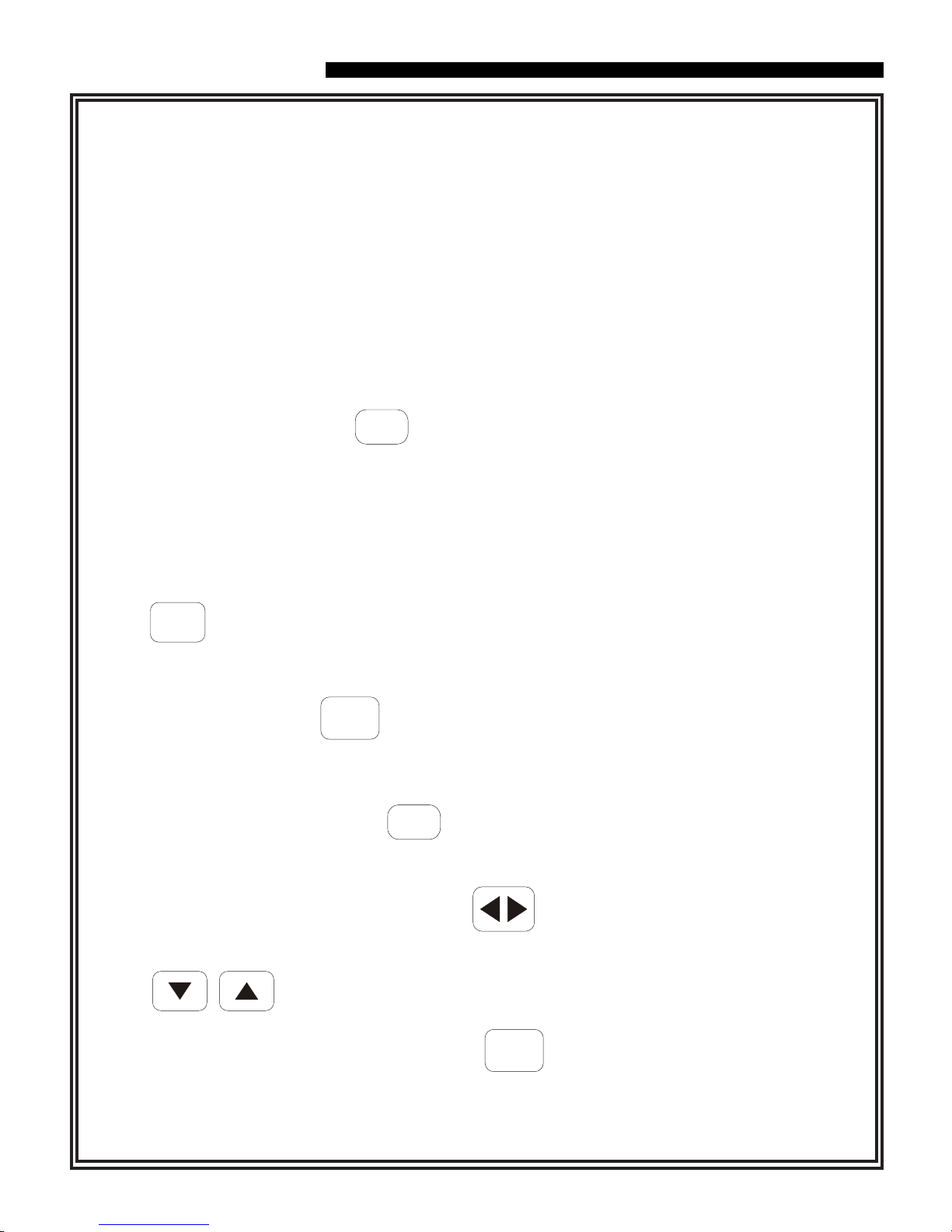
MicroPurge Mode Quick Guide
1. Opening cover turns power ON. (Close to turn OFF.)
2. Select desired Cycles Per Minute (CPM) with the key
(default value is 4 CPM).
3. Turn throttle to set depth on gauge to 10-20 feet
deeper than the pump location in the well.
4. Press CYCLE to START pumping.
5. When water discharge begins, adjust throttle until
a slow,steady flowstream is achieved.
6. Press keys to set the desired purge flow.
7. Use key to directly control sample flow and pause.
II
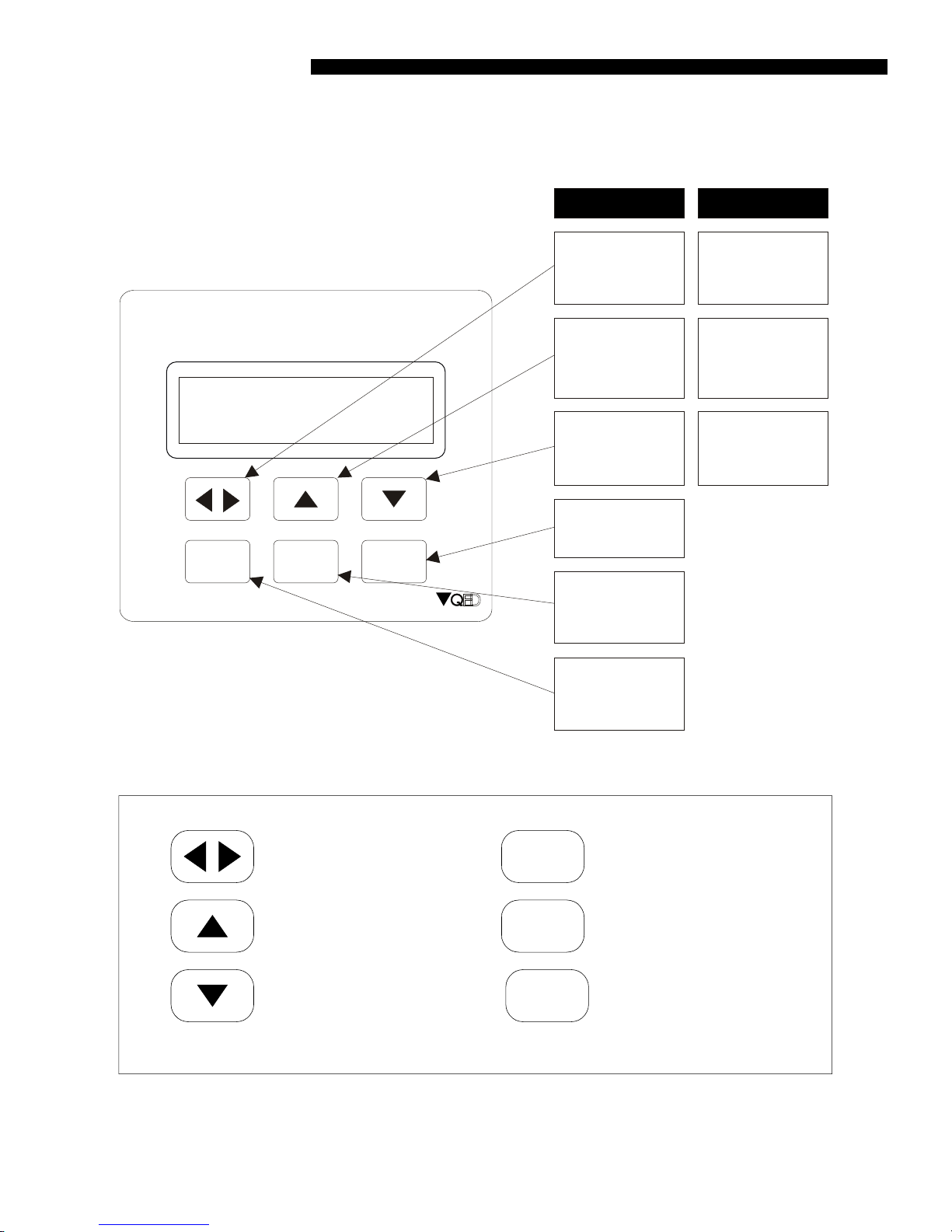
Diagrams and Conventions used in the Text

MP10UH Control Keys:
MODE
I I
CPM Button (also scroll for
item selects)
UP Button, faster pumping
(also increase item)
DOWN Button, slower
pumping (also decrease
item)
CYCLE Button
MODE Button (also battery
check)
PAUSE Button (also
manual sample)
MicroPurge Basics Controller
MP Micro Purge
ID ID Time Set MN Manual Time Set
LVL LevelShutoff
CYCLE
I I
MODE
CPM/Value Flow/Value Flow/Value
Hold/Sample
/Cycle
Start/Stop ID/MN/MP/
Battery
Mode CPM
ID
Time Refill
Discharge
00.1
1 03
1 0.0
M PC P M 4 > 05 .0
D
E
CYCLE
In MP Mode
Cycle Per Minute
key - Changes
cycle per minute Scrolls cursor
Faster key -
Speeds up flow
Slower key -
Slows down
flow
Pause key -
Pauses flow for
sampling
Mode key -Selects
the operation
mode. Also battery
check
Cycle key -Selects
Start and Stop of
pump cycling
Changes a value
at the cursor
location
Changes a value
at the cursor
location
In Other Modes
Diagrams / Conventions
3
Diagrams and Conventions used in the Text (cont.)

MP10UH Display:
00.1
M P C PM 4 > 05 .0
1 03 1 0.0 Discharge time
setting in
seconds
Indicates if
pump is
Refilling or
Discharging
Cycles per
minute setting
The mode the
controller is in
Refill time
setting in
seconds
Time
remaining
in the cycle ID for time
settings
4
Abbreviations:
Diagrams / Conventions
Diagrams and Conventions used in the Text (cont.)
CPM
MP
ID
HELD
MN
BAT
LVL
>
Cycles Per Minute
MicroPurge Mode
ID Time Set Mode
Held In A Cycle
Manual Time Set Mode
Battery
Level Pause
Indicates Refill Or Discharge Cycle

Manual Mode Operation Directly set pump refill and discharge cycle times for deep well
applications.
MicroPurge Mode Operation Simple Increase / Decrease keys allow you to easily set the
flow rate you need for each well, for pump depths to approximately 250 ft.
Level Delay Interface The controller plugs into the optional MP30 MicroPurge Drawdown/
Water Level Meter to provide direct feedback of well drawdown and to pause pump operation
until the level recovers.
Insert Batteries
Introduction/quick Start
5
Introduction / Quick start
The MP10UH Micro Purge Basics Controller is used to operate QED Well Wizard bladder
sampling pumps to purge and sample ground water.The MP10UH has specific design features
to make MicroPurge sampling easier. These features include:
IDTime Set Mode Operation Quickly recalls pre-determined MicroPurge settings for each
well by specifying a 3-digit ID.
The optional MP30 MicroPurge Drawdown / Water Level Meter plugs into the MP10UH to provide
water level feedback. The MP30 uses a standard conductivity probe to detect the ground water
surface and a marked tape allowing the user to measure the depth.When the meter is set in
MicroPurge mode, the probe is lowered a specific distance below the static water level and fixed in
this position. During well sampling if the water level drops below the user-set probe position, the
MP10UH is paused which prevents further draw down by the pump. Once the level recovers the
MP10UH begins pump operation again, starting in the pump refill cycle. Use of the MP10UH with
the MP30 is detailed later in this manual.
Remove the battery cover on the top of the MP10UH. Insert 3, AA alkaline batteries into the battery
holder and carefully replace the holder in the carrier. Replace the battery cover and tighten the 4
screws. Batteries should last for about 6-8 weeks of typical full-time field use. If the MP10UH will
be stored longer than about 3 months, the alkaline batteries should be removed to prevent leakage.

Press keys to set the desired purge flow rate.
For pump depths greater than 250 ft
Select manual mode (MN) with key
Turn throttle to set pressure on gauge to 12-16 psi higher than the minimum requirement
of 0.5 psi per foot of pump depth location in the well.
For pumps located at depths less than 250 ft.
MO DE
Cycle
Introduction/Quick Start
Quick Start: Connect the pump air supply hose to the fitting label-edAIR OUT on the
MP10UH. Connect the black air supply hose to a compressed air or gas source and
connect it to the fitting labeled AIR IN on the MP10UH. Supply up to 300 psi compressed
air or gas to the controllerurn the controller throttle until the gauge reads appropriate
pressure for the depth of the sample pump approximately, 0.42 psi per foot of pump depth.
Follow instructions on the battery panel:
Opening the MP10UH case turns power on.
Note: It may take up to 20 seconds for the unit to power up.
6
Then set Refill and Discharge times as needed to begin and optimize pumping; use initial
settings of 30 seconds each for both refill and discharge for pump depths to 300 ft; for
pump depths over 300 ft., use 60 seconds each for both refill and discharge.
Press to START pumping.
When water discharge begins, adjust throttle until a slow, steady flowstream is achieved.
Then adjust refill and discharge times to achieve desired flow rate. To collect samples,
MO DE
Select MicroPurge mode (MP) with key
Turn throttle to set pressure on gauge to 4-8 psi higher than the minimum requirement of
0.5 psi per foot of pump depth location in the well.
Select desired Cycles Per Minute (CPM) with (default value is 4 CPM, lower CPM
I I
To collect samples, continue purge flow, or use key to directly
control sample flow and pause.
I I
continue purge flow, or use key to directly control sample flow and pause.
for deeper wells, higher CPM possible with shallow wells).

7
Bladder Pump Operation in Low-Submergence
QED sampling bladder pumps fill by hydrostatic pressure. As the inside of the pump's bladder
fills with water, the bladder expands. This filling and expanding of the bladder is referred to as
the "refill" half of the pump cycle. When air pressure is applied to the outside of the bladder, the
bladder is squeezed, forcing the water up the discharge tubing. This is referred to as the
"discharge" half of the pump cycle. In low-submergence applications, there is less water pres-
sure available to expand the bladder during the refill.
This can result in a smaller volume of water being pumped with each pump cycle because the
bladder may not fully expand.
As a result of the lower volume per cycle, more time will be required to bring the water to the
surface. An easy way to verify that the pump is working, prior to the water reaching the surface,
is to submerge the pump's discharge tubing in a beaker of water. Each time the pump goes into
discharge, air in the discharge tubing, which is displaced as the water level in the tubing rises,
can be seen as air bubbles coming from the end of the tubing. To optimize the pumping rate,
the refill time should be set long enough to achieve the maximum volume of air bubbles on
each pump cycle, and the discharge time should be set long enough to ensure that the air has
stopped bubbling out of the tube before the pump controller switches back into refill.
In low submergence wells, it is critical that the air pressure driving the pump not be more
than 10-15psi higher than the minimum re-quirement of 0.5 psi per foot of pump depth.
Higher pressures than this can cause the bladder to be squeezed too tightly during discharge,
a condition which can prevent the bladder from expanding during refill. To avoid this condition
in deeper wells, it is suggested that the air pressure applied to the pump be gradually increased
as the water level in the pump's discharge tubing rises. It is recommended that the air pressure
be set at 15 psi initially, and slowly increased in increments of 10 psi as needed until the water
reaches the surface. Submerging the end of the discharge tubing under water as described
above will verify whether the air pressure is set high enough.
Bladder Pump Operation in Low-Submergence Applications
Pump submergence is defined as the height of the static water column above the top of the
pump. In wells in which this water column height is 5 feet or less, the pump is considered to be
in a low-submergence application.
Indice
Altri manuali QED Controllori