Quark-Elec QK-A031 Manuale utente

Quark-Elec Manual
https://www.quark-elec.com 1of 15 2016
V1.0
QK-A031 NMEA 0183 Multiplexer with SeaTalk Converter
Features
Multiplex up to three NMEA 0183 input devices
Galvanically isolated NMEA and SeaTalk input ports
Configurable baud rates: (4.8, 9.6, 38.4k input and output)
Differential NMEA output with galvanically isolated protection
Simultaneous wireless and USB output
The internal WiFi access point connects up to 4 devices simultaneously
SeaTalk to NMEA 0183 protocol converter
Wide range of power supply voltage tolerance (DC 9-35 Volts)
Compatible with Windows, Mac, Linux, Android and iOS (Initial Configuration must be
completed using Windows software.)
This device connects to NMEA 0183 and is compatible with RS422F output devices. NMEA
0183-RS232 devices can connect to our device by using the Garmin Bridge (QK-AS03).
This device does not come pre-loaded with map data. We advise using openCPN for map
data. Some iOS apps may charge for map use.

Quark-Elec Manual
https://www.quark-elec.com 2of 15 2016
V1.0
Limited warranty
Quark-elec warrants this product to be free from defects in materials and manufacture for one
year from the date of purchase. Quark-elec will, at its sole option, repair or replace any
components that fail in normal use. Such repairs or replacement will be made at no charge to the
customer for parts and labour. The customer is, however, responsible for any transportation
costs incurred in returning the unit to Quark-elec. This warranty does not cover failures due to
abuse, misuse, accident or unauthorized alteration or repairs. A returns number must be given
before any unit is sent back for repair.

Quark-Elec Manual
https://www.quark-elec.com 3of 15 2016
V1.0
The above does not affect the statutory rights of the consumer.
Disclaimer
This product is designed to aid navigation and should be used to augment normal navigational
procedures and practices. It is the user’s responsibility to use this product prudently. Neither
Quark-elec, nor their distributors or dealers accept responsibility or liability either to the product
user or their estate for any accident, loss, injury or damage whatsoever arising out of the use of
this product.
Accuracy of this manual
The Quark-elec QK-A031 Multiplexer may be upgraded from time to time and future versions
may therefore not correspond exactly with this manual. The manufacturer of this product
disclaims any liability for consequences arising from omissions or inaccuracies in this manual
and any other documentation provided with this product.
Document history
Issue
Date
Changes / Comments
1.0
05-10-
2016
Initial release
1.1
12-12-
2016
Support WiFi station mode
Order Information
Part No
Description
QK-A031
QK-A031 NMEA 0813 Multiplexer with WiFi/USB output
Contents
Contents..................................................................................................................................................................3
1 Introduction.................................................................................................................................................... 4
2 Connections...................................................................................................................................................5
2.1 SeaTalk.............................................................................................................................................. 5
2.2 NMEA input....................................................................................................................................... 7
2.3 NMEA output.....................................................................................................................................7

Quark-Elec Manual
https://www.quark-elec.com 4of 15 2016
V1.0
2.4 WiFi output (Ad-hoc mode).............................................................................................................8
2.5 WiFi output in Station mode......................................................................................................... 10
2.6 USB port.......................................................................................................................................... 11
3 Configuration............................................................................................................................................... 13
4 Mounting.......................................................................................................................................................13
5 Specification................................................................................................................................................ 14
1 INTRODUCTION
QK-A031 NMEA 0183 multiplexer enables the connection of multiple NMEA 0183 devices and host
devices such as PCs, laptops or tablets. QK-A031 multiplexer has three NMEA 0183 inputs (listener-
ports), one SeaTalk1 input, one NMEA 0813 output (talker-port), a WiFi interface and a USB port to
connect to a host devices. The multiplexer combines NMEA data that is received on the listener ports
and sends this data to a talker port, the WiFi interface and the USB port simultaneously. The USB
port is also used for configuration of specific WiFi and NMEA ports settings.
The built-in SeaTalk1 to NMEA converter translates SeaTalk data into NMEA sentences. This data is
then combined with NMEA data received on the other inputs. This allows a SeaTalk instrument to
communicate on the NMEA network. Only one SeaTalk input is provided since the SeaTalk bus is a
single-cable system that connects all instruments together through one cable. The SeaTalk to NMEA
converter in the QK-A031 works in one direction. NMEA sentences are unable to be converted into
SeaTalk, the multiplexer just listens on the SeaTalk bus.
Data from multiple instruments is available wirelessly though a WiFi connection, giving complete
freedom to navigate, monitor and control from anywhere on board. It acts as a wireless access point
for iPad, iPhone, Android tablets and other WiFi enabled devices.
Every NMEA input on the QK-A031 is galvanically isolated (also called opto-isolation).A galvanically
isolated input prevents unwanted currents flowing between the instruments and the multiplexer.
These currents can damage equipment or interfere with radio signals and should therefore be avoided.

Quark-Elec Manual
https://www.quark-elec.com 5of 15 2016
V1.0
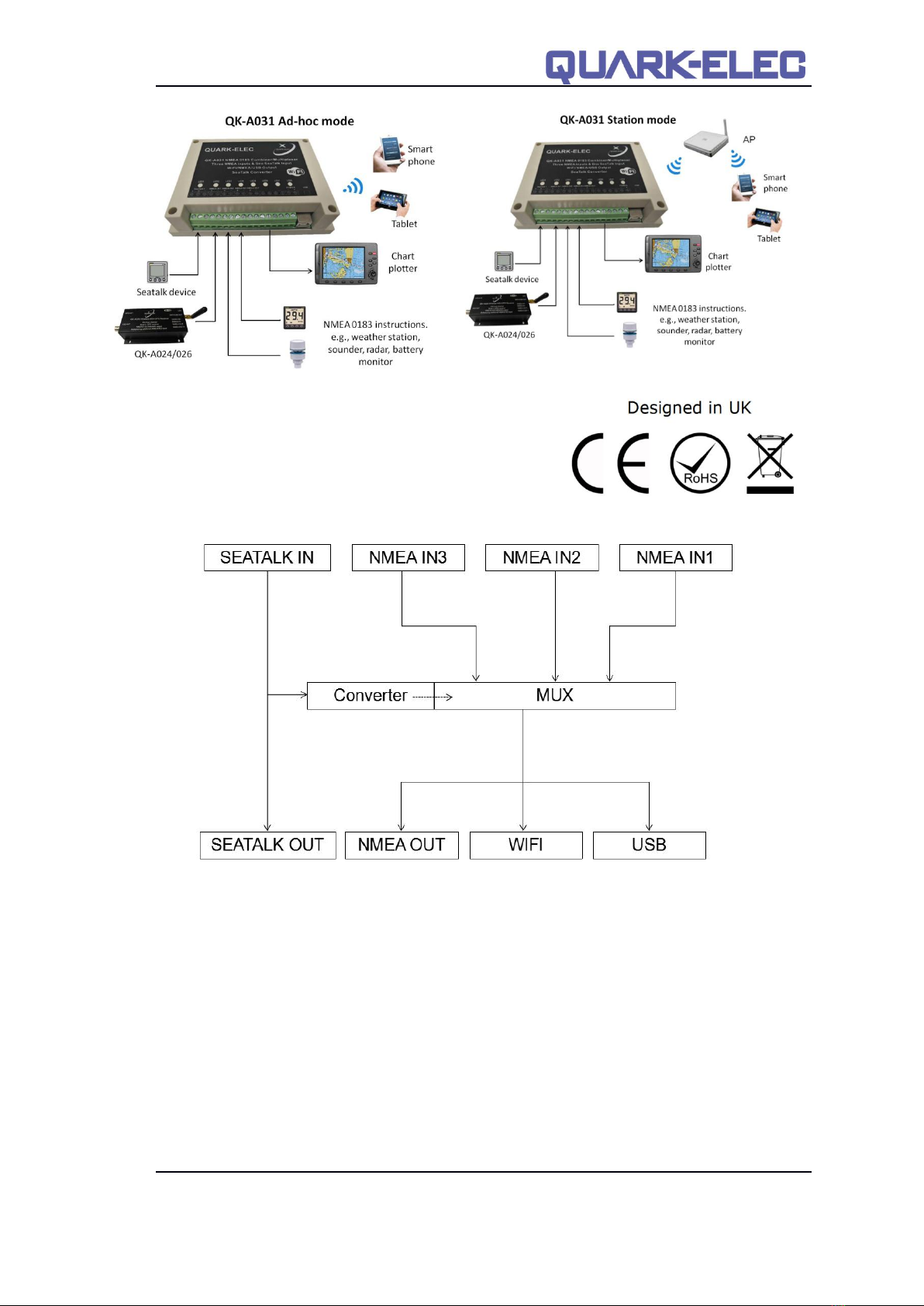
Figure 1 System diagram
2 CONNECTIONS
2.1 SeaTalk
The built-in SeaTalk1 to NMEA converter translates SeaTalk data into NMEA sentences. The
SeaTalk port has 3-Pin terminals for connection to the SeaTalk bus. Make sure the
connection is correct before powering up. A wrong connection could damage the QK-A031 and
other devices on the SeaTalk Bus.
When a SeaTalk message is received, QK-A031 checks if the message is recognised and
should be processed. When the message is recognized by the SeaTalk messages table, the
message is extracted, stored and converted to an NMEA sentence. Any unknown datagram is
ignored. These converted NMEA messages are then combined with NMEA data received on
the other inputs. This function allows a SeaTalk instrument to communicate on an NMEA
network. Only one SeaTalk input is needed since the SeaTalk bus is a single-cable system that
connects all the instruments together through one cable. SeaTalk to NMEA converter in the
QK-A031 works in one direction only. No NMEA sentences are converted into SeaTalk, the
multiplexer just listens on the SeaTalk bus.
Supported SeaTalk Datagrams
SeaTalk
NMEA
Description
00
DBT
Depth below transducer
10
MWV
Wind angle, (10 and 11 combined)

Quark-Elec Manual
https://www.quark-elec.com 6of 15 2016
V1.0
11
MWV
Wind speed, (10 and 11 combined)
20
VHW
Speed through water, includes heading when
present
21
VLW
Trip mileage (21 and 22 combined)
22
VLW
Total mileage (21 and 22 combined)
23
MTW
Water temperature
25
VLW
Total and Trip mileage
26
VHW
Speed through water, includes heading when
present
27
MTW
Water temperature
50
---
GPS latitude, value stored
51
---
GPS longitude, value stored
52
---
GPS speed over ground, value stored
53
RMC
Course over ground. RMC sentence is
generated from stored values from other GPS
related datagrams.
54
---
GPS time, value stored
56
---
GPS date, value stored
58
---
GPS lat/long, values stored
89
HDG
Magnetic heading, including variation (99)
99
---
Magnetic variation, value stored
The table shows that not all datagrams result in an NMEA 0183 sentence. Some datagrams are
only used to retrieve data, which is combined with data from other datagrams to be able to
create one NMEA 0183 sentence.

Quark-Elec Manual
https://www.quark-elec.com 7of 15 2016
V1.0
2.2 NMEA input
QK-A031 has three NMEA inputs called IN1 to IN3. Each input should be connected to one
output devices only. These inputs are galvanically isolated from QK-A031 multiplexer, as
specified by the NMEA 0183 standard. QK-A031 performs serial combining of these three
NMEA-0183 serial inputs into one NMEA-0183 serial output. Input baud rates are switch
selectable through an application on a Windows system. The default baud rate of the NMEA
0183 inputs is 4800 bps (the NMEA standard) but it can be set to any value from 4800 to 38400
bps.
Figure 2 Baud rate settings
Although the NMEA 0183 standard specifies the signal names, voltage levels and connection
methods very clearly, in reality, this standard has been interpreted with quite a bit of variation
between manufacturers. So to ensure QK-A031 is not damaged please double-check the
specifications of the devices before connecting them.
The status LEDs on the panel show each input port activity and system status.
QK-A031 features eight LEDs which indicate power(LED8), NMEA In(LED2,LED3,and LED4),
NMEA out(LED5) and SeaTalk(LED1) status respectively. LEDs 6 & 7 are not used on this
model.
NMEA In, NMEA out and SeaTalk: LEDs flash for each valid message received or sent.
Power: LED light is constantly on when powered up.
2.3 NMEA output
The NMEA 0183 output is capable of driving the combined data from the inputs. The default
baud rate is 4800bps, however it can be set to from 4800 to 38400bps using the application
software. Connect the + and - terminals of the NMEA output on the QK-A031 to the + and -
terminals of the input on the instrument(e.g., chart plotter). These terminals may also be
labeled as A/B, Data+/Data-, RX+/RX-, In+/In–.

Quark-Elec Manual
https://www.quark-elec.com 8of 15 2016
V1.0
2.4 WiFi output (Ad-hoc mode)
15 seconds after QK-A031 has been powered up, the operator should be able to scan and find
a WiFi network (SSID) similar to ‘QK-A031xxxx’ using WiFi enabled devices such as computers,
mobile phones or tablets.
Figure 3 Operating in Ad-hoc mode
Connect the device/s to ‘QK-A031xxxx’ with ‘88888888’ as the default password. Set the
protocol as ‘TCP’, IP address as ‘192.168.1.100’ and the port number as ‘2000’ in the chart
software.
Item
Setting
SSID
Similar to ‘QK-A031xxxx’
Protocol
TCP
IP address
192.168.1.100
Port
2000
With the above settings, wireless connection should be set and the operator will be able to
receive the output messages through the chart software. the operator can always check the
wireless connection with TCP/IP port monitoring software as shown below:

Quark-Elec Manual
https://www.quark-elec.com 9of 15 2016
V1.0
Figure 4 TCP/IP setting check
Operator can always change the SSID and password through the QK-A031 configuration panel,
increasing security and memorability.
Figure 5 Ad-hoc mode settings
Modify SSID
and password
here

Quark-Elec Manual
https://www.quark-elec.com 10 of 15 2016
V1.0
Note: In Ad-hoc mode, the IP address should not be changed and the password should
between 8 to 12 characters.
2.5 WiFi output in Station mode
More and more vessels have a wireless onboard network for access to the internet. In most
cases the network is created by using a 3G/4G wireless router with cellular modem. iOS
devices, tablets, mobile phones can all access the internet to obtain weather forecasts,
send/receive email and access many other internet services via onboard WiFi.
Although switching between the QK-A031 WiFi network and the onboard wireless network is
simple and quick, it can be advantageous to integrate the two networks and allowing operators
to receive the QK-A031 multiplexer output through the onboard WiFi network. This way,
operators can access the internet while receiving the NMEA 0183 messages without having to
switch between the 2 access points. To work in this way, operators should set up QK-A031 in
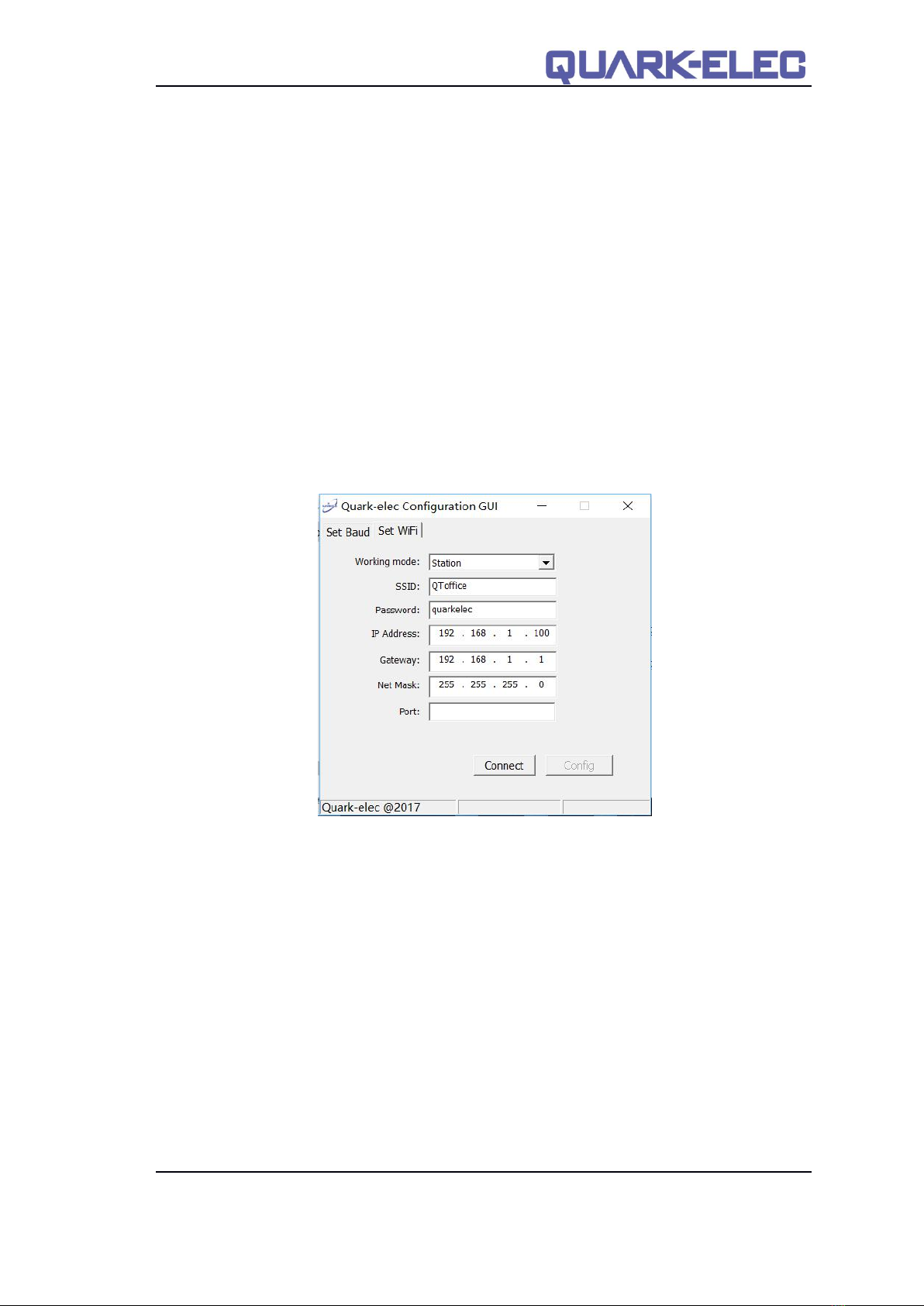
Station mode through QK-A031 configuration panel.
After the proper SSID and password setup, QK-A031 should be reset to activate the settings.
IP address, Gatway, Net Mask and Port can be left blank if no fixed IP address is needed.
Figure 6 Station mode settings
Altri manuali per QK-A031
3
Indice
Altri manuali Quark-Elec Multiplexer

Quark-Elec
Quark-Elec QK-A034-B Manuale utente

Quark-Elec
Quark-Elec QK-A034 Manuale utente

Quark-Elec
Quark-Elec QK-A035 Manuale utente

Quark-Elec
Quark-Elec Seatalk QK-A033 Manuale utente

Quark-Elec
Quark-Elec QK-A031 Manuale tecnico

Quark-Elec
Quark-Elec Seatalk QK-A033 Manuale utente

Quark-Elec
Quark-Elec QK-A034-B Manuale utente

Quark-Elec
Quark-Elec QK-A035 Manuale utente

Quark-Elec
Quark-Elec QK-A031 Manuale utente