
R/Evolution Revosys X500 Manuale utente
I

(Revosys X500 2DIN PC System Operations Manual) V1.2
I
Directory
Preface ...............................................................................4
Disclaimer.......................................................................................................... 5
Operation Precautions ........................................................6
A. Product maintenance precautions..................................................... 6
B. Product Caution.......................................................................6
C. Touch screen Caution...............................................................7
D. Front panel buttons and interface description ...............................8
E. Rear panel interfaces ...............................................................9
F. Start and shut down the system......................................................... 9
G. Rear view function........................................................................... 10
MMI VER1.2 (Operations Guide).........................................10
A. Human-computer interface using the description............................ 11
B. The software setup interface ........................................................... 13
1. Set menu 1.................................................................................. 13
1.1 Setting General Options............................................................ 13
1.2 Skin Settings menu ................................................................... 13
1.2.1 Select Interface Language Options........................................ 13
1.2.2 Changes in the interface between the effect of .................... 145
1.2.3 Select the interface background pictures ............................. 156
1.3 Music player settings................................................................. 16
1.3.1 Set the table file path music player cases .............................. 16
1.3.2 Display serial number............................................................. 17
1.3.3 Set audio file format ............................................................... 17
1.4 Radio Play Set .......................................................................... 19
1.4.1 Set the radio hardware type ................................................... 19
1.4.2 Set the frequency of the radio tuning all................................. 19
1.4.3 Set the serial number HD Radio ........................................... 19
1.5 Video Play Set .......................................................................... 20
1.5.1 Automatic full screen.............................................................. 20
1.5.2 Automatic full screen time ...................................................... 20
2. Set menu 2.................................................................................. 21
2.1 Navigation settings.................................................................... 21
2.1.1 GPS class name .................................................................... 22

(Revosys X500 2DIN PC System Operations Manual) V1.2
II
2.1.2 GPS Path ............................................................................... 22
2.1.3 GPS Port................................................................................ 23
2.1.4 GPS Mode ............................................................................. 23
2.1.5 GPS Synchronization time ..................................................... 24
2.2 Weather Settings....................................................................... 24
2.3 Media Path Settings.................................................................. 24
2.4.1 Logo Settings ......................................................................... 24
2.4.2 Select Other Logo .................................................................. 25
2.5 Plug-in settings ......................................................................... 27
3. Set menu 3.................................................................................. 28
3.1.1 Volume change due to Speed 1 ............................................. 28
3.1.2 Volume change due to Speed 2 ............................................. 29
3.2 MMI version of the introduction ................................................. 30
3.3 Mixer Set................................................................................... 31
3.4 Touch screen calibration ........................................................... 30
3.5 Advanced settings procedures.................................................. 31
C. Application software interface..................................................... 34
4.1 Car Video Surveillance.............................................................. 35
4.2 XP Explorer interface ................................................................ 36
4.3 Handwritten notepad................................................................. 36
4.4 Calculator interface ................................................................... 37
E. Application of the main interface functions................................ 38
5.1 Playing music............................................................................ 38
5.1.1 Music player / media library ................................................... 39
5.1.2 Music Player / Play patients Table.......................................... 40
5.2 Video playback interface ........................................................... 40
5.3 DVD player interface................................................................. 43
5.4 FM radio player interface .......................................................... 44
5.5 Mobile Internet access .............................................................. 45
5.6 Weather features....................................................................... 46
F. Exit System Menu .......................................................................... 47
Performance parameters ...................................................48
G. Basic features ................................................................................. 48
H. Audio Performance ......................................................................... 50
I. FM Radio Performance .................................................................... 50
Products Troubleshooting .................................................50

(Revosys X500 2DIN PC System Operations Manual) V1.2
III
System Restore Guide ......................................................54

(Revosys X500 2DIN PC System Operations Manual) V1.2
4
Preface
Thank you for purchasing the Revosys X500 2DIN Car PC. This product is used in
cars, commercial vehicles and special purpose vehicles such as the development of
entirely new set of multi-vehicle intelligent vehicle information systems.
This manual is authored by Revolution Systems LLC. Without official permission,
readers agree not to engage in some or all of the additions and deletions, adapt,
excerpt, reproduced or imitation.
The contents of this guide, the writer does not assume any express or implied
warranty or guarantee. The author is not responsible for typographical errors and
any misunderstanding caused to the reader of this manual. Despite detailed
examination of this manual it is still possible to have textual errors and omissions in
the technical description.
The Company reserves the products described in this manual without prior notice to
modify the rights of, printing errors, and software updates to make the necessary
changes at any time and incorporated into the new version of the manual.
Product Introduction
Automobile, computer and wireless communications technology continues to
change people's lives from simple means of transportation to new directions. Its
intelligent network is the inevitable development of the Information Society. Based
on embedded PC technology, the vehicle computer is the first choice for automotive
electronic devices.
The system provides the computer, the global satellite positioning and navigation,
wireless communications, mobile storage, multimedia, and rear view camera
support, forming a powerful vehicle intelligent information system. Main features
include GPS navigation, multimedia, wireless Internet, car phone, rear view camera,
Bluetooth, video conferencing, e-mail, picture browse, automotive, computer and
wireless communications technology.
The installation is simple, easy to operate, for different users, different uses of
vehicles, according to the user's specific requirements. Through this system, you
can transform the car into a mobile office, multimedia theater, and mobile command

(Revosys X500 2DIN PC System Operations Manual) V1.2
5
platform, as well as in emergency command vehicles, logistics management and
security monitoring.
For the proper use of the product, please read this manual.
Disclaimer
Watching a movie or other multimedia programs while in operation of the vehicle is
prohibited by the laws of user’s country. The multimedia/video programs provide
services to passengers of car, not the driver. For your personal security, the driver
operating the vehicle must not watch programs or any other part of the system’s
operation. The navigation system should be set before the driver begins operating
the vehicle. The driver must operate their vehicle with full attention of the road, not
operating the system.
This system’s rear view camera function supports only as a backup aid. Any
accidents caused while the driver is using the rearview camera are not the
responsibility of the Company.
Operation Precautions
A. Product maintenance precautions
1)Do not attempt to repair. This product is composed of many precision electronic
components, improper removal or modification may cause product damage. If unit
fails, turn off the power immediately and notify the company or distributor.
2)Do not subject the system to moisture, dust, steam, dirt and other pollution.
3)To remove any dirt, first turn off the power to the system
4)Do not use a diluted chemical detergent. Apply a soft cloth to wipe off surface dirt.
5)Do not subject the system to long-term exposure to the sun.
6)If water or other objects get into the machine, immediately disconnect the power
supply, and contact the company or distributor.
7) Do not frequently startup and shutdown the system. If the unit becomes hot,
suspend usage for period of time, so as not to affect the product's life.

(Revosys X500 2DIN PC System Operations Manual) V1.2
6
8)Do not subject the system to physical impact.
9)Do not attempt to access the internals other than the power of this product, so as
not to burn the internal components of this product.
10)The operating temperature of this product is -5 to 65 ℃, storage temperature is
-40 ~ 80 ℃。
B. Product note
1) Please keep strict accordance with the instructions to operate this product. Such
violation of provisions to the operation of the product leading to damage, the
Company shall not be responsible for.
2) The driver must never to drive and operate the system.
3) Any children using this product should be supervised by adults.
4) When not in use, turn off the product to avoid excessive consumption of the
vehicle's battery.
5) The following circumstances may affect the normal operation of this product:
6) Car battery is without adequate power. The system will not work.
7) Poor weather or geographical location may affect the system’s wireless network,
GPS access signal. The system’s network, GPS positioning and navigation
functions may be affected.
8) If the system’s optional rear view camera is subject to poor weather or poor
lighting conditions, this may negatively impact the performance of this function,
especially at night when the product will be less effective.
C. Touch screen Caution
1) The system’s touch screen is specifically designed to control the internal
computer.
2) Before using the touch screen feature, users must install the appropriate driver.
3) After pro-longed use of the touch screen, it is recommended that the user
calibrate the touch panel as the images may appear to deviate from the actual touch
point.
4) Because the surface film of the touch screen is fragile, please do not have it make
direct contact with hard objects such as nails, causing permanent damage. Please
(Revosys X500 2DIN PC System Operations Manual) V1.2
7
make use of the touch pen to operate the system.
5) Users can clean the touch screen surface with a soft cloth or other soft items to
prevent scratching the touch screen surface. If you need to use a detergent, do not
use with organic solvents, as these detergents can damage the surface film,
affecting touch screen’s light transmission.
6) For the scratches that are caused by hard objects leading to failure of the touch
screen, the warranty does not cover this.
D. Front panel buttons and interface description
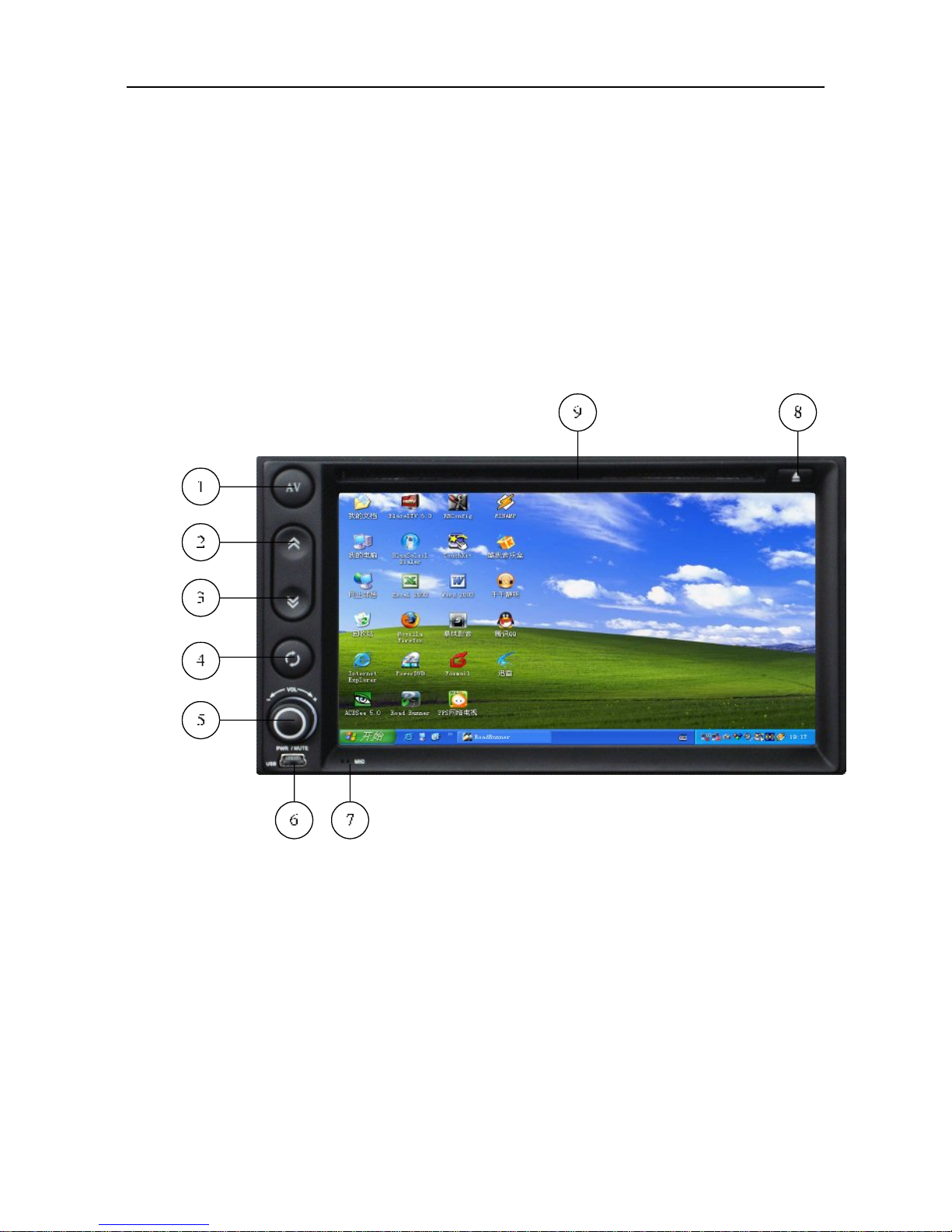
1) Click on button 1, the video switch, Click the button between the PC interface and
AV2 conversion cycle;
2) Click on the button 2, PgUp key, Click on a button for the function;
3) Click on the button 3, PgDn key, Click the button for the next one function;
4) Click on the button 4, a key to restore the system, this key is only valid when the
computer boots up, press this button, the system will restore the system to factory
state, the specific reference to the back of a "System Restore" in the description.
5) Dial 5, clockwise rotation, "Volume +" Rotate "Volume -"; the computer turned off,
(Revosys X500 2DIN PC System Operations Manual) V1.2
8
press the knob, the computer boots; the computer turned on, press the knob, the
computer mutes, pressing again cancels mute. If the computer is turned on, hold the
knob for 4 seconds to force shutdown of the computer.
6) MINI USB interface
7) Built-in MIC interface
8) CD-ROM (OPEN) button
9) Disc Drive
E. Rear panel interfaces
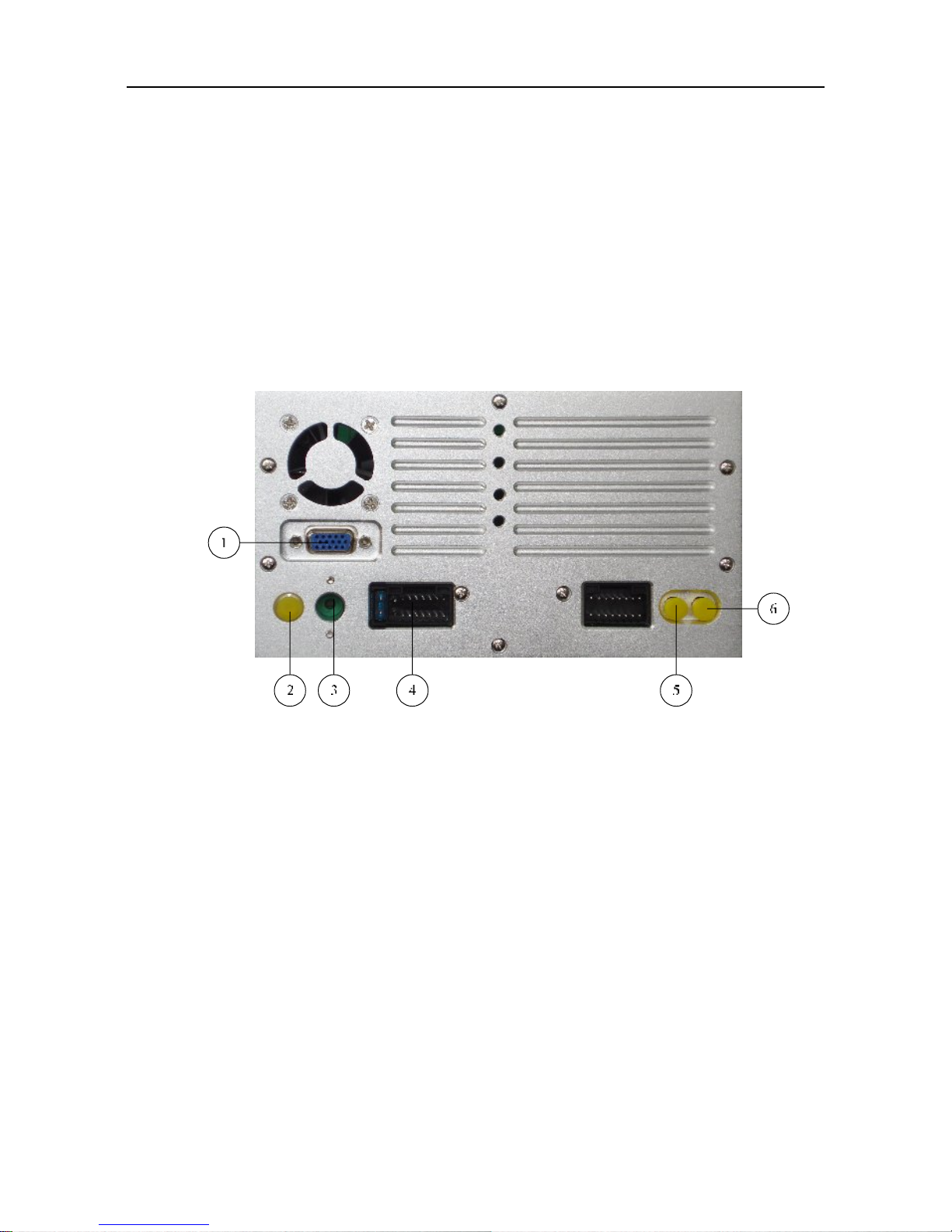
1) Extension VGA port for connection to an external display
2) GPS antenna port
3) Radio antenna port
4) "POWER SUPPLY CONNECTOR" interface, interface definitions see box above
the label, then see how the back line interface, the "Quick Installation Guide";
5) Digital TV antenna connection. If this feature is not included, this port is not used
6) WiFi 802.11b/g Wireless LAN antenna connector for the built-in WiFi card
F. Startup and shut-down of the system
1) Power: car keys must be in the ACC ON position, press the front panel knob, you
can boot. If no car keys are inserted to ACC ON position, the system can not start.
2) Shutdown: There are several ways to shut down the system:

(Revosys X500 2DIN PC System Operations Manual) V1.2
9
A. Press and the front panel knob for 4 seconds to force shut down of the system,
which is not recommend.
B. You can exit the system via the “Shut-down” selection in Windows
C. Pull out car keys: shutting down the system in this manner is recommended.
G. Rear view function
The X500 has an automatic reversing display function, set the optional reversing
camera AV access the rear panel "VTR CONNECTOR" interface "CAM IN" Video
Interface (yellow RCA): camera reverse power is received, auto start, reverse light,
the display screen will automatically switch to the backup camera, backup ended,
the display will revert to their original state.
*Rear view camera must be purchased separately*
MMI VER1.2 Operational Guidelines
Vehicle Information System V1.2 is a set of navigation, surveillance, entertainment,
wireless Internet access, games, Bluetooth, video conference, car phone, rear view
camera and picture browsing, all-in-one vehicle intelligent information system. With
the powerful hardware to provide processing power, you can use the global GPS
navigation while providing high-fidelity audio sound, while the intelligent vehicle
monitoring system will be your key to real-time car information. Rely on the system's
wireless internet access, regardless of where you are, you can easily maintain the
information and global file synchronization, wireless Internet access allows for a
mobile office to be easily set-up
A. Human-computer interface using the description
To meet consumer demand, improve product functionality in the car powerful
computer vehicle hardware platforms were developed and designed for the human
machine interface. The following information describes the control interface in detail
so that consumers can quickly familiarize themselves with the product.
Indice


