Radio Systems Millenium-A Analog Console Manuale utente

Radio Systems Millenium-A Console Page 1
Radio Systems Millenium-A Analog Console
Installation and Operation Manual
Copyright 2010 by Radio Systems Design, Inc. All rights reserved. Radio Systems Design, Inc. reserves specication
privileges. Information in this manual is subject to change without notice.
Technical support: +1-856-467-8000 or [email protected]
Radio Systems Millenium Analog Broadcast Manual — Part # MAN-MILLCONA
For Console Models:
RS-6A
RS-12A
RS-18A
RS-24A
Manual Revision 08-06-2014
for serial numbers 101255 and higher
Revised to include
Illustration B-1 Updated to detail new Control Board part #18516
Illustration B-1 Updated to detail “classic” remote control protocol
Sect 2.2.9 Updated to reference New Control Prom 18406 Functionality
Illustration B-2 Updated to detail Cue/IFB Control
Illustration B-3 Included to detail “Classic” Control
Sect 1.3.2 Updated to reference new Switch-mode Power Supplies
Sect 2.2.3 Updated to reference correct Jumper designations
Illustration D-2 Corrected to reference part #18516
Illustration D-7 Corrected to reference part #10887

Radio Systems Millenium-A Console Page 2
Installation/Wiring/Operation ...........................................................6
1.1 Console Placement .................................................................. 6
1.2 Opening the Console ............................................................... 6
1.3 Power Supply ........................................................................... 6
1.3.1 Installation........................................................................ 6
1.3.2 Conguration ................................................................... 6
1.4 Wiring Access Layout ...................................................... 7
1.4.1 Connectors ...................................................................... 7
1.4.2 Inputs ............................................................................... 7
1.4.3 Outputs ............................................................................ 7
1.4.4 Control ............................................................................. 7
1.4.5 Wiring Quick Connectors (5-Pin) ..................................... 7
1.4.6 Wiring RJ-45 Connectors (RJ-45) .................................... 7
1.5 Operation ......................................................................... 7
1.5.1 Input Assignment ............................................................ 8
1.5.2 Mic Use ........................................................................... 8
1.5.3 Cue Circuitry ................................................................... 8
1.5.4 Output Routing ................................................................ 8
1.5.5 Mix-Minus ........................................................................ 8
1.5.6 Monitor Amplier Input Select ......................................... 8
1.5.7 Headphone Amplier Input Select .................................. 8
1.5.8 VU Meter Selection (6 Channel Consoles Only).............. 9
1.5.9 Remote Control ............................................................... 9
1.5.10 Eight Position Switcher .................................................... 9
Illus. A-1 CT-2002 Console Clock/Timer ............................................... 10
Illus. A-2 CT-2002 Console Clock/Timer Wiring Diagram ..................... 11
Six Channel Control Board .............................................................12
2.1 Overview ................................................................................ 12
2.2 Function Programming .......................................................... 12
2.2.1 Channel Power-Up Mode .............................................. 12
2.2.2 Remote Control Options – by Channel .......................... 13
2.2.3 Remote Control Options – by Input ............................... 13
2.2.3.1 Pulse/Holding Remote Control ...................................... 13
2.2.3.2 Send Through of Remote On/Off Commands ............... 13
2.2.4 Muting Buses ................................................................. 13
2.2.5 Timer Reset ................................................................... 14
2.2.6 Cue Options by Channel................................................ 14
2.2.6.1 Cue on Fader Detent ..................................................... 14
2.2.6.2 Auto Cue ........................................................................ 14
2.2.6.3 Cue Defeat on Channel ON ........................................... 14
2.2.6.4 Cue Exclusive ................................................................ 14
2.2.7 Cue Options by Input ..................................................... 14
2.2.8 Off (Ready) Lamp Options ............................................. 14
2.2.9 Remote Control Connector ............................................ 15
2.2.10 Optional Remote Board ................................................. 15
2.2.11 Monitor Control Board.................................................... 15
Illus. B-1 Six Channel Control Board Jumper Settings ......................... 16

Radio Systems Millenium-A Console Page 3
Illus. B-2 Remote Control Wiring (factory default with cue for IFB) ...... 17
Illus. B-3 Remote Control Wiring (“classic” mode) ................................ 18
Illus. B-4 Monitor Board Wiring ............................................................. 19
Six Channel Audio Board ...............................................................20
3.1 Input Connectors ................................................................... 20
3.1.1 Input Wiring .................................................................... 20
3.1.2 Unbalanced Audio.......................................................... 20
3.1.3 Mono Inputs .................................................................. 20
3.2 Input Gain .............................................................................. 20
3.2.1 Channel Sensitivity ....................................................... 20
3.2.2 Input Sensitivity.............................................................. 20
3.3 Patch Point Connections ....................................................... 21
3.3.1 Pre-Fader, Pre-On/Off Patch Point ................................ 21
3.3.2 Post- Fader, Pre-On/Off Patch Point ............................. 21
Illus. C-1 Six Channel Audio Board - 5 Pin ........................................... 22
Illus. C-2 Six Channel Audio Board - RJ-45 .......................................... 23
Illus. C-3 Input Attenuator (IAD) Programming ..................................... 24
Output Board ...................................................................................25
4.1 Overview ................................................................................ 25
4.2 Audio Circuitry ....................................................................... 25
4.2.1 Program and Audition Outputs ...................................... 25
4.2.2 TEL (Telephone) Output ............................................... 25
4.2.3 External Monitor and Headphone Inputs ...................... 25
4.2.4 Headphone Outputs ...................................................... 26
4.2.5 Monitor Sends................................................................ 26
4.3 Control Wiring ........................................................................ 26
4.3.1 Mute and Timer Reset Bus Connections ...................... 26
4.4 Talk Back Connections ......................................................... 27
4.4.1 Intercom ......................................................................... 27
4.5 Internal Adjustments and Input Level Calibration .................. 27
4.5.1 Mix Bus Output Level Adjust .......................................... 27
4.5.2 VU Meter “0” Calibration ............................................... 28
4.5.3 Peak LED Trip Point Calibration ................................... 28
4.5.4 External Monitor Input Level ......................................... 28
4.5.5 Cue Bus External Input Level ....................................... 28
4.5.6 VCA Distortion Null Adjustments ................................... 28
Illus. O-1 Output and Meter Board - 5 Pin ............................................. 29
Illus. O-2 Output and Meter Board - RJ-45 ........................................... 30
Illus. O-3 Auxiliary Control Relay Wiring ............................................... 31
Illus. O-4 Talkback Wiring ...................................................................... 32
Interface Options and Accessories ...............................................33
5.1 Overview ................................................................................ 33
Illus. E-1 Enhanced Remote Interface Card ......................................... 34
Illus. E-2 Selector Logic Card ............................................................... 35

Radio Systems Millenium-A Console Page 4
Illus. E-3 Four Source Router Card ...................................................... 36
Illus. E-4 DA-Mixer Card ....................................................................... 37
Illus. E-5 DA-Mixer Programming Examples ........................................ 38
Illus. E-6 Intercom Card Wiring ............................................................. 39
Illus. E-7 Intercom Card Speaker & Console Interconnection .............. 40
5.2 Intercom Card Overview ........................................................ 41
5.2.1 Operation ....................................................................... 41
5.2.2 Installation and Wiring ................................................... 41
5.2.2.1 Control Wiring ................................................................ 41
5.2.2.2 Intercom card audio wiring............................................. 41
5.2.2.3 Console internal wiring .................................................. 41
5.2.2.4 Table-top speaker wiring ................................................ 41
5.2.2.5 Console interconnection ................................................ 41
5.2.3 Calibration ...................................................................... 42
Maintenance and Troubleshooting ...............................................43
6.1 Overview ................................................................................ 43
6.2 Power Supply ........................................................................ 43
6.3 Six Channel Audio Board ...................................................... 43
6.4 Six Channel Control Board ................................................... 44
6.5 Output Board ........................................................................ 44
6.6 Changing VCAs ..................................................................... 44
6.6.1 Distortion Null Adjustment.............................................. 44
Theory of Operation ........................................................................46
7.1 Power Supply Circuit Description ......................................... 46
7.1.1 Grounding ..................................................................... 46
7.1.2 Positive and Negative 7.5 volts ..................................... 46
7.2 Six Channel Control Board .................................................... 46
7.2.1 Brief Description ........................................................... 46
7.2.2 Detailed Description ...................................................... 46
7.3 Six Channel Audio Board Circuit Description ........................ 47
7.3.1 Brief Description ............................................................ 47
7.3.2 Detailed Description ...................................................... 47
7.4 Monitor Control Board ........................................................... 48
7.4.1 Brief Description ........................................................... 48
7.4.2 Detailed Description....................................................... 48
7.5 Output Board Circuit Description ........................................... 49
7.5.1 Brief Description ........................................................... 49
7.5.2 Detailed Description ...................................................... 49
7.6 RFI Suppression .................................................................... 50
7.7 Using Active Balanced Circuitry ............................................. 51
Schematics, Drawing and Parts Lists
Illustration Six Channel Control Board Schematic ................................ D-1
Illustration Six Channel Control Board Parts Layout Top ...................... D-2
Illustration Six Channel Control Board Parts Layout Bottom ................. D-3
List Six Channel Control Board Parts List ............................... D-4/5

Radio Systems Millenium-A Console Page 5
Illustration Monitor Board Schematic .................................................... D-6
Illustration Monitor Board Parts Layout Top .......................................... D-7
Illustration Monitor Board Parts Layout Bottom ..................................... D-8
List Monitor Board Parts List ...................................................... D-9
Illustration CT-2002 Clock/Timer Schematic ...................................D-10/11
Illustration CT-2002 Clock/Timer Parts Layout .................................... D-12
List CT-2002 Clock/Timer Parts List ............................... D-13/14/15
Illustration Six Channel Audio Board Schematic ........ D-16/17/18/19/20/21
Illustration Six Channel Audio Board Parts Layout .............................. D-22
List Six Channel Audio Board Parts List .............................. D-23/24
Illustration Power Supply Interface Board Schematic ......................... D-25
Illustration Power Supply Interface Board Parts Layout Top ............... D-26
Illustration Power Supply Interface Board Parts Layout Bottom ......... D-27
List Power Supply Interface Board Parts List ........................... D-28
Illustration Output Board Schematic .......................................... D-29/30/31
Illustration Output Board Parts Layout ................................................ D-32
List Output Board Parts List ........................................... D-33/34/35
Millenium Console Specications .................................................52
Millenium Consoles - Warranty and Repair Policies ....................53
Warranty ................................................................................ 53
Repair Policy .......................................................................... 53
Return Instructions ................................................................. 53

Radio Systems Millenium-A Console Page 6
Installation/Wiring/Operation
1.1 Console Placement
Because neither ventilation, or rear access is required, the console may be mounted on any sturdy surface. Opening
the lid provides access to all electronics, internal controls and wiring points.
After placing the console, open the lid and mark the cable access slots on the chassis bottom on the table surface.
Remove the console and cut the slots with a saber saw. The console may then be permanently mounted with two #10
sheet metal screws inserted through the two holes provided in the front of the chassis’ bottom.
1.2 Opening the Console
A “T”-shaped lifter is provided by the factory to open the console.
This lifter can be inserted in any fader slot, angled and used to raise the lid. Once the lid is opened, the two hinges are
pulled forward to lock the lid open.
To close the lid, push the hinges in to release the locks, while holding the lid up with the “T” lifter, and gently lower the
console.
The external lifter discourages unauthorized access to console electronics.
1.3 Power Supply
1.3.1 Installation
All console operating voltages are provided by the external power supply which connects to the console via a multi
conductor cable. A ten foot length is provided as standard equipment. Longer lengths, up to 20 feet, are available from
the factory.
To install the cable, remove the top cover of the power supply and insert the end of the cable with the large solder lug
through the rectangular cut out in the power supply back panel. Plug the connector into the circuit board and secure the
solder lug to the ground stud provided on the inside rear panel. After replacing the top cover, the supply may be hung
from the key-hold slots in the cover, placed on the shelf or the oor, or rack mounted with the optional rack adapter front
panel.
To connect the console end of the power supply cable, pass the other end of the cable (with the smaller ground lug)
through the rectangular hole on the center right-hand-side of the console base. Screw the ground lug under the mount-
ing screw on the right front hand side of the Output Board. Plug the 10 position connector into J24 and the 4 position
connector into J26(Ouput Board v.2: Plug the 10 position connector into J6 and the 4 position connector into J8).Take
extreme care to plug these connectors in with the correct orientation - locking tab to loacking tab (with cables existing
towards the right hand side) as it is possible to plug them in backwards.
A grounding stud is provided on the rear of the power supply. Console grounds reach a common point at the power sup-
ply. To minimize RFI and potential ground loop problems, the console should only be connected to station ground at this
one ground stud.
In intense RF environments, or if you experience any RFI problems, consult RFI suppression in the Troubleshooting and
Theory of Operation Section for detailed information.
1.3.2 Conguration
The power supply houses a switch-mode module and an interface and indicator board. This provides 15 volts for audio
circuitry and 7.5 for control circuits.
Front panel LED’s show the status of both 15 volt modules and the 7.5 voltages derived from the rst module. Fuse
holders are front panel mounted housing a 2 amp fuse for the rst module and a one amp fuse for the second.

Radio Systems Millenium-A Console Page 7
1.4 Wiring Access Layout
1.4.1 Connectors
Millenium Analog Consoles can be ordered with RJ-45 female connectors, pinned out to the StudioHub+ standard, or
with 5-pin removable barrier strip connectors (quick connector).
1.4.2 Inputs
All audio inputs and audio patch points wire to the Six Channel Audio Board(s) on the base of the console. One board is
utilized for every 6 channel positions. Audio inputs are stereo and balanced. The left and right channels of one input are
wired to a single connector. Interstage channel audio patch points are unbalanced. These loop-thru inputs and outputs
for each channel are accessible on a single 5 pin quick connector. On RJ-45 version consoles only, there is also a 3-pin
post-fader patch point.
Consult the Six Channel Audio Board Section of this manual for detailed information on input and patch point wiring and
level attenuation.
1.4.3 Outputs
All program outputs are balanced and appear on connectors on the Output Board.
Also mounted on this board are connectors for external monitor inputs, monitor sends, talk back, timer reset, cue audio,
and control sends.
Consult the Output Board Section of the manual for detailed information on output and control wiring and level calibra-
tions.
1.4.4 Control
The front panel mounted Six Channel Control Board houses one 15 pin D connector for each remote channel control.
Consult the Six Channel Control Board Section of this manual for detailed information on control remote functions and
programming options.
Consult the Interface Options and Accessories Section of this manual for detailed information on the optional interface
card applications, wiring and function.
1.4.5 Wiring Quick Connectors (5-Pin Connector Console Version)
Audio input and output connections to the console are made via 5-pin connectors. These connectors may be unplugged
from the circuit board to facilitate wiring or servicing.
StudioHub+ wiring harnesses are available from Radio Systems which bring all input and output connections to conve-
nient connection blocks outside the console. Consult the factory for literature.
1.4.6 Wiring RJ-45 Connectors (RJ-45 Connector Console Version)
Use standard TIA 568B RJ-45 STP patch cords or 22 AWG shielded wire for audio connections. The cable should be
stripped so that the insulation comes close to, but does not enter the connector.
StudioHub+ wiring harnesses are available from Radio Systems which bring all input and output connections to conve-
nient connection blocks outside the console. Consult the factory for literature.
1.5 Operation
The Millenium Consoles have been designed to offer the greatest combination of user exibility and operating ease. Ob-
viously, the console should be installed and operated in accordance with station format, personnel habits and engineer-
ing principles.
The following sections suggest some operational possibilities which were considered in the console design.

Radio Systems Millenium-A Console Page 8
1.5.1 Input Assignment
Traditionally, commonly used inputs are assigned to input “A”. This gives the operator quick assurance of proper input
selection.
1.5.2 Mic Use
Mic channels should always be activated with the slider down, and then potted up to avoid a sudden “room rush” of
background sound.
Cue speaker muting is only provided when a mixing channel is turned “on”. Therefore, feedback can occur between the
cue speaker or the monitor speakers (if cue monitoring is selected) and a mic input if the mic channel is placed in cue.
To avoid this possibility, remove the cue inhibit jumpers on the section of the Six Channel Control Board associated with
the mic channel. This will prevent a mic channel from entering the cue mode and possibly cuing feedback. Consult the
Six Channel Control Board Section for details on programming information.
1.5.3 Cue Circuitry
Unless disallowed by jumper removal, all selected inputs maybe placed on the cue bus by depressing the cue button,
located above the fader. Refer to Section 2.2 for additional information.
The cue signal is monitored by the cue speaker, and level adjusted by the front panel cue level control. The cue speaker
is muted by any input that is turned “on” and that was pre-selected during installation to activate the Mute 1 control bus.
The internal cue speaker may be disconnected and a remote speaker connected in its place. Consult the Output Board
Section for detailed information on wiring.
In addition, the cue signal maybe selected for monitoring by the headphone or monitor amplier select switches.
1.5.4 Output Routing
Each mixing channel can be routed to any combination of program (PGM), audition (AUD), and tel (TEL) mix buses.
The program and audition buses provide identical stereo performance allowing the audition output to be used as a back
up to the program bus, as a separate program bus, or to preview or record material. The TEL bus is a monaural.
1.5.5 Mix-Minus
Talk show hybrid telephone patches frequently require a return feed to the caller that does not contain his own voice (mix
minus). To accomplish this, the host should be routed to PGM and TEL and the caller to PGM only. The TEL bus should
then be fed back to the telephone hybrid and program audio used to feed the air chain. To prevent feedback in this ap-
plication, the studio monitor speakers should not be used.
A “fold back” feed can also be created by feeding all microphone inputs into the PGM bus, and feeding all other inputs
to both PGM and AUD mix buses. Switch the monitor speakers to AUD and feed the air chain with PGM. In this applica-
tion the mic inputs need not mute the monitor speakers, as no feedback will result.
1.5.6 Monitor Amplier Input Select
The monitor input select switches on the right hand side of the console allow monitoring of PGM, AUD, TEL, cue and
four external stereo inputs which are common to the monitor and headphone circuitry. All monitor outputs follow these
switches. Level adjustment for the control room monitor output is provided on the front panel. In addition, the control
room monitor output is dimmed to an level which has been preset by a trimmer on the Output Board by the Mute 1 con-
trol bus. A studio monitor output which is muted by the Mute 2 bus, and an unmuted monitor output is also provided. In
addition, a prefader, unmuted monitor output is available.
1.5.7 Headphone Amplier Input Select
The headphone input select switches on the right hand side of the console allow monitoring of program, audition, tel, cue
and four external stereo inputs which are common to the headphone and monitor circuitry. All headphone outputs follow
these switches. Level adjustment and connection for the operator’s headphones are provided on the front panel. In ad-
dition, a pre-fader headphone output is available for driving an external headphone amplier.


Radio Systems Millenium-A Console Page 9
1.5.8 VU Meter Selection (6 Channel Consoles Only)
The six channel console provides only three meters. One meter is dedicated to the TEL output, while the remaining two
are selected by a front panel switch to display either PGM or AUD outputs. The peak LEDs in the meters also follow the
VU meter select switch.
1.5.9 Remote Control
The Millenium Consoles provide extensive remote control using a 15-pin D connector located at each mixing channel.
Each channel has the capability to remote start almost any source. In addition, each channel provides inputs for remote
control of channel on/off and ready lamp illumination.
Sophisticated control interface is also accommodated with the use of the optional interface card (RS Part# 11022). See
Section 2.2.9 and Illustration E-1 for additional information.
1.5.10 Eight Position Switcher
Eight accessory switches are provided on the right-hand side of the console for user control of external equipment or the
optional Four Source Expander or Intercom Accessory boards. These switches and their associated LED indicators can
be wired directly to external equipment using two 15-pin D connectors mounted on the underside of the monitor control
board. Consult Illustration B-3 for more details.

Radio Systems Millenium-A Console Page 10
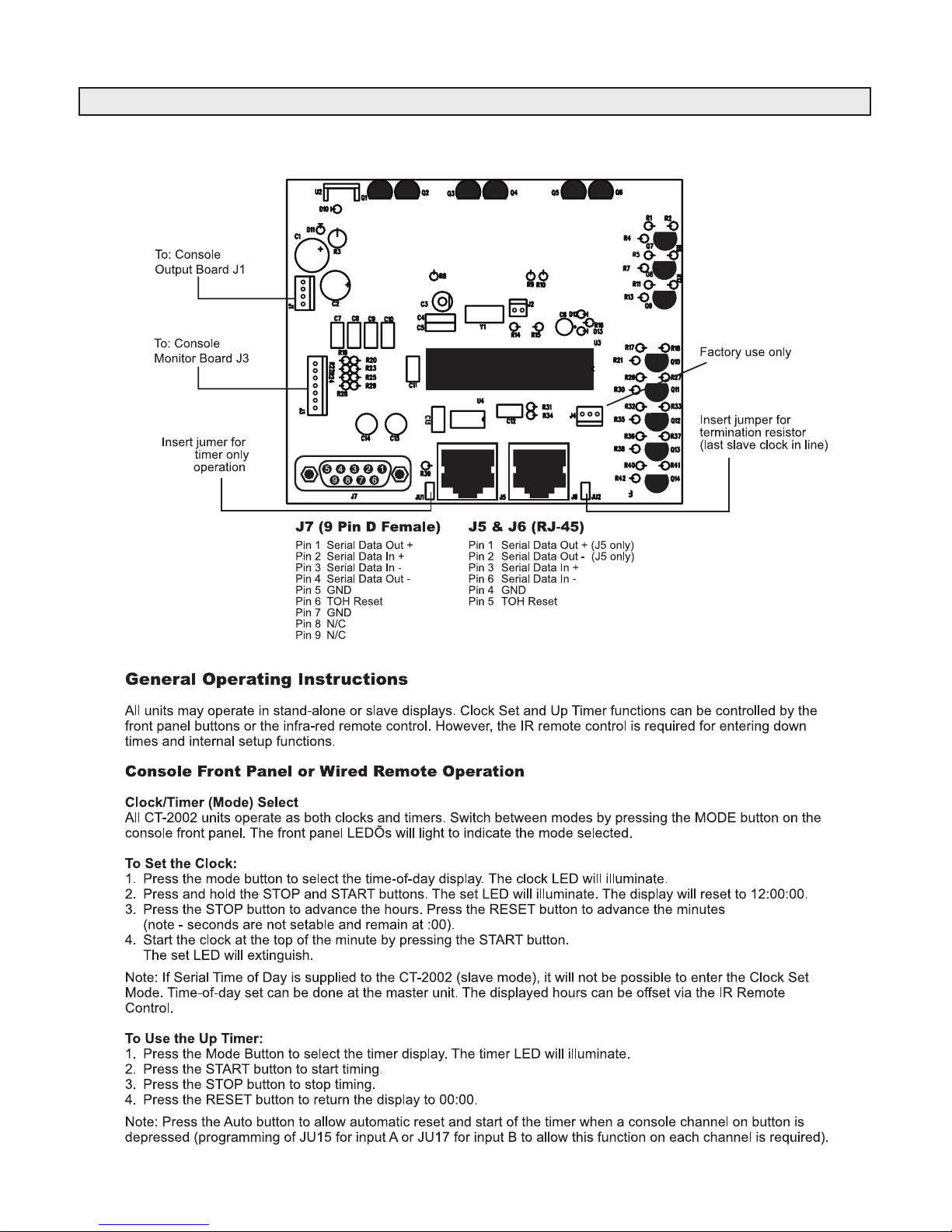
Illustration A-1
CT-2002 Console Clock/Timer
Questo manuale è adatto per i seguenti modelli
4
Indice
Altri manuali Radio Systems Mixer musicale