
RadioLAN DockLINK Manuale utente

890-010 12/04/98 © 1998 RadioLAN. All rights Reserved
Wireless Local Area Network
DockLINK User Guide

890-010 12/04/98 Page ii © 1998 RadioLAN.
Notices
FCC This equipment has been tested and found to comply with the limits for a Class B digital device, pursuant to Part
15 of the FCC rules. These limits are designed to provide reasonable protection against harmful interference in a
residential installation. This equipment generates, uses and can radiate radio frequency energy and, if not
installed and used in accordance with the instructions, may cause harmful interference to radio communications.
However, there is no guarantee that interference will not occur in a particular installation. If this equipment does
cause harmful interference to radio or television reception, which can be determined by turning the equipment off
and on, the user is encouraged to try to correct the interference by one of the following measures:
•Reorient or relocate the receiving antenna.
•Increase the separation between the equipment and receiver.
•Connect the equipment into an outlet on a circuit different from that to which the receiver is connected.
•Consult the dealer or an experienced radio/TV technician for help.

890-010 12/04/98 Page iii © 1998 RadioLAN.
FCCID: MCIPUNIIT
FCC Rule Part(s): 15
Frequency (MHz): 5775, 5200, 5300
Equipment Class Low Power Communication Device Transmitter
Remarks:
Maximum Output Power: 50 mW
Notes:
This device has shown compliance with new rules adopted under Docket 87-389 and is not affected by Section
15.37, transition rule.
Each radio is marked with its operating frequency.

890-010 12/04/98 Page iv © 1998 RadioLAN.
Disclaimer
The instructions in this document have been carefully checked for accuracy and are presumed to be reliable.
RadioLAN and its writers assume no responsibility for inaccuracies and reserve the right to modify and revise this
document without notice.
It is always our goal at RadioLAN to supply accurate and reliable documentation. If you discover a discrepancy in
No part of this publication may be placed in a retrieval system, transmitted, or reproduced in any way, including,
but not limited to, photograph, photocopy, computer disk or other record, without prior agreement and written
permission from:
RadioLAN
455 De Guigne Drive
Sunnyvale, CA 94086
© 1998 RadioLAN, Sunnyvale, CA, USA. All rights reserved.
890-010 12/04/98 Page v© 1998 RadioLAN.
Trademark Disclosures
RadioLAN has made every effort to provide disclosures when using trademarks owned by other companies.
Trademarked designations appear throughout this publication. The publisher states that it is using the
designations only for editorial purposes, and to the benefit of the trademark owner with no intent to infringe upon
that trademark. The following trademarks are found in this manual:
Microsoft™, and Windows for Workgroups™, and Windows 95™, Microsoft Internet Explorer™ and Windows NT™ are trademarks of the Microsoft Corporation.
Netscape™ is a registered trademark of The Netscape Corporation
Novell™ and NetWare™ are trademarks of Novell, Inc.
Xerox™ is a trademark of the Xerox Corporation.
IBM™ is a trademark of International Business Machines.
10BaseRadio™ and RadioLAN10™ are trademarks of RadioLAN.
Java™ is a trademark of Sun Microsystems, Inc.
Manual Conventions
The following text formats are used throughout this manual:
References to other locations in the manual or to other manuals provided by RadioLAN are italicized.
Narrow Bold Letters describe buttons and fields on the screen.
SMALL CAPITAL LETTERS describe Screen Names or Screen Tab Names.
Bold and Italicized Letters indicate important information.
890-010 12/04/98 Page vi © 1998 RadioLAN.
Table of Contents
Notices...................................................................................................................................................................ii
FCC........................................................................................................................................................................ii
Disclaimer.............................................................................................................................................................. iv
Trademark Disclosures ............................................................................................................................................ v
Manual Conventions................................................................................................................................................ v
Table of Contents..............................................................................................................................................vi
Introduction.........................................................................................................................................................1
Quick Installation Steps...................................................................................................................................5
To Test the Antenna Placement................................................................................................................................6
Designing Your System....................................................................................................................................7
Installing the DockLINK....................................................................................................................................9
Locating the Radio Unit..........................................................................................................................................10
Connecting the DockLINK......................................................................................................................................11
Initial IP Address Setup..........................................................................................................................................13
Using the DockLINK Manager......................................................................................................................16
The DockLINK Manager.........................................................................................................................................16
Accessing the DockLINK with the Browser ..............................................................................................................17

890-010 12/04/98 Page vii © 1998 RadioLAN.
Logging Onto the DockLINK Manager.....................................................................................................................17
DockLINK Manager Layout.....................................................................................................................................19
Discovering Wireless Nodes Within the DockLINK’s Data Range..............................................................................21
Setting Up Security Features..................................................................................................................................25
Setting the DockLINK’s Mode of Operation..............................................................................................................30
Securing the DockLINK with Data Encryption ..........................................................................................................31
Setting up10BaseT Port Parameters.......................................................................................................................32
Managing Packet Flow through the DockLINK.........................................................................................................40
Interrogating DockLINK for Performance Information................................................................................................44
Upgrading System Software...................................................................................................................................50
Saving or Rejecting Configuration Setting Changes .................................................................................................53
Resetting the DockLINK.........................................................................................................................................55
Testing DockLINK Connectivity to the Wireless Network ..........................................................................................56
Recording Important System Information.................................................................................................59
Viewing the System Log.........................................................................................................................................62
Managing the DockLINK Locally..................................................................................................................63
DockLINK Local Management................................................................................................................................65
Configuring the DockLINK for use in the Dock Mode................................................................................................66
Logging onto the DockLINK Configuration Screen....................................................................................................67
Using the Main Menu.............................................................................................................................................69
Working with the System Configuration Menu..........................................................................................................71
Configuration Manager Menu Items ........................................................................................................................74
890-010 12/04/98 Page viii © 1998 RadioLAN.
Troubleshooting...............................................................................................................................................85
Glossary..............................................................................................................................................................87
Access Point.........................................................................................................................................................87
Appendix A: Indicators, Switches, and Connectors...............................................................................91
Indicators..............................................................................................................................................................91
MDI/MDI-X switch..................................................................................................................................................92
IO Connectors.......................................................................................................................................................93
Serial Port connector......................................................................................................................................94
Appendix B: Technical Specifications.......................................................................................................95
Network Protocol...................................................................................................................................................95
Standards Support.................................................................................................................................................95
Electrical Specifications..........................................................................................................................................95
Physical Specifications...........................................................................................................................................96
Environmental Specifications..................................................................................................................................96
Electromagnetic Emissions ....................................................................................................................................97
Safety Agency Approvals .......................................................................................................................................97
Getting Technical Support.............................................................................................................................98
Index....................................................................................................................................................................99
890-010 12/04/98 Page 1© 1998 RadioLAN.
Introduction
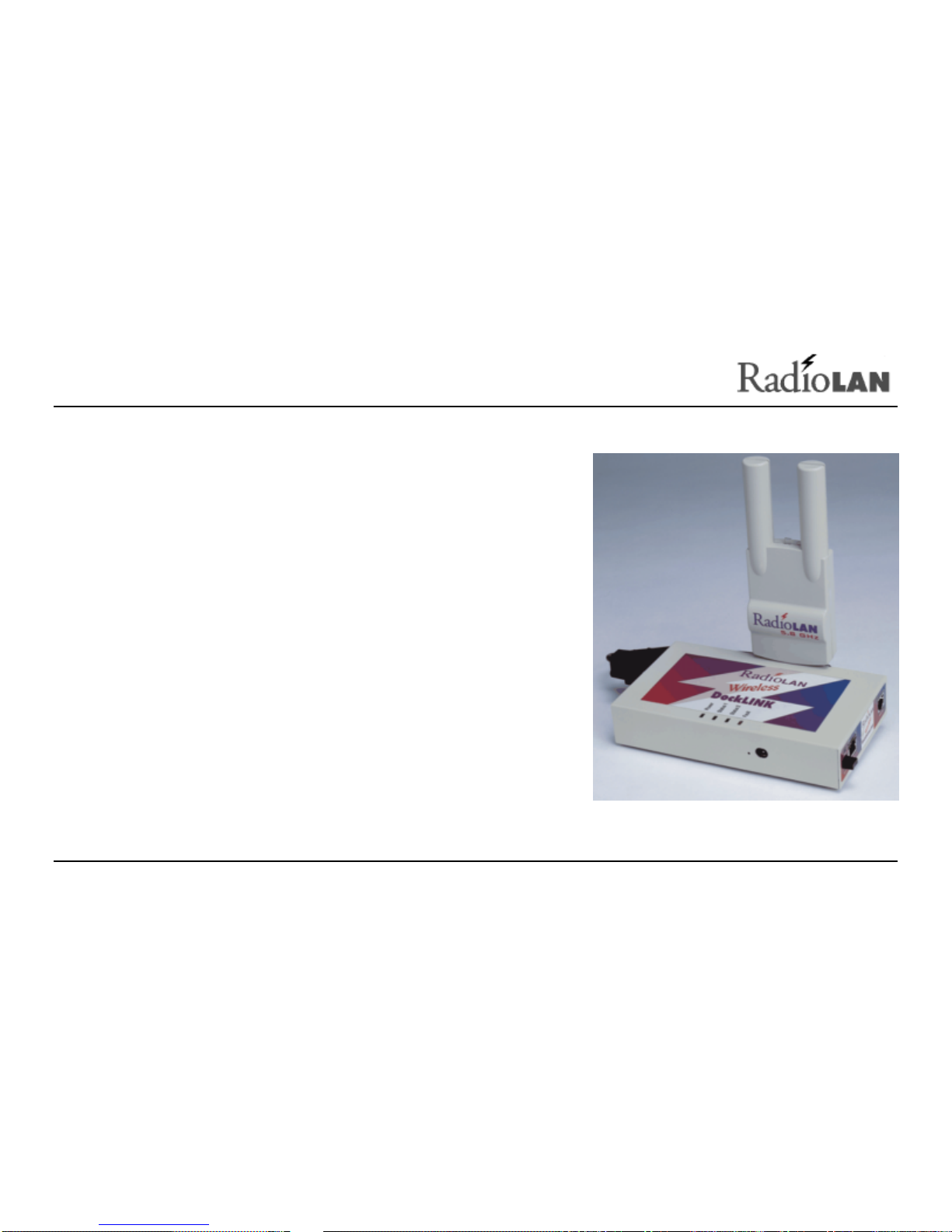
Welcome to the next generation of RadioLAN wireless network
products. The DockLINK is a module, which connects to a 10BaseT
Network device, such as a PC, workstation, or printer, allowing
interaction with RadioLAN wireless network resources.
The DockLINK includes a Radio Unit, a RJ-45 jack for connection to
an Ethernet Hub, a power jack, and a special RJ11 serial port for
connecting the DockLINK to a VT-100 terminal or modem.
There are two versions of the DockLINK:
Model 408 for US Installations: This version uses a plug-in power
adapter that is compatible with US electrical systems.
Model 408Z for International Installations: This version uses a
plug-in power adapter that is compatible with European electrical
systems.
Each version now supports options that you can download anc
configure to enhance the DockLINK’s operation and security
capabilities, so you can add Data Encryption to the already
powerful capabilities included with the DockLINK.
Figure 1: The DockLINK and Radio Unit

890-010 12/04/98 Page 2© 1998 RadioLAN.
Transform a 10BaseT Network Node into a Wireless Network Station
The primary use of the DockLINK is to transform a typical
hard-wired 10BaseT Network Interface Card into a wireless
network station. This allows the station to access and share
network resources such as printers, modems, and servers.
When you use the DockLINK in the Dock Mode, you can
connect the DockLINK to any device containing a 10BaseT
Ethernet Network Interface Card to transform your standard
Network Interface Card to a wireless network Interface Card.
The DockLINK exchanges information between the Ethernet
device and the RadioLAN wireless network.
Although the DockLINK and the device each have their own
MAC address, the DockLINK hides its address from others
on the wireless network. If attempting to Ping the DockLINK
from a remote wireless station, the DockLINK will not respond. Instead, you will receive an IP Address response
from the network interface card that is directly connected to the DockLINK.
If you set an IP Address in the DockLINK, you will receive an IP Address response only when you Ping the
DockLINK from the device to which it is connected.
When using the Dock Mode, the DockLINK’s configuration screens are “invisible” to wireless network stations
Category 5 Cable
DockLINK
Network
Interface
Card
PC
Figure 2: Dock Mode
Indice
Altri manuali RadioLAN Hardware di rete


Manuali Hardware di rete popolari di altre marche

Matrix Switch Corporation
Matrix Switch Corporation MSC-HD161DEL Manuale utente

B&B Electronics
B&B Electronics ZXT9-IO-222R2 Manuale utente

Yudor
Yudor YDS-16 Manuale utente

D-Link
D-Link ShareCenter DNS-320L Manuale utente

Samsung
Samsung ES1642dc Istruzioni per l’uso

Honeywell Home
Honeywell Home LTEM-PV Istruzioni per il montaggio


