RCA LCD FLAT PANEL HDTV Manuale utente

LCD FLAT PANEL HDTV
user’s guide
connections 6
remote 25
features 34
menus 40
FAQs 44
warranty 50
contents

Important Information
WARNING
To reduce the risk of fire or electric shock, do not
expose this product to rain or moisture. The apparatus
shall not be exposed to dripping or splashing. No ob-
jects filled with liquids, such as vases, shall be placed
on the apparatus.
This symbol indicates that this product contains mercury. Special disposal of this product for environmental
reasons may be required under the laws applicable to your jurisdiction. For disposal or recycling
information, please contact your local authorities or the Electronic Industries Alliance: www.eiae.org.
Refer to the identification/rating label located on the back panel of your product for its proper operating voltage.
Cable TV Installer: This reminder is provided to call your attention to Article 820-40 of the National Electrical Code
(Section 54 of the Canadian Electrical Code, Part 1) which provides guidelines for proper grounding and, in particular,
specifies that the cable ground shall be connected to the grounding system of the building as close to the point of cable
entry as practical.
Product Registration
Please fill out the product registration card (packed separately) and return it immediately. For US customers: Your RCA
Consumer Electronics product may also be registered at www.rca.com/television. Registering this product allows us to
contact you if needed.
Product Information
Keep your sales receipt to obtain warranty parts and service and for proof of purchase. Attach it here and record the
serial and model numbers in case you need them. These numbers are located on the product.
Model No. _____________________ Serial No.____________________ Purchase Date __________________
Dealer/Address/Phone _________________________________________________________________________
FCC Regulations state that unauthorized changes or modifications to this equipment may void the user’s authority to
operate it.
Important: This television is a table model and is designed to sit on a firm, flat, surface. Don't place the TV on soft
carpeting or similar surface because the ventilation slots on the bottom of the unit will be blocked resulting in reduced
lifetime from overheating. To assure adequate ventilation for this product, maintain a spacing of 4 inches from the top
and sides of the TV receiver and 2 inches from the rear of the TV receiver and other surfaces.
Also, make sure the stand or base you use is of adequate size and strength to prevent the TV from being accidentally
tipped over, pushed off, or pulled off. This could cause personal injury and/or damage the TV. Refer to the Important
Safety Instructions on the next page.
The TV is unstable if it is not properly attached to the
base or mounted to the wall. Please follow the base
or wall mounting instructions provided in the User’s
Guide to ensure your safety.
WARNING
Caution: To reduce the risk of electric shock, do not remove cover (or back). No user serviceable parts
inside. Refer servicing to qualified service personnel.
This symbol indicates "dangerous
voltage" inside the product that
presents a risk of electric shock or
personal injury.
This symbol indicates important
instructions accompanying the product.
CAUTION
RISK OF ELECTRIC
SHOCK DO NOT OPEN
This symbol indicates that this product incorporates double
insulation between hazardous mains voltage and user accessible
parts. When servicing use only identical replacement parts.

Important Safety Instructions
1. Read these instructions.
2. Keep these instructions.
3. Heed all warnings.
4. Follow all instructions.
5. Do not use this apparatus near water.
6. Clean only with dry cloth.
7. Do not block any ventilation openings. Install in accordance with the manufacturer’s instructions.
8. Do not install near any heat sources such as radiators, heat registers, stoves, or other apparatus (including
amplifiers) that produce heat.
9. Do not defeat the safety purpose of the polarized or grounding-type plug. A polarized plug has two blades with
one wider than the other. A grounding type plug has two blades and a third grounding prong. The wide blade or the
third prong is provided for your safety. If the provided plug does not fit your outlet, consult an electrician for replace-
ment of the obsolete outlet.
10. Protect the power cord from being walked on or pinched particularly at plugs, convenience receptacles, and the
point where it exits from the apparatus.
11. Only use attachments/accessories specified by the manufacturer.
12. Use only with the cart, stand, tripod, bracket, or table specified by the manufacturer, or sold with
the apparatus. When a cart is used, use caution when moving the cart/apparatus combination to
avoid injury from tip-over.
13. Unplug this apparatus during lightning storms or when unused for long periods of time.
14. Refer all servicing to qualified service personnel. Service is required when the apparatus is damaged in any way,
such as power-supply cord or plug damage, liquid spilled on or objects falling onto apparatus, rain or moisture
exposure, abnormal operation, or if the apparatus has been dropped.
15. If an outside antenna or cable system is connected to the product, be sure the antenna or cable system is
grounded so as to provide some protection against voltage surges and built-up static charges. Section 810 of the
National Electrical Code, ANSI/NFPA No. 70-1984 (Section 54 of Canadian Electrical Code, Part 1) provides infor-
mation with respect to proper grounding of the mast and supporting structure, grounding of the lead-in wire to an
antenna-discharge unit, size of grounding conductors, location of antenna-discharge unit, connection to grounding
electrodes, and requirements for the grounding electrode. See following example.
ANTENN A
LEAD IN
WIRE
GROUND CLAM P
GROUNDING CONDUCTOR
S
(NEC SECTION 810-21)
GROUND CLAMP S
POWER SERVICE GROUNDING
ELECTRODE SYSTEM
(NEC ART 250, PART H)
ELECTRIC SERVICE
EQUIPMENT
ANTENN A
DISCHARGE UNIT
(NEC SECTION 810-20)

Table of Contents
4Table of Contens
Important Safety Instructions .................................................................................................................... i
Chapter 1 I Connections & Setup
Things to Consider Before You Connect....................................................................................... 6
Protect Against Power Surges ...................................................................................................... 6
Instructions at the Beginning of User's Guide ................................................................................ 6
Position Cables Properly to Avoid Audio Interference.................................................................... 6
Use Indirect Light .......................................................................................................................... 6
Check Supplied Parts ................................................................................................................... 6
Attaching TV to Table Stand ........................................................................................................... 7
Mounting TV to Wall.......................................................................................................................13
Get the Picture ...............................................................................................................................14
Getting Channels ......................................................................................................................... 14
Choose Your Connections ............................................................................................................15
Composite Video Connection ....................................................................................................... 16
Component Video Connection ..................................................................................................... 16
HDMI/DVI Connection .................................................................................................................. 17
PC Connection ............................................................................................................................ 18
Plug in TV ...................................................................................................................................... 20
Put Batteries in Remote ............................................................................................................... 20
Turn on TV ..................................................................................................................................... 20
How to Use Remote Control to Complete Initial Setup.............................................................. 20
Complete Initial Setup .................................................................................................................. 21
Set Menu Language ................................................................................................................... 21
Set TV Location Mode ................................................................................................................ 21
Complete Channel Setup ............................................................................................................ 21
What To Expect............................................................................................................................. 22
Watching TV ............................................................................................................................... 22
Changing Channels .................................................................................................................... 22
Explanation of Jacks (in alphabetical order)............................................................................... 23
Buttons and Other Jacks on Your TV........................................................................................... 24
Side Input Jacks ......................................................................................................................... 24
Side Panel Buttons ..................................................................................................................... 24
Chapter 2 I Using the Remote Control
Remote Control Buttons................................................................................................................ 25
Using the INPUT Button ............................................................................................................... 26

Programming Remote to Operate Other Devices........................................................................ 26
Find Out If You Need to Program Remote .................................................................................... 26
Programming Remote .................................................................................................................. 27
How to Use the Remote After You’ve Programmed It ................................................................. 28
Modes of Operation ..................................................................................................................... 28
Manual Reset of Remote Control..................................................................................................29
Remote Code List .......................................................................................................................... 30
Chapter 3 I Using TV Features
Channel Banner ............................................................................................................................. 34
Autotuning...................................................................................................................................... 34
Parental Controls and V-Chip ....................................................................................................... 35
How V-Chip Works for USA and Canada ..................................................................................... 35
Lock/Unlock Parental Controls .................................................................................................... 36
US V-Chip TV Ratings .................................................................................................................. 36
US V-Chip Movie Rating Limit ...................................................................................................... 37
Blocking Canada V-Chip Ratings ................................................................................................. 38
Future Rating Region ................................................................................................................... 38
Reset Downloadable Data ........................................................................................................... 38
Blocking Unrated/Exempt Programs ............................................................................................ 38
Block Channel ............................................................................................................................. 38
Button Block ................................................................................................................................ 38
Change Password ....................................................................................................................... 39
Additional Features........................................................................................................................ 39
Screen Formats ........................................................................................................................... 39
Chapter 4 I Using TV Menu
Using Menu System....................................................................................................................... 40
Picture Menu .................................................................................................................................. 40
Sound Menu................................................................................................................................... 41
Channel Menu ................................................................................................................................ 42
Parental Control Menu................................................................................................................... 42
Setup Menu.................................................................................................................................... 42
Time Menu...................................................................................................................................... 43
Chapter 5 I Other Information
Frequently Asked Questions (FAQs)............................................................................................. 44
Troubleshooting ............................................................................................................................. 45
V-Chip Rating Explanations .......................................................................................................... 48
US V-Chip Rating System ............................................................................................................ 48
Canadian English V-Chip Rating System ...................................................................................... 48
Canadian French V-Chip Rating System ...................................................................................... 49
Limited Warranty............................................................................................................................ 50
Care and Cleaning ......................................................................................................................... 51
Table of Contens 5

1Connections and Setup
Things to Consider Before You Connect
Protect Against Power Surges
•Connect all devices before you plug any power cords into the wall outlet or power strip.
NEVER plug your TV into an outlet that is controlled by a wall switch.
•Turn off the TV and/or device(s) before you connect or disconnect any cables.
•Make sure all antennas and cables are properly grounded. Refer to the Important Safety
Instructions.
Instructions at the beginning of the User's Guide
•Protect devices from overheating.
•Don’t block ventilation holes on any of the devices. Arrange the devices so that air can
circulate freely.
•Don’t stack devices.
•If you place devices in a stand, make sure you allow adequate ventilation.
•If you connect an audio receiver or amplifier, place it on the top shelf so the heated air
from it won’t flow around other devices.
Position Cables Properly to Avoid Audio Interference
•Insert each cable firmly into the designated jack.
•If you place devices above the TV, route all cables down one side of the back of the TV
instead of straight down the middle.
•If your antenna uses 300-ohm twin lead cables, do not coil the cables. Also, keep the twin
lead cables away from audio/video cables.
Use Indirect Light
Don’t place the TV where sunlight or room lighting will be directed toward the screen. Use soft
or indirect lighting.
Check Supplied Parts
Check that the following parts were packed with your product.
Note: If you need
to replace your remote,
call 1-800-338-0376.
A shipping and
handling fee, and the
appropriate sales
tax, will be charged
upon ordering.
Have your Visa,
MasterCard, or Discover
Card ready.
Graphics contained within this publication are presentation only.
6Chapter 1 Connections and Setup
Go to Pages 7, 8, 10 to see the parts list for the
table stand
REMOTE CONTROL
PART # RC2254702/01
2 AA BATTERIES
POWER CORD

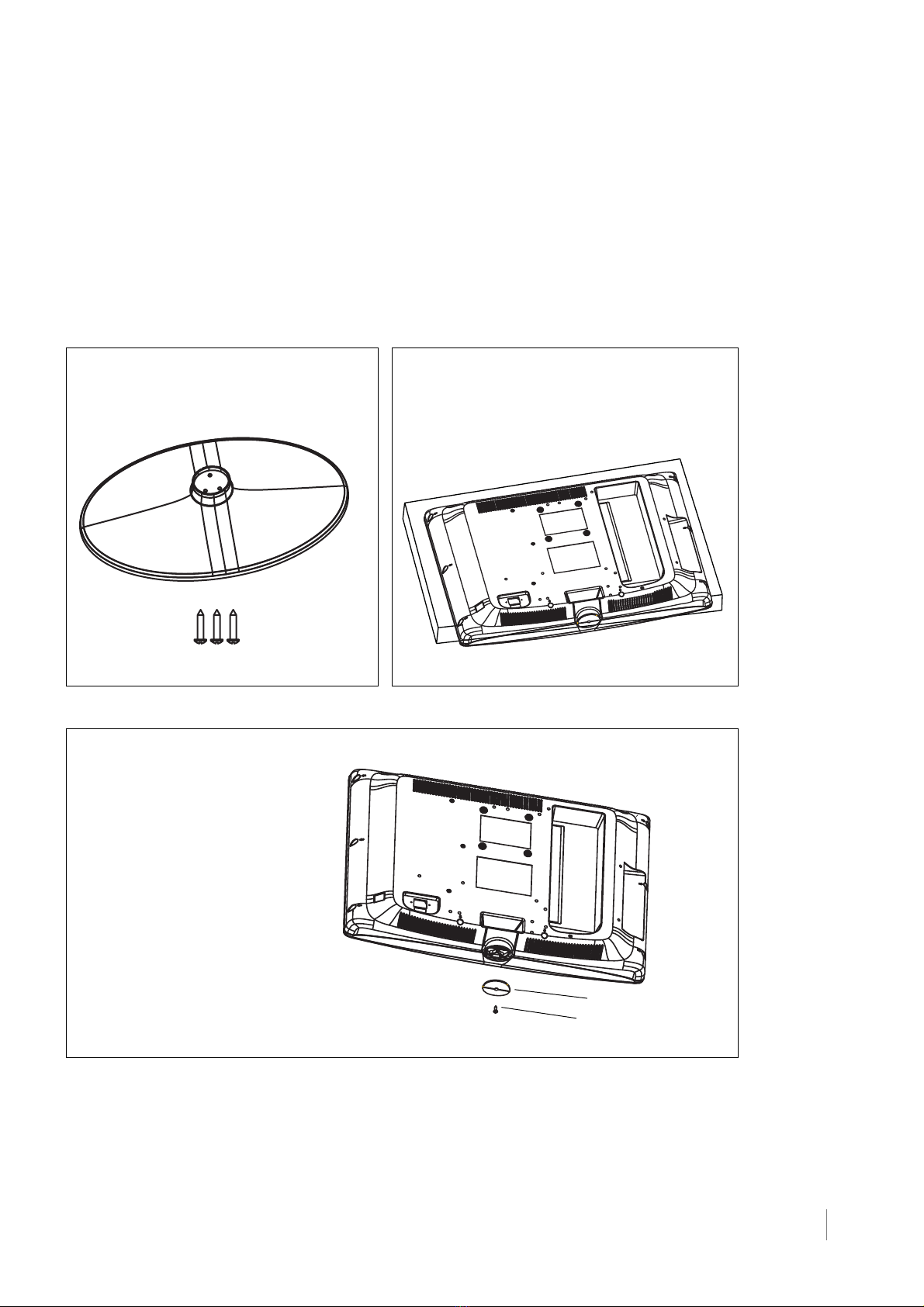
Attaching TV to Table Stand
Your TV comes without the table stand attached so that you can choose to
mount your TV either to its table stand or to a wall (wall mount sold separately). If
you want to mount your TV to the wall, don’t attach the table stand, and instead,
follow the Mounting Your TV to the Wall instructions on page 13.
Table Stand Assembly for models L26HD31 and L26HD31S
Connections and Setup Chapter 1 7
Parts List
1 Table Stand
3 Size M4 St-Screws
Step 2
Remove the Stand Cap from the TV
cabinet by taking off the size M3
St-screw with a screwdriver and pulling
out the cap.
Stand Cap
Size M3 St-Screw
Step 1
1. Take the TV bag and place it on a flat table.
2. Take the TV set and place it face down on
the TV bag.

8Chapter 1 Connections and Setup
Step 3
Attach the table stand to the TV cabinet by inserting the stand into the stand
connector support, and aligning the three screw holes, from the bottom, tighten-
ing three M4 St-screws with a screwdriver.
3 size M4 St-screws
Table Stand Assembly for model L32HD31
Parts List
1 Stand Table
1 Post Support
3 Size M4 ST-Screws
1 Size M8 Screw
Stand Connector Support
Step 1
1. Take the TV bag and place it on a flat table.
2. Take the TV set and place it face down on
the TV bag.

Connections and Setup Chapter 1 9
Step 2
1. Take the Stand Base, Post Support and 3 Size M4 screws.
2. Locate the Post Support on the Stand Base by aligning the screw holes.
3. Attach the Post Support to the Stand Base with 3 Size M4 screws, from the
top, with a screwdriver.
Table Stand Assembly
Step 3
Attach the Table Stand Assembly to the TV cabinet by
inserting the Post Support into the cabinet and aligning the
Post Support Guide to the Slot Opening.
Post Support
Guide
Slot Opening

Step 4
Secure the table stand to the TV cabinet by tightening the
Size M8 screw with a Philips head #3 screwdriver.
Swivel Table Stand Assembly for models L32HD36 and L40HD36
Parts List
1 Stand Table
4 Size M5 Screws
1 Size M8 Screw
1 Hinge for model L40HD36 1 Hinge for model L32HD36
1 Hinge Cover for model
L40HD36
1 Hinge Cover for model
L32HD36
10 Chapter 1 Connections and Setup
Indice
Altri manuali RCA TV a schermo piatto

RCA
RCA L40HD36 - 40" LCD TV Guida rapida

RCA
RCA TruFlat 20F671T Manuale utente

RCA
RCA Scenium M50WH185 Manuale utente

RCA
RCA LCDX2619W Manuale utente

RCA
RCA RLED1530-WHITE Manuale utente

RCA
RCA HD52W55 Manuale utente

RCA
RCA 27F400T Guida rapida

RCA
RCA RLED1530 Manuale utente

RCA
RCA L22HD31 Manuale utente

RCA
RCA L32HD36 Manuale utente

RCA
RCA L42FHD37 - LCD HDTV Guida rapida

RCA
RCA L32HD31 Manuale utente

RCA
RCA 32F531T Manuale utente

RCA
RCA RLED3216A Manuale utente

RCA
RCA Scenium L32WD250 Manuale utente

RCA
RCA Scenium L46FHD38 Manuale utente

RCA
RCA 20F650T Manuale utente

RCA
RCA L19WD20 - 19" LCD TV Manuale elenco delle parti

RCA
RCA L42FHD37 - LCD HDTV Manuale utente

RCA
RCA F32TF720 Manuale utente