RCA LED32B30RQD Manuale utente

-ADEFOR4ODAY
-ODEL.UMBER
,%$"21$
0ART.O2.2
0LEASEREGISTERYOURPRODUCTATWWWRCACOM
English
0LEASEKEEPYOURSALESRECEIPTANDKEEPTHERECORDOF
THESERIALNUMBERANDTHEDATEOFPURCHASEINORDERTO
RECEIVEWARRANTYPARTSANDSERVICE
4HESERIALNUMBERISLOCATEDATTHEBACKOFTHE46

1
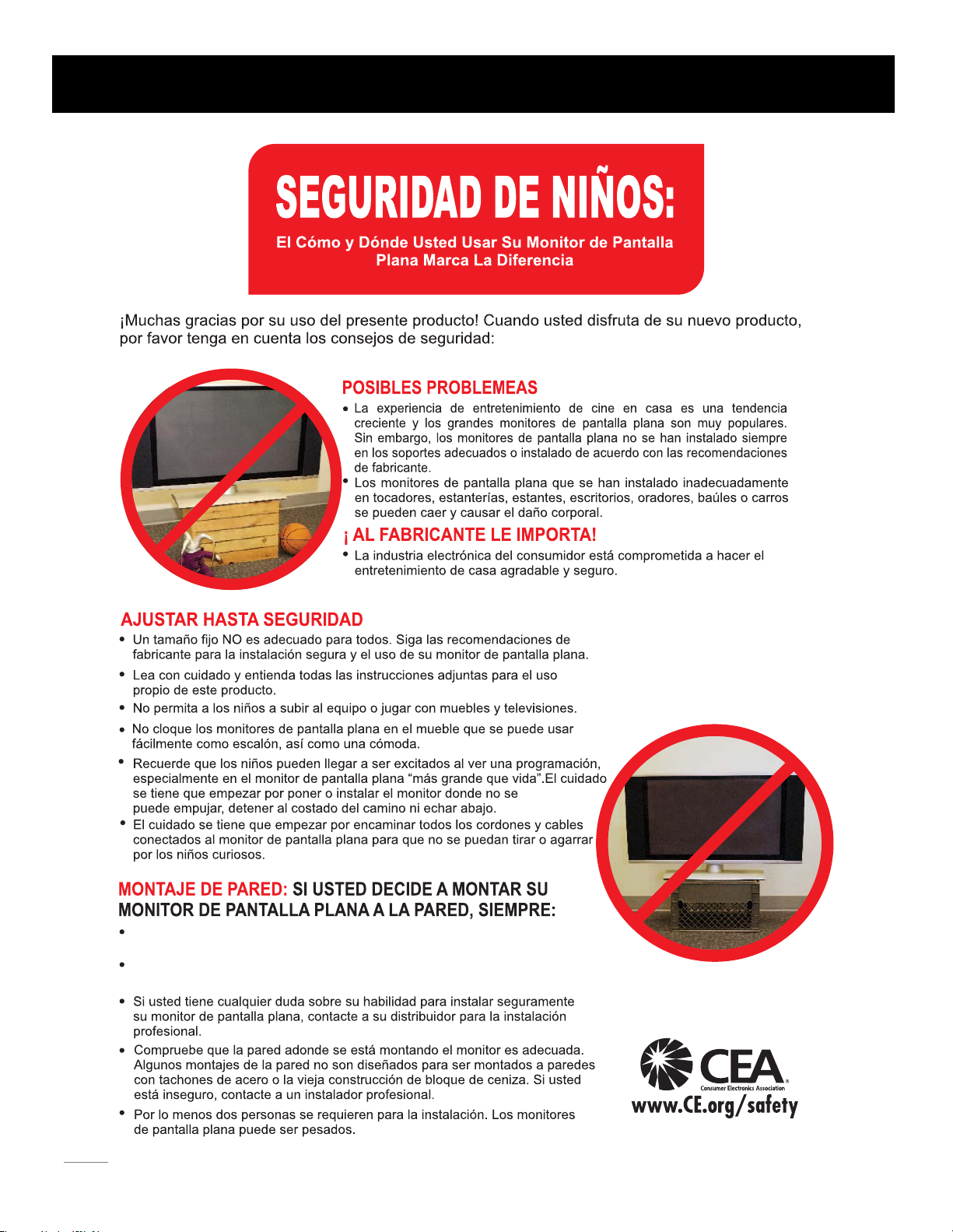
Child Safety Guide

2
Use una montura que se ha recomendado por el fabricante de monitor
y/o listado por un laboratorio independiente (como UL, CSA, ETL).
Siga todas las instrucciones ofrecidas por el fabricante de monitor
y montaje de pared.
Child Safety Guide

1
5
5
6
3
Child Safety Guide ........................................................................................................................................
Table of Contents
Caution and Warning ...................................................................................................................................
...................................................................................................
......................................................................................................................................
..................................................................................................................................
......................................................................................................................................
..................................................................................................................................
....................................................................................................................................
.......................................................................................................................................
......................................................................................................................
FCC and Class 1 Laser Product Notice
Preparation for Your New TV
Check Accessories 8
8
Setup TV Table Stand 8
Select TV Location 8
Connection and Using 8
TV Stand Installation 9
Safety Precautions
.................................................................................................................................................
...................................................................................................................................................
......................................................................................................................................
..............................................................................................................................
......................................................................................................................................
...............................................................................................................................
..................................................................................................................................
.................................................................................................................................
.............................................................................................................................
...................................................................................................................
...............................................................................................................
........................................................................
..........................................................................
...............................................................................................
...............................................................................................
.................................................................................................................
.................................................................................................................
TV Signal Connection 10
Cable Connections 11
Side Panel Connections
TV Jacks Explanation
Side Keypad and Front Panel
12
12
13
14
15
15
16
17
Connecting AV Composite Video device (Good Video Quality)
Connecting YPbPr Component device (Better Video Quality)
Initial Setup 20
Connecting HDMI device (Best Video Quality)
Connecting a Computer
How to Obtain Various Kinds of Input Sources
.................................................................................................................................
................................................................................................................................
.....................................................................................................................................
.........................................................................................................................................
Basic Operations 21
21
21
21
Turning On and Off
Choosing TV Channel
Selecting Input Source
.......................................................................................................................................
...............................................................................................................................................
.................................................................................................................
22
Channel Bar
22
22
Adjusting Volume
EPG (Electronic Program Guide)
17
17
Side Panel Buttons
Front Panel
Remote Control Instructions .....................................................................................................................
18
18
18
Inserting Batteries in the Remote
Learning about Remote Control 19
19Remote Control Buttons
Remote Control Reception Angle

...........................................................................................................................................
USB Media Play 44
..................................................................................................................................
Product Specification 45
...............................................................................................................................................
Warranty Card 46
4
Table of Contents
OSD Menu Operations ..............................................................................................................................
.............................................................................................................................
.........................................................................................................................................
..........................................................................................................................
................................................................................................................
................................................................................................................
....................................................................................................................
............................................................................................................................................
............................................................................................................................................
............................................................................................................................................
.....................................................................................................
..........................................................................................................................................
..........................................................................................................................................
23
23
23
25
26
27
31
33
38
39
41
Adjust the OSD Screen
Picture Menu
Sound Menu
Channel Menu
Parental Menu
Frequently Asked Questions (FAQs)
.......................................................................................................................................... 34
DVD Operations
Troubleshooting
V-Chip Rating Explanations
41
41
42
............................................................................................................
Wall Mounting Unit Specification 43
US V-Chip Rating System
Canadian English Rating System
Canadian French Rating System
Setup Menu ..............................................................................................................................................
Others Menu

5
WARNING: TO REDUCE THE RISK OF FIRE OR ELECTRIC SHOCK, DO NOT EXPOSE THIS APPLIANCE TO RAIN
OR MOISTURE.
CAUTION: CHANGES OR MODIFICATIONS NOT EXPRESSLY APPROVED BY THE PARTY RESPONSIBLE FOR
COMPLIANCE WITH THE FCC RULES COULD AVOID THE USERS AUTHORITY TO OPERATE THIS
EQUIPMENT.
Caution: To reduce the risk of electric shock, do not remove cover or back. No user-serviceable parts inside.
Refer servicing to qualified service personnel.
CAUTION
RISK OF ELECTRIC SHOCK
DO NOT OPEN
Caution and Warning
FCC and Class 1 Laser Product Notice
The lightning flash with arrowhead
symbol, within an equilateral triangle
is intended to alert the user to the
presence of uninsulated dangerous
voltage within the product enclosure
that may be of sufficient magnitude to
consitute a risk of electric shock.
The exclamation point within an
equilateral triangle is intended to
alert the user to the presence of
important operating and maintenance
(servicing) instructions in the literature
accompanying the TV.
FCC Information
Class 1 Laser Product
Device complies with FDA radiation performance standards, 21 CFR subchapter.
Caution: (Invisible) Laser Radiation when open. Do not stare into beam.
This equipment has been tested and found to comply with the limits for a Class B digital device, pursuant to Part 15 of the
FCC rules. These limits are designed to provide reasonable protection against harmful interference in a residential installation.
This equipment generates, uses and can radiate radio frequency energy and, if not installed and used in accordance with
the instructions, may cause harmful interference to radio Communications. However, there is no Guarantee that interference
will not occur in a particular installation. If this equipment does cause harmful interference to radio or television reception,
which can be determined by turning the equipment off and on, the user is encouraged to try to correct the interference by
one or more of the following measures:
- Reorient or relocate the receiving antenna.
- Increase the separation between the equipment and the receiver.
- Connect the equipment into an outlet on a circuit different from that to which the receiver is connected.
- Consult the dealer or an experienced radio/TV technician for help.

6
1. Read these instructions.
2. Keep these instructions.
3. Heed all warnings.
4. Follow all instructions.
5. Do not use this apparatus near water. For example, do not use near a laundry tub, in a wet basement, or near a swimming
pool, and the like.
6. Clean only with dry cloth.
7. Do not block any ventilation openings. Install in accordance with the manufacturer’s instructions. Slots and openings in
the cabinet back or bottom are provided for ventilation, to ensure reliable operation of the TV and to protect it from
overheating. These openings must not be blocked or covered. The openings should never be blocked by placing the TV
on a bed, sofa, rug, or other similar surface.
8. Do not install near any heat sources such as radiators, heat registers, stoves, or other apparatus (including amplifiers) that
produce heat.
9. Do not defeat the safety purpose of the polarized or grounding-type plug. A polarized plug has two blades with one wider
than the other. A grounding-type plug has two blades and a third grounding prong. The wide blade or the third prong is
provided for your safety. If the provided plug does not fit into your outlet, consult an electrician for replacement of the
obsolete outlet.
10. Protect the power cord from being walked on or pinched particularly at plugs, convenience receptacles, and the point
where they exit from the apparatus.
11. Only use attachments/accessories specified by the manufacturer.
12. Use only with cart, stand, tripod, bracket, or table specified by the manufacturer, or sold with the
apparatus. When a cart is used, use caution when moving the cart/apparatus combination to
avoid injury from tip-over. A TV and cart combination should be moved with care. Quick stops,
excessive force, and uneven surfaces may cause the TV and cart combination to overturn.
13. Unplug this apparatus during lightning storms or when unused for long periods of time. For added protection for this TV
receiver during a lightning storm, or when it is left unused for long periods of time, unplug it from the wall outlet and
disconnect antenna or cable system. This will prevent damage to the TV due to lightning and power line surges.
14. Refer all servicing to qualified service personnel. Servicing is required when the apparatus has been damaged in any way,
such as power-supply cord or plug is damaged, liquid has been spilled or objects have fallen into the apparatus, the
appratus has been exposed to rain or moisture, does not operate normally, or has been dropped.
15. This TV should be operated only from the type of power supply indicated on the rating label. If customer is not sure the
type of power supply in your home, consult your appliance dealer or local power company. For TV remote control battery
power, refer to the operating instructions.
16. The TV set shall not be exposed to dripping or splashing. No objects filled with liquids, such as vases, shall be placed on
the TV set.
17. Never push objects of any kind into this TV through openings as they may touch dangerous voltage or other electrical
parts that could result in fire or electric shock. Never spill liquid of any kind into the TV.
18. Unplug the TV from the wall outlet before cleaning. Do not use liquid or aero cleaners. Use a damp cloth for cleaning.
19. This TV should never be placed near or over a radiator or heat resource. This TV should not be placed in a built-in
installation such as a bookcase or rack unless proper ventilation is provided or the manufacturer's instructions have been
adhered to.
20. Do not place this TV on an unstable cart, stand, tripod, bracket, or table. The TV may fall, causing serious injury to
someone, and serious damage to the appliance.
21. Do not attempt to service this TV by yourself because opening or removing covers may expose you to dangerous high
voltage or other hazards. Refer all servicing to qualified service personnel.
22. This device complies with Part 15 of the FCC Rules. Operation is subject to the following two conditions: (1) this device
may not cause harmful interference, and (2) this device must accept any interference received, including interference
that may cause undesired operation.
Safety Precautions

Figure B Figure C
M6 Screws
Wall
7
25. If an outside antenna or cable system is connected to the TV, be sure the antenna or cable system is grounded to provide
some protection against voltage surges and built-up static charges. Section 810 of the National Electrical Code,
ANSI/NFPA NO.70, provides information with respect to proper grounding of the mast and supporting structure,
grounding of the lead-in wire to an antenna discharge unit, size of grounding conductors, location of antenna discharge
unit, connection to grounding electrodes, and requirements for the grounding electrode. (See figure A)
24. To reduce the risk of electric shock, the grounding of center pin of plug must be maintained.
Safety Precautions
ANTENNA
LEAD I N
WIRE
GROUND C L AMP
GROUNDING CONDUCTORS
(NEC S E CTI ON 8 10-2 1)
GROUND CLAMPS
POWER SERVICE GROUNDING
ELECTRODE S Y STEM
(NEC A R T 2 50, PART H)
ELECTRIC SERVICE
EQUIPMEN T
ANTENNA
DISCHARGE UNIT
(NEC SECTION 810-20)
Figure A
23. WARNING: To prevent injury, this apparatus must be securely attached to the floor/wall in accordance with the
installation instructions.
26. CAUTION: This device employs a laser system. Use of controls, adjustments or the performance of procedures other than
those specified may result in hazardous exposure to radiation. To prevent exposure to laser beam, do not try to open the
enclosure. Do not stare into beam.
Safety Strap
Caution: Pushing, pulling or climbing on the TV may cause the TV falling. Do not let chlidren climb or hang on the TV.
Always place the TV on a sturdy, level, stable surface that can hold the weight of TV. And if possible, secure the TV
according to the instruction below (Note: The fastening components such as screws are not supplied with TV).
Step one: Insert the M6 mounting screws into the upper two wall mounting screw holes and fasten them (Figure B).
Step two: Insert anchors to wall and connect the bolts and anchors with ropes or chains (Figure C).

5745"/%4$3&84
"""#"55&3*&4
4$3&84
.YNNQDT
1BSU345#)
5745"/%#"4& 5745"/%/&$,
4$3&84
.YNNQDT
1BSU3418")5
-ODEL.UMBER
,%$"21$ 64&34
(6*%&
3&.05&$0/530-
(6*%&
26*$,45"35
(6*%&
0ART.O2.2
0LEASEREGISTERYOURPRODUCTATWWWRCACOM
Eng lish
0LEASEKEEPYOURSALESRECEIPTANDKEEPTHERECORDOF
THESERIALNUMBERANDTHEDATEOFPURCHASEINORDERTO
RECEIVEWARRANTYPARTSANDSERVICE
4HESERIALNUMBERISLOCATEDATTHEBACKOFTHE46
2VJDL4UBSU(VJEF
/PUF"CPWFBDDFTTPSJFTBSFTVCKFDUUPDIBOHFXJUIPVUOPUJDF
#FGPSF5VSOJOH0O57
$IFDL"DDFTTPSJFT
$IFDLUIFBDDFTTPSJFTUIBUBSFQBDLFEXJUIZPVS57
4FMFDU57-PDBUJPO
4FMFDUBnBUTUBCMFUBCMFUPQMBDFZPVS57TFU1MFBTFGPMMPXUIF4BGFUZ*OTUSVDUJPOTXIFOQMBDJOHUIF57
4FUVQ575BCMF4UBOE
1MFBTFSFGFSUP574UBOE*OTUBMMBUJPOHVJEFJOOFYUQBHFUPDBSSZPVUTUBOEJOTUBMMJOH
$POOFDUJPOBOE6TJOH
"GUFSQMBDJOHZPVS57QSPQFSMZZPVDBODPOOFDUUIF57XJUIQPXFSTVQQMZBOEDBCMFDPNQPOFOUT'PSGVSUIFSJOGPSNBUJPOTFFQBHF
UPQBHF
1"35/03&21
3&.05&$0/530- %0$6.&/54
1SFQBSBUJPOGPS:PVS/FX57
8
2EMOTE#ONTROL'UIDE
0ROGRAM9OUR5NIVERSAL#ABLE
OR3ATELLITE2EMOTE#ONTROLTO
/PERATE9OUR.EW2#!46
)FYOUWOULDLIKETOPROGRAMYOUROTHER
HOUSEHOLDREMOTECONTROLSTOYOURNEW2#!
TELEVISIONPLEASECONSULTTHE5SERS-ANUAL
SUPPLIEDBYYOUR#ABLEOR3ATELLITEPROVIDER
4HE#ABLEOR3ATELLITEPROVIDERS5SERS-ANUALS
SHOULDINCLUDEINSTRUCTIONSONHOWTOPROGRAM
THEIRREMOTETOYOURTELEVISION
"ELOWISALISTOF2#!CODESFORTHEMOST
COMMON#ABLEAND3ATELLITEPROVIDERS
5SETHE2#!CODETHATISASSOCIATEDWITHYOUR
#ABLEOR3ATELLITEPROVIDERIFAPPLICABLE
$)2%#46
4IME7ARNER#ABLE
#OMCAST
#OX#OMMUNICATIONS
$ISH .ETWORK
&IOS6ERIZON
)FTHE2#!CODEASSOCIATEDWITHYOUR#ABLEOR3ATELLITE
PROVIDERISNOTLISTEDABOVEIFTHECODEABOVEDOES
NOTWORKORIFYOUCANNOTLOCATETHEINSTRUCTIONSFOR
PROGRAMMINGYOURHOUSEHOLD
REMOTETOYOURTELEVISIONCALLYOURLOCAL#ABLEOR
3ATELLITEPROVIDERSCUSTOMERSERVICECENTER
4HISISFOR53CUSTOMERS
CH LI ST
.
PICTURE
SOUND
CHLIST
.
PICTURE
SOUND
,%$,#$46
$6$#/-").!4)/.
5SERS-ANUAL

The panel can be scratched easily, so please:
1. Choose an absolutely flat surface to place the TV on.
2. Use soft cloth or cushion to face the TV panel.
Do not put TV on the table directly.
Always unplug the AC cord first when installing/removing
the stand.
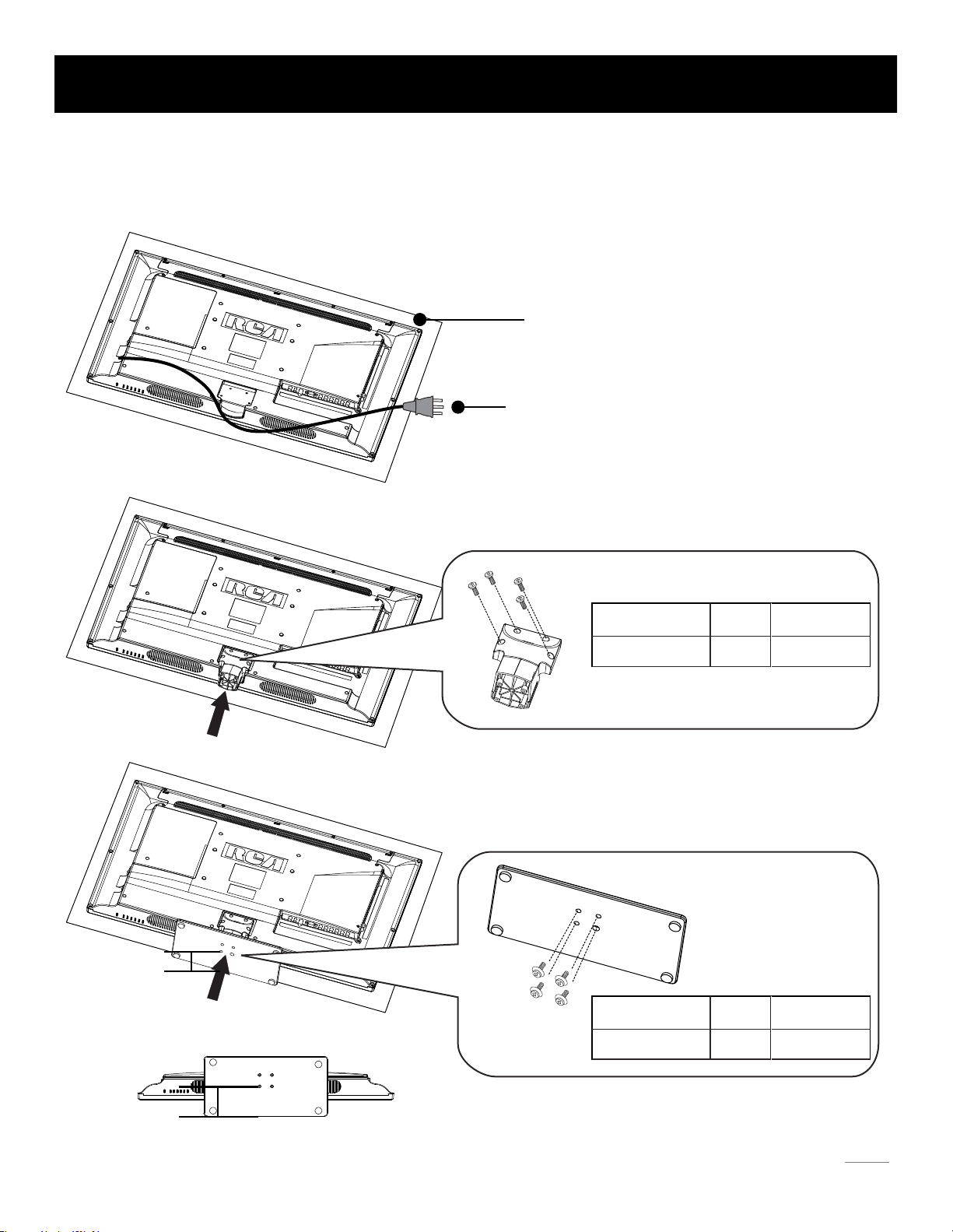
Step One
Place the TV faced down on a soft cloth or cushion to prevent the
panel from being damaged.
TV LED32B30RQD is packaged with the TV stand separated from the cabinet. To setup the TV table stand, please carry out
the installation according to the instructions below.
TV Stand Installation
9
Step Three
Take the base. Please align four holes of the base and four
screwholes of the neck, insert the base to the neck, and then
insert the 4 screws and tighten them.
RS01PWA414HT
Pedestal Screws Quantity Part #
4pcsM4 x 14mm
Please take note of the base direction:
Step Two
Take the neck. Please align the screw holes of the neck and the
TV, and then insert the 4 screws into the 4 holes on the neck and
tighten them.
RS01TB416H
Pedestal Screws Quantity Part #
4pcsM4 x 16mm
Longer side
Longer side
The bottom view of the TV (Front cabinet faces down)
Altri manuali per LED32B30RQD
2
Indice
Altri manuali RCA TV LCD

RCA
RCA SLD55A55RQ Manuale utente

RCA
RCA LED32B30RQ Manuale utente

RCA
RCA LED46C45RQ Manuale utente

RCA
RCA L42FHD28 Manuale utente

RCA
RCA l46wd250 - LCD Scenium Flat HDTV Guida rapida

RCA
RCA LED32C45RQ Manuale utente

RCA
RCA L32W11 Manuale utente

RCA
RCA LRK32G45RQ Manuale utente

RCA
RCA 26LB33RQ Manuale utente

RCA
RCA 22LB45RQ Manuale utente

RCA
RCA L40FHD41 Manuale utente

RCA
RCA RLC1906 Manuale utente

RCA
RCA 50LB45RQ Service Manuale utente

RCA
RCA L52FHD38 - 52" 1080P LCD HDtv Manuale utente

RCA
RCA LED32B30RQ Manuale utente

RCA
RCA LED50B45RQ Manuale utente

RCA
RCA R40F1FHD-EU Manuale utente

RCA
RCA 47LA55RS Manuale utente

RCA
RCA 26LA33RQ Manuale utente

RCA
RCA LED42B45RQ Manuale utente