Retell 332 clip Manuale utente

Operating Instructions (UK)
Professional Answering Machine
with telephone number display
and message transfer
Retell 332 clip


Safety information
3
Safety information
When installing, connecting and operating the Retell 332 clip, please make sure that
the following is taken into consideration:
• Connect the connecting cables only to the provided receptacles.
• Please take care that the cables do not lead to any danger of stumbling and avoid
folding, pushing and pressing of the cables.
• Avoid installing the device near electrical interference sources.
• Only connect approved accessory for this device.
• Never open the device. Do not touch the plug contacts with sharp or metal
objects.
• Only use a soft, slightly moist cloth to clean your Retell 332 clip. Do not use
chemicals or abrasive cleaning products.
• Avoid operating your Retell 332 clip in damp or dusty rooms and keep the device
away from liquids and steam or smoke.
• Do not install the device where it is exposed to direct sunlight.
• Do not operate the device in areas with danger of explosions.
• Only use the original Retell AC adapter and the original Retell telephone
connecting cable.

Button assignment
4
Button assignment
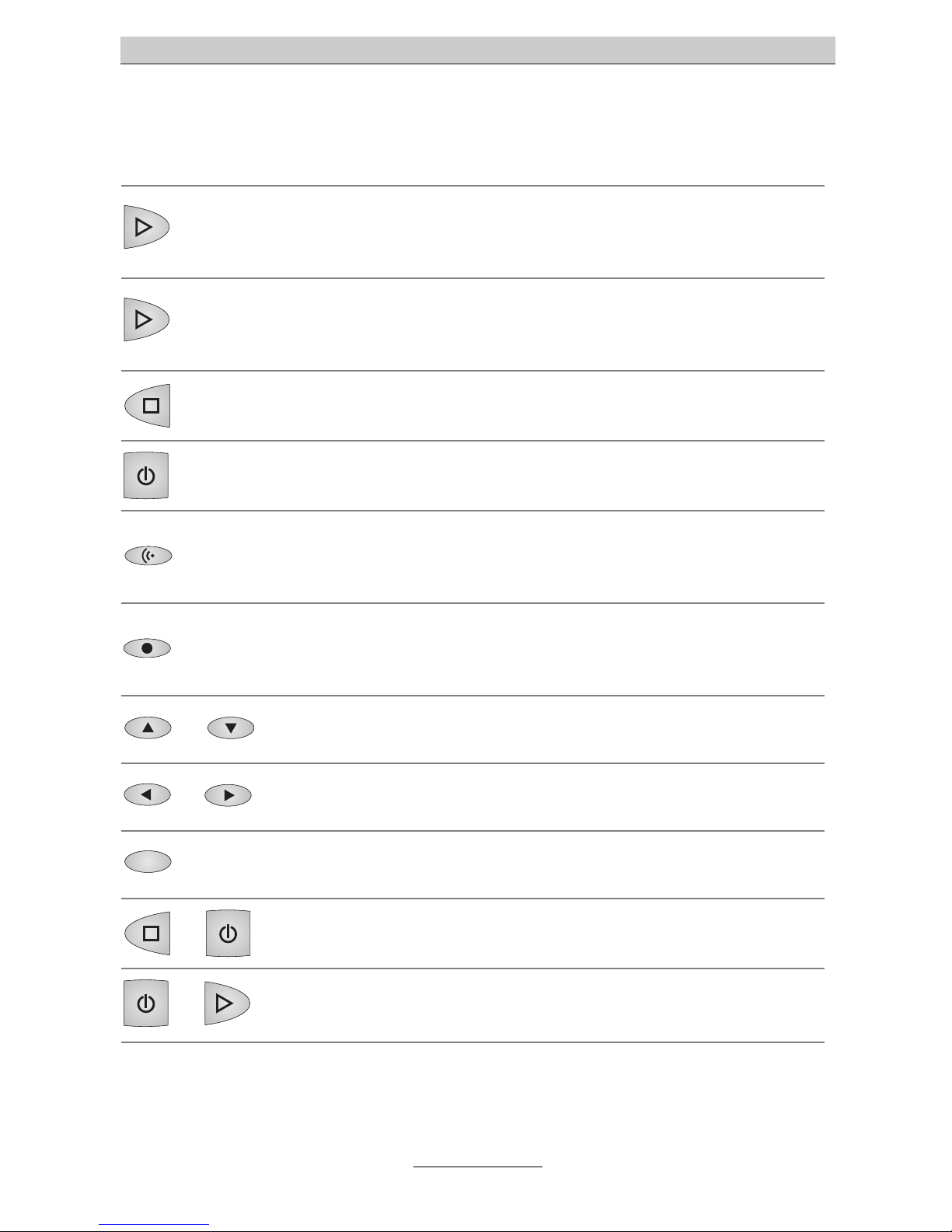
Playback: Starts the playback of new and not yet played back incoming
messages. Allows the repetition of the last 3 seconds when being pressed
during playback.
2 sec.
Playback button pressed 2 seconds: Starts the playback of all incoming
messages. The playback starts with the oldest and ends with the latest
message.
Stop: Stops a function that is currently being executed and serves to exit an
open menu.
Answering mode: Activates or deactivates the answering mode.
Outgoing message (OGM): When pressed briefly, starts the playback of the
current outgoing message. When you press the button and keep it pressed,
you can start the recording of the currently set outgoing message.
Recording: Starts the recording of a personal information (dictate). When
pressed during a phone conversation, starts the two-way conversation
recording.
or Arrow buttons (up/down): Are used to open the call list and to navigate and
make settings in the set-up menu.
or Arrow buttons (left/right): Are used to change the volume and to move the
cursor to the left or right side.
Selection button: This button serves to select entry fields and functions
which are shown in the display next to the corresponding button.
and
Stop and Answering mode pressed at the same time: Opens the set-up
menu.
and
Answering mode and Playback pressed at the same time: Activates or
deactivates the message transfer function.

Operating elements
5
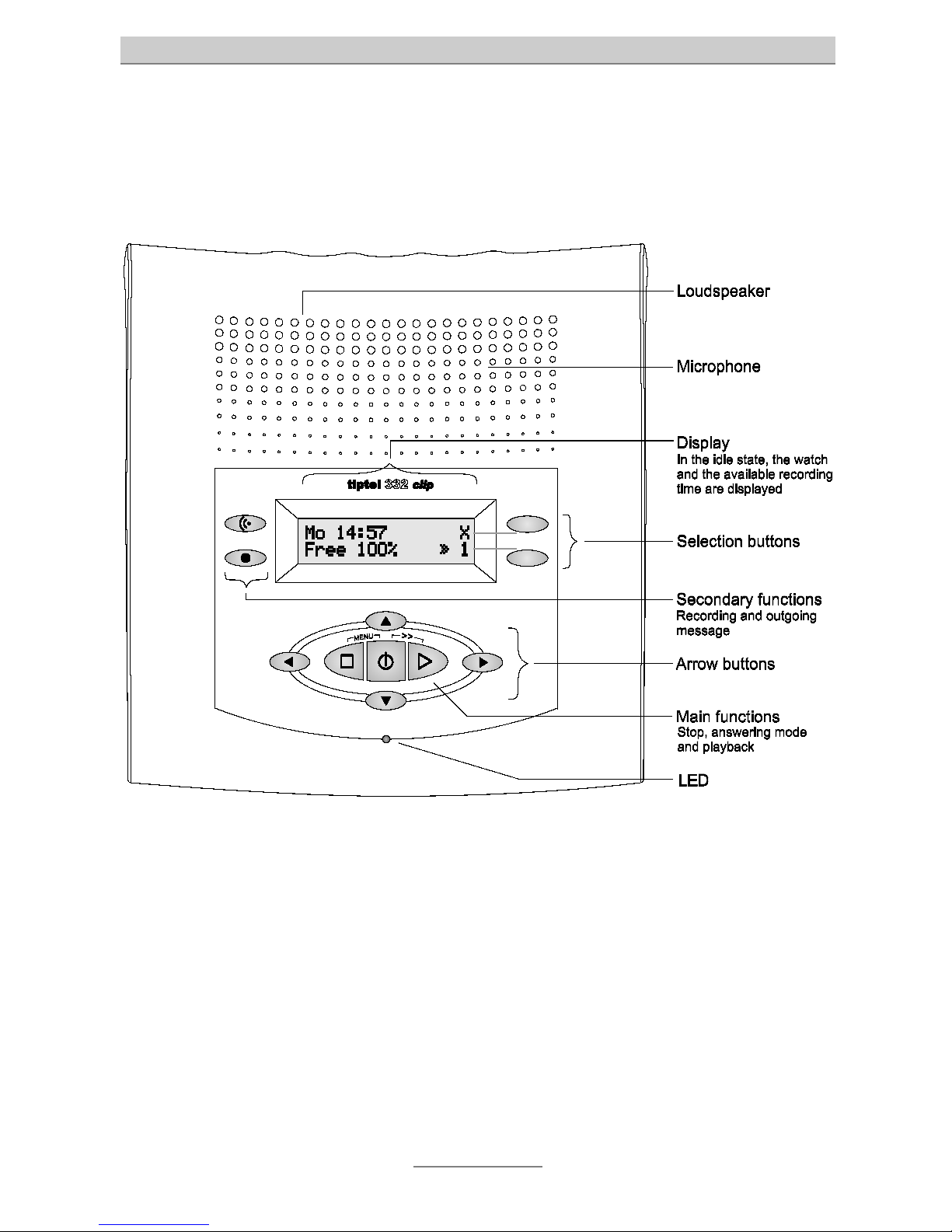
Operating elements

Table of contents
6
Table of contents
Safety information ............................................................................................3
Button assignment ...........................................................................................4
Operating elements ..........................................................................................5
Table of contents..............................................................................................6
Initial operation.................................................................................................8
Scope of supply............................................................................................8
Installation.....................................................................................................8
Connection ...................................................................................................8
Settings .............................................................................................................10
Programmable parameters ..........................................................................10
Set-up menu.................................................................................................11
Volume adjustment.......................................................................................12
Outgoing messages (OGMs) ...........................................................................13
General information......................................................................................13
Examples of outgoing messages.................................................................13
Recording outgoing messages....................................................................14
Testing the outgoing messages...................................................................15
Erasing outgoing messages ........................................................................15
Answering mode...............................................................................................16
Play back and erasing incoming messages (ICMs) .......................................17
Playback of new incoming messages .........................................................17
Playback of all incoming messages.............................................................17
Repetition......................................................................................................17
Interrupting the playback .............................................................................18
Search (Skip)................................................................................................18
Erasing individual incoming messages .......................................................18
Erasing all incoming messages ...................................................................18
Direct connection to the caller .....................................................................19
Two-way conversation recording / Personal information (dictate) ...............20
Two-way conversation recording of telephone calls ...................................20
Personal information (dictate)......................................................................21
Message transfer..............................................................................................22
Setting the destination number....................................................................22
Activating the message transfer...................................................................23

Table of contents
7
Call list ..............................................................................................................24
General information......................................................................................24
Browse through the call list..........................................................................24
Call back from the call list ............................................................................25
Message function .............................................................................................26
Remote control .................................................................................................27
Remote operation.........................................................................................27
Remote control functions .............................................................................28
Remote activation of the answering mode ..................................................30
Appendix ...........................................................................................................31
Legality of Call Recording in the UK ............................................................31
Guarantee.....................................................................................................31
Liability..........................................................................................................32
R&TTE Directive............................................................................................32
Support.........................................................................................................32
Customer Comments ...................................................................................32
Malfunctions and Troubleshooting ..............................................................33
Factory pre-set .............................................................................................34
Technical data ..............................................................................................35
Index..................................................................................................................36
Brief operating instructions .............................................................................39

Initial operation
8
Initial operation
Scope of supply
In the packaging carton of your Retell 332 clip you will find:
•Retell 332 clip
•telephone connecting cable
•AC adapter 11.5 V / 350 mA
•operating instructions with removable short operating instructions and operation
instruction card for the remote control
Installation
Your Retell 332 clip was designed for normal use conditions. Solvents in some
furniture lacquers or furniture cleaning products may attack the rubber at the feet of
the device and thus cause patches.
In such cases, especially with new or recently treated furniture, please use a non-slip
pad under the device.
Connection
Before you can take your Retell 332 clip into operation, you need to connect all
necessary cables.
1Plug the small plug of the AC adapter in the “POWER” jack and plug the AC
adapter in a 230 V power outlet.
2Plug one end of the telephone connecting cable in the “LINE” jack. Plug the
other end in the telephone socket.

Initial operation
9

Settings
10
Settings
Programmable parameters
Language ............................... German, English, French, Italian or Dutch.
Time ........................................ Here, you can set the time.
Date ........................................ Here, you can set the date (day, month, year).
Length of incoming ...............
messages
1 to 5 minutes or endless. Here, you can limit the time
a caller has at his disposal to speak a message.
Recording quality .................. Level 1 or 2, whereas level 2 has the highest re-
cording quality. An increasing recording quality
means a decrease of available recording time. Level
1 corresponds to about 50 minutes and level 2 about
25 minutes recording time.
Ringing tones ........................ 2 to 9 ringing tones. This is to set the number of
ringing tones until the answering machine picks up.
Remote control code ............ The remote control code consists of 1 to 4 digits
ranging from 0 to 9999. The code “-”is used to
deactivate the remote control.
Remote pre-interrogation ..... Yes or no. If you selected “yes”, and new incoming
messages exist, your Retell 332 clip will pick up after
2 ringing tones (regardless of your settings for the
number of ringing tones). If no new incoming
messages exist, the device picks up after the number
of ringing tones according to your settings. Thus, you
can identify whether new messages have been re-
corded or not and whether a remote interrogation
needs to be performed or not.
Message code ....................... The message code is a 1 to 4 digit number ranging
from 0 to 9999. The code “–” is used to turn the
message function off.
Altri manuali per 332 clip
1
Indice
Altri manuali Retell Segreteria telefonica