
RF Concepts 9500 Manuale utente


RF Concepts
Alpha 9500 Linear Amplifier
User Manual
www.rfconcepts.com
Product Release 1
Document Issue 1.1
February 2010

Alpha 9500 Linear Amplifier User Manual RF Concepts
Product Release 1
DOCNUMBER 9500
Document Issue 1.1
Page ii February 2010
Alpha 9500 Linear Amplifier User Manual
Prepared for RF Concepts by MRH/JH/LJW.
To reach technical support or obtain copies of this document, go to
www.rfconcepts.com.
Copyright © 2010 RF Concepts, LLC. All rights reserved. Specifications
subject to change without notice.

RF Concepts, LLC
Product Release 1 Contents
DOCNUMBER 9500
Document Issue 1.1
February 2010 Page iii
Contents
1. Introduction . . . . . . . . . . . . . . . . . . . . . . . . . . . . . . . . . . . . 1-1
1.1 Product Description 1-1
1.2 Product Capabilities 1-2
1.3 Safety Considerations 1-2
1.4 Related Products 1-3
1.5 Assistance 1-3
2. Amplifier Components and Specifications . . . . . . . . . . . . . . . . . . . 2-1
2.1 Cathode (Input-Match) Board 2-2
2.2 Center-Partition Board 2-3
2.3 Controls and Display 2-3
2.4 Display Board 2-4
2.5 Firmware 2-5
2.6 Master-Control Board 2-5
2.7 Output-Tank Circuit 2-5
2.8 Power Connections 2-5
2.9 Power Supply 2-6
2.10 Tube and Tube Deck 2-8
2.11 Specifications 2-8
3. Preparing Your Station . . . . . . . . . . . . . . . . . . . . . . . . . . . . . . 3-1
3.1 Prepare Your Station 3-1
3.2 Limitations of Operation at 90–130 VAC 3-3
4. Setting Up the Amplifier . . . . . . . . . . . . . . . . . . . . . . . . . . . . . 4-1
4.1 Unpack the Amplifier and Transformer 4-1
4.2 Install the Transformer 4-3
4.3 Connect the Transformer 4-4
4.4 Connect the Cables 4-7
4.5 Set the Input Drive 4-10
4.6 Connect the Transceiver Keying Line 4-10
5. Operating the Amplifier . . . . . . . . . . . . . . . . . . . . . . . . . . . . . . 5-1
5.1 Principles of Operation 5-1
Basic operation 5-1
Operational states 5-2
Tuning modes 5-4
Faults 5-5
5.2 Start Up the Amplifier 5-5
5.3 Tune the Amplifier 5-7
(Optional) Changing antenna settings 5-7
Autotuning 5-8
Manual tuning 5-9

Alpha 9500 Linear Amplifier User Manual RF Concepts, LLC
Contents Product Release 1
DOCNUMBER 9500
Document Issue 1.1
Page iv February 2010
5.4 Program the Amplifier Memory 5-10
5.5 Operate the Amplifier 5-12
6. Operating the Amplifier from a PC . . . . . . . . . . . . . . . . . . . . . . . . 6-1
6.1 Set Up to Operate from a PC 6-1
6.2 Operate from the PC 6-2
Main window 6-3
Simulated front panel 6-4
Tools menu 6-4
Options menu 6-5
7. Maintaining and Upgrading the Amplifier . . . . . . . . . . . . . . . . . . . . 7-1
7.1 Clean the Chassis 7-1
7.2 Retune the Amplifier 7-2
7.3 Replace the Tube and Fuses 7-2
7.4 Upgrade Firmware 7-3
On the Primary Board 7-4
On the Secondary Boards 7-5
8. Diagnosing Faults . . . . . . . . . . . . . . . . . . . . . . . . . . . . . . . . . 8-1
8.1 Overview 8-1
8.2 Fault Codes and Resolutions 8-2
Fault code 1 8-2
Fault code 2 8-4
Fault code 3 8-5
Fault code 4 8-5
Fault code 5 8-6
Fault code 6 8-6
Fault code 7 8-6
Fault code 8 8-6
Fault code 9 8-7
Fault code 10 8-7
Fault code 11 8-8
Fault code 12 8-9
Fault code 13 8-9
Fault code 14 8-9
Fault code 15 8-10
Fault code 16 8-10
Fault code 17 8-10
Fault code 18 8-10
Fault code 19 8-11
Terminology Term-1
Schematics Schem-1

RF Concepts, LLC
Product Release 1 List of Procedures
DOCNUMBER 9500
Document Issue 1.1
February 2010 Page v
List of Procedures
Procedure 3-1, “Prepare your station,” page 3–1
Procedure 4-1, “Unpack the amplifier and transformer,” page 4–1
Procedure 4-2, “Install the transformer,” page 4–3
Procedure 4-3, “Connect the transformer,” page 4–4
Procedure 4-4, “Connect the cables,” page 4–7
Procedure 4-5, “Connect the transceiver keying line,” page 4–10
Procedure 5-1, “Start up the amplifier,” page 5–5
Procedure 5-2, “(Optional) Change the antenna settings,” page 5–7
Procedure 5-3, “Autotune the amplifier,” page 5–8
Procedure 5-4, “Manually tune the amplifier,” page 5–9
Procedure 5-5, “Program the amplifier memory,” page 5–11
Procedure 5-6, “Operate the amplifier,” page 5–12
Procedure 6-1, “Set up to operate from a PC,” page 6–1
Procedure 7-1, “Clean the amplifier,” page 7–1
Procedure 7-2, “Replace the tube and fuses,” page 7–3
Procedure 7-3, “Upgrade firmware on the primary board,” page 7–4
Procedure 7-4, “Upgrade firmware on the secondary boards,” page 7–7

Alpha 9500 Linear Amplifier User Manual RF Concepts, LLC
List of Procedures Product Release 1
DOCNUMBER 9500
Document Issue 1.1
Page vi February 2010
RF Concepts, LLC
Product Release 1 1
DOCNUMBER 9500
Document Issue 1.1
February 2010 Page 1–1
1 Introduction
1.1 Product Description 1–1
1.2 Product Capabilities 1–2
1.3 Safety Considerations 1–2
1.4 Related Products 1–3
1.5 Assistance 1–3
Congratulations on your purchase of a professional-quality Alpha 9500
linear amplifier.
1.1 Product Description
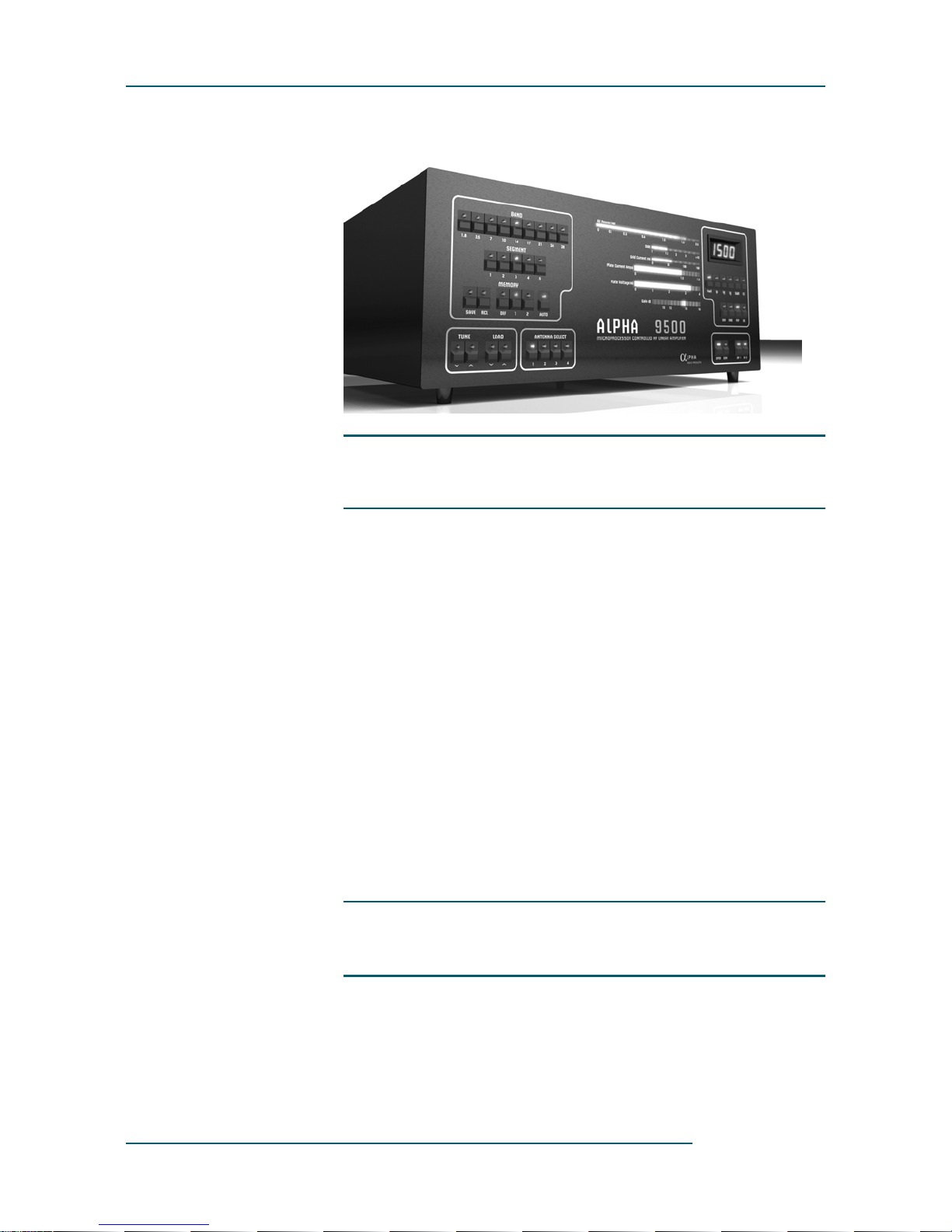
The Alpha 9500 (see Figure 1-1) is an self-contained autotune HF linear
power amplifier. It is capable of continuous operation at 1500 W peak
power output on single sideband (SSB), keyed continuous wave (CW),
slow-scan television (SSTV), radioteletype (RTTY), digital modes or
FM, with no time limit.
CAUTION
!
CAUTION! Study this manual carefully before operating your
amplifier for the first time. In particular, it is extremely important that
you thoroughly review the installation and operation sections. Failure
to do so could result in serious damage not covered under warranty.
Alpha 9500 Linear Amplifier User Manual RF Concepts, LLC
Introduction Product Release 1
DOCNUMBER 9500
Document Issue 1.1
Page 1–2 February 2010
11
1Figure 1-1 Alpha 9500
1.2 Product Capabilities
Product capabilities include:
•Continuous RF output. The Alpha 9500 is capable of 1.5 kW
continuous RF output on all commonly used modes and on any
authorized amateur frequency from 1.8 to 29.7 MHz (other than the
60-meter band).
•Compatibility with popular amateur transceivers and exciters. The
Alpha 9500 requires approximately 50-65 W peak RF drive for 1.5-
kW output.
•Capable of full CW break-in, QSK, and all digital modes when used
with any appropriate transceiver.
•Built-in protective functions. The control system incorporates
protective functions that minimize the probability of accidental
damage to the amplifier or its power tubes. In most cases, when one
of the protective functions is tripped, the amplifier goes to standby.
•USB and serial interface allow for remote operations, diagnostics,
and firmware upgrades.
1.3 Safety Considerations
•Locate the Alpha 9500 where there is good air circulation all around
and on top of the cabinet. The unit may become hot during operation.
Questo manuale è adatto per i seguenti modelli
1
Indice
Altri manuali RF Concepts Amplificatore


