RF-Link AWS-5832-VSR Manuale utente

1
04
1
User’s Manual
for
AWS-5832-VSR
5.8 GHz Wireless Video Server
Document Number:PSS08003 Page :1 of 51
Revision :1A
Date :2008-04-28
RF-Link/Araneus USA, Inc.
URL: http://www.rflinkusa.com

2
04
2
About this document
This
software quick
manual
is
intended
for
u
ser of
5.8 GHz Wireless
Video Server
.
The default IP setting of Wireless Video Server is
DHCP
. Please refer to user manual of Wireless Video Server, if there
is not DHCP Server on your network.
IMPORTANT
Check
PC
specification
requirements
Check
OS
platform
requirements
Install
IPSurveillance
Application
Software
be
for
e
you
s
t
ar
t
wo
rk
ing
with
Wireless Video Server
.
Read
special
note
s
and
important
con
f
iguration
information.

3
04
3
TABLE OF CONTENTS
1. PRODUCT OVERVIEW........................................................................................5
2. PRODUCT CD.........................................................................................................6
3. BEFORE YOU INSTALL SOFTWARE...............................................................6
4. LANGUAGE SUPPORT.........................................................................................6
5. HOUSING and CONNECTORS............................................................................7
Front
side
look .......................................................................................................7
Back
side
look........................................................................................................9
6. FIRST TIME USE INSTRUCTIONS (read carefully) ......................................11
INSTALL IPSURVEILLANCE APPLICATION SOFTWARE
.........................11
WHICH BROWSER TO USE?
............................................................................11
POWER ON Wireless Video Server
....................................................................11
CONNECTING TO NETWORK
.........................................................................11
FACTORY SETTING - INITIAL IP ADDRESS
................................................11
USING IPSCAN
..................................................................................................12
CHANGE NETWORK SETTINGS BY IPSCAN
...............................................14
7. ACCESS Wireless Video Server...........................................................................16
BROWSER
..........................................................................................................16
INSTALL AND RUN ACTIVEX CONTROL
....................................................17
INITIAL USERNAME & PASSWORD
..............................................................18
VIEWING AND OPERATTING PAGE
.............................................................18
CONTROL PANEL SETTINGS
.........................................................................20
8. WEB INTERFACE SETTINGS...........................................................................21
STATUS
...............................................................................................................22
NETWORK
..........................................................................................................23
STATIC IP....................................................................................................23
DYNAMIC IP..............................................................................................24
PPPoE SETTINGS.......................................................................................25
VIDEO
.................................................................................................................26
VIDEO SETTINGS.....................................................................................26
COLOR SETTINGS....................................................................................28
VIDEO PREVIEW ......................................................................................28
MAX CLIENT LIMIT.................................................................................29
EVENT RULE
.....................................................................................................29
EVENTS HANDLED..................................................................................30
ACTIONS TRIGGERED.............................................................................31

4
04
4
RULE LISTS - ADDING/DELETING........................................................31
MODIFYING RULE LISTS........................................................................31
CAPTURE
...........................................................................................................32
DATE & TIME
....................................................................................................33
OSD
......................................................................................................................34
DWELL MODE SETUP (ATUO-SCAN MODE)
...............................................35
PTZ CONTROL
...................................................................................................36
PORT
...................................................................................................................36
DDNS
...................................................................................................................38
SMTP/FTP
...........................................................................................................39
E-MAIL – SMTP SETTINGS .....................................................................39
FTP SETTINGS...........................................................................................40
TRIGGER SETUP
...............................................................................................41
Digital INPUT..............................................................................................41
PERIODIC TIMER......................................................................................41
MOTION DETECTION..............................................................................42
Video Loss ...................................................................................................44
PRE/POST SETTING
..........................................................................................44
ACCOUNT
..........................................................................................................45
SECURITY
..........................................................................................................46
MAINTENANCE
.................................................................................................48
9. FACTORY DEFAULT..........................................................................................49
10. REBOOT ..............................................................................................................49
11. LOGOUT..............................................................................................................49
12. USB Config Port - FIRST TIME EXPERIENCE.............................................50
SUPPORTED OS
.................................................................................................50
NO SOFTWARE INSTALLATION REQUIRED
...............................................50
STEPS FOR USING USB config port (Windows XP PC)
...................................51

5
04
5
1. PRODUCT OVERVIEW
AWS-5832-VSR is the first 5.8GHz wireless video server developed
by RF-Link. By installing a 5.8GHz transmitter in each of your
analog camera, and a built-in 8-channel receiver in AWS-5832-VSR,
it can connect up to 8 cameras wirelessly without interference from
all devices operating from 2.4GHz, such as Bluetooth and Wi-Fi.
AWS-5832-VSR also has a built-in video server that connects to the
internet, enables you to view and record video from 8 cameras (one
at a time), and set auto-scan time freely (from 1-120 seconds) on
each channel either locally or over the internet.
Wirelessly remote control PTZ speed dome over the internet and
remote control locally features are also available with additional
purchase.

6
04
6
2. PRODUCT CD
Produ
c
t
CD
in
the
package
contains
the
fo
llowing:
9
IPSurveillance
Application
Softwa
re
NVR
management
softwa
re
¾
16CH
Live
View
/
Recording
/
Playback
9
User Manuals
3. BEFORE YOU INSTALL SOFTWARE
9
PC running Microsoft Windows XP Server Pack 2 or above is only
capable of running IPSurveillance Application Software.
9
PLEASE go through IPSurveillance Application Software
user’s manual before installation to check further PC
requirements
in order
to
en
sure
smooth
s
oftwa
re
op
er
atio
n.
4. LANGUAGE SUPPORT
9
ENGLISH
NOTE
IPSurveillance Application Software™ setup will auto-run when inserting
product CD. Pay attention to dialog box questions before you press OK button.

7
04
7
5. HOUSING and CONNECTORS
Front
side
look
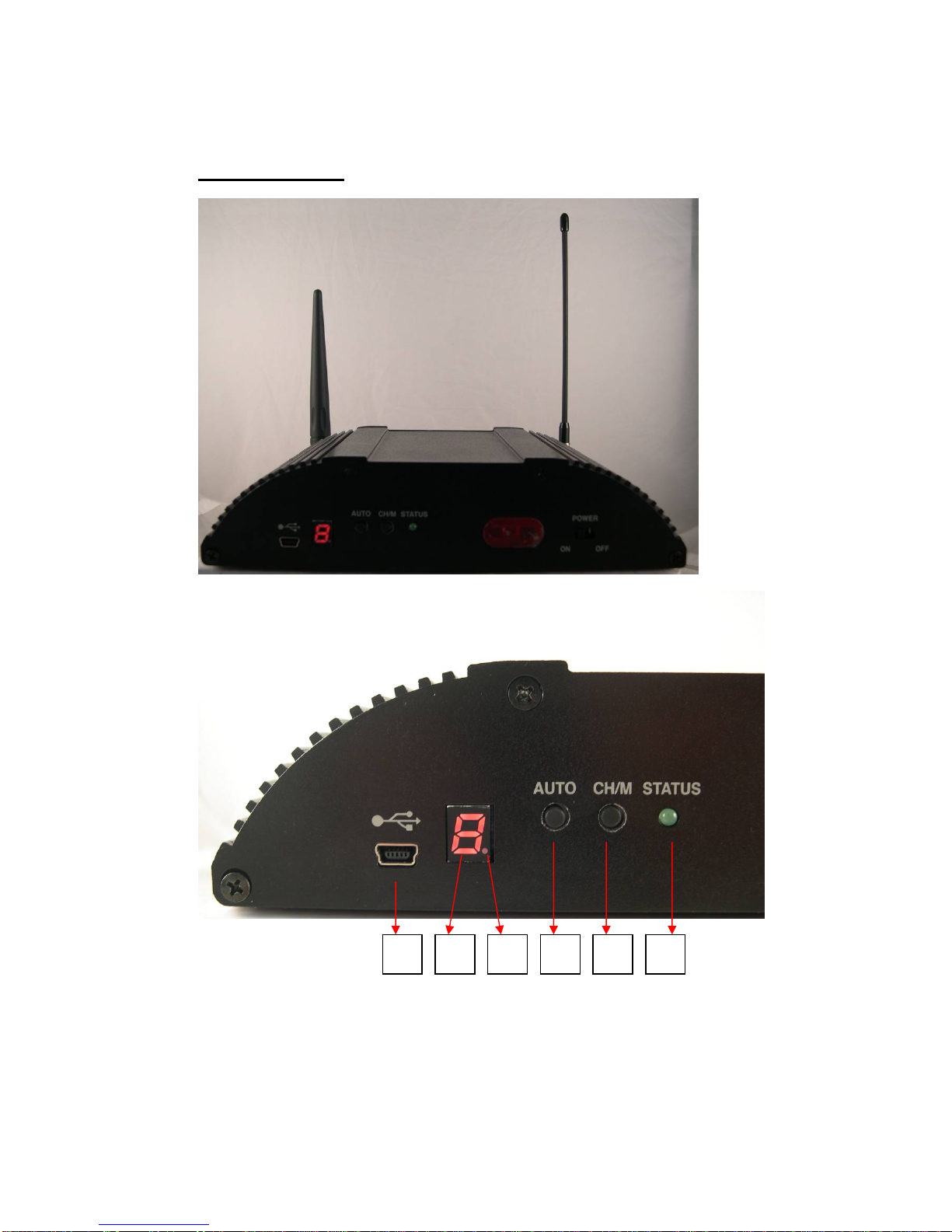
1: mini USB Port for configuration
2: Channel or mode number display. This indicates mode number (Mode 1 ~ 9), if
it is flashing. Or, this indicates channel number (CH 1 ~ 8 for wireless receiver,
CH 9 for wire input), it is bright.
3: Fixed channel mode or auto-scan mode display. This indicates auto-scan mode,
124563

8
04
8
if the dot display is bright. Or, this fixed channel mode, if the dot display is off.
4: Push button for changing fixed channel mode or auto-scan mode
5: Push button is for changing channel number, if it is at fixed channel mode. And,
it is for changing mode number, if it is auto-scan mode.
6: LED for System Status
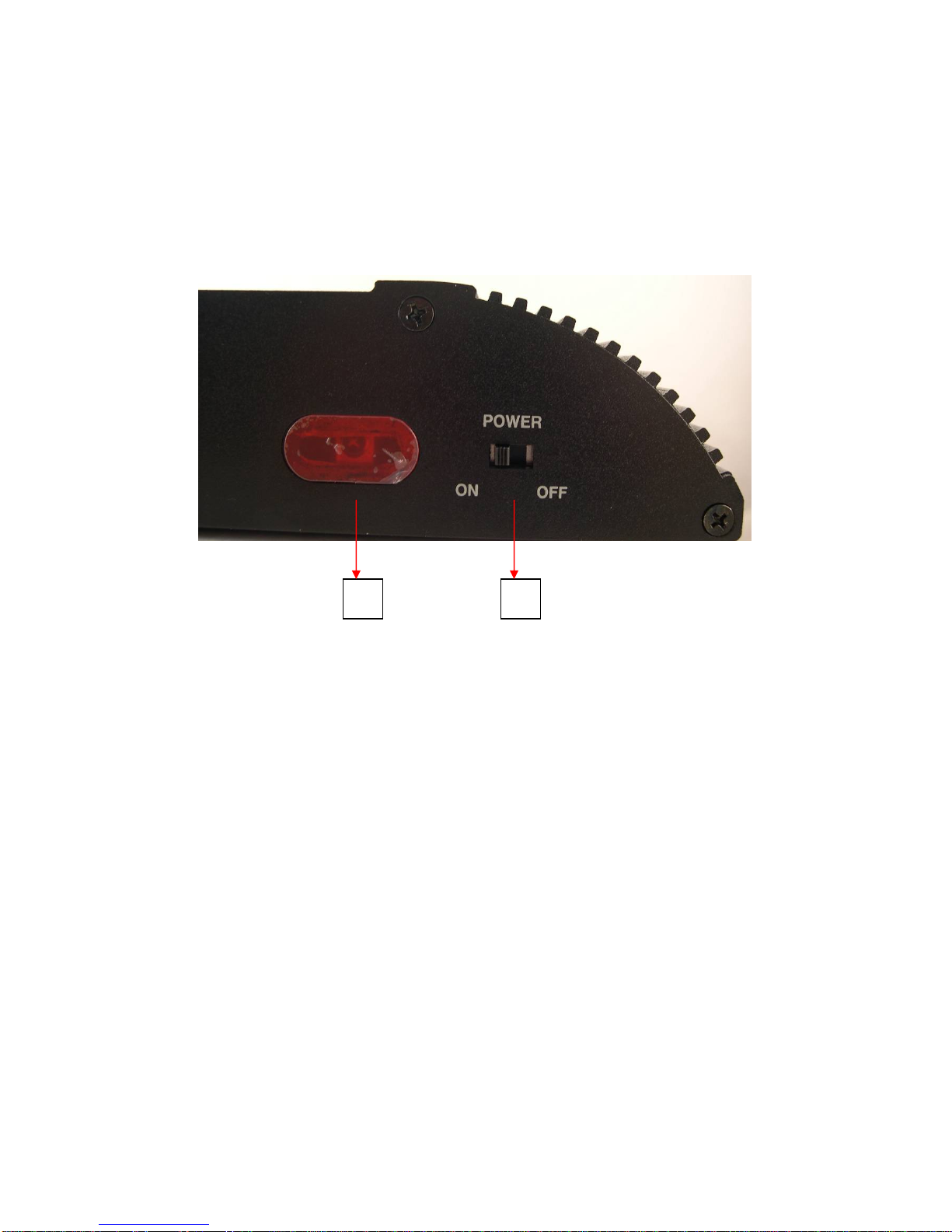
7: IR Receiver
8: Power switch
78

9
04
9
Back
side
look
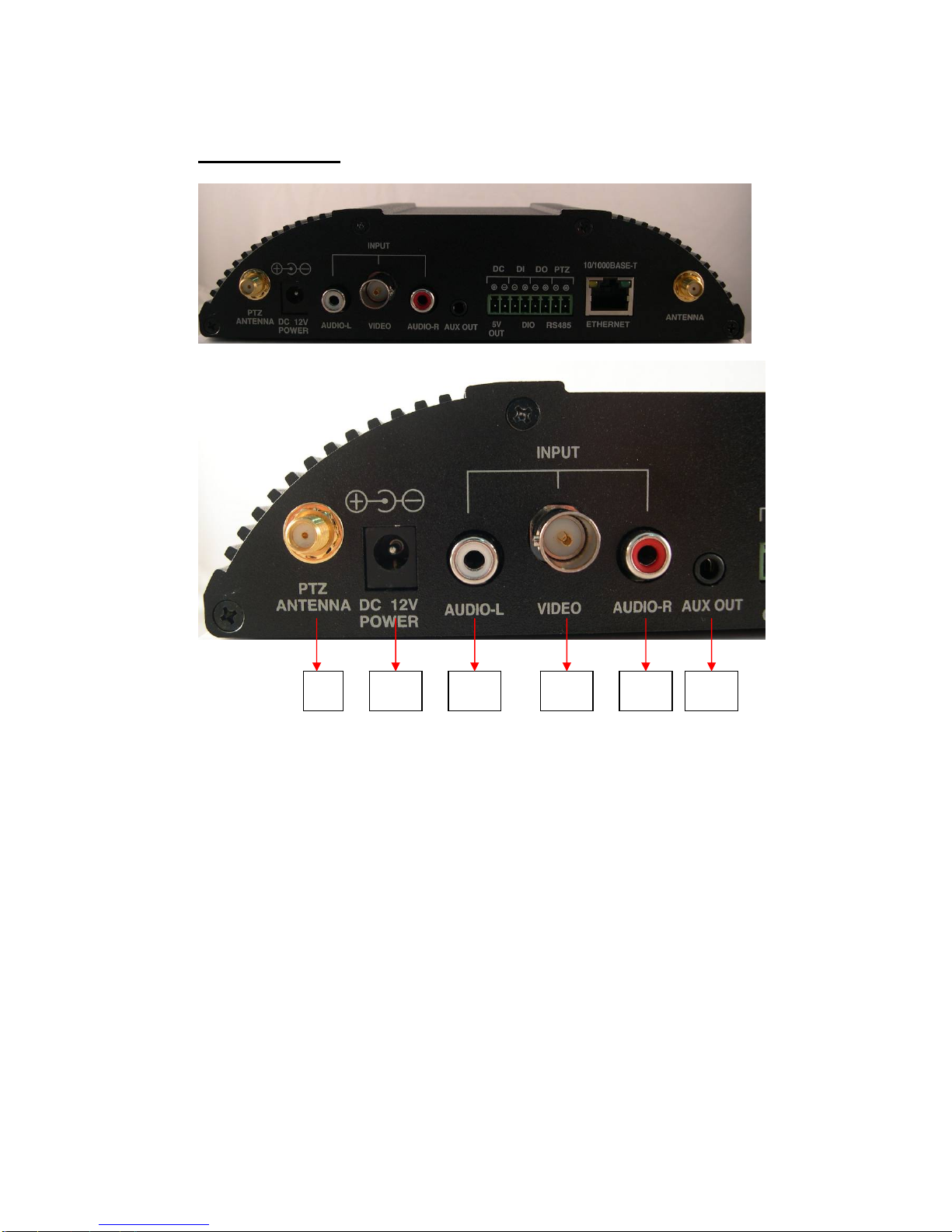
9: SMA connector for wireless PTZ antenna. It disappears, if wireless PTZ is not
built in this device.
10: Power Jack for 8 ~ 32 VDC input
11: RCA connector for audio left input (CH 9)
12: BNC connector for video input (CH 9)
13: RCA connector for audio left input (CH 9)
14: A/V jack for audio and video output
910 11 12 13 14

10
04
10
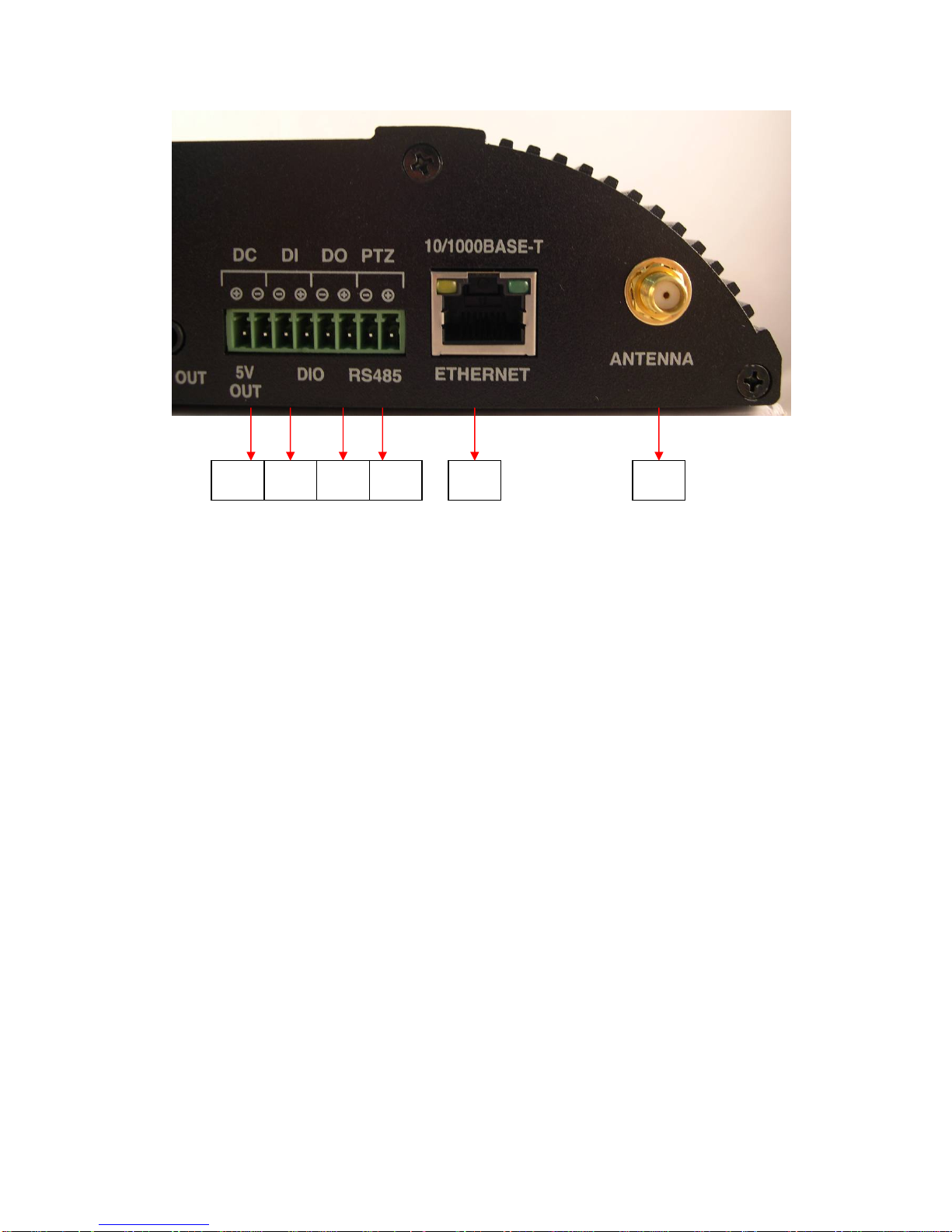
15: 5V DC output
16: Terminal block for digit input, if wireless PTZ is not built in this device. There
is no function, if wireless PTZ is built in this device.
17: Terminal block for digit output, if wireless PTZ is not built in this device.
There is no function, if wireless PTZ is built in this device.
18: Terminal block for RS-485, if wireless PTZ is not built in this device. There is
no function, if wireless PTZ is built in this device.
19: RJ-45 connector for Ethernet
20: SMA connector for 5.8 GHz antenna
15 16 17 18 19 20
Indice
Manuali Hardware di rete popolari di altre marche

Matrix Switch Corporation
Matrix Switch Corporation MSC-HD161DEL Manuale utente

B&B Electronics
B&B Electronics ZXT9-IO-222R2 Manuale utente

Yudor
Yudor YDS-16 Manuale utente

D-Link
D-Link ShareCenter DNS-320L Manuale utente

Samsung
Samsung ES1642dc Istruzioni per l’uso

Honeywell Home
Honeywell Home LTEM-PV Istruzioni per il montaggio