
Rhoson DV Series Manuale utente

User Manual
DV Series

2
About the Manual
The information is for reference only. If there are any changes, we will not notify otherwise. We will do our best to
ensure the accuracy and completeness of this manual. We will not be responsible for any errors or omissions. The
manufacturer reserves the right to change the technical specifications without prior notice.
About the SD(memory) card
•SD card is consumable. Please format it regularly and test it for normal operation.
•To ensure normal operation of the SD card, it’s recommended to format it every two weeks. And remember to save
the required file before formatting to avoid it disappeared.
•It’s recommended that Micro SD use a Class of 10 or above. The SD card capacity depends on the model. It can
support 32 to 128GB but there is no guarantee that all SD/SDHC cards are compatible with this device.
•Do not remove the SD card when the device is turned on and be sure to turn off the device before removing it to
avoid damaging the video files.
Note: The DVR is a real-time writing device. The SD card is recommended to store consumables after 8 months of
use, depending on the situation.

3
Table of Contents
1.Product Design Specification .........................................................................................................4
2.Product Function Description ........................................................................................................6
2-1.Function Button ............................................................................................................................6
2-2.LED Button Indication Description.........................................................................................6
2-3.Micro SD Card Embedded Position Indication ..................................................................7
2-4.Micro SD Card Instructions .......................................................................................................7
2-5.Product Accessories ....................................................................................................................8
2-6.Control Box Interface Description ..........................................................................................9
3.File Locking Function Description.................................................................................................10
4.APP Instructions ...................................................................................................................................11
4-1.Method of App Downloading & DVR Connecting............................................................11
4-2.App Screen Displaying After DVR Connect .........................................................................12
4-3.APP Setup Instructions................................................................................................................13
5.Videos and Photos Browsing Function ........................................................................................14
5-1.Use of Videos and Photos Browsing Function On the App ...........................................14
5-2.Function of Computer Browsing Videos and Photos On Micro SD card………………16
4
1.Product Design Specification
DVR
Item
Specification
Resolution
Full HD: Video Record 1920x1080P
BMP(Image File Format)
(Transport Stream) (MPEG2-TS)
Video Source
LVDS CMOS of front and rear cameras
Audio
A Built-in Microphone Supports Recording
Wi-Fi
IEEE 802.11n 2.4GHz, WPA2
Memory Capacity
Micro SD card, 32GB (inclusive or above) is recommended, with Class 10 or above.
Note: Support up to 128G, please format it to FAT32 on the computer so it can be used normally.
Sensor
Triple-axis Acceleration G-sensor
Recording Method
Loop recording: When the memory capacity is full,
the oldest file will be overwritten automatically to maintain the continuous recording of the camera.
Power Supply Connecting
Input 12V DC power supply / 1A or less
Dimensions (Length x Width x Height)
Front Camera:24.3mm*68.2mm*50.1mm Rear Camera:56.2mm*30mm*36.5mm
Main Box:93mm*71.8mm*23.3mm
Weight
690g
Operating Temperature
-20°C~70°C
Storage Temperature
-40°C~85°C
5
Front Camera
Sensor
Sony STARVIS sensor
Camera
Optical Glass Camera HFOV (degrees):120°F.no:2.0
Resolution
1920x1080P
Rear Camera
Sensor
Sony Exmor sensor
Camera
Optical Glass Camera HFOV (degrees):120°F.no:2.1
Resolution
1920x1080P
App
Operation System Support
iOS:7+ Android:V5.0+
Note: LVDS is a small amplitude differential signal technology. The transmission rate can reach hundreds of megabytes or even higher. Also,
it has lower power consumption with better noise performance and more reliable stability.
6
2.Product Function Description
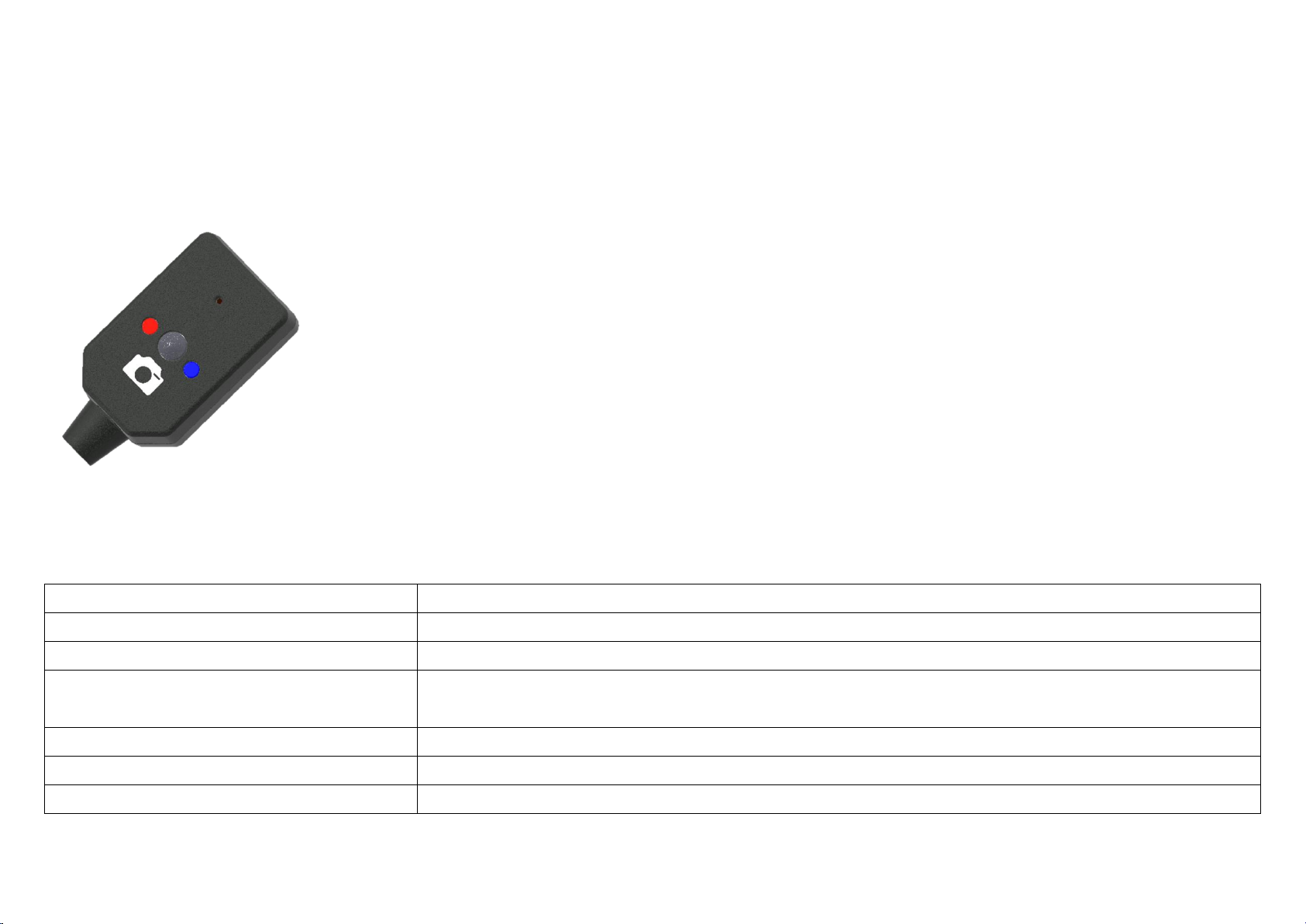
2-1.Function Button
2-2.LED Button Indication Description
1.Power light
Blue light on
2.Video recording start
Blue & Red lights on
3.Video recording stop
Blue light on, Red light off
4.Lock file
1.Manually lock file: Long press for more than 3 seconds,the Red light flashes
2. G value trigger: The Red light flashes
5.Take pictures
Click to flashes the Red light once
6.Time Correction
Blue light flashes, Red light on
7.Machine Abnormality (SD card/camera/body)
Red and Blue lights flash alternately
1. Camera Button
2. Power Indicator
3. Video Recording Indicator
Camera button: click to take a photo, long press for
more than 3 seconds to lock the video.
1
2
ZZ
ZZ
3
7
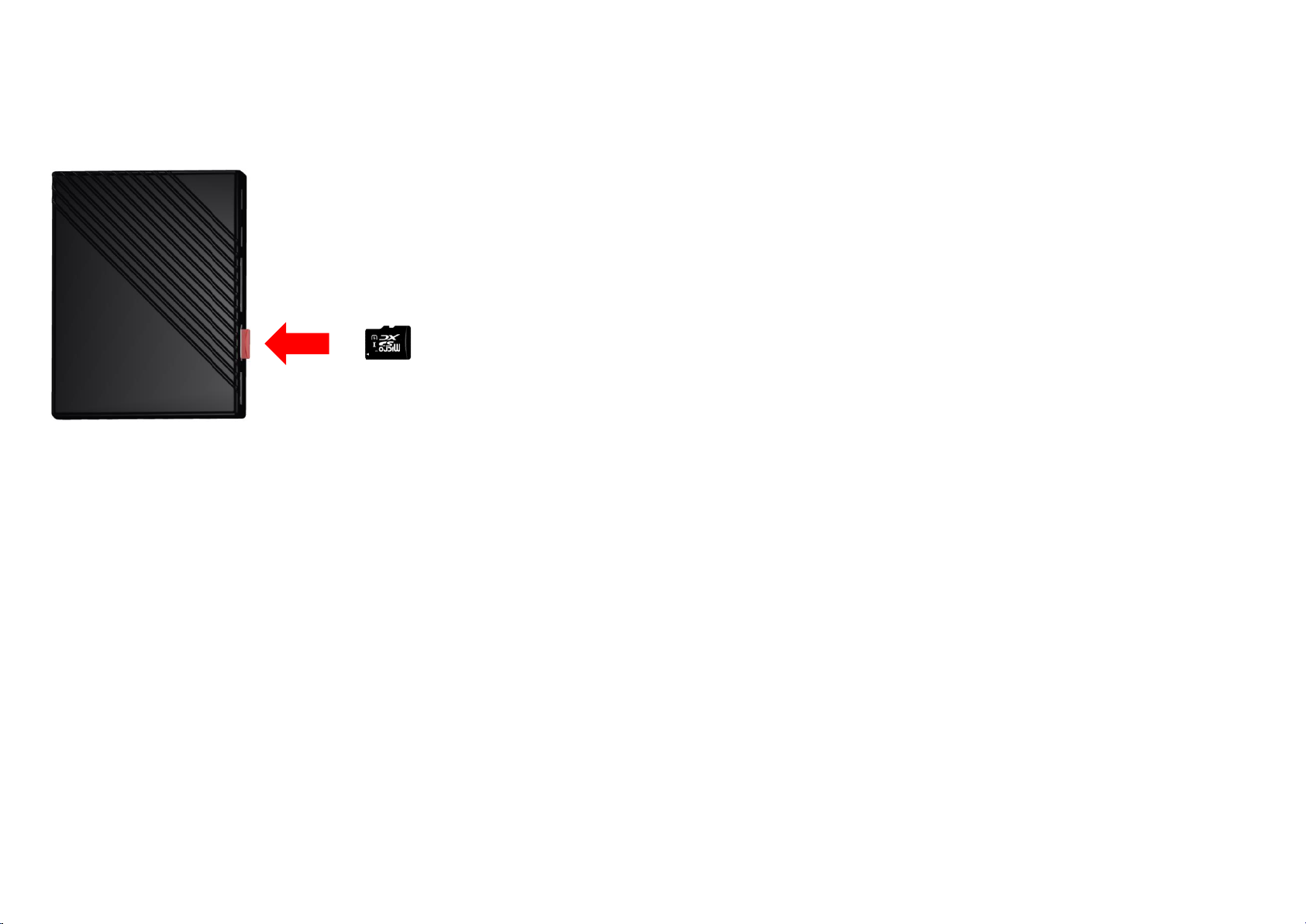
2-3.Micro SD Card Embedded Position Indication
2-4.Micro SD Card Instructions
⚫To avoid poor recording performance and quality, the SD card is only suitable for Class 10 and it is recommended to choose a major
brand.
⚫Insert the Micro SD card into the card slot and push it to the end until hearing a "click" to indicate that the Micro SD card has been fixed
in the card slot.
⚫Do not remove the Micro SD card arbitrarily during video recording to avoid damaging the files.
⚫Please make sure that the video recorder is maintaining off during removing or installing the Micro SD card, otherwise, the Micro SD
card may be damaged.
⚫If needed to remove the Micro SD card, push it according to the insertion direction until hearing a "click", which means the front part of
the Micro SD card has ejected. Then you can remove the Micro SD card correctly.
⚫Please execute [Format Micro SD Card] on your APP monthly to ensure the operation of the Micro SD card maintaining well.
8
⚫Since the camera resolution is 1080P, the recording file size is an average of 230MB every 3 minutes (depending on the shooting
content). A 32GB SD card can record video for about 4.9 hours (2.4 hours for the front and rear dual cameras). If you need a longer
recording time, please replace a large-capacity Micro SD card.
⚫If you replace the Micro SD card, be sure to format it (FAT32 format) with a computer or a recorder with a built-in function to ensure the
Micro SD card store normally.
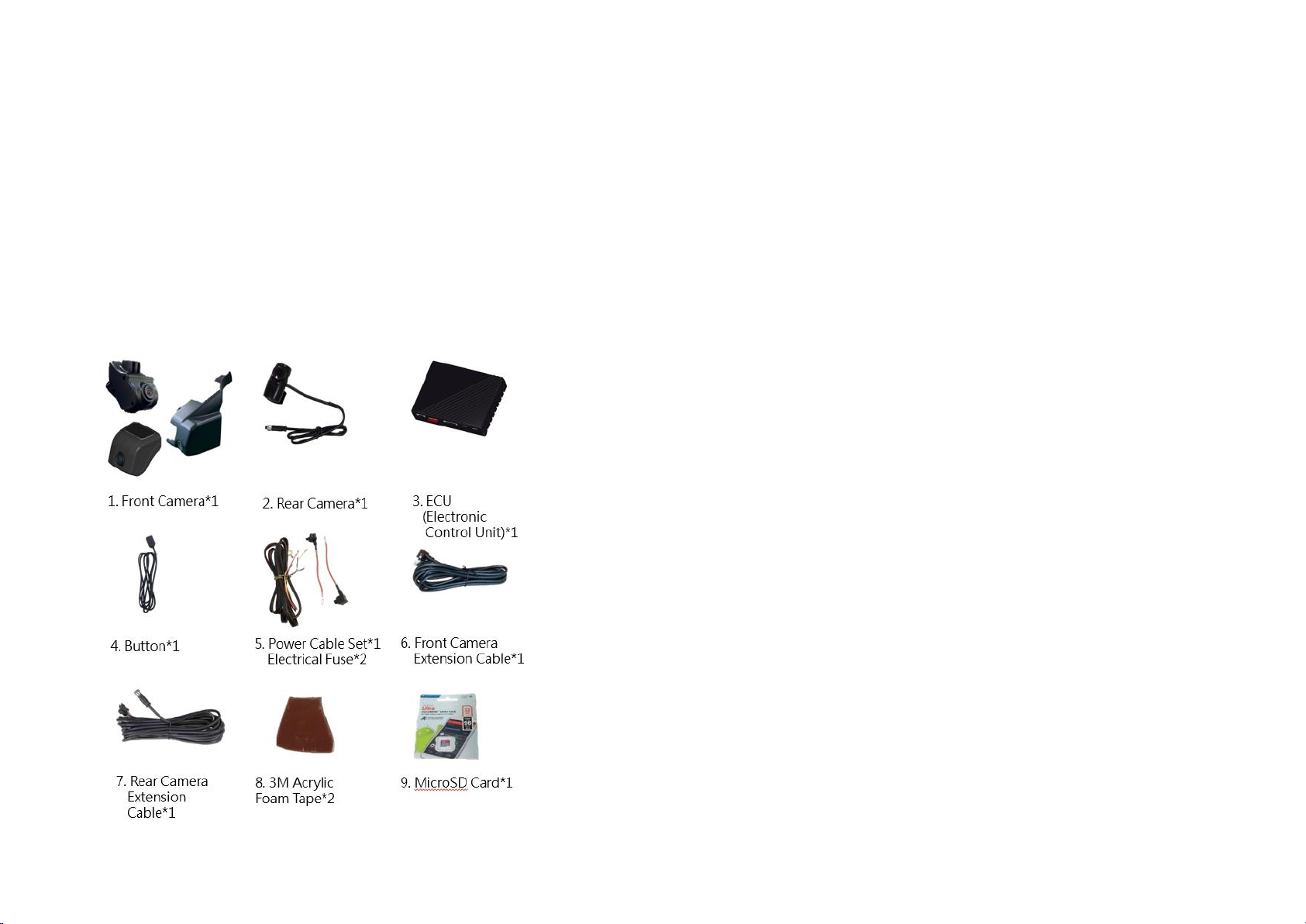
2-5.Product Accessories
9
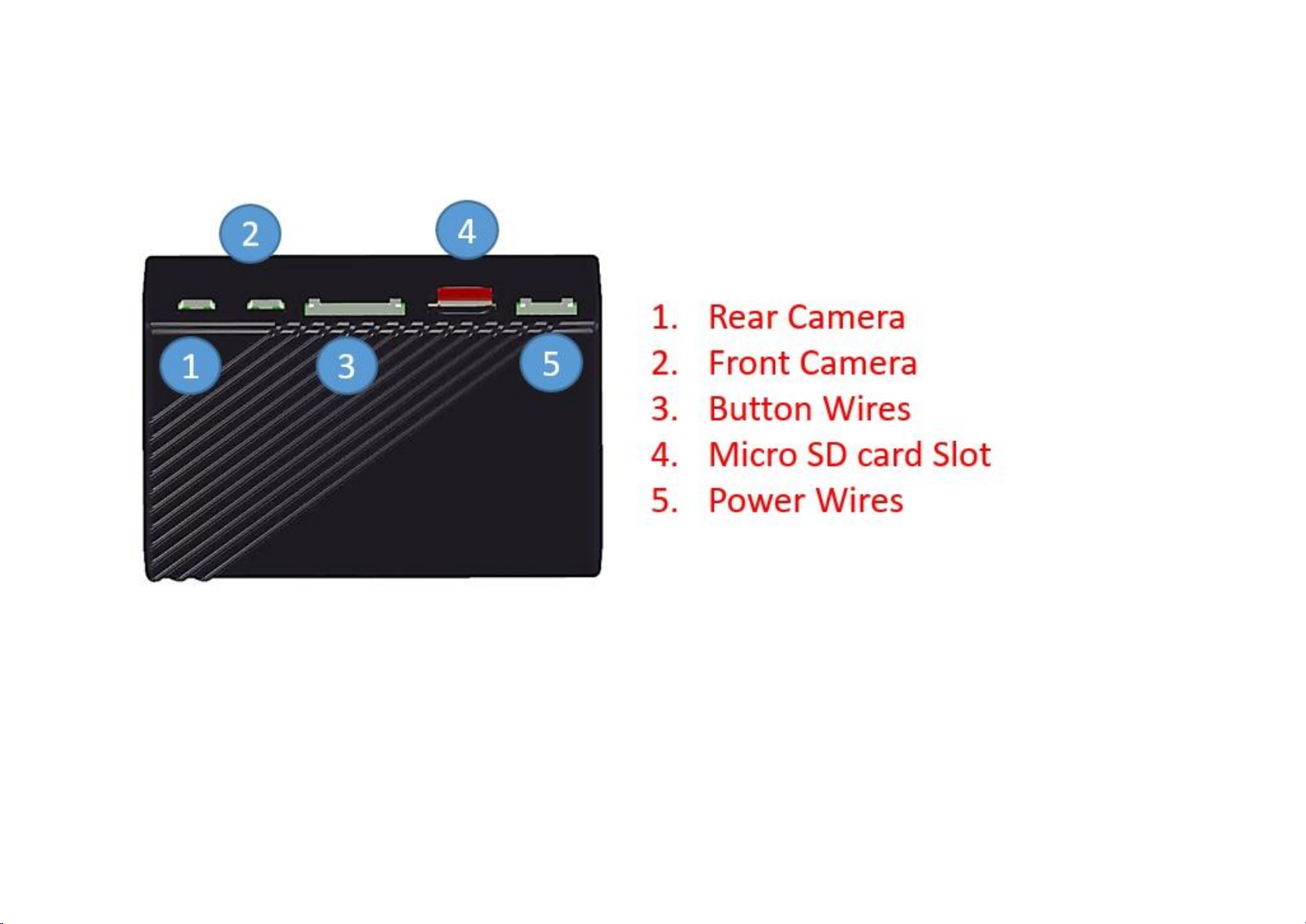
2-6.Control Box Interface Description
Warning: The MINI USB port of the control box is only used for accessory LVDS CMOS cameras. Do not insert any other MINI USB products
or power supplies to avoid damage.
10
3.File Locking Function Description
The host can manually lock file and may trigger an automatic file lock due to external impact.
Automatic Lock:
When the built-in Triple-axis Acceleration In-sensor of the host detects excessive acceleration, it will automatically determine that an impact
accident has occurred and thus immediately lock the file.
Manual Lock:
Please press the button and hold for 3 seconds to keep the files that are currently being recorded from overwritten. At this time, the red
light will flash slowly, indicating that the recording function is locked.
File Locking Reference:
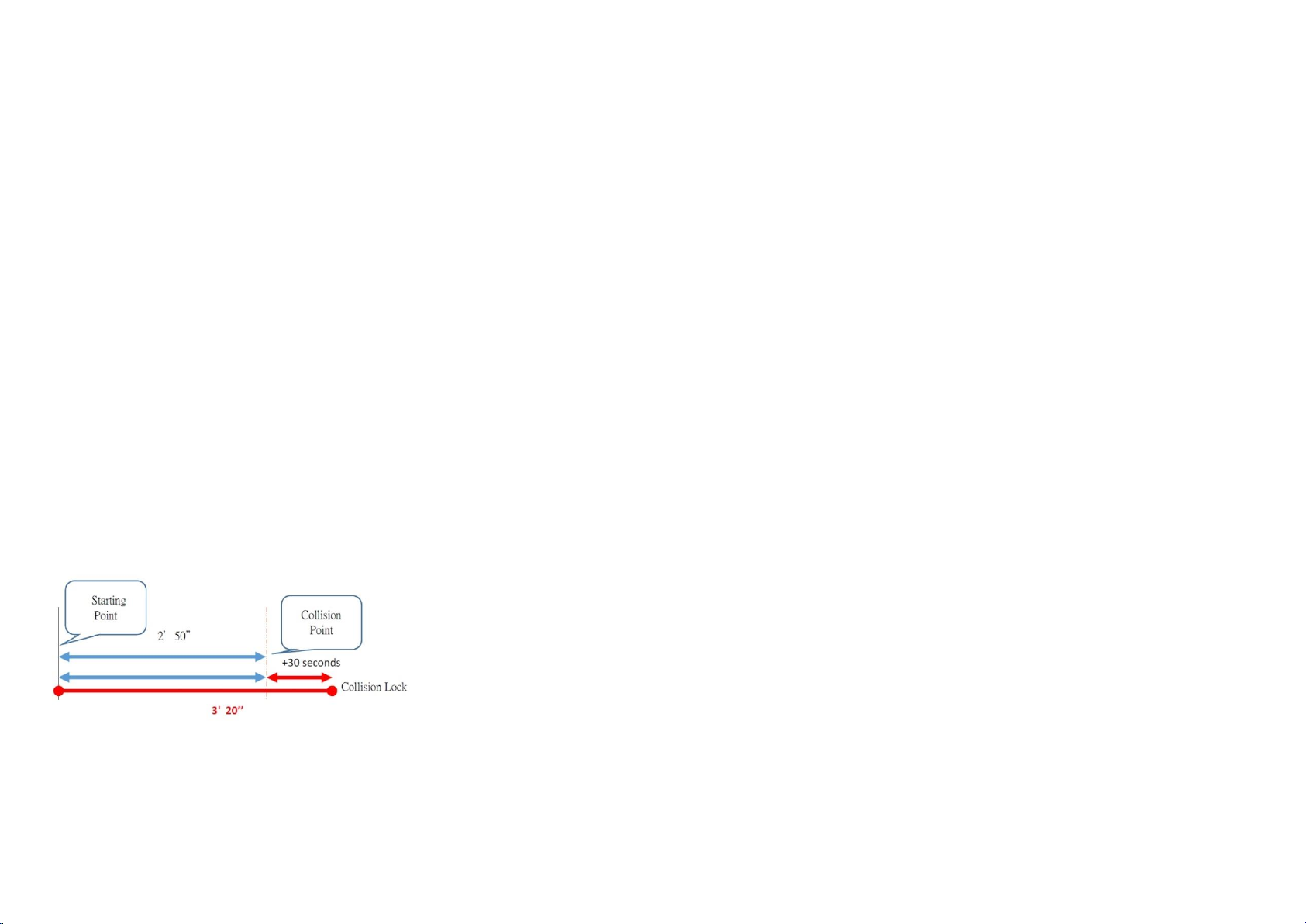
The lock file is based on the "file" instead of the recording time. For example: the exact trigger file is a trigger file plus 30 seconds from the
start point to the trigger point.
Take the 3 minutes file as an example:
Note: Locked files can occupy up to 30% of the SD card's capacity. When this capacity is exceeded, the oldest locked files will be overwritten.
Questo manuale è adatto per i seguenti modelli
1
Indice


