
Roberts Swallow 2 Manuale utente

Please read this manual before use
ROBERTS
PLL synthesised radio MP3/WMA/CD/USB player

1
Contents
Contents .............................................................................. 1
Controls ............................................................................2-4
Battery operation ............................................................... 5
Mains operation................................................................... 5
Operating your radio - FM search tuning............................. 6
Operating your radio - MW search tuning............................ 7
Operating your radio - manual tuning.................................. 8
Presetting radio stations automatically................................ 9
Presetting radio stations manually..................................... 10
Recalling a preset station .................................................. 11
Last station memory .......................................................... 11
Compact discs................................................................... 12
CD-R / CD-RW discs......................................................... 12
Inserting a CD.................................................................... 13
Playing a CD...................................................................... 13
Selecting a track................................................................ 14
Search function.................................................................. 14
CD repeat mode ................................................................ 15
CD random mode .............................................................. 15
Programmed play .............................................................. 16
Editing a programme ......................................................... 16
Checking a programme ..................................................... 17
Erasing a programme........................................................ 17
MP3/WMA mode .............................................................. 18
Playing an MP3/WMA CD ................................................. 19
Selecting albums and files................................................. 19
Repeating a file.................................................................. 20
Repeating all files in an album........................................... 20
Repeating all files .............................................................. 20
Playing back files in random order .................................... 21
Programming tracks .......................................................... 21
Playing a programmed track.............................................. 22
Editing a programme ......................................................... 22
Adding a new file ............................................................... 23
USB mode ......................................................................... 24
Selecting USB mode ......................................................... 25
General.............................................................................. 26
Mains supply...................................................................... 27
Headphones ...................................................................... 28
Specification ...................................................................... 29
Circuit features .................................................................. 29
Troubleshooting ................................................................. 29
Guarantee.......................................................................... 30
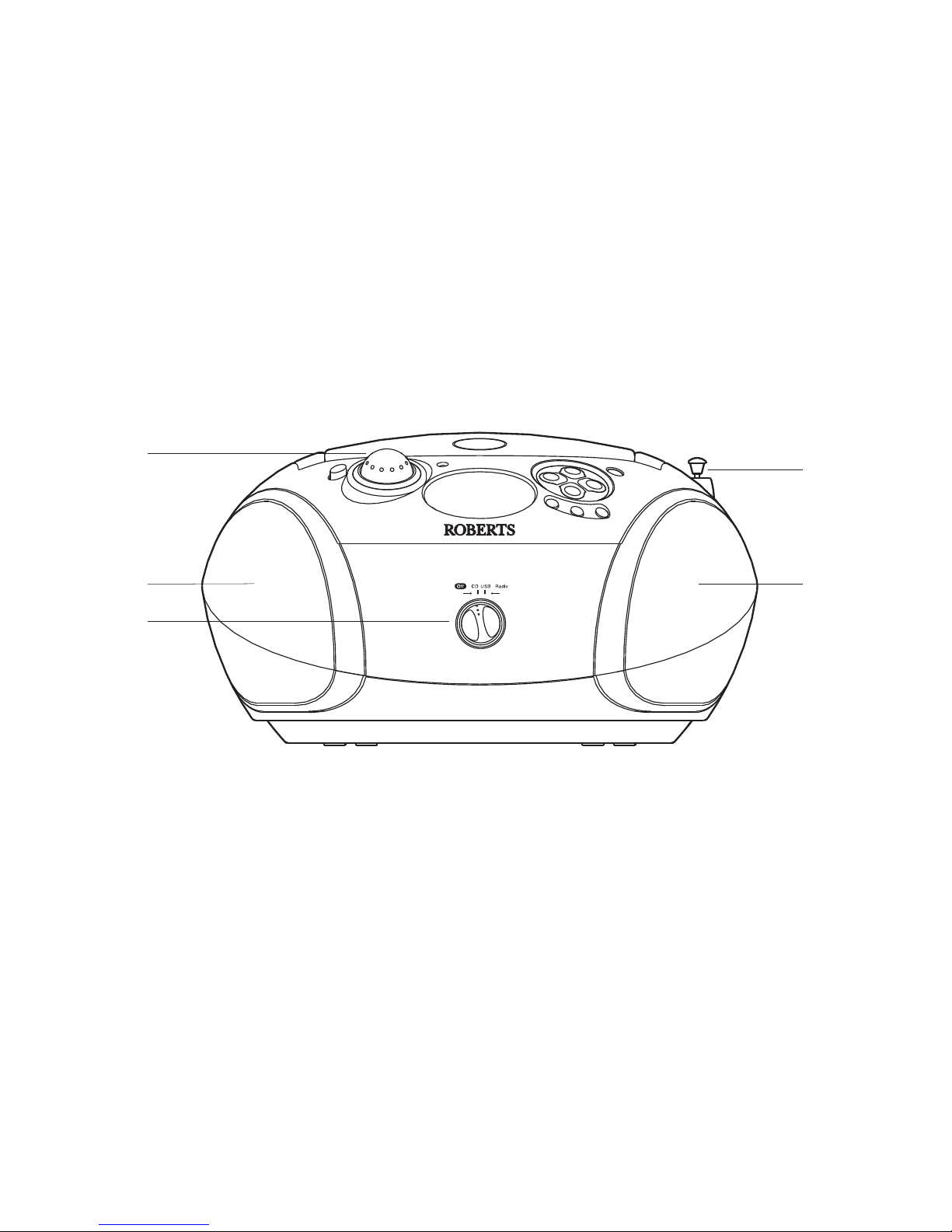
Controls
(Front)
2
1. Function switch
2. Telescopic aerial
3. Loud speakers
4. Volume control
2
1
3
3
4

Controls
(Top)
3
5
6
7
8
17
5. Headphone socket
6. Deep Bass Boost button
7. On indicator light
8. LCD display
16
9. CD open close
10. Programme / Memory button
11. Play / Pause button
12. Tuning Down / B Skip button
13. Tuning Up / F Skip button
14. Waveband / Stop button
15. Mode button
16. Album / Memory up button
17. Album / Memory down button
9
10
11
12
14
15
13

Controls
(Left side)
4
MONO/STEREO
FM MODE
USB
18. Handle
19. Mains power socket
20. USB socket
21. FM Mode switch
22. Battery compartment
19
18
20
22
(Right side)
21
Aerial storage
When the aerial is in the vertical position it can be collapsed and
then pushed partly into the aerial stud for storage (see the right hand
illustration above).
For best reception the aerial should be restored to the vertical
orientation and fully extended.

5
Battery operation
1. Slide the battery cover catch in the direction of the arrow. Open the
battery cover.
2. Fit six LR14 (C size) batteries into the spaces in the compartment.
Take care to ensure all batteries are inserted with the correct polarity
as shown next to the battery compartment. Replace the battery cover.
3. Reduced power, distortion and a 'stuttering' sound are all signs that
the batteries may need replacing. If your MP3 CD radio is not to be
used for a prolonged period of time, remove the batteries to avoid
damage by battery leakage.
• We recommend for economy that your MP3 CD radio is used on the
mains whenever possible with battery operation for occasional or
stand-by use only.
IMPORTANT: The batteries should not be exposed to excessive
heat such as sunshine, fire or the like. After use, disposable batteries
should if possible be taken to a suitable recycling centre. On no account
should batteries be disposed of by incineration.
Mains operation
1. Place your MP3 CD radio on a flat surface.
2. Plug the mains lead into the AC mains socket located towards the rear
of the unit ensuring that the plug is pushed fully into the socket.
3. Plug the other end into a mains wall socket and switch on.
IMPORTANT: The mains plug is used as the means of connecting the
radio to the mains supply. The mains socket used for the radio must
remain accessible during normal use. In order to disconnect the radio
from the mains completely, the mains plug should be removed from
the mains socket outlet completely.
1

6
Operating your radio FM - search tuning
1. Switch on your MP3 CD radio by rotating the Function switch to the
'Radio' position. The On indicator will light.
2. Press the Waveband button to select the 'FM' waveband. The FM
symbol will appear in the display.
3. The Telescopic aerial which is only operational on FM, should be
fully extended and positioned for optimum reception.
4. Press and hold the Tuning Up or Down buttons in for a couple of
seconds. Your radio will search in an upwards or downwards direction
and stops automatically when it finds a station of sufficient strength.
Search tuning may be stopped by a single press on either the Tuning
Up or Down buttons.
5. Adjust the volume by rotating the Volume control to the required level.
6. To receive stereo broadcasts set the FM Mode switch located on the
rear of the unit to the 'FM Stereo' position. The FM stereo indicator
will be displayed. If the station being received is weak some hiss
may be audible, to reduce the hiss set the FM Mode switch to the 'FM
mono' position to return to mono operation.
7. Press the DBB button to activate the Deep Bass Boost system. Press
the DBB button again to deactivate the Deep Bass Boost system.
8. The radio can be switched off by rotating the Function switch to the
'Off' position.
DOWN UP
BAND
FM Mode
Mono Stereo
FM
Mhz
1
DOWN UP
BAND
2
44
6
7
5
8

7
Operating your radio MW - search tuning
1. Switch on your MP3 CD radio by rotating the Function switch to the
'Radio' position. The On indicator will light.
2. Press the Waveband button to select the 'MW' waveband. The MW
symbol will appear in the display.
3. To auto-tune press and hold the Tuning Up or Down buttons in for a
couple of seconds. Your radio will search in an upwards or downwards
direction and stops automatically when it finds a station of sufficient
strength.
Search tuning may be stopped by a single press on either the Tuning
Up or Down buttons.
For MW reception there is a built in ferrite aerial. Rotate the unit to
the position giving best reception.
4. Adjust the volume by rotating the Volume control to the required level.
5. Press the DBB button to activate the Deep Bass Boost system. Press
the DBB button again to deactivate the Bass Boost system.
6. The radio can be switched off by rotating the Function switch to the
'Off' position.
DOWN UP
BAND
DOWN UP
BAND
2
33
5
4
1
6

8
Operating your radio - manual tuning
1. Switch on your MP3 CD radio by rotating the Function switch to the
'Radio' position. The On indicator will light.
2. Press the Waveband button to select either the 'FM' or 'MW' waveband.
The band symbol will appear in the display. On FM fully extend the
telescopic aerial. On MW rotate your radio for best reception.
3. A single press on either the Tuning Up or Down buttons
will change the frequency up or down. The frequency steps
are:- FM 50MHz, MW 9kHz.
4. Adjust the volume by rotating the Volume control to the required level.
5. Press the DBB button to activate the Deep Bass Boost system. Press
the DBB button again to deactivate the Bass Boost system.
6. The radio can be switched off by rotating the Function switch to the
'Off' position.
DOWN UP
BAND
DOWN UP
BAND
2
334
1
56

9
Presetting radio stations - automatically
1. Switch on your MP3 CD radio by rotating the Function switch to the
'Radio' position. The On indicator will light.
2. Press the Waveband button to select either the 'FM' or 'MW' waveband.
The band symbol will appear in the display. On FM fully extend the
telescopic aerial. On MW rotate your radio for best reception.
3. Press and hold the Programme Memory button in for several seconds.
The memory symbol will flash on the display whilst it is searching.
The radio searches for up to 10 radio stations and then stores them
automatically in preset positions 1 - 10 and the memory symbol remains
on the display.
4. After all ten preset positions have been stored the radio will begin to
play the station located in the preset 1 position.
DOWN UP
BAND
2
MEM
3
FM
Mhz
MEM
1
Indice
Altri manuali Roberts Lettore CD

Roberts
Roberts Swallow CD9959 Manuale utente

Roberts
Roberts Symphony CD9949 Manuale utente

Roberts
Roberts CD965 Manuale utente

Roberts
Roberts CD965 Manuale utente

Roberts
Roberts CD9909 Manuale utente

Roberts
Roberts CD9913 Manuale utente

Roberts
Roberts SRCD970 Manuale utente

Roberts
Roberts Concerto2 Manuale utente


