
Rocket Fish RF-WSW312 Manuale utente

Universal Wireless
Subwoofer Kit
RF-WSW312
User Guide
12-1005_RF-WSW312_MAN_V1_EN.fm Page 1 Friday, October 12, 2012 12:13 PM

2
Rocketfish RF-WSW312
Universal Wireless Subwoofer Kit
Contents
Introduction ...................................................................... 2
Features............................................................................... 5
Setting up your subwoofer kit.................................... 8
Using your subwoofer kit ...........................................13
Troubleshooting ............................................................15
Specifications..................................................................15
Legal notices ...................................................................16
One-Year Limited Warranty........................................19
Introduction
This manual explains how to correctly install, operate, and get
the best performance from your Rocketfish RF-WSW312
Universal Wireless Subwoofer Kit. Read this user guide carefully
before installing your system, then keep it near your system for
quick reference.
Your RF-WSW312 Universal Wireless Subwoofer Kit uses a
wireless communication system to transmit high fidelity audio
to a subwoofer, providing superior level audio quality and
resistance to interference.
The system is compatible with typical audio/video Receivers
and subwoofers.
12-1005_RF-WSW312_MAN_V1_EN.fm Page 2 Friday, October 12, 2012 12:13 PM
3
RF-WSW312
Safety information
WARNING:
TO REDUCE THE RISK OF FIRE OR ELECTRIC SHOCK,
DO NOT EXPOSE THIS APPLIANCE TO RAIN OR
MOISTURE.
Important Safety Instructions
1) Read these instructions.
2) Keep these instructions.
3) Heed all warnings.
4) Follow all instructions.
5) Do not use this apparatus near water.
6) Clean only with dry cloth.
CAUTION:
TO REDUCE THE RISK OF
ELECTRIC
SHOCK, DO NOT REMOVE
COVER
(OR BACK). NO USER-SERVICEABLE
PARTS INSIDE. REFER SERVICING
TO
QUALIFIED SERVICE PERSONNEL.
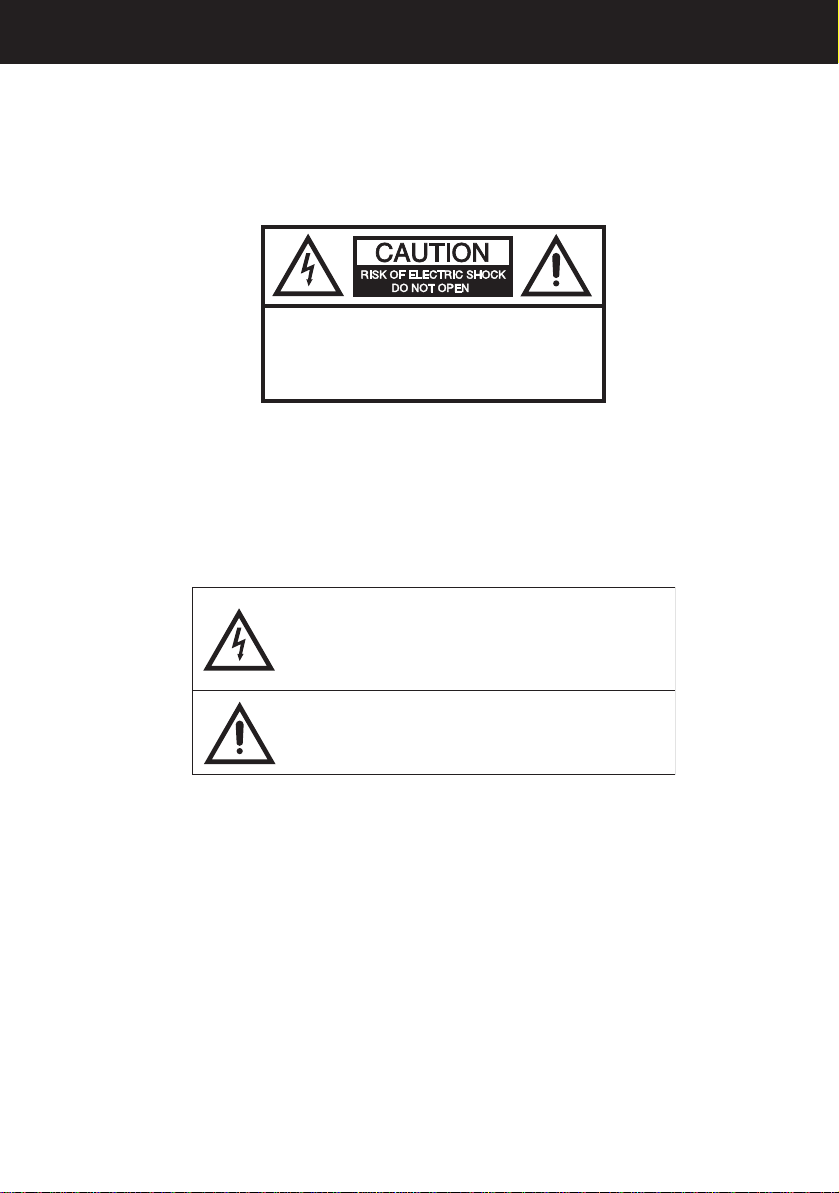
The lightning flash with arrowhead symbol, within an
equilateral triangle is intended to alert the user to the
presence of uninsulated dangerous voltage within the
product’s enclosure that may be of sufficient magnitude
to constitute a risk of electric shock.
The exclamation point within an equilateral triangle is
intended to alert the user to the presence of important
operating and maintenance (servicing) instructions in the
literature accompanying the appliance.
12-1005_RF-WSW312_MAN_V1_EN.fm Page 3 Friday, October 12, 2012 12:13 PM

4
7) Do not block any ventilation openings. Install in accordance
with the manufacturer’s instructions.
8) Do not install near any heat sources such as radiators, heat
registers, stoves, or other apparatus (including amplifiers) that
produce heat.
9) Do not defeat the safety purpose of the polarized or
grounding-type plug. A polarized plug has two blades with one
wider than the other. A grounding type plug has two blades
and a third grounding prong. The wide blade or the third prong
are provided for your safety. If the provided plug does not fit
into your outlet, consult an electrician for replacement of the
obsolete outlet.
10) Protect the power cord from being walked on or pinched
particularly at plugs, convenience receptacles, and the point
where they exit from the apparatus.
11) Only use attachments/accessories specified by the
manufacturer.
12) Unplug this apparatus during lightning storms or when
unused for long periods of time.
13) Refer all servicing to qualified service personnel. Servicing is
required when the apparatus has been damaged in any way,
such as power-supply cord or plug is damaged, liquid has been
spilled or objects have fallen into the apparatus, the apparatus
has been exposed to rain or moisture, does not operate
normally, or has been dropped.
Additional safety information
• The apparatus should not be exposed to dripping or
splashing and no objects filled with liquids should be placed
on the apparatus.
12-1005_RF-WSW312_MAN_V1_EN.fm Page 4 Friday, October 12, 2012 12:13 PM

5
RF-WSW312
• The AC power plug or an appliance coupler is used as the
disconnect device. This disconnect device should remain
readily operable.
• Read the Rating Labels on the bottom of the Wireless Sender
and Wireless Receiver for power input and other safety
information.
Features
• Wireless Sender and Wireless Receiver
• Transmits high quality audio over a radio frequency
communication link
•Compactsize
• Hidden antennas
Package contents
Examine the contents of the box for your RF-WSW312 Universal
Wireless Subwoofer Kit. The box should contain:
• Wireless Sender
• Wireless Receiver
• AC power adapters (2)
• Subwoofer RCA cables (2)
•User Guide
12-1005_RF-WSW312_MAN_V1_EN.fm Page 5 Friday, October 12, 2012 12:13 PM
6
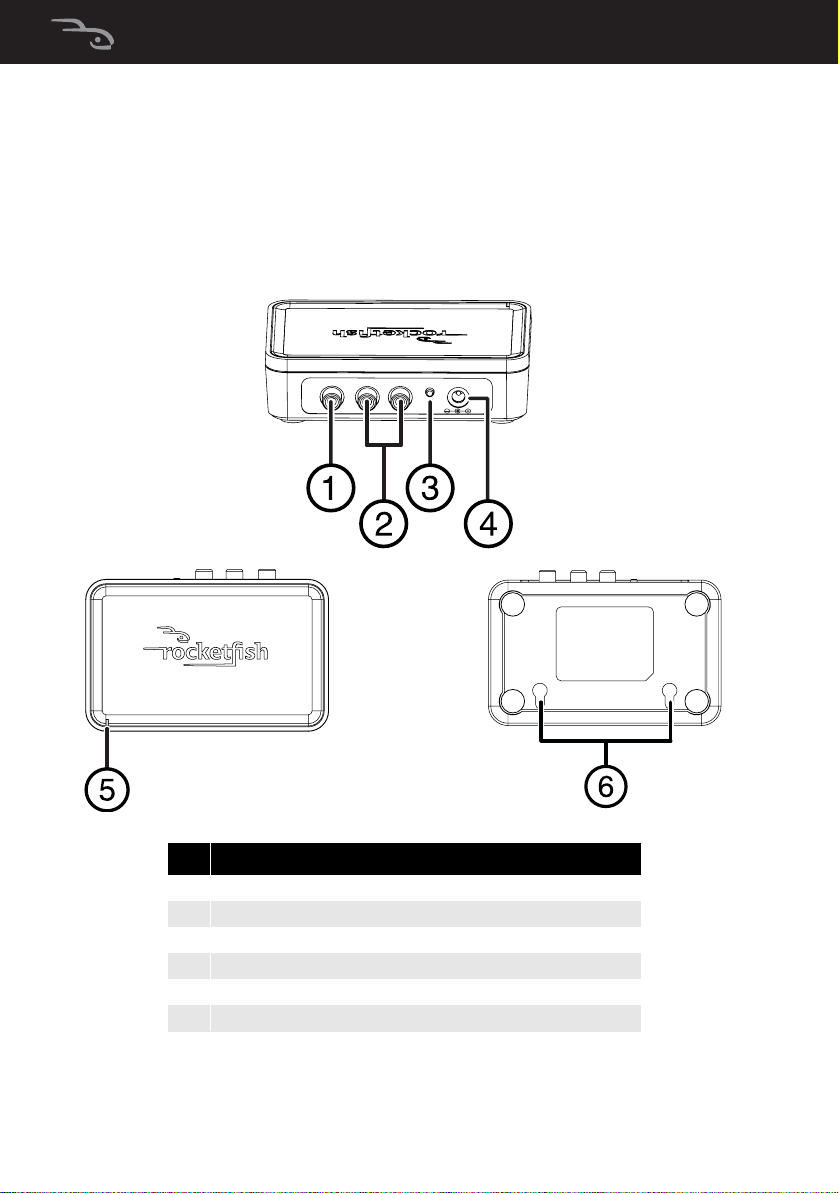
Wireless Sender
The Wireless Sender transmits audio signals to the Wireless
Receiver.
#Feature
1 Subwoofer In RCA jack
2Line In RCA jack
3 Connect (pairing) button
4DC IN jack
5PowerindicatorLED
6Hanging holes for wall mounting the Sender
CONNECT DC IN 5V
SUB L R
Top view
Back view
Bottom view
12-1005_RF-WSW312_MAN_V1_EN.fm Page 6 Friday, October 12, 2012 12:13 PM
7
RF-WSW312
Wireless Receiver
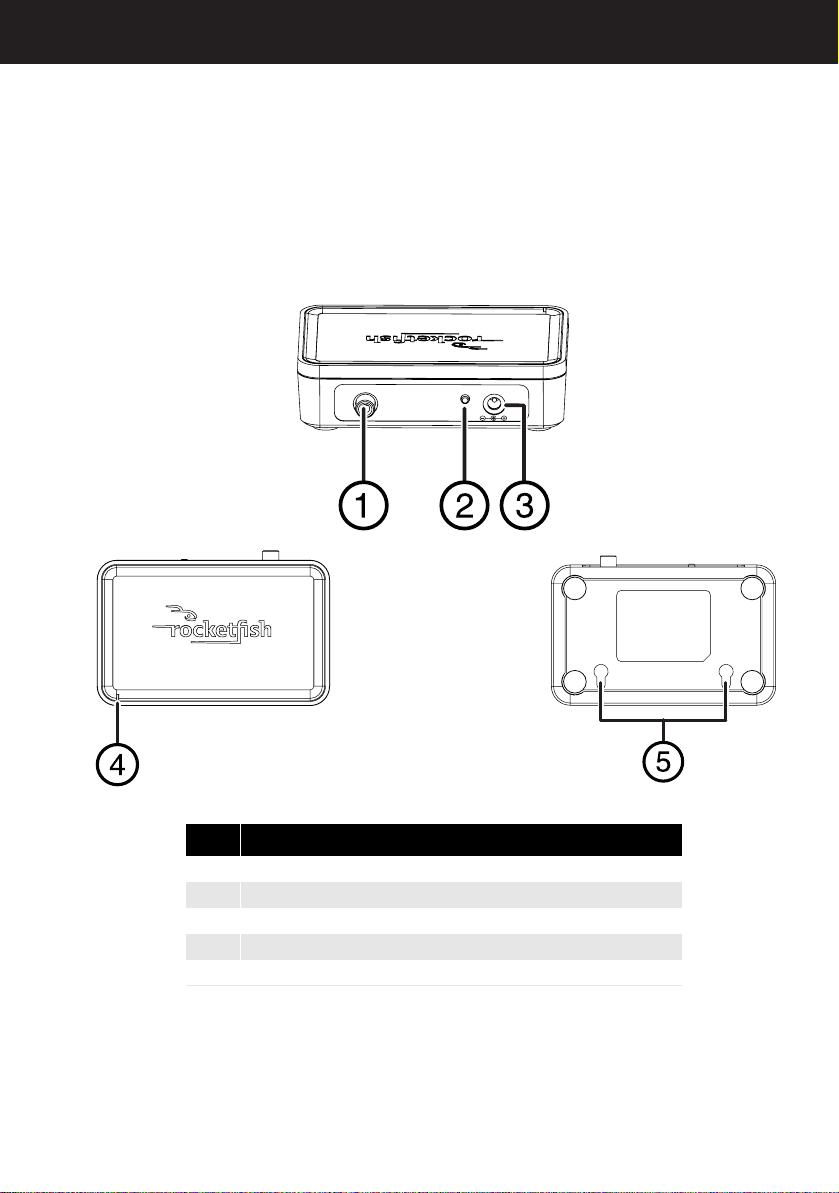
The Wireless Receiver unit receives audio signals from the
Wireless Sender.
#Feature
1 Subwoofer Out RCA jack
2Connect (pairing) button
3DCINjack
4Power indicator LED
5 Hanging holes for wall mounting the Receiver
CONNECT DC IN 5V
SUB
Top view
Back view
Bottom view
12-1005_RF-WSW312_MAN_V1_EN.fm Page 7 Friday, October 12, 2012 12:13 PM
8
Setting up your subwoofer kit
CONNECT DCIN 5V
SUB
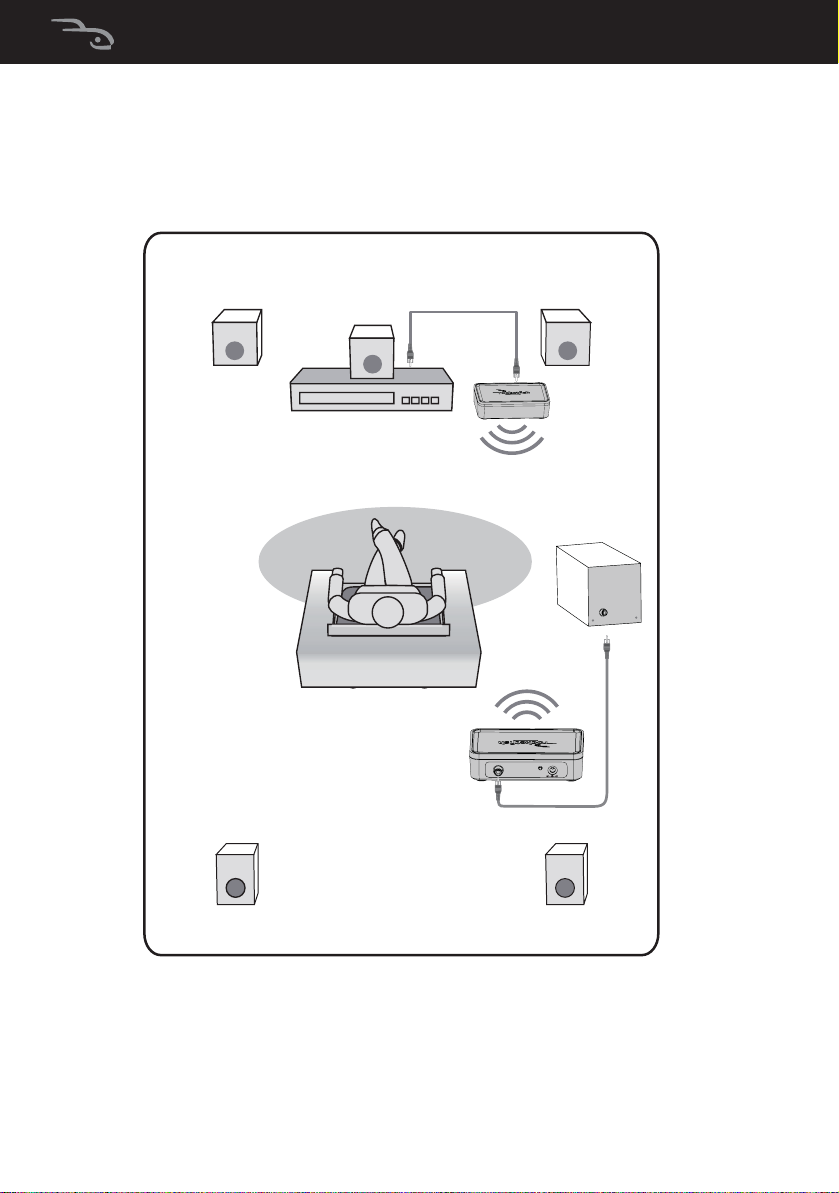
Left speaker Right speaker
Center speaker
Subwoofer
Amplifier
Wireless
Sender
Wireless
Receiver
Rear Left speaker Rear Right speaker
12-1005_RF-WSW312_MAN_V1_EN.fm Page 8 Friday, October 12, 2012 12:13 PM

9
RF-WSW312
Connecting the Wireless Sender
Option 1: Home theater receiver with a Sub Out jack
Most home theater receivers have a subwoofer output jack. For
that type of receiver, use this option.
• Connect the Subwoofer RCA cable (provided) to the
Subwoofer Out RCA jack on your home theater receiver and
to the Wireless Sender’s SUB IN RCA jack.
-OR-
CONNECT DC IN 5V
SUB L R
Wireless Sender back panel
12-1005_RF-WSW312_MAN_V1_EN.fm Page 9 Friday, October 12, 2012 12:13 PM
10
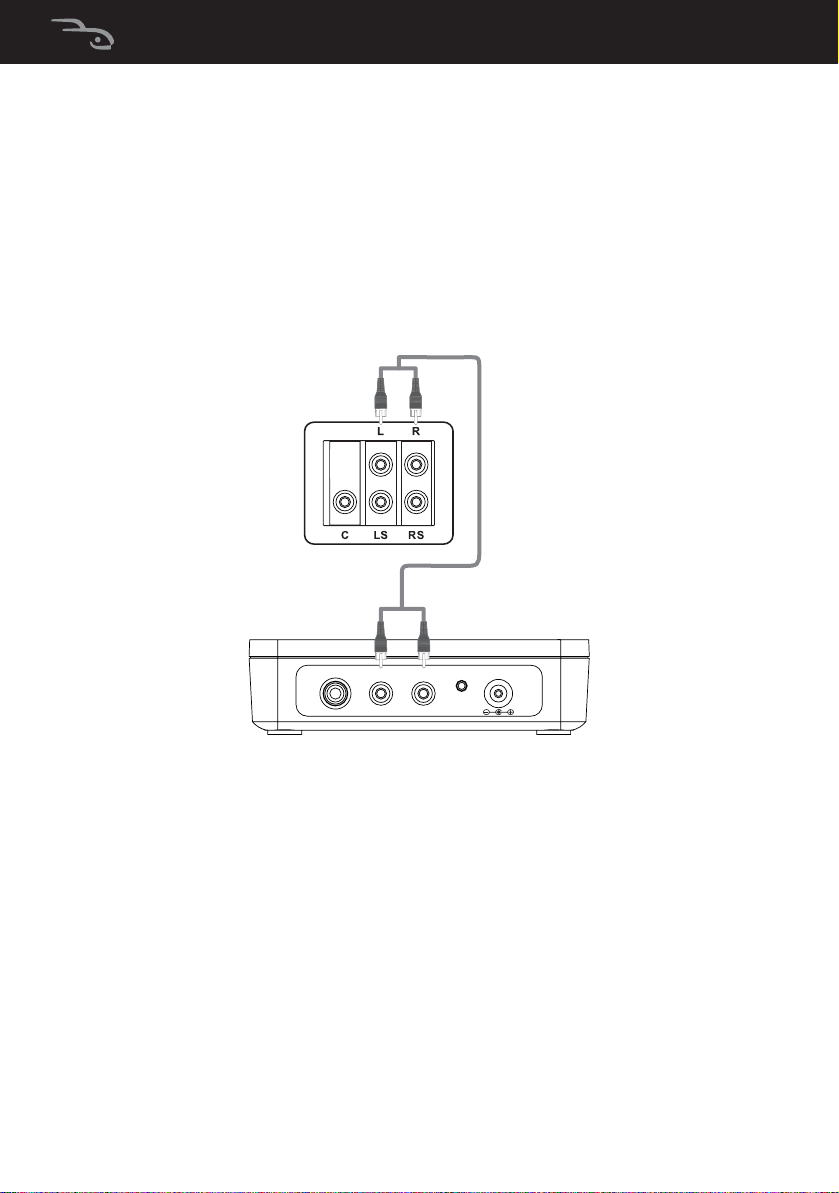
Option 2: Audio source with L/R Line Out jacks
If your audio receiver does not have a subwoofer output jack,
use this option.
• Connect an RCA stereo audio cable (not included) to the
stereo output jack of your audio receiver and to the Wireless
Sender’s Line In RCA jacks.
CONNECT DC IN 5V
SUB L R
Wireless Sender back panel
12-1005_RF-WSW312_MAN_V1_EN.fm Page 10 Friday, October 12, 2012 12:13 PM
Altri manuali per RF-WSW312
3
Indice
Altri manuali Rocket Fish Subwoofer


