
rough country 921995100 Manuale utente
1
A A
B B
C C
D D
E E
F F
G G
H H
J J
K K
L L
M M
N N
P P
R R
T T
24
24
23
23
22
22
21
21
20
20
19
19
18
18
17
17
16
16
15
15
14
14
13
13
12
12
11
11
10
10
9
9
8
8
7
7
6
6
5
5
4
4
3
3
2
2
1
1
921995100
8 SPEAKER, 500-WATT SOUND BAR
Thank you for choosing Rough Country for all your vehicle needs!
Please read instructions before beginning installation. Check the kit hardware
against the kit contents shown below. Be sure you have all needed parts and
know where they go.
If question exist, please call us at 1-800-222-7023. We will be happy to answer
any questions concerning this product. Check all fasteners for proper torque.
Check to ensure for adequate clearance between all components.
Periodically check all hardware for tightness.
2
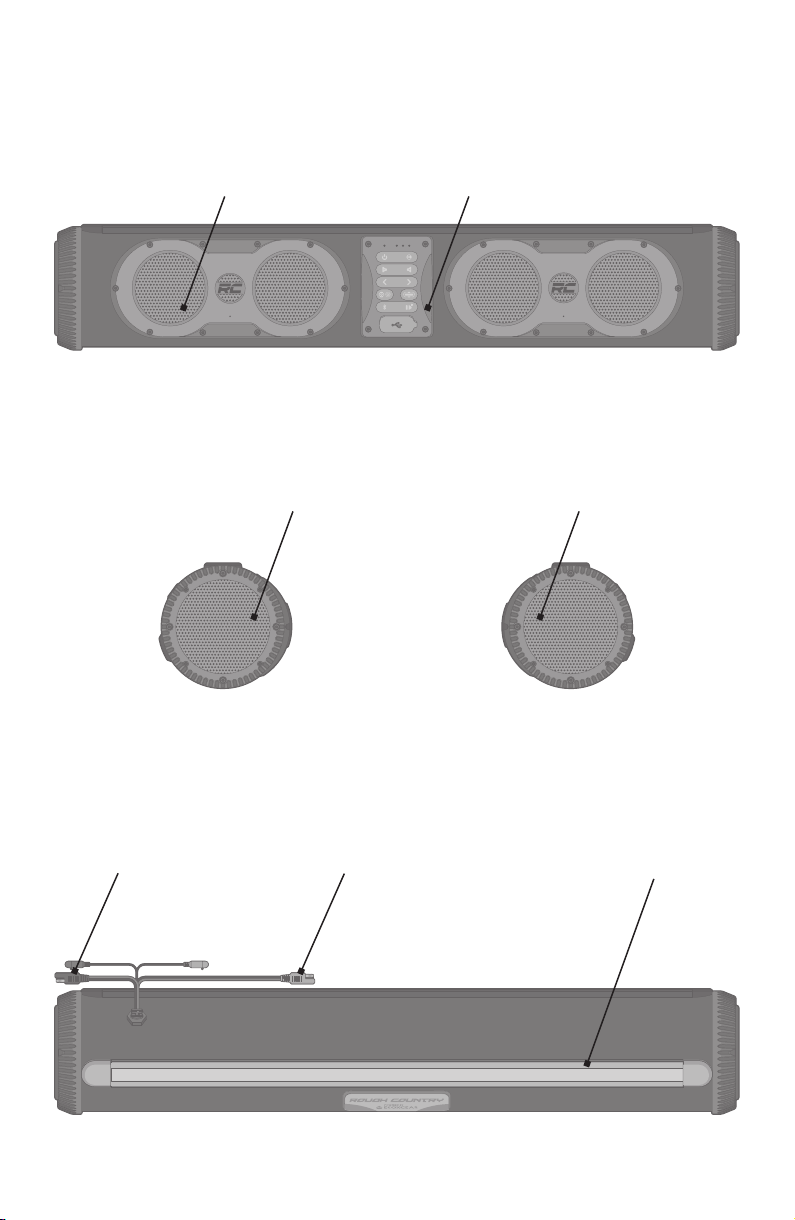
Sound bar Layout
BACK
Auxiliary Power Out
SAE Connector (Black)
12V Power In SAE
Connector (Red) Light Bar
RIGHT SIDELEFT SIDE
FRONT
Control PanelBacklit Speakers
Backlit Woofer Backlit Woofer
3
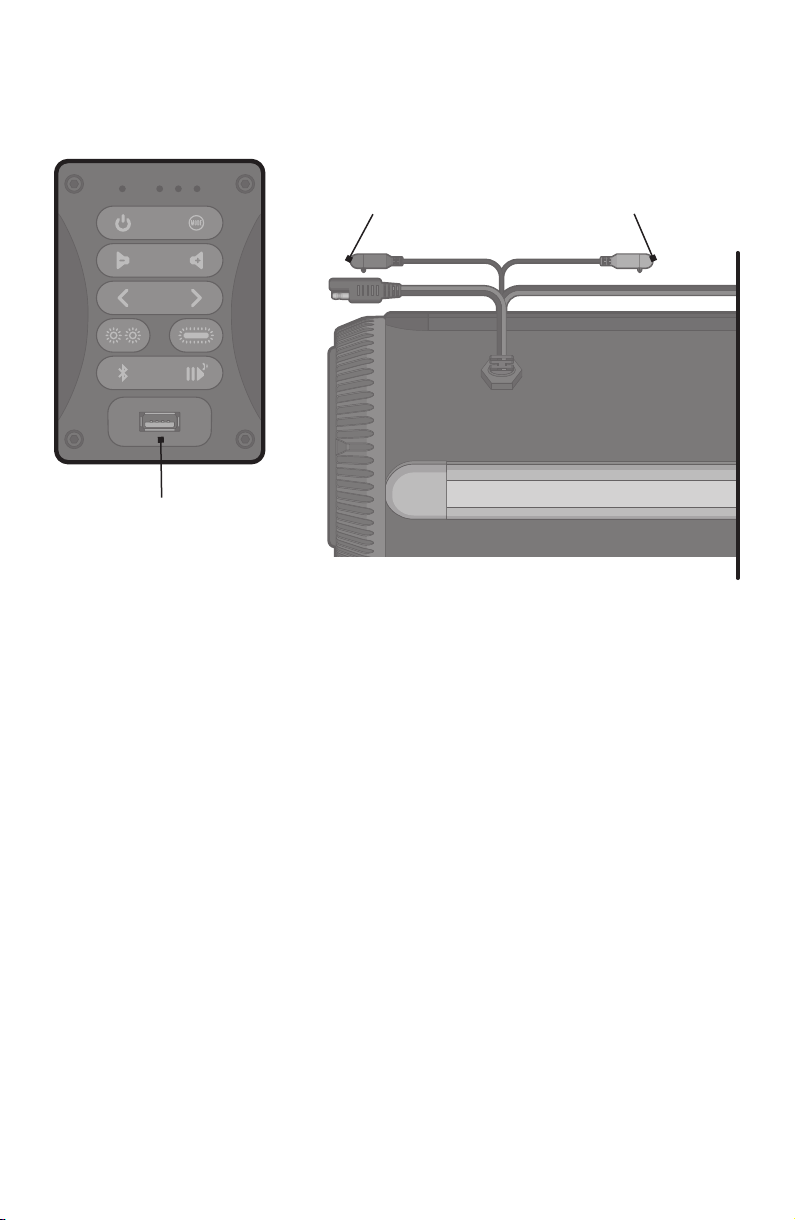
In/Out Connections
Do NOT use these connections if they are wet.
AUX-IN: This input can be used to connect a CD player, MP3 player, etc.
AUX-OUT: This output can be used to connect to an amplifier or to
another speaker AUX-IN connection.
USB Charging Port: Connect charging cable here to charge your device.
USB charging only functions when the sound bar power is turned on. USB
port rating is 5V, 2.1A.
Important: Maintaining Waterproofness
If the caps on the control panel, the AUX-IN, and AUX-OUT Caps are not
properly closed, the unit is NOT watertight.
To close the USB Charging Port properly, push firmly to be sure the cap
fits flat along the edges with the panel.
To close the AUX-IN and AUX-OUT ports properly, push firmly to be sure
the cap snaps securely into place.
AUX-IN
Port (Gray)
AUX-OUT
Port (Black)
USB Charging
Port
4
Connecting to 12VDC
Power Supply
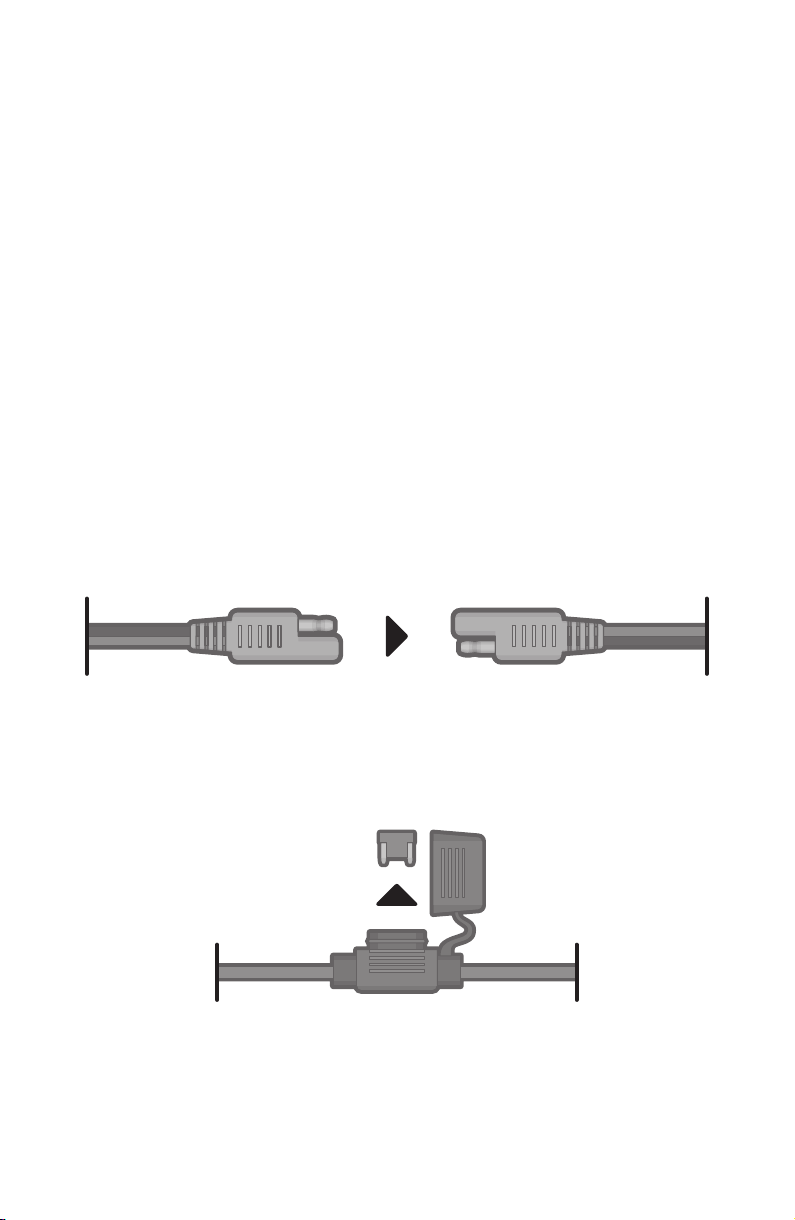
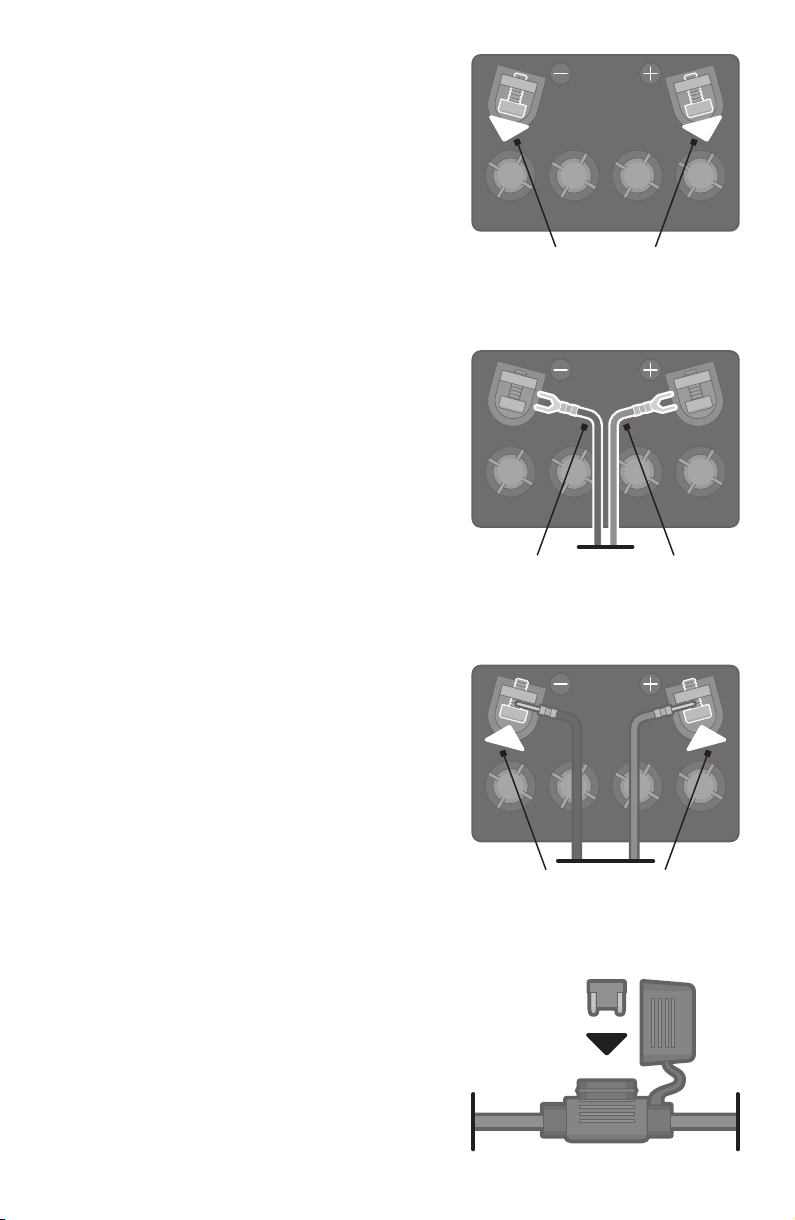
Attach the 8ft Power Cable to the 12V Power In SAE Connector (RED).
Use Caution: Do NOT connect to 12V Battery if the Power In SAE
Connector is wet. Contact may cause electric shock and injury if wet.
The sound bar does not have an internal battery. It must be connected to
an external 12VDC power supply to function. When you install the sound
bar to a battery or a voltage regulator on a golf cart, a boat, a quad bike, a
UTV, or another vehicle, you need to make sure that your vehicle battery
or battery pack terminal voltage is 12VDC. If the battery terminal voltage
is not 12V, you will need a DC–DC converter with output 12V. Connecting
the sound bar to a non-12VDC power source will lead to a malfunction or
damage to the speaker.
WARNING: Even when powered off, the sound bar will draw a small
amount of power from your battery. To prevent draining your battery when
your sound bar or vehicle are not in use for more than 48hrs, we suggest
unplugging the sound bar from the battery or adding the toggle switch.
(Toggle switch sold separately.)
Remove the 15 Amp Blade Fuse from the Fuse Holder.
Use Caution: Do NOT remove Fuse if the Fuse Holder is wet. An improperly
fitted cap may cause electric shock and injury if wet.
To close properly, push firmly to be sure the cap snaps into place.
5
Black Cable Red Cable
Loosen Bolts
Tighten Bolts
Installation: Gas Vehicle
1. Loosen the bolts on the
battery terminals.
Use Caution: Do NOT attempt to loosen
bolts if battery is wet. Contact may
cause electric shock and injury if wet.
2. Connect the BLACK wire to the
BLACK, negative terminal, then
the RED wire to the RED, positive
terminal. Unit will not work correctly
and may be damaged if wires are not
correctly attached.
3. Tighten the bolts on the battery
terminals until the connectors are
held firmly in place.
4. Return the 15 Amp Blade Fuse into
the Fuse Holder and close v the cap.
Installation: Electric Vehicle
1. Switch your vehicle to TOW mode.
2. Loosen the bolts on the
battery terminals.
3. Connect the BLACK wire to the
GROUND on the DC-DC Converter,
then the RED wire to the POSITIVE
(+) post on the DC-DC Converter.
Unit will not work correctly and
may be damaged if wires are not
correctly attached.
4. Tighten the bolts on the battery
terminals until the connectors are
held firmly in place.
5. Return the 15 Amp Blade Fuse into
the Fuse Holder and close the cap.
Tip: Use zip ties to gather any excess
wires, and secure them so that they are
not dangling, loosely.
6
Controls
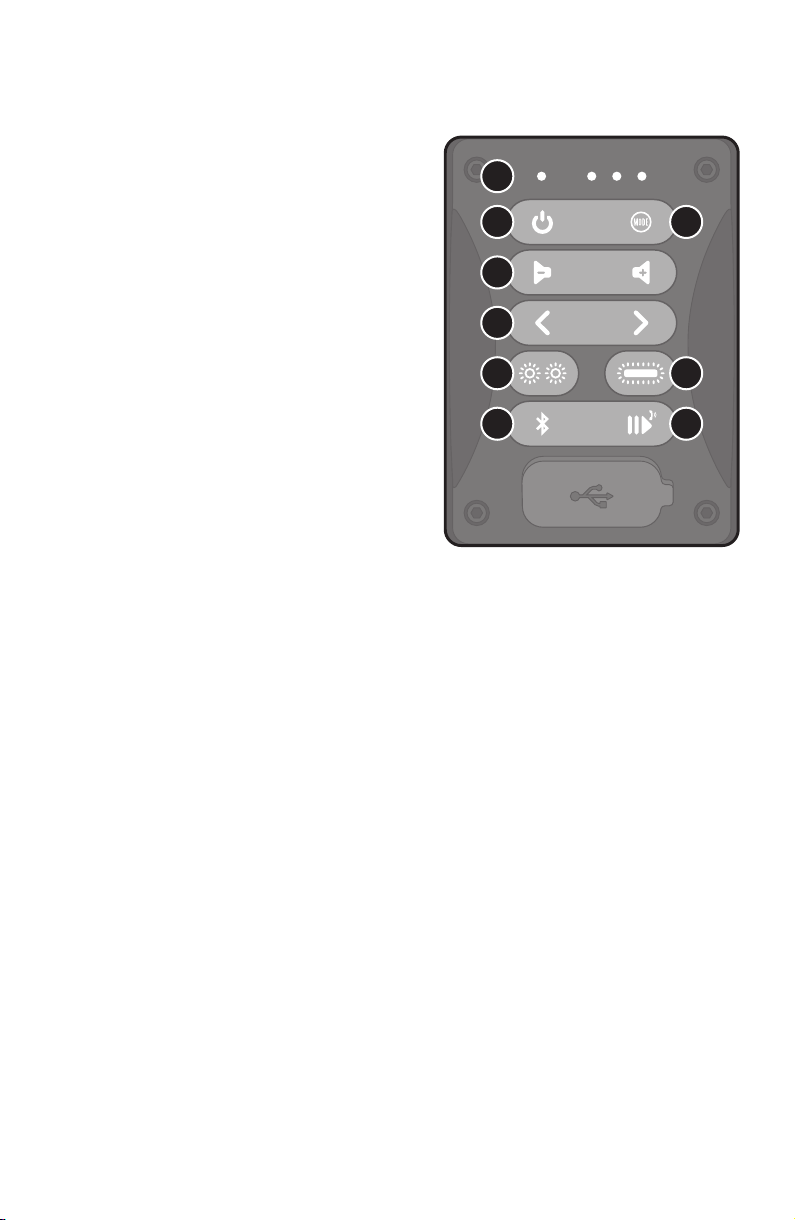
1. LED Indicators: Each of the 4 LEDs
correspond to different functions:
Power, Bluetooth, Mode, and Status.
2. Power Button: Press button to
turn the sound bar on / off.
3. Mode Button: Press button to
cycle through the following modes:
Bluetooth, EcoCast Transmitting,
EcoCast Receiving, FM, and AUX-IN.
4. Volume Control Buttons: Press
to adjust the speaker’s volume.
Press and hold to adjust the
volume continually.
5. Track Buttons: Press buttons to
go to the previous / next track on
a paired Bluetooth device.
6. Backlight Speakers Button: Press to cycle through the following 6
Party Light Modes: Green Light, Red Light, White Light, Blue Light,
Music Sync, and Fading.
7. Light Bar Button: Press to cycle through the following 5 Light Modes:
Red Light, Yellow Light, White Light (High), White Light (Mid), and
White Light (Low). Press and hold to enable / disable Accessory Mode
(which turns on /off the Auxiliary Power Out connection).
8. Bluetooth Button: When in Bluetooth Mode, if the Bluetooth LED
Indicator is not flashing Blue, press this button to enter Bluetooth
Pairing mode. If your device is paired (solid Blue LED), press button to
disconnect. Press and hold this button for 5 seconds to clear all pairing
records. In FM Mode, this button is used for FM Station Preset 1.
9. Play / Pause / Answer / EcoTalk Button: Press to play / pause a
track or answer / end a mobile call from a paired Bluetooth device.
Press and hold to activate your Voice Assistant (Siri and OK Google). In
FM Mode, this button is used for FM Station Preset 2.
CONTROL PANEL
2
1
3
5
4
6 7
98

7
Operations
LED Indicators
From left to right, the 4 LED Indicators correspond to Power, Bluetooth,
Mode, and Status.
1. Power
Solid Green: Power On
No Light: Power Off
2. Bluetooth
Flashing Blue: Bluetooth Paring
Solid Blue: Bluetooth Connected
3. Mode
Solid Blue: Speaker Mode
Solid / Flashing Red: EcoCast Transmitting Mode
Solid / Flashing Green: EcoCast Receiving Mode
4. Status
Solid Blue: FM
Solid Green: AUX-IN
Solid Red: Accessory Mode Enabled
Power On / Off
Power On: Press briefly to power on the sound bar. “Speaker on,
ready to connect” voice prompt will be heard.
Power Off: Press briefly to power off the sound bar.
Mode Button
Press briefly to cycle through the following modes: Bluetooth,
EcoCast Transmitting, EcoCast Receiving, FM, and AUX-IN.
8
Pairing a Bluetooth Device
1. Turn on your Bluetooth device.
2. Power on the sound bar. “Speaker on, ready to connect” voice
prompt will be heard. If the Bluetooth LED Indicator (the second
LED Indicator from the left) is not flashing, briefly press to
start pairing your device.
3. Navigate to your Bluetooth device’s setup screen, find ROUGH
COUNTRY and connect. If the connection is successful, the
Bluetooth icon will be lit solid and your sound bar will announce
“Your phone is connected.”
Notes:
· If the pairing is not complete within 5 minutes, the speaker will
exit the pairing mode. You need to repeat the pairing steps again.
· After the connection is successful, if you turn the speaker off
and turn it on again, it will reconnect to the last connected
device automatically. Also, a voice prompt, “Speaker on, ready to
connect” followed by, “Your phone is connected” will be heard.
· PRESS AND HOLD for 5 seconds to clear all pairing records.
Adjust Volume
1. Press or briefly to adjust the speaker volume.
2. PRESS AND HOLD or to adjust the volume continuously.
a. Press briefly to increase one volume level. PRESS
AND HOLD to keep increasing the volume until
maximum volume level is reached.
b. Press briefly to decrease one volume level. PRESS
AND HOLD to keep decreasing the volume until
minimum volume level is reached.

9
Play Music (Bluetooth Mode)
After the sound bar is connected to your Bluetooth device,
press briefly on the sound bar controls to play, press again
to pause.
Press briefly to play previous song. Press briefly to get the
next song.
Notes:
· Pair and connect your Bluetooth device with sound bar before
using this feature.
· If a call is received when you are listening to music, press briefly
on the sound bar to answer the call. Press again to end the call.
· You can also control Volume and Play / Pause music operations
from your Bluetooth enabled device. When the Audio Source is
via the AUX-In connection, you must use your device to control
Play / Pause music operations.
EcoTalk
PRESS AND HOLD for 3 seconds to activate the voice assistant on
your device (Siri, OK Google, etc.). Once activated, the speakerphone mic
on your sound bar will hear your voice commands and transfer them to
the voice assistant on your device.
Notes:
· Before using the EcoTalk function, your device must be connected to
the sound bar via Bluetooth.
· Not all devices have voice assistant functionality; refer to your device
for details.
10
EcoCast – Broadcast Your Music
to Multiple Speakers
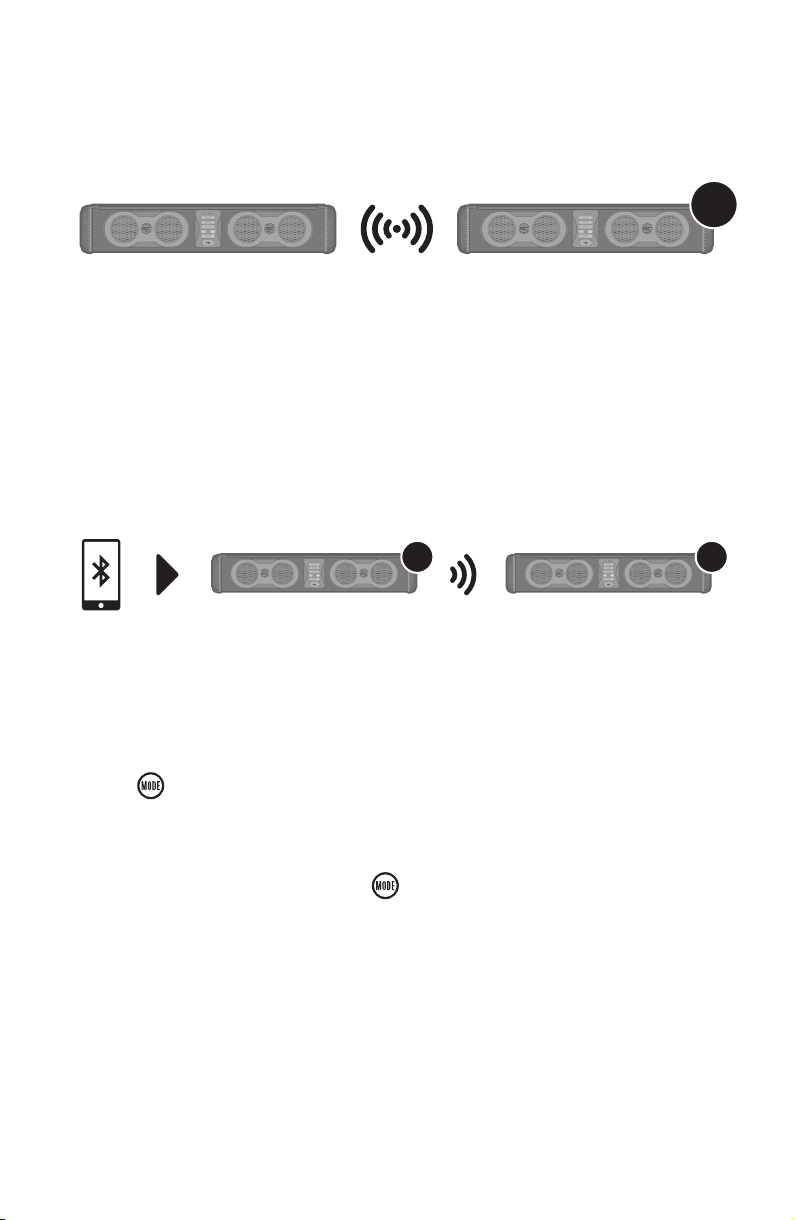
1. Follow the Pairing a Bluetooth Device instructions to connect one
SoundExtreme (Speaker A) to your Bluetooth device. After your device
is connected to Speaker A, you can select a song to play.
2. Press on Speaker A to initiate EcoCast Transmitting Mode. The
Mode LED Indicator (the third LED Indicator from the left) will flash
Red, and the speaker will announce, “EcoCast transmitting.”
3. Power on Speaker B and press to cycle through to and initiate
EcoCast Receiving Mode. The Mode LED Indicator will flash Green,
and the speaker will announce, “EcoCast receiving.”
4. Once the connection between the speakers is successful, Speaker B
will announce, “Connection Successful,” and start playing music from
your Bluetooth device.
When you have two or more sound bars, you can build a broadcast
system by initiating EcoCast Transmitting Mode in one sound bar speaker
and broadcasting your music to one or more sound bar speakers in
EcoCast Receiving Mode.
EcoCast: First Two Speakers
x50
A B
Indice
Manuali Sistema di altoparlanti popolari di altre marche


Sondpex
Sondpex Active Speaker System and Digital Music... Manuale utente

JVC
JVC NX-PN7 Manuale utente

Marshall Amplification
Marshall Amplification AR-DM61-BT Manuale utente

Yamaha
Yamaha NX-A01 - Speaker Sys Manuale utente

SE Audiotechnik
SE Audiotechnik I-LINE Manuale utente

Gemini
Gemini WRX-843 Series Manuale utente