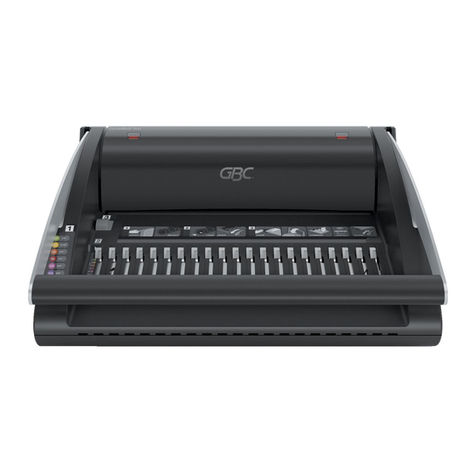
Royal Sovereign RBM-1500 Manuale utente

Royal Sovereign International, Inc.
RBM-1500
BINDING MACHINE
Manual
Owner's Manual
Please read and retain these instructions.
To register your product, please www.royalsovereign.com USA.
Click the Customer Support Tab, then the Registration Tab.
www.royalsovereign.com
Página en Español 13
Page en Français 25

BINDING MACHINE
MANUAL

RBM-1500
3
SAFETY INSTRUCTIONS
The safety recommendations outlined in this section should be read and understood before operating this machine.
Keep this information for future reference.
Caution
1. Keep the machine away from heat and water sources.
2. Do not attempt to open or otherwise repair your machine.
3. When operating, place the machine on a flat, level surface.
4. Test punch scrap sheets before punching final documents.
5. Remove staples, paper clips, and other metals from your sheets before punching.
6. Do not use the punching handle as a carrying handle.
7. Never exceed the machine’s quoted performance.

4
Box Contents 5
Parts 5
Features 6
Operation 7~8
Troubleshooting 9
Specifications 10
Warranty 11
Contact Information 12
Página en Español 13
Page en Français 25
CONTENTS

RBM-1500
5
BOX CONTENTS
Binding machine and Handle
PARTS
Cover
Punching handle
Paper entry
Comb pullers
Comb pins
Adjustable edge guide
Margin depth knob
Paper waste tray
Binding handle
Punching handle lock

6
FEATURES
Document Supporting Cover
Cover acts as a support for the paper being punched.
Independent Punch and Bind System
This binding machine has a simple 2 step punch and bind system that punches up to 15 pages at a time and binds up to
300 pages.
Adjustable Paper Edge Guide
Precise paper edge guide is adjustable for sheets of paper and binding covers.
Adjustable Margin Depth
Depth of the paper margin can easily be adjusted from 1/4 inch to 1/10 inch by moving the knob up or down.
Waste Tray
No-mess built in waste tray allows easy removal for paper clippings.
Sleek Design
Cover closes and handle can be locked in place for easy storage.

RBM-1500
7
OPERATION
Set-up
1. Before you begin binding you need to attach the handle to the machine. Unscrew the gray handle knob on the right side of the
machine by turning the knob to the left. Place the handle onto the metal square and insert the knob into the handle. Turn the knob
to the right to tighten and hold handle in place.
2. Make sure the machine is on a flat, sturdy surface.
3. Check to make sure the paper waste tray is empty and correctly fitted.
4. Lift the cover and the punching handle to the upright position.
5. Move the adjustable paper edge guide to the size of paper you wish to punch.
6. Push the margin depth knob up or down to adjust the margin on the paper from 1/10
˝
to 1/4
˝
.
7. Select the right-sized comb and covers for your documents. For the appropriate comb sizes, refer to the chart of the binding
machine.
NOTE: Test pieces of scrap paper to make sure everything is aligned properly before punching your finished document.
Punching and Binding
1. Slide the front and back covers into the paper entry lengthwise. Pull the handle down to punch.
2. Punch the remaining sheets in small batches that do not overload the machine. This machine can punch 15 sheets of
20lb./80gsm paper at one time.
3. Place the binding comb in between the comb pins with the open side facing up. Slowly push back the handle to have
the comb pullers open up the combs wide enough to insert the punched sheets. This machine binds up to 300 sheets
using a 1 1/2˝ comb.
4. Insert the punched sheets onto the open binding comb. For the best results, insert the front cover face down first,
then insert the rest of the sheets and back cover.
5. When all of the sheets are loaded onto the comb, pull the handle back to its original position. Remove the bound
document by lifting it up.

8
Editing a Bound Document
Sheets may be added or removed at any time by placing the bound document into to comb pins and using the handle to
open the binding comb as described above.
Emptying the Waste Tray
The waste tray located on the front of the binding machine can be easily pulled out for emptying. Always check that the
tray is correctly fitted before punching.

RBM-1500
9
Symptom Solution
Punched holes are not centered. Adjust the edge guide and use scrap paper to test if the holes are centered.
Machine will not punch. Check that the paper waste tray is empty and correctly fitted. Check for
blockage in the paper entry
Punched holes are not parallel to the edge. Take a stiff object and slide it sideways through the paper entry to release any
paper clippings into the paper waste tray.
Holes are partially punched. Ensure that the punching capacity is not exceeded. Adjust edge guide and use
scrap paper to test if holes are properly punched.
Hole edges are damaged. Reduce the number of sheets being punched.
Waste tray is leaking. Check that the paper waste tray is empty and correctly fitted.
TROUBLESHOOTING
If you are still having complications, please contact Royal Sovereign’s Service Center at 1-800-397-1025.

10
SPECIFICATIONS
Model RBM-1500
Operation type Manual
Punching capacity 15 sheets (20lb/80g paper)
Binding capacity 300 sheets
Paper dimensions US Letter (8/12˝ x 11˝ / 216 x 279mm)
Comb capacity 1/4˝-1 1/2˝ / 6mm-50mm
Weight 18.7lbs / 8.5kg
Dimensions 16.5˝ x 14˝ x 3.5˝ / 418 x 355 x 88mm
Indice
Lingue:
Altri manuali Royal Sovereign Macchina rilegatrice