
Saab 32 025 681 Manuale utente

Saab 9-3 5D M06-
900 Installation instructions
SCdefault
MONTERINGSANVISNING ·INSTALLATION INSTRUCTIONS
MONTAGEANLEITUNG ·INSTRUCTIONS DE MONTAGE
SITdefault
Saab 9-3 5D M06-
Navigation system
Accessories Part No. Group Date Instruction Part No. Replaces
32 025 681 9:51-05 Sep 05 32 025 682
F930A446
2 32 025 682
Saab 9-3 5D M06-
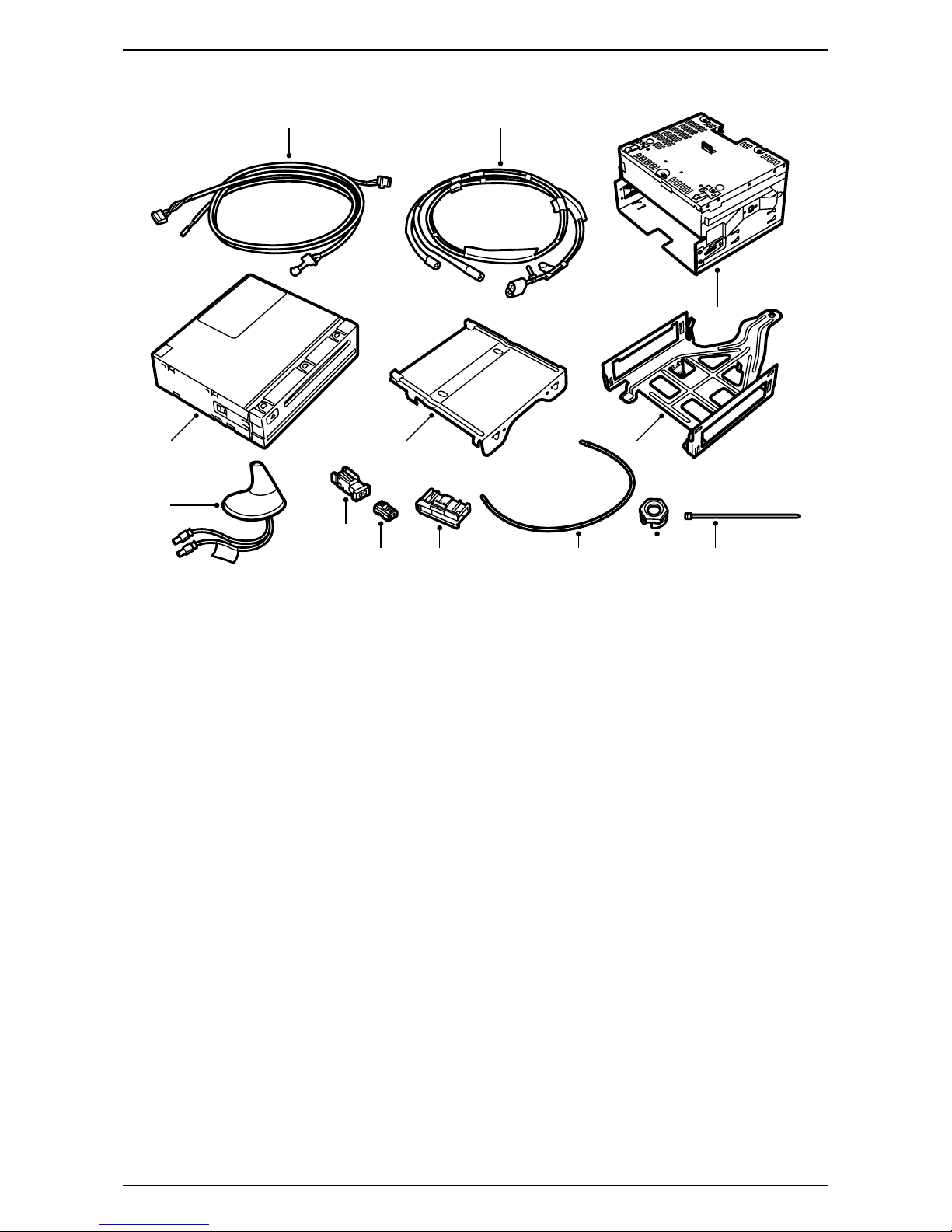
Basic kit
1DVDunit
2 Wiring harness
3 Console, lower section
4 Console, upper section
5 Head unit, radio
6 Antenna GSM/GPS
7 Antenna cable GPS
8Nut
9 Cable tie (x20)
10 Fibre optic connector (x2)
11 Fibre optic connector
12 Connector casing (x2)
13 Fibre optic cable (x3)
Depending on the equipment level of the car the kit
may need to be supplemented with:
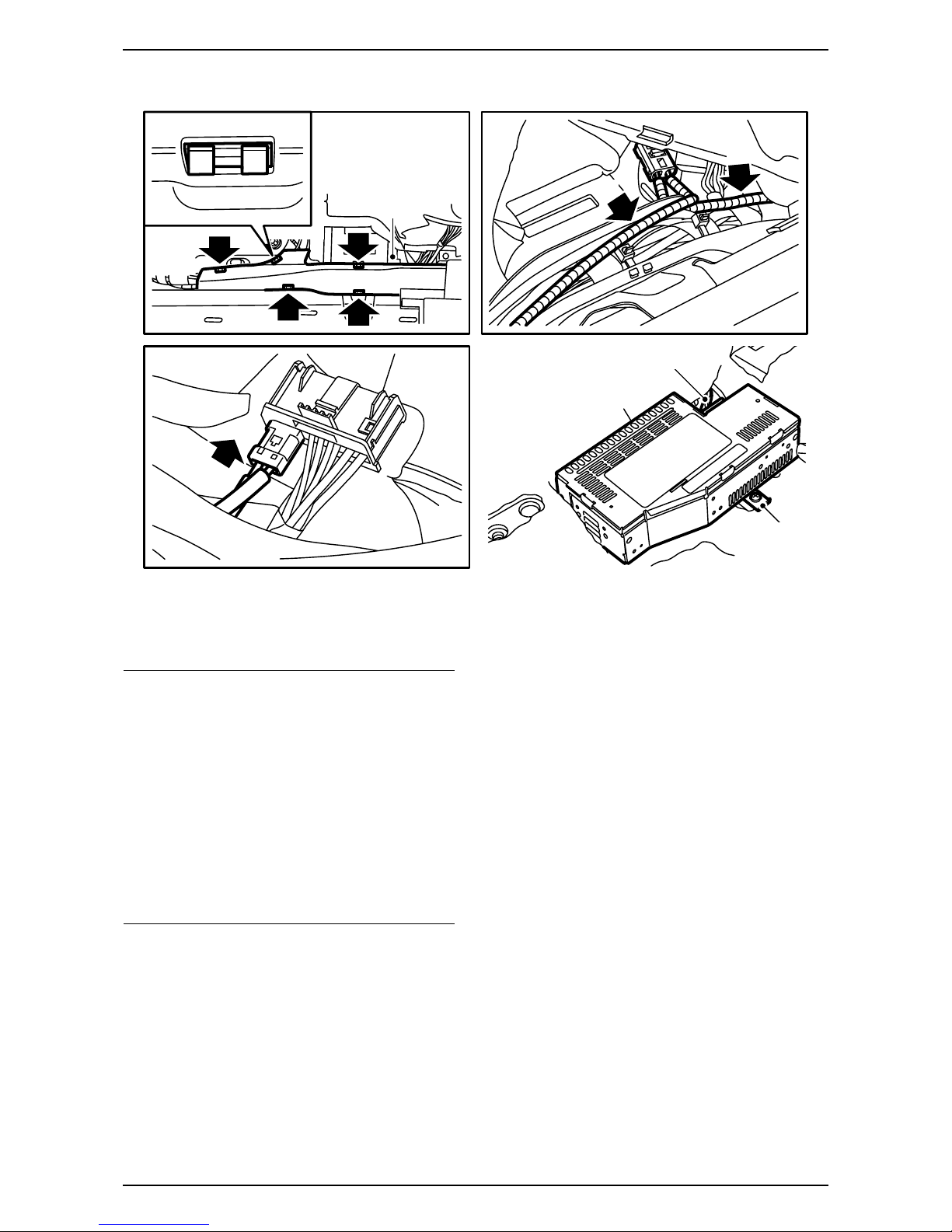
– Control panel (ICM3)
– Telematics unit
– Console, upper + lower section for telematics unit
– Microphone
which are ordered separately.
F930A447
2 7
5
813 9
1 4 3
6
10
11
12

32 025 682 3
Saab 9-3 5D M06-
Bus Communication
Many parts of the car's electrical system communi-
cate using a bus. There are three types of bus com-
munication: P-bus (Powertrain Bus), I-bus (Instru-
ment Bus) and O-bus (Optical bus). The audio
system communicates via the O-bus together with
the navigation system, the telephone system and
others.
The O-bus is optical and is a ring bus. Two fibre opti-
cal cables are connected to each control module on
the bus, one fibre optical cable for receiving and one
for sending. Messages received are converted by
each control module from a fibre optic signal to elec-
trical and then converted back to optical for sending.
The O-bus data transfer rate is 25 Mbit/s.
AMP2 is an amplifier by the right-hand rear wheel
housing
CU/PU is a telematics unit behind the backrest
DVD is a DVD player behind the backrest
When fitting new equipment to be connected to the
O-bus it is important that it is connected into the cor-
rect side of the existing equipment.
Important
It is very important that everything connected to
the O-bus is connected in a specific order, see
illustration, and that the ring is closed the whole
time.
Connection in any other way than that described
in these fitting instructions may result in several of
the car's systems failing to work.
F930A448
1
2
1
2
1
2
AMP2
DVD
CU/PU
2 1
1
2
1
2
AMP2
DVD
1
2
1
2
AMP2
CU/PU
1
2
1
2
DVD
CU/PU
1
2
AMP2
1
2
DVD
1
2
CU/PU
Important
Handle the fibre-optic cables with care or the sig-
nal may be distorted.
·It is very important that the two leads in the
connector are not confused with one another.
·Do not splice the cables.
·Do not bend the cable in a radius smaller than
25 mm.
·Do not expose the cable to temperatures
exceeding 85 °C.
·Keep the cable ends free from dirt and grime.
·Do not expose the cable to impact as this may
cause the transparent plastic to whiten,
thereby reducing the intensity of the light and
causing possible communication interruptions.
·The cable should not lie against any sharp
edges as this may cause increased signal
reduction.

4 32 025 682
Saab 9-3 5D M06-
1 Connect the diagnostic tool and separate the
infotainment system's control panel and radio
from the car.
2 Remove the key from the ignition switch.
3 Remove the infotainment system control panel.
4 Fit a new infotainment system (ICM3) control
panel.
5 Remove the radio.
6 Fit the kit's radio.
7On cars with TEL1: Fit the microphone in the
roof console's vacant space on the passenger
side.
– The connector is located by the microphone
for the driver's side.
– Remove the tape over the hole for the
microphone.
Note
For more detailed information on the different
steps in the removal/fitting methods, please refer
to the corresponding section in WIS.
Important
The control module is sensitive to electrostatic dis-
charges. To avoid damaging the internal compo-
nents in the control module, a replacement must
be made with care in the following way:
·Never touch the pins on a control module with
hands or clothes.
·Ground yourself by touching the car's body/
engine. Remove the connector on the car's
control module.
·Ground yourself by touching the car's body/
engine. Connect the connector on the car's
control module.
·Deposit the replaced control module in the
returns packaging without touching its pin.
·Keep the new control module in its packaging
as long as possible.
F930A449
7
7
5,6
Important
Handle the fibre-optic cables with care or the sig-
nal may be distorted.
·Do not bend the cable in a radius smaller than
25 mm.
·Do not expose the cable to impact as this may
cause the transparent plastic to whiten,
thereby reducing the intensity of the light and
causing possible communication interruptions.
·The cable should not lie against any sharp
edges as this may cause increased signal
reduction.

32 025 682 5
Saab 9-3 5D M06-
8 Fold down the rear seat backrests.
9 Remove the cargo guard if fitted.
10 Remove the scuff plate and luggage compart-
ment floor.
11 Steps 11-14 must be carried out on both
sides.
Remove the C-pillar trim.
12 Remove the side bolsters.
13 Remove the rear side trim and the covers over
the storage compartments.
14 Remove the foam blocks.
F930A450
11
12
13
13
14 1410
9
10

6 32 025 682
Saab 9-3 5D M06-
15 Remove the headlining's rear and centre clips
by turning them 90°.
16 Remove the mountings above the side
windows.
17 Lower the rear edge of the headlining, enough
to reach the antenna. Hold the headlining in
place using two removal tools 82 93 474.
18 Remove the antenna cable, if fitted, from the
roof antenna, and remove the antenna.
19 Take the kit's antenna, guide the antenna cables
down through the hole in the roof and fit the
antenna.
Tighten the antenna nut.
Tightening torque 2 Nm (1.5 lbf ft)
20 Connect the kit's antenna cable to the antenna,
blue connector to the blue connector from the
antenna and violet connector to violet. Affix the
kit's antenna cable up to the left-hand D-pillar.
F930A451
15
15 16
15
15
16
17
20
18,19

32 025 682 7
Saab 9-3 5D M06-
21 Route the new antenna cable along the D-pillar
and in front of the electrical centre down to the
floor. Follow the car's wiring harness to the loca-
tion for the telematics unit.
22 Tape any removed cable along the new one.
Apply anti-rattle tape to the connector.
23 Fit the headlining.
Cars with rear amplifier (AMP2): Go to
step 49.
F930A452
22
21
20
23

8 32 025 682
Saab 9-3 5D M06-
24 Steps 24-48 apply to cars without AMP2
Remove the front scuff plate and the lower sec-
tion of the A-pillar trim on the left-hand side of
the car.
25 Position the left-hand front seat in its most for-
ward position and fold the backrest forwards.
26 Remove the two rear retaining screws from the
seat.
27 Angle the seat forwards.
28 Pull the seat back so that the fitting hooks
loosen from their positions. Fold the whole seat
backwards.
29 Remove the amplifier.
F930A453
26 26
24
24
28
29
29

32 025 682 9
Saab 9-3 5D M06-
30 Locate the green marked fibre optic cable by the
amplifier.
31 Unplug the fibre optic cables' connector (the
small connector) from the amplifier's connector.
32 Remove the fibre optic cable connected to posi-
tion 1 by opening the connector locking clip and
carefully lifting the catch.
33 Remove the protective cover from the connec-
tion on the green marked fibre optic cable.
34 Fit the protective cover onto the removed fibre
optic cable connection and carefully move the
fibre optic cable aside in order to prevent
damage.
F930A454
30
31 32
32
10 32 025 682
Saab 9-3 5D M06-
35 Remove the cover from the cable duct, check
that the green marked fibre optic cable cannot
bend and fit it in position 1 in the amplifier's fibre
optic connector. Fit the locking clip.
36 Plug the fibre optic connector into the large
connector.
37 Fit the cover to the cable duct, draw back the
carpet and guide out the connector and the
cables through the hole in the carpet.
38 Connect and fit the amplifier.
Cars with integrated phone: Go to step 49.
Important
Handle the fibre-optic cables with care or the sig-
nal may be distorted.
·Do not bend the cable in a radius smaller than
25 mm.
·Do not expose the cable to impact as this may
cause the transparent plastic to whiten,
thereby reducing the intensity of the light and
causing possible communication interruptions.
·The cable should not lie against any sharp
edges as this may cause increased signal
reduction.
F930A455
38
35
35
38
35,37
36
Indice
Altri manuali Saab Sistema di navigazione per auto

Saab
Saab 400 132 239 Manuale utente

Saab
Saab 12 787 151 Manuale utente

Saab
Saab R5 SUPREME AIS Manuale utente

Saab
Saab R5 SUPREME AIS Manuale utente

Saab
Saab 12 832 506 Manuale utente

Saab
Saab R5 SUPREME MkII Manuale utente

Saab
Saab 12 787 151 Manuale utente

Saab
Saab R4 Manuale utente

Saab
Saab 12 832 506 Manuale utente


