
Safety Track UCIT 4 Manuale
Safety Track 249 Main Street Belleville, MI 48111 888-286-9829
1
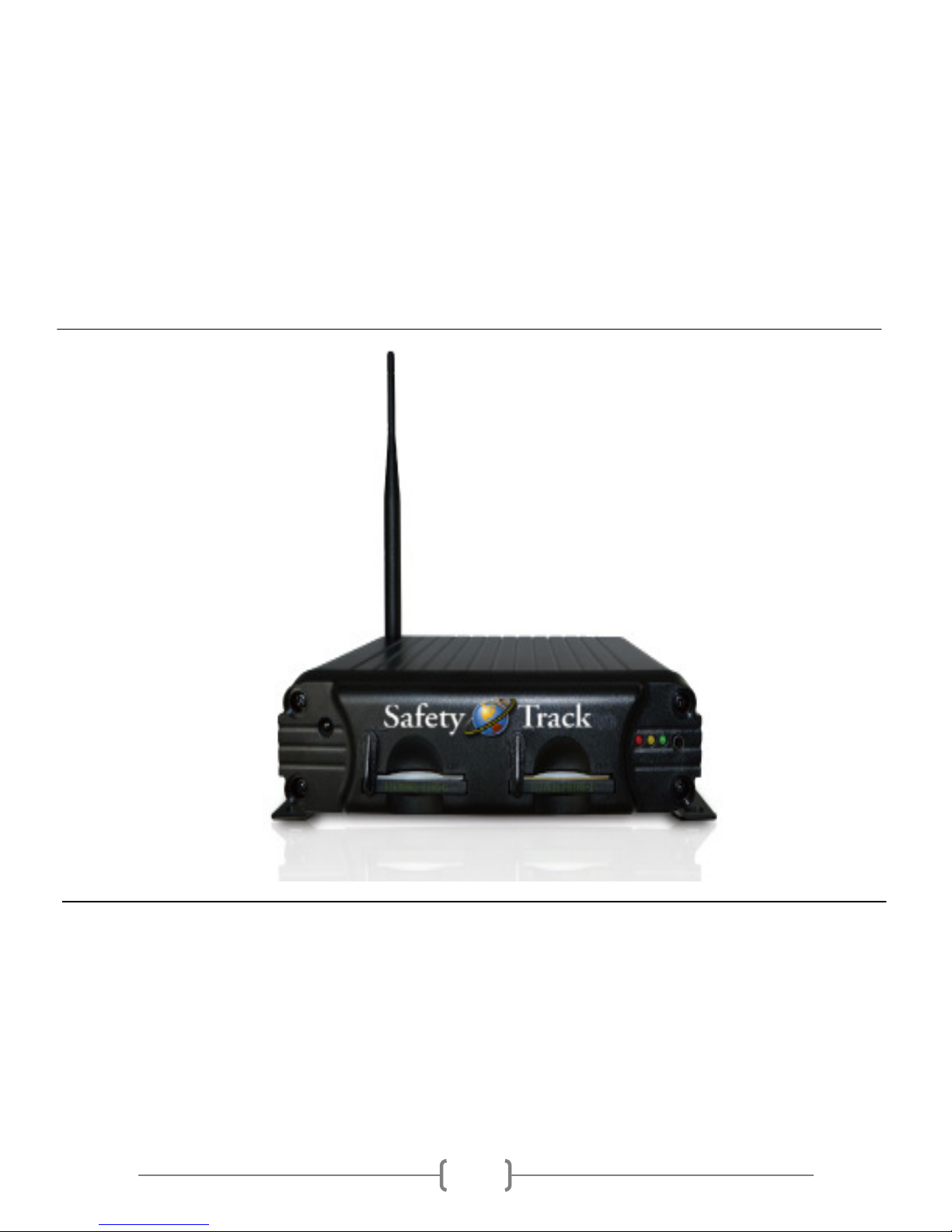
Safety Track UCIT 4 Channel DVR
Installation and Configuration Manual
Version 1.0.2 ugust, 2013

Safety Track 249 Main Street Belleville, MI 48111 888-286-9829
2
Table of Contents
Product Features………………………………………………………………………………………………………………………………3
Specifications………………………………………………………………………………………………………………………………….. 4
Product Diagram………………………………………………………………………………………………………………………………5
Front Panel…………………………………………………………………………………………………………………………………. 5
Rear Panel……………………………………………………………………………………………………………………………………5
Wiring Diagrams……………………………………………………………………………………………………………………………… 6
12-28v larm Input Harness…………………………………………………………………………………………………………6
udio Input/Output Harness………………………………………………………………………………………………………. 6
4-Pin Video Cable Harness……………………………………………………………………………………………………………7
Power Harness……………………………………………………………………………………………………………………………. 7
Unit Installation…………………………………………………………………………………………………………………………….... 8
DVR Mounting……………………………………………………………………………………………………………………………. 8
Camera Mounting………………………………………………………………………………………………………………………. 8
Speaker/Microphone Mounting…………………………………………………………………………………………………. 8
System Configuration……………………………………………………………………………………………………………………… 9
Remote Diagram…………………………………………………………………………………………………………………………. 9
Menu Screen Overview………………………………………………………………………………………………………………. 9
Encoding Settings……………………………………………………………………………………………………………………… 10
Video Settings…………………………………………………………………………………………………………………………… 10
Time Settings……………………………………………………………………………………………………………………………. 10
Plate Settings……………………………………………………………………………………………………………………………. 11
CF Card Format…………………………………………………………………………………………………………………………. 11
On Screen Display (OSD) Settings……………………………………………………………………………………………… 11
Power Management…………………………………………………………………………………………………………………. 12
Firmware Version……………………………………………………………………………………………………………………… 12
Firmware Update……………………………………………………………………………………………………………………… 12
DVR Serial Number…………………………………………………………………………………………………………………… 13
3G Network Settings…………………………………………………………………………………………………………………. 13
12-28v larm Input Settings……………………………………………………………………………………………………… 14
On Screen Display (OSD)………………………………………………………………………………………………………………...15
Camera Views…………………………………………………………………………………………………………………………… 15
Status Indicators………………………………………………………………………………………………………………………..15
Playback Mode……………………………………………………………………………………………………………………………… 16
ccessing Playback Mode…………………………………………………………………………………………………………. 16
Reviewing Video Files……………………………………………………………………………………………………………….. 16
Support………………………………………………………………………………………………………………............................ 17

Safety Track 249 Main Street Belleville, MI 48111 888-286-9829
3
Product Features
•4 Channel mobile DVR system with Live Streaming Video, udio, and GPS Tracking.
•Indoor and Outdoor cameras to give true 360° viewing coverage.
•Video output for external monitor/In-Dash stereo connectivity.
•Industry leading compression format – allowing video to stream over 3G signals.
•utomatic and Scheduled Recordings
•Four separate 12v inputs to switch the video view (example backup monitor).
•Up to 64GB Compact Flash storage which will hold approximately 72 hours of continuous
recordings.
•Video Backup capabilities for archive purposes.
•Live GPS tracking with vehicle speed.
Safety Track 249 Main Street Belleville, MI 48111 888-286-9829
4
Specifications
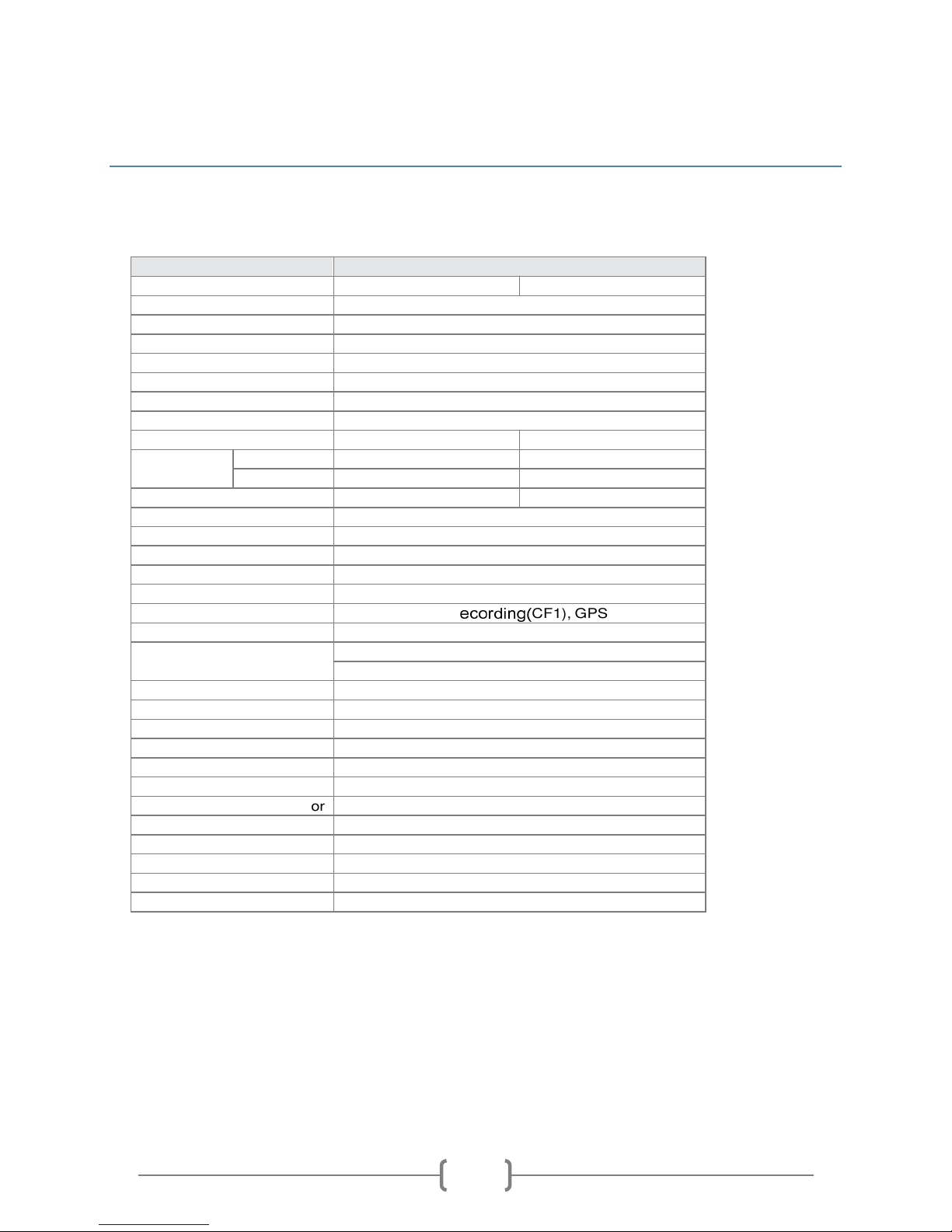
Item
Description
Video Format
NTSC
PAL
Video Input
4CH Input BNC/ Harness Connector
Audio Input
1CH Input / Harness Connector
Video Output
1CH Output BNC / Harness Connector
Audio Output
1CH Output RCA / Harness Connector
Alarm Input
4 12v Inputs
Alarm Output
Buzzer (Optional)
Display Mode
Full Screen, 4 Split
Display Resolution
720 x 480
720 x 576
Recording
Resolution
D1
720 x 480
720 x 576
CIF
360 x 240
360 x 288
Recording Frame
Max. 120 FPS
Max. 100 FPS
Compression Format
H.264 Technology
Operation System
Embedded Linux Kernel
Triplex
Record / Playback / Backup
Recording Mode
Schedule or Automatic Recording
Schedule Recording
15/30/60/120 Minutes
LED Indicator
Power, R
ecording(
CF1), GPS(CF2)
Event Mode
Alarm Trigger / Video Loss
Playback Mode
Normal Speed x1/Fast Forward/Fast Rewind
Search Function: Time / Event
Network
3G Module
GPS
GPS
Storage Type
CF Card
Backup Device
PC VIEWER
Firmware Update
USB
Multi-Language
English / Traditional Chinese / Others
(Customizable)
G Sensor
G Sensor
Operation
IR Remote Controller (Extending IR Lead)
Power Supply
8v - 28v DC
Dimension
214mm x 160mm x 58mm (W x D x H)
Weight
0.92kg ( including CF card)
Operation Temperature
-20°C~65°C (inside vehicle)
Safety Track 249 Main Street Belleville, MI 48111 888-286-9829
5
Product Diagram
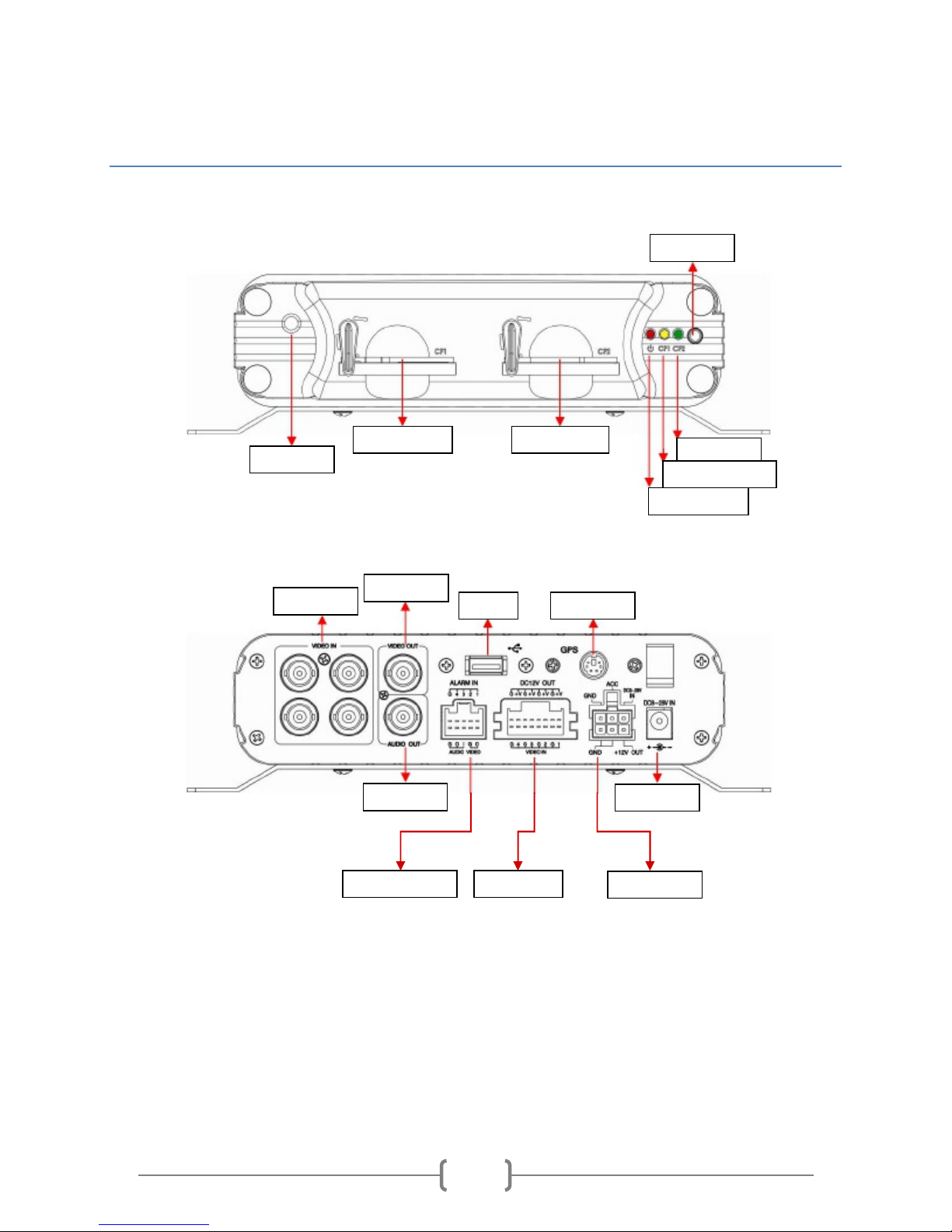
Front Panel
Rear Panel
IR Receiver
Compact Flash 1 Compact Flash 2
Power Indicator
Recording Indicator
GPS Indicator
IR Extension
BNC Video In
Video Out
USB
GPS ntenna
udio Out ux Power In
12-28v ‘ larm’ Input 4-pin Video In Power Harness
Safety Track 249 Main Street Belleville, MI 48111 888-286-9829
6
Wiring Diagrams
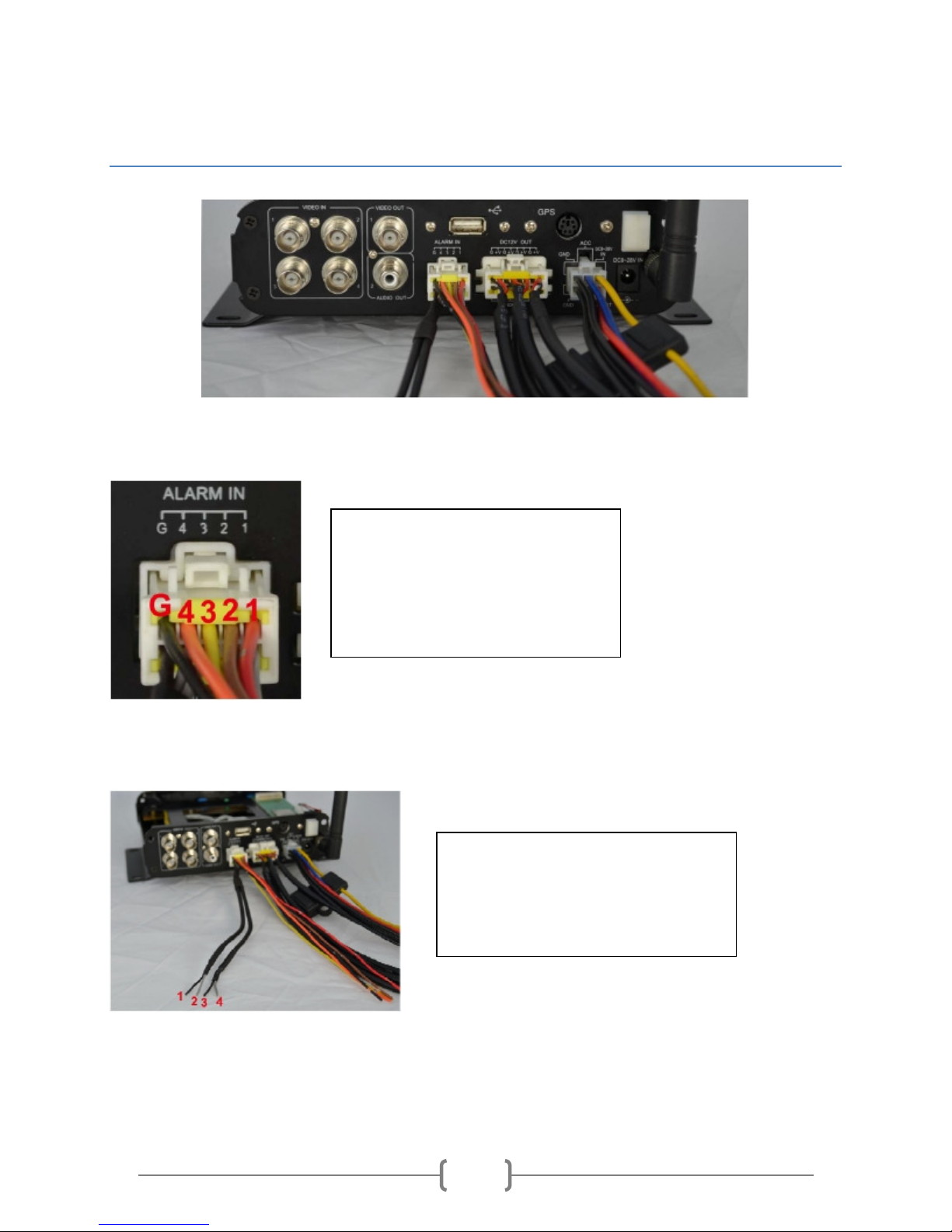
12-28v Alarm Input (Alarm functionality outlined on page 14)
Audio Input/ utput
1.
larm Input 1
2. larm Input 2
3. larm Input 3
4. larm Input 4
5. Chassis Ground
1.
Chassis/Signal Ground
2. udio Output (to speaker or radio)
3. Chassis/Signal Ground
4. udio Input
Safety Track 249 Main Street Belleville, MI 48111 888-286-9829
7
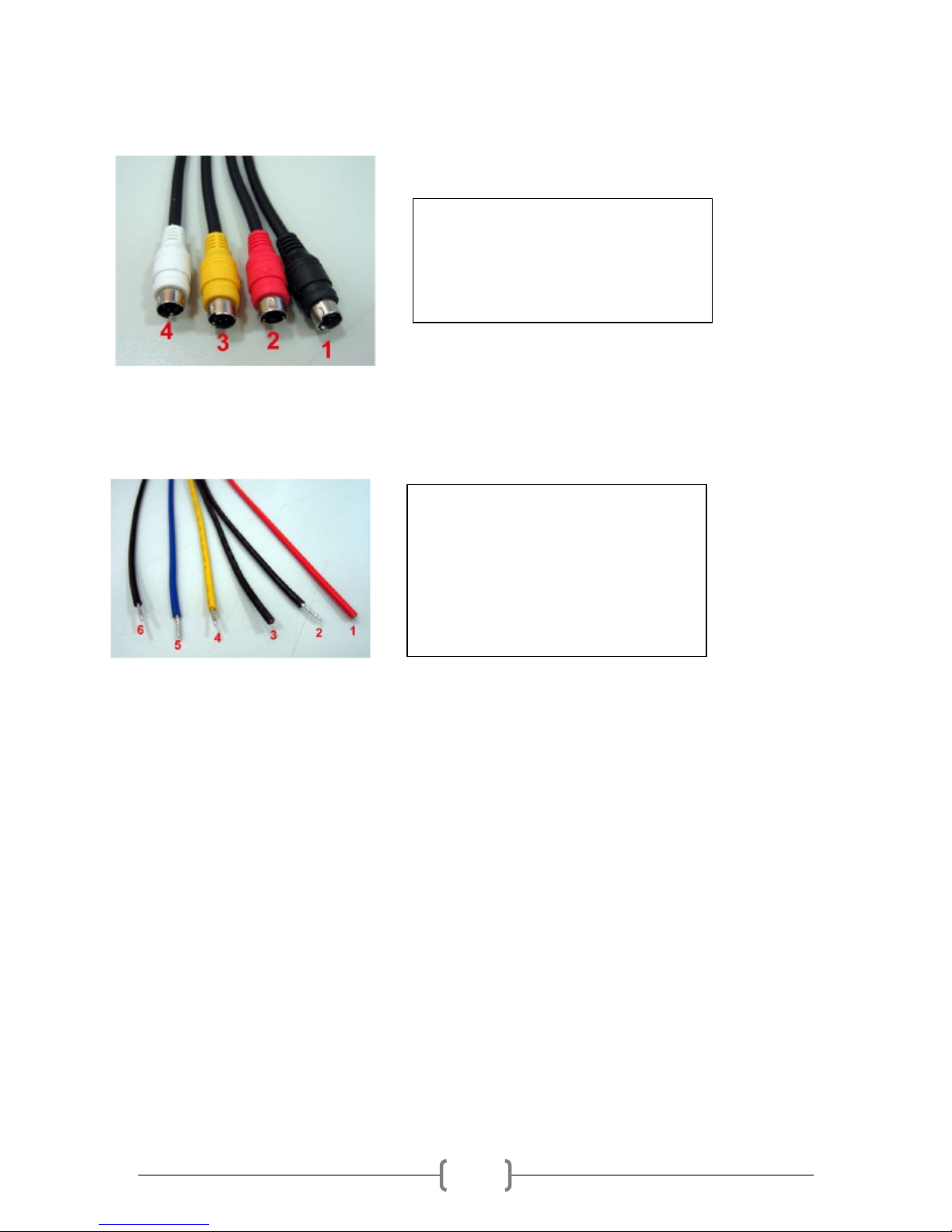
4-Pin Video Cable Harness
Power Harness
*Note: When connecting wiring harness, the Chassis Ground should be an isolated connection to a true
Chassis Ground not tapped into an existing ground circuit. The Signal Ground connections can be
combined and added to an existing ground circuit or a new ground circuit.
When extending wires on the power harness, a solder connection is recommended. If solder is not
available, a weatherproof butt style connector should be used.
1.
Channel 1 (Black)
2. Channel 2 (Red)
3. Channel 3 (Yellow)
4. Channel 4 (White)
1.
Switch Power ( CC)
2. Signal Ground
3. Chassis Ground
4. Constant Power
5. 12v Output
6. Signal Ground

Safety Track 249 Main Street Belleville, MI 48111 888-286-9829
8
Unit Installation
Mounting DVR
Mount the DVR unit inside the vehicle, with the below considerations:
•Unit should be mounted in an area that has no exposure to potential moisture
•When mounting unit, choose a location that will deter operator tampering but facilitate access
to the CF cards should they need to be removed for manual review.
•ll wiring harnesses should be protected with conduit, and rubber grommets should be used for
all through-metal runs to prevent chafing of the wires.
•Unit is to be mounted using a screw-type fastener. No adhesive or Velcro should be used.
Mounting Cameras
Mount the cameras in the areas that are to be monitored, with the below considerations:
•The Cameras are not to be installed in any location that will interfere with the
dri er/operator’s direct line of sight.
•Outdoor cameras should use rubber grommets for all through-metal runs and sealed with a
silicone to prevent wind noise or moisture from entering the vehicle.
•lways dry-run your cables and connect the cameras to ensure they are recording what is
intended and at the right direction (e.g. not upside down).
•Interior camera cables should be tucked into interior panels/under carpet to prevent tampering,
damage, and potential interference with the driver/operator.
Mounting ptional Speaker and Microphone
If the optional microphone is being installed, install inside the vehicle with the below considerations:
•The microphone should be installed close to the driver/operator to ensure clear audio is heard.
The best place for microphone placement is typically the ‘ ’ pillar of the vehicle.
•Speaker(s) should be mounted close to the driver/operator to ensure they can hear clearly
without having to distract themselves to focus on the speaker location.
Safety Track 249 Main Street Belleville, MI 48111 888-286-9829
9
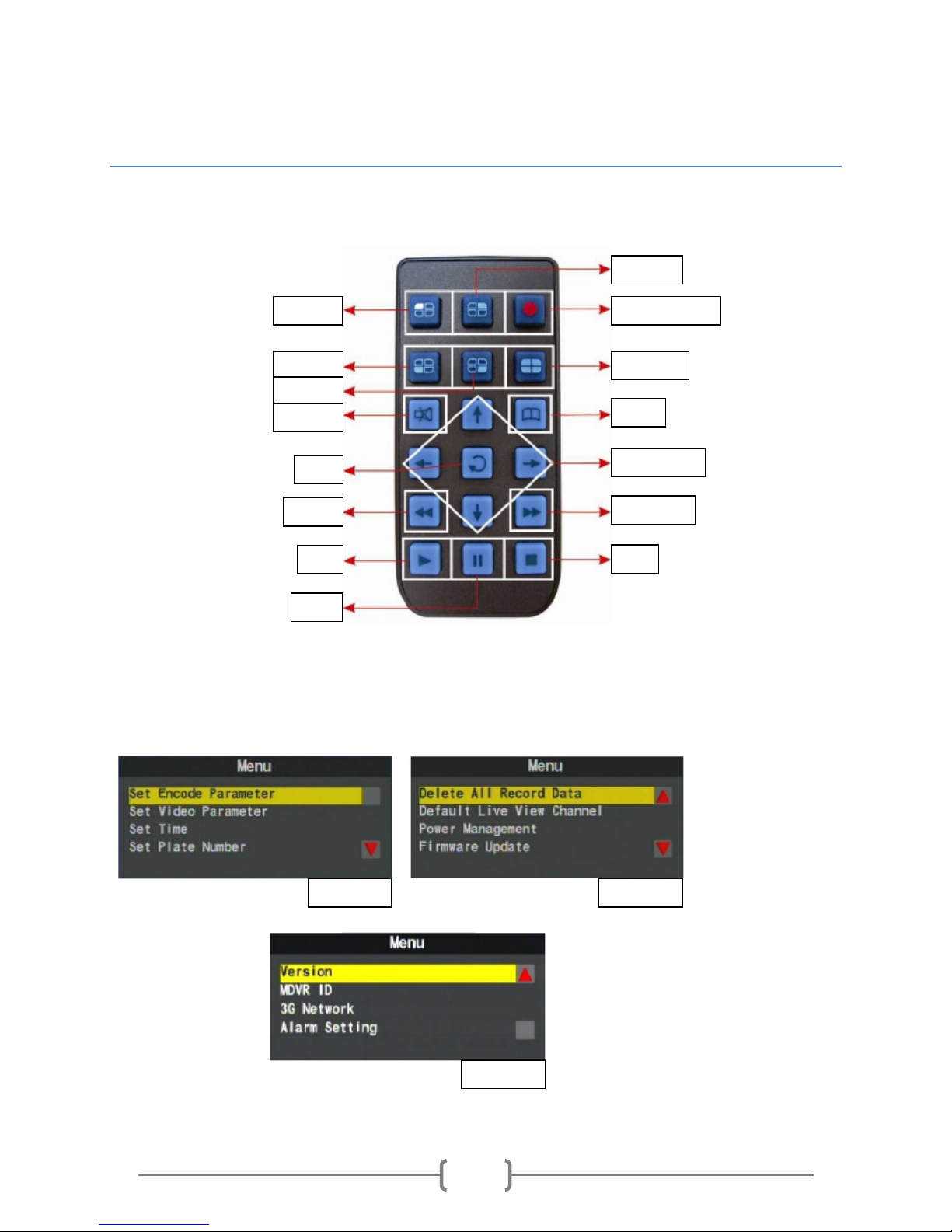
System Configuration
Unit Remote verview
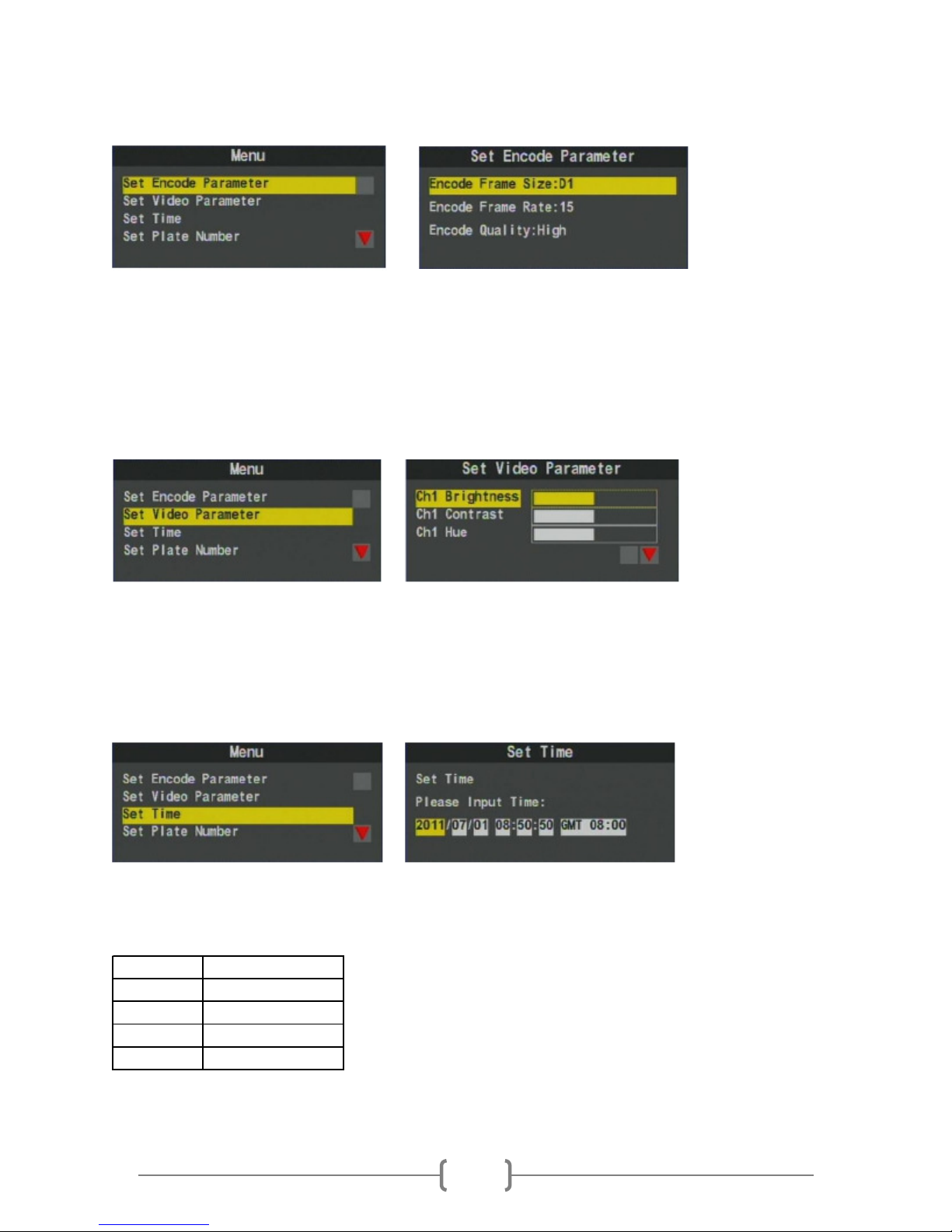
Menu Screen verview
The below images are the menu options of the DVR which will be outlined in the following sections.
Channel 3
Channel 4
Mute
Channel 1
Channel 2
Record Start/Stop
Quad View
Menu
Direction Right
Fast Forward
Stop
Enter
Rewind
Play
Pause
Page 1 Page 2
Page 3
Safety Track 249 Main Street Belleville, MI 48111 888-286-9829
10
Encoding Settings
The Encoding settings determine the video quality and compression for live streaming. These settings
will be set by Safety Track prior to shipment, and should not be modified at any time. Modifying these
settings can alter the compression of the video which can cause undesired live viewing results, increased
data charges, and decreased storage intervals.
Video Settings
The Video Settings are used to adjust Brightness, Contrast, and Hue (Color). These settings can be
modified to adjust to a particular environment, however, it is recommended to keep the default settings
set by Safety Track.
Time Settings
The Time Settings are to set the DVR time to local time. The DVR uses GMT (Greenwich Mean Time)
adjustments to determine local time. Please use the below table to determine your GMT adjustment to
set your DVR to local time:
Time Zone GMT djustment
EST GMT -5
CST GMT -6
MST GMT -7
PST GMT -8
*Note: The DVR does not adjust for Daylight Savings Time (DST). This is a feature being worked and will be released soon.
Altri manuali per UCIT 4
1
Questo manuale è adatto per i seguenti modelli
1
Indice
Altri manuali Safety Track Registratore digitale


