Sapido GR-1736 Manuale utente

Dual-Band
Wireless Router
Simultaneous Dual-band Wireless N
Gigabit Router
GR-1736
Networking
User Manual

http://www.sapido.com.tw/ User Manual v1.0.0
2
Table of Contents
Table of Contents .....................................................................................................................2
Chapter 1 Introduction......................................................................................................7
1.1 Hardware Features..........................................................................................7
1.2 ProductAppearance ........................................................................................8
Chapter 2 System and Network Setup...........................................................................10
2.1 Build Network Connection............................................................................10
2.1.1 Router Mode...........................................................................................10
2.1.2 AP Mode..................................................................................................11
2.1.3 Wi-FiAPMode.......................................................................................11
2.2 Connecting GR-1736......................................................................................11
2.3 Network setup.................................................................................................12
2.3.1 Windows 2000.........................................................................................12
2.3.2 Windows XP...........................................................................................13
2.3.3 Windows Vista / Windows 7..................................................................14
2.4 Router IPAddress Lookup............................................................................16
2.4.1 Log into Web GUI..................................................................................17
Chapter 3 Internet Connection.......................................................................................19
3.1 Plug and Play..................................................................................................19
3.1.1 Smart Phone /iPhone Internet sharing plug and play........................19
3.2 Router Mode- Using as a broadband router ...............................................21
3.2.1 One button setup....................................................................................21
3.2.2 Parental Control.....................................................................................22
3.2.2.1 URL Filtering .........................................................................................22
3.2.2.2 Mac Filter Schedule...............................................................................23
3.2.2.3 Schedule..................................................................................................24
3.2.3 AirCloud Storage ...................................................................................25
3.2.3.1 FTP server...............................................................................................25
3.2.3.2 Samba management...............................................................................26
3.2.4 WAN Interface- Ethernet Port..............................................................26
3.2.4.1 Static IP...........................................................................................27
3.2.4.2 DHCP Client...................................................................................29
3.2.4.3 PPPoE..............................................................................................30
3.2.4.4 PPTP................................................................................................32
3.2.4.5 L2TP................................................................................................33
3.2.4.6 Advance function ...........................................................................34
3.2.5 WAN Interface- 3G USB dongle...........................................................35
3.2.6 WAN Interface- Wireless.......................................................................37

http://www.sapido.com.tw/ User Manual v1.0.0
3
3.3 AP Mode-Using as a Access Point.................................................................38
3.4 WiFiAPMode- Using as a Network Converter..........................................40
Chapter 4 Wireless Setup................................................................................................42
4.1 Wireless Setup................................................................................................42
4.1.1 Setup Wireless LAN by WPS button....................................................42
4.1.2 Wireless Basic Setup from Web GUI ...................................................44
4.1.2.1 Multiple APs...................................................................................46
4.1.2.2 Enable Universal Repeater Mode.................................................47
4.2 Wireless Security Setup.................................................................................48
4.3 Wireless Access Control.................................................................................50
Chapter 5 Router Mode Security Setup.........................................................................52
5.1 NAT .................................................................................................................52
5.1.1 Virtual Server.........................................................................................52
5.1.2 DMZ........................................................................................................53
5.2 Firewall ...........................................................................................................54
5.2.1 QoS..........................................................................................................55
5.2.2 Port Filtering..........................................................................................56
5.2.3 IP Filtering..............................................................................................57
5.2.4 Denial of Service.....................................................................................58
5.2.5 VLAN Settings........................................................................................59
5.3 Server Setup ...................................................................................................60
5.3.1 Webcam server.......................................................................................60
Chapter 6 Advanced Setup..............................................................................................62
6.1 Dynamic DNS Setting ...................................................................62
6.2 Wireless Advanced Setup ..............................................................................63
6.2.1 Wireless Site Survey ............................................................65
6.2.2 WPS .......................................................................65
6.3 System Management......................................................................................67
6.3.1 Statistics ..................................................................................................68
6.3.2 Change Password...................................................................................69
6.3.3 Firmware Upgrade.................................................................................69
6.3.4 Profile Save.............................................................................................70
6.3.5 Remote Manager....................................................................................73
6.3.6 Time Zone Setting..................................................................................73
6.3.7 UPnP Setting...........................................................................................74
6.3.8 VPN Passthrough Setting......................................................................75
6.3.9 Language Setting....................................................................................76
6.3.10 Routing Setup.........................................................................................77

http://www.sapido.com.tw/ User Manual v1.0.0
4
6.3.11 UserAccount Settings............................................................................79
6.3.12 Walk on LAN Schedule .........................................................................79
6.4 Log & Status...................................................................................................80
6.4.1 Network Config......................................................................................81
6.4.2 Event Log................................................................................................83
6.5 Logout .............................................................................................................84
Chapter 7 Samba Server .................................................................................................85
7.1 How to use GR-1736 as a Samba server......................................................85
7.2 Air play ...........................................................................................................86
7.3 Printer Server.................................................................................................87
Chapter 8 DDNS ServiceApplication ............................................................................89
Chapter 9 Q & A ..............................................................................................................94
9.1 Installation......................................................................................................94
9.2 LED .................................................................................................................94
9.3 IPAddress.......................................................................................................94
9.4 OS Setting.......................................................................................................95
9.5 GR-1736 Setup ...............................................................................................97
9.6 Wireless LAN..................................................................................................98
9.7 Support..........................................................................................................100
9.8 Others............................................................................................................101
9.9 USB Device ...................................................................................................101
Chapter 10 Appendices....................................................................................................102
10.1 Operating Systems.......................................................................................102
10.2 Browsers........................................................................................................102
10.3 Communications Regulation Information.................................................102

http://www.sapido.com.tw/ User Manual v1.0.0
5
FCC Statement
Federal Communication Commission Interference Statement This equipment has
been tested and found to comply with the limits for a Class B digital device, pursuant
to Part 15 of the FCC Rules.
These limits are designed to provide reasonable protection against harmful
interference in a residential installation. This equipment generates, uses and can
radiate radio frequency energy and, if not installed and used in accordance with the
instructions, may cause harmful interference to radio communications. However,
there is no guarantee that interference will not occur in a particular installation. If this
equipment does cause harmful interference to radio or television reception, which can
be determined by turning the equipment off and on, the user is encouraged to try to
correct the interference by one of the following measures:
Reorient or relocate the receiving antenna.
Increase the separation between the equipment and receiver.
Connect the equipment into an outlet on a circuit different from that to which the
receiver is connected.
Consult the dealer or an experienced radio/TV technician for help.
FCC Caution
1. The device complies with Part 15 of the FCC rules. Operation is subject to the
following conditions:
2. This device may not cause harmful interference, and this device must accept any
interference received, including interference that may cause undesired
operation.
3. FCC RF Radiation Exposure Statement: The equipment complies with FCC RF
radiation exposure limits set forth for an uncontrolled environment. This
equipment should be installed and operated with a minimum distance of 20
centimeters between the radiator and your body.
4. This Transmitter must not be co-located or operating in conjunction with any
other antenna or transmitter.
5. Changes or modifications to this unit not expressly approved by the party
responsible for compliance could void the user authority to operate the
equipment.
IMPORTANT NOTE
FCC Radiation Exposure Statement:
This equipment complies with FCC radiation exposure limits set forth for an
uncontrolled environment. This equipment should be installed and operated with
minimum distance20cm between the radiator & your body.

http://www.sapido.com.tw/ User Manual v1.0.0
6
CE Mark Warning
This is a class B product. In a domestic environment, this product may
cause radio interference, in which case the user may be required to take adequate measures.
National Restrictions
Frequency range - 2400.0 - 2483.5 MHz
Country Country Reason/remark
Bulgaria none General authorization required for outdoor use
and public service.
France
Outdoor use limited to 10
mW e.i.r.p. within the
band 2454-2483.5 MHz
Military Radiolocation use. Refarming of the 2.4
GHz band has been ongoing in recent years to
allow current relaxed regulation. Full
implementation planned 2012.
Italy none If used outside of own premises, general
authorization is required.
Luxembourg none General authorization required for network and
service supply (not for spectrum).
Norway Implemented
This subsection does not apply for the
geographical area within a radius of 20 km from
the centre of Ny-Ålesund.
Russian
Federation none Only for indoor applications.
Note: Please don’t use the product outdoors in France
CE Statement of Conformity
Our product has been tested in typical configuration by Ecom Sertech Corp and was found to
comply with the essential requirement of "Council Directive on the Approximation of the Laws
of the Member Sates relating to Electromagnetic Compatibility" (89/336/EEC; 92/31/EEC;
93/68/EEC). The Declaration of Conformity can be found at the Sapido regional website.
www.sapidotech.de
CE Information of Disposal
The electric and electronic equipment or unit which is labeled with crossed-out wheeled bin
may not be disposed of with household waste. This mark is based on European Directive
2002/96/EC (for Waste Electric and Electronic Equipment=WEEE).
Please take it to the designated collection facilities. We will ensure the proper recycling, reuse
and other forms of recovery of WEEE. WEEE has the potential effects on the environment
and human health as a result of the presence of hazardous substances. You can contribute to
eliminate these effects by your cooperation.

http://www.sapido.com.tw/ User Manual v1.0.0
7
Chapter 1 Introduction
1.1 Hardware Features

http://www.sapido.com.tw/ User Manual v1.0.0
8
1.2 Product Appearance

http://www.sapido.com.tw/ User Manual v1.0.0
9
LED Indicator Status Description:

http://www.sapido.com.tw/ User Manual v1.0.0
10
Chapter 2 System and Network Setup
The GR-1736 is an easy to setup and wireless device for various application and environment,
especially for large installs such as hotels, offices space, warehouses, hot-spots and more.
To begin with GR-1736, you must have the following minimum system requirements. If your
system can’t correspond to the following requirements, you might get some unknown troubles
on your system.
Internet Account for XDSL/Cable Modem, or 3G.
One Ethernet (10/100/1000 mbps) network interface card.
TCP/IP and at least one web browser software installed (E.g.: Internet Explorer 6.0,
Netscape Navigator 7.x, Apple Safari 2.03 or higher version).
At lease one 802.11g (54Mbps) or one 802.11b (11Mbps) wireless adapter for wireless
mobile clients.
Recommended OS: WinXP, Visata or Win7 / Linux.
2.1 Build Network Connection
Administrator can manage the settings for WAN, LAN, Wireless Network, NTP, password,
User Accounts, Firewall, etc.
Please confirm the network environment or the purpose before setting this product.
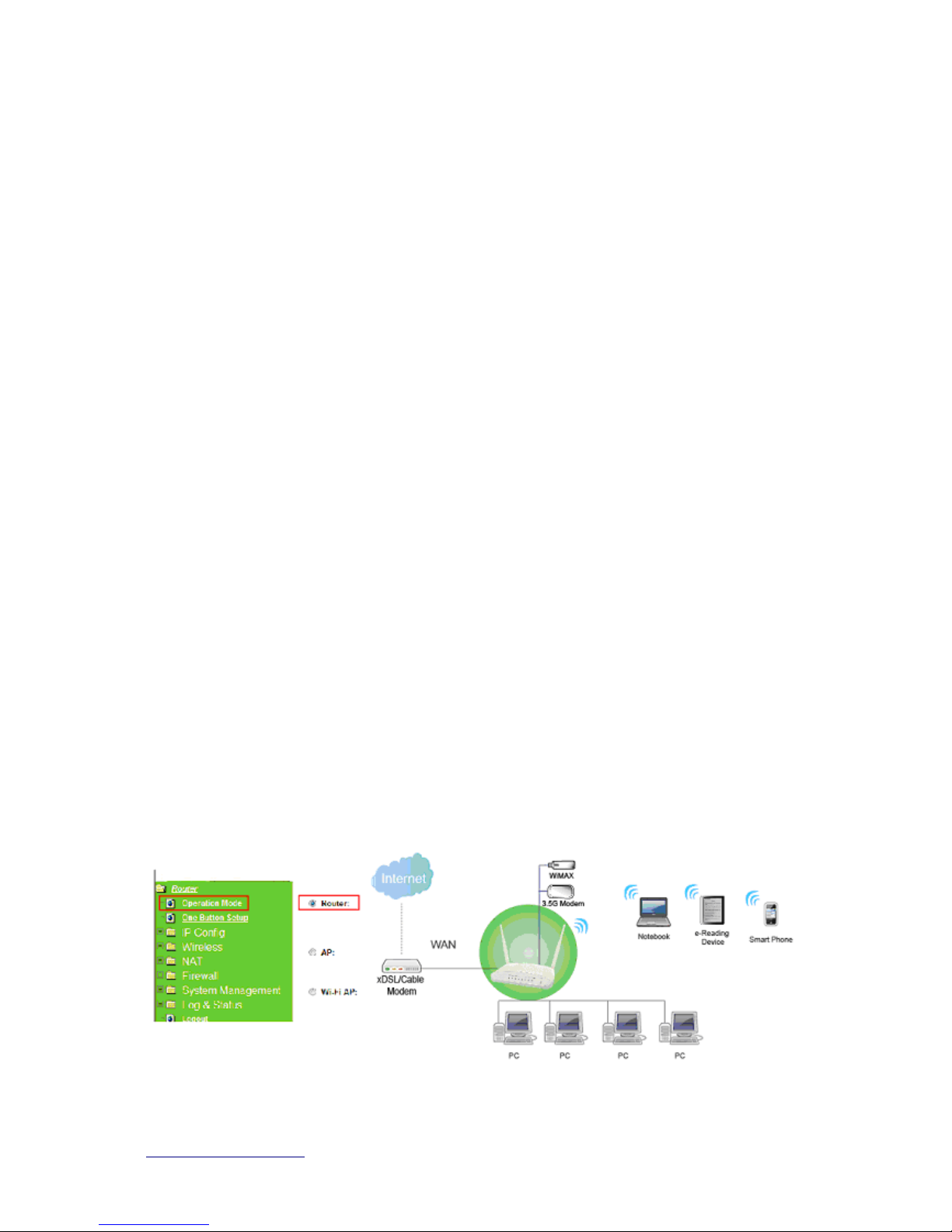
2.1.1 Router Mode
Switch to router mode through web GUI when the first setup.
Indice
Altri manuali Sapido Router wireless

Sapido
Sapido BR270n Manuale utente

Sapido
Sapido BRE71n Manuale utente

Sapido
Sapido RB-1632 Manuale utente

Sapido
Sapido RB-1830 Manuale utente

Sapido
Sapido BR476n Manuale utente

Sapido
Sapido RB-1602G3 Manuale utente

Sapido
Sapido RB-6132 Manuale utente

Sapido
Sapido BRF71n Manuale utente

Sapido
Sapido BRE70n Manuale utente

Sapido
Sapido BRD70n Manuale utente

Sapido
Sapido RB-1602G3 Manuale utente

Sapido
Sapido BRC76n Manuale utente

Sapido
Sapido BRB72n Manuale utente

Sapido
Sapido BRD70n Manuale utente

Sapido
Sapido GR-1102 Manuale utente

Sapido
Sapido MB-1132G3 Manuale utente

Sapido
Sapido RB-1232V2 Manuale utente

Sapido
Sapido BR476n Manuale utente

Sapido
Sapido RM-1802 Manuale utente

Sapido
Sapido RB-1602 Manuale utente