Schippers MS Fancontrol Touch Manuale utente

MS Fan Controller Touch
3409617
Title page Fancontroller 1

MS Fan Controller Touch
3409617
EN - MS Fancontroller Touch 3

MS_FANCONTROL_TOUCH_GEBRUIKERSHANDLEIDING Page 2
Dear customer,
This manual contains all the necessary information to quickly master the operation of the MS Fancontrol
Touch. Please read this manual carefully before starting to operate the MS Fancontrol Touch. In this way,
you will learn how to operate the controller more easily.
Keep this manual in a safe place so that you can use it as a reference at all times. With a view to its
programme of continuous development and improvement, MS Schippers reserves the right to revise or
change its product range without prior notice. No rights can be derived from this manual.
EN - MS Fancontroller Touch 4

MS_FANCONTROL_TOUCH_GEBRUIKERSHANDLEIDING Page 3
Table of contents
1Safety instructions and general warnings 4
1.1 General Warnings ___________________________________________________________________ 4
1.2 Safety warnings ____________________________________________________________________ 4
1.3 Wiring precautions __________________________________________________________________ 5
1.4 Deletion___________________________________________________________________________ 5
2Introduction 6
2.1 Possibilities of the MS Fancontrol Touch _________________________________________________ 6
2.2 Screen overview ____________________________________________________________________ 7
3User menus 9
3.1 24-hour overview ___________________________________________________________________ 9
3.2 Target temperature _________________________________________________________________ 9
3.3 Minimum ventilation _________________________________________________________________ 9
3.4 Maximum ventilation ________________________________________________________________ 9
3.5 Bandwidth________________________________________________________________________ 10
3.6 Ventilation stop____________________________________________________________________ 10
3.7 Switching the controller on or off _____________________________________________________ 10
3.8 Restore factory value _______________________________________________________________ 10
3.9 System time ______________________________________________________________________ 11
3.10 System info_______________________________________________________________________ 11
3.11 QR-code manual___________________________________________________________________ 11
4Alarm overview 12
5Printed circuit board overview 13
5.1 Front pcb ________________________________________________________________________ 13
5.2 Bottom pbc _______________________________________________________________________ 14
6Wiring diagram 15
6.1 Hirschmann connectors _____________________________________________________________ 15
6.2 Temperature sensor & mains voltage __________________________________________________ 15
6.3 Alarms (Optional) __________________________________________________________________ 16
7Technical specifications 17
EN - MS Fancontroller Touch 5

MS_FANCONTROL_TOUCH_GEBRUIKERSHANDLEIDING Page 4
1Safety instructions and general warnings
Read, understand and carefully follow all warnings and instructions of MS Schippers to use our products
safely. These warnings and instructions can be found on the equipment, in manuals, in brochures, on our
website or by contacting us. The selection and application of MS Schippers products remains the
responsibility of the installer or end user of the equipment. MS Schippers accepts no responsibility for the
way its products are applied. All MS Schippers products must be delivered to the end user with appropriate
warnings and instructions regarding safe use and operation. MS Schippers does not accept any liability for
personal injury, material damage, losses or claims as a result of incorrect application of its products.
1.1 General Warnings
⚠WARNING
Read and understand all warnings and instructions provided by MS Schippers before
installing, using or maintaining any of our products.
All work may only be carried out by qualified personnel.
The product may only be placed, used or stored in places that are inaccessible to children.
Handle the product with care; impacts, shocks or falls, even from a low height, can
damage the product.
Do not expose the product to direct sunlight, high heat or cold.
Always check all settings after installation to make sure they are working correctly.
Do not use running water to clean your computer. The computer is splashproof, not
waterproof!
1.2 Safety warnings
⚠WARNING
Do not wear metal or conductive materials, such as jewellery (necklaces, bracelets, rings,
etc.) when installing or servicing electrical parts or components.
Always switch off the power before opening the enclosure.
Never remove components or wires from electronic boards when the device is turned on.
Use the correct mains voltage.
Make sure that all clamp screws are correctly tightened.
Always use cable glands when installing cables in the controller.
After installation, unused cable glands or blind holes must be sealed to prevent water,
dust and other substances from entering the regulator.
If you have reason to believe that the device can no longer be used safely, disconnect it
immediately and ensure that it is not operated inadvertently.
EN - MS Fancontroller Touch 6

MS_FANCONTROL_TOUCH_GEBRUIKERSHANDLEIDING Page 5
1.3 Wiring precautions
⚠WARNING
Always use a shielded cable for all low-voltage connections.
Always use a shielded cable for all high voltage connections.
For communication connections, always use a twisted-pair shielded cable.
Do not connect the shielding of low-voltage connections to the earthing block (PE).
Do not connect the shielding of communication links to the earthing block (PE).
The maximum length of the communication link shall not exceed 1200 metres.
Disconnect high-voltage connections from low-voltage connections and/or
communication connections to prevent interference.
If inductive loads such as magnetic switches etc. are connected to the equipment,
Schippers advises to disconnect these loads by placing an RC filter (100ohm + 100nF)
in parallel.
1.4 Deletion
Electronic devices are recyclable and should not be disposed of as household waste. At the end
of its service life, dispose of the product in accordance with the applicable legal regulations.
EN - MS Fancontroller Touch 7

MS_FANCONTROL_TOUCH_GEBRUIKERSHANDLEIDING Page 6
2Introduction
2.1 Possibilities of the MS Fancontrol Touch
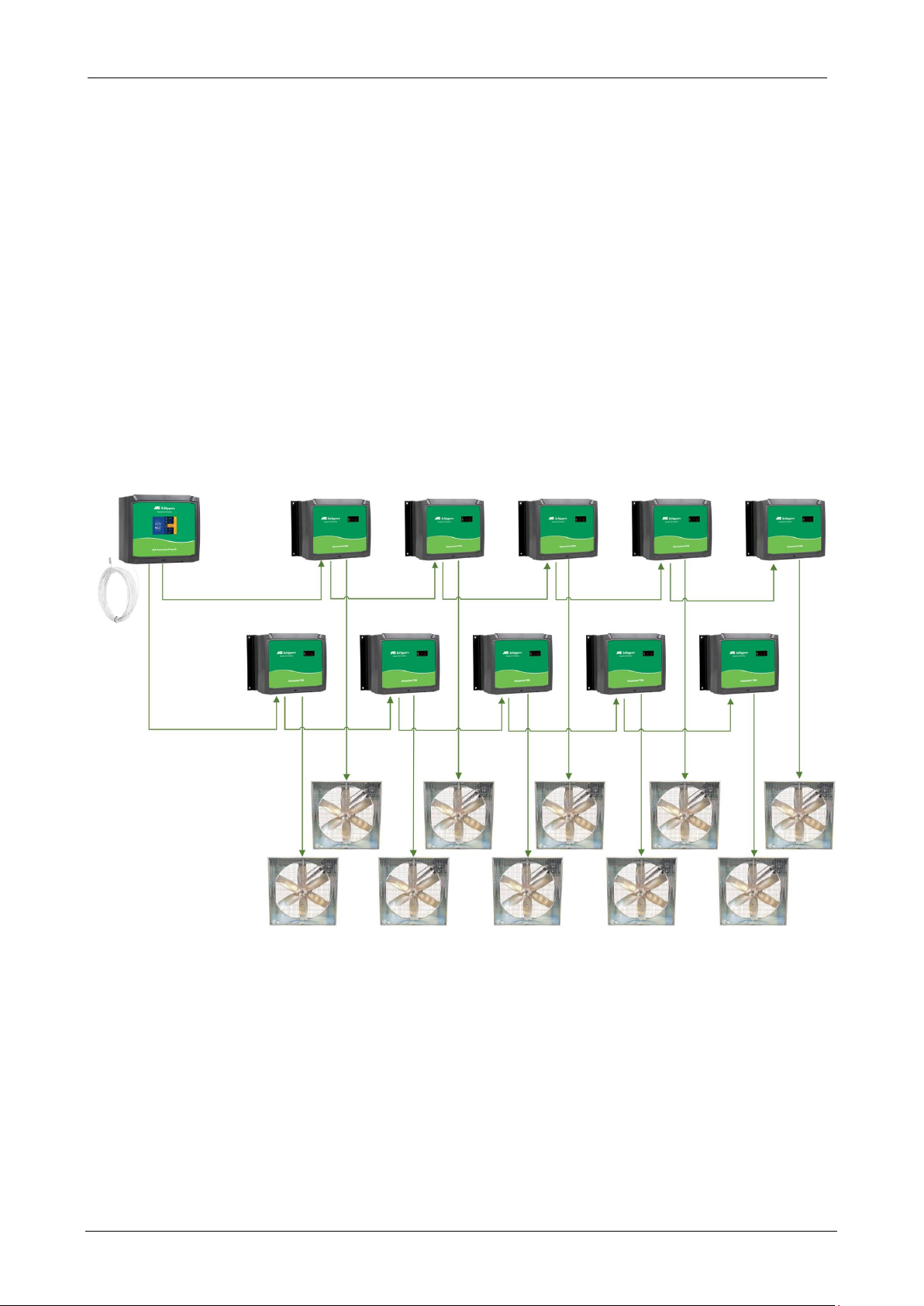
The MS Fancontrol Touch is specially designed for controlling fans in a cattle shed. The controller has
the following features:
Measurement of room temperature
Graph with measurements of today and yesterday
Control of 1 to a maximum of 10 ventilators (2 groups of maximum 5 ventilators per group).
Ventilation stop below a set temperature
Minimum and maximum temperature alarm
Alarm on defective room sensor
External alarm input
EN - MS Fancontroller Touch 8

MS_FANCONTROL_TOUCH_GEBRUIKERSHANDLEIDING Page 7
2.2 Screen overview
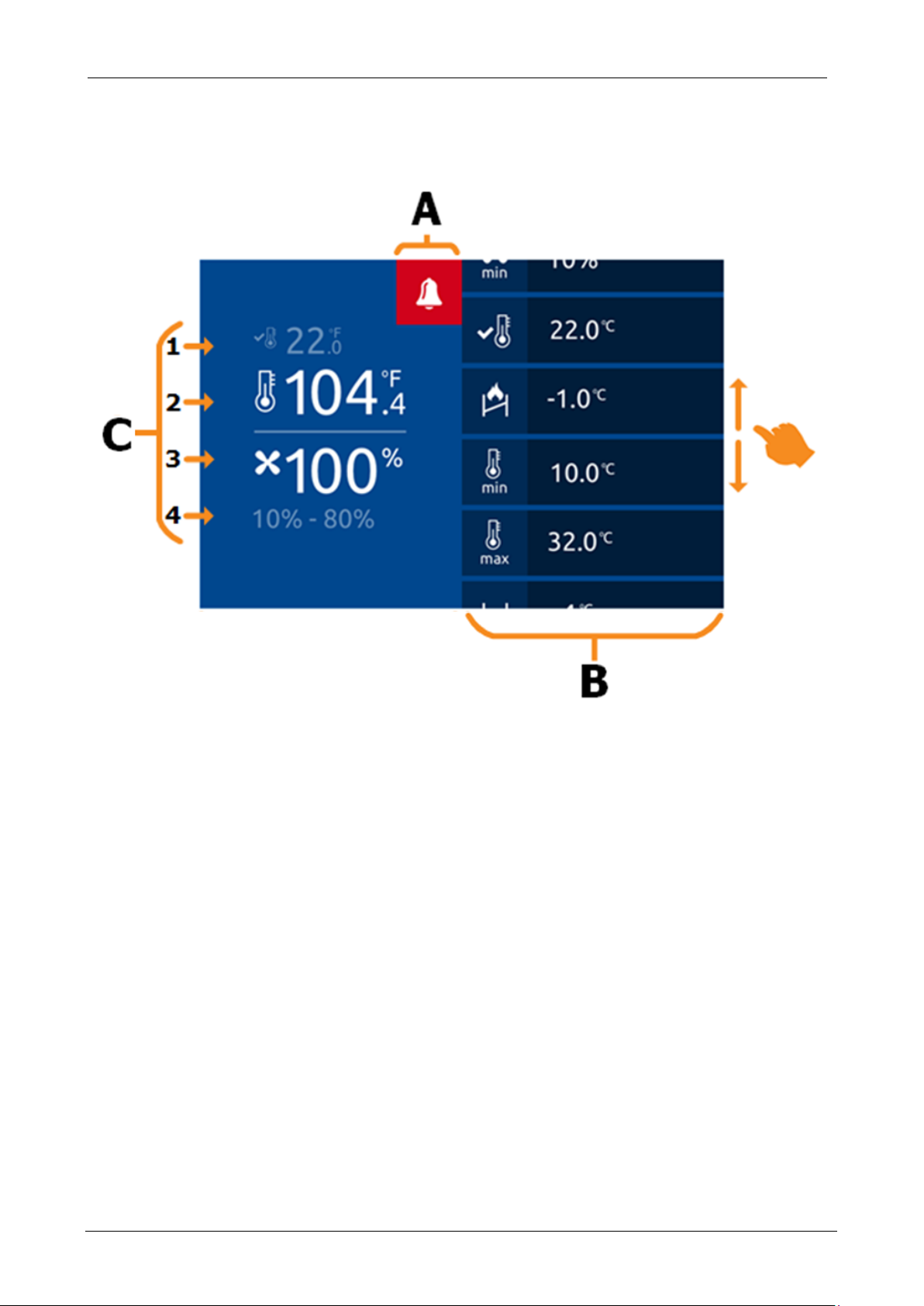
Figure 1: MS Fancontrol Touch screen layout
A: The alarm bell icon is displayed here. If no alarm is active, this icon is gray
. If an alarm is active, the icon turns red. The alarm bell icon is orange
when alarms have been silenced but not yet resolved.
B: On the right side of the screen, you can swipe up and down through all the control icons.
By pressing the icon, you can enter your desired settings (see Figure 2: Change settings). The set values
are displayed to the right of the corresponding icon.
C:
1 The set point value in °C.
2 The measured room temperature in °C.
3 The current state of ventilation.
4 The minimum to maximum ventilation set.
EN - MS Fancontroller Touch 9

MS_FANCONTROL_TOUCH_GEBRUIKERSHANDLEIDING Page 8
G
Figure 2: Adjusting settings
D: If you press any of the control icons, the displayed settings bar will be visible. You
can adjust the controls settings by pressing "+" to increase and
"-" to lower. Press "OK" as soon as the desired setting is entered.
Remark: If you want to cancel a newly entered value, press the left half of the screen. The settings bar
closes and the value is reset to the previous setting.
EN - MS Fancontroller Touch 10
Questo manuale è adatto per i seguenti modelli
1
Indice
Lingue: