
ScottyMakesStuff Glider Pro 3 Duo Manuale utente

Glider Pro 3 Duo - 4th Axis
Stabilizer
User Guide

Getting Started with your 4th Axis Stabilizer 3
Let’s get your new Stabilizer out! 4
Attaching the gimbal mount to your gimbal 6
Now for a quick once over 7
Variable Fluid Damping Cartridges 7
Suspension System 8
Handles 10
Initial Setup 11
Handle Position 11
Balancing 12
What angle should the support arms be when loaded? 12
How low / high can you go? 12
So what’s the optimal position? 13
It’s all about control and how much you can do without! 13
Holding your stabilizer with a soft touch 14
Testing 17
Payload -> Shoot, Analyse, Adjust, Repeat 17
Variable Fluid Damping 18
Adjusting Damping 20
Damping Settings: 20
Fluid Damping -> Shoot, Analyse, Adjust, Repeat 21
Common Rig Configurations 23
Upright Mode 23
High Mode 23
Mid Mode 24
Low Mode 25
Rigid Mode 25
Advanced Usage 26
Semi-Rigid Mode 26
Pro Rig Setups 26
Load Support 27
1
User Guide - Glider Pro 3 Duo - 4th Axis Stabilizer - 20180917 ScottyMakesStuff.com

Re-Tuning AKA Troubleshooting 28
Some common problem sounds include the following:- 28
Knocking spring adjuster 28
Scratching or scraping around the spring adjuster 29
Scratching or scraping around the gimbal mount 29
General Care 30
Temperature range 30
Rain, Dust and moisture 30
Cleaning, Maintenance and Care 31
OK, that’s it! Congratulations! :) 31
2
User Guide - Glider Pro 3 Duo - 4th Axis Stabilizer - 20180917 ScottyMakesStuff.com

Getting Started with your 4th Axis Stabilizer
We all know that handheld gimbals are the biggest game changer in the past few
years for filmmakers! - You turn it on and out comes the magic footage!
But they do have their (bumpy) limitations which is why you’re here.
Our 4th Axis Stabilizers are designed to reduce that bounce that you typically see
when someone is walking with a gimbal. That vertical bounce from your steps
transferred to your hands can be mostly absorbed before it gets to the camera.
But it doesn’t stop at walking, you can go from softer motion all the way to
jumping around like crazy.
The best steadicam support arm operators usually take years
before they truly master their trade, but with our 4th Axis
Stabilizers and a handheld gimbal the learning curve is vastly
quicker to get smooth results. You might be a natural right out of
the box but most of us will need to dedicate time to getting your technique
and settings right for each shooting scenario. Follow this guide to get up to
speed as quickly as possible and you’ll soon understand the finer points about
how to get lovely smooth footage!
As there are moving parts in the stabilizer there are a
number of pinching hazards that you will need to take
care of so as not to injure yourself.
3
User Guide - Glider Pro 3 Duo - 4th Axis Stabilizer - 20180917 ScottyMakesStuff.com

Let’s get your new Stabilizer out!
Your 4th axis stabilizer (also called a Z axis stabilizer) comes to you fully
assembled. All you need to do is add your mount to your gimbal and connect it.
You’ll also find this printed guide, an M3, M4, M5 allen keys and an M6 socket
which are used for tuning and upgrades but typically you should rarely need to
use them as the stabilizer is mostly tool-less.
Note:
Your stabilizer is fully tuned out of the box so don’t be tempted
to go and tighten everything before you start or else you’ll have to go
over the re-tuning process unessesarily!
The only parts you’ll normally be adjusting are the handles, payload adjusters,
fluid damping adjusters and stabilizer arm attachments which are all tool-less!
The re-tuning section near the end of this guide is helpful if you make upgrades to
your stabilizer or on the rare occasion that the stabilizer has become out of tune.
4
User Guide - Glider Pro 3 Duo - 4th Axis Stabilizer - 20180917 ScottyMakesStuff.com

Although your stabilizer is ‘tough as old boots’ extremely high temperatures can
cause permanent damage so please remember:-
Note:
Just as you wouldn’t leave your expensive cameras in a car on
an extremely hot day, don’t do likewise with your Glider Pro 3 Duo.
Temperatures exceeding 80°C (180°F) can cause permanent
deformation!
Attaching the gimbal mount to your gimbal
Before you add the stabilizer to your gimbal you need to first add the gimbal
mount (
Note
: This is for standard mounts. Some specialized mounts may connect
differently)
. This mount is essentially a clamp that holds your stabilizer in place on
your gimbal. In most cases the mount should attach high on the handle but
occasionally you may wish to change the position to lower down the handle for
even higher shots or when inverted for even lower shooting positions.
1. Take your mount halves, the bolts that
come with the mount and the M4
allen key (the middle size allen key)
2. Place both sides of the mount clamp
around the handle and line them up
so that the top sides sit level with
each other.
3. While holding the clamp in position with one hand use your free hand to
start to screw the bolts in by hand.
4. Then continue using the M4 allen key tightening each side alternately just a
turn or two until the clamp holds firmly
and won’t be moved easily by hand.
There’s no need to tighten fully at this point. There should be a gap
between the two clamp halves.
5
User Guide - Glider Pro 3 Duo - 4th Axis Stabilizer - 20180917 ScottyMakesStuff.com

Note:
Do not overtighten! Unlike alloy dual rigid handles these don’t
need excessive force to hold your gimbal securely! This is a very
secure clamp and the rubber surface provides a strong hold.
5. Add the two Pro 3 Modules in the
Upright Position Note:
Make sure the
damping knobs face to the rear of the
gimbal.
a. Open the locking lever up
b. Slide module along mounting rail
c. Hold module firmly while locking
down the locking lever until it lines
up with the line.
6. Now you finally test the holding power
of the gimbal clamp by gripping the
gimbal firmly and trying to rotate the
4th axis handle. If the gimbal rotates
inside the clamp then tighten the clamp
bolts another quarter turn and try again
and repeat until it won’t move easily.
6
User Guide - Glider Pro 3 Duo - 4th Axis Stabilizer - 20180917 ScottyMakesStuff.com

Now for a quick once over
Variable Fluid Damping Cartridges
On each side of the gimbal mount are the two smaller adjuster knobs for
the variable fluid damping cartridges. The suspension springs, by their
nature when stretched bounce back and forth until the springs initial
energy or bounce is lost in the system via friction.
That bounce can be reduced
and absorbed in the fluid
damping cartridge by setting
the damping knob; turn it
towards the ‘+’ to increase the
strength of the damping and
towards the ‘-’ to lighten the
damping. The white indicating
gauge on the top indicates the
relative range for the amount of damping. This a concept that’s easy to
misunderstand so please read the more detailed explanation about this in
the ‘Fluid Damping’ section?
7
User Guide - Glider Pro 3 Duo - 4th Axis Stabilizer - 20180917 ScottyMakesStuff.com

Suspension System
Support Arms
The two sets of support arms connect the spring adjusters to gimbal mount
and holds the sprung system in tension in a ‘McPherson Strut’
arrangement.
This geometry is what gives you the
range of support for different weight
rigs. It’s also mostly responsible for
the very soft up to the more firm
elastic suspension.
Payload Spring Adjusters
The payload spring adjusters attach to the ends of the support arms and
the other side to the handles via the rosette mount. The main purpose
though is to adjust the spring
tension so that you can balance
your rig properly.
The spring adjustment knob
turns towards the ‘+’ to increase
the spring tension and the scale
on the side moves towards the
‘Max’. This will support an
increased payload weight while
at the same time decreasing the iso-elasticity.
Turning the other way towards the ‘-’ and the scale on the side moves
towards the ‘Min’. This will decrease the spring tension (also increasing the
iso-elasticity). In most cases you want to be using the most ‘Iso-Elastic’
setting for your rig but please read the ‘Balancing’ section to find out more
about this as there’s reasons to break these rules too!
8
User Guide - Glider Pro 3 Duo - 4th Axis Stabilizer - 20180917 ScottyMakesStuff.com
Think of it in the same way that car suspension smooths out a bumpy
road. So too our suspension system does the same to your bumps.
Now consider the difference between the super soft suspension of a
luxury limo and the very rigid suspension of an off-roader.
In a luxury limo you barely feel any bumps and this is ‘Iso-Elastic’ suspension.
With the stiff suspension of the off-roader you feel the bumps a lot more and
this is more ‘Elastic’ or ‘springy’ suspension.
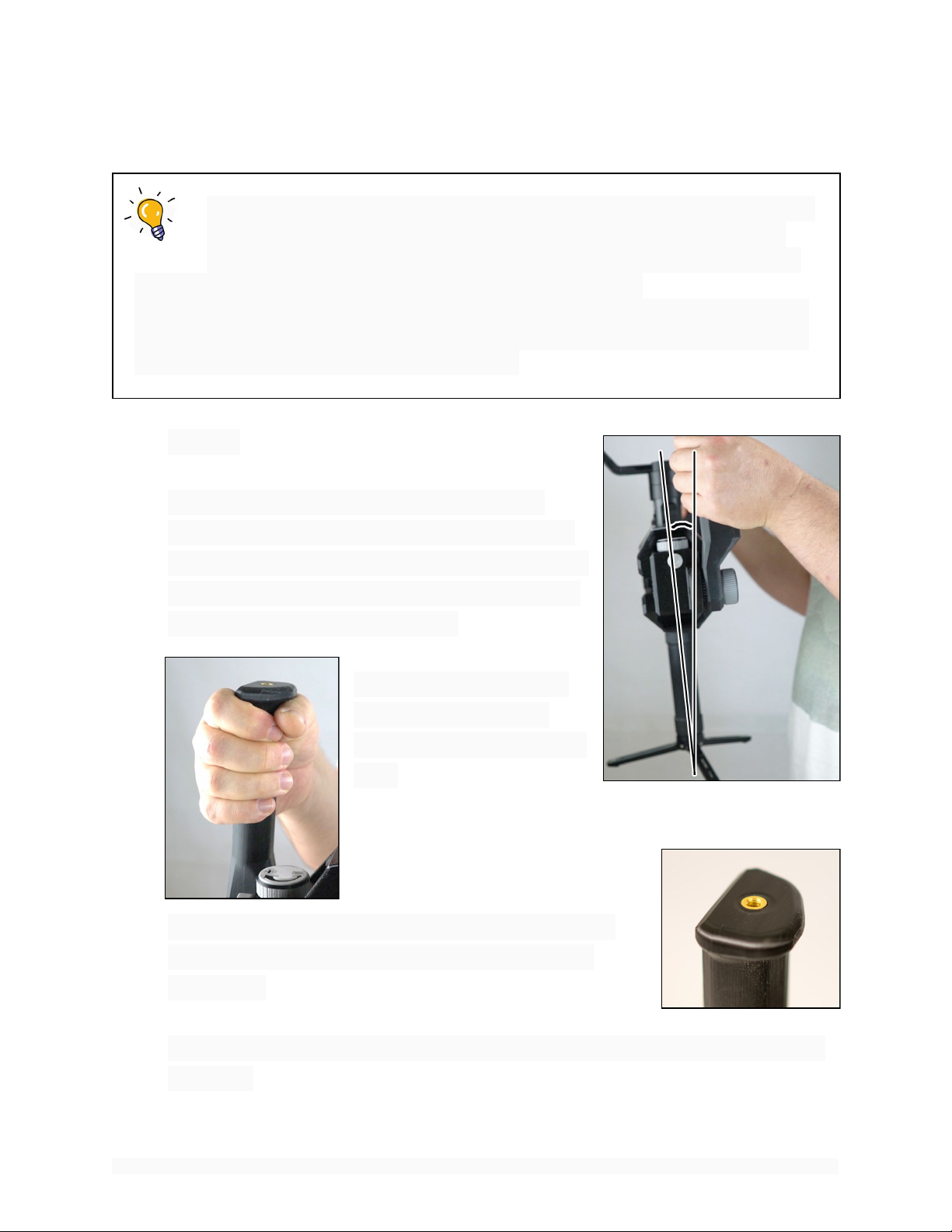
Handles
They may just look like the things you hold
onto but there’s a bit more to them than that.
For starters, they are offset slightly towards the
rear so as to give a slight forward lean to aid in
reducing ‘forward / aft’ wobbles.
Secondly, there’s a lip at
the top of the handles
that aids in supporting the
load.
Thirdly, there’s 4 brass ¼-20 attachment points on
the handles for adding field monitors, audio and
other gear.
Lastly they attach via a ‘Rosette Knob’ that gives a full 240 degree range of
positions.
9
User Guide - Glider Pro 3 Duo - 4th Axis Stabilizer - 20180917 ScottyMakesStuff.com
Indice
Altri manuali ScottyMakesStuff Accessori per fotocamere


