SCS Ion Pro Manuale utente

TB-9107 Page 1 of 14 © 2021 DESCO INDUSTRIES INC
Employee Owned
SCS - 926 JR Industrial Drive, Sanford, NC 27332
East: (919) 718-0000 | West: (909) 627-9634 • Website: StaticControl.com
Ion Pro™ Benchtop Ionizer
Installation, Operation and Maintenance
December 2021
Description
The SCS Ion Pro™ Benchtop Ionizer is used for
neutralizing electrostatic charges on insulators and
ungrounded conductors. Its fast discharge times (< 1.5
seconds at 12 inches) and ±3 volt offset voltage exceed
the required limits of ANSI/ESD S20.20 and ESD TR53.
The Ion Pro Benchtop Ionizer monitors both its offset
voltage (balance) and discharge time. The ionizer will
alarm should its offset voltage exceed the required
limits defined by ANSI/ESD S20.20 or discharge time
take longer than 4.5 seconds. Steady-state DC emitters
are spaced farther apart to prevent ion recombination,
increase decay efficiency, and provide a broader
coverage area of ionization. The Ion Pro™ Benchtop
Ionizer’s dual-speed fan produces consistent airflow
performance. The Ion Pro™ Benchtop Ionizer features
a stainless steel enclosure and multi-mount stand to
minimize contamination and corrosion when used in
clean or sensitive areas.
The SCS Ion Pro™ Benchtop Ionizer operates on
Steady-state DC. Steady-state DC systems consist of
separate negative and positive ion emitters connected
by a pair of high-voltage cables to their respective
high-voltage power supplies. DC power is constantly
applied to the emitter points. The ionizer utilizes
patented capacitance-based sampling from its internal
sensor to continuously adjust the output, maintain its
offset voltage, and minimize maintenance.
Made in the
United States of America
USER GUIDE TB-9107
“The primary method of static charge control is direct
connection to ground for conductors, static dissipative
materials, and personnel. A complete static control
program must also deal with isolated conductors
that cannot be grounded, insulating materials (e.g.,
most common plastics), and moving personnel who
cannot use wrist or heel straps or ESD control flooring
and footwear. Air ionization is not a replacement for
grounding methods. It is one component of a complete
static control program. Ionizers are used when it is not
possible to properly ground everything and as backup
to other static control methods. In clean rooms, air
ionization may be one of the few methods of static
control available.” [ESD Handbook ESD TR20.20
Ionization, section 5.3.6.1 Introduction and Purpose /
General Information]
The Ion Pro™ Benchtop Ionizer and its accessories are
available as the following item numbers:
Item Description
770116 Ion Pro™ Benchtop Ionizer, 120 VAC
770117 Ion Pro™ Benchtop Ionizer, 220 VAC
770000 Power Cord, North America Plug
770001 Power Cord, UK Plug
770002 Power Cord, Europe Plug
770003 Power Cord, China Plug
770118 Power Cord, Daisy Chain
770047 Benchtop Ionizer Boom Arm
770055 SMP Software
Figure 1. SCS Ion Pro™ Benchtop Ionizer
Static Management Program
The SCS Ion Pro™ Benchtop Ionizer is compatible
with SCS Static Management Program (SMP). SMP
continuously monitors your ESD process control system
throughout all stages of manufacturing. SMP captures
data from SCS workstation, equipment and ESD event
continuous monitors and provides a real-time picture of
critical manufacturing processes. All activity is stored
into a database for on-going quality control purposes.
SMP allows you to pinpoint areas of concern and
prevent ESD events. Quantifiable data allows you to see
trends, become more proactive and prove the efficiency
of your ESD process control system. When paired with
the Ion Pro Benchtop™ Ionizer, SMP will monitor its
balance (offset voltage) and discharge time statuses.
SMP is sold separately. Click here to learn more.

TB-9107 Page 2 of 14 © 2021 DESCO INDUSTRIES INC
Employee Owned
SCS - 926 JR Industrial Drive, Sanford, NC 27332
East: (919) 718-0000 | West: (909) 627-9634 • Website: StaticControl.com
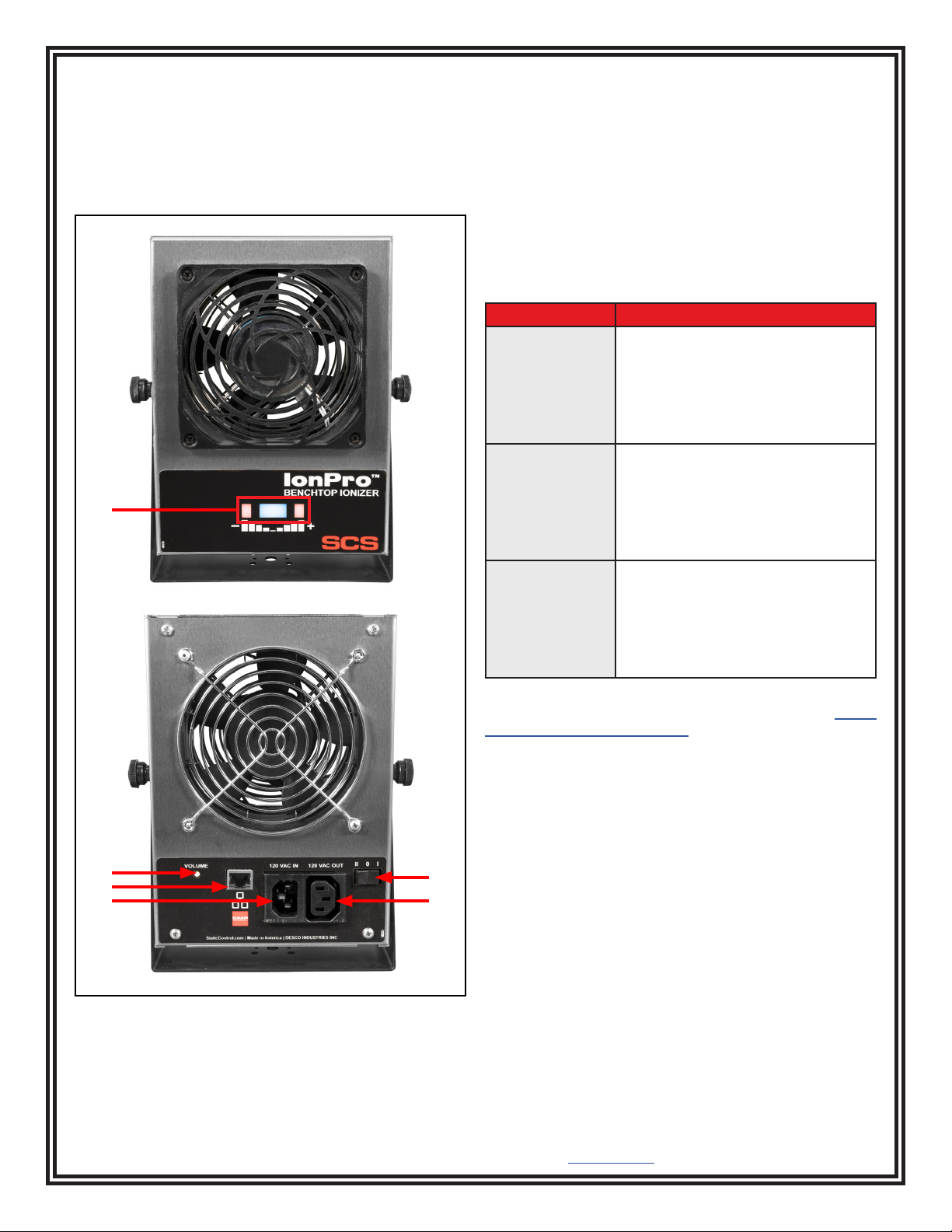
A. Status LEDs: The blue LED will illuminate when the
ionizer is powered and its balance and discharge times
are below the alarm thresholds. The negative red LED
will illuminate and audible alarm will sound when the
balance exceeds the negative balance alarm threshold.
The positive red LED will illuminate and audible alarm
will sound when the balance exceeds the positive
balance alarm threshold. Both the negative and positive
red LEDs will illuminate and audible alarm will sound
when the discharge time exceeds the alarm threshold.
B. Volume Pushbutton Switch: Toggles the ionizer's
settings for the audible alarm and balance alarm.
Feature Procedure
Buzzer Volume 1. Push and release the switch
while the ionizer is powered.
2. The ionizer will toggle its
buzzer volume through 8
different settings. The 8th
setting disables the buzzer.
Balance Alarm
(CE Mode)
1. Power the ionizer OFF.
2. Push and hold the switch while
restoring power to the ionizer.
3. The buzzer will chirp once to
indicate that it is in Critical
Environment Mode.
Balance Alarm
(Standard Mode)
1. Power the ionizer OFF.
2. Push and hold the switch while
restoring power to the ionizer.
3. The buzzer will chirp twice to
indicate that it is in Standard
Mode.
C. Ethernet Port: Provides network communication
between the Ion Pro™ Benchtop Ionizer and SCS Static
Management Program (SMP).
D. Power Inlet: Connect the power cord here.
E. Fan Speed Switch: Rock the switch to the II position
to set the fan speed to HIGH. Rock the switch to the I
position to set the fan speed to LOW. Rock the switch to
the 0 position to power the ionizer OFF.
F. Power Outlet: Use the SCS 770118 power cord to
daisy-chain power to another 9 ionizers. Up to 10 Ion
Pro™ Benchtop Ionizers may be powered in one daisy
chain.
Packaging
1 Ion Pro™ Benchtop Ionizer
1 Power Cord with North America Plug (770116 only)
1 Emitter Point Cleaner
1 Certificate of Calibration
Features and Components
Figure 2. Ion Pro™ Benchtop Ionizer features and
components
A
CFD
BE

TB-9107 Page 3 of 14 © 2021 DESCO INDUSTRIES INC
Employee Owned
SCS - 926 JR Industrial Drive, Sanford, NC 27332
East: (919) 718-0000 | West: (909) 627-9634 • Website: StaticControl.com
Installation
Hardware Setup
Place the Ion Pro™ Benchtop Ionizer at a desired location where the airflow will not be restricted. The SCS 770047
Benchtop Ionizer Boom Arm may be used to save workspace and lift the ionizer off the workbench. Use the tilt lock
knobs to aim the ionizer at the area to be neutralized. Ensure that the power switch is set to OFF. Connect the
ionizer’s power cord into an appropriate AC power source.
Note that placement of the ionizer is important in determining its effectiveness. The distance from the targeted
object and fan speed affect the ionizer’s performance. The discharge time will increase as the distance increases or
fan speed is reduced.
SMP Network Setup
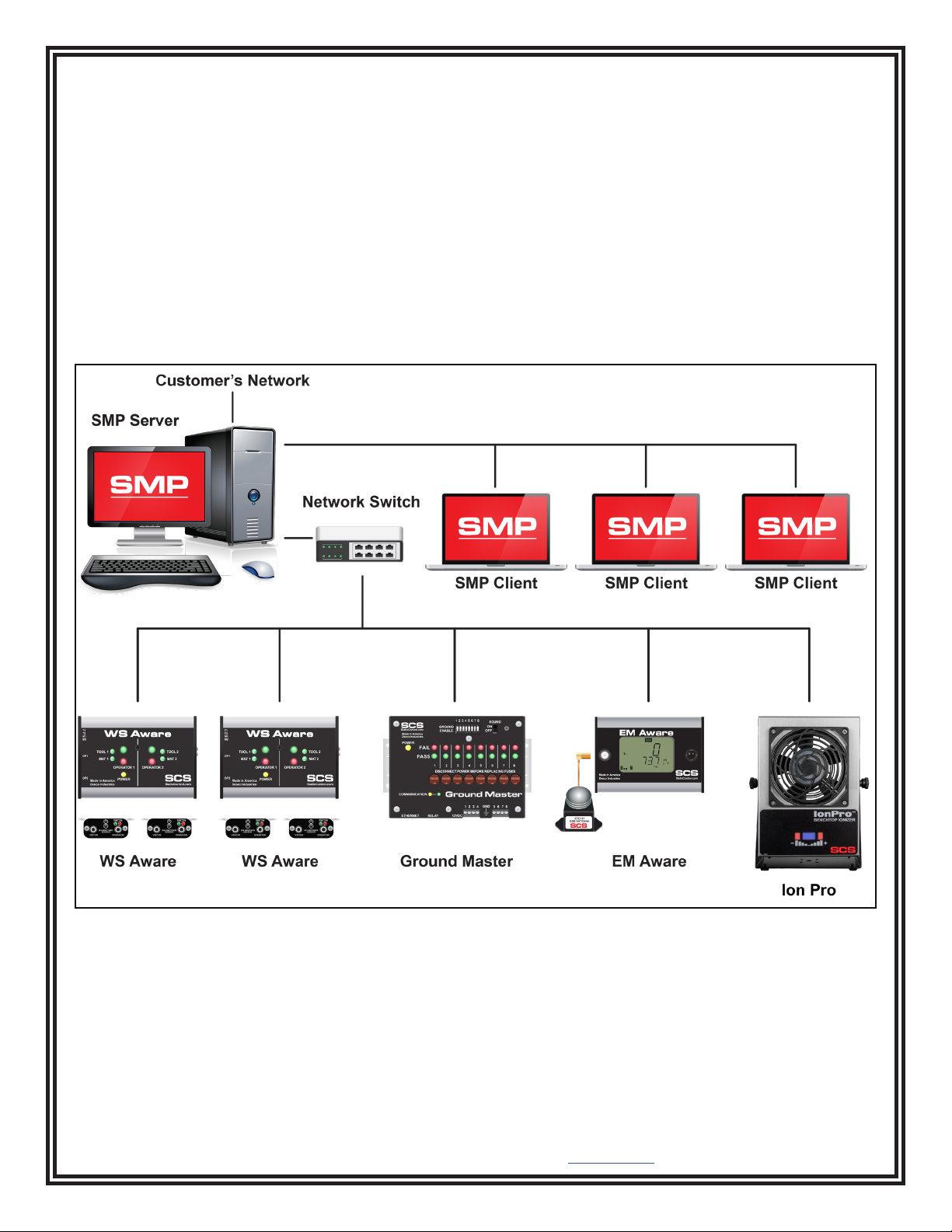
The following procedure outlines how to connect the Ion Pro™Benchtop Ionizer to SMP via a local area network
(LAN). SMP must be installed to a PC prior to using this procedure. The diagram shown below illustrates a common
SMP system setup that utilizes the server software, client software, Ion Pro™Benchtop Ionizer, WS Aware Monitor,
EM Aware Monitor, and Ground Master Monitor.
Figure 3. SMP system setup

TB-9107 Page 4 of 14 © 2021 DESCO INDUSTRIES INC
Employee Owned
SCS - 926 JR Industrial Drive, Sanford, NC 27332
East: (919) 718-0000 | West: (909) 627-9634 • Website: StaticControl.com
DYNAMIC IP PROCEDURE
1. Verify that the Ethernet cable is securely connected to your network and Ion Pro™Benchtop Ionizer. The LEDs
on the Ethernet port will illuminate when a connection to the network is established.
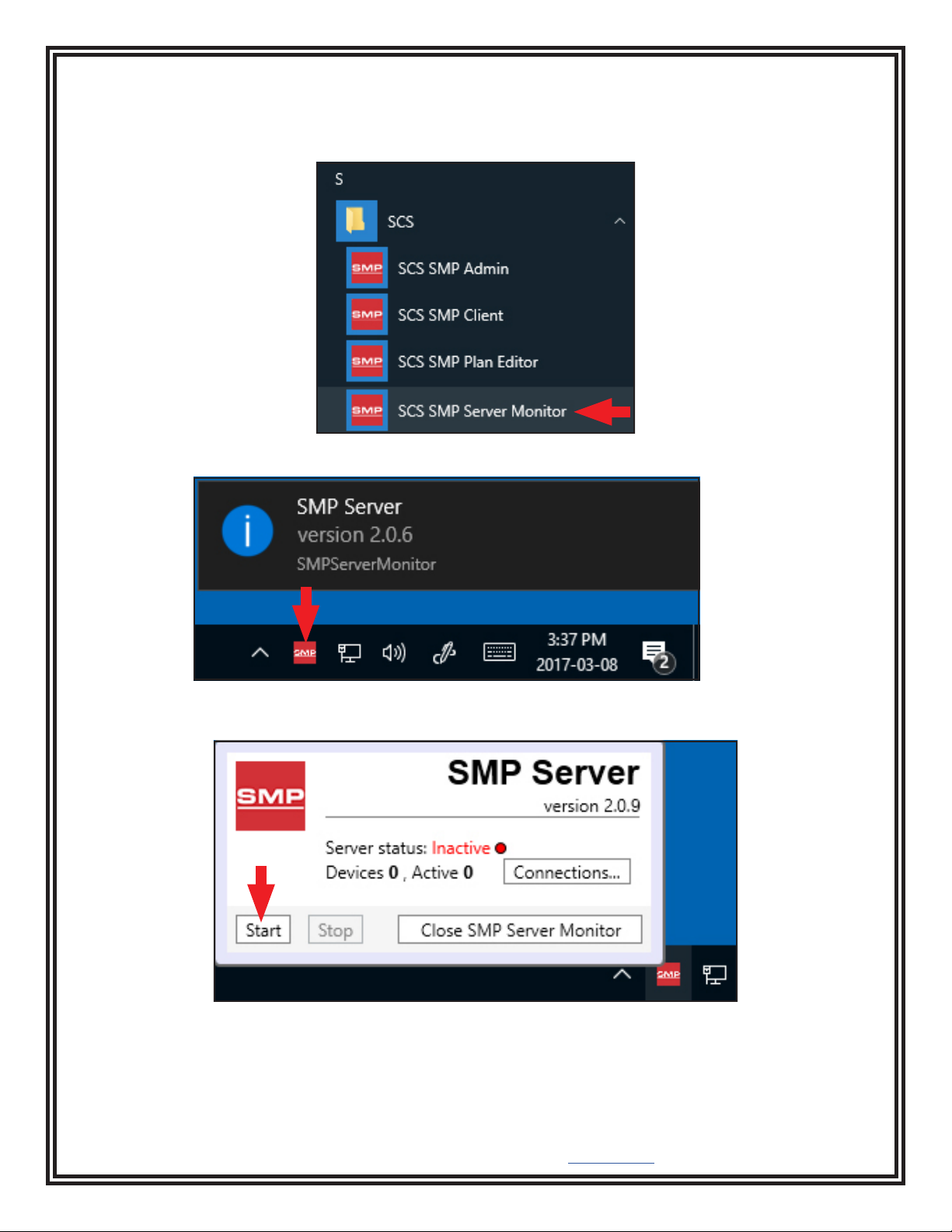
2. Open SCS SMP Server Monitor.
3. The SMP Server icon will appear in the Windows taskbar.
4. Click the SMP Server icon located on the Windows taskbar. The SMP Server menu will appear. Click the Start
button to start SMP Server.

TB-9107 Page 5 of 14 © 2021 DESCO INDUSTRIES INC
Employee Owned
SCS - 926 JR Industrial Drive, Sanford, NC 27332
East: (919) 718-0000 | West: (909) 627-9634 • Website: StaticControl.com
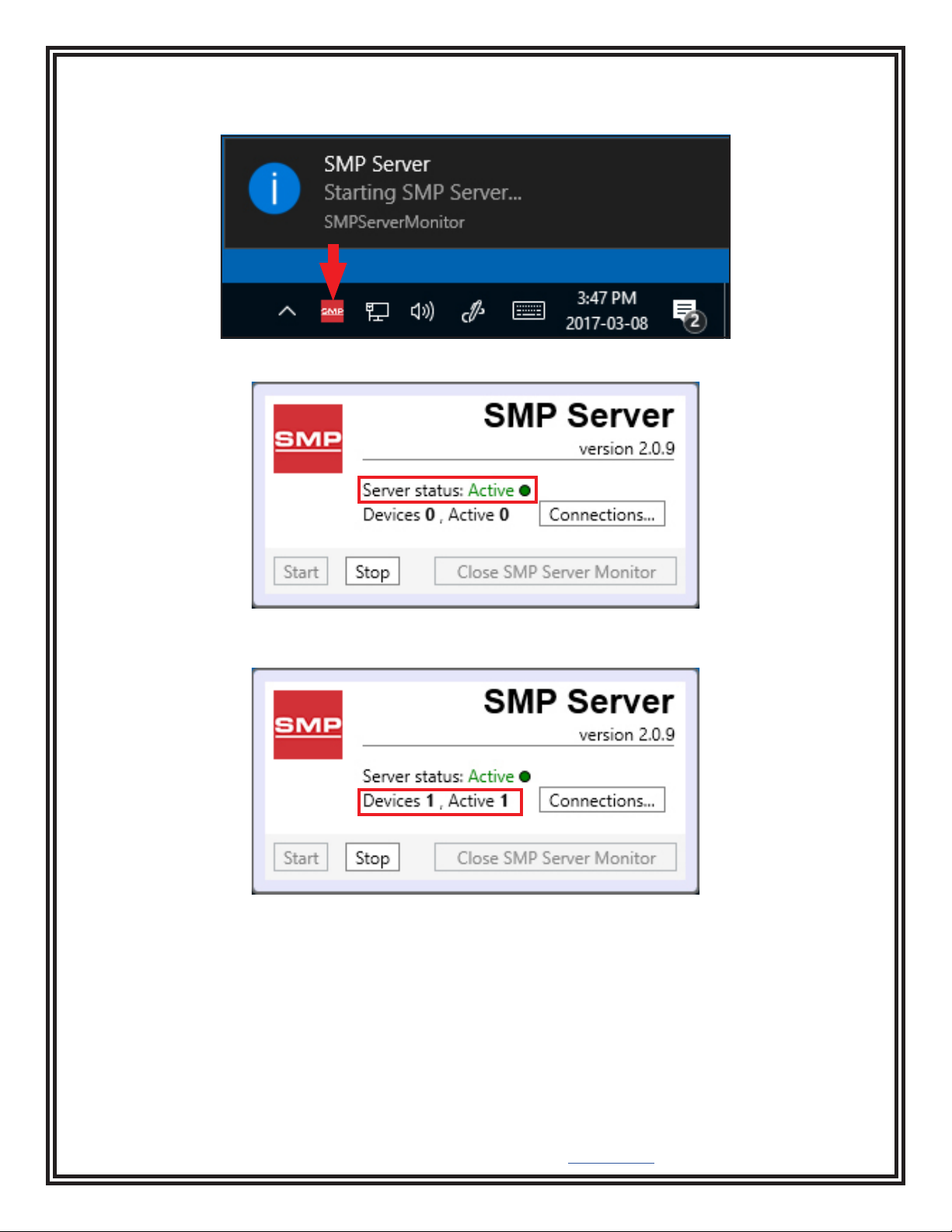
5. A message will appear and display “Starting SMP Server…” Click the SMP Server icon located in the Windows
taskbar.
6. SMP Server will now indicate Active server status.
7. SMP Server will search and find the Ion Pro™Benchtop Ionizer on the network. The Device and Active counts
will increase to 1.

TB-9107 Page 6 of 14 © 2021 DESCO INDUSTRIES INC
Employee Owned
SCS - 926 JR Industrial Drive, Sanford, NC 27332
East: (919) 718-0000 | West: (909) 627-9634 • Website: StaticControl.com
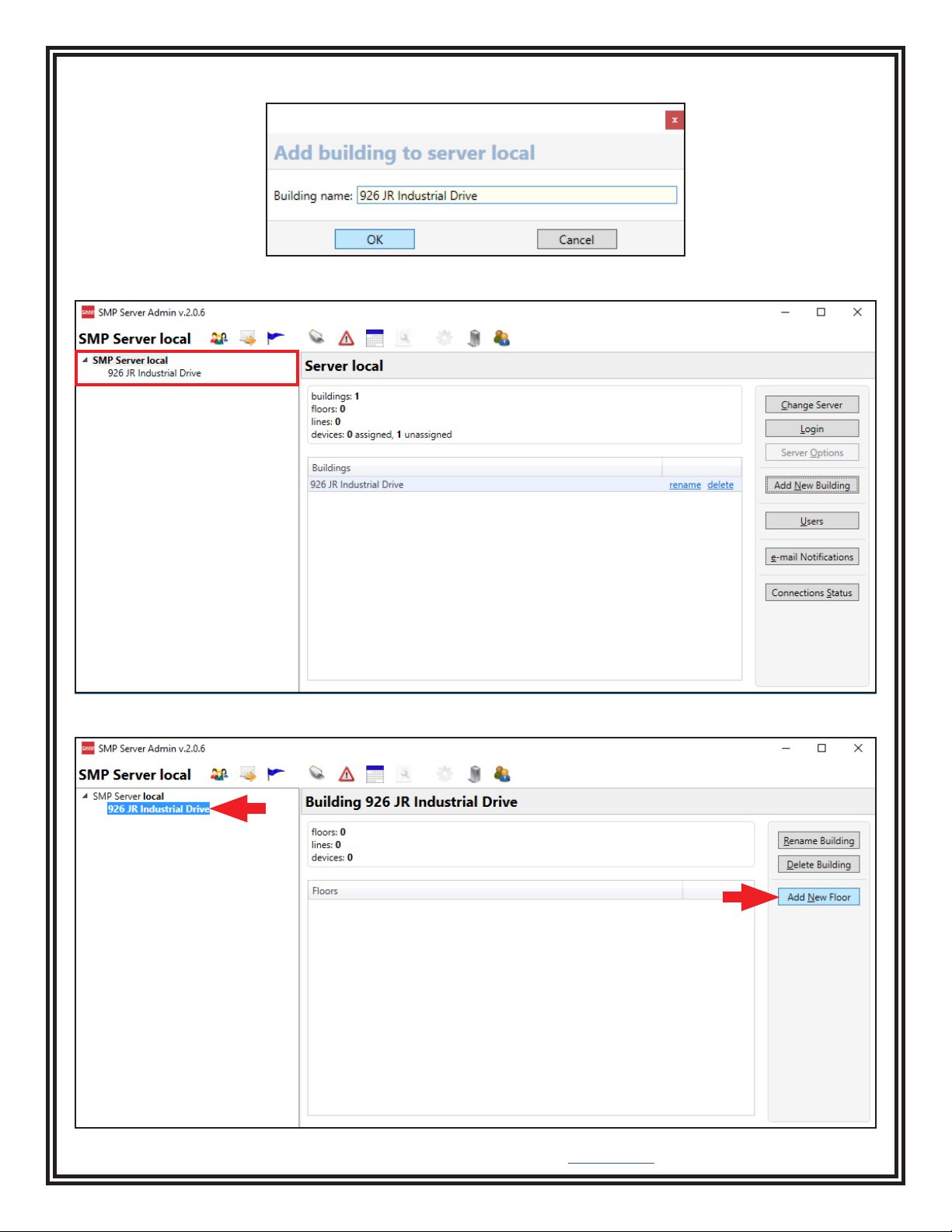
8. Open SCS SMP Admin.
9. The window for SMP Server Admin will appear. “1 unassigned” is representative of the Ion Pro™Benchtop
Ionizer that was just found by SMP Server. Click the Add New Building button.

TB-9107 Page 7 of 14 © 2021 DESCO INDUSTRIES INC
Employee Owned
SCS - 926 JR Industrial Drive, Sanford, NC 27332
East: (919) 718-0000 | West: (909) 627-9634 • Website: StaticControl.com
10. Enter a building name, and then click the OK button.
11. The building name will appear on the navigation pane in SMP Server Admin.
12. Click on the building name in the navigation pane, and then click the Add New Floor button.

TB-9107 Page 8 of 14 © 2021 DESCO INDUSTRIES INC
Employee Owned
SCS - 926 JR Industrial Drive, Sanford, NC 27332
East: (919) 718-0000 | West: (909) 627-9634 • Website: StaticControl.com
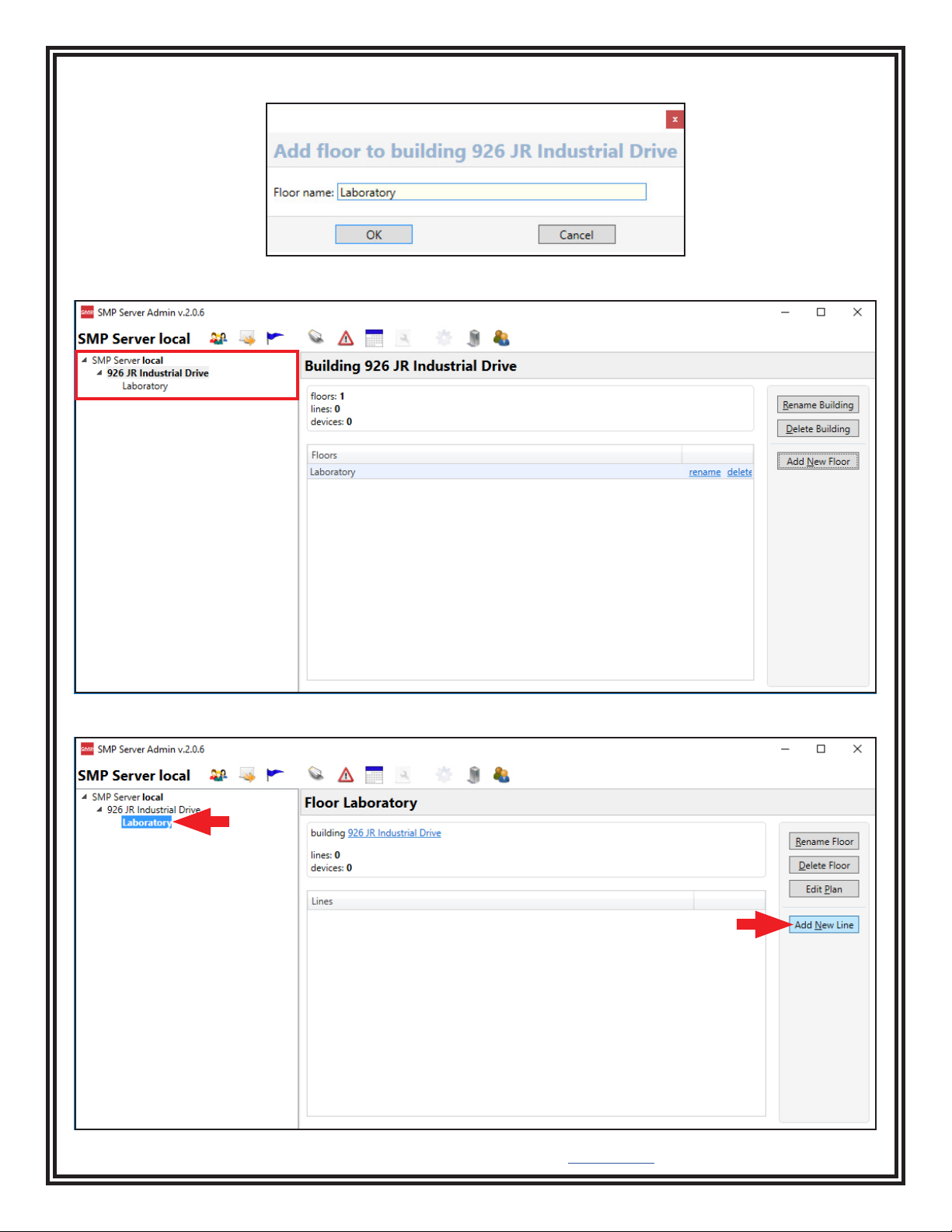
13. Enter a floor name, and then click the OK button.
14. The floor name will appear on the navigation pane in SMP Server Admin.
15. Click on the floor name in the navigation pane, and then click the Add New Line button.

TB-9107 Page 9 of 14 © 2021 DESCO INDUSTRIES INC
Employee Owned
SCS - 926 JR Industrial Drive, Sanford, NC 27332
East: (919) 718-0000 | West: (909) 627-9634 • Website: StaticControl.com
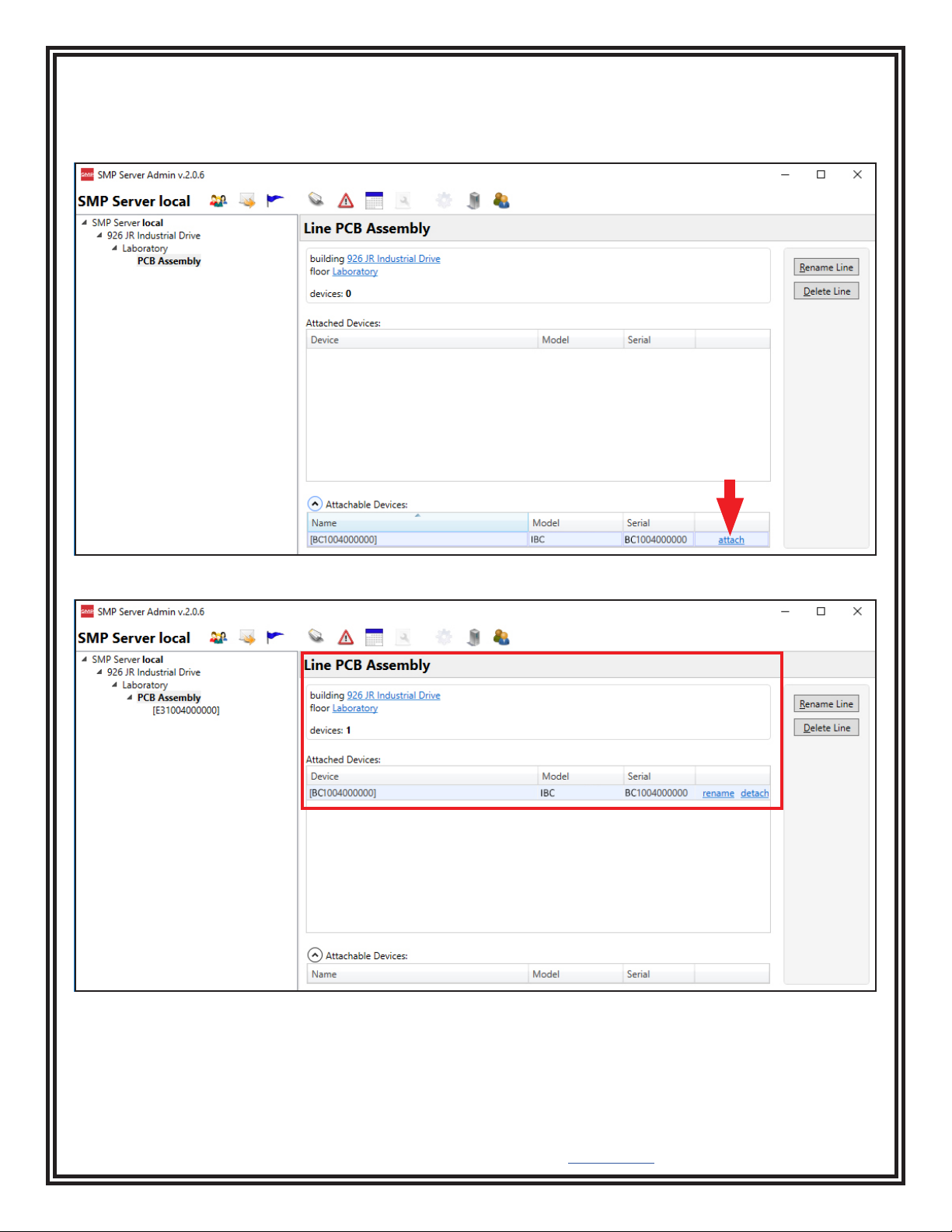
16. Enter a line name, and then click the OK button.
17. The line name will appear on the navigation pane in SMP Server Admin.
18. Click on the line name in the navigation pane, and then click the Attachable Devices arrow located at the
bottom of the window.

TB-9107 Page 10 of 14 © 2021 DESCO INDUSTRIES INC
Employee Owned
SCS - 926 JR Industrial Drive, Sanford, NC 27332
East: (919) 718-0000 | West: (909) 627-9634 • Website: StaticControl.com
19. The serial number for the Ion Pro™Benchtop Ionizer will appear. This number will resemble the number found
on the monitor's serial label with the exception of one zero. For example, if the serial number on the label says
"XXXXX2025001", the serial number in SMP will read "XXXXXX202501".
Click attach.
20. The Ion Pro™Benchtop Ionizer will attach to the selected line.
Questo manuale è adatto per i seguenti modelli
2
Indice
Altri manuali SCS Ionizzatore d'aria
Manuali Ionizzatore d'aria popolari di altre marche

Static Clean
Static Clean 4203UC Manuale utente

Desco EMIT
Desco EMIT C/E Series Manuale utente

Best Living Systems
Best Living Systems KHAOS Manuale utente

Desco EMIT
Desco EMIT Chargebuster 50680 Istruzioni per l'installazione e il funzionamento

ELTEX
ELTEX ES60 Series Manuale utente

SMC Networks
SMC Networks IZN10E Series Manuale utente