
SecurityMan FlashDVR Manuale utente
FlashDVR User’s Manual
Waterproof Digital Video Recorder with LED Flashlight

1
Copyright Notice
This manual is furnished under license and may be used or copied only in accordance with the
terms of such license. Except as permitted by such license, no part of this publication may be
reproduces, stored in a retrieval system, or transmitted, in any means, electronic,
mechanical, recording, or otherwise, including translation to another language or format, without
the prior written permission of SecurityMan.
The content of this manual is furnished for informational use only, is subject to change without
responsibility or liability for any errors or inaccuracies that may appear in this book.
All other product names, trademarks and registered trademarks in this document are the proper-
ties of their respective holders.
FCC Information
Note on FCC’s “Consistent Statement of Information” this product meet the requirements
specified in Part 15 of FCC Regulation. Operation rests with the following two conditions:
(1) The equipment should not cause any harmful interference.
(2) The equipment must accept any interference received, including interference that may us by
undesired operation.
After testing the product, we confirm that camera complies with the provision for class C digital
equipment in the 15th part in FCC regulation; and complies with the limitations for class B digital
equipment in Part 15 of FCC regulation.

2

3
Operating Restrictions
DO NOT use this product to violate one’s privacy. Monitoring one’s private
activities or private conversation without consent is illegal and this product is
not designed and manufactured for these purposes.
DO NOT use this product for any illegal activities. SecurityMan® shall not be
responsible for any consequences of illegal conducts made by users.
Conditions
Please read the following messages to make sure whether your working
environment is suitable.
• Ensure there is enough recording space in built-in memory card
• Make sure the rechargeable battery is fully charged
• The temperature should be kept between 0˚C to 50˚C (32˚F to 122˚F).
The relative humidity should remain from 15% to 85%.
• Avoid putting the product in places where occur might change rapidly in
temperature or humidity
• Keep it dry, dustless and avoid exposure in it directly in sunlight
• Keep product away from heat sources such as electric heater
• Do not use this product near aggressive chemicals
• Do not point the camera toward sunshine directly
4
Warning
• Turn off the camera when it is not in use.
• Do not shake or stricken the product.
• Do not put in fire or heating place.
• Do not use metal objects to connect the polarities of the battery.
• Do not disassemble the product, otherwise the internal precision parts may
get damaged, or personal injury caused.
• Do not attempt to service the product yourself as opening or removing covers
may expose you to dangerous voltage or other hazards. Refer all servicing to
qualified service personnel.

5
Table of Contents
Introduction
Features
Package Contents
Product Basic
Charging
Time/Date Setup
Installation
Operation
Power on DVR & Flashlight Use
Recording Video
Day Time Recording
Night Time Recording
Underwater Recording
FlashDVR Characteristics
USB Connection & PC Playback
MPC Installation Guide
Product Specications
6
6
7
8
9
10
11
13
13
14
14
14
15
16
17
18
25

6
Introduction
Thank you for purchasing the FlashDVR. SecurityMan FlashDVR is a smart
ashlight with built-in color camera for video recording and 4GB memory of
storage. It is a portable ashlight DVR recorder ideal for daytime recording, night
time recording, and under water recording (submergible up to 33ft). Easy access
to recorded video les with USB interface to any personal computer to view, edit,
and playback footages. It is a great companion for drivers, bikers, campers,
hunters, scuba divers, cavers, hikers, and security guards.
Note: Please read the entire user’s manual before operation.
Features
• Sporty ashlight design with color camera built-in
• Crystal clear VGA quality with date and time stamp
• Strong lighting LED matrix for illumination in dark areas
• Submergible up to 10m (33ft) underwater
• Underwater “Lock” switch to prevent controls from the impact of water pressure
• Rechargeable Li-battery battery for 4/8 hours usage (record with ashlight on /
ashlight on only)
• Built-in 4GB of memory up to 2hrs of record time, records in AVI le format
• Mini USB 2.0 interface, connect to a PC for playback and download
• Easy mounting brackets for hat and bike
7
Package Contents
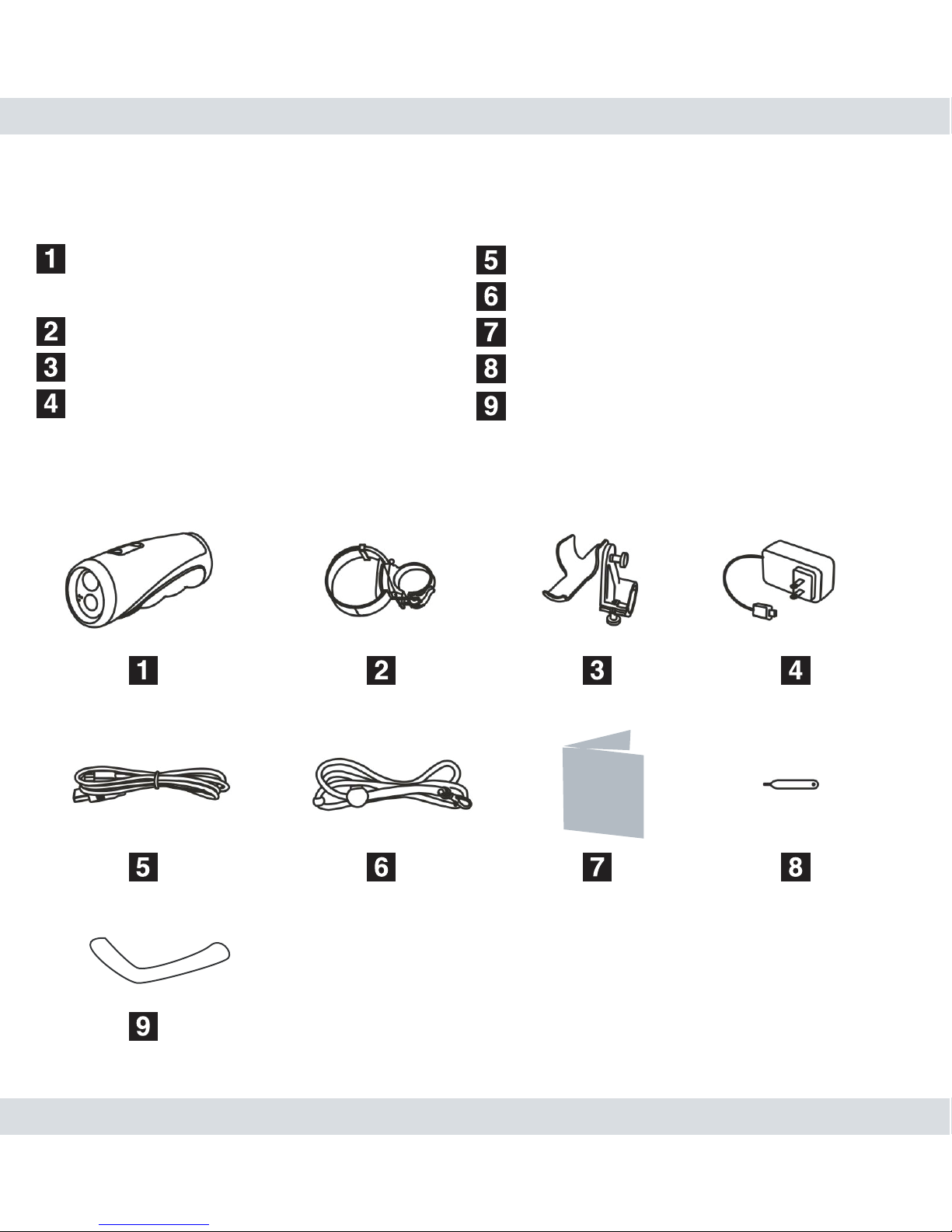
1 x Flashlight DVR (GETTIME.
exe, User’s Manual inside)
1 x Hat-bracket
1 x Bike-bracket
1 x Power adapter/charger
1 x USB cable
1 x Lanyard
1 x User’s Manual
1 x Plectrum
1 x Adhesive(3M)
User’s
Manual
8
Product Basics
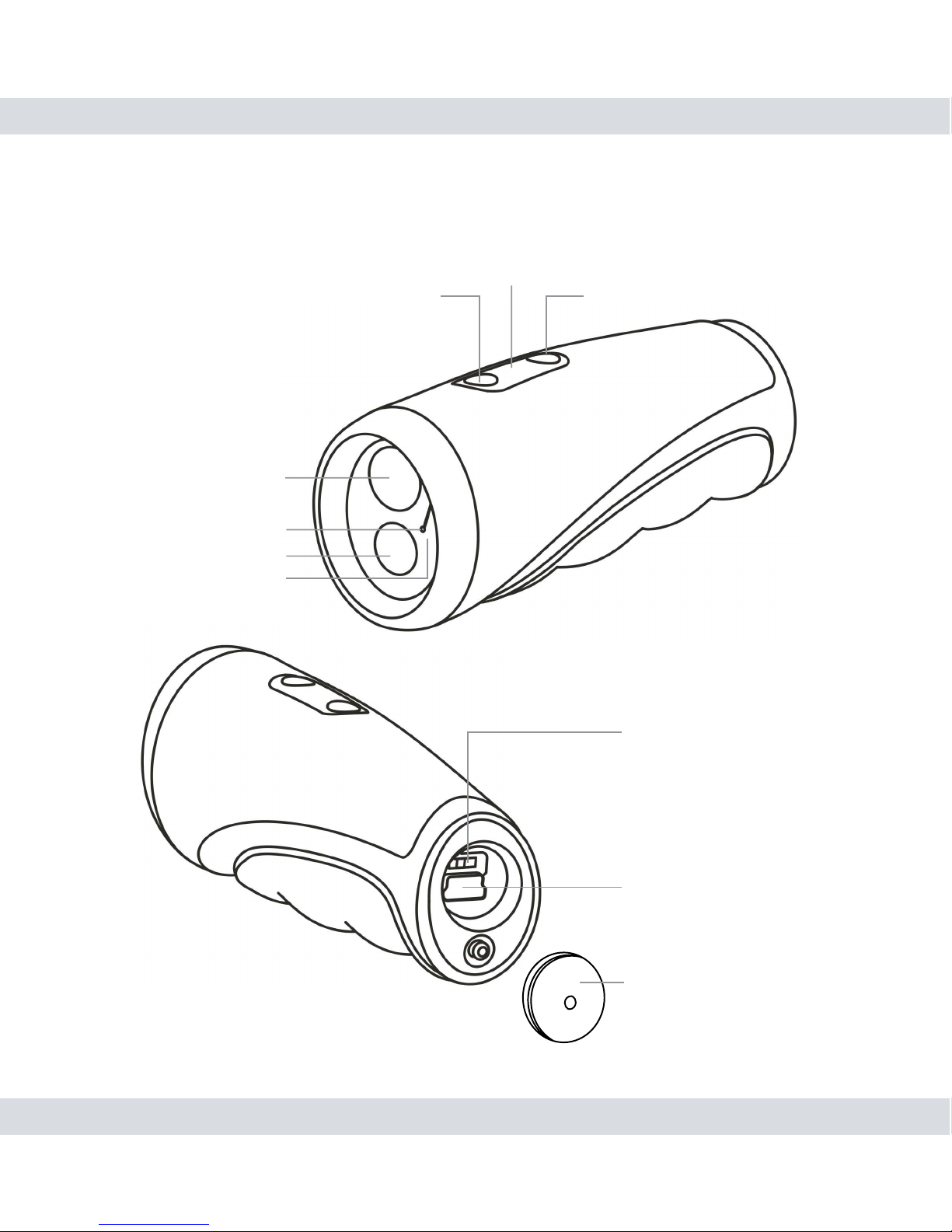
Light Indicator Window
Record/Stop buttonFlashlight Button
LED lighting
Microphone
Camera lens
Waterproof plug
Main ON/OFF/LOCK Switch
Mini USB Port
Waterproof plug
9
Charging
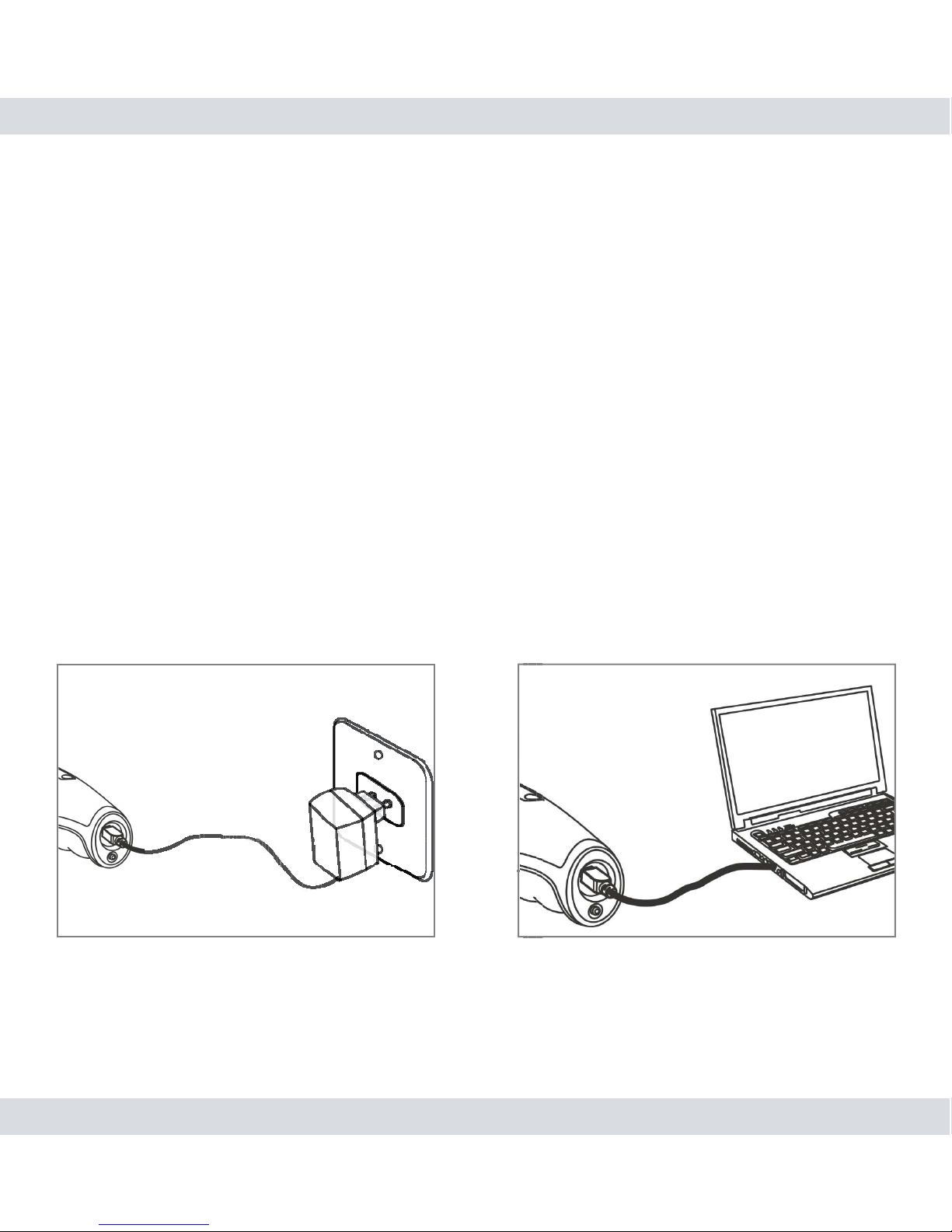
Charging is required before Flashlight DVR can be use. There are two ways to
charge; the rst way is to use the A/C adapter (5V 1.5A) and the second way is
through a USB cable to plug into a computer to charge. To charge using the
A/C adapter, plug the adapter end into an electrical outlet and then plug the mini
USB to the back (remove Waterproof Plug) of FlashDVR and a solid red light
will appear in the Indicator Light Window to indicate charging. To charge using
a personal computer, plug the receptacle A of the USB cable into a PC and then
plug the mini USB to the back (remove waterproof Plug) of the FlashDVR and
a solid red light will appear in the Indicator Light Window to indicate charging, as
shown below. The solid red light will turn off when internal rechargeable battery
is fully charged. Charging the battery will take about 4 hours and a half.
Using A/C adapter Using USB cable with computer
Indice
Altri manuali SecurityMan Videocamera


